


Key Takeaways
- Cloud apps offer scalable, flexible, and accessible digital infrastructure.
- The right cloud model depends on business needs, security, scalability, and control.
- Development involves planning, architecture, development, testing, deployment, and optimization.
- Cloud app development can cost $10,000 to $250,000+, depending on complexity, requirements, development location, and project scale.
- Businesses should plan for both development and ongoing cloud costs.
- Strong cloud architecture prioritizes scalability, security, reliability, and cost efficiency.
Cloud app development is the process of building, deploying, and maintaining applications using cloud infrastructure and managed services. It enables businesses to scale resources, support distributed users, integrate digital systems, and manage workloads more flexibly. The right approach depends on application requirements, architecture, security, integrations, cloud strategy, and long-term operating costs.
Unlike applications built around fixed infrastructure, cloud-based application development is designed to use elastic resources, managed services, and distributed infrastructure to support changing workloads. Businesses can apply this approach across web, mobile, SaaS, and enterprise applications while reducing reliance on traditional physical infrastructure. Working with an experienced cloud app development company can also help businesses evaluate architecture options and build scalable digital products aligned with their growth requirements.
For founders, CEOs, and CTOs, choosing cloud app development is more than a technology decision. It can influence scalability, infrastructure costs, security, product agility, and long-term growth. This guide covers cloud application types, development stages, key benefits, costs, use cases, and best practices to help you make informed investment decisions.
Table of Contents
What Is Cloud App Development?
Cloud app development is the process of designing, building, deploying, and maintaining applications using cloud infrastructure and services for hosting, databases, storage, APIs, security, and other backend operations. Unlike traditional applications, cloud apps are designed to leverage scalable resources, managed services, distributed infrastructure, and remote accessibility.
For businesses, cloud app development can support growing workloads without continually expanding physical infrastructure. It requires careful planning around architecture, security, scalability, integrations, data requirements, and ongoing operating costs.
Why Businesses Are Moving to Cloud Apps
Cloud computing has moved from being primarily an infrastructure decision to becoming a broader business strategy. Gartner forecasts that worldwide spending on infrastructure as a service (IaaS) will reach $287.3 billion in 2026, up 29.3% from 2025, as demand for AI workloads and scalable cloud infrastructure continues to grow.
The shift is also visible in how organizations evaluate cloud investments. Flexera’s 2026 State of the Cloud report found that 73% of organizations use hybrid cloud environments. The report also highlights a broader shift toward evaluating cloud investments through business value rather than cost reduction alone.
For decision-makers, this means cloud adoption should be connected to measurable outcomes such as:
- Faster product launches
- Greater application scalability
- Improved customer experiences
- More flexible infrastructure
- Better integration between business systems
- Support for AI and data-driven products
- Improved operational resilience
- More efficient resource utilization
The objective should not be to move everything to the cloud simply because cloud technology is popular. The architecture and cloud strategy should support the specific business model and growth plan. Businesses can also track emerging developments through our guide to cloud computing trends, which covers the technologies and shifts influencing modern cloud adoption.
Types of Cloud Applications
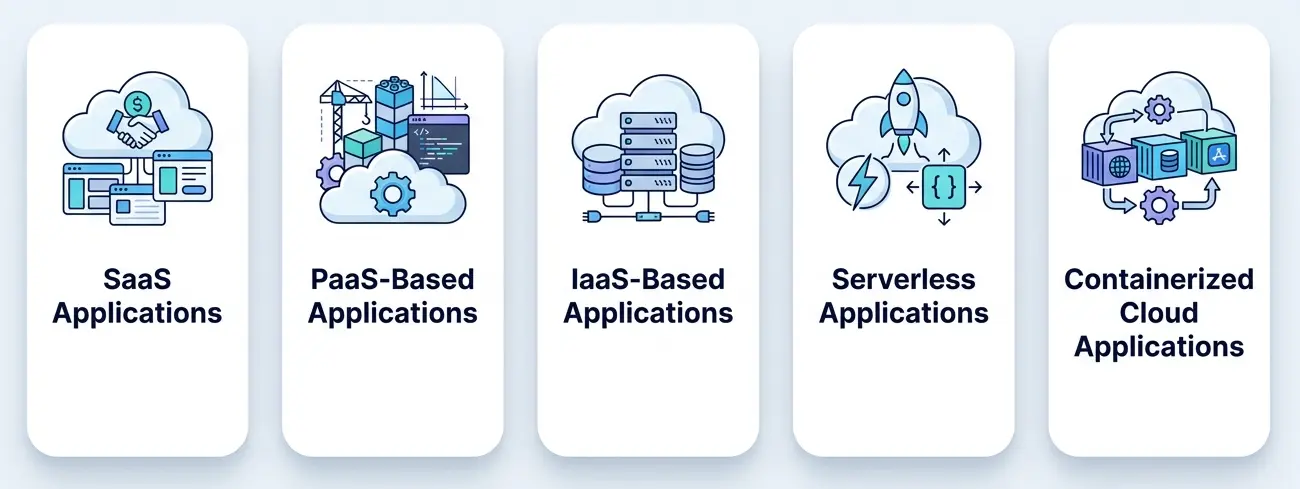
Cloud applications can be classified according to the services and infrastructure they use, as well as how much control the business needs.
For businesses evaluating providers, our comparison of AWS, Azure, and Google Cloud can help clarify how major cloud platforms differ in capabilities, pricing considerations, and suitability for different workloads.
1. SaaS Applications
Software as a Service (SaaS) applications are delivered over the internet and typically managed centrally by the provider. Examples include Salesforce, Slack, and other subscription-based business platforms.
SaaS works particularly well for businesses building recurring-revenue products because users can access the application without installing or managing the underlying infrastructure.
2. PaaS-Based Applications
Platform as a Service (PaaS) provides a managed environment for building and deploying applications. The cloud provider handles much of the underlying infrastructure, allowing businesses to focus on application functionality and product development.
This approach can be useful when a business wants to reduce infrastructure management without giving up the ability to build a customized application.
3. IaaS-Based Applications
Infrastructure as a Service (IaaS) provides fundamental resources such as virtual computing, storage, and networking.
IaaS offers greater control over the environment but also requires more responsibility for infrastructure configuration, security, monitoring, and maintenance.
4. Serverless Applications
Serverless applications use managed cloud functions and services without requiring businesses to manage traditional servers directly.
This model can work well for event-driven workflows, APIs, background processing, notifications, and applications with variable workloads.
5. Containerized Cloud Applications
Containerized applications package application components and their dependencies into portable environments.
This approach can help businesses build modular systems that are easier to deploy, scale, and operate across suitable cloud environments.
Cloud App Development Process
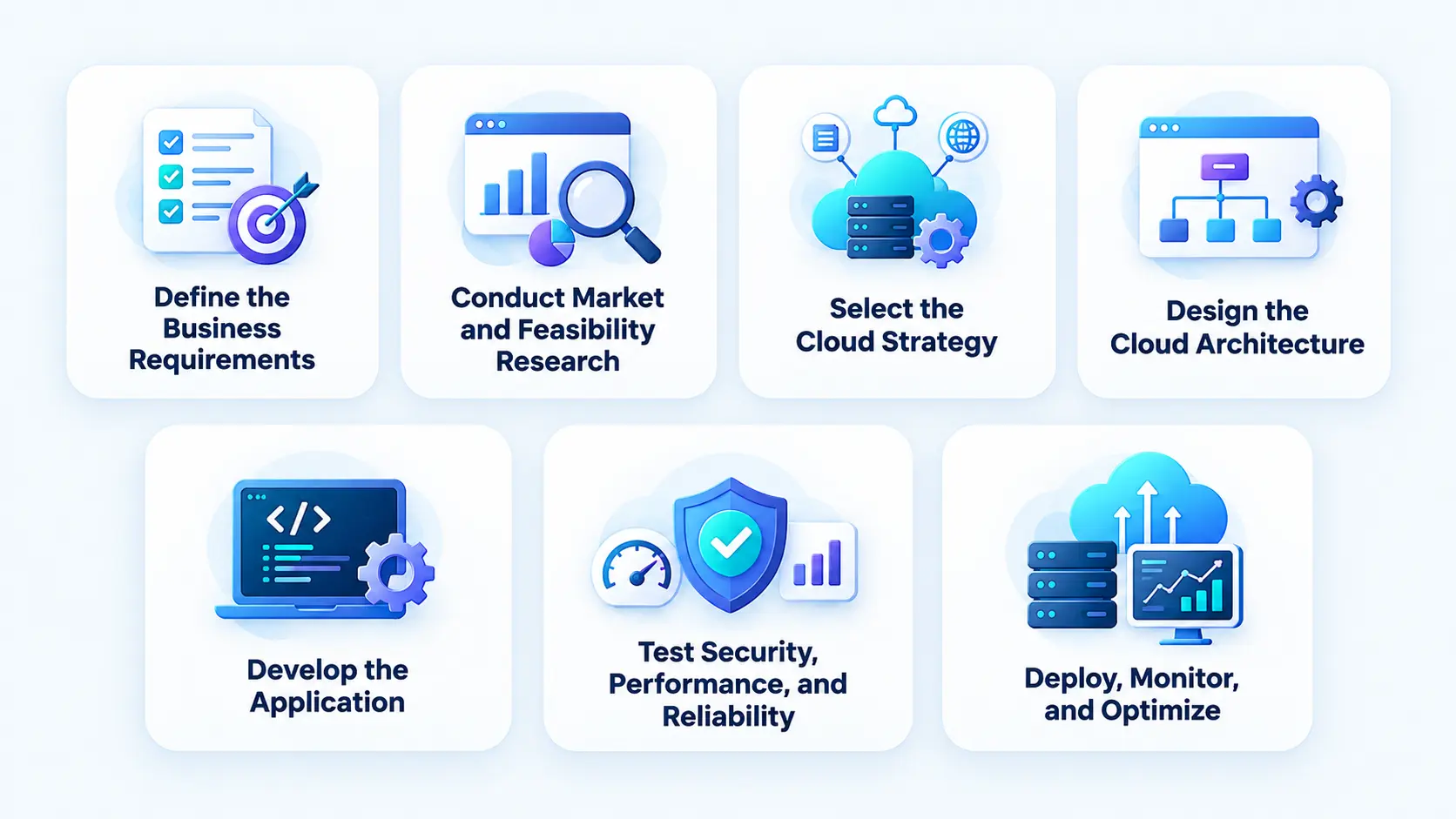
A structured approach to cloud based app development helps businesses align application architecture, technology choices, security requirements, and scalability with their long-term product goals. The process typically involves the following stages:
1. Define the Business Requirements
The first stage is to establish the business problem, target users, product objectives, core workflows, revenue model, and expected outcomes. This stage should answer questions such as:
- What problem will the application solve?
- Who will use it?
- Which features are essential for the first release?
- What integrations are required?
- What volume of users and transactions is expected?
- What security or compliance requirements apply?
Clear requirements prevent unnecessary features from increasing the initial development budget and complexity.
2. Conduct Market and Feasibility Research
Market research helps determine whether the product solves a sufficiently valuable problem and how competing solutions approach it. A feasibility assessment should examine technical complexity, infrastructure requirements, integrations, security, expected investment, and operational considerations.
For a startup, this stage can also help determine whether an MVP should be launched before investing in a larger cloud platform.
3. Select the Cloud Strategy
Businesses can choose from public, private, hybrid, or multi-cloud approaches depending on their workload, security, compliance, data, and operating requirements. The decision should also consider existing infrastructure, geographic needs, integration requirements, and long-term technology strategy.
The specific cloud provider and architecture can then be selected based on these requirements.
4. Design the Cloud Architecture
Architecture defines how the application’s frontend, backend, databases, APIs, integrations, and cloud services work together. The design should support the application’s expected workload, scalability, security, reliability, and operating requirements.
The architecture should meet current product needs while providing a practical path for future growth without introducing unnecessary complexity.
5. Develop the Application
Once the architecture is defined, development can begin across the frontend, backend, databases, APIs, cloud services, and integrations.
A phased approach can help businesses release the highest-value capabilities first and use real customer feedback to guide subsequent development.
6. Test Security, Performance, and Reliability
Cloud applications need more than functional testing. Testing should evaluate:
- Application functionality
- API behavior
- Security
- Performance
- Load handling
- Database performance
- Cloud infrastructure
- Third-party integrations
- Backup and recovery
- Compatibility
Testing under realistic workloads is particularly important for applications expected to experience rapid growth or unpredictable traffic.
7. Deploy, Monitor, and Optimize
After testing, the application is deployed to its production environment. The post-launch phase should include monitoring of performance, availability, infrastructure utilization, security events, and cloud spending.
As usage increases, businesses can optimize infrastructure, databases, APIs, storage, and application architecture to maintain performance while controlling operating costs.
Choosing Your Cloud Tech Stack and Provider
Cloud provider and architecture choices should align with workload requirements, scalability, security, existing systems, budget, and operational needs.
AWS, Microsoft Azure, and Google Cloud provide broad infrastructure and managed services. The right provider depends on factors such as your existing technology ecosystem, required services, geographic availability, compliance needs, and budget.
Architecture choices also affect scalability, cost, complexity, and ongoing operations:
- Monolithic architecture: A simpler structure that can suit smaller applications but may become harder to scale as complexity grows.
- Microservices: Divides an application into independent services, allowing flexible scaling but increasing operational complexity.
- Containers: Package applications and dependencies into portable environments for consistent deployment and scaling.
- Serverless: Uses managed execution environments that can reduce infrastructure management and suit event-driven or variable workloads.
- Managed databases and services: Reduce operational overhead by handling infrastructure management for databases, storage, authentication, monitoring, and other capabilities.
The best approach is not necessarily the most technically complex one. It should provide the scalability, control, cost efficiency, and operational model the business actually needs.
Security and Compliance in Cloud Apps
Security and compliance should be treated as architectural requirements rather than post-development additions. Cloud applications may process customer information, financial data, business records, or other sensitive information, making appropriate protection essential from the planning stage.
- Protect Data and Access: Use encryption, strong authentication, authorization, and role-based access controls to protect sensitive data and restrict unauthorized access.
- Secure APIs and Integrations: Protect APIs with authentication, input validation, rate limiting, monitoring, and secure credential management across connected systems.
- Monitor and Detect Threats: Use continuous monitoring and centralized logging to detect unusual activity, security incidents, and infrastructure issues early.
- Plan Backups and Disaster Recovery: Maintain regular backups and tested recovery procedures to minimize data loss and downtime during disruptions.
- Address Applicable Compliance Requirements: Align data handling, access, retention, auditing, and privacy controls with the regulations applicable to the industry, market, and data involved.
Depending on the product and markets served, businesses may also need to address requirements or frameworks such as SOC 2, HIPAA, and GDPR through appropriate data handling, access controls, auditing, privacy, and security practices.
Benefits of Cloud App Development
Cloud app development helps businesses scale efficiently, improve accessibility, reduce infrastructure overhead, and adapt quickly to changing demands.
1. Scalability and Flexibility
Cloud infrastructure can scale resources based on application demand, helping businesses accommodate growth without making equivalent investments in physical infrastructure. This flexibility is particularly valuable for cloud based mobile app development, where backend resources can adjust as user traffic, transactions, and data volumes increase.
This flexibility helps maintain consistent application performance during traffic spikes and seasonal demand. Businesses can also expand into new markets without redesigning their entire infrastructure.
2. Cost Efficiency
Cloud computing can reduce upfront infrastructure investments and enable businesses to pay for resources based on usage. However, inefficient resource allocation, unused services, and excessive data transfer can increase ongoing costs.
With proper monitoring and optimization, businesses can improve infrastructure utilization and gain better control over their technology spending.
3. Accessibility
Cloud applications enable users and distributed teams to access systems and data across locations and devices, supporting businesses operating across multiple markets.
This can improve collaboration, service availability, and response times across geographically distributed operations. Consistent access can also create a more convenient experience for customers and employees.
4. Faster Innovation
Cloud services make it easier to provision infrastructure and adopt new technologies, helping businesses test ideas, launch capabilities, and respond to market changes faster.
Teams can introduce and validate new features without making significant infrastructure investments upfront. This can shorten time to market and support more frequent product improvements.
5. Easier Integration
Cloud applications can integrate with CRMs, ERPs, payment gateways, analytics platforms, AI services, communication tools, and other business systems through APIs and managed cloud services.
Connected systems can reduce manual data entry, improve information flow, and streamline cross-functional workflows. Better integration can also provide decision-makers with more consistent and accessible business data.
6. Support for AI and Advanced Technologies
Cloud platforms provide access to AI, machine learning, analytics, automation, and data services without requiring businesses to build and maintain all the underlying infrastructure themselves.
This makes it easier to introduce capabilities such as intelligent recommendations, predictive analytics, automated workflows, and AI-powered customer experiences. Businesses can scale these capabilities as adoption and demand increase.
Cloud App Use Cases Across Industries
Cloud applications support diverse industries by improving scalability, streamlining operations, connecting systems, and enabling more accessible digital experiences.
1. Healthcare
Healthcare organizations use cloud applications for telemedicine, appointment management, patient communication, health data management, and other digital services. Businesses exploring this space can learn more about cloud computing in healthcare, including its benefits, use cases, and challenges.
Because healthcare applications handle sensitive information, security, privacy, access controls, and applicable compliance requirements must be incorporated into the architecture from the beginning.
2. E-commerce
Cloud applications support product discovery, personalized recommendations, inventory management, payment processing, order tracking, customer accounts, and analytics.
Scalable infrastructure is especially valuable when businesses experience sudden traffic increases during promotions or seasonal campaigns. Our guide to cloud computing in e-commerce explores how cloud infrastructure can support these digital operations.
3. Fintech
Financial businesses can use cloud applications for digital banking, payments, financial management, customer onboarding, analytics, and fraud monitoring. When selecting a FinTech app development company, businesses should evaluate its approach to security, authentication, transaction integrity, monitoring, data protection, and applicable regulatory requirements
4. Education
Educational platforms can use cloud infrastructure for learning management systems, online classes, digital assessments, content delivery, student communication, and analytics. An e-learning app development company can help businesses build scalable learning platforms that support personalized experiences, seamless content access, and evolving user demands.
Cloud architecture can allow education platforms to serve users across locations while maintaining centralized access to learning resources, supporting consistent performance and easier content management.
5. Travel and Hospitality
Cloud applications can support bookings, reservations, customer accounts, payments, availability management, recommendations, and communication.
Scalable infrastructure can help travel businesses handle demand fluctuations during holidays and peak seasons.
6. Logistics
Logistics businesses can use cloud applications for shipment management, fleet tracking, route planning, inventory visibility, delivery coordination, and real-time notifications.
Cloud-based systems can connect customers, operations teams, drivers, warehouses, and business partners through a shared digital ecosystem. Businesses evaluating enterprise warehouse solutions can also explore how a cloud-based warehouse management system can support centralized operations and real-time visibility.
How Much Does Cloud App Development Cost?
The cost of developing a cloud application depends on its complexity, functionality, architecture, integrations, security requirements, development team, and expected scale.
Businesses should also account for infrastructure, storage, data transfer, monitoring, security, backups, third-party services, and ongoing maintenance when planning the application’s total cost of ownership.
A practical planning range is:
| Type of Cloud App | Estimated Development Cost |
| Simple Cloud App | $10,000–$30,000 |
| E-commerce Platform | $30,000–$100,000 |
| Custom CRM | $20,000–$60,000 |
| Healthcare App | $50,000–$90,000 |
| FinTech Application | $60,000–$100,000 |
| Travel Booking System | $40,000–$120,000 |
| Education Platform | $30,000–$80,000 |
| Custom IoT Solution | $70,000–$150,000 |
| Enterprise Resource Planning (ERP) | $90,000–$200,000 |
| Social Media App | $50,000–$100,000 |
| Gaming App | $60,000–$150,000 |
| Telemedicine App | $40,000–$150,000 |
Cloud App Development Cost by Region
| Region | Estimated Development Cost (USD) |
| North America | $50,000–$250,000 |
| Western Europe | $40,000–$200,000 |
| Eastern Europe | $30,000–$120,000 |
| South Asia | $20,000–$80,000 |
| Southeast Asia | $25,000–$90,000 |
| Latin America | $30,000–$100,000 |
| Australia | $40,000–$150,000 |
| Middle East | $35,000–$120,000 |
| Africa | $25,000–$70,000 |
These are development planning ranges, not fixed quotations. A detailed estimate requires evaluating the product scope, user journeys, integrations, architecture, technology requirements, and delivery timeline.
Development Cost vs. Ongoing Cloud Costs
The initial development budget is only one part of the total cost of owning a cloud application. After launch, businesses may have recurring expenses for:
- Cloud computing
- Databases
- Storage
- Data transfer
- Content delivery
- Monitoring and logging
- Security services
- Backup and disaster recovery
- Third-party APIs
- AI services
- Software licenses
- Maintenance and support
These expenses can increase as the number of users, transactions, stored data, and application workloads grow. Therefore, businesses should evaluate total cost of ownership (TCO) rather than comparing development quotations alone.
Planning infrastructure with cost visibility from the beginning can also reduce the risk of unexpected cloud bills as the product scales.
Factors Affecting Cloud App Development Cost
Several factors influence cloud app development costs, including application complexity, features, architecture, integrations, security requirements, development team, and ongoing infrastructure needs.
- Application Complexity: More features, workflows, user roles, business rules, and integrations generally require greater development, testing, and maintenance effort.
- UI/UX Requirements: Custom interfaces, dashboards, personalization, and multi-device experiences can increase design, development, usability testing, and iteration costs.
- Cloud Architecture: Highly available, distributed, serverless, containerized, or multi-region architectures may require additional engineering, monitoring, and operational expertise.
- Integrations: Connecting payment gateways, CRMs, ERPs, analytics tools, AI services, or external APIs adds development and testing effort based on integration complexity and data requirements.
- Security and Compliance: Sensitive applications may need stronger authentication, encryption, access controls, monitoring, testing, and compliance measures, increasing initial and ongoing costs.
- AI Capabilities: AI recommendations, automation, predictive analytics, conversational features, and intelligent search can add development complexity and recurring model, API, and infrastructure costs.
- Development Team Location: Development rates vary by location, expertise, engagement model, and project complexity, while cloud and security experience can also affect overall efficiency and cost.
Best Practices for Cloud Application Development
Following cloud app development best practices helps businesses build secure, scalable, cost-efficient applications that remain reliable as users, workloads, and business requirements grow.
Security should be considered from the architecture stage, particularly for applications handling sensitive customer, financial, or healthcare information. Businesses can explore our guide to cloud application security best practices for a deeper look at security risks and protection strategies.
- Start With Business Outcomes: Define the business problem and measurable goals first, then choose technologies and cloud services that directly support those outcomes.
- Design for Growth Without Overengineering: Build for expected growth while avoiding unnecessary infrastructure complexity that the product does not need yet.
- Treat Security as an Architectural Requirement: Integrate authentication, encryption, access controls, monitoring, backups, and recovery into the architecture from the beginning.
- Monitor Cloud Costs: Track infrastructure spending alongside usage and performance, using scaling, budget controls, and regular reviews to manage costs.
- Build for Integration: Establish a clear API and data strategy that makes it easier to connect with CRMs, ERPs, payment platforms, AI services, and other systems.
- Plan for Reliability: Use appropriate backups, monitoring, redundancy, disaster recovery, and failover mechanisms to support availability and business continuity.
- Optimize Continuously: Regularly review performance, security, infrastructure, and costs to keep the application efficient as business needs and workloads evolve.
Real-World Cloud Application Examples
Cloud applications are used across industries to support large user bases, distributed operations, real-time services, and continuously evolving digital products. The following examples demonstrate how cloud-based architectures can support different business models and workloads.
1. Netflix
Netflix uses cloud infrastructure to support its global streaming platform, allowing the service to handle high and fluctuating demand across markets. Cloud-based infrastructure supports content delivery, service scalability, data processing, and the operational requirements of a platform serving users across different regions.
2. Salesforce
Salesforce delivers cloud-based customer relationship management and business applications through a SaaS model. Its cloud platform allows organizations to access customer data, workflows, analytics, and business applications without managing the underlying infrastructure themselves.
3. Slack
Slack is a cloud-based collaboration platform that enables organizations to communicate through channels, direct messages, file sharing, integrations, and other workplace tools. Its cloud model supports distributed users while allowing the platform to integrate with numerous business applications and services.
4. Uber
Uber uses cloud-based technology to support ride matching, location services, payments, notifications, and real-time data processing. Its scalable infrastructure helps connect riders, drivers, and operational systems while handling fluctuating demand across different locations.
How to Choose the Right Cloud Development Partner
Choosing the right cloud development partner should involve more than comparing hourly rates. Evaluate whether the development partner can:
- Understand your business requirements
- Recommend an appropriate cloud strategy
- Design scalable architecture
- Build secure cloud applications
- Integrate existing business systems
- Manage application deployment
- Monitor performance and infrastructure
- Optimize cloud costs
- Support post-launch improvements
- Modernize existing applications when required
The right partner should be able to connect cloud engineering decisions with business objectives rather than treating cloud development as an isolated technical exercise. For a broader comparison, you can also review our list of top cloud application development companies in the USA before evaluating potential partners.
Conclusion
Cloud app development can give businesses the flexibility to build, launch, and scale digital products without depending entirely on fixed infrastructure. But the value of cloud technology comes from how effectively the application architecture supports business goals. For founders, CEOs, and CTOs, the priority should be to define the right product scope, choose a suitable cloud strategy with the right cloud implementation services, design for expected growth, build security into the architecture, and plan for both development and ongoing operating costs.
A well-planned cloud application supports scalable experiences, connected systems, AI adoption, and continuous product evolution. RipenApps helps businesses build cloud solutions aligned with their product goals, scalability needs, and long-term strategy.
FAQs
1. What is cloud app development?
Cloud app development is the process of building and deploying applications using cloud infrastructure and services. Cloud applications can use cloud computing, databases, storage, networking, APIs, security services, and other managed capabilities to support scalable digital products.
2. What are the main types of cloud applications?
Common cloud application models include SaaS, PaaS-based applications, IaaS-based applications, serverless applications, and containerized applications. The right model depends on the application’s functionality, scalability, control, security, and infrastructure requirements.
3. How much does it cost to build a cloud application?
Cloud app development typically costs $10,000 to $250,000+, depending on the app type, complexity, features, architecture, integrations, security requirements, and development location.
4. How long does it take to develop a cloud application?
A basic cloud application may take a few months, while a complex SaaS, fintech, healthcare, or enterprise platform can require substantially more time. The timeline depends on scope, architecture, integrations, testing, and the size of the development team.
5. What is the difference between SaaS and a cloud application?
SaaS is a software delivery model in which users access centrally managed software over the internet. A cloud application is a broader term for an application that uses cloud infrastructure or services and can follow different deployment and delivery models.
6. Which cloud platform is best for application development?
There is no single best cloud platform for every application. AWS, Microsoft Azure, and Google Cloud are major options, and the right choice depends on workload requirements, existing infrastructure, security, integrations, scalability, compliance, and budget.
Discuss your project and request for proposal
SHARE
WRITTEN BY

Ishan Gupta
CEO & Founder
Ishan Gupta is a seasoned entrepreneur and CEO with extensive 10+ years of experience in business and mobile app development landscape. He believes that the right digital product allows companies to focus on what they do best, while technology handles the rest. With deep exposure to global markets, he understands what makes an app succeed. His approach translates business needs into clear product strategies, ensuring that every feature contributes to measurable ROI.
View All Articles