


Key Takeaways
- Android remains dominant: It holds around 68% of global mobile OS share, making it a key platform for businesses.
- AI is becoming essential: AI and on-device ML are enabling smarter, more personalized Android experiences.
- Security is a priority: Strong authentication, privacy, secure data handling, and platform compliance are critical.
- Connected experiences are growing: 5G, IoT, AR/XR, cloud, and wearables are expanding Android beyond smartphones.
- Choose trends strategically: Prioritize technologies that align with user needs, business goals, and expected ROI.
Android continues to dominate the global mobile ecosystem, but building an Android app is no longer simply about supporting the largest mobile platform. Users now expect applications to be intelligent, personalized, secure, fast, and available across an expanding range of connected devices.
The Android ecosystem is evolving rapidly. AI is moving closer to the device, Android is expanding into XR and connected experiences, security requirements are becoming stricter, and Google Play is introducing new ways to optimize application and AI model delivery. For founders, product leaders, and CTOs, the key is separating developments that create real product value from those that are still hype. When AI is part of the product roadmap, an experienced Android app development company can help determine the right architecture, integrations, and delivery strategy.
This guide covers the app development trends most relevant to businesses in 2026, with practical examples of where each trend can create product or business value.
Table of Contents
Current Market Overview of Android App Development & Its Trends
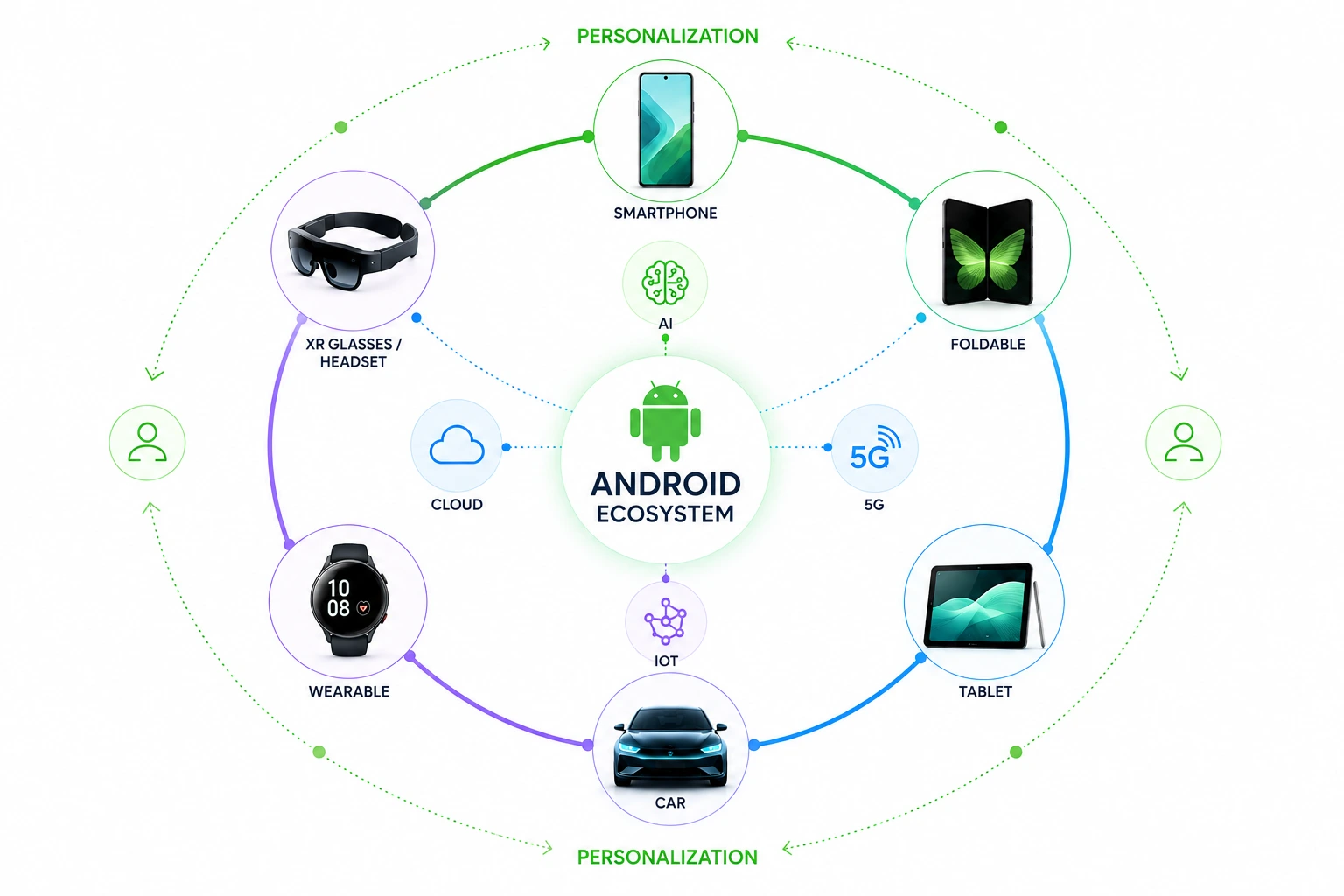
Android remains the dominant mobile operating system worldwide. StatCounter reports that Android accounted for 68.36% of global mobile operating-system share in mid-2026, highlighting its continued scale across the mobile ecosystem.
AI is becoming a core part of the Android experience. In 2026, Google introduced Gemini Intelligence features that can automate multi-step tasks across apps, summarize content, assist with forms, and work across Android phones, watches, cars, glasses, and laptops.
The latest technology in Android development is therefore moving beyond basic app functionality. Key developments include:
- On-device AI: Google Play now supports dedicated delivery of custom machine-learning models through AI packs, including install-time, fast-follow, and on-demand delivery. Models are also targeted to specific device characteristics.
- Stronger privacy and security: Android 17 also brings new development considerations in 2026, including enhanced security and privacy controls, improved multitasking, screen-recording updates, and optimizations for foldable devices. The release is rolling out first to Pixel devices, followed by other eligible Android devices throughout 2026.
- Multi-device development: Android is expanding beyond phones into watches, XR headsets, and different types of glasses.
- Modular app delivery: Android App Bundles allow Google Play to generate optimized APKs for individual device configurations, while Play Feature Delivery allows selected features to be delivered conditionally or on demand.
- Connected experiences: IoT, wearables, cameras, sensors, and faster networks are giving Android applications more ways to interact with users and their physical environments.
For businesses, the objective should not be to adopt every new technology. The better approach is to evaluate each trend against the product’s users, business model, technical requirements, and expected return.
Top Android App Development Trends: Our Curated List
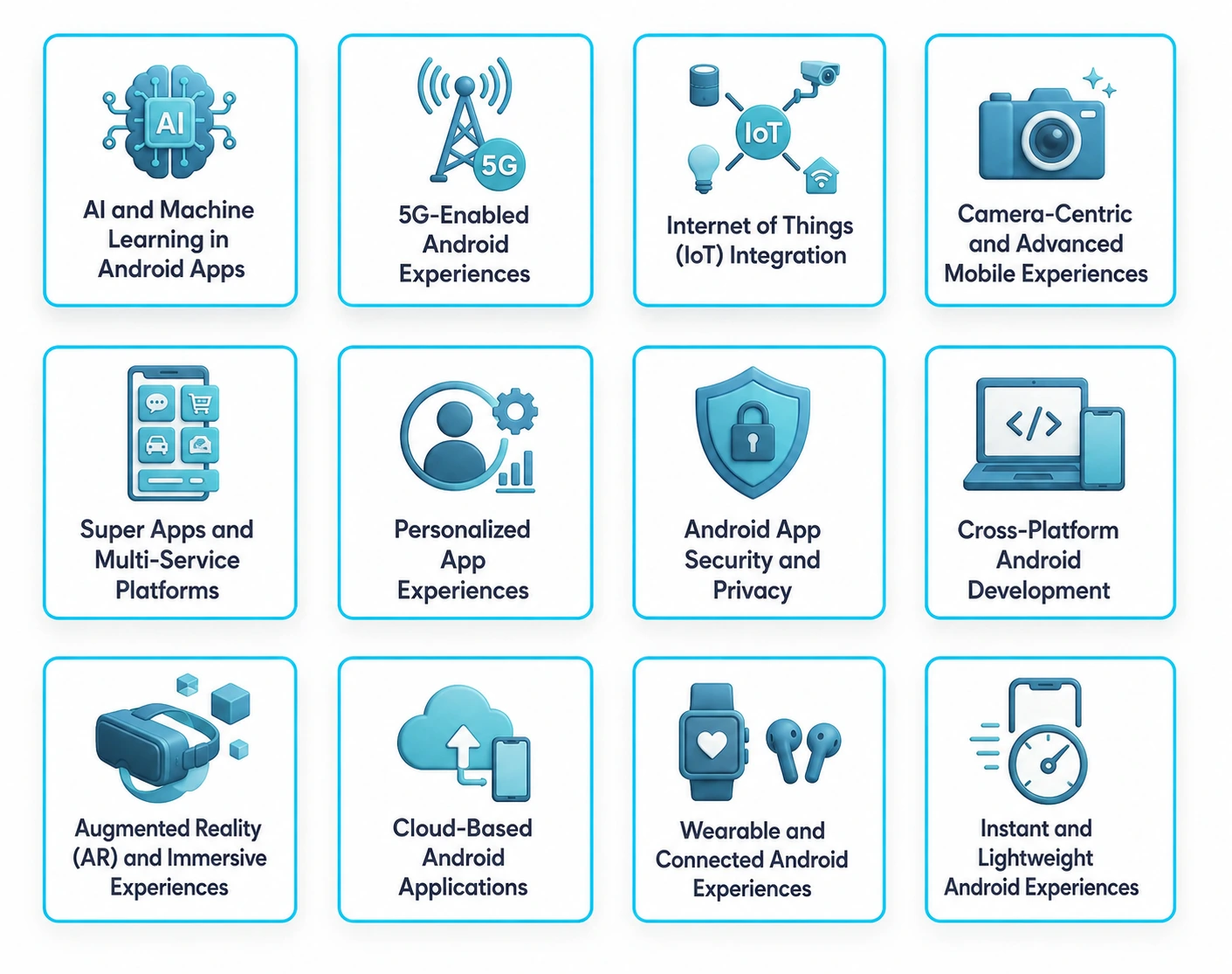
The following Android development trends reflect where the platform is heading in 2026 and which technologies are most relevant to businesses planning or modernizing Android applications.
1. AI and Machine Learning in Android Apps
AI and machine learning are moving from standalone features into everyday application workflows. Android applications now use intelligent models for recommendations, search, automation, image understanding, voice interactions, fraud detection, and predictive experiences.
On-device AI is especially important because some workloads typically run closer to the user instead of requiring every request to travel to a remote server. Google’s Play for On-device AI currently supports distributing custom ML models through install-time, fast-follow, or on-demand delivery, including device-specific model targeting.
The practical applications vary by industry. A healthcare app uses AI to support symptom-triage workflows, while an ecommerce application generally uses machine learning to improve product recommendations.
RipenApps proof: The Hungama project combines an AI-driven recommendation layer with multi-format streaming to support personalized content discovery. The application is available on Android & iOS and has 50M+ installs on Google Play, with 553K Play Store reviews.
This is a useful distinction for businesses: AI should solve a measurable product problem rather than exist simply as a technology label. For a deeper look, explore machine learning in Android app development.
2. 5G-Enabled Android Experiences
5G is expanding the possibilities for Android applications that depend on high bandwidth and low-latency communication. The technology is particularly relevant to applications involving:
- High-quality video streaming
- Cloud gaming
- Real-time collaboration
- Connected vehicles
- IoT systems
- Live AR experiences
- Remote assistance
- Real-time translation
However, a 5G-ready Android app should not assume that every user has a 5G connection. Strong applications still need efficient data usage, caching, offline behavior, and graceful performance on slower networks.
The broader trend is therefore network-aware development. Faster connectivity gives businesses more room to introduce real-time features, but the application architecture still needs to account for variable network quality.
For example, a logistics application uses faster connectivity to synchronize vehicle or delivery data more frequently, while a streaming application generally adapt media quality according to available bandwidth. The value of 5G comes from enabling a better experience, not from using 5G as a marketing feature.
3. Internet of Things (IoT) Integration
Android smartphones are increasingly becoming control and monitoring interfaces for connected products. IoT-enabled Android applications generally connect users with smart-home systems, wearables, industrial equipment, connected vehicles, healthcare devices, and energy-management systems.
The broader IoT ecosystem is also expanding. IoT Analytics projected nearly 29.7 billion active IoT connections globally by 2027, highlighting the growing scale of connected devices and the opportunities for Android applications to interact with smart devices, sensors, and connected systems. For Android applications, this creates opportunities for:
- Real-time sensor monitoring
- Smart-device control
- Remote equipment management
- Health and fitness tracking
- Connected-vehicle workflows
- Industrial alerts
- Energy monitoring
However, IoT development introduces additional considerations around device communication, authentication, synchronization, battery consumption, network reliability, and security.
A smart-energy application, for example, typically allow users to monitor energy production and device performance from their Android phone. The strongest IoT applications are therefore built around a clear physical-world problem rather than simply connecting a device to an app.
4. Camera-Centric and Advanced Mobile Experiences
The smartphone camera is becoming an interface for digital services rather than simply a tool for taking photographs. Android applications typically combine cameras with computer vision, AI, sensors, and AR to support use cases such as:
- Virtual product try-ons
- Document scanning
- Visual search
- Barcode and QR workflows
- Fitness posture analysis
- Object recognition
- AI-assisted video editing
- Retail visualization
For example, a retail application could allow customers to visualize a product before purchasing it. A healthcare application typically use camera-based workflows for selected monitoring or documentation tasks, subject to appropriate clinical and privacy requirements. The important shift is from camera as a feature to camera as an interaction layer.
As smartphone processors and AI capabilities improve, camera-centric experiences generally remove steps from workflows that previously required manual data entry. Businesses should therefore identify where visual input genuinely reduces friction before investing in a camera-first experience. These developments also form part of the broader mobile app development trends shaping the industry.
5. Super Apps and Multi-Service Platforms
Super apps combine multiple services within one digital ecosystem. Payments, messaging, commerce, bookings, transportation, loyalty, and other related services typically operate from a single application. The model is particularly useful when several services naturally belong to the same customer journey.
For example, an on-demand platform could combine service booking, payments, order tracking, loyalty, and customer support in one application. A custom app development company can help integrate these capabilities into a unified, scalable experience tailored to the platform’s specific business needs.
However, businesses generaly not treat a super app as an application with as many features as possible. Adding unrelated functionality makes navigation complicated and increases development and maintenance requirements. A stronger approach is to identify adjacent services that existing customers already need.
The technical foundation also needs to support shared identity, secure payments, scalable backend services, analytics, and consistent user journeys. For businesses exploring the model, see super app development for more details.
6. Personalized App Experiences
Personalization is becoming an important part of modern Android app experiences.
Instead of showing identical content and workflows to every user, applications typically adapt recommendations, notifications, search results, onboarding, and content according to behavior and context. Common examples include:
- Personalized product recommendations
- Adaptive content feeds
- Contextual notifications
- Personalized fitness plans
- Customized learning paths
- Location-aware suggestions
- Behavior-based onboarding
AI and machine learning typically make these experiences more sophisticated by identifying patterns across user activity. For example, a fitness app generally recommends a workout based on previous activity, while an education platform can surface learning material according to a user’s progress.
However, personalization typically not become an excuse for collecting unnecessary information. Businesses need to make their data practices transparent and design experiences that give users meaningful value in exchange for personalization. The goal is to make an application more relevant and useful, not more intrusive. For practical design guidance, see best Android app design practices.
7. Android App Security and Privacy
Security is becoming an increasingly important part of Android application architecture. Applications handling financial information, identity documents, health data, location information, or enterprise workflows need security controls across authentication, authorization, APIs, storage, permissions, and release processes. This demonstrates why security is designed into the product architecture rather than added immediately before launch. For a deeper checklist, explore Android application security best practices.
Android 16 introduced multiple security and privacy-related changes, including safer intent handling and additional protections designed to reduce access to certain sensitive information. These changes reinforce the need for developers to keep applications aligned with evolving Android platform requirements. Businesses need to prioritize security:
- Secure authentication
- Biometric verification where appropriate
- Encryption for sensitive data
- Secure API communication
- Least-privilege permissions
- Session and token management
- Dependency monitoring
- Security testing
- Google Play compliance
RipenApps Proof: Al Muzaini’s Secure Android & iOS Fintech App
The Al Muzaini project demonstrates how modern fintech applications generally combine advanced security with AI-powered verification. The Android and iOS application incorporates three-factor authentication with biometric login and an AI-powered KYC onboarding system, helping strengthen identity verification and secure user access.
The application has achieved 100K+ installs on Google Play (August 2026) and supports features including Western Union integration, real-time exchange rates, beneficiary management, and multi-language support.
8. Cross-Platform Android Development
Cross-platform development continues to be relevant for businesses that need Android alongside iOS or other platforms. Technologies such as React Native, Flutter, and Kotlin Multiplatform typically help teams share code, business logic, or selected components across platforms.
Potential advantages include:
- Less duplicated development work
- Consistent product experiences
- Faster feature rollout across platforms
- Shared business logic
- Simplified maintenance for suitable architectures
However, cross-platform development is not automatically the right choice for every Android application. Teams generally consider native device capabilities, performance requirements, platform-specific functionality, testing needs, and long-term maintenance before selecting an approach.
For example, a content or ecommerce application may be well suited to a cross-platform strategy, while an application deeply dependent on specialized Android hardware may require more native implementation. Businesses comparing options typically review top Android frameworks.
9. Augmented Reality (AR) and Immersive Experiences
AR is moving beyond entertainment and visual filters into practical business applications. Businesses typically use immersive experiences for:
- Retail product visualization
- Furniture placement
- Education and training
- Tourism previews
- Industrial maintenance
- Remote assistance
- Digital twins
- Interactive product demonstrations
The Android ecosystem is also expanding into extended reality. Google’s Android XR platform is designed for devices including XR headsets and different types of glasses, creating opportunities for developers to build experiences that extend beyond traditional smartphone screens.
This creates a broader shift in Android development: developers increasingly need to think about spatial and contextual interactions rather than only rectangular mobile screens. For example, an industrial company could use immersive instructions to help technicians understand equipment maintenance procedures. For businesses evaluating practical use cases, explore AR/VR integration in mobile apps.
10. Cloud-Based Android Applications
Cloud infrastructure remains an important part of modern Android application architecture. Most complex applications depend on backend systems for authentication, data synchronization, storage, analytics, media processing, AI workloads, and integrations.
Cloud-backed architecture typically supports:
- Scalable backend services
- Real-time data synchronization
- Media delivery
- AI processing
- Enterprise integrations
- Centralized data management
- High-volume application traffic
The Hungama project demonstrates this approach. RipenApps’ case study describes AI-driven recommendations, adaptive bitrate streaming, advanced caching, offline downloads, and infrastructure deployed on AWS and Google Cloud to support high user loads.
However, cloud adoption should be driven by architecture requirements rather than by the assumption that every workload belongs in the cloud. For some use cases, on-device processing typically provides lower latency or better offline functionality, while cloud infrastructure remains useful for centralized processing and synchronization. Businesses planning connected Android applications must therefore determine which workloads belong on-device, in the cloud, or across both.
11. Wearable and Connected Android Experiences
Android development is increasingly becoming a multi-device discipline. Applications generally extend their experiences across smartphones, watches, XR devices, and other connected hardware.
A fitness platform, for example, uses a smartphone for detailed analytics while a wearable provides quick activity information. A productivity application generally allow users to receive notifications or complete lightweight actions from a watch. Android XR expands this direction further by supporting immersive experiences across headsets and glasses.
The challenge is to avoid simply copying the smartphone interface onto another device. Each form factor must have a specific role:
- Smartphone: detailed interaction and complex workflows
- Wearable: quick actions and glanceable information
- XR device: immersive visualization and spatial interaction
- Connected hardware: sensing, control, or real-world interaction
Businesses planning connected Android experiences should therefore design the ecosystem around complementary device roles. If you’re comparing Android development partners, review our guide to the top mobile app development companies in India.
12. Instant and Lightweight Android Experiences
Lightweight application delivery is becoming increasingly important as apps become more feature-rich. Android App Bundles allow Google Play to generate optimized APKs for different device configurations, meaning users receive the code and resources required for their particular device.
Developers also use Play Feature Delivery to make selected functionality available through install-time, conditional, or on-demand delivery. A feature used by only a small percentage of users therefore be separated from the core application and delivered when required.
This is useful for applications containing:
- Large media experiences
- AR features
- Advanced editing tools
- Specialized payment flows
- Rarely used enterprise functions
- Optional support modules
Google’s current Android documentation also makes clear that modularization requires additional engineering effort, so not every feature automatically becomes an on-demand module. The relevant Android app development future is therefore not simply “instant apps.” It is more about optimized, modular, and device-aware delivery.
RipenApps Proof: Stoklo- Android B2B Pharmacy App
Stoklo is an Android B2B pharmacy procurement platform delivered by RipenApps. It connects pharmacies with 500+ manufacturers and supports 24/7 ordering, with features including real-time inventory updates, AI-powered product discovery, and secure payments.
Final Remarks
The future of Android app development is not about adopting every technology that becomes popular. The strongest products use emerging capabilities where they solve a real user problem or create measurable business value. AI improves recommendations when applied to relevant user data and automation. 5G enables support for more responsive connected experiences. IoT bridges mobile applications with physical devices. Personalization can make products more relevant, while security and privacy protect user trust. Cross-platform development improves development efficiency for suitable products, while AR, wearables, XR, cloud infrastructure, and modular delivery are expanding what an Android application generally becomes.
For founders, product leaders, and CTOs, the right question is therefore not “Which Android trend should we follow?” It is “Which trend typically improves our product enough to justify the investment?” A technology roadmap built around that question helps prevent unnecessary complexity while keeping an Android product competitive. If you are evaluating which of these trends belong in your roadmap, explore Android app development services to discuss your product requirements, architecture, and development priorities.
FAQs
Q1. What are the latest Android app development trends?
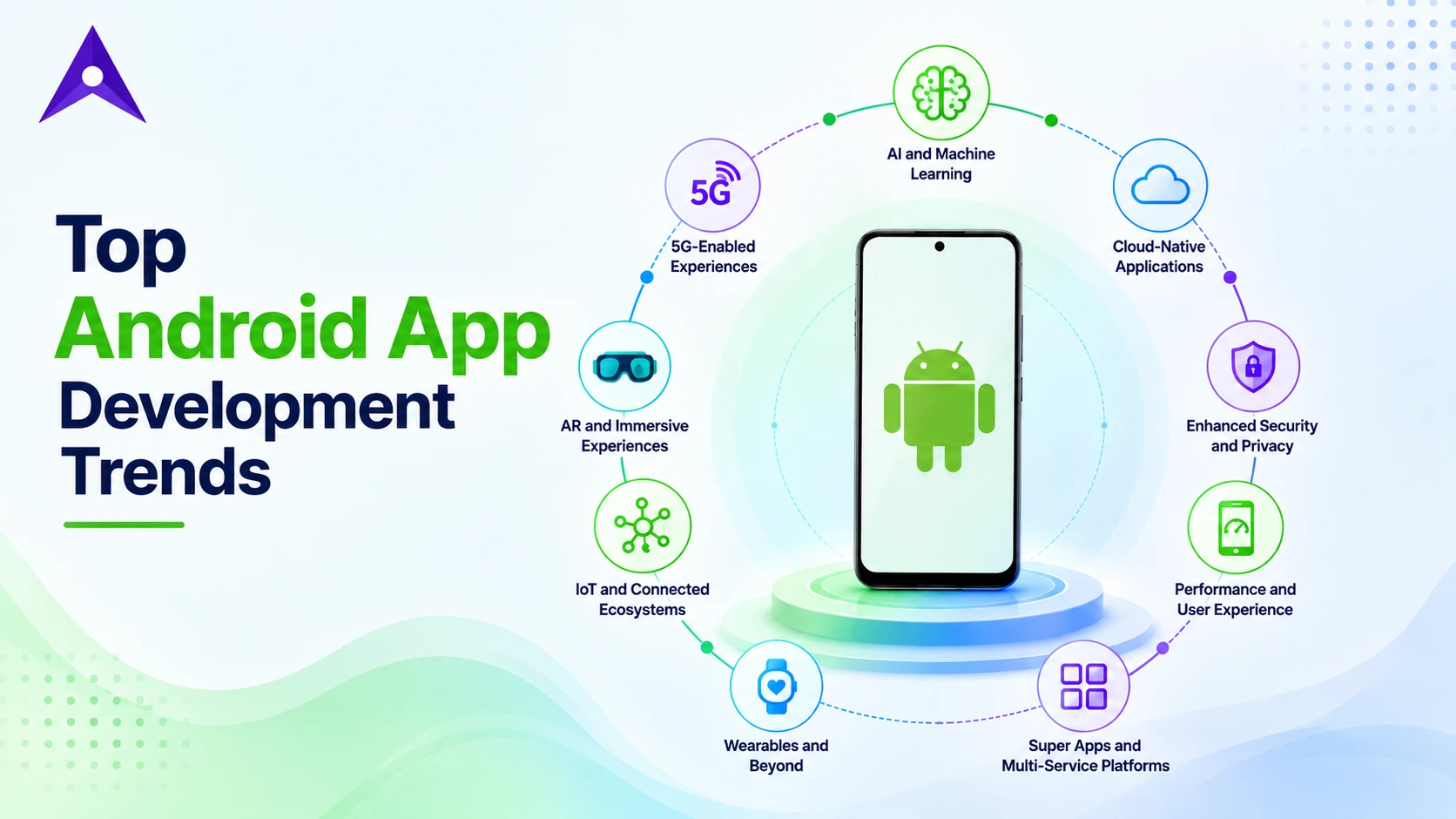
The major Android app development trends in 2026 include AI and machine learning, 5G-enabled experiences, IoT integration, camera-centric applications, super apps, personalization, stronger security and privacy, cross-platform development, AR/XR, cloud applications, wearable experiences, and modular app delivery.
Q2. Why are Android app development trends important for businesses?
Android development trends help businesses understand changing user expectations, device capabilities, security requirements, and technology opportunities. Choosing the right trends can improve application performance, personalization, scalability, security, and user experience without adding unnecessary technology to the product.
Q3. How much does Android app development cost?
Android app development cost depends on factors such as application complexity, feature scope, UI/UX requirements, integrations, backend architecture, security requirements, development team location, and maintenance needs. A basic MVP generally costs less than a complex fintech, healthcare, or enterprise application. For a better understanding, explore the Android app development cost guide for a detailed breakdown.
Q4. Which Android trends should a startup prioritize first?
Startups need to prioritize trends that directly support their core user problem and business model. AI and personalization can be valuable for recommendation-driven products, while security is essential for applications handling sensitive information. Startups need to establish a strong product foundation before adding advanced technologies such as AR, IoT, or XR.
Q5. Should businesses adopt every new Android development trend?
No. Adopting every trend can increase development complexity, cost, and maintenance requirements without improving the product. Businesses need to evaluate each technology based on user needs, technical feasibility, security, development effort, and expected ROI before adding it to the roadmap.
Discuss your project and request for proposal
SHARE
WRITTEN BY

Ishan Gupta
CEO & Founder
Ishan Gupta is a seasoned entrepreneur and CEO with extensive 10+ years of experience in business and mobile app development landscape. He believes that the right digital product allows companies to focus on what they do best, while technology handles the rest. With deep exposure to global markets, he understands what makes an app succeed. His approach translates business needs into clear product strategies, ensuring that every feature contributes to measurable ROI.
View All Articles