


Key Takeaways
- Apple’s iPhone Duo, announced on September 9, 2026, ends the Android-only era of foldable app development. iOS is now a foldable platform.
- Foldable apps need adaptive layouts that respond smoothly to changes in screen size, posture, and available space.
- iOS 27 brings Split View to iPhone for the first time. Apps now need to work well when resized or used alongside another app.
- Foldables still account for only about 2% of smartphone units, but they represent a much larger share of smartphone market value. This makes them commercially important before they become mainstream by volume.
- For foldable apps, the biggest development effort often goes into state continuity and multi-posture testing rather than creating a second layout.
Foldable app development means building an app that works across a phone-sized outer screen and a larger inner screen. The app should adapt when the device folds or unfolds without losing the user’s progress.
With Apple’s iPhone Duo joining Samsung, Huawei, and Honor in the foldable market in 2026, foldable support is no longer an Android-only consideration. Businesses now need to think about both Android and iOS when planning a foldable app.
When the first Galaxy Fold launched in 2019, foldable optimization was an optional advantage. That changed on September 9, 2026, when Apple introduced the iPhone Duo, its first foldable iPhone, at its “Surprise and Shine” event.
For product teams and businesses looking for iOS app development services, the key question is now simple: how much of the existing app needs to change to deliver a good foldable experience?
This guide covers both platforms. It explains what iPhone Duo changes for iOS app developers, what Android developers have learned from years of foldable development, and how businesses can plan the work and budget more realistically.
Table of Contents
What is a Foldable Smartphone Technically?
A foldable smartphone combines the portability of a phone with the larger display of a tablet.
The Samsung Galaxy Z Fold series is a good example. It has a regular outer display for everyday phone use. When opened, the device provides a much larger inner display that is close to tablet size.
This larger screen is useful for productivity and multitasking. Users can work with multiple apps or divide the screen into different panes.
Foldables are also becoming popular for gaming and entertainment because the larger display provides more space for content. Many foldable devices also support a stylus, giving users a larger canvas for drawing, writing, and creative work.
In simple terms, foldable smartphones combine portability, productivity, and entertainment in one device.
Technically, foldable smartphones now fall into three main categories. Each one creates different requirements for app development.
Book-style foldables
These devices open vertically to reveal a larger, tablet-sized inner display. Samsung’s Galaxy Z Fold series and Apple’s iPhone Duo fall into this category. They create the biggest opportunities for apps that can use a larger screen.
Clamshell foldables
These devices fold horizontally into a smaller, compact form. They usually have a smaller cover display. The main challenge here is making the app useful on a limited outer screen.
Tri-fold devices
These devices fold twice and create an even larger display. They introduce more screen configurations and additional layout states that developers need to consider.
The important difference is that foldables can change screen size while the app is running. Your app needs to respond to that change without losing the user’s progress.
Is the Foldable Smartphone Market Sustainable?
Foldable smartphones are still a small part of the overall smartphone market, but the category is moving beyond the early-adopter stage. Counterpoint Research expects cumulative global foldable smartphone shipments to cross 100 million units by the end of 2026. Foldables still account for only around 2% of the overall smartphone market, which leaves significant room for growth.
The latest market forecast also points to stronger growth ahead. Counterpoint expects global foldable smartphone growth to accelerate to 37% in 2027. Apple’s entry is expected to be one of the factors driving this next phase of adoption.
| Market indicator | Latest forecast |
| Cumulative foldable shipments by end of 2026 | 100M+ units |
| Foldables’ share of overall smartphone market | ~2% |
| 2027 global shipment growth | +37% YoY |
| Apple’s 2026 foldable market share | ~25% |
| Samsung’s 2026 foldable market share | ~38% |
| Huawei’s 2026 foldable market share | ~22% |
| Apple’s 2027 forecast share | ~40% |
Source: Counterpoint Research, September 2026
For businesses, this creates an interesting window. Foldables are still a premium category, but the growing installed base makes foldable-ready experiences more relevant for apps where multitasking, larger screens, or productivity matter.
What Apple’s iPhone Duo Changes for App Development
Apple’s entry into foldables changes the market for app developers. Until September 2026, businesses mainly looked at Android when planning foldable experiences. With iPhone Duo, foldable support is now part of iOS app development too.
The hardware facts that actually affect your build
- A 7.6-inch inner display, which is 50% larger than the iPhone 18 Pro Max, and a 5.4-inch outer display carrying 90% of the screen area of the iPhone 18 Pro.
- Both displays share the same aspect ratio. Apple says this allows content to scale proportionally and helps maintain a continuous experience between the open and closed states.
- A20 Pro silicon with a Dual 16-core Neural Engine offering twice the compute for on-device AI models.
Source: Apple Newsroom: Apple unveils iPhone Duo
Why the shared aspect ratio is the single most important detail
This is an important advantage for iOS app developers. Many Android book-style foldables have noticeably different aspect ratios between their outer and inner displays. This can make an app look awkward when it moves between screens.
iPhone Duo takes a different approach. Both displays use the same aspect ratio, which can simplify responsive layout work across the two displays. However, the app still needs to handle transitions smoothly when the device opens, closes, or changes posture.
What iOS 27 introduces
- Split View on iPhone for the first time. Users can place two apps side by side, use two windows of the same app, and save app pairs for quick access.
- Repositioned system controls. The Lock Screen controls, Home Screen Dock, and app navigation move to the side to make better use of the display.
- Posture-aware behavior. Apple says content can respond as the device folds, changes orientation, or switches between displays.
- StandBy on either display, even when the device is not charging.
Apple’s stated developer path
Apple says developers can adapt their apps using new and updated APIs in the latest SDKs. iPhone Duo support is also coming to Device Hub in Xcode.
Several major apps, including Netflix, Zoom, and Slack, demonstrated foldable-ready experiences at the announcement. Zoom, for example, can use the larger inner display to show shared content and meeting participants together. Slack can use the larger screen to show more of a workspace in one view.
The lesson for other businesses is simple. The best foldable experiences are not about filling a larger screen with more content. They use that extra space to remove steps and make the user’s task easier.
Building Foldable Apps for iOS
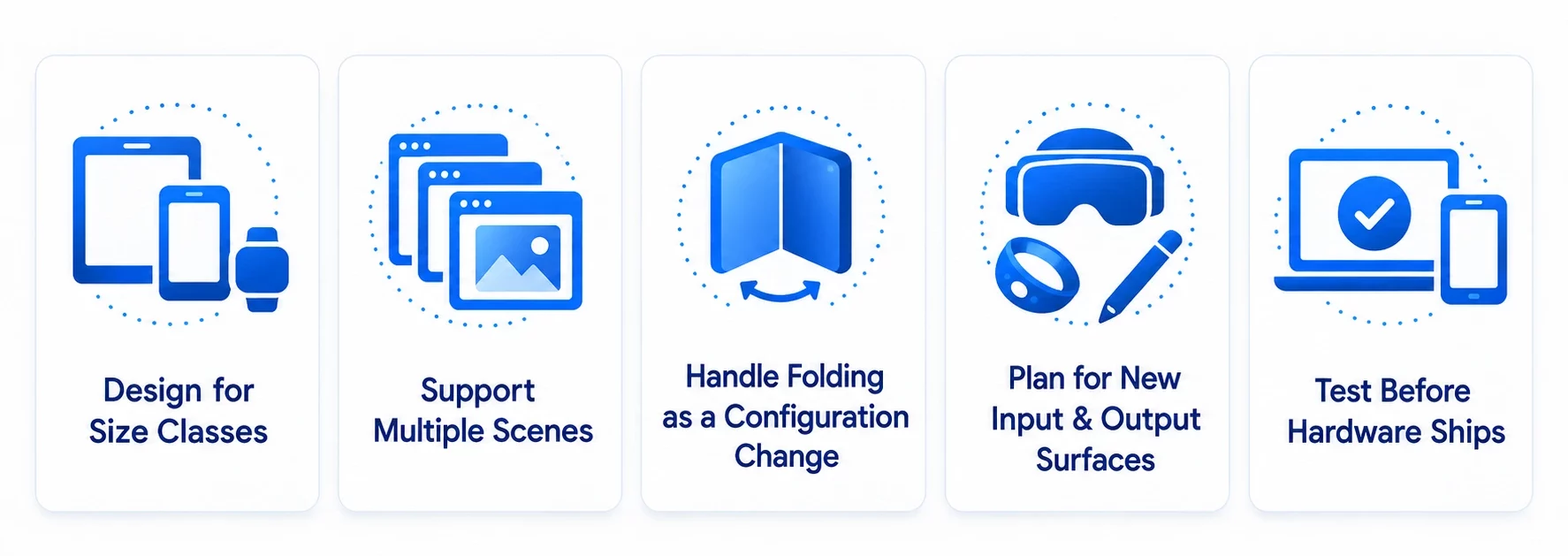
Foldable iOS app development is mainly about changing how an app responds to available space. Developers need to move away from fixed layouts and make the interface flexible enough to work across different screen sizes and states.
Five areas deserve particular attention.
Design for size classes, not device names
Avoid designing the app around fixed device dimensions. New Apple devices can introduce different screen configurations, so this approach becomes difficult to maintain.
Instead, use adaptive layouts and size classes. The interface should respond to the width available to it. On iPhone Duo, this width can change when the app is shown on the outer display, the inner display, or within Split View.
SwiftUI provides adaptive layout tools that can make this easier. If an existing app uses UIKit, developers should review the current layout architecture before deciding whether a larger migration is necessary.
Support multiple scenes
Split View means an iOS app cannot assume that it will always occupy the entire display. This creates two important scenarios.
- Your app may run alongside another app at a smaller width without restarting.
- Your app may run in two windows at the same time.
Apps built around a single-window assumption may need changes to their scene and state management. This can become an important part of the scope when planning iOS app development for foldable devices.
Treat folding as a configuration change, not a relaunch
This is one of the areas where foldable apps often fail. When a user opens the device during a task, the app should keep their progress.
For example, the app should not lose:
- Video playback position
- Scroll position
- Form input
- Game progress
- Upload status
- Current navigation
- Other important user activity
The best approach is to test folding and unfolding during important user journeys. Do not test only when the app is sitting idle.
Plan for new input and output surfaces
- Adaptive Input and Larger-Screen Interactions
Foldable devices introduce more room for richer touch interactions and productivity-focused experiences. Apps for documents, contracts, design, note-taking, and creative work can use the expanded screen to support more detailed interactions and workflows without making the interface feel cramped.
- On-device AI
Apple has also highlighted on-device AI experiences on the larger display. With increased Neural Engine performance, some AI features can run locally instead of depending on a server for every interaction. This can improve response times and also create new opportunities for privacy-focused features.
- The outer display as a second surface
The outer display does not always have to be treated as a smaller version of the inner screen. Apple’s own camera experiences show how the outer display can serve another person while the main user interacts with the device. This creates new interaction patterns that developers can consider when designing their apps.
Testing before hardware ships
Apple has said iPhone Duo support is coming to Device Hub in Xcode. Until physical devices are available, developers can use the simulator and Device Hub testing to prepare layouts and user flows.
Building Foldable Apps for Android
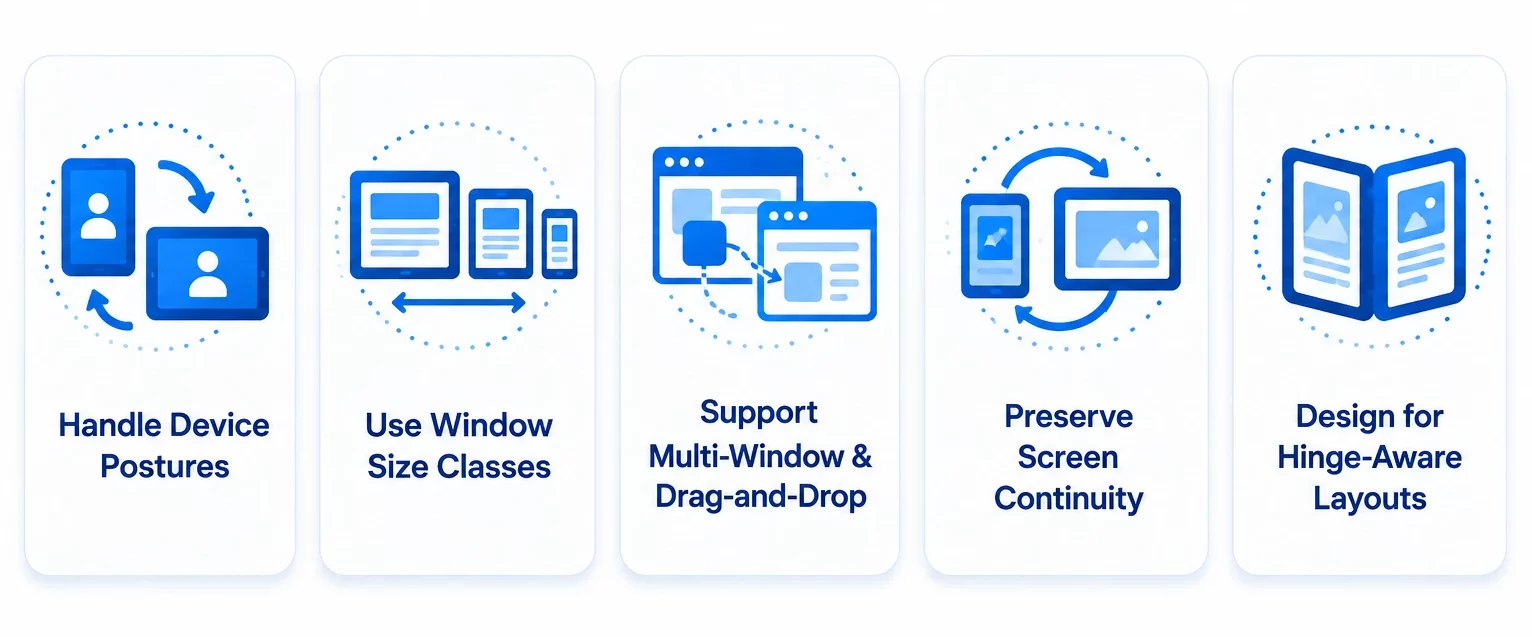
Android has had several years of experience with foldable smartphones, and its development tools have evolved with the hardware. Teams providing Android app development services have had years to understand what happens when users fold or unfold a device during an active task. Many of these lessons are now built into Android’s development tools. Modern Android foldable development is less about supporting a specific device and more about adapting to the available screen space and device posture.
Handle postures through Jetpack WindowManager
Developers can use Jetpack WindowManager to understand changes in the app’s window and folding features. This includes information about whether the device is flat or partially folded and where the hinge is located.
This information helps developers avoid placing important content or controls under the hinge. It also makes it possible to design useful experiences for modes such as Tabletop mode, where the device is partially folded and content can be placed above and below the hinge.
Use window size classes for layout decisions.
Window size classes provide compact, medium, and expanded breakpoints for designing responsive interfaces. They help developers build layouts that work across foldables, tablets, and other large-screen devices without tying the interface to one specific device.
Multi-window and drag-and-drop
Foldable phones are designed to improve productivity. Multi-window support allows users to work with several apps at the same time.
Your app should therefore be designed to work when it has only part of the display available. Drag-and-drop can also be useful when users move content between apps or panes.
Preserve Screen Continuity
When a user unfolds a foldable device, the application should continue on the larger display without interrupting the current task.
Make sure activities handle configuration changes properly and that the app supports resizing. This helps the application adapt to the new display instead of restarting.
Design for Hinge-Aware Layouts
The hinge creates a physical gap or reserved area that can affect how content is displayed. Avoid placing important text, buttons, images, or interactive elements where the hinge could obstruct them.
Use the available screen information to adjust the layout around the hinge. This becomes especially important for apps that use two-pane layouts or take advantage of tabletop and other partially folded positions.
Cross-platform on Foldables: React Native and Flutter
Many businesses do not want to maintain two separate codebases for a relatively small device segment. That makes cross platform app development services worth considering before committing to separate native foldable builds. A shared layout system can support Android foldable postures and iPhone Duo’s two-display experience from a common codebase.
React Native and Flutter can both handle responsive layouts and help apps adapt as the available screen width changes.
However, some foldable features are platform-specific. These include hinge information, posture detection, display handoff, and stylus input. These areas may require native modules or platform-specific code.
A practical approach is to share the core application code while adding small native modules where Android or iOS requires specific foldable functionality. This keeps development efficient without ignoring the capabilities of each platform.
Before adding advanced foldable features, ask one simple question: does the larger display help the user complete a task more easily? If it only shows more of the same content, a responsive layout might be enough.
Read More: React Native VS Flutter: Which is Better For Your Business?
The FOLD-4 foldable Readiness Check
Before planning a foldable build, run your existing app through four basic checks. The areas that fail become your development scope. The areas that pass may need little or no additional work.
| Gate | Question | Fails when |
| F — Fit | Does the layout adapt to different aspect ratios and a half-width Split View pane? | Fixed dimensions, fixed-width containers, device-specific layouts |
| O — Orientation & posture | Does the app work correctly when flat, half-opened, and flipped? | Controls sit under the hinge, or the view is lost after flipping |
| L — Lifecycle continuity | Does the app preserve state during folding, resizing, and display changes? | Video restarts, forms clear, or scroll position resets |
| D — Density & input | Do touch targets, text, stylus input, and drag-and-drop work at different sizes? | Phone-sized UI on a larger display or missing stylus and drag support |
Many existing apps will pass some of the Fit checks but fail on lifecycle continuity. This is where the real development work often appears.
That is also why a foldable app quote should not be based only on creating a second layout. State management, platform behaviour, and testing can have a bigger impact on the overall scope.
How do Folding Phones Deliver a Better Experience to Users?
Foldable smartphones are changing what users expect from a mobile device. A larger display can bring some of the benefits of a computer while keeping the portability of a phone.
Efficient banking
Banking users often need to review information while completing another task.
A foldable display can allow account information and transaction details to appear together. This can reduce unnecessary navigation.
Efficient productivity
Users can read and write at the same time on a computer.
Foldables bring a similar experience to mobile devices. Users can work with multiple apps or views without constantly switching between screens.
Detailed calendar view
A larger display gives users more space to view their schedules.
Instead of seeing only a limited portion of a calendar, users can view more dates and events together. This can make planning easier.
Emerging gaming experience
A foldable phone can transform into a larger gaming display when opened.
This provides more space for controls, game content, and immersive experiences.
AI that can show its work
Larger screens can also make AI assistants easier to use. Instead of covering the entire screen, an AI assistant can operate alongside the content it is helping with.
For example, Apple has demonstrated an iPhone Duo experience where users can interact with Siri while viewing the content involved in the task on the other side of the display. This creates a more transparent AI experience because users can see the result while interacting with the assistant.
With foldable smartphones, users can complete more on-the-go tasks without reaching for a laptop or desktop.
What are the Key Factors to Consider While Building Apps for Foldable Devices?
We have covered how foldables work and how they can improve the user experience. Now, let’s look at the factors that can determine whether your foldable app performs well.
Focus on the quality of the app.
Foldable smartphones are still premium devices. Their users are often early adopters, professionals, gamers, and technology enthusiasts.
These users are also likely to notice poor optimization quickly. When someone spends more on a device with a larger screen, they expect apps to make good use of that screen.
Your app should provide:
- Smooth performance
- Responsive layouts
- Clear navigation
- Good multitasking support
- Consistent behaviour across screen sizes
Test it more
A foldable app has more combinations to test than a standard smartphone app. The device can change posture, orientation, and screen size while the user is in the middle of a task.
Create a clear test matrix that covers each supported posture, orientation, screen configuration, and critical user journey. This is one of the areas businesses often underestimate when planning the project timeline.
Folded and unfolded states should provide a consistent experience in terms of both UI and performance.
Collect user feedback
iPhone Duo is a first-generation foldable device from Apple, so real user behaviour will reveal insights that may not surface during the initial design stage. Tracking Android vs. iOS user behavior can also help teams identify differences in how users interact with foldable layouts and screen configurations.
Collect feedback after launch and use analytics to understand which layouts, features, and screen states users prefer. This helps you refine the experience based on real usage rather than assumptions.
How to Build an App for Foldable Devices?
UI/UX design aspects to consider
Foldable design needs to be planned earlier than standard mobile design. Since the available space can change while the app is running, UI UX design services should define how each screen responds to different widths and device states, rather than designing for a single fixed layout.
Multiple states and screens
Traditional smartphone apps are usually designed around standard screen sizes. Foldable apps need to consider multiple screen configurations and device states, including unfolded, flat-opened, and partially folded states.
With iPhone Duo, the layout challenge is somewhat simpler because both displays share the same aspect ratio. However, the app still needs to respond correctly as the device opens, closes, or changes posture.
For example, in a messaging app, a partially folded device could place the conversation on the upper section while the keyboard and controls appear on the lower section.
Multi-window support
Foldables are designed for productivity. Multi-window support allows users to work with several apps or views at the same time.
On iOS, this is a new consideration because iOS 27 introduces Split View on iPhone. Developers should therefore design for smaller available widths instead of assuming that the app will always occupy the entire display.
Screen continuity
When a device unfolds, the app should continue from the same point on the larger display. Users should not lose their current task, entered information, navigation, or content position.
Use proper state management and configuration handling so the app can resize when the display changes instead of restarting.
Technical Preparations For Foldable App Development
Account for different screen ratios
Study the screen ratios of the devices you plan to support.
This can include:
- Samsung Galaxy Z Fold series
- Huawei and Honor book-style foldables
- Clamshell devices
- Tri-fold devices
- iPhone Duo
Instead of designing around specific device dimensions, use responsive breakpoints and size classes. This makes the application easier to maintain when new foldable devices enter the market.
Responsive and resizable components
Every UI component should work across different available spaces.
This includes:
- Typography
- Spacing
- Images
- Forms
- Buttons
- Navigation
- Touch targets
On Android, developers can also integrate drag-and-drop interactions for larger screens. On iOS, teams should plan for scene-based multitasking and richer interactions across the iPhone Duo’s two displays, especially for apps that support productivity, documents, or content-heavy workflows.
The old approach of treating Android as the only foldable platform is no longer relevant. Businesses now need to decide whether they want foldable support for Android, iOS, or both.
What is the Cost of Building a Mobile App for Foldable Devices?
There is no single price for foldable app development. The cost depends on what you are changing and how deeply the app needs to support foldable features. In practice, foldable support usually falls into three broad project types.
The following figures are indicative estimates, not fixed industry rates. Actual costs depend on app complexity, platform coverage, integrations, design requirements, foldable-specific features, and testing scope.
| Scope | What it covers | Indicative range |
| Adaptive retrofit | Making an existing single-platform app responsive across screen states, with layout improvements and basic state restoration | $15K–$25K |
| Foldable-native build, one platform | A purpose-built multi-pane experience with posture awareness, drag-and-drop, and full continuity testing | $25K–$50K |
| Dual-platform foldable-native | Android and iPhone Duo support, shared design system, stylus input, on-device AI features, and a full multi-posture test matrix | $50K–$100K+ |
Three factors have the biggest impact on the final cost.
- How much state your app needs to preserve.
A media app or form-heavy fintech product usually needs more foldable optimization than a simple content catalog. - Whether the larger screen creates a new interaction.
If users can complete a task faster because of the larger display, additional foldable development can make sense. If the screen only displays more of the same content, responsive design may be enough. - The size of the testing matrix.
More devices, postures, orientations, and critical user journeys mean more QA work.
iOS app development cost for foldable support can also differ from Android. iPhone Duo’s shared aspect ratio can reduce some layout work, but Split View and multi-scene support introduce new development requirements.
We recommend discussing your product requirements with a leading mobile app development company before setting a fixed budget. This helps identify the features that actually require foldable-specific development.
How does RipenApps Deliver Foldable-Ready Apps for Your Business?
We have watched the foldable category evolve since the first Galaxy Fold. Our Android teams have experience with applications that need to support screen continuity, multi-window configurations, and state transfer between folded and unfolded modes.
Apple’s entry into the foldable market changes the platform scope, but the basic development questions remain the same. What does the larger screen help your user do? What information needs to survive when the device folds? And how many device states need to be tested?
Our iOS app developers can use the FOLD-4 readiness check to review your existing application before development begins. This helps identify what needs to be changed instead of adding a generic foldable development scope to the project.
With iPhone Duo pre-orders opening October 16 and availability starting October 23, 2026, businesses planning a launch-window release have limited time to prepare. If foldable support is part of your 2026 product roadmap, early planning can help avoid last-minute development and testing issues.
Wrapping Up
Foldable app development is no longer limited to Android. With foldable experiences emerging across both iOS and Android, teams need to rethink how their apps respond to changing screen sizes, device postures, multitasking, and screen transitions.
The goal is not to create an entirely separate app for foldables. It is to make the existing experience adapt smoothly. Layouts should respond to different screen sizes, user progress should remain intact when the device folds or unfolds, and larger screens should add real value instead of simply showing more content.
The best approach is to test your existing app across different foldable scenarios, identify what breaks, and focus development efforts where they matter most. At RipenApps, we use this approach to define the right scope for foldable app development and create experiences that feel natural across devices.

FAQs
Q1. Does Apple’s iPhone Duo mean I have to rebuild my iOS app?
Not usually. Most existing apps will need adaptive layout improvements and state-restoration checks rather than a complete rebuild. However, apps that assume they always have the full screen available may need additional work. iOS 27 introduces Split View on iPhone, so an app may now run beside another app or in two windows of itself.
Q2. What is the difference between a foldable and a standard smartphone?
A standard smartphone generally provides one screen at one size. A foldable device can provide an outer display, a larger inner display, and intermediate postures. The device can also change between these states while the user is using the app. Developers therefore need to focus on responsive layouts, screen continuity, and state preservation.
Q3. What is unique about foldable mobile app development?
Three areas stand out: screen continuity, responsive layouts, and multi-window support. The biggest challenge is often state continuity because the app needs to preserve the user’s progress when the screen changes.
Q4. Is foldable app development worth the investment for businesses?
Foldable support can help businesses reach users across emerging device formats while improving usability on larger screens. The investment makes more sense when your target audience includes foldable users or when your app benefits from multitasking, larger layouts, and adaptive experiences.
Q5. What is the cost of building apps for foldable smartphones?
The cost typically ranges from $15,000 to $100,000+, depending on whether you are adapting an existing app, building a foldable-first experience for one platform, or supporting both Android and iPhone Duo. The biggest cost drivers are state management, foldable-specific interactions, platform support, and the number of devices and postures that need to be tested. These are indicative estimates, and the actual cost depends on the app’s complexity, features, integrations, and testing scope.
Discuss your project and request for proposal
SHARE
WRITTEN BY

Ishan Gupta
CEO & Founder
Ishan Gupta is a seasoned entrepreneur and CEO with extensive 10+ years of experience in business and mobile app development landscape. He believes that the right digital product allows companies to focus on what they do best, while technology handles the rest. With deep exposure to global markets, he understands what makes an app succeed. His approach translates business needs into clear product strategies, ensuring that every feature contributes to measurable ROI.
View All Articles