


Key Takeaways
- Custom iOS development gives businesses greater control over functionality, UX, integrations, security, and long-term product scalability.
- Native iOS development helps businesses leverage Apple-specific capabilities while delivering a consistent experience across supported iPhone and iPad devices.
- Custom iPad app development requires dedicated planning for larger screens, multitasking, responsive layouts, and different input methods rather than simply scaling an iPhone interface.
- A future-ready iOS app needs modular architecture, secure authentication, scalable backend integrations, analytics, accessibility, and continuous testing to adapt as the product grows.
- Custom iOS app development costs vary by complexity, integrations, design, security, device coverage, and development team, making scope-based estimation essential before development begins.
A differentiated app idea needs more than a functional mobile interface. When your product depends on unique workflows, proprietary features, deep integrations, or a highly controlled user experience, an off-the-shelf solution becomes a constraint before the product reaches the market.
Custom iOS app development lets businesses build the product around their users, workflows, technical requirements, security model, and long-term roadmap. Instead of adapting the business to predefined software capabilities, you control the application’s functionality, experience, integrations, and architecture from the start.
This makes custom development particularly relevant for founders and product leaders deciding whether a dedicated iPhone or iPad application supports a differentiated product. The right approach depends on your product requirements, budget, integrations, and growth plans, while the right custom iOS app development services partner can help translate those requirements into a scalable product strategy.
This guide covers custom iOS development, its strategic advantages, iPad-specific requirements, future-ready features, development process, and 2026 cost considerations.
Table of Contents
What Is Custom iOS Development?
Custom iOS development is the process of designing and building an iPhone or iPad application specifically around a business’s users, workflows, functionality, integrations, security requirements, and growth plans. Unlike off-the-shelf software, the product architecture and experience are created around the business rather than predetermined platform capabilities.
Unlike an off-the-shelf application or template-based solution, a custom product does not start with a fixed set of capabilities that the business has to work around. The development team first understands what the product needs to achieve and then selects the appropriate architecture, technologies, integrations, and user experience.
A custom iOS application generally includes:
- Business-specific workflows
- Custom UI/UX
- Secure authentication
- Payment and transaction functionality
- Location-based services
- Real-time communication
- Third-party API integrations
- CRM or ERP integrations
- Analytics and reporting
- AI-powered functionality
- Cloud infrastructure
- Enterprise systems integration
- iPhone and iPad-specific experiences
The approach is especially valuable when the application is itself a competitive advantage.
For example, a fintech company requires identity verification, beneficiary management, currency conversion, payment processing, transaction history, and integrations with external financial networks. A generic template typically provides basic account functionality, but it is unlikely to reflect the company’s complete workflow. Custom iOS development allows those requirements to become part of the product architecture from the beginning.
Why the iOS Platform Is a Strategic Choice
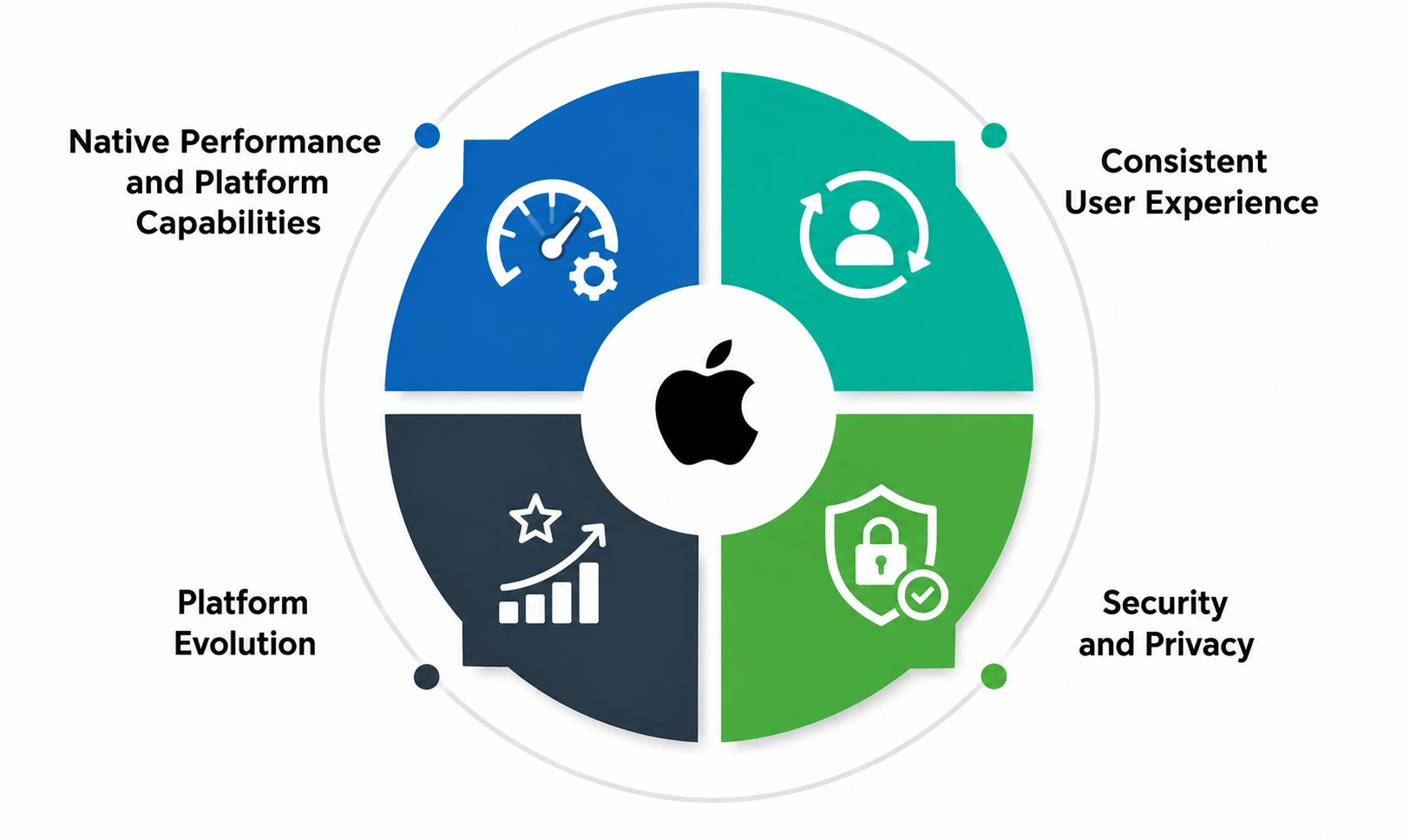
Choosing iOS should align with your target audience, product requirements, revenue model, and long-term platform strategy. For businesses targeting Apple users, native iOS development provides access to Apple’s device ecosystem and platform capabilities while supporting experiences aligned with established design and interaction patterns. iOS and iPadOS continue to evolve with new APIs, device capabilities, and intelligence features.
For long-term products, this makes adaptable architecture essential. A future-ready iOS application should not be designed around a single operating-system version; it should have the flexibility to adopt relevant platform capabilities as Apple introduces them.
1. Native Performance and Platform Capabilities
Native iOS development uses Apple’s frameworks and device capabilities according to the application’s requirements.
Depending on the product, the technology stack includes Swift, SwiftUI, UIKit, Apple platform frameworks, Core ML, Apple Pay, MapKit, HealthKit, CloudKit, Live Activities, widgets, and other device capabilities. The appropriate stack needs to be selected based on the application’s functionality, supported devices, integrations, and long-term roadmap rather than the number of frameworks available.
The goal is not to use every available framework. The goal is to select the capabilities that create genuine value for the product.
2. Consistent User Experience
iOS users have established expectations around navigation, gestures, typography, accessibility, responsiveness, and interface behavior.
Custom development allows designers and developers to build the product around those expectations while still creating a distinctive brand experience.
3. Security and Privacy
Many business applications handle sensitive information, including financial data, personal information, authentication credentials, location data, or health-related information.
Security should be an architectural requirement, not a post-launch feature. Authentication, authorization, data protection, secure storage, API security, device-level protections, logging, and threat monitoring need to be planned according to the application’s risk profile and regulatory requirements.
Depending on the application’s requirements, the team uses capabilities such as Keychain, Secure Enclave, biometric authentication, encrypted storage, secure API communication, and appropriate access controls.
4. Platform Evolution
Apple’s platform evolves continuously through new APIs, device capabilities, and intelligence features. A modular architecture makes it easier to adopt relevant capabilities as they become valuable to the product without forcing major changes to the existing foundation. Businesses planning long-term custom iOS development also explore the latest iOS app development trends to understand how the platform is evolving.
Custom iPad App Development: What Businesses Need to Consider
Custom iPad app development should not simply mean stretching an iPhone interface across a larger screen.
The iPad provides more screen space and different interaction possibilities, which need to change how users navigate, consume information, and complete tasks.
Apple’s iPadOS 26 introduced a new windowing system that lets users resize, position, tile, and manage multiple app windows, reinforcing the importance of designing iPad applications around larger-screen workflows.
1. iPhone, iPad, or Both?
Device scope should be defined during product planning because it affects UX design, architecture, testing, supported OS versions, and development cost.
- iPhone: Best suited to mobile-first, on-the-go workflows and consumer experiences.
- iPad: Better suited to dashboards, productivity, field operations, professional workflows, and larger-screen experiences.
- iPhone + iPad: Appropriate when users need the same product across both contexts, with interfaces adapted to each device rather than simply duplicated.
2. Design for Larger Screens
A larger display typically supports workflows that would be cumbersome on an iPhone. For example:
- A financial dashboard shows account information beside transaction details.
- A logistics application displays a map alongside delivery information.
The additional screen space should improve productivity rather than simply create empty space.
3. Plan for Multitasking
iPad applications should be designed around the multitasking and window-management behaviors relevant to their users. Depending on the workflow, this generally includes resizable layouts, multiple windows, orientation changes, persistent navigation, state preservation, and support for different screen dimensions.
These requirements should be considered early during UX and architecture planning to ensure a consistent and productive experience across iPad use cases.
4. Support Relevant Input Methods
Depending on the use case, iPad users need to interact through touch, keyboard, trackpad, or Apple Pencil. Education, design, field-service, and productivity apps benefit from keyboard shortcuts or Apple Pencil support, while consumer apps generally rely primarily on touch.
The product should support only the input methods that genuinely improve the target user’s workflow and experience.
5. Define Device and OS Coverage
The iPad ecosystem spans multiple device generations, screen sizes, and hardware capabilities, so custom iPad app development should define the minimum supported iPad models, OS versions, hardware requirements, orientation needs, accessibility standards, and testing coverage before development begins.
Establishing these requirements early keeps the testing scope manageable and helps prevent compatibility issues later in the development cycle. For a broader look at how Apple’s platform is evolving, explore our guide to the future of iOS app development.
Top Features That Make Your Custom iOS Apps Future-Ready
A future-ready application is not one that includes every emerging technology. It needs to evolve without requiring the business to rebuild its foundation whenever the roadmap changes.
1. Modular Architecture
A modular architecture divides an iOS application into independent components, making features easier to develop, test, maintain, and scale. It helps teams introduce new functionality, integrations, and platform capabilities without disrupting unrelated parts of the app. This approach also reduces dependencies between modules, supports parallel development, simplifies testing, and makes it easier to adapt the application as business requirements and iOS or iPadOS capabilities evolve.
2. Scalable Backend Integration
The mobile app is one part of a broader product ecosystem and may need to connect with REST or GraphQL APIs, cloud platforms, CRM and ERP systems, payment gateways, identity providers, analytics tools, and internal business systems.
These integrations support data exchange, authentication, payments, business operations, and product insights. The backend and API architecture should therefore accommodate both current requirements and realistic future expansion.
3. Secure Authentication
Authentication requirements depend on the application’s security needs. Common approaches include password-based authentication, multi-factor authentication, passkeys, biometrics, social login, and enterprise identity providers.
The appropriate method should reflect the application’s users, data sensitivity, and access requirements. For example, a fintech application typically requires stronger authentication and additional verification than a simple content application.
4. Offline and Resilient Functionality
Some applications need to remain functional when connectivity is limited. An offline-capable architecture can let users access synced data, complete selected workflows, store actions locally, queue changes, and synchronize updates when connectivity is restored.
This is particularly valuable for field-service, logistics, healthcare, and enterprise applications where reliable access to critical workflows is essential.
5. Analytics, Monitoring, and Observability
Launching an application does not tell you whether the product is working as intended. Analytics generally help measure:
- Feature adoption: Which features users discover and use.
- Conversion: Whether users complete key actions.
- Engagement: How frequently and deeply users interact with the product.
- Retention: Whether users continue returning over time.
- User journeys: Where users encounter friction or drop off.
- Revenue events: Purchases, subscriptions, renewals, and transactions.
Application monitoring helps identify crashes, performance issues, API failures, and other technical problems.
6. Accessibility
Accessibility needs to be considered during UX and development.
Depending on the application, this includes:
- VoiceOver support
- Dynamic text
- Accessible controls
- Sufficient contrast
- Logical navigation
- Reduced-motion considerations
- Appropriate labels and focus behavior
7. API-First Integrations
An API-first architecture makes it easier to connect the iOS application with web applications, administrative dashboards, future mobile platforms, and external services.
It also reduces the risk of tightly coupling the mobile application to one specific backend implementation.
8. Continuous Testing and Delivery
As the application evolves, continuous testing helps maintain reliability across new releases and supported devices. A mature pipeline combines unit, UI, and integration testing with automated builds, TestFlight beta distribution, crash and performance monitoring, and regression testing. These practices help teams identify issues early, validate new features without disrupting existing functionality, and deliver updates more confidently.
Continuous testing also supports faster release cycles while maintaining the app’s stability, performance, security, and overall user experience.
Key Advantages of Custom iOS Development Over Off-the-Shelf Solutions
The decision between custom development and an off-the-shelf solution depends on how closely the available solution matches your business requirements.
| Factor | Custom iOS Development | Off-the-Shelf Solution |
| Product experience | Designed around your users | Based on predefined workflows |
| Functionality | Built around business requirements | Limited to available features |
| Integrations | Designed for required systems | Depends on supported integrations |
| Scalability | Architecture evolves with the product | Depends on vendor limitations |
| Branding | Fully customizable | Usually template-based |
| Security | Designed around application requirements | Depends on provider |
| Roadmap control | Business controls product direction | Influenced by vendor roadmap |
| Upfront investment | Higher initial investment | Usually lower initial cost |
| Long-term flexibility | High | Varies by solution |
The strongest argument for custom development is not that every business needs a custom application. It is that businesses with genuinely differentiated requirements should not allow a generic platform to dictate their product experience.
Deeper Integration With Business Tools & Backend Systems
Custom development becomes especially valuable when the app must connect multiple business systems. Instead of adapting workflows to the limitations of a prebuilt platform, the architecture can be designed around the company’s existing APIs, identity systems, financial infrastructure, CRM, ERP, and operational tools.
This is where an experienced mobile app development company adds value by connecting the user-facing application with the backend systems and third-party services that power the product. To understand how a tailored application generally supports broader business goals, explore our guide on how custom app development can boost your business.
Step-by-Step Custom iOS Development Process
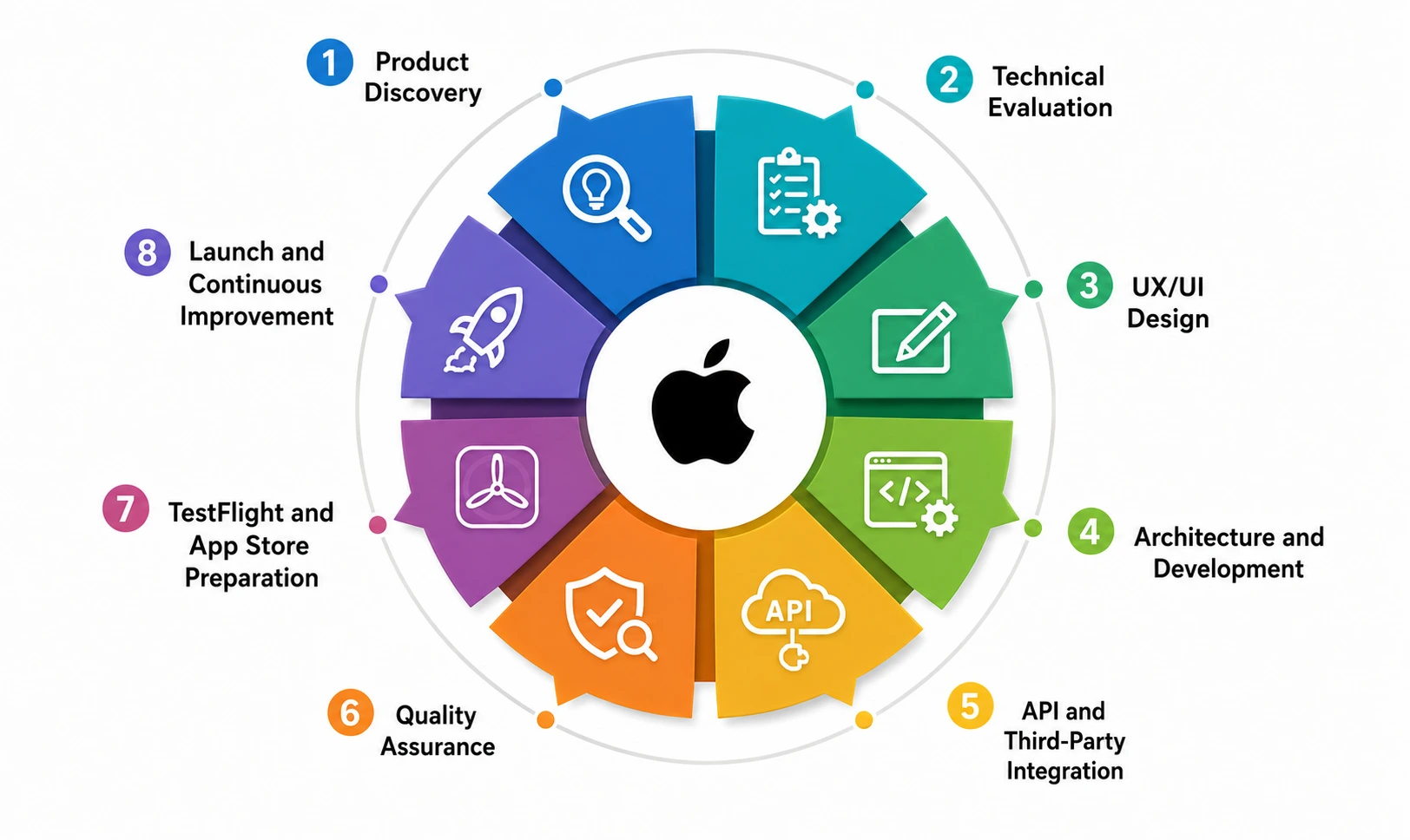
A reliable custom iOS application typically does not begin with coding. It begins with understanding the product. An Agile approach also helps teams manage evolving requirements through iterative planning, development, testing, and feedback. For a deeper look at its benefits, explore the top reasons to choose agile methodology for mobile app development.
1. Product Discovery
The discovery stage defines the product’s users, business objectives, core workflows, MVP scope, functional requirements, competitive context, and technical constraints. The outcome is a clear product scope that gives the design and engineering teams a shared foundation.
2. Technical Evaluation
The technical evaluation translates product requirements into an implementation strategy. The team evaluates:
- Native iOS capabilities
- Backend architecture
- APIs
- Third-party integrations
- Authentication
- Data storage
- Security
- Scalability
- Device coverage
- Performance requirements
The team identifies potential technical risks before development starts.
3. UX/UI Design
Designers convert requirements into:
- User flows
- Wireframes
- Interactive prototypes
- Visual design
- Responsive iPhone and iPad layouts
The design stage accounts for accessibility and platform conventions while maintaining the product’s unique identity.
4. Architecture and Development
Developers establish the application architecture and implement the product’s core functionality.
The technology stack includes Swift, SwiftUI, UIKit, Apple frameworks, backend services, APIs, databases, cloud infrastructure, and third-party services according to the project. The architecture generally supports the expected roadmap rather than only the initial feature list.
5. API and Third-Party Integration
The application is connected with the systems required to deliver the complete product experience. These may include:
- Payment systems: Enable secure transactions, subscriptions, refunds, and payment processing within the app.
- Maps: Add location-based features such as navigation, geolocation, route tracking, and nearby services.
- Authentication providers: Support secure sign-in, identity verification, social login, passkeys, or multi-factor authentication.
- CRM platforms: Sync customer profiles, interactions, leads, and other customer-related data with the app.
- ERP systems: Connect business operations such as inventory, orders, finance, and resource management with the application.
- Analytics tools: Track user behavior, feature adoption, conversions, retention, and other product metrics.
- Communication services: Enable push notifications, emails, SMS, chat, voice calls, or other user communication features.
- Financial networks: Connect the app with banking, remittance, payment, or financial infrastructure for secure transaction processing.
Integration testing becomes particularly important when external systems affect transactions or critical user workflows.
6. Quality Assurance
The QA team validates the application across supported devices and operating-system versions to ensure reliability and consistency. Testing covers functional behavior, UI consistency, performance, security, accessibility, network conditions, device compatibility, and regression scenarios.
Teams verify features against defined user flows, test responsiveness under different conditions, validate authentication and data protection, check VoiceOver and dynamic text support, and assess behavior across iPhone and iPad models, screen sizes, orientations, weak networks, and offline scenarios. Regression testing confirms updates do not disrupt existing functionality.
7. TestFlight and App Store Preparation
Beta testing needs to be conducted through TestFlight before production release.
The Apple Developer Program currently costs $99 per membership year, with local-currency pricing where available. Apple also provides TestFlight and App Store Connect as part of the developer program.
App Store preparation needs to cover:
- App metadata
- Screenshots
- Privacy information
- Permissions
- App functionality
- Review requirements
- Release configuration
8. Launch and Continuous Improvement
Launch is the beginning of the product lifecycle rather than its endpoint. Once the app is live, ongoing improvements help maintain performance, security, compatibility, and user experience as the product and Apple ecosystem evolve. Post-launch work includes:
- Bug fixes and issue resolution
- Performance optimization
- iOS and iPadOS compatibility updates
- Security improvements
- Analytics and user-behavior reviews
- New feature development
- Infrastructure scaling
Apple’s annual platform cycle makes ongoing maintenance important. Compatibility testing, security updates, performance monitoring, and product improvements should therefore remain part of the post-launch roadmap. For teams evaluating the tools and technologies that support this process, explore our guide to top iOS app development tools. This ongoing approach helps keep a custom iOS application reliable, competitive, and ready for future updates.
How Much Does Custom iOS App Development Cost in 2026?
The cost of custom iOS app development depends on scope rather than the platform alone. Current market estimates place iOS app development at approximately $25,000 for a simple application to $350,000+ for an enterprise-grade product, although actual costs vary significantly by scope, integrations, design, security, geography, and team expertise, with mid-level applications falling between those extremes. (Source: Goodfirms)
The same analysis highlights features, design, backend infrastructure, testing, geography, and integrations as major cost drivers. For planning purposes, the following ranges are used as a starting point:
Indicative planning ranges for 2026:
These ranges are directional rather than standardized industry prices. A discovery phase is needed to estimate a specific product accurately.
| App complexity | Typical scope | Estimated cost | Approx. timeline |
| Simple/MVP | Core workflows, authentication, basic backend | $25,000–$60,000+ | 3–6 months |
| Mid-level | Custom UX, backend, APIs, multiple integrations | $60,000–$150,000+ | 6–12 months |
| Complex/Enterprise | Advanced security, scalable infrastructure, AI, enterprise integrations | $150,000–$350,000+ | 12–18+ months |
These are planning ranges, not fixed quotations. A product with a smaller feature count but demanding security or integration requirements costs more than a larger application with relatively simple functionality.
Web application development cost typically ranges from $25,000 to $200,000+, depending on application complexity, UI/UX requirements, backend infrastructure, integrations, security, and development resources. A simple web app requires a smaller investment, while feature-rich or enterprise applications with complex integrations and scalability requirements require a larger budget.
What Determines Custom iOS Development Cost?
- Feature complexity: Real-time communication, advanced search, AI, payments, location services, complex dashboards, and data synchronization can increase development effort.
- UI/UX requirements: A highly customized user experience requires additional research, wireframing, prototyping, design, and usability testing.
- Backend architecture: A basic API is very different from a scalable backend with an admin portal, real-time infrastructure, databases, analytics, and DevOps requirements.
- Third-party integrations: Every external system introduces development, authentication, testing, monitoring, and maintenance requirements.
- Security and compliance: Financial, healthcare, enterprise, and other sensitive applications require additional architecture, testing, monitoring, and compliance work.
- Device coverage: Supporting multiple iPhone and iPad generations increases the testing matrix.
- Team location and expertise: Developer rates vary by geography and experience. Current GoodFirms data shows a wide range of rates across iPhone development companies, reinforcing the need to compare vendors based on capabilities and project fit rather than hourly rate alone.
- Post-launch support: OS updates, security patches, monitoring, optimization, and new features create continuing costs after the initial launch.
Don’t Budget Only for Development
The initial build is only one part of the total investment required to launch and grow an iOS product. Beyond development, your budget generally needs to account for:
- Apple Developer Program membership
- Cloud infrastructure and hosting
- Third-party APIs and services
- Payment processing fees
- Analytics and monitoring tools
- Security services
- App maintenance and OS compatibility updates
- Future feature development
- App Store and operational requirements
Apple’s Developer Program currently costs $99 per year; beta testing can be conducted through Apple’s TestFlight before production release. App Store preparation should cover metadata, screenshots, privacy information, permissions, functionality, review requirements, and release configuration.
For a broader breakdown of the factors that influence the overall investment, explore our guide on how much it costs to develop an iOS app. Planning for the complete product lifecycle, rather than only the initial build, helps you create a more realistic budget and avoid unexpected costs as the app evolves.
Why Choose RipenApps for Custom iOS Development?
Custom iOS development is most valuable when an application needs tailored functionality, platform-specific experiences, secure integrations, or an architecture designed around long-term product goals. RipenApps approaches these projects by aligning product discovery, user experience, technical architecture, API integration, testing, and App Store preparation with the application’s actual requirements. Our professional custom app development services help businesses build iOS applications around their workflows, user expectations, and growth objectives.
The Where To Go Social Travel app demonstrates RipenApps’ experience in building iOS products focused on user engagement and personalized discovery. The app helps users discover nearby places, explore trending spots, and access verified recommendations from their own social networks rather than relying solely on anonymous reviews. Moreover, the app achieved a 66% increase in user engagement and 5,000+ daily active users. Explore the Where To Go social travel case study to learn how RipenApps developed this iOS-only travel discovery experience.
Conclusion
Custom iOS development makes the strongest business case when your application requires a genuinely differentiated product strategy. Instead of adapting your product to the limitations of a template or generic platform, custom development lets you shape the architecture, user experience, integrations, security model, and roadmap around your actual business requirements.
Once these requirements are clear, the next step is defining your MVP scope, target users, iPhone/iPad requirements, integrations, technical constraints, and growth roadmap. RipenApps can help turn these requirements into a scalable iOS product, combining custom UX, native development, backend integrations, testing, and post-launch support to create an app built for long-term growth.

FAQs
Q1. What is custom iOS app development?
Custom iOS app development is the process of creating an iPhone or iPad application specifically around a business’s users, workflows, functionality, integrations, and long-term product requirements.
Q2. How much does custom iOS app development cost in 2026?
Based on current 2026 market estimates, iOS app development can range from approximately $25,000 for a simple application to $350,000+ for enterprise-grade products. The actual cost depends on features, design, backend infrastructure, integrations, security, testing, and team location.
Q3. How long does it take to build a custom iOS app?
A simple application typically takes around 3–6 months, a mid-level application around 6–12 months, and a complex enterprise application 12–18 months or longer. Scope, integrations, testing, and approval requirements may change the timeline.
Q4. What is the difference between custom iOS development and off-the-shelf development?
Custom development creates the application’s functionality, user experience, architecture, and integrations around your business requirements. Off-the-shelf solutions provide predefined capabilities and generally offer less control over workflows and the product roadmap.
Q5. Does custom iOS development include iPad app development?
It does. However, iPad applications need to be planned around larger screens, multitasking, responsive layouts, input methods, and supported device ranges rather than simply scaling up an iPhone interface.
Q6. Should a startup build a custom iOS app?
A startup needs to consider custom development when its competitive advantage depends on unique functionality, workflows, integrations, or user experience. A focused custom MVP validates the core product without requiring every planned feature to be built at launch.
Q7. What technology is used for custom iOS app development?
Native iOS applications commonly use Swift, SwiftUI, UIKit, and Apple’s platform frameworks. The broader technology stack also includes APIs, cloud infrastructure, databases, analytics, payment systems, AI services, and third-party integrations depending on the product.
Q8. How do I choose a custom iOS development company?
Evaluate relevant portfolio experience, native iOS expertise, discovery and technical evaluation practices, integration capabilities, security approach, testing methodology, communication process, post-launch support, and the company’s ability to provide a realistic scope-based estimate.
Discuss your project and request for proposal
SHARE
WRITTEN BY

Ishan Gupta
CEO & Founder
Ishan Gupta is a seasoned entrepreneur and CEO with extensive 10+ years of experience in business and mobile app development landscape. He believes that the right digital product allows companies to focus on what they do best, while technology handles the rest. With deep exposure to global markets, he understands what makes an app succeed. His approach translates business needs into clear product strategies, ensuring that every feature contributes to measurable ROI.
View All Articles