

Key Takeaways
- Clear requirements and defined project scope help prevent delays, rework, and budget overruns.
- The right technology stack supports application performance, scalability, and easier maintenance.
- Strong security measures and compliance practices help protect user data and build customer trust.
- Proper testing and performance optimization help deliver a consistent experience across devices.
- Regular updates, AI improvements, and ongoing maintenance keep applications reliable after launch.
Mobile app development involves more than building features and releasing an application. Businesses must make decisions about product scope, technology, budgets, security, performance, and long-term maintenance. Each decision can affect the development timeline, user experience, and return on investment.
As mobile applications become central to business operations, managing these requirements requires careful planning and coordination. Businesses must balance customer expectations, technical capabilities, and available resources while ensuring the application remains reliable, secure, and easy to use. Even a well-funded application can exceed its budget, struggle with device compatibility, expose sensitive information, or fail to retain users if critical risks are overlooked.
Understanding common mobile app development challenges helps business leaders make informed decisions before committing resources. Choosing an experienced mobile app development company can also help identify technical risks, plan development budgets, and build a product that supports long-term business goals. This guide examines 12 common challenges across the development lifecycle and explains practical ways to address them.
Mobile App Development Challenges at a Glance
Mobile app development challenges can affect different stages of a project, from initial planning to post-launch operations. The following table summarizes the most common issues, their business impact, and the recommended approach.
| Development challenge | Potential business impact | Recommended approach |
| Unclear requirements and scope creep | Delays, rework, and budget overruns | Define business objectives, user needs, and MVP scope |
| Choosing the wrong technology stack | Limited flexibility and higher maintenance costs | Evaluate native, cross-platform, and backend requirements |
| Managing development budgets and timelines | Financial pressure and delayed market entry | Estimate the full lifecycle cost and plan contingencies |
| Handling Device and Operating System Fragmentation | Inconsistent functionality across devices | Establish a device and OS compatibility strategy |
| Designing a user-friendly and accessible experience | Low engagement and user abandonment | Prioritize usability, accessibility, and user feedback |
| Maintaining application performance and reliability | Crashes, slow response, and negative reviews | Test performance under realistic conditions |
| Protecting user data and application security | Data exposure, compliance issues, and lost trust | Integrate security into architecture and development |
| Integrating APIs and third-party services | Unreliable features and operational disruption | Assess dependencies and build integration safeguards |
| Building an application that can scale | Higher infrastructure costs and service interruptions | Design architecture around expected growth |
| Ensuring effective testing and quality assurance | Defects after launch and expensive fixes | Use continuous and risk-based testing |
| Meeting App Store submission and approval requirements | Rejection and delayed release | Review platform requirements before submission |
| Integrating AI and managing post-launch maintenance | Rising costs and product obsolescence | Establish an upgrade and maintenance roadmap |
12 Common Mobile App Development Challenges and How to Overcome Them
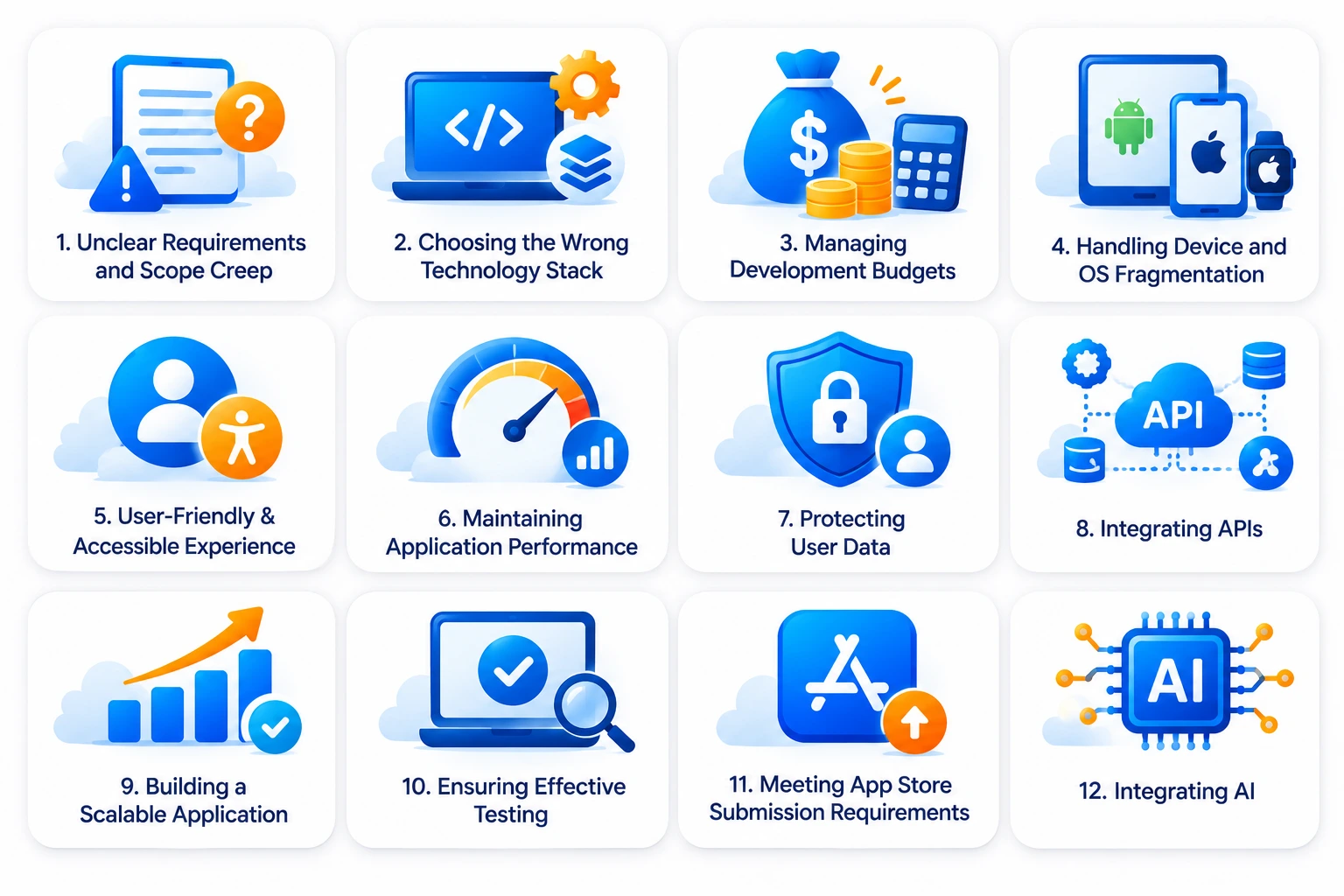
Each development challenge presents different technical and business risks. Understanding these issues early helps businesses prioritize investments, reduce avoidable rework, and make better product decisions.
1. Unclear Requirements and Scope Creep
Unclear requirements are among the earliest challenges in mobile app development. Businesses often begin with a broad idea but lack a shared understanding of the problem, target audience, and expected product outcomes.
This creates gaps between business expectations and the development team’s understanding. Features may be added during development, priorities may change, and stakeholders may disagree about what the application should deliver.
These changes can lead to scope creep. Even small additions can affect design, architecture, integrations, testing, and delivery schedules. As a result, the project may take longer and cost more than originally planned.
How to prevent scope creep
Start with a structured discovery process before development begins. Define the business problem, target users, core workflows, and measurable product objectives. This gives stakeholders a common reference point for making decisions. Businesses can also follow a step-by-step mobile app development guide to understand the major planning and delivery stages.
Prioritize features according to business value rather than the number of ideas available. A minimum viable product (MVP) should include the essential functionality required to validate the product with real users.
A clear scope document should also explain what is included, what is excluded, and how new requirements will be evaluated. Establishing a change-control process helps stakeholders understand the cost and timeline implications of additional features.
For example, a fintech company launching a digital banking application may initially need account access, transaction history, payments, and secure authentication. Advanced financial insights and personalized recommendations can follow after the core experience has been validated.
2. Choosing the Wrong Technology Stack
Technology decisions influence an application’s performance, development cost, scalability, and maintenance requirements. Selecting a framework based only on popularity or initial development speed can create problems later.
For example, a business may choose cross-platform development to reduce costs without evaluating its hardware requirements or platform-specific functionality. Another may select native development for a product that does not require extensive platform-specific capabilities.
The wrong choice can introduce unnecessary complexity, limit future enhancements, and increase maintenance expenses.
How to select the right technology stack
Evaluate technology choices against the application’s functional and business requirements. Consider performance expectations, device capabilities, integrations, security needs, development resources, and long-term product plans.
The three common approaches have different advantages:
| Development approach | Best suited for | Key considerations |
| Native development | Applications requiring platform-specific features, advanced performance, or deep device integration | Separate Android and iOS development efforts may increase cost |
| Cross-platform development | Products targeting Android and iOS with substantial shared functionality | Platform-specific adjustments may still be necessary |
| Progressive Web App (PWA) | Browser-based experiences that need broad device accessibility | Limited access to certain native capabilities and platform features |
Native development uses platform-specific technologies, such as Kotlin for Android and Swift for iOS. It offers greater control over platform functionality and can be suitable for performance-intensive applications.
Cross-platform frameworks such as Flutter and React Native allow businesses to share substantial portions of their application code across platforms. This can reduce duplicated development effort while supporting Android and iOS releases.
PWAs provide app-like experiences through web browsers. They can be appropriate for businesses prioritizing accessibility and simpler distribution rather than extensive native functionality.
The right choice depends on product requirements, not general technology trends. Businesses should also consider the availability of experienced talent and the long-term cost of maintaining the selected stack.
For example, RipenApps developed Cobone using React Native, with delivery completed in three months. The project demonstrates how a cross-platform approach can support an application targeting both Android and iOS. Explore the React Native app development guide for more details.
3. Managing Development Budgets and Timelines
Mobile app development budgets can become difficult to manage when estimates account only for design and initial development. Integrations, infrastructure, security, testing, licensing, and post-launch maintenance also contribute to the total investment.
Unplanned requirements and technical changes can further increase costs. Tight deadlines may also pressure teams to reduce testing or compromise important product decisions. This creates a financial challenge for businesses, particularly startups and companies working with fixed investment limits.
How to control development costs and timelines
Estimate the total mobile app development cost rather than focusing only on the initial build. Include discovery, UI/UX design, development, integrations, quality assurance, deployment, infrastructure, and ongoing support.
Divide the project into milestones with defined deliverables and acceptance criteria. This helps stakeholders track progress and identify cost variations before they become significant.
An MVP approach can also help control initial investment. Instead of building every planned feature, businesses can launch a smaller product, gather user feedback, and prioritize subsequent releases based on actual demand.
Maintain a contingency budget for unexpected technical requirements and third-party dependencies. Regular budget reviews also help business leaders assess whether changes remain aligned with the expected return on investment.
4. Handling Device and Operating System Fragmentation
Mobile applications must work across different devices, screen sizes, hardware configurations, and operating system versions. This is particularly challenging for businesses targeting a broad Android user base.
Differences in processing power, memory, screen resolution, camera capabilities, and operating system behavior can affect application performance. A feature that works correctly on a flagship device may behave differently on an older or lower-end model.
Operating system updates introduce another layer of complexity. Changes to permissions, APIs, and platform behavior may require application adjustments to preserve compatibility.
How to ensure device compatibility
Define the minimum supported operating system versions and device requirements before development begins. These decisions should reflect the target audience and the devices customers are likely to use.
Create a compatibility matrix covering representative device categories, screen sizes, and OS versions. Testing should include both current devices and older configurations that remain relevant to the target market.
Use responsive layouts and adaptive components to maintain a consistent experience across screen sizes. Device testing should also cover connectivity changes, battery restrictions, background activity, and permission behavior. A planned compatibility strategy helps businesses avoid treating every device-related issue as an unexpected post-launch problem.
5. Designing a User-Friendly and Accessible Experience
An application can offer useful functionality and still struggle to gain adoption if users find it difficult to navigate. Complicated onboarding, confusing navigation, inconsistent layouts, and unnecessary steps can create friction.
Accessibility is another important consideration. Applications that rely heavily on color, small text, unclear labels, or complex gestures may exclude users with different needs.
Poor user experience affects more than design quality. It can reduce engagement, increase abandonment, and weaken customer satisfaction.
How to improve usability and accessibility
Begin with user research to understand customer expectations, common tasks, and potential usability barriers. Use this information to create user journeys and wireframes before investing in detailed interface design.
Keep navigation predictable and make important actions easy to find. Reduce unnecessary form fields, simplify onboarding, and provide clear feedback when users complete an action or encounter an error.
Accessibility should be considered throughout the design process. Support readable text, sufficient contrast, descriptive labels, screen readers, and alternative interaction methods where relevant.
Test prototypes with representative users before development is finalized. Their feedback can reveal navigation problems and confusing workflows while changes are still relatively inexpensive. For businesses planning a customer-facing product, investing in UI UX design services can help establish a more consistent and usable experience.
6. Maintaining Application Performance and Reliability
Performance problems can affect the entire customer experience. Slow loading, delayed responses, unexpected crashes, and excessive battery consumption can cause users to abandon an application.
These problems may emerge under conditions that are difficult to reproduce during basic testing. For example, an application may perform well on a fast connection but struggle when users switch between Wi-Fi and mobile data.
Performance can also deteriorate as the application handles more users, larger datasets, and additional background processes.
How to maintain application performance
Set performance expectations for important user journeys before development begins. Define acceptable loading times, response times, crash rates, and resource usage based on the application’s purpose.
Optimize images, media files, network requests, and data processing. Avoid unnecessary background operations and ensure that the application handles weak connectivity without disrupting essential workflows.
Monitor performance throughout development and after launch. Crash reporting, analytics, and application performance monitoring can help identify recurring problems and understand which user journeys are affected.
Businesses should also conduct load and stress testing where backend performance is critical. This helps identify bottlenecks before traffic increases. For a deeper understanding, explore mobile app performance optimization.
7. Protecting User Data and Application Security
Security is a critical challenge for applications that handle personal information, financial transactions, health records, or business data. Weak authentication, insecure data storage, exposed API credentials, and poorly protected communication channels can create serious risks.
A security incident can lead to financial losses, legal exposure, operational disruption, and damage to customer trust. The impact may be especially significant for applications operating in regulated industries.
Security should not be treated as a final testing activity. Decisions made during architecture and development determine how effectively an application can protect sensitive information.
How to overcome it
Adopt a security-by-design approach. Identify sensitive data, define access requirements, and establish appropriate security controls before development begins.
Use secure authentication and authorization mechanisms. Apply encryption to sensitive data in transit and at rest, protect API communication, and avoid storing information that the application does not need. Keep third-party libraries and dependencies updated. Conduct vulnerability assessments and security testing throughout the development lifecycle, rather than relying only on a final review.
Businesses should also understand the regulations applicable to their product and target markets. Requirements may differ depending on the type of data collected, the business model, and the jurisdictions in which the application operates.
For example, healthcare applications may need to account for applicable health data privacy requirements, while payment-related products must evaluate relevant payment security obligations. For more information, read about HIPAA Compliance.
8. Integrating APIs and Third-Party Services
Modern mobile applications rarely operate independently. They often connect with payment gateways, maps, analytics platforms, identity verification services, messaging systems, and enterprise software.
Each connection introduces dependencies that businesses must evaluate before integrating external services. Understanding API architecture through an API development guide can help businesses plan these connections more effectively.
How to manage API integrations effectively
Evaluate third-party services based on reliability, documentation, security, pricing, scalability, and support availability. Businesses should understand the limitations of each provider before making it part of a critical product workflow.
Use secure API authentication and define how the application will handle timeouts, failed requests, and service interruptions. Where appropriate, use retry mechanisms, caching, and fallback options to reduce the impact of temporary failures.
Keep integrations modular so that a provider can be replaced without requiring major changes to the entire application. Monitor API usage and response times to identify problems early.
For example, a digital banking application may depend on identity verification, payment processing, transaction services, and external financial networks. Each integration needs clear error handling and monitoring to maintain a reliable customer experience.
9. Building an Application That Can Scale
An application that works for its initial users may not perform well as demand increases. Growth can place pressure on databases, APIs, cloud infrastructure, storage, and third-party services.
If scalability is not considered early, businesses may face slow response times, service interruptions, and expensive architectural changes. Scaling too early can also create unnecessary infrastructure costs.
The objective is to build an application that can accommodate expected growth without overengineering the initial product.
How to overcome it
Estimate expected user growth, transaction volumes, data requirements, and peak usage patterns. These assumptions should guide decisions about architecture, hosting, storage, and backend services.
Use modular architecture to separate important application components. This makes it easier to update individual services and introduce new functionality as business requirements evolve.
Cloud infrastructure can provide flexible resource allocation, but it still requires appropriate configuration and cost monitoring. Database optimization, caching, load balancing, and performance monitoring can also support growth.
Plan scalability around realistic business milestones. A startup validating an MVP may not need the same infrastructure as an enterprise platform serving large transaction volumes. The architecture should support the next stages of growth without creating unnecessary complexity or recurring expenses.
10. Ensuring Effective Testing and Quality Assurance
Testing is essential for identifying defects before they affect customers. However, mobile application testing can be challenging because applications must work across devices, operating systems, network conditions, and user scenarios.
A feature may work correctly in isolation but fail when combined with another workflow. Updates can also introduce regressions in functionality that previously worked. Insufficient testing can lead to crashes, payment failures, data inconsistencies, and negative customer feedback after release.
How to overcome it
Establish a quality assurance strategy during the planning phase. Identify critical user journeys and prioritize testing based on business impact and technical risk.
Combine functional testing with usability, compatibility, performance, security, and regression testing. Automate repetitive test cases where practical, while retaining manual testing for exploratory scenarios and complex user interactions.
Test applications on representative physical devices as well as simulators. Include different network conditions, permissions, interruptions, and operating system configurations.
Use a release checklist to confirm that critical workflows, integrations, analytics, and error-handling mechanisms are functioning as expected. Continuous integration and continuous delivery (CI/CD) pipelines can automate builds, testing, and deployment, reducing manual release effort. Tools such as GitHub Actions, Bitrise, and Fastlane can support automated mobile release workflows.
Platforms such as BrowserStack and Firebase Test Lab can help test applications across different devices and configurations. A staged rollout through Google Play or phased release on the App Store can also help identify issues before an update reaches the entire user base.
11. Meeting App Store Submission and Approval Requirements
Publishing an application requires more than completing development. Apple App Store and Google Play have policies covering functionality, privacy, security, payments, user data, content, and other platform requirements.
An application may be rejected if it contains incomplete functionality, misleading descriptions, inadequate privacy disclosures, or violations of platform guidelines. Repeated submission issues can delay the launch and affect marketing plans.
Businesses that review store requirements only at the end of development may discover problems when changes are expensive.
How to overcome it
Review the relevant App Store and Google Play guidelines during product planning. Identify requirements that could influence application functionality, data collection, payments, account management, or content moderation.
Prepare accurate store listings, screenshots, descriptions, privacy disclosures, and required permissions. Ensure that the application provides a complete experience for reviewers and does not rely on unavailable test accounts or inaccessible services.
Build time for submission, review, and potential revisions into the launch schedule. Keep platform requirements in view during development so that compliance does not become a last-minute task. A structured release process helps businesses reduce avoidable rejection risks and coordinate product launch activities more effectively.
12. Integrating AI and Managing Post-Launch Maintenance
AI features are becoming part of many mobile products, from personalized recommendations and conversational assistants to image recognition and predictive analytics. However, businesses must identify clear use cases and understand how to integrate AI into mobile applications without adding unnecessary complexity. Adding AI does not automatically improve an application’s value.
Businesses must consider data quality, model accuracy, response time, infrastructure costs, privacy, and the user experience. An AI feature that produces inconsistent results can reduce trust rather than improve engagement.
The challenge continues after launch. Mobile operating systems change, third-party services evolve, security vulnerabilities emerge, and customer expectations develop. An application requires ongoing attention to remain useful and reliable.
How to overcome it
Start by identifying a specific business problem that AI can solve. Evaluate whether the feature can improve an existing workflow, reduce manual effort, personalize an experience, or support better decision-making.
Choose an appropriate model or AI integration service based on accuracy, latency, cost, data requirements, and integration complexity. Define how outputs will be evaluated and provide a fallback experience when AI results are unavailable or unreliable.
Treat maintenance as part of the product lifecycle. Plan for operating system updates, security patches, dependency upgrades, bug fixes, infrastructure monitoring, and performance improvements.
Review analytics and customer feedback regularly to identify opportunities for improvement. A roadmap for ongoing updates helps businesses protect their initial investment and keep the application aligned with changing requirements.
Real-World Examples: Addressing Mobile App Development Challenges
Mobile app development challenges vary by industry, but successful delivery depends on aligning product requirements, technical decisions, and business objectives. The following examples illustrate how different application requirements can shape development priorities.
Al Muzaini: Building a Secure Digital Banking Experience
Digital banking applications must balance usability with strong security and reliable financial integrations. Al Muzaini app required features such as AI-powered KYC onboarding, three-factor authentication with biometric login, real-time exchange rates, beneficiary management, and Western Union network integration.
The project demonstrates why authentication, integration planning, and data protection need to be considered from the beginning of a financial application project.
Hungama: Supporting a Large Digital Entertainment Platform
Entertainment applications must deliver reliable media experiences while managing extensive content libraries and personalized recommendations. Hungama’s platform integrates more than 30 million songs and 8,000 movies and web shows, supported by an AI-driven recommendation layer.
These requirements highlight the importance of content management, recommendation capabilities, and infrastructure planning when developing entertainment platforms at scale.
Cobone: Developing a Cross-Platform Offers Application
Businesses targeting both Android and iOS must balance development efficiency with platform-specific user expectations. Cobone was developed using React Native, with delivery completed in three months.
The project illustrates how a cross-platform approach can support a product targeting multiple mobile platforms while keeping development efforts coordinated.
Mednovate Connect: Supporting Healthcare Workflows
Healthcare applications must account for sensitive information, dependable workflows, and clear communication between users and service providers. Mednovate Connect required Android and iOS applications with features such as medication management plans, licensed clinical pharmacist consultations, appointment booking, treatment monitoring, and patient-provider messaging.
The applications were delivered in three months. The project demonstrates the importance of aligning application architecture with healthcare workflows, information sensitivity, and the need for reliable patient-provider communication.
How to Choose the Right Mobile App Development Partner
The development partner you select can influence product quality, delivery timelines, technical decisions, and long-term maintenance. A low initial quote does not necessarily represent the best value if the team lacks experience with your product’s requirements.
Evaluate potential partners using the following criteria:
- Relevant project experience: Review applications with comparable functionality, integrations, and business requirements.
- Technical expertise: Assess experience across native and cross-platform development, backend architecture, cloud infrastructure, and security.
- Product discovery process: Look for a structured approach to requirements gathering, user research, feasibility, and MVP planning.
- Quality assurance practices: Understand how the team handles device compatibility, performance, security, and regression testing.
- Communication and transparency: Confirm how milestones, risks, changes, and delivery progress will be reported.
- Post-launch support: Discuss maintenance, operating system updates, monitoring, and future enhancements.
- Code ownership and documentation: Establish clear terms for intellectual property, source code access, documentation, and project handover.
Ask prospective partners to explain how they would approach your specific requirements. Their ability to identify risks and discuss trade-offs can reveal more than a portfolio alone.
A dependable partner should help you make informed product decisions, not simply agree to every requested feature.
Conclusion
Mobile app development challenges can affect every stage of a product, from idea validation and technology selection to launch, scaling, and maintenance. Their impact is not limited to technical performance. Poor planning, unclear requirements, security gaps, and inadequate testing can increase costs, delay market entry, and weaken customer trust. Partnering with an experienced mobile app development team offering cross platform app development services can help businesses make informed technology decisions, streamline development, and build reliable applications that support long-term business goals.
RipenApps helps businesses plan and build mobile applications around their product requirements, technical needs, and growth objectives. Whether you are validating an MVP or developing an enterprise application, a clear development strategy can help you make better investment decisions.

FAQs
Q1. What are the biggest challenges in mobile app development?
The biggest challenges include unclear requirements, scope creep, technology selection, budget management, device fragmentation, poor user experience, performance issues, security risks, complex integrations, scalability, testing, and app store approval. Businesses must also plan for AI integration and ongoing maintenance.
Q2. How can businesses reduce mobile app development costs?
Businesses can control development costs by defining clear requirements, prioritizing essential features, selecting an appropriate technology stack, and planning integrations early. Launching an MVP can also reduce initial investment while allowing the product to be validated before additional features are developed.
Q3. Why is choosing the right technology stack important?
The technology stack affects application performance, scalability, development effort, platform compatibility, and maintenance costs. Businesses should select technologies based on product requirements, expected growth, integration needs, and available expertise rather than popularity alone.
Q4. How can businesses ensure mobile app security?
Businesses should integrate security into the development lifecycle. Important measures include secure authentication, encryption, access controls, protected API communication, dependency updates, vulnerability assessments, and regular security testing. Applications handling sensitive information should also account for applicable privacy and compliance requirements.
Q5. What is the difference between native and cross-platform app development?
Native development uses platform-specific technologies to build separate Android and iOS applications. Cross-platform development uses frameworks such as Flutter or React Native to share substantial portions of the codebase. Native development offers greater platform-specific control, while cross-platform development can reduce duplicated development effort.
Q6. How long does it take to develop a mobile app?
The development timeline depends on application complexity, feature scope, integrations, platform requirements, and testing needs. A straightforward MVP may take a few months, while complex enterprise or regulated applications can require substantially longer. Early planning helps identify risks and establish realistic delivery milestones.
Q7. Why is post-launch maintenance important for mobile applications?
Post-launch maintenance keeps an application secure, compatible, and reliable as operating systems, devices, third-party services, and user expectations change. Regular updates, performance monitoring, bug fixes, and security patches help protect the product investment and support long-term customer engagement.
Discuss your project and request for proposal
SHARE
WRITTEN BY

Radhika Yadav
Content Strategist
Radhika finds covering the tech world to be an exciting and engaging experience as each day brings new and groundbreaking technologies to explore and write about. A believe that words are our most inexhaustible source of magic, makes her fortify to writing pieces that enhance the visibility of any brand and helps them position themselves in the best possible way.
View All Articles