



Key Takeaways
- iOS app development costs $25,000–$250,000+, depending on app complexity, features, integrations, security, AI requirements, device support, and team structure.
- Simple iOS apps typically cost $25,000–$50,000, mid-level apps $50,000–$120,000, and complex or enterprise-grade apps $120,000–$250,000+.
- The biggest cost drivers include feature depth, backend complexity, third-party integrations, iOS 26 interface updates, SwiftUI modernization, on-device AI, security, compliance, and multi-device support.
- Post-launch costs matter too, including Apple Developer Program fees, App Store commissions, maintenance, cloud infrastructure, third-party services, localization, and compliance.
- Native iOS vs. cross-platform should be evaluated by total cost of ownership, not just the initial development price.
- A focused MVP can reduce upfront costs while allowing businesses to validate the product before investing in advanced features and broader device support.
- A detailed scope-based estimate is more reliable than a generic app price, because the final budget depends on the product’s features, technical requirements, team, and roadmap.
Building an iOS app can cost $25,000 to $250,000+, depending on complexity, features, integrations, devices, compliance, AI requirements, and team structure. Simple apps generally fall into the $25,000–$50,000 range, mid-level products into $50,000–$120,000, and complex or enterprise-grade apps into $120,000–$250,000+.
The important point is that iOS app development cost is not determined by the number of screens alone. Backend architecture, security, third-party integrations, device support, AI capabilities, testing requirements, and post-launch operations can materially change the budget. Choosing the right iOS app development services provider can also influence delivery efficiency, technical decisions, and overall project cost.
This guide breaks down the cost of developing an iOS app by complexity, category, development stage, region, technology approach, and ongoing ownership costs. It also shows how to estimate a realistic budget before you request or compare development quotes.
Table of Contents
How Much Does It Cost to Develop an iOS App?
The average iOS app development cost is $25,000–$250,000+, with the final budget determined by product complexity, scope, integrations, supported Apple devices, backend requirements, security, and the development team.
| App Complexity | Development Cost | Typical Timeline | Typical Team |
| Simple | $25,000–$50,000 | 3–4 months | Product/UI-UX + iOS developer + QA |
| Mid-level | $50,000–$120,000 | 4–7 months | Product + UI/UX + iOS + backend + QA |
| Complex / enterprise-grade | $120,000–$250,000+ | 7–12+ months | Product + design + iOS + backend + QA + specialist roles |
These are RipenApps planning bands, not fixed quotes. Final costs depend on features, architecture, integrations, device support, security, and team composition.
If you are comparing an iOS-specific budget with a broader mobile app budget, use the broader app development cost guide as the parent reference. At the same time, this page remains the source for iOS-specific cost and pricing questions.
iOS App Development Cost by App Complexity
The cost to build an iOS app rises primarily with the depth of the product rather than simply the number of screens. This is why the iOS app development price can vary significantly even for products with a similar number of screens.
Simple iOS App: $25,000–$50,000
A simple iOS app focuses on one clearly defined user journey and a limited feature set. It may include account registration, profiles, basic search, push notifications, simple forms, standard API connections, and a straightforward administrative backend.
The lower end of the range is appropriate when the product uses standard interface patterns and limited custom logic. Costs move toward the upper end when the product requires custom UI, additional integrations, more extensive testing, or a stronger backend foundation.
A simple app can still require careful architecture. Cutting essential planning or QA simply because the feature list is short can create rework after launch.
Mid-Level iOS App: $50,000–$120,000
A mid-level iOS product usually has multiple workflows, more complex business logic, third-party integrations, customized UI/UX, and a more substantial backend.
Examples include commerce applications, learning platforms, subscription products, service marketplaces, and financial applications with several user journeys.
The budget increases when the product requires payment processing, multiple roles, real-time functionality, advanced analytics, custom animations, complex APIs, or additional security controls. At this level, architecture decisions matter more because the initial product may need to support additional features, users, or integrations after launch.
Complex / Enterprise-Grade iOS App: $120,000–$250,000+
Complex iOS applications combine multiple cost-intensive requirements. These may include real-time data, advanced authentication, extensive backend synchronization, high-volume transactions, sophisticated analytics, AI capabilities, multi-device support, enterprise security, or regulatory requirements.
An enterprise-grade application may also require more extensive QA, CI/CD automation, monitoring, accessibility work, security testing, and operational support. For these products, the development budget should be treated as part of a longer product investment rather than a one-time launch expense. Teams can also use Xcode Cloud, Apple’s CI/CD service integrated with Xcode, for automated builds, testing, and release workflows.
iOS App Development Cost by App Category
iOS app development cost varies by category because compliance, backend complexity, real-time infrastructure, integrations, and content delivery requirements can significantly change the amount of development work involved.
The same feature can have very different development implications depending on the industry. Compliance, transaction complexity, real-time infrastructure, content operations, and backend requirements can move an application into a higher complexity band.
| App Category | Typical Complexity Consideration | Why the Cost Differs |
| Fintech | Mid-level to complex | Financial workflows can require stronger authentication, transaction handling, auditability, security controls, and third-party financial integrations. For financial products, see our fintech app development capabilities. |
| Healthcare | Mid-level to complex | Sensitive data, privacy controls, healthcare workflows, integrations, and compliance requirements can increase design, development, and QA effort. |
| eLearning | Simple to complex | The cost depends heavily on course structure, assessments, video delivery, live classes, progress tracking, and content management. |
| Ecommerce | Mid-level | Product catalogs, search, checkout, payments, inventory, order management, notifications, and analytics increase backend and integration requirements. |
| On-demand delivery | Mid-level to complex | Real-time location, dispatch logic, order tracking, payments, notifications, and multiple user roles increase system complexity. |
| Media streaming | Mid-level to complex | Content delivery, streaming infrastructure, subscriptions, playback, media processing, analytics, and content management add technical requirements. |
| Social | Mid-level to complex | Profiles, feeds, messaging, notifications, media uploads, moderation, recommendations, and real-time interactions can substantially increase backend load. |
| Marketplace | Mid-level to complex | Multiple user types, listings, search, payments, messaging, reviews, transactions, and dispute workflows require broader product architecture. |
Healthcare products may require additional privacy, security, interoperability, and compliance planning. For a broader breakdown of healthcare product requirements and development considerations, see our healthcare app development guide.
The category does not determine the price by itself. A focused fintech MVP may fit within a lower complexity band, while a media or ecommerce platform with extensive infrastructure can move into a higher band.
iOS App Development Cost by Development Stage
An iOS app development cost breakdown typically distributes the budget across discovery, design, architecture, development, backend work, QA, and App Store release based on the effort each stage requires.
| Development Stage | Share of Total Budget | Example allocation on a $100K project | What it Covers |
| Discovery | 5–10% | $5,000–$10,000 | Requirements, product goals, user flows, technical feasibility, scope definition |
| UI/UX | 10–15% | $10,000–$15,000 | Information architecture, wireframes, visual design, prototypes, interaction patterns |
| Architecture | 5–10% | $5,000–$10,000 | Technical architecture, data models, API strategy, security planning, scalability decisions |
| iOS development | 30–40% | $30,000–$40,000 | Swift/SwiftUI implementation, screens, business logic, device capabilities |
| Backend/API | 15–25% | $15,000–$25,000 | Server-side logic, APIs, database, authentication, integrations, administration |
| QA | 10–15% | $10,000–$15,000 | Functional testing, device testing, regression testing, performance and release validation |
| App Store release | 2–5% | $2,000–$5,000 | Release preparation, TestFlight, App Store assets, submission, review fixes, production release |
These percentages are planning allocations rather than separate charges. They should scale with the total project budget.
For example, if a project has a $100,000 approved development budget, a 35% iOS-development allocation would represent approximately $35,000. The actual distribution depends on scope and architecture.
What Drives iOS App Development Cost Up or Down
Several factors can materially change the iOS app development budget, including feature depth, architecture, integrations, AI, device support, security, compliance, and team structure.
Feature Depth and Screen Count
Screen count is useful for estimating design and implementation effort, but it is not a reliable cost model by itself. Ten simple screens may require less work than three screens containing complex real-time workflows, payment logic, advanced animations, or device integrations.
Features such as authentication, payments, subscriptions, messaging, maps, search, analytics, offline functionality, notifications, and role-based access each introduce additional implementation and testing requirements. The best estimate therefore starts with user journeys and feature depth rather than counting screens alone.
Native Swift/SwiftUI vs Legacy UIKit Refactor
Native iOS development provides direct access to Apple platform capabilities, but legacy apps may require modernization. The iOS 26 interface refresh introduced Apple’s Liquid Glass design language, which can update standard SwiftUI and UIKit components when apps use the latest SDKs. However, some interfaces may need targeted changes.
For legacy apps, assess the existing architecture, screens, and SwiftUI migration needs before estimating costs. Modernization can cost less than a full rebuild when valuable business logic can be retained.
On-Device AI and Apple Intelligence Integration
AI can increase iOS development costs through model integration, prompt design, evaluation, privacy controls, fallback logic, and backend requirements.
Apple’s Foundation Models framework supports on-device intelligent experiences, while other model providers can support additional use cases. Costs vary by complexity: a summarization feature requires less work than an AI agent that processes app data, calls tools, handles images, and requires evaluation and safety controls. Treat AI as a defined product capability rather than a generic integration.
Device Matrix: iPhone, iPad, Apple Watch, Vision Pro
Supporting additional Apple devices can increase development and testing costs. Businesses should also account for compatibility, testing, release management, and other platform-specific issues covered in our iOS app development challenges guide. iPad may require different layouts, navigation, and multitasking support. Apple Watch uses a different interaction model, while Vision Pro can require spatial interactions and a substantially different experience.
Estimate these platforms as incremental costs on top of the iPhone build. Supporting every device from launch may increase the budget without improving the core product outcome.
Third-Party Integrations and Backend Load
Payments, maps, analytics, messaging, identity verification, CRM, ERP, and other integrations can increase development and ongoing costs.
Teams must account for authentication, error handling, data mapping, API limits, monitoring, and testing. Backend requirements also vary by product scale. A simple app with limited transactions has very different infrastructure needs from one processing real-time activity at scale.
Security and Regulatory Compliance
Security and compliance requirements can materially affect an iOS project budget. Financial apps may require identity verification, transaction controls, encryption, and auditability.
Healthcare apps typically need stronger privacy and data-handling controls. Working with a healthcare app development company can help businesses account for these requirements early, particularly when the product handles sensitive health information or operates across multiple jurisdictions.
Financial applications may require PCI DSS-related payment controls, secure transaction handling, and appropriate protection of cardholder data. Healthcare products handling protected health information may require HIPAA-aligned privacy, security, and data-handling practices, depending on the product and operating environment. Apple requirements such as App Tracking Transparency may also apply.
Team Seniority and Location
Development rates vary by region, seniority, specialization, and engagement model. A lower hourly rate does not necessarily reduce total project cost. Experienced teams may complete complex work faster, reduce rework, and make stronger architecture decisions.
When comparing providers, evaluate total delivery effort, technical ownership, communication, QA coverage, and post-launch support alongside hourly rates.
Indicative iOS Development Rates by Region and Engagement Model
When comparing the average cost to develop an iPhone app, hourly pricing is useful for understanding how location, seniority, specialization, and team structure affect the overall development budget.
| Region | Junior | Mid-level | Senior / Specialist |
| India | $25–$50/hr | $50–$75/hr | $75–$90/hr |
| Latin America | $25–$50/hr | $50–$75/hr | $75–$100/hr |
| Eastern Europe | $50–$90/hr | $90–$140/hr | $140–$200/hr |
| Western Europe | $100–$130/hr | $130–$160/hr | $160–$180/hr |
| Australia | $80–$120/hr | $120–$160/hr | $160–$200/hr |
| North America | $120–$150/hr | $150–$175/hr | $175–$200/hr |
These ranges should be used as planning references rather than treated as universal market prices. The actual project quote depends on the product scope, team composition, delivery responsibility, and required expertise.
Fixed-Scope Development
A fixed-scope engagement works best when requirements, deliverables, assumptions, and acceptance criteria are sufficiently defined.
The main advantage is budget predictability. The trade-off is that significant scope changes can require change requests and revised estimates.
Dedicated Team
A dedicated team provides a stable group that can work continuously on a product roadmap. This model is useful when requirements will evolve, or the application needs continuous development. The trade-off is that the business takes more responsibility for prioritization and ongoing team utilization.
Resource-Based Engagement
A resource-based model is useful when a business already has product or engineering leadership and needs additional iOS capacity. It provides flexibility but requires stronger internal coordination because the client retains more responsibility for product direction, prioritization, and delivery management.
For a more detailed comparison of platform-specific development approaches, see our iOS app development guide.
Native iOS vs Cross-Platform: Which Actually Costs Less?
Native iOS development can cost more upfront when compared with a shared cross-platform build, but the lower initial price of cross-platform development does not necessarily produce the lowest three-year total cost of ownership.
| Cost consideration | Native iOS | Cross-platform |
| Initial iOS build | Higher when only iOS is considered | Can be lower for shared mobile development |
| Platform-specific features | Direct access | May require native modules or additional work |
| iOS interface customization | Strong | Depends on framework and implementation |
| Maintenance | Focused on iOS codebase | Shared code can reduce duplication but platform changes still require validation |
| Native device capabilities | Direct access | May require plugins or native integrations |
| Multi-platform expansion | Requires additional platform implementation | Can reduce duplicated application logic |
| Long-term technical debt | Depends on architecture | Depends on framework maturity and native dependencies |
The right choice depends on the product roadmap. If Flutter is being considered for a shared iOS and Android build, see our Flutter app development cost guide for a detailed breakdown of development costs and key cost drivers. If the product is iOS-first and depends heavily on Apple-specific capabilities, native development can provide stronger platform alignment. If the business needs iOS and Android quickly with substantial shared logic, cross-platform development may reduce initial duplication.
Over three years, compare the initial build with maintenance, platform-specific development, native module work, infrastructure, QA, and future Android expansion. Cross-platform may reduce duplicated development initially, while native iOS can avoid framework-specific work when Apple capabilities are central to the roadmap.
For a broader comparison, see cross-platform app development vs native app development. The better question is not “Which costs less to build?” It is “Which approach produces the lowest total cost for the product’s expected three-year roadmap?”
The iOS Costs Most Founders Miss
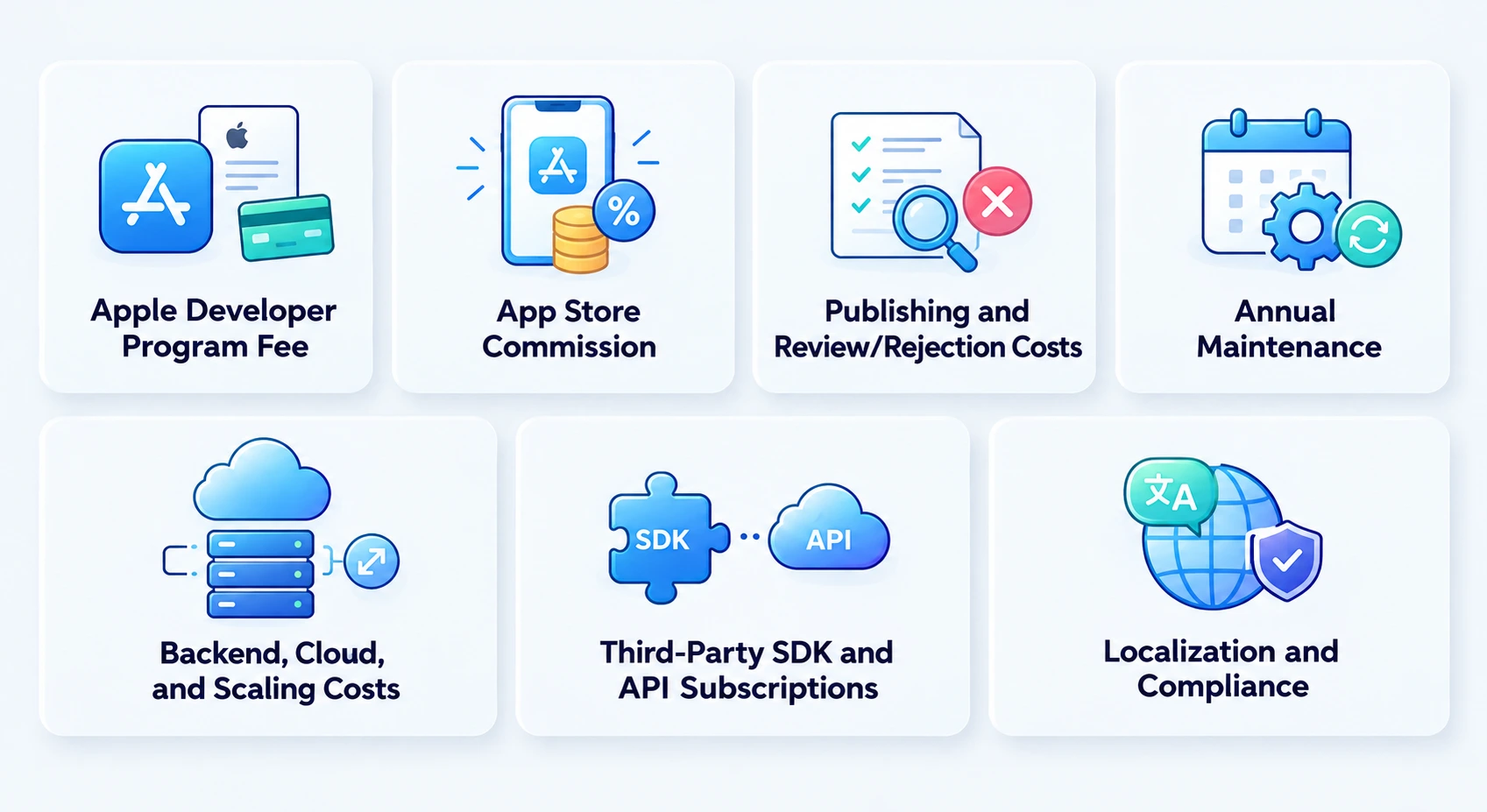
The development quote is only one part of the total ownership cost.
Apple Developer Program Fee and App Store Commission
Publishing an iOS app requires Apple Developer Program membership, currently $99 USD per membership year, with local-currency pricing where available.
App Store commissions vary by transaction type, developer program, and applicable subscription rules. Apple’s standard commission structure can differ from the rate available to eligible developers through the Small Business Program, while certain subscription transactions may have different rates after the first year. Businesses should verify the applicable rate against Apple’s current App Store terms before forecasting revenue.
Publishing and Review/Rejection Costs
Apple does not charge a separate fee for an app rejection. The cost comes from the engineering, testing, design, documentation, or compliance work needed to address the issue and resubmit.
Budget time for TestFlight testing, App Store preparation, review feedback, and potential remediation.
Annual Maintenance: 15–20% of Build Cost
iOS app maintenance can be budgeted at approximately 15–20% of the initial build cost per year, although actual costs vary with product complexity, release frequency, infrastructure, and the level of ongoing support required. For a $100,000 app, this equals roughly $15,000–$20,000 per year.
Maintenance may cover OS updates, bug fixes, security patches, performance improvements, dependency updates, compliance changes, and smaller enhancements. Actual costs depend on product complexity and how frequently the app changes.
Backend, Cloud, and Scaling Costs
An iOS app may rely on APIs, databases, authentication, storage, analytics, notifications, and media services.
Infrastructure costs typically increase with users, transactions, stored data, media consumption, and traffic. Treat cloud and backend expenses as ongoing operating costs rather than part of the initial mobile development budget.
Third-Party SDK and API Subscriptions
Third-party services may involve monthly, usage-based, transaction, or licensing fees. Common examples include analytics, identity verification, maps, communications, payments, monitoring, customer support, and AI services. Document each dependency during estimation and identify whether its cost is fixed or usage-based.
Localization and Compliance
Localization can involve more than translating app text. Costs may include localized content, currencies, date formats, legal documents, support workflows, screenshots, metadata, and testing.
Compliance can also require additional product, legal, security, and documentation work. Planning these requirements early helps prevent unexpected post-launch costs.
How to Estimate Your Own iOS App Budget
You can estimate an iOS app development budget by converting the approved scope into effort and multiplying the estimated hours by the applicable delivery rate.
Basic formula:
iOS app development cost = estimated development hours × hourly rate
Use this five-step process:
- Define the product scope. List the core user journeys, features, integrations, devices, and backend requirements.
- Estimate effort by stage. Allocate work across discovery, UI/UX, architecture, iOS development, backend/API, QA, and release.
- Choose the team model. Decide whether the product needs a fixed-scope project, dedicated team, or resource-based engagement.
- Apply the appropriate rate. Use the team’s region, seniority, specialization, and engagement model to establish the delivery rate.
- Add ownership costs. Include Apple fees, cloud infrastructure, third-party services, maintenance, compliance, and expected post-launch work.
Worked Example
Suppose a mid-level iOS project requires 600 delivery hours, assuming a North American blended delivery rate of $160/hour.
600 × $160 = $96,000
The resulting development estimate is approximately $96,000, which falls within the $50,000–$120,000 mid-level master band. The business should then separately assess post-launch maintenance, cloud usage, third-party services, App Store economics, and any additional device support.
How to Reduce iOS App Development Cost Without Cutting Quality
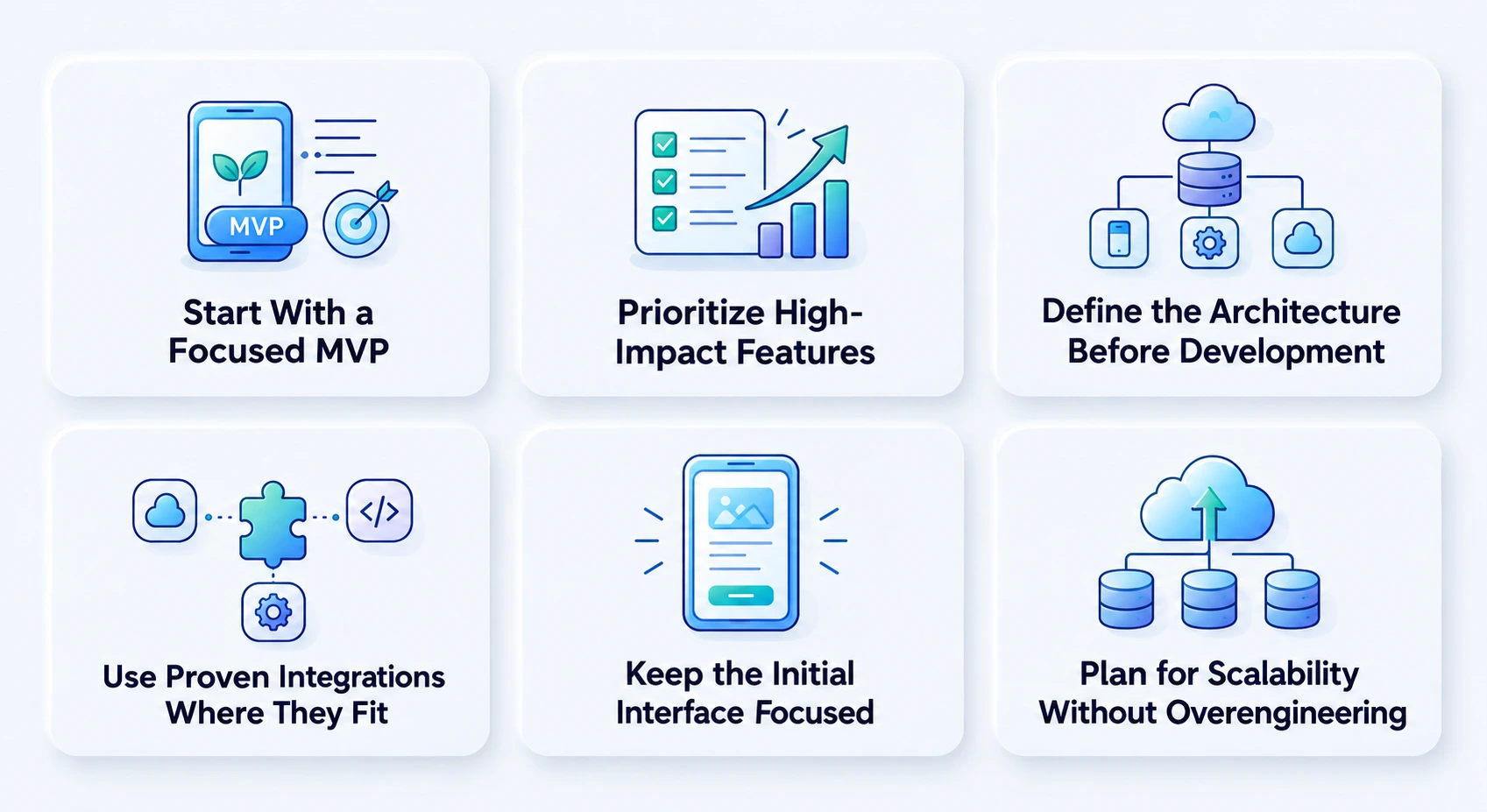
A focused approach to scope, features, technology, and development workflows can reduce costs while maintaining product quality and long-term scalability.
1. Start With a Focused MVP
Build the smallest version that proves the core business proposition instead of funding every planned feature in version one. Prioritize the workflows directly connected to the product’s primary outcome and move secondary functionality into later releases. This focused approach is often easier to manage with MVP development services, particularly when the goal is to validate the product before expanding its scope.
The trade-off is that users may not receive every planned capability at launch. However, delaying secondary functionality can prevent the initial budget from being consumed by features that may not improve acquisition, activation, retention, revenue, or operational efficiency.
2. Prioritize High-Impact Features
Rank features according to business value, user demand, technical effort, and dependency risk. Features that do not materially improve acquisition, activation, revenue, retention, or operational efficiency can be postponed.
The trade-off is that some desirable features will move to a later roadmap phase. This prevents the initial budget from being consumed by low-priority functionality.
For example, advanced analytics, secondary user roles, social features, or complex personalization can often follow the core workflow rather than launch with it. This keeps the first release focused on capabilities that directly influence the product’s primary business outcome.
3. Define the Architecture Before Development
A clear technical architecture reduces avoidable rework. Establish the data model, API strategy, authentication approach, integration requirements, device support, and scalability expectations before implementation begins.
The trade-off is that discovery and architecture require budget before users can see a working application. The benefit is reduced uncertainty during development and a stronger foundation for future releases.
4. Use Proven Integrations Where They Fit
Pre-built services can reduce the time required to implement common capabilities such as payments, analytics, notifications, authentication, maps, and communications.
The trade-off is dependency on an external provider, including its pricing, availability, API changes, and technical limitations. The integration should therefore be selected for long-term fit rather than lowest initial cost alone.
5. Keep the Initial Interface Focused
A strong interface does not require unnecessary visual complexity. Use clear navigation, consistent components, accessibility-aware patterns, and purposeful interactions before adding custom animations or elaborate transitions.
The trade-off is that the first release may have a simpler visual language than a fully branded experience. This can reduce design and implementation effort while leaving room for later refinement based on actual user behavior.
6. Plan for Scalability Without Overengineering
Build an architecture that can support the expected roadmap, but avoid paying for infrastructure designed for hypothetical scale.
The trade-off is that the product may require architectural expansion when usage grows. The objective is to establish sensible extension points without implementing expensive infrastructure before the business needs it. If the product requires highly tailored iOS engineering, our guide to custom iOS development provides additional context.
What an iOS Budget Actually Buys: RipenApps Project Examples
Cost bands become easier to understand when connected to real product complexity.
Al Muzaini
Al Muzaini is a Kuwait-based financial application associated with remittance and financial services. The verified project scope includes AI-enabled KYC, three-factor biometric authentication, Western Union integration, and foreign-exchange-rate functionality. Its Android app had 100K+ Google Play installs as of August 2026.
Those requirements illustrate why financial applications can move beyond a basic iOS build. Authentication, financial workflows, external service integrations, security requirements, and sensitive data handling create additional product and engineering work.
Hungama
Hungama operates a large-scale entertainment ecosystem spanning music and video content. Its verified Google Play listing has 50M+ installs and 553K reviews, while its App Store listing has a 4.0 rating.
A media product of this type demonstrates why streaming applications can require more than mobile UI development. Content delivery, media playback, recommendation capabilities, analytics, backend infrastructure, and large-scale content operations can significantly increase system complexity.
This type of product aligns with the complex / enterprise-grade end of the cost model when the scope includes substantial backend and streaming requirements.
Conclusion
iOS app development cost depends on more than the initial build. Complexity, features, AI, device support, integrations, security, development rates, and ongoing maintenance can all affect the final budget. A realistic estimate starts with a defined scope, a clear development approach, and an understanding of post-launch costs. For businesses evaluating mobile app development services USA, understanding these cost factors can help set a realistic budget and choose an approach that fits the product’s requirements and complexity.
At RipenApps, we help businesses turn their iOS product requirements into a practical development roadmap and budget based on scope, technical needs, and long-term goals. Use the cost calculator to create an initial estimate, then explore our iOS app development services and discuss your requirements with our team to determine the right approach for your product.
FAQs
Q1. How much does it cost to develop an iOS app in 2026?
iOS app development typically costs $25,000–$250,000+. Simple apps cost $25,000–$50,000, mid-level apps $50,000–$120,000, and complex or enterprise apps $120,000–$250,000+. Features, backend complexity, integrations, AI, security, device support, and team structure affect the final cost.
Q2. What factors affect iOS app development cost the most?
The main cost drivers are app complexity, feature depth, UI/UX, backend architecture, integrations, security, compliance, device support, AI capabilities, team structure, and location. Real-time systems, advanced AI, regulated workflows, and complex infrastructure typically require larger budgets.
Q3. How much does it cost to publish an iOS app?
Apple Developer Program membership costs $99 USD per membership year, with local-currency pricing where available. Additional costs include App Store preparation, testing, and potential review-related rework. App Store commission varies by applicable program and monetization model.
Q4. What does iOS app maintenance cost per year?
A practical planning allowance is 15–20% of the initial development cost per year. For a $100,000 app, this equals approximately $15,000–$20,000 annually and may cover OS updates, bug fixes, security patches, dependencies, compliance changes, and enhancements.
Q5. How long does it take to develop an iOS app?
A simple iOS app can take around 3–4 months, while complex applications may take 7–12+ months. The timeline depends on scope, workflows, backend requirements, integrations, design complexity, testing, team size, and release requirements.
Q6. Is native iOS development more expensive than cross-platform development?
Native iOS development can cost more initially than a shared cross-platform build, but the lower upfront cost does not always mean lower three-year TCO. Native is often preferable for Apple-specific capabilities, while cross-platform can work well when iOS and Android require substantial shared functionality.
Q7. How much does it cost to make an iPhone app?
The cost to make an iPhone app typically ranges from $25,000 to $250,000+. Simple apps generally cost $25,000–$50,000, mid-level apps $50,000–$120,000, and complex or enterprise-grade apps $120,000–$250,000+, depending on features, backend requirements, integrations, security, and device support.
Q8. How much does it cost to develop an iPad app?
Developing an iPad app can cost approximately $30,000–$150,000+, depending on the app’s complexity, UI requirements, backend integrations, device support, and whether the iPad experience is adapted from an existing iPhone app or designed specifically for iPad.
If an existing iPhone app is being extended to iPad, the incremental cost may be lower than building a separate iPad product because backend services and some business logic can be reused. However, iPad-specific layouts, navigation, multitasking, larger-screen interactions, and testing across supported devices can add development and QA effort.
Discuss your project and request for proposal
SHARE
WRITTEN BY

Prankur Haldiya
Chief Technical Officer
A tech innovator and engineering leader, Prankur Haldiya drives RipenApps’ product development strategy and oversees cutting-edge solutions in mobility, AI, and cloud ecosystems. He is passionate about building high-performance teams and helping brands launch secure, scalable, and user-centric digital products.
View All Articles