



Key Takeaways
- AI-native apps embed intelligence into every architectural layer, while traditional apps rely on predefined rules and workflows.
- The core AI-native stack includes inference, memory, orchestration, adaptive UX, and continuous model lifecycle management layers.
- On-device and hybrid inference enable faster responses, stronger privacy, lower latency, and better offline functionality.
- Organizations should build AI-native products when intelligence drives core value, not simply enhances existing features.
- Retrofitting AI onto traditional architectures often creates scalability, performance, and personalization challenges that limit long-term growth.
Artificial intelligence is no longer just a feature inside mobile apps. The most successful digital products are now being built with AI as the foundation of their architecture. An AI-native app is fundamentally different from a traditional mobile application because intelligence drives every layer of the product experience, from user interactions to decision-making and personalization.
According to Gartner, by the end of 2026, nearly 40% of enterprise applications will incorporate AI agents, compared with less than 5% in 2025. This rapid shift signals a new era in software development where businesses must decide whether to continue evolving traditional architectures or invest in AI-first foundations.
For organizations evaluating AI-native app development, the decision goes beyond technology trends. It impacts scalability, customer experience, operating costs, competitive differentiation, and long-term growth. As demand for advanced AI in mobile app development continues to rise, CTOs, product leaders, and development teams are increasingly prioritizing AI-powered product development strategies that combine intelligent experiences, scalable architectures, and long-term business value.
Table of Contents
What is an AI-Native App?
An AI-native app is a mobile application built from the ground up with artificial intelligence as its foundational architecture rather than as an added feature. Every layer, including user experience, business logic, data pipelines, and decision-making systems, is designed around AI inference, learning, adaptation, and personalization. Without AI, the application would lose its core functionality.
Organizations often confuse AI-enabled products with AI-native products. However, the distinction is significant from both technical and business perspectives. For product leaders and CTOs evaluating mobile app architecture guidelines, understanding this architectural difference is essential for building scalable, intelligent, and future-ready applications. For a broader understanding of how AI is transforming software products, an AI in mobile app development guide will be helpful.
Many organizations use the terms AI Native and AI-native interchangeably. In both cases, the application is designed with intelligence as the foundation rather than adding AI capabilities later.
What Is the Difference Between Traditional, AI-Enabled, and AI-Native Apps?
Most discussions create a binary comparison between AI and non-AI applications. In reality, modern software exists on a three-tier spectrum.
| Dimension | Traditional App | AI-Enabled App | AI-Native App |
| Core Logic | Rule-based | Rule-based + AI features | AI-driven |
| Architecture | Deterministic | Traditional with AI add-ons | Intelligence-first |
| User Experience | Static flows | Mostly static | Adaptive and contextual |
| AI Dependency | None | Optional | Essential |
| Personalization | Hardcoded rules | Limited AI personalization | Continuous learning |
| Data Strategy | Transactional data | Data + AI APIs | Data flywheel |
| Decision Making | Human-authored | Human + AI assistance | AI-led orchestration |
| Example | Booking app | CRM with lead scoring | ChatGPT Mobile |
The Four Pillars of AI-Native Applications
A mobile app becomes truly AI-native when it includes:
- AI-driven decision-making
- Continuous learning systems
- Context-aware personalization
- Adaptive user experiences
Remove AI from these applications and their primary value disappears.
The Printed Map vs. Google Maps vs. Self-Driving Navigation Analogy
A traditional app resembles a printed map. Every route is predetermined. An AI-enabled app resembles Google Maps. AI helps optimize predefined experiences.
An AI-native app resembles self-driving navigation. The system continuously interprets context, predicts intent, and executes actions with minimal user intervention.
Why AI-Powered Is Not the Same as AI-Native
Many products market themselves as AI-powered because they integrate a chatbot, recommendation engine, or generative AI feature. However, adding an AI layer does not fundamentally change architecture.
An AI-native mobile app is designed around intelligence from day one. The model is not a feature. It is the product. The distinction between AI native vs AI powered products comes down to architecture. AI-powered apps use AI as a feature, while AI-native apps rely on AI to deliver their core functionality and user experience.
What Defines Traditional Mobile App Architecture?
Before understanding AI-native architecture, it is important to examine the structure most mobile applications still use today.
Core Characteristics of Traditional Architecture
Traditional mobile applications typically follow a three-layer architecture that separates the application into distinct functional components. The Presentation Layer is responsible for the user interface and includes screens, navigation flows, and all elements that users interact with directly.
The Business Logic Layer manages the application’s core functionality by implementing business rules, workflows, and validation processes to ensure that operations are performed correctly.
The Data Layer handles data management by interacting with databases, APIs, and storage systems, enabling the application to store, retrieve, and process information efficiently. This layered architecture improves maintainability, scalability, and the overall organization of the application.
The entire architecture operates through deterministic logic. If a user performs Action X, the system produces Response Y.Outcomes remain predictable, repeatable, and easily testable. Development cycles focus primarily on code deployment rather than model optimization.
While focusing on AI-native architecture, many organizations also evaluate native vs cross-platform architecture when planning new mobile products. The choice impacts performance, AI model integration, device-level optimization, and long-term scalability, making architecture decisions even more important in AI-driven applications.
Traditional Architecture Shows Its Age
According to the World Economic Forum’s Future of Jobs report 2025, AI is expected to transform over 40% of working hours across industries, accelerating automation demands that traditional mobile architectures struggle to support.
As customer expectations evolve, traditional systems struggle to provide:
- Real-time personalization
- Context-aware experiences
- Predictive workflows
- Autonomous decision-making
Organizations often attempt to add AI capabilities later. This creates what many teams experience as the “bolt-on trap.”
Many organizations attempt AI feature integration within legacy systems, but without architectural modernization, these initiatives often result in fragmented experiences, performance bottlenecks, and increased technical debt.
AI services are often implemented as separate layers attached to traditional, rigid application architectures rather than being integrated into the core system. This approach can lead to several challenges, including higher latency due to additional communication between components and increased infrastructure complexity as more services and integrations need to be managed.
Gartner also predicts a significant decline in traditional app interactions by 2027 as AI assistants increasingly complete tasks on behalf of users rather than requiring direct navigation through applications.
What Does AI-Native App Architecture Look Like?
Unlike traditional software, AI-native architecture is built around intelligence as the operating system of the application.
Five foundational layers define modern AI-native mobile architecture.
1. The Inference Layer
The inference layer determines where AI processing occurs. The choice of inference location is closely tied to the application’s underlying cloud architecture, which directly influences latency, scalability, security, and operational costs.
Three primary deployment models are commonly used. In Cloud-Only Inference, all AI processing is performed on remote servers. This approach supports large and powerful AI models while reducing device hardware requirements, but it introduces challenges such as network dependency, higher latency, and potential privacy concerns.
Hybrid Inference intelligently distributes tasks between the device and the cloud, providing improved performance, reduced operational costs, and enhanced privacy by processing sensitive or lightweight tasks locally while delegating more complex computations to cloud servers.
On-Device Inference, a defining feature of many AI-native mobile applications, performs AI processing directly on the user’s device using dedicated AI hardware such as the Apple Neural Engine, Qualcomm AI Engine, and Google Tensor processors. Modern smartphones can efficiently run compact AI models locally through technologies such as Small Language Models (SLMs), quantized Large Language Models (LLMs), TensorFlow Lite, Core ML, and Apple Foundation Models.
This approach offers significant advantages, including response times of less than 100 milliseconds, offline functionality, and stronger privacy protection by keeping user data on the device.
2. The Memory and Context Layer
The Memory and Context Layer enables AI-native applications to store context rather than just transactions, allowing them to understand and remember user interactions over time. This supports features such as conversation continuity, user preference memory, personalized recommendations, and semantic search.
It commonly uses technologies like vector databases, embeddings, Retrieval-Augmented Generation (RAG), and local semantic indexes. Unlike traditional applications, where storage mainly records data, this layer treats memory as a strategic asset that enhances personalization and improves the overall user experience.
3. The Orchestration Layer
The Orchestration Layer enables AI-native applications to move beyond simple assistants toward intelligent agents that can plan actions, use tools, execute workflows, and self-correct errors. Rather than requiring users to manually navigate interfaces, AI agents can autonomously coordinate tasks and streamline complex processes, making applications more efficient and user-centric.
This shift creates substantial gains in efficiency and task completion rates. Understanding AI vs automation is critical here. Traditional automation follows predefined workflows, while AI-native systems can interpret context, make decisions, and adapt actions dynamically based on changing conditions.
4. The Adaptive UX Layer
The Adaptive UX Layer enables AI-native applications to provide dynamic, personalized user experiences instead of static interfaces. Rather than showing the same screens to every user, the interface adapts based on context, intent, behavior patterns, and historical interactions.
A key design principle is Inferred Intent, Confirmed Action (IICA), where the application predicts what users want to accomplish and suggests relevant actions that require only minimal confirmation. This approach significantly reduces user effort and creates a more seamless experience.
5. The Data and Model Lifecycle Layer
The Data and Model Lifecycle Layer manages the continuous improvement of AI models throughout their lifecycle. Unlike traditional applications that rely on CI/CD pipelines focused on code deployment, AI-native applications require MLOps, continuous evaluation, model monitoring, feedback loops, and drift detection to maintain model performance.
Popular platforms such as MLflow, SageMaker, Vertex AI, and Weights & Biases support these processes. As a result, the focus shifts from simply deploying software to continuously improving the application’s intelligence.
AI-Native Architecture Layers Summary
- Inference Layer
- Memory & Context Layer
- Orchestration Layer
- Adaptive UX Layer
- Data & Model Lifecycle Layer
Together, these layers create the foundation of modern AI-native app architecture.
How Does AI-Native Architecture Compare to Traditional Mobile Architecture?
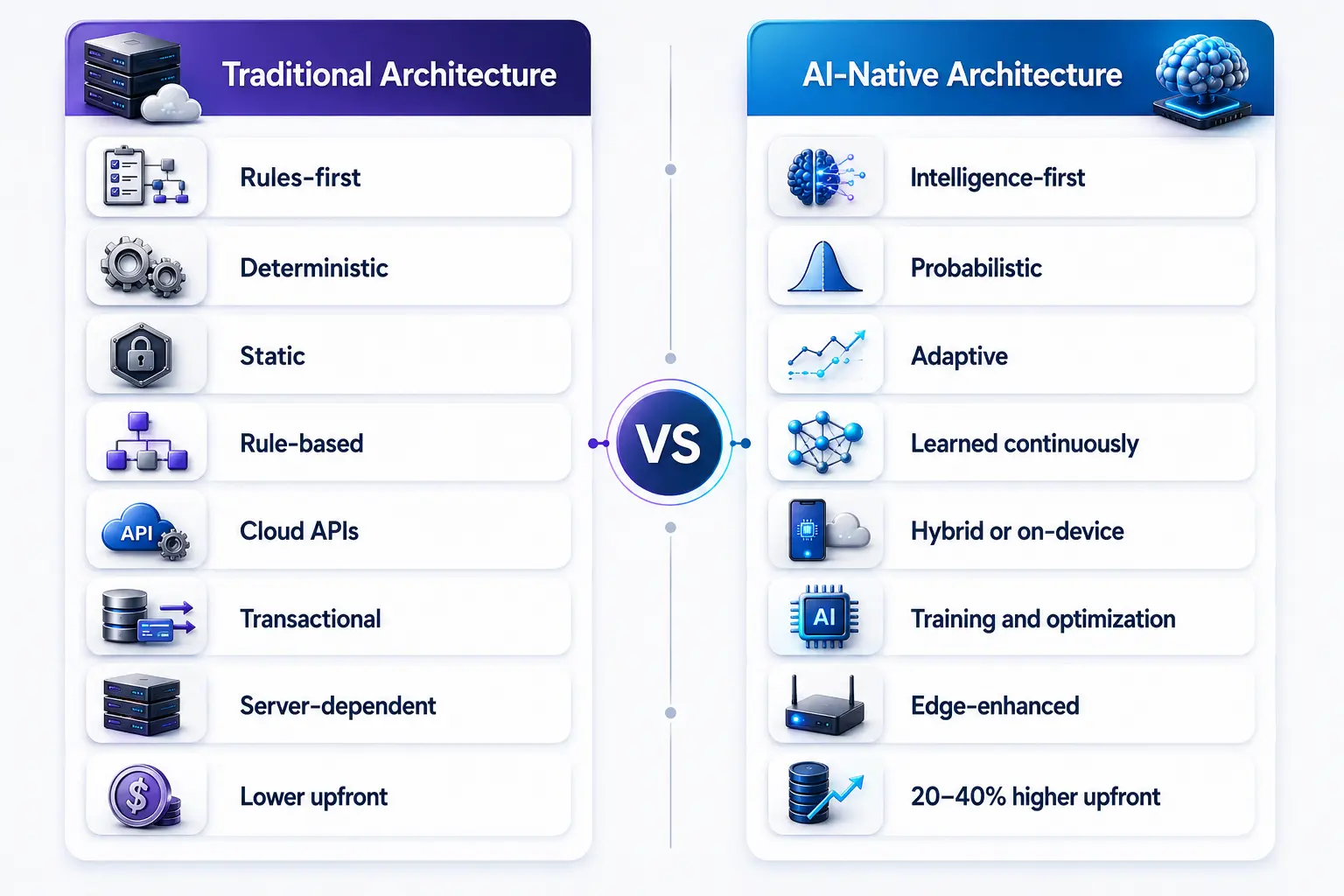
The differences extend far beyond technology choices.
Design Philosophy
Traditional Architecture: Built around predefined rules, workflows, and business logic where every action follows a predictable path.
AI-Native Architecture: Built around intelligence-first systems that continuously learn, adapt, and optimize experiences based on user behavior and contextual data.
Decision Making
Traditional Architecture: Uses deterministic logic where the same input consistently produces the same output based on fixed rules.
AI-Native Architecture: Uses probabilistic decision-making, allowing the system to evaluate context, predict outcomes, and adapt responses dynamically.
User Experience (UX)
Traditional Architecture: Delivers static interfaces and predefined user journeys that remain largely unchanged for all users.
AI-Native Architecture: Provides adaptive experiences that evolve in real time based on user intent, preferences, behavior, and contextual signals.
Personalization
Traditional Architecture: Relies on manually configured rules, user segments, and predefined conditions for personalization.
AI-Native Architecture: Continuously learns from interactions and behavioral patterns to deliver increasingly personalized and relevant experiences.
Inference
Traditional Architecture: Primarily depends on cloud APIs and centralized processing for application functionality and decision-making.
AI-Native Architecture: Leverages hybrid or on-device inference to deliver faster responses, enhanced privacy, reduced latency, and offline capabilities.
Data Strategy
Traditional Architecture: Treats data primarily as transactional information used for reporting, storage, and operational processes.
AI-Native Architecture: Uses data as a continuous learning asset that fuels model training, optimization, feedback loops, and intelligent decision-making.
Scalability
Traditional Architecture: Scaling is largely dependent on backend servers, cloud infrastructure, and increasing computing resources.
AI-Native Architecture: Utilizes edge-enhanced scalability through distributed intelligence, on-device processing, and optimized resource utilization.
Development Cost
Traditional Architecture: Typically requires lower upfront investment due to simpler infrastructure, development processes, and tooling requirements.
AI-Native Architecture: Requires approximately 20–40% higher initial investment because of AI infrastructure, model development, MLOps, and specialized expertise, but often delivers stronger long-term returns.
Here is a comparison table:
| Category | Traditional Architecture | AI-Native Architecture |
| Design Philosophy | Rules-first | Intelligence-first |
| Decision Making | Deterministic | Probabilistic |
| UX | Static | Adaptive |
| Personalization | Rule-based | Learned continuously |
| Inference | Cloud APIs | Hybrid or on-device |
| Data Strategy | Transactional | Training and optimization |
| Scalability | Server-dependent | Edge-enhanced |
| Development Cost | Lower upfront | 20–40% higher upfront |
McKinsey estimates that generative AI could deliver $2.6 trillion to $4.4 trillion in annual economic value, reinforcing the business case for AI-native architecture over traditional systems.
What Is the Retrofit Trap and Why Is It a Common AI Development Mistake?
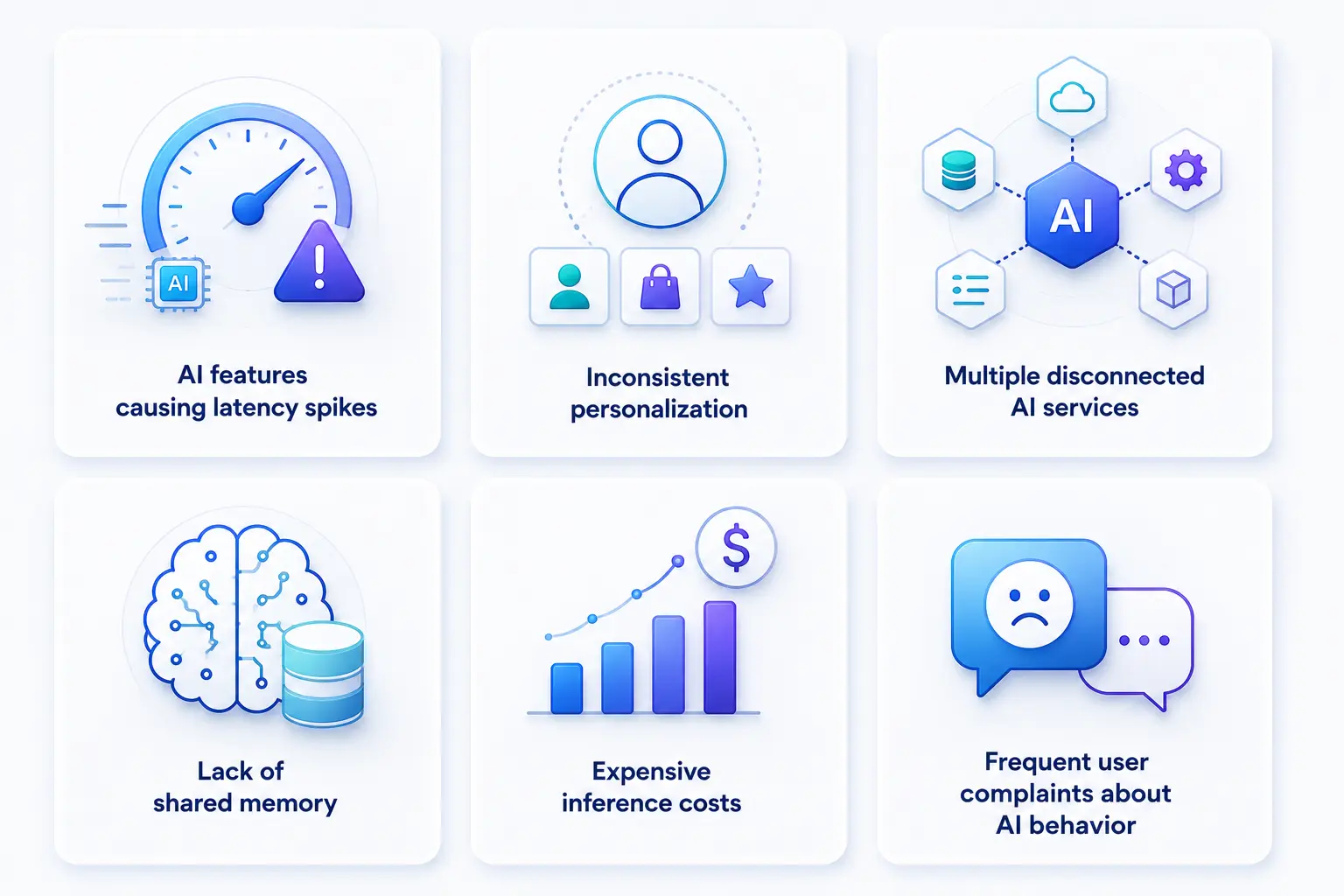
One of the biggest mistakes organizations make is assuming AI can simply be attached to existing systems.
Signs Your App Has Fallen Into the Retrofit Trap
Here are the common AI integration mistakes where organizations prioritize adding AI features quickly without addressing underlying architectural limitations.:
- AI features causing latency spikes
- Inconsistent personalization
- Multiple disconnected AI services
- Lack of shared memory
- Expensive inference costs
- Frequent user complaints about AI behavior
Architecture Is Usually the Real Problem
Many executives assume model quality is responsible when AI experiences underperform.
In reality, architecture is often the bottleneck.
Imagine installing solar panels on a century-old roof.
The technology is modern.
The foundation is not.
Similarly, AI models running through outdated service layers inherit all existing inefficiencies.
Without architectural modernization, AI rarely achieves its full value.
When Should You Build AI-Native vs Retrofit an Existing App?
The right approach depends on your business goals, existing technology infrastructure, scalability requirements, and how deeply AI capabilities need to be embedded into the user experience and core workflows.
Organizations evaluating a native AI app builder approach should determine whether AI is central to the product’s value proposition or simply an enhancement to existing workflows. For example, products that rely heavily on conversational interactions may benefit from custom AI chatbot development, while existing apps may only need targeted AI features added to specific workflows.
Build AI-Native If
Choose an AI-native approach when:
- AI is the core value proposition
- Competitive advantage depends on proprietary intelligence
- Personalization is mission-critical
- Latency requirements are strict
- Privacy regulations are demanding
- You are building a greenfield product
- Continuous learning drives product value
AI native development is particularly valuable when personalization, automation, and intelligent decision-making directly influence business outcomes.
Examples include:
- AI copilots
- Intelligent healthcare tools
- AI financial advisors
- Autonomous productivity platforms
Retrofit an Existing App If
An AI-enabled strategy may be better when:
- Existing user adoption is strong
- AI enhances only one workflow
- Budget constraints exist
- Market validation is still needed
- Full rebuild risk is high
Examples include:
- CRM lead scoring
- Customer support automation
- Recommendation engines
- Search enhancements
The Incremental Migration Path
Successfully transitioning to AI-native architecture often requires an experienced AI native developer team capable of designing inference, orchestration, memory, and model lifecycle layers from the ground up. Most successful organizations do not jump directly to AI-native architecture.
They evolve through stages.
- Phase 1: AI-Assisted Development: Tools such as GitHub Copilot and Cursor improve developer productivity.
- Phase 2: AI-Enabled Features: Introduce targeted AI capabilities in high-value workflows.
- Phase 3: Architectural Refactoring Gradually rebuild: Perception layer, Memory layer, Orchestration layer
- Phase 4: Core Systems: Transition critical product workflows to intelligence-first architecture.
While AI-native development often costs 20–40% more initially, lower maintenance costs and faster iteration cycles frequently reduce total ownership costs over time.
What are Real Examples of AI-Native Mobile Apps?
Understanding real-world products makes architectural differences easier to visualize. The strongest AI-native applications share one common characteristic: AI is the product’s core operating system rather than an added feature. If the intelligence layer disappears, the user value proposition largely disappears with it.
ChatGPT Mobile: AI-Powered Conversational Intelligence
Without AI, the application becomes an empty interface. Every interaction, response, recommendation, and workflow depends on large language model inference. The model is the product.
Google Maps: AI-Driven Navigation and Predictive Routing
Real-time traffic prediction, route optimization, ETA calculations, and contextual recommendations rely on continuous AI inference. The experience evolves dynamically based on changing conditions and user behavior.
EmmyWellness: AI-Driven Wellness and Health Management
EmmyWellness was developed to simplify and enhance personal wellness management through intelligent health tracking and personalized experiences. As AI capabilities become increasingly embedded into wellness ecosystems, platforms like EmmyWellness demonstrate how contextual insights, behavioral data, and personalized recommendations can create more adaptive user experiences rather than relying solely on static workflows.
Mind Alcove: AI-Powered Mental Wellness and Mood Tracking
Mind Alcove is a digital journaling and mood-tracking platform designed to help users better understand and manage emotional well-being. The application showcases how AI-native principles such as context awareness, behavioral analysis, personalization, and predictive insights can transform mental wellness products from passive tracking tools into intelligent support systems that evolve with user behavior.

What Separates These Apps From AI-Enabled Products?
The simplest test is this: remove the AI model and evaluate whether the product can still deliver meaningful value.
In AI-enabled apps, functionality remains available but becomes less efficient. In AI-native apps, the product’s primary value disappears because intelligence powers every critical workflow. This creates a powerful flywheel where more usage generates more data, better models, stronger personalization, and increasingly differentiated user experiences. That flywheel is one of the defining advantages of AI-native architecture.
What Challenges do AI-Native Apps Face?
AI-native architecture creates substantial advantages, but it introduces new challenges as well.
Model Performance Constraints
Running AI models locally on mobile devices requires significant optimization to balance performance, speed, and resource usage. Common optimization techniques include quantization, which reduces model size and computational requirements, distillation, which transfers knowledge from larger models to smaller ones, and the use of platform-specific accelerators to improve inference efficiency on modern hardware.
Explainability Challenges
AI systems can produce unpredictable or difficult-to-understand outputs, which may reduce user trust. The Inferred Intent, Confirmed Action (IICA) pattern addresses this challenge by pairing AI-generated predictions with explicit user confirmation, ensuring that users remain informed and in control of important actions.
Privacy and Compliance Risks
AI applications often process sensitive personal and organizational data, making privacy and regulatory compliance critical concerns. To minimize data exposure, organizations increasingly adopt on-device inference, federated learning, and Edge AI architectures, which enable data processing closer to the user while reducing reliance on centralized servers.
Testing Probabilistic Systems
Traditional quality assurance (QA) methods are not sufficient for AI-native applications because AI models produce probabilistic rather than deterministic outputs. As a result, development teams implement evaluation frameworks, continuous monitoring, behavioral testing, and model performance tracking to ensure consistent accuracy, reliability, and user experience over time.
Higher Upfront Investment
Developing AI-native applications requires greater initial investment than traditional software development. Organizations must invest in specialized AI talent, MLOps infrastructure, and model engineering expertise. Many successful companies reduce risk by starting with focused Minimum Viable Products (MVPs) before expanding AI capabilities.
Talent Availability
Experienced AI-native development professionals remain in limited supply, creating challenges for organizations adopting AI at scale. To accelerate implementation, many enterprises partner with specialized AI development firms that provide expertise in AI architecture, model strategy, integration, and deployment.
Final Thoughts
The future of mobile software will not be defined by whether applications use AI. It will be defined by whether intelligence is embedded into the architecture itself. Traditional systems were built around rules, workflows, and predictable paths. AI-native systems are built around learning, adaptation, context, and outcomes. As organizations pursue digital transformation initiatives, the gap between AI-enabled and AI-native products will become one of the most important competitive differentiators in the market.
For companies evaluating their next product strategy, architecture decisions made today will shape scalability, innovation velocity, customer experience, and long-term ROI for years to come. If you’re assessing a mobile app architecture, planning an AI app development approach, or exploring advanced AI integration solutions, the experts at RipenApps can help you design, validate, and build future-ready AI-powered products. To better understand the growing role of AI in mobile app development, explore our complete guide and discover how intelligent technologies are transforming every stage of modern app creation.

Frequently Asked Questions
1. What is the difference between AI-native and AI-enabled apps?
AI-enabled apps add AI features to an existing product architecture. AI-native apps are architecturally built around intelligence from the start. AI-enabled systems use AI to enhance experiences, while AI-native systems rely on AI to define and deliver the core product value.
2. Can a traditional app be converted into an AI-native app?
Yes, but it requires significant architectural transformation. Successful modernization typically involves rebuilding core systems around machine learning, memory layers, orchestration frameworks, and intelligent workflows rather than simply adding AI features to existing codebases.
3. How much does AI-native app development cost compared to traditional development?
AI-native app development generally costs 20–40% more upfront due to AI infrastructure, MLOps requirements, and specialized expertise. However, improved automation, lower maintenance overhead, and stronger user engagement often reduce total cost of ownership over three to five years.
4. What is on-device AI inference?
On-device AI inference refers to machine learning computations performed locally on a smartphone’s Neural Processing Unit (NPU) rather than in the cloud. This enables faster response times, offline functionality, lower latency, and enhanced privacy.
5. What technology stack does an AI-native mobile app use?
Modern AI-native mobile applications typically combine on-device SLMs or LLMs, vector databases for memory, RAG architectures, agent orchestration frameworks, AI acceleration hardware, Core ML or TensorFlow Lite, and model-centric CI/CD pipelines for continuous optimization.
6. How does AI transform product development?
AI transforms product development by enabling faster decision-making, intelligent automation, continuous personalization, and data-driven innovation. Unlike traditional development approaches that rely on predefined workflows, AI-native systems can learn from user behavior, adapt experiences in real time, and continuously improve product performance. This allows businesses to accelerate innovation while delivering more relevant and scalable customer experiences.
7. Why is an AI strategy for digital products important?
An effective AI strategy for digital products helps organizations align technology investments with business goals, customer needs, and long-term growth plans. For CTOs and product leaders, understanding the difference between AI-enabled and AI-native architectures is critical for building scalable products that can support personalization, automation, and continuous learning as AI adoption continues to grow.
Discuss your project and request for proposal
SHARE
WRITTEN BY

Ishan Gupta
CEO & Founder
Ishan Gupta is a seasoned entrepreneur and CEO with extensive 10+ years of experience in business and mobile app development landscape. He believes that the right digital product allows companies to focus on what they do best, while technology handles the rest. With deep exposure to global markets, he understands what makes an app succeed. His approach translates business needs into clear product strategies, ensuring that every feature contributes to measurable ROI.
View All Articles