




Quick Summary
Mobile app architecture defines how an application’s components work together. This guide covers the three architectural layers, key design principles, and patterns such as MVC, MVVM, and Clean Architecture. It also explores platform-specific approaches, backend options, and best practices to help businesses build scalable, secure, and maintainable mobile applications.
Mobile app architecture is the structural design that determines how an application’s components communicate, process information, and manage data. It defines the separation between the user interface, business logic, and data operations, influencing performance, maintainability, security, and scalability. Choosing the right architecture helps businesses control technical complexity as their products evolve.
The decision affects more than engineering. It influences development timelines, the cost of introducing features, integration requirements, and the effort needed to support a growing user base. Businesses planning a new product or modernizing an existing one should evaluate these trade-offs before development begins.
Working with a mobile app development company can help decision-makers align architectural choices with product goals, delivery constraints, and long-term ownership costs.
Table of Contents
What Is Mobile App Architecture?
Think of mobile app architecture as the blueprint connecting an app’s screens, business rules, data sources, and backend services. For example, when a user makes a payment, the UI collects the request, business rules validate it, and the data layer communicates with the relevant services. Clear boundaries help each component evolve without unnecessary changes elsewhere.
Mobile app architecture covers two key areas:
- Application structure: How presentation, domain, and data responsibilities are organized.
- System structure: How the app connects to APIs, databases, authentication services, and cloud infrastructure.
The right structure depends on product complexity, platform requirements, team capabilities, and expected growth. The goal is to support reliable delivery today while keeping future changes manageable and cost-effective.
Mobile App Architecture vs. Tech Stack
Mobile app architecture and a technology stack are related, but they answer different questions.
| Aspect | Mobile App Architecture | Technology Stack |
| Primary concern | How components are organized and interact | Which technologies implement the application |
| Includes | Layers, modules, responsibilities, communication patterns | Programming languages, frameworks, databases, cloud services |
| Examples | MVVM, Clean Architecture, modular monolith | Kotlin, Swift, Flutter, React Native, PostgreSQL |
| Business impact | Maintainability, change costs, scalability | Compatibility, development capabilities, operational requirements |
A product can use the same technology stack with different architectural approaches. For instance, two applications built with Kotlin and Jetpack Compose may differ significantly in how they manage state, organize business rules, and access data.
Selecting suitable technologies is important, but the architecture determines how effectively those technologies work together.
Why Mobile App Architecture Matters?
Architecture influences the cost and operational reliability of a mobile product throughout its lifecycle. Its value becomes particularly apparent as features, integrations, users, and business requirements increase.
- Development costs and delivery speed: Clear component boundaries reduce the amount of unrelated code that must change when introducing a feature. Teams can work on defined areas with fewer dependencies, helping them deliver improvements more predictably.
- Maintenance and technical debt: Poorly separated responsibilities create tightly coupled components. Even minor changes can then require extensive modifications and regression testing. A suitable architecture reduces these dependencies and makes future maintenance more manageable.
- Scalability and product growth: Growing applications often need additional integrations, new user journeys, more complex business rules, and support for different markets. Modular components and well-defined interfaces make these changes easier to accommodate.
- Quality and reliability: Testable business rules, predictable state management, and controlled data access make defects easier to identify. This is especially important for applications handling transactions, sensitive information, or time-critical operations.
- Security and compliance: Architecture determines where authentication, authorization, data validation, and sensitive information handling occur. Clear boundaries help teams apply security controls consistently rather than distributing them unpredictably throughout the codebase.
The benefits depend on implementation quality and ongoing governance. However, making deliberate structural decisions early can reduce expensive redesigns as the product grows.
The Three Layers of Mobile App Architecture
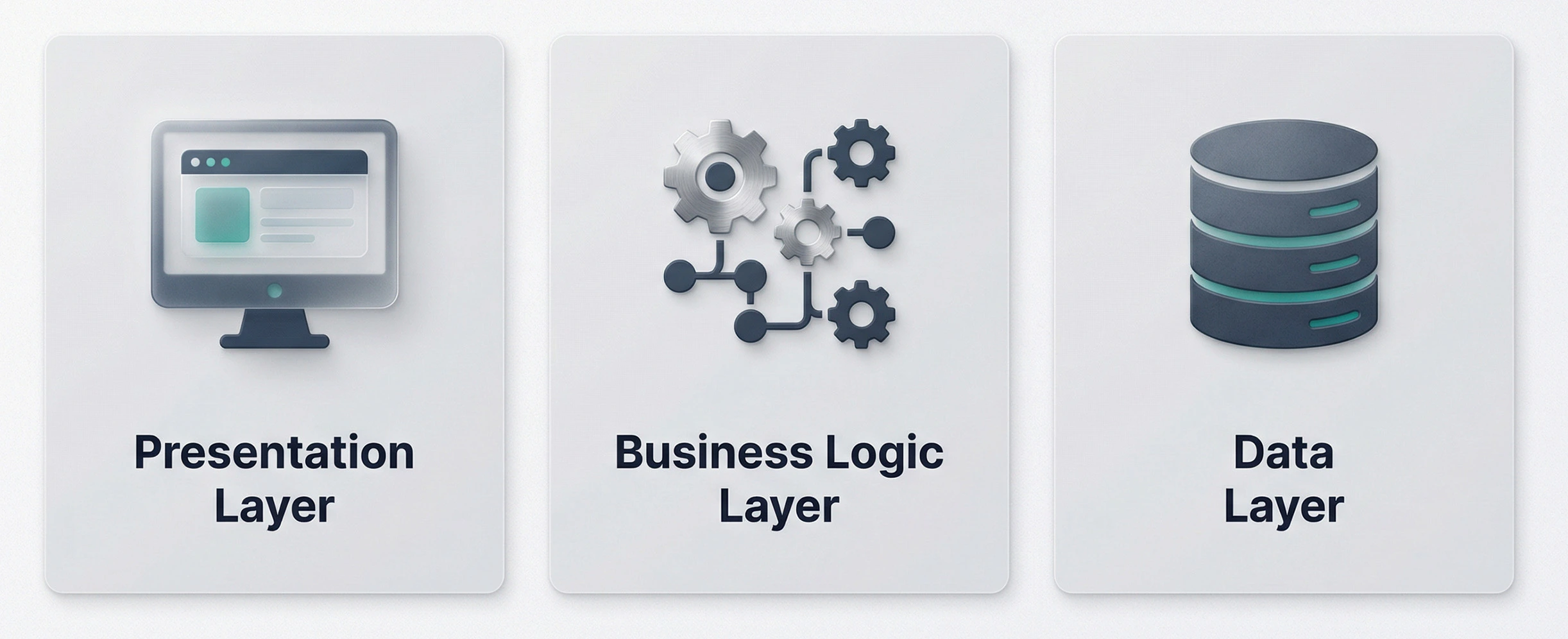
A common way to organize mobile applications is through three layers: presentation, business logic, and data. Each layer has a distinct responsibility, with communication between them controlled through defined interfaces.
Presentation Layer
The presentation layer manages the user interface, including screens, navigation, input handling, and application state.
For example, in a food delivery app, it displays restaurants, menus, cart contents, and order progress. It should focus on presenting information rather than handling complex business rules or directly managing data sources. Separating presentation from business logic makes screens easier to update and test without affecting underlying operations.
Business Logic (Domain) Layer
The business logic layer contains the rules, validations, domain models, and use cases that define how an application operates. For example, a digital wallet uses this layer to validate transfer limits, check eligibility, and enforce transaction rules.
Keeping business logic independent of the UI and database makes it easier to test and reuse. A separate domain layer is particularly useful for applications with complex workflows or frequently changing business rules.
Data Layer
The data layer manages information from APIs, databases, local storage, and other sources. It typically includes repositories, network clients, and data models. For example, a travel app may use this layer to retrieve destination details, store itineraries locally, and synchronize bookings with its backend.
Repositories provide a consistent way to access data while managing caching, synchronization, and errors. This separation also supports offline functionality when required. The three-layer model is flexible. Larger applications may divide responsibilities into additional modules, while simpler apps can combine layers when appropriate.
Key Principles of Mobile App Architecture
A strong architecture follows principles that make the product easier to change, test, operate, and secure.
Separation of Concerns
Each component should have a clearly defined responsibility. UI components should handle presentation, business logic should enforce product rules, and data components should manage information access. This reduces the risk that changes in one area will cause unexpected effects elsewhere.
Modularity
Organize the application into cohesive components with explicit interfaces. Modules might represent authentication, payments, user profiles, or order management.
Modularity helps teams work on different features independently and limits the impact of changes. However, excessive fragmentation can increase coordination and integration overhead.
Testability
Business-critical rules should be testable without requiring every test to launch the full application or depend on live external services.
Unit tests, integration tests, and end-to-end tests serve different purposes. A balanced testing strategy helps identify defects early while keeping the testing process proportionate to the product’s risk.
Offline-First and Network Resilience
Applications that users depend on while traveling, working in the field, or operating in areas with unreliable connectivity may need local data storage and synchronization.
An offline-capable architecture should define which actions are available without connectivity, how conflicting changes are resolved, and when data is synchronized. Not every application needs full offline support, so requirements should determine the investment.
Security by Design
Security should be considered when defining data flows, authentication, permissions, storage, and API communication. Sensitive information should not be exposed through logs or stored unnecessarily on the device.
Architecture should support secure defaults, controlled access, appropriate encryption, and server-side enforcement of critical business rules. Client-side validation improves usability but cannot replace backend authorization.
Scalability and Flexibility
Applications should accommodate foreseeable growth without requiring a complete redesign. Well-defined interfaces, manageable dependencies, and appropriate state management make it easier to introduce capabilities over time.
Scalability also involves operational decisions, including backend capacity, monitoring, caching, and deployment. Mobile architecture and backend architecture must work together to support product growth.
Mobile App Architecture Patterns
Architecture patterns provide established ways to organize components and manage communication. The right choice depends on application complexity, testing needs, team experience, and the cost of maintaining the structure.
MVC (Model-View-Controller)
MVC separates an application into Model, View, and Controller components. The Model represents data and application rules, the View displays information, and the Controller handles user input and coordinates actions.
MVC can be practical for relatively small applications or straightforward screens where the responsibilities remain easy to manage. However, controllers can become overloaded as features and business rules accumulate. Without clear boundaries, the pattern may lead to tightly coupled UI and business logic.
MVP (Model-View-Presenter)
MVP separates the View from the Presenter, which coordinates presentation behavior and interacts with the Model. The View delegates user actions to the Presenter, while the Presenter prepares the information the View needs to display.
This separation can improve testability, particularly when the Presenter can be tested without rendering the actual interface. MVP may suit applications with established presentation logic or teams familiar with the pattern. Its main trade-off is additional code and the need to manage communication between the View and Presenter carefully.
MVVM (Model-View-ViewModel)
MVVM separates the View, ViewModel, and Model. The ViewModel exposes UI state and presentation-related behavior, allowing the View to react to changes without containing all the underlying logic.
MVVM is widely used in modern mobile development, including Android applications built with Jetpack Compose and iOS applications using SwiftUI. It supports clearer UI-state management and testable presentation logic.
However, ViewModels can become difficult to maintain when they absorb unrelated business responsibilities. Complex products may benefit from separating domain rules into use cases or other dedicated components.
In our projects, we consider MVVM a practical starting point for many mobile applications. When business rules become more complex, we separate them into dedicated use cases rather than allowing ViewModels to accumulate unrelated responsibilities.
MVI (Model-View-Intent) and Unidirectional Data Flow
MVI organizes interactions around user intents, state changes, and the resulting UI updates. In a unidirectional data flow approach, actions move through a defined path, and the interface renders the resulting state.
This can make state transitions easier to understand in applications with complex interactions, frequent updates, or asynchronous operations. A predictable flow also helps teams investigate unexpected UI behavior.
The trade-off is additional structure and potentially more boilerplate. Teams should define clear conventions for state ownership, side effects, and error handling to prevent the implementation from becoming unnecessarily complicated.
VIPER (View, Interactor, Presenter, Entity, Router)
VIPER separates an application into five components: View, Interactor, Presenter, Entity, and Router. Each component has a focused responsibility, covering presentation, business operations, data representation, and navigation.
The pattern can support large iOS applications where independent modules and explicit boundaries are valuable. It also encourages isolated testing and makes responsibilities easier to identify.
Its main disadvantage is structural overhead. Small features may require multiple files and additional coordination, slowing development without providing equivalent business value. VIPER is most appropriate when the product’s complexity justifies that level of separation.
We evaluate VIPER against the product’s actual modularity and testing needs before adopting it. For smaller applications, a simpler architecture can offer clearer responsibilities without introducing unnecessary files and coordination overhead.
Clean Architecture
Clean Architecture organizes an application around business rules, keeping them independent of UI frameworks, databases, and networking libraries.
It separates domain logic, application use cases, presentation, and infrastructure, allowing external technologies to change without significantly affecting core business rules.
This approach suits applications with complex workflows, multiple integrations, or long-term maintenance needs. However, simpler apps may not need this additional structure, as it can increase development time and complexity.
Mobile App Architecture Patterns Compared
| Pattern | Complexity | Testability | Best Fit | Common Platform |
| MVC | Low to medium | Moderate | Simple applications and screens | iOS, Android |
| MVP | Medium | Good | Applications needing separated presentation logic | Android, iOS |
| MVVM | Medium | Good | Modern UI-driven applications | Android, iOS, cross-platform implementations |
| MVI | Medium to high | Good | Applications with complex UI state and frequent updates | Android, cross-platform implementations |
| VIPER | High | High when well structured | Large, modular iOS applications | iOS |
| Clean Architecture | Medium to high | High when dependencies are well isolated | Complex products with long-term maintenance needs | Android, iOS, cross-platform |
Implementation quality, team experience, and the application’s specific requirements affect the actual complexity and testability of each pattern.
For many business applications, MVVM provides a practical starting point. Products with extensive business rules may benefit from combining MVVM with Clean Architecture principles, while state-heavy interfaces may need a more explicit unidirectional data flow.
Mobile App Architecture by Platform
The architecture should reflect the development platform, its UI framework, the product’s requirements, and the capabilities of the team maintaining it. Common principles such as separation of concerns apply across platforms, but implementation choices differ.
Android App Architecture
Android applications commonly separate responsibilities into a UI layer and data layer, with an optional domain layer for complex or reusable business logic. Google’s Guide to App Architecture recommends clear layer boundaries, repositories for data access, and unidirectional data flow. Jetpack Compose supports declarative UI development, while ViewModel helps manage UI-related state.
Simple apps may need only UI and data layers, while complex products can introduce a domain layer for business operations. Architecture should also address navigation, background tasks, offline storage, lifecycle management, and data security, especially for apps involving payments, location tracking, or multiple user roles. For a deeper platform-specific discussion, see Android Clean Architecture best practices.
iOS App Architecture
iOS applications typically use SwiftUI or UIKit for the presentation layer, with architecture patterns that organize state, navigation, and business logic. MVVM is common in SwiftUI applications, while larger products may benefit from dedicated use cases, repositories, and dependency boundaries.
The Composable Architecture (TCA) provides a structured approach to state management and side effects, while VIPER separates presentation, business logic, and navigation. The right approach depends on the application’s complexity, integration requirements, and testing needs.
Cross-Platform Architecture: Flutter and React Native
Cross-platform architecture enables businesses to share code across platforms while maintaining performance and user experience. The design must balance code reuse with platform-specific requirements and long-term maintainability.
Flutter applications commonly use BLoC for event-driven state management or Riverpod for reactive state handling and dependency management.
Explore Flutter BLoC architecture for more details. React Native uses component-based UI development, with modern architecture technologies such as JSI, TurboModules, and Fabric improving communication between JavaScript and native components.
Both frameworks may require native implementations for permissions, notifications, navigation, and performance-sensitive features. Businesses should evaluate technical requirements, team expertise, and maintenance needs before choosing an approach. The React Native vs. Flutter comparison explains the key trade-offs.
Native vs. Hybrid vs. Cross-Platform Architecture
These approaches differ in how much code is shared and how the application interacts with device capabilities.
| Approach | Structure | Main Advantage | Main Consideration |
| Native | Separate platform-specific applications | Direct access to platform capabilities and native APIs | Separate codebases may increase development and maintenance costs |
| Cross-platform | Shared application logic with framework-specific rendering or platform integration | Greater code reuse across platforms | Platform-specific work may still be required |
| Hybrid | Web technologies delivered within a native container or related hybrid model | Reuse of web development skills and assets | Complex interactions may require careful performance and integration management |
Businesses should evaluate user experience, device integration, team expertise, and the cost of maintaining releases. Read the hybrid app development guide for a more detailed comparison of hybrid and native approaches.
For products that need shared business logic across mobile platforms, cross-platform app development services may be worth evaluating alongside native development.
Backend Architecture for Mobile Apps
A mobile application depends on backend services for functions such as authentication, data synchronization, payments, notifications, and business operations. The backend architecture should match the product’s current scale and expected growth without introducing unnecessary operational complexity.
Monolith and Modular Monolith
A monolithic backend combines application functions into a single deployable system, making development, testing, and deployment simpler for products with manageable complexity. A modular monolith maintains this unified deployment model while separating business functions, such as accounts, orders, and payments, into distinct modules.
This approach helps startups and growing businesses control infrastructure costs while maintaining clear code boundaries. A monolith can still scale effectively; its suitability depends on system coupling, workload demands, deployment needs, and maintainability.
Microservices
Microservices divide backend capabilities into independently deployable services that communicate through defined interfaces. A large product might separate identity, payments, orders, and notifications into individual services when those capabilities have sufficiently different scaling or operational needs.
Independent deployment and scaling can help larger organizations manage complex systems. However, microservices also introduce distributed-system challenges, including network failures, service coordination, observability, data consistency, and infrastructure costs.
They are generally worth considering when organizational or technical needs justify that additional complexity, not simply because a product expects more users. For a decision-focused overview, explore microservices in mobile app development.
Serverless and Backend as a Service (BaaS)
Serverless computing lets businesses run backend functions without managing servers, making it suitable for event-driven tasks, APIs, and workloads with variable demand. Backend as a Service (BaaS) provides managed capabilities such as authentication, databases, storage, and notifications, helping teams launch products faster.
Both approaches reduce infrastructure management but introduce dependencies on provider pricing, service limits, security, and data residency. Businesses should assess integration needs, expected workloads, and migration options to understand long-term costs.
Factors That Shape Your Architecture
The right architecture depends on more than the application’s feature list. The following factors influence the design decisions that matter most.
- Offline Requirements and Network Handling: Define local storage, background synchronization, and conflict resolution needs for reliable operation during connectivity disruptions.
- State Management: Choose an approach that keeps application data consistent and makes state transitions predictable across user workflows.
- Security and Compliance: Plan authentication, encryption, secure storage, and regulatory controls around the sensitivity of data and industry requirements. See Android app security best practices for platform-specific guidance.
- Performance and Responsiveness: Set measurable targets for startup time, rendering, memory use, and network activity, then validate them through profiling.
- Peak Load and Growth: Assess expected traffic spikes and plan backend capacity, caching, and rate limiting to support growth efficiently.
- Integrations and Third-Party Dependencies: Evaluate external services for reliability, security, pricing, compatibility, and fallback options to reduce operational risks.
How to Choose the Right Mobile App Architecture?
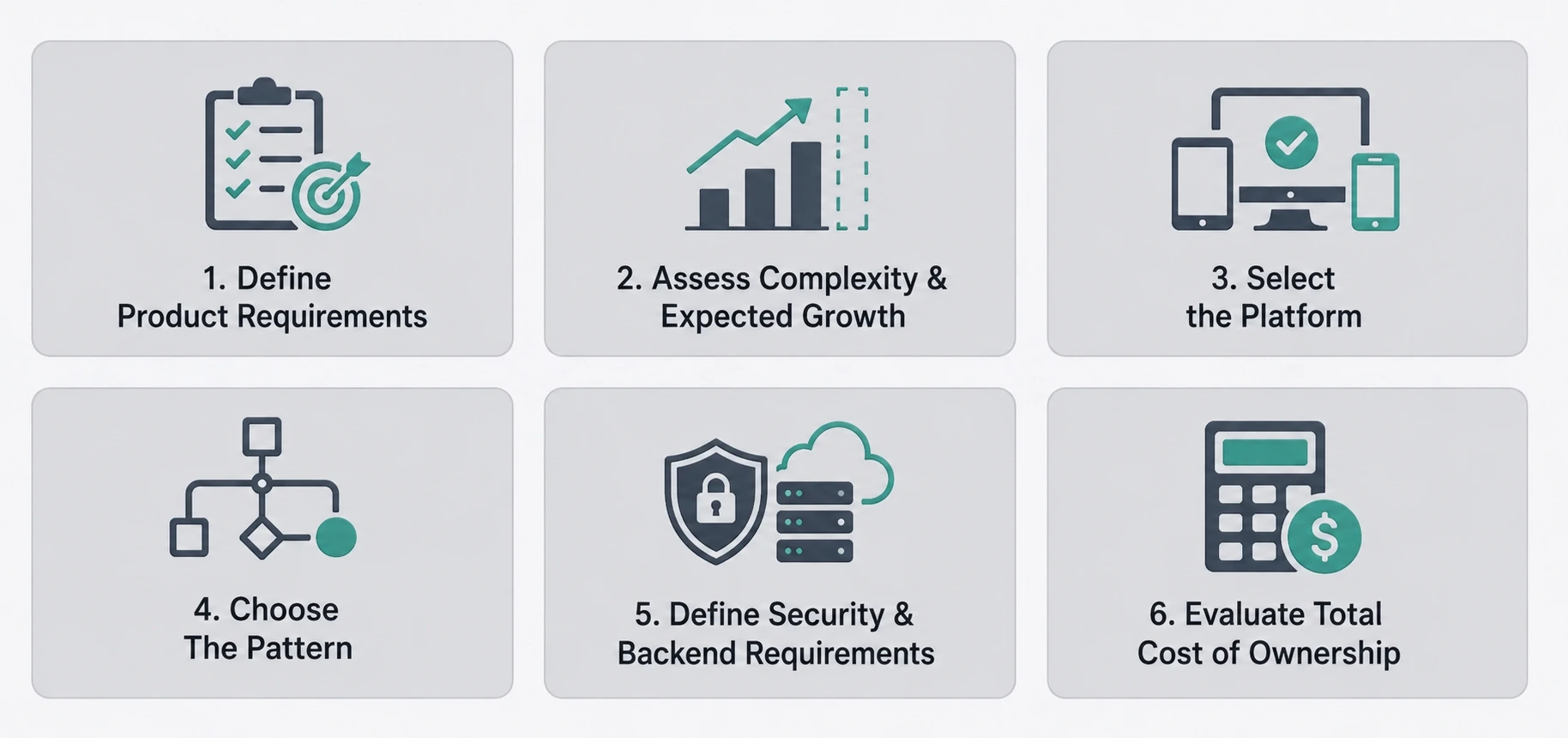
Choosing an architecture requires balancing product requirements, delivery timelines, technical constraints, and long-term ownership costs. A structured evaluation helps businesses avoid both underengineering and unnecessary complexity.
1. Define Product Requirements and Business Priorities
Start by identifying the application’s primary purpose, target users, essential workflows, and expected business outcomes. Determine which capabilities must be available at launch and which can be introduced later.
A customer-facing marketplace, for example, may need payments, inventory updates, search, and notifications. An internal business application may prioritize secure access, reporting, and integration with existing systems. These requirements establish the foundation for architectural decisions.
2. Assess Complexity and Expected Growth
Evaluate the number of features, integrations, user roles, workflows, and external dependencies. Consider how these may change as the product expands into new markets or introduces additional capabilities.
A straightforward application may work well with a simple layered structure. A product with complex business rules may benefit from domain separation, modular design, and more explicit state management. Avoid designing for hypothetical requirements that have no credible business justification.
3. Select the Platform and Development Approach
Compare native, cross-platform, and hybrid development against user experience requirements, device capabilities, release plans, and available team expertise.
Native development may be appropriate when platform-specific behavior is central to the product. Cross-platform development can support code reuse across iOS and Android, while hybrid approaches may suit products with substantial web-based functionality. Evaluate the long-term implications for updates, testing, and platform compatibility before deciding.
4. Choose a Pattern That Matches the Complexity
Select MVC, MVP, MVVM, MVI, VIPER, or Clean Architecture according to the application’s actual needs. MVVM can provide a practical balance for many mobile applications.
Products with complex business rules may need stronger domain boundaries, while applications with intricate UI states may benefit from unidirectional data flow. The goal is to improve clarity, testability, and maintainability without adding layers that provide little value.
5. Define Data, Security, and Backend Requirements
Determine where data will be stored, how the application will communicate with backend services, and which operations require server-side validation.
Establish requirements for offline access, synchronization, authentication, authorization, encryption, monitoring, and recovery from failures. Choose backend architecture according to workload, growth expectations, operational capabilities, and cost constraints. These decisions should be consistent with the product’s security and reliability requirements.
6. Evaluate Total Cost of Ownership and Validate the Design
Compare implementation effort with the ongoing cost of maintenance, infrastructure, testing, upgrades, and future changes. An inexpensive architecture to launch may become costly if every new feature requires extensive modifications.
Review the proposed structure against realistic user journeys and expected changes. Validate critical assumptions through prototypes, technical testing, and architecture reviews before committing to expensive implementation decisions. A useful assessment considers the total cost of ownership of a custom app, not only the initial development budget.
Mobile App Architecture Best Practices
Use the following checklist to assess whether an architecture supports reliable delivery and long-term product growth.
- Define component responsibilities. Keep presentation, business rules, and data access sufficiently separate to limit unnecessary dependencies.
- Establish clear module boundaries. Organize features around cohesive business capabilities and define how modules communicate.
- Keep business rules independent where practical. Avoid tying critical product decisions directly to UI frameworks, database implementations, or individual screens.
- Adopt consistent state management. Define how state is created, updated, shared, and recovered when operations fail.
- Plan for network failures. Specify loading states, retries, timeouts, caching, synchronization, and offline behavior where required.
- Build security into data flows. Apply appropriate authentication, authorization, encryption, input validation, and secure storage practices.
- Test critical business workflows. Prioritize transactions, authentication, data synchronization, and other high-impact user journeys.
- Monitor performance and reliability. Track startup behavior, crashes, API failures, response times, and resource consumption.
- Document significant architectural decisions. Record why major choices were made, the alternatives considered, and the conditions that might justify revisiting them.
- Review architecture as the product evolves. Reassess dependencies, maintenance costs, and operational constraints when business requirements change.
Architecture should remain adaptable. Regular reviews help teams identify when an existing structure is sufficient and when a specific component needs refactoring. They also help prevent technical debt from accumulating unnoticed.
For products incorporating emerging capabilities, the AI-native vs. traditional mobile app architecture comparison can help frame additional architectural considerations.
How RipenApps Designs Scalable App Architecture
At RipenApps, we base architecture decisions on product requirements, target platforms, integration needs, and expected growth. Our approach prioritises scalable system design, efficient resource utilisation, and seamless integration to help businesses adapt to changing market demands while maintaining long-term performance and reliability.
Two projects illustrate different considerations involved in mobile architecture: cross-platform delivery and supporting an established digital entertainment product.
Cobone: A Unified Cross-Platform Approach
Cobone is a deals and offers platform built with React Native. Its shared codebase supports iOS and Android while accommodating platform-specific requirements. The app had surpassed 500K installs on Google Play and held a 4.0-star rating.
The project illustrates how cross-platform architecture can reduce duplicated implementation work while maintaining consistent functionality across platforms.
Hungama: Supporting a Large-Scale Entertainment Product
Hungama is a digital entertainment platform for music and video. RipenApps delivered its mobile application for Android and iOS over seven months, supporting a product serving a substantial audience.
Hungama had recorded 50M+ installs on Google Play, with a 4.0-star rating on the Apple App Store from 11K+ ratings. These figures highlight the scale that mobile architecture, release management, performance monitoring, and ongoing maintenance must support.
Conclusion
Mobile app architecture influences how efficiently a product can evolve, how reliably it operates, and how much businesses spend maintaining it over time. Choosing the right layers, patterns, platform, and backend structure requires balancing current requirements with realistic growth expectations. A deliberate approach helps decision-makers control complexity, support security and performance, and avoid costly redesigns.
Mobile app architecture affects product reliability, development costs, and the effort required to introduce new features. Businesses should choose layers, patterns, platforms, and backend components based on current requirements, security needs, and realistic growth plans. Reviewing these decisions against long-term maintenance costs can help keep the product scalable without adding unnecessary complexity. Experienced teams such as RipenApps help align technical decisions with broader product goals.
FAQs
Q1. What is mobile app architecture?
Mobile app architecture defines how an application’s components are organized and interact. It separates presentation, business logic, and data to improve maintainability, testing, security, and scalability.
Q2. What are the three layers of mobile app architecture?
The three layers are:
- Presentation: Manages screens, navigation, and UI state.
- Business logic: Handles business rules, validations, and use cases.
- Data: Manages APIs, databases, local storage, and synchronization.
Q3. What is the best architecture for Android apps?
MVVM is a common choice for Android apps, particularly those using Jetpack Compose and ViewModel. Google recommends separating UI and data layers, with an optional domain layer for complex or reusable business logic. More complex applications may also benefit from modularization and Clean Architecture principles.
Q4. What is the difference between MVC and MVVM?
MVC uses a Controller to coordinate user input and interactions between the Model and View. MVVM uses a ViewModel to manage UI-related state and presentation logic, supporting clearer separation and easier testing.
Q5. What is Clean Architecture in mobile apps?
Clean Architecture separates business rules from implementation details such as UI frameworks, databases, and external services. This improves testability and maintainability, especially for complex applications.
Q6. How do I choose the right architecture for my app?
Assess your product requirements, complexity, security needs, platform, integrations, and growth plans. Then compare suitable patterns based on development costs, testability, maintenance, and scalability.
Discuss your project and request for proposal
SHARE
WRITTEN BY

Prankur Haldiya
Chief Technical Officer
A tech innovator and engineering leader, Prankur Haldiya drives RipenApps’ product development strategy and oversees cutting-edge solutions in mobility, AI, and cloud ecosystems. He is passionate about building high-performance teams and helping brands launch secure, scalable, and user-centric digital products.
View All Articles