


Key Takeaways
- IoT apps connect physical devices with applications and cloud services to enable monitoring, automation, and remote control.
- A reliable IoT architecture includes device, connectivity, cloud and data, and application layers.
- Technology choices depend on device capabilities, communication protocols, data volume, integration requirements, and operating costs.
- Security must cover device identity, data transmission, software updates, APIs, access controls, and ongoing vulnerability management.
- Development costs and timelines depend on product complexity, hardware requirements, integrations, testing, and long-term maintenance.
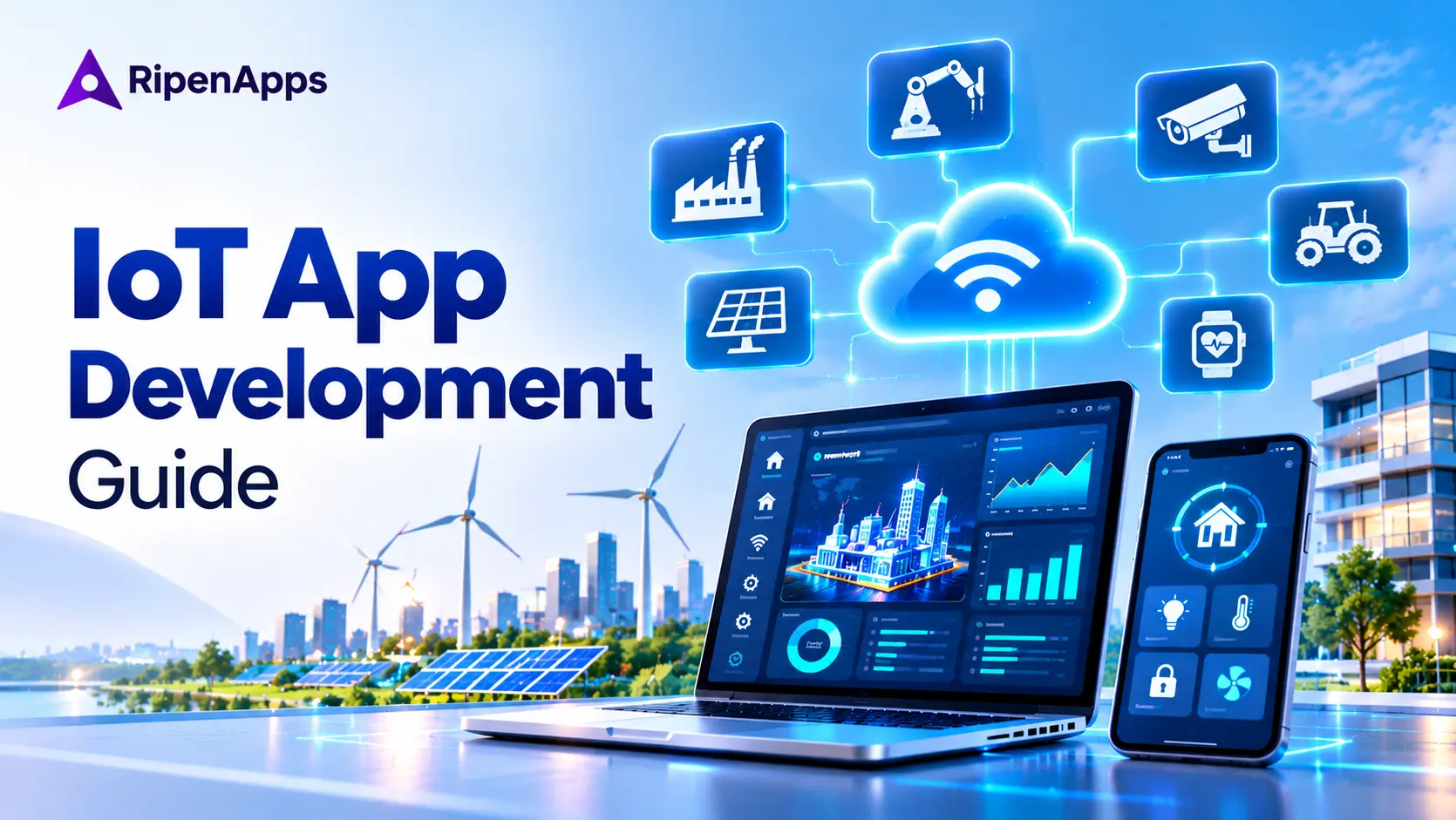
IoT app development connects physical devices to mobile apps, web dashboards, and cloud systems, allowing businesses to monitor data, control equipment, and automate operations. Building a reliable solution requires compatible hardware, dependable connectivity, a scalable backend, and security controls. A proof of concept may take weeks, while a production platform can require several months.
When evaluating an IoT app development company, assess its device integration capabilities, security practices, and ability to support the product throughout its lifecycle. The right architecture also depends on the devices involved, the volume of data generated, and how quickly the system must respond. Defining these requirements early helps businesses prioritize features, estimate investment, and plan for security, scalability, and long-term maintenance.
This guide explains the major cost factors, development timelines, and industry use cases to help business leaders make informed product decisions.
Table of Contents
What Is an IoT App?
An Internet of Things (IoT) app is software that connects users or business systems with physical devices through networks, gateways, and cloud services. It collects device data, presents useful information, and enables authorized users to monitor or control connected equipment.
IoT apps differ by audience and operational requirements. A consumer app may prioritize convenience, while an industrial platform may require continuous monitoring, strict access controls, and integration with existing business systems.
| IoT app type | Common examples | Primary purpose |
| Consumer IoT | Smart lights, thermostats, security cameras | Remote control, automation, and household monitoring |
| Industrial IoT | Factory equipment, sensors, connected machinery | Asset monitoring, predictive maintenance, and operational efficiency |
| Enterprise IoT | Fleet tracking, connected facilities, asset management | Centralized visibility, workflow automation, and business reporting |
How an IoT App Works: The Four Layers
An IoT application typically relies on four connected layers: devices, connectivity, cloud and data processing, and the user-facing application. Each layer handles a specific function, from collecting device data to presenting information and executing commands.
1. Device Layer
The device layer includes sensors, actuators, embedded systems, and connected equipment. Sensors collect information such as temperature, location, pressure, movement, or energy consumption. Actuators receive commands and perform actions, such as opening a valve or adjusting a thermostat.
Device selection affects battery life, processing capacity, communication options, and the amount of data the system can collect.
2. Connectivity Layer
The connectivity layer transfers data between devices, gateways, cloud services, and applications. Depending on the use case, it may use Wi-Fi, Bluetooth Low Energy (BLE), Ethernet, cellular networks, or low-power wide-area network (LPWAN) technologies such as LoRaWAN, NB-IoT, and LTE-M.
Smart-home products may also use Matter and Thread. Matter supports interoperability across compatible smart-home ecosystems, while Thread provides low-power, IP-based mesh networking for connected devices. At the messaging layer, MQTT supports lightweight publish-and-subscribe communication, CoAP suits constrained devices, and HTTP enables conventional web integrations. The right combination depends on device compatibility, operating range, bandwidth, power consumption, latency, and network reliability.
3. Cloud and Data Layer
The cloud and data layer receives device messages, validates them, processes events, stores relevant information, and routes commands. It may include device registries, message brokers, databases, rules engines, analytics services, and integration APIs.
The architecture should separate real-time operations from historical analysis when their performance requirements differ. For example, a fleet-monitoring system may need immediate location updates alongside historical records for reporting and route analysis.
4. Application Layer
The application layer presents device status, alerts, analytics, controls, and configuration options. It may include a mobile app for individual users, a web dashboard for operations teams, or both.
The interface should communicate device status clearly, indicate when information was last updated, and distinguish between successful commands and pending actions. This helps users make informed decisions when connectivity is unreliable.
How data moves through the architecture: Telemetry travels from devices to the cloud for processing and storage, while authorized commands travel from the application through the backend to the relevant device. The system should acknowledge commands and report their outcomes rather than assuming that a sent command was successfully executed.
IoT App Tech Stack: Protocols, Platforms, and Frameworks
An IoT tech stack combines communication protocols, device-management services, backend technologies, data storage, and application frameworks. Choose technologies based on device compatibility, scalability, integration needs, and operating costs.
| Layer | Technology options | When to consider them |
| Communication protocols | MQTT, CoAP, HTTP, WebSockets | Device messaging, constrained networks, API communication, or real-time updates |
| Backend development | Node.js, Python, Go | APIs, business logic, event processing, and integrations |
| Time-series databases | TimescaleDB, InfluxDB | Timestamped telemetry, historical analysis, and device metrics |
| Mobile applications | Swift, Kotlin, Flutter, React Native | Native or cross-platform interfaces and device interactions |
| Web dashboards | React and compatible web technologies | Fleet management, analytics, administrative controls, and reporting |
| Connectivity | Wi-Fi, BLE, Matter, Thread, LoRaWAN, NB-IoT, LTE-M | Smart-home interoperability, nearby devices, or long-range, low-power connections |
| IoT platforms | AWS IoT Core, Azure IoT Hub, ThingsBoard, EMQX | Device connectivity, management, messaging, and monitoring |
| Edge computing | AWS IoT Greengrass, Azure IoT Edge | Local processing, reduced cloud dependence, and operation during connectivity interruptions |
| Firmware updates | AWS IoT Jobs, Mender | Coordinating deployments, distributing firmware, and managing device updates |
Choosing Communication Protocols
MQTT is suitable for lightweight publish-and-subscribe messaging between devices and services. CoAP can be useful for constrained devices and networks, while HTTP supports conventional request-response integrations. WebSockets provide persistent, two-way communication when an application needs live updates.
The decision should account for message frequency, bandwidth, power consumption, security requirements, and network reliability. A solution may use multiple protocols when devices and application components have different communication needs.
Selecting an IoT Platform
Managed platforms can reduce the effort required to build device registries, authentication, messaging, monitoring, and cloud integrations. AWS IoT Core and Azure IoT Hub provide managed IoT capabilities, while ThingsBoard and EMQX offer options for different device-management and messaging requirements.
Platform lifecycle is equally important. Google Cloud IoT Core was discontinued on August 16, 2023, according to Google’s official service documentation. This illustrates why businesses should confirm product availability, support commitments, migration paths, and data portability before selecting an IoT platform.
Selecting Mobile and Backend Technologies
Native development with Swift or Kotlin can suit applications that require platform-specific capabilities or deeper device integration. Flutter and React Native can support cross-platform development when shared code and consistent experiences across mobile platforms are priorities.
Applications that communicate directly with nearby devices may also require BLE libraries and platform-specific permission handling. Review the technical considerations in this guide to React Native for IoT apps.
The backend should support the required event volume, integrations, authentication model, and operational workflows. Time-series databases can store telemetry efficiently, while dashboards translate device data into information that operations teams can use.
How to Build an IoT App: Step-by-Step
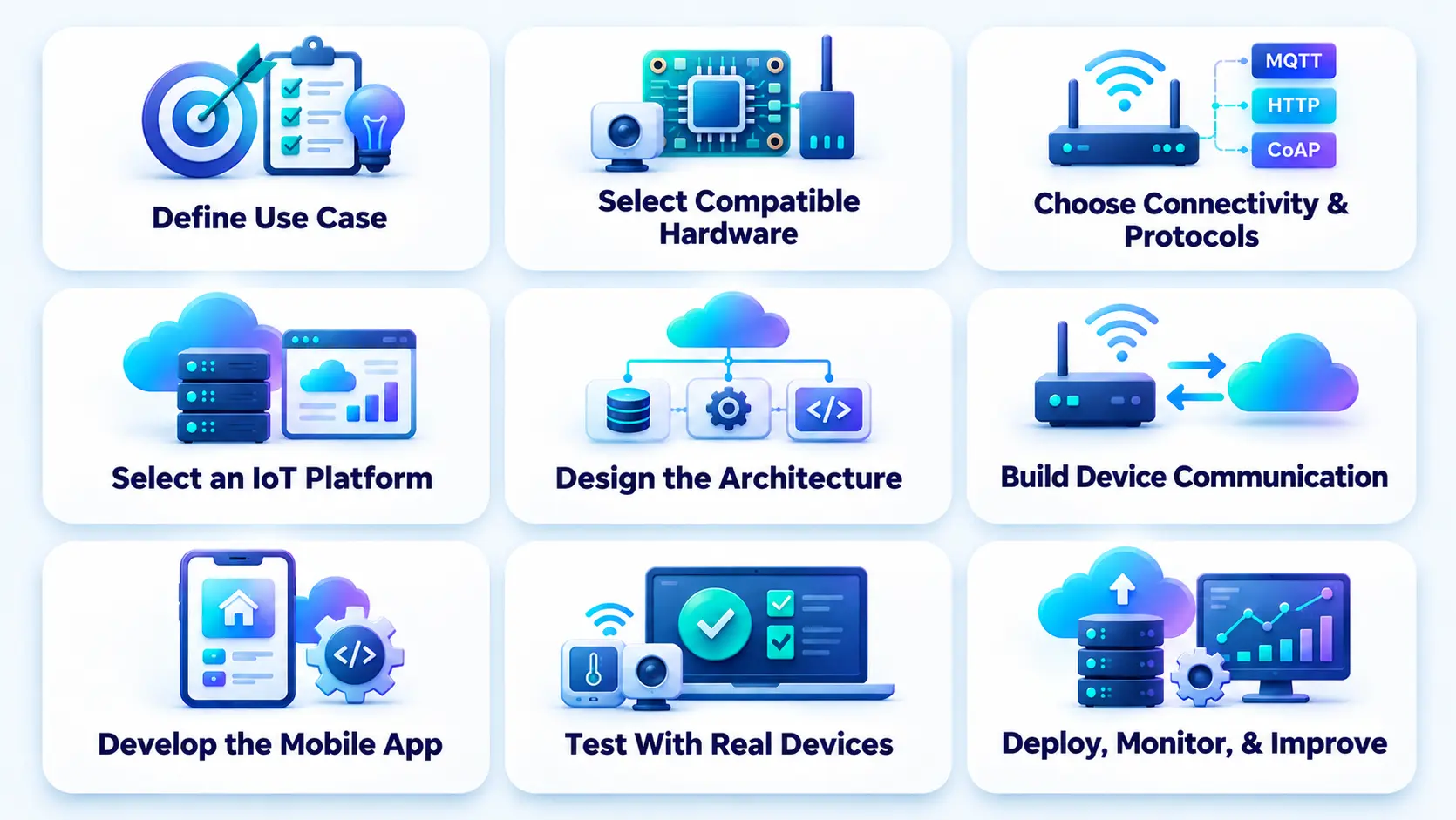
Building an IoT app requires decisions across hardware, connectivity, software architecture, security, testing, and operations. The following steps help businesses validate the product before committing to a full-scale rollout.
Step 1: Define the Use Case and Business Requirements
Start with the business problem the IoT solution must address. Establish whether the product will monitor assets, automate equipment, track vehicles, manage facilities, or deliver another connected experience.
Define the target users, required device actions, data collection frequency, alert conditions, response times, and success measures. Use these requirements to prioritize features and define measurable success criteria.
Step 2: Select Compatible Hardware
Choose sensors, controllers, gateways, and connected devices that can support the required functionality. Evaluate operating conditions, power requirements, processing capacity, communication interfaces, expected lifespan, and availability.
Hardware selection should also account for firmware updates, device provisioning, replacement procedures, and future compatibility. Involving hardware and software stakeholders early can reduce integration problems later in development.
Step 3: Choose Connectivity and Communication Protocols
Select connectivity options based on operating range, bandwidth, power consumption, latency, and network availability. A nearby smart device may use BLE, while a remote industrial asset may require cellular connectivity or a gateway.
Define how devices authenticate, publish telemetry, receive commands, and recover from connection loss. Test these assumptions under realistic network conditions before finalizing the architecture.
Step 4: Select an IoT Platform
Compare managed and self-hosted options against device volume, integration needs, operational complexity, security controls, and projected costs. Consider whether the platform supports the required protocols, device lifecycle management, monitoring, and deployment regions.
Also evaluate vendor dependence, data export options, service availability, and migration requirements.
Step 5: Design the Architecture and Data Model
Map how information flows from devices to the backend and application. Define device identities, telemetry formats, event types, command structures, data retention rules, and user-device relationships. A web app development company can help design an architecture that supports reliable data exchange and future scalability.
Decide which operations require immediate processing and which can run asynchronously. Plan how the system handles duplicate messages, delayed events, unavailable devices, and inconsistent data.
Step 6: Build Device Communication and Backend Services
Develop the services responsible for device registration, authentication, telemetry ingestion, command handling, business rules, and integrations. The backend should validate incoming data and enforce permissions before processing device actions.
Use queues or event-driven processing where asynchronous workloads improve resilience. Define retry policies, message ordering requirements, and error handling so that temporary failures do not cause uncontrolled processing or incorrect device states.
Businesses can review the relevant capabilities of a backend API development company when planning these services.
Step 7: Develop the Mobile App or Web Dashboard
Build the interface around the tasks users need to complete. Typical features include device pairing, live status, historical readings, alerts, remote controls, user permissions, and device configuration.
Show whether information is current, delayed, or unavailable. For remote commands, communicate whether an action is pending, acknowledged, completed, or unsuccessful. This avoids giving users a false impression that a device has responded.
Step 8: Test With Real Devices and Network Conditions
Test the application with actual hardware, firmware versions, gateways, and supported operating systems. Validate device pairing, message delivery, command execution, permissions, and behavior during connectivity interruptions.
Evaluate performance under expected load and test failure scenarios such as low battery, repeated messages, unavailable services, and firmware incompatibility. A structured quality assurance process can help validate the complete product rather than isolated components.
Step 9: Deploy, Monitor, and Improve
Roll out the application in stages, beginning with a controlled group of devices when practical. Monitor connection health, telemetry delivery, command success, application errors, latency, and infrastructure costs.
Establish procedures for software updates, incident response, device replacement, vulnerability reporting, and customer support. Use operational data and user feedback to prioritize improvements after launch.
Security by Design: Best Practices for Secure IoT Apps
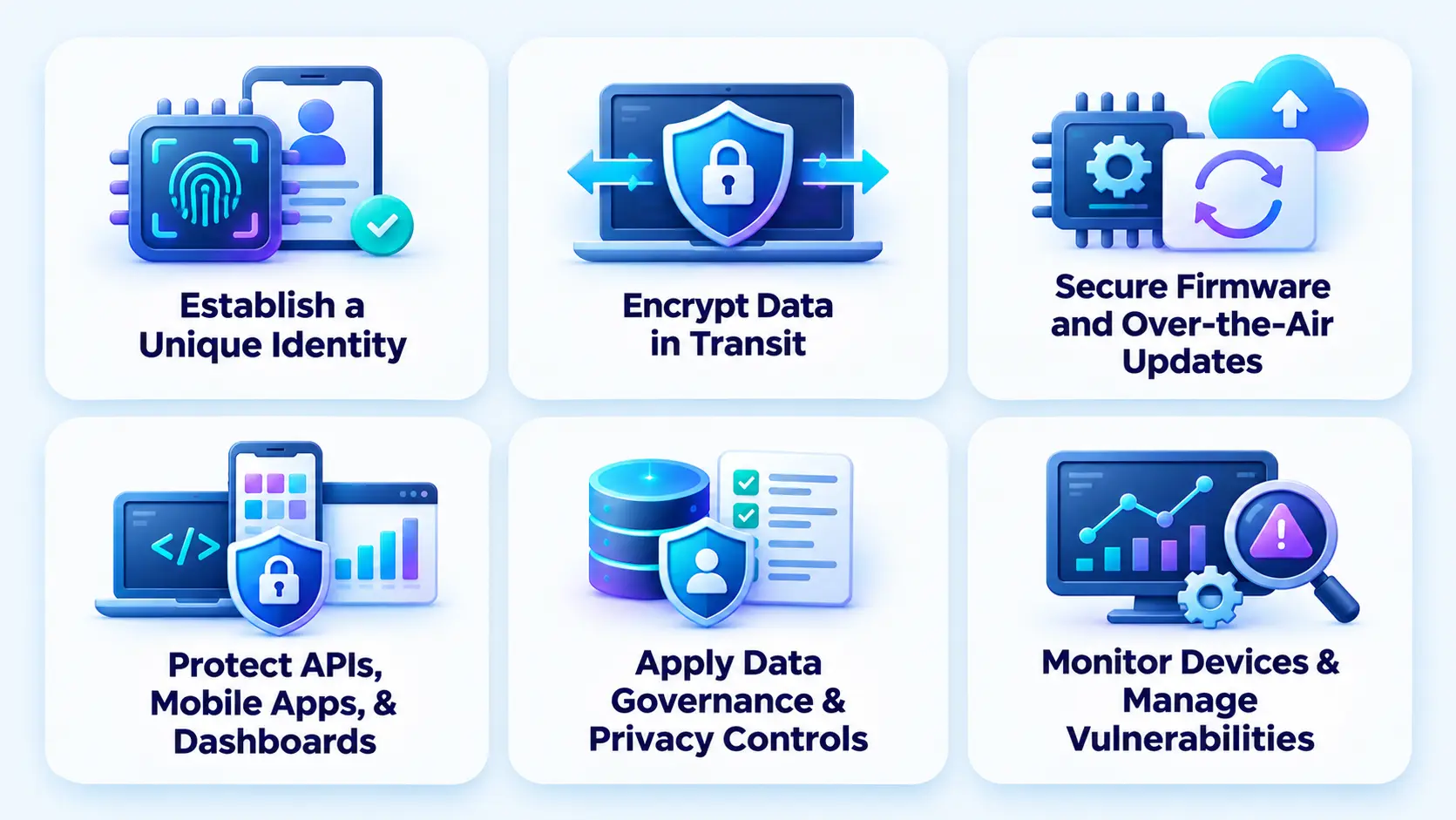
Building security into an IoT app requires controls across device identity, firmware, network communication, backend services, APIs, and user interfaces. These controls should be defined during architecture planning and validated throughout development and deployment.
Before finalizing the architecture, review the common IoT security challenges and their solutions. Use that overview to inform your threat assessment, then translate relevant risks into specific security controls, testing requirements, and ongoing operational procedures.
1. Establish Unique Device Identity and Secure Provisioning
Each device should have a unique identity and a secure way to prove that identity to the system. Avoid shared default credentials or static secrets that allow one compromised device to expose an entire fleet.
Use certificate-based authentication or another suitable device identity mechanism. Provision credentials securely, restrict access to registration processes, and define how credentials can be rotated, revoked, or replaced when a device is compromised.
Device onboarding should also verify that the device is authorized to join the network and access its assigned resources.
2. Encrypt Data in Transit and at Rest
Protect device telemetry, commands, user information, and stored records against unauthorized access. Use current, properly configured transport encryption, such as TLS, where supported by the communication stack. Encrypt sensitive stored data and restrict access to encryption keys. Key management should include secure storage, controlled access, rotation, and revocation procedures.
Encryption alone does not establish trust. The system must also authenticate communicating parties and validate authorization before accepting data or executing commands.
3. Secure Firmware and Over-the-Air Updates
Firmware vulnerabilities can expose devices to unauthorized control or disrupt their operation. Build a secure update process that verifies update authenticity and integrity before installation. Use digitally signed firmware, secure boot where supported, protected update credentials, and a recovery mechanism for failed updates. Plan how devices will receive security patches throughout their expected service life.
Before deployment, define update eligibility, rollout stages, failure handling, and rollback procedures. Critical devices may require additional safeguards to prevent updates from interrupting essential operations.
For fleet-wide update management, evaluate AWS IoT Jobs, which supports scheduling and tracking remote operations such as firmware updates, and Mender, which provides software deployment and device-update management. Confirm support for the target hardware, operating system, update strategy, and deployment environment before choosing a tool.
4. Protect APIs, Mobile Apps, and Dashboards
Applications and backend APIs often control sensitive device functions. Require authentication, enforce role-based or attribute-based permissions, and verify authorization for every device action.
Use server-side validation, rate limits, secure session handling, and appropriate protections against common web and mobile vulnerabilities. Never rely on hiding a control in the interface as a substitute for enforcing permissions on the backend.
Use the OWASP IoT Top 10 (2018 edition) as a historical reference for common device-security weaknesses, alongside the NISTIR 8259 series and ETSI EN 303 645 for broader IoT cybersecurity guidance. For mobile applications and APIs, consult the relevant OWASP Mobile and API security resources. Assess each reference against the product’s architecture, threat model, and applicable requirements.
5. Apply Data Governance and Privacy Controls
IoT devices can collect location, behavioral, environmental, operational, or personal data. Define which data the product needs, why it is collected, who can access it, and how long it should be retained.
Minimize unnecessary collection and use aggregation or anonymization when detailed records are not required. Provide appropriate consent, notices, and user controls when personal data is involved.
Map data flows across devices, cloud services, analytics systems, and third-party integrations. This helps businesses evaluate privacy obligations, cross-border transfers, retention policies, and the consequences of a data breach.
6. Monitor Devices and Manage Vulnerabilities
Security responsibilities continue after launch. Monitor authentication failures, unusual traffic, unexpected device behavior, configuration changes, and repeated command failures.
Maintain an inventory of device models, firmware versions, software dependencies, and support status. Establish a vulnerability management process for assessing reports, prioritizing fixes, distributing patches, and communicating with affected users.
A coordinated vulnerability disclosure policy gives researchers a clear way to report security issues. Define how reports are acknowledged, investigated, resolved, and communicated without exposing users to unnecessary risk.
IoT Security Regulations and Standards to Plan For (2024–2027)
IoT security obligations depend on the product, target market, industry, and data it handles. Businesses should assess applicable laws and standards during product planning rather than waiting until the product is ready for release.
The following frameworks are useful starting points, but they do not all have the same legal status or apply to every IoT product.
UK Product Security and Telecommunications Infrastructure (PSTI)
The UK’s consumer connectable product security regime came into force on April 29, 2024. It introduces requirements covering areas such as default passwords, vulnerability reporting information, and the publication of security update support periods for products within scope.
Manufacturers, importers, and distributors should assess the requirements that apply to their products and supply-chain responsibilities. See the UK government’s PSTI product security guidance.
EU Cyber Resilience Act (CRA)
The EU Cyber Resilience Act establishes cybersecurity requirements for products with digital elements. Its main obligations apply from December 11, 2027, while reporting obligations for actively exploited vulnerabilities and severe security incidents began applying on September 11, 2026.
Manufacturers must assess applicable product requirements, vulnerability handling, support periods, and reporting procedures. Reporting deadlines can include an early warning within 24 hours and a more complete notification within 72 hours. The precise obligations depend on the applicable provisions and circumstances. Review the European Commission’s CRA reporting guidance and implementation timeline.
US Cyber Trust Mark
The US Cyber Trust Mark is a voluntary cybersecurity labeling program for eligible consumer wireless products. It is intended to help consumers identify products that meet applicable cybersecurity criteria.
Businesses considering participation should review the FCC’s program requirements, eligibility criteria, and current implementation details. The mark should not be treated as a universal certification requirement for all IoT products. See the FCC’s program order.
NIST IR 8259 and ETSI EN 303 645
The NISTIR 8259 series provides guidance for manufacturers on foundational cybersecurity activities and capabilities for IoT devices. It can help teams establish security requirements and incorporate device cybersecurity into product development.
ETSI EN 303 645 provides a baseline of cybersecurity provisions for consumer IoT products. It addresses areas such as passwords, vulnerability disclosure, software updates, and the protection of sensitive security parameters.
These frameworks can guide security design and evaluation, but their relevance depends on the product and applicable requirements. Review the NISTIR 8259 series and the ETSI consumer IoT security guidance announcement.
Industry-Specific Requirements
Some IoT products must meet additional sector-specific requirements. Healthcare systems may need to address HIPAA obligations when handling protected health information in the United States. Industrial systems may need to consider IEC 62443 for industrial automation and control system security.
These requirements are not interchangeable. Determine which laws, contractual obligations, and standards apply based on the product’s intended use, deployment environment, data, and target markets.
Building for Reliability: Offline-First and Sync
IoT devices may lose connectivity, send delayed messages, or become temporarily unavailable. Reliability depends on how the system handles failures, delayed messages, and connectivity loss.
Design for Offline Operation and Synchronization
Determine which functions must continue when a device or mobile app loses its connection. Depending on the use case, the application may need to cache recent readings, queue commands, or preserve configuration changes until connectivity returns.
Define synchronization rules before implementing offline support. Consider duplicate messages, conflicting updates, timestamps, retry limits, and data that arrives out of order. Safety-critical commands may require different handling from routine settings changes. The application should clearly communicate when data was last synchronized and whether an action is waiting to be delivered.
Make Device States Visible in the UI
A device can be online, offline, connecting, reporting stale data, updating firmware, or responding to a command. Represent these states clearly so users can distinguish a device problem from an application issue.
Display the last-seen timestamp where it matters, indicate pending actions, and provide useful error messages. Avoid presenting cached data as live information or marking a command complete before receiving the appropriate confirmation.
Plan for Fleet Growth
An architecture that supports a small pilot may not perform well with thousands of devices. Estimate message volume, payload sizes, peak connection counts, data retention needs, and expected growth before selecting infrastructure.
Use scalable ingestion, asynchronous processing, appropriate database indexing, and efficient telemetry retention policies. Test realistic workloads and failure scenarios to identify bottlenecks before expanding the fleet.
Monitor Fleet Health
Operational monitoring should cover device connectivity, message delivery, command outcomes, latency, error rates, infrastructure usage, and update status. Set thresholds that reflect the business impact of a failure rather than alerting on every minor variation.
Dashboards should help teams identify affected devices, compare behavior across firmware versions, and investigate recurring incidents. Alert routing and escalation procedures should also make ownership clear when a critical issue occurs.
Common IoT App Development Challenges
IoT projects involve dependencies across hardware, networks, cloud services, and user-facing software. Addressing common challenges early helps reduce operational risks and avoid expensive architectural changes.
| Challenge | Practical response |
| Incompatible devices and protocols | Validate hardware compatibility and communication requirements before committing to the architecture. |
| Unreliable connectivity | Support appropriate buffering, retries, synchronization, and clear connection states. |
| Complex third-party integrations | Validate vendor APIs, data formats, authentication methods, and integration dependencies before finalizing the architecture. |
| Increasing data volume | Plan ingestion capacity, database performance, retention, and processing requirements around projected usage. |
| Difficult device maintenance | Maintain device inventories, firmware versions, update procedures, and support timelines. |
The right solution depends on the product’s operating environment. Validate these assumptions with representative devices and realistic workloads before expanding deployment. See these IoT app development trends when evaluating future product investments.
How Much Does IoT App Development Cost?
IoT app development costs depend on device complexity, communication requirements, backend architecture, application features, integrations, security, and testing. Hardware procurement and ongoing operations may add to the initial software budget.
The following estimates provide planning ranges. Actual costs depend on the scope, team composition, integration complexity, and delivery requirements
IoT App Development Cost by Complexity
| App complexity | Typical scope | Estimated development cost |
| Basic single-device app | One device type, core controls, basic telemetry, and a simple mobile interface | $20,000–$50,000 |
| Multi-device app with analytics | Multiple device types, dashboards, alerts, data processing, and third-party integrations | $50,000–$120,000 |
| Enterprise fleet platform | Large-scale device management, advanced analytics, extensive integrations, and enterprise security controls | $120,000–$300,000+ |
Factors That Influence Development Cost
- Hardware and integration requirements: Custom hardware, multiple device models, firmware dependencies, and specialized gateways increase integration and testing effort.
- Connectivity and data processing: Real-time messaging, high-frequency telemetry, offline synchronization, and complex event processing can require additional backend infrastructure.
- Application scope: Device onboarding, user roles, analytics dashboards, alerts, reporting, and administrative workflows affect the amount of design and development work.
- Security and compliance: Device authentication, encryption, secure updates, audit trails, penetration testing, and regulatory obligations can increase implementation and validation requirements.
- Testing and deployment: Physical-device testing, environmental conditions, load testing, and staged rollout procedures add time and cost, especially for products with complex operating requirements.
Ongoing IoT App Costs
The initial build is only part of the total cost of ownership. Businesses must also budget for cloud infrastructure, device connectivity, data storage, monitoring, security updates, hardware replacement, and ongoing maintenance. Partnering with a Cloud app development company can help optimize infrastructure and plan for long-term scalability.
Cloud and messaging costs depend on connected devices, message frequency, data retention, and processing workloads. Forecast usage and monitor actual consumption after launch to keep operating costs predictable.
How Long Does IoT App Development Take?
Development timelines vary with hardware readiness, integration complexity, feature scope, and testing requirements.
| Development stage | Estimated timeline |
| Proof of concept (PoC) | 2–6 weeks |
| Basic single-device app | 2–4 months |
| Multi-device app with analytics | 4–6 months |
| Enterprise fleet platform | 6–12 months or longer |
A proof of concept validates the core device connection and primary use case. A production release requires additional work on security, error handling, testing, deployment, monitoring, and support processes.

IoT App Use Cases by Industry
IoT applications support different business needs depending on the assets being connected, the data collected, and the decisions that information enables.
- Smart homes: Connected lighting, climate control, security systems, and home automation.
- Healthcare: Remote device monitoring, connected medical equipment, and patient-related workflows, subject to applicable privacy and safety requirements. See IoT in healthcare app development.
- Logistics and supply chain: Fleet visibility, shipment tracking, asset monitoring, and condition monitoring. Learn more about IoT in logistics and supply chain management.
- Retail: Inventory visibility, connected shelves, equipment monitoring, and store operations.
- Manufacturing: Equipment monitoring, predictive maintenance, production visibility, and operational automation.
- AI-powered applications: IoT data can support anomaly detection, forecasting, and automated decision-making when combined with appropriate models and reliable data. Learn how IoT is used in modern AI applications.
As connected products evolve, businesses are also exploring edge processing, AI-assisted monitoring, and more advanced device-management capabilities.
Why Build Your IoT App With RipenApps?
IoT products require coordinated work across application development, backend services, integrations, and quality assurance. RipenApps provides mobile app development, web development, cloud solutions, AI integration, and application modernization services that can support different parts of an IoT product.
The required delivery approach depends on the project. A connected-device companion app may prioritize mobile interactions and device pairing, while an enterprise platform may require extensive backend services, dashboards, data processing, and integrations.
Before development begins, define the device ecosystem, communication requirements, security controls, rollout plan, and long-term maintenance responsibilities. These decisions help align the product scope with business objectives and establish a practical delivery plan.
Conclusion:
Building a successful IoT app requires compatible hardware, scalable architecture, secure device communication, and reliable connectivity. Planning these elements early helps control costs, reduce risks, and support future growth. ReactJS app development services can help businesses build responsive web dashboards for IoT monitoring, data visualization, and remote control, aligning connected solutions with evolving business needs.
RipenApps offers mobile app development, backend engineering, cloud solutions, and integration capabilities that can support different components of an IoT product. By establishing clear business goals, technical requirements, and security priorities before development begins, businesses can make informed investment decisions and build connected solutions designed for long-term reliability and growth.
FAQs
1. What is IoT app development?
IoT app development is the process of building software that connects physical devices with mobile apps, web dashboards, and cloud services. It includes device communication, data processing, user interfaces, security, and device management.
2. How do you build an IoT app?
Start by defining the use case and selecting compatible hardware. Then choose connectivity protocols and an IoT platform, design the architecture, build the backend and user interface, test with real devices, and establish deployment and monitoring processes.
3. How much does IoT app development cost?
A basic single-device IoT app may cost $20,000–$50,000. A multi-device app with analytics may cost $50,000–$120,000, while an enterprise fleet platform may cost $120,000–$300,000+ or more. Hardware, integrations, security, and infrastructure affect the final budget.
4. How long does it take to develop an IoT app?
A proof of concept may take 2–6 weeks. A basic production-ready app may require 2–4 months, while a multi-device app with analytics may take 4–6 months. Enterprise fleet platforms can require 6–12 months or longer.
5. How is an IoT app different from a regular mobile app?
A regular mobile app may rely primarily on user input and backend APIs. An IoT app must also communicate with physical devices, handle changing device states, process telemetry, manage connectivity interruptions, and protect device commands and data.
6. Should an IoT app use MQTT, CoAP, or HTTP?
The choice depends on device resources, network conditions, message patterns, and integration requirements. MQTT suits lightweight publish-and-subscribe messaging, CoAP can support constrained devices, and HTTP is useful for conventional request-response APIs. Some products use multiple protocols across different components.
7. How can an IoT app remain secure after launch?
Use unique device identities, encryption, strong access controls, signed firmware updates, API protection, and security monitoring. Maintain an inventory of device and software versions, establish vulnerability response procedures, and plan security updates throughout the product’s supported lifecycle.
8. Can an IoT app work without an internet connection?
Yes, if offline behavior is included in the design. Devices or applications can cache data, queue selected operations, and synchronize when connectivity returns. The exact capabilities depend on hardware, local storage, safety requirements, and whether actions must be confirmed by a remote service.
Discuss your project and request for proposal
SHARE
WRITTEN BY

Ishan Gupta
CEO & Founder
Ishan Gupta is a seasoned entrepreneur and CEO with extensive 10+ years of experience in business and mobile app development landscape. He believes that the right digital product allows companies to focus on what they do best, while technology handles the rest. With deep exposure to global markets, he understands what makes an app succeed. His approach translates business needs into clear product strategies, ensuring that every feature contributes to measurable ROI.
View All Articles