
Key Takeaways
- iOS 26 introduced Liquid Glass, making interface compatibility and design reviews relevant for existing applications.
- iOS 27 brings Siri AI, expanded Apple Intelligence capabilities, and new opportunities for intelligent app interactions.
- The Foundation Models framework supports on-device AI experiences with greater privacy and less dependence on external AI services.
- Swift 6 and SwiftUI support safer, more maintainable native iOS application development.
- App Intents extend app interactions across Apple’s ecosystem.
- Privacy requirements, connected devices, and cross-platform frameworks will continue influencing iOS development strategies.
Apple’s mobile ecosystem is evolving through AI, interface redesigns, connected devices, and stronger privacy requirements. These developments are changing how teams design, develop, and maintain iOS apps. They also influence development costs, device compatibility, customer experiences, security requirements, and long-term product strategies.
Understanding the latest iOS app development trends helps product owners identify valuable technologies, prioritize investments, and prepare for the future of iOS app development. For businesses considering an iOS application, selecting the right iOS app development services can help balance functionality, development costs, and future scalability.
The growing adoption of these technologies also raises important decisions around architecture, third-party integrations, and ongoing maintenance. Product owners need to evaluate how emerging capabilities align with user expectations, operational requirements, and business objectives. A forward-looking development approach helps ensure that iOS applications remain adaptable as Apple’s ecosystem and customer needs continue to evolve.
Table of Contents
Where iOS App Development Stands in 2026
iOS app development is moving toward AI-powered experiences, connected services, and more personalized user interactions. Apple’s latest platform updates are changing how apps are designed, integrated with system features, and maintained across devices.
The commercial opportunity remains significant. According to Apple’s June 2026 announcement, the App Store ecosystem facilitated more than $1.4 trillion in developer billings and sales worldwide in 2025, with over 850 million average weekly users across 175 countries and regions.
iOS 26 and the Introduction of Liquid Glass
Released in September 2025, iOS 26 introduced Liquid Glass, Apple’s redesigned interface language. For existing apps, this means reviewing interface compatibility, visual hierarchy, and navigation patterns. Teams can adopt the updated design conventions without necessarily rebuilding their products.
iOS 27 and the Next Phase of Apple’s Development Ecosystem
Announced at WWDC on June 8, 2026, and released on September 14, 2026, iOS 27 introduced Siri AI and further Apple Intelligence improvements. The update also expanded developer opportunities through App Intents, Foundation Models, and new AI development tools.
These changes create opportunities for more intelligent app interactions, contextual assistance, and automated workflows. However, device compatibility, language support, and regional restrictions remain important considerations when planning new features.
Top iOS App Development Trends in 2026
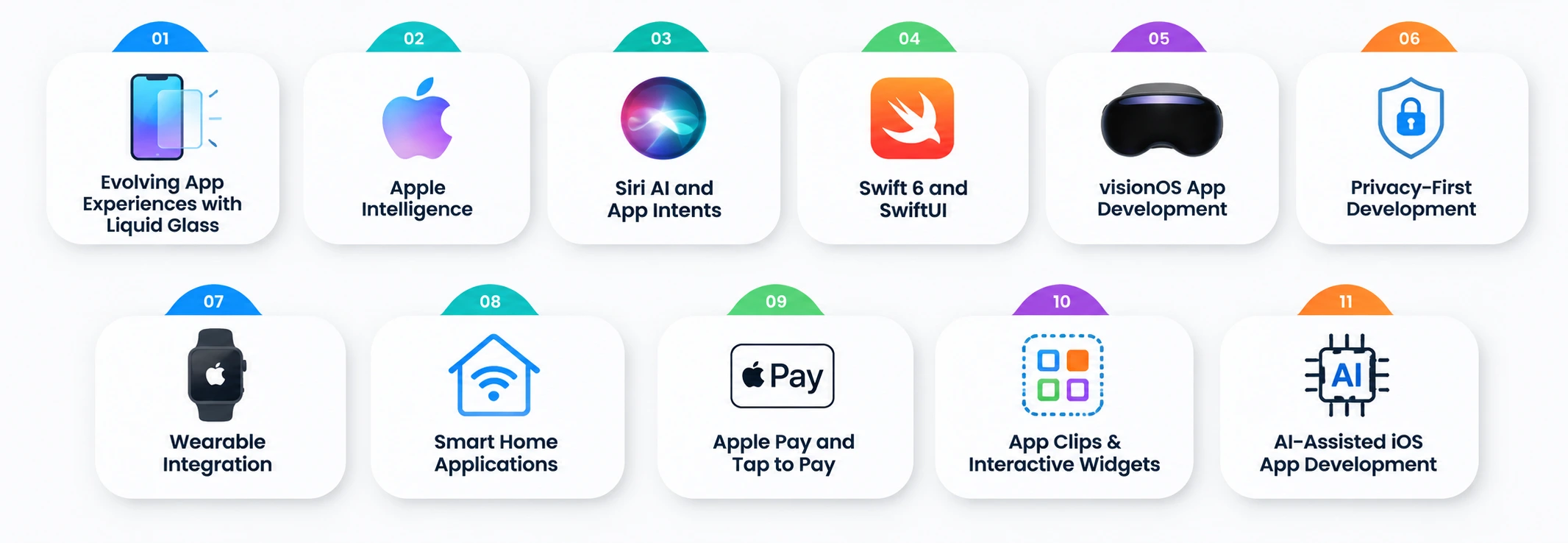
Several technology developments are changing how businesses approach application development within Apple’s ecosystem. The following trends highlight the capabilities worth considering when building new products or modernizing existing applications.
1. iOS 26 and iOS 27: Evolving App Experiences with Liquid Glass
Liquid Glass is Apple’s interface design language introduced with iOS 26. It uses translucent materials, layered visual elements, reflections, and dynamic effects to create interfaces that respond to their surroundings.
The design changes how users interact with navigation bars, menus, controls, and other interface elements. It creates a more fluid relationship between interface components and the content behind them.
This makes interface compatibility an important consideration. Existing applications may need adjustments to navigation, typography, contrast, spacing, and visual hierarchy to maintain usability.
iOS 27 continues refining the experience while emphasizing performance and responsiveness. Review their applications across supported screen sizes and operating system versions before introducing major interface changes.
A practical review should cover:
- Existing navigation and interface components.
- Text readability and visual contrast.
- Translucent elements against different backgrounds.
- Layout consistency across supported devices.
- Compatibility with older supported operating system versions.
Rebuilding applications for Liquid Glass is not necessary. Apple’s guidance recommends building existing apps with the latest Xcode version first, reviewing the resulting interface, and adopting the new design principles where appropriate.
2. Apple Intelligence and the Foundation Models Framework
Artificial intelligence is becoming a relevant part of native iOS application development. Apple Intelligence provides capabilities that allow applications to support more personalized and context-aware experiences.
Apple’s Foundation Models framework provides a native Swift API for integrating language models into applications. It supports tasks such as text summarization, entity extraction, content generation, structured output, and tool calling.
The commercial opportunity is also growing. According to Apple, apps featuring consumer-facing AI experienced four times more growth in billings in 2025. This indicates increasing commercial momentum around AI-powered experiences and creates opportunities for exploring intelligent features in their iOS products.
Teams can use these capabilities to introduce practical AI features:
- Intelligent search: Help users find relevant information using natural language.
- Content summarization: Condense lengthy documents, messages, and reports.
- Personalized recommendations: Generate suggestions using relevant user context.
- Automated assistance: Help users complete repetitive tasks within an application.
- Content generation: Support drafting, rewriting, and other text-based activities.
For more demanding tasks, Apple also provides Private Cloud Compute (PCC), which processes supported AI requests using Apple’s cloud infrastructure while maintaining its privacy-focused approach. Apple offers eligible developers free access to Apple Foundation Models running on Private Cloud Compute, provided their apps have fewer than two million first-time App Store downloads.
Apple has also expanded developer options with image input support and introduced Core AI, a framework designed to help developers run custom AI models directly on supported devices. These options give development teams more flexibility when choosing between on-device processing and cloud-based AI.
However, on-device models remain constrained by device memory, processing capacity, and model size. Apps requiring more complex reasoning or specialized functionality may need additional cloud infrastructure and integration work. Teams exploring advanced AI functionality can also consider AI app development services to evaluate suitable models, integrations, and deployment approaches.
3. Siri AI and App Intents for More Intelligent App Interactions
Siri AI introduces more advanced interactions through personal context understanding, onscreen awareness, and natural-language commands. Apple began its beta rollout on September 14, 2026, for supported devices configured to use English. Although iOS 27 supports iPhone 11 and later models, as well as the second-generation iPhone SE and later, Siri AI requires an iPhone 15 Pro or a newer supported model.
Apple’s App Intents framework makes application content and actions discoverable through Siri, Shortcuts, Spotlight, widgets, and Apple Intelligence. It provides structured ways to describe what an application can do and which actions users can perform.
For example, a food delivery application could expose actions that allow users to check an order or repeat a previous purchase. A travel application could make booking information easier to discover through supported system interactions.
You can use App Intents to:
- Make application actions accessible through Siri.
- Improve content discovery through Spotlight.
- Support automated workflows through Shortcuts.
- Connect application functionality with Apple’s broader ecosystem.
- Make frequently used actions available outside the main application interface.
The framework also allows applications to define entities representing important information, such as bookings, orders, products, and user records. This helps supported system experiences understand and interact with application content. App Intents can make existing app features more accessible without requiring users to navigate the application manually for every task.
4. Swift 6 and SwiftUI for Modern Native iOS Development
Swift remains Apple’s primary programming language for native application development. Swift 6 strengthens the language’s concurrency model, helping development teams identify data-race risks during compilation.
These improvements matter as applications handle background processing, network requests, real-time updates, and AI-powered functionality. Better concurrency safety can reduce certain runtime errors and improve application reliability.
SwiftUI complements this development approach through a declarative interface framework. It allows development teams to define interfaces based on application state, reducing the need for manual UI management.
Its main advantages include:
- Reusable interface components.
- Consistent layouts across Apple platforms.
- Faster interface development and iteration.
- Integration with Apple’s native frameworks.
- Better maintainability for supported application architectures.
SwiftUI vs UIKit: SwiftUI is suitable for modern applications that benefit from declarative interfaces and faster development. UIKit remains relevant for established applications, specialized interface requirements, and projects that depend on existing UIKit components.
Apps can retain existing UIKit components and introduce SwiftUI incrementally. The choice should reflect application requirements, existing architecture, team expertise, and future maintenance needs.
5. visionOS App Development and Spatial Computing
Spatial computing is expanding digital interaction beyond conventional smartphone and desktop screens. Apple’s visionOS platform enables applications to operate in immersive environments using spatial interfaces, 3D objects, and interactive digital experiences.
Through Apple Vision Pro, you can explore applications that require more than traditional two-dimensional interfaces.
Potential use cases include:
- Healthcare: Medical visualization, professional training, and educational simulations.
- Retail: Interactive product demonstrations and virtual product exploration.
- Manufacturing: Equipment visualization and operational training.
- Education: Immersive learning environments and interactive demonstrations.
- Enterprise: Spatial collaboration and remote product reviews.
However, Vision Pro development is relevant primarily to businesses with specific spatial computing use cases. It requires specialized design, development, and testing, while its target audience differs from the mainstream iPhone market.
Consider visionOS app development when immersive interaction solves a defined problem or creates measurable value. For most consumer-facing businesses, improving an existing iPhone application is likely to deliver greater value than building a separate spatial application.
6. Privacy-First Development and App Store Compliance
Privacy and security remain central to iOS app development. As applications collect more personal information and introduce AI-powered features, businesses must establish clear data-handling practices and meet Apple’s platform requirements.
Several technologies and compliance requirements influence this process:
- Privacy manifests: These describe an application’s data collection practices and the use of certain required-reason APIs.
- App Tracking Transparency (ATT): Applications must request permission before tracking users across other companies’ apps and websites.
- Passkeys: These provide passwordless authentication using cryptographic credentials and supported device authentication methods.
- Data protection: Encryption, secure storage, and controlled access help protect sensitive application information.
Businesses operating in European markets must also consider the EU Digital Markets Act (DMA). The regulation introduces obligations for designated gatekeepers and affects aspects of Apple’s platform policies, including app distribution and alternative arrangements.
Regional restrictions will affect Siri AI availability. Apple has confirmed that there is currently no timeline for bringing the new Siri AI features to iOS, iPadOS, and watchOS in the EU. EU users will still be able to access these features on macOS 27 and visionOS 27.
Developers located in the EU will also be unable to test or use the new Siri AI features in their apps on iOS 27, iPadOS 27, and watchOS 27. Similar restrictions apply to China, where Siri AI and the new Apple Intelligence features will not be available. Product teams should account for these regional limitations and avoid making restricted AI features essential to their core user journeys.
7. Wearable Integration and HealthKit-Powered Applications
Wearable technology is expanding the features of applications connected to Apple’s ecosystem. Integrate iPhone applications with Apple Watch and other supported devices to provide more continuous and accessible digital experiences.
HealthKit provides a framework for accessing and sharing health and fitness information with user permission. It allows applications to work with supported health data, including activity, workouts, and other health-related information.
Use the following factors in several areas:
- Fitness applications: Track workouts, physical activity, and fitness progress.
- Healthcare applications: Support remote monitoring and patient engagement through compatible devices.
- Wellness platforms: Provide personalized activity insights and health recommendations.
- Lifestyle applications: Connect user activity with personalized goals and notifications.
For the healthcare sector, wearable integration can support applications that combine patient-reported information with compatible health data. AI capabilities can also help summarize information and identify relevant patterns, subject to clinical validation and appropriate safeguards.
Secure permissions, reliable synchronization, and device compatibility are essential for delivering consistent wearable-powered health experiences. Organizations exploring these capabilities can also consider AI in healthcare app development to understand how intelligent features can support digital healthcare services.
8. Smart Home Applications with HomeKit, Matter, and Thread
Smart home technology is creating opportunities for iOS applications that connect users with household devices and automation systems. Apple’s HomeKit framework allows applications to configure, communicate with, and control compatible home automation accessories.
IoT app development enables the creation of applications that help users manage smart lighting, thermostats, security systems, connected appliances, and other home devices.
Three technologies are particularly relevant to this ecosystem:
- HomeKit: Apple’s framework for controlling and managing compatible home automation accessories.
- Matter: An industry connectivity standard designed to improve interoperability between smart home devices from different manufacturers.
- Thread: A low-power, mesh-based networking technology used by supported connected devices.
Together, these technologies support more consistent smart home experiences across compatible products. Users can control lighting, manage connected devices, and automate household activities through an iOS app.
The opportunity extends beyond individual device controls. Smart home platforms can combine automation, notifications, device management, and personalized settings within a single app. These integrations can help create connected home experiences in which multiple compatible devices work together through a single iOS interface.
Read Also: IoT Smart Home App Development: Everything You Need To Know
9. Apple Pay and Tap to Pay for Seamless Transactions
Mobile payments are an important part of digital customer experiences. Apple Pay allows users to make supported payments through Apple devices, while Tap to Pay on iPhone enables eligible merchants to accept contactless payments using a compatible iPhone without additional payment-terminal hardware. These features create opportunities across retail, hospitality, transportation, and services.
Apple Pay integration can simplify checkout by allowing customers to authenticate payments using supported Apple devices. Incorporate it into purchasing workflows to reduce manual payment entry and provide a familiar checkout experience.
Tap to Pay on iPhone serves a different purpose. It allows merchants to accept contactless cards and digital wallets directly through a compatible payment app.
Apple requires developers to work with a supported payment service provider, obtain the appropriate entitlement, and integrate the relevant payment framework or provider SDK. Availability also depends on supported regions and payment providers.
Evaluate payment security, transaction processing, regional availability, and existing payment infrastructure before adding these features.
10. App Clips, Live Activities, and Interactive Widgets
Apple provides several ways for users to access application functionality without navigating through the entire application. App Clips, Live Activities, and interactive widgets support quicker interactions and keep relevant information accessible.
App Clips allow users to access a small part of an app without downloading its full version. Use them for specific tasks such as ordering food, renting equipment, accessing services, or completing quick transactions.
Live Activities display ongoing information on supported iPhone interfaces, including the Lock Screen and Dynamic Island. They are useful for activities that require frequent updates. A food delivery app, for example, can display order progress, while a travel app can show relevant journey updates.
Interactive widgets allow users to perform selected actions directly from widgets rather than opening the full application. These can support reminders, task management, content controls, and other frequently used features.
This functionality can reduce interaction steps and make important application functions easier to access. Used selectively, these features make frequently needed information and actions accessible with fewer interaction steps.
11. AI-Assisted iOS App Development with Xcode 27
Xcode 27 is expanding how development teams approach coding, testing, and project maintenance through integrated AI coding agents. These tools can assist with planning tasks, reviewing proposed changes, testing applications, and improving development workflows.
Apple has also introduced specialized AI assistance for tasks such as localization, UIKit resizing, and accessibility. Development teams can use these tools to handle repetitive engineering activities and review implementation changes more efficiently.
Xcode 27 also supports extensible coding agents and additional tools for debugging and application validation. However, generated code and suggested changes still require engineering review, security testing, and performance validation.
What these trends mean for your app roadmap
The latest developments in Apple’s ecosystem create several opportunities, but businesses do not need to implement every new technology. Priorities should reflect application requirements, customer expectations, available resources, and long-term objectives.
The following table provides a practical starting point for evaluating adoption priorities.
| Technology trend | Who should adopt it now | Effort or cost impact |
| Liquid Glass | For maintaining or upgrading existing iOS apps | Medium: UI review and interface adjustments |
| Apple Intelligence | Apps requiring personalization, summarization, or intelligent assistance | Medium to high: depends on AI functionality |
| App Intents and Siri AI | Apps with frequent user actions and automation needs | Low to medium |
| Swift 6 and SwiftUI | For building new native iOS applications | Medium: depends on existing architecture |
| Xcode 27 AI tools | iOS development teams | Low to medium: tooling and workflow changes |
| visionOS | Businesses with clear spatial computing use cases | High: specialized development |
| Privacy and compliance | All businesses handling user data | Medium to high: depends on regulatory requirements |
| HealthKit and wearables | Healthcare and fitness sector | Medium to high |
| HomeKit and Matter | Smart home and IoT businesses | Medium to high |
| Apple Pay and Tap to Pay | Retail and service sector | Low to medium |
| App Clips and Live Activities | Delivery, travel, retail, and service apps | Low to medium |
| Cross-platform frameworks | For targeting multiple mobile platforms | Medium: depends on platform requirements |
These are directional effort estimates, not fixed development costs. Actual implementation depends on the existing application architecture, required integrations, technical complexity, and regional requirements.
Businesses can prioritize their roadmaps through five steps:
- Address compatibility first: Review existing applications for iOS 26 and iOS 27 compatibility, particularly interface changes and system integrations.
- Identify valuable AI opportunities: Introduce Apple Intelligence capabilities where they solve specific customer problems.
- Improve application accessibility: Evaluate App Intents, Live Activities, and widgets for frequently performed user actions.
- Strengthen security and compliance: Review data collection, authentication, privacy requirements, and regional regulations.
- Evaluate specialized technologies: Consider visionOS, HealthKit, and smart home integrations when they align with the product’s business model.
This approach helps businesses invest in relevant features without adding unnecessary development complexity.
Native iOS vs cross-platform in 2026
Choosing between native iOS and cross-platform development is a vital product decision. Both approaches can support scalable applications, but they differ in performance, platform integration, development requirements, and long-term maintenance.
Native development uses Apple’s technologies to build apps specifically for its ecosystem. Cross-platform development uses frameworks such as React Native and Flutter to share app code across multiple platforms. The right approach depends on app functionality, target audience, budget, and future expansion plans.
When Native iOS App Development Makes More Sense
Native development is suitable for applications that require deep integration with Apple’s hardware, software, and system frameworks.
Consider native iOS development when:
- The application requires complex animations and high-performance interactions.
- It relies heavily on Apple-specific features such as HealthKit, HomeKit, or advanced Apple Pay integrations.
- The product requires specialized hardware access or platform-level functionality.
- The application has complex background processing or real-time requirements.
- The business prioritizes a highly customized iOS experience.
Native development also gives teams direct access to Apple’s development frameworks, making it easier to adopt new platform capabilities. For a closer look at the framework, see our guide to React Native for mobile app development.
When Cross-Platform Development Is the Better Choice
Cross-platform development is suitable for businesses targeting both iOS and Android with similar core functionality. Cross platform app development services can help streamline development by using a shared codebase for both platforms.
It can be a practical choice when:
- Startups want to launch on multiple platforms using a shared codebase.
- The application primarily uses standard mobile features.
- Businesses want to reduce duplicated development work.
- Product requirements are similar across iOS and Android.
- Teams need to maintain common application functionality across platforms.
React Native and Flutter can support these requirements while allowing native integrations where necessary.
Native vs Cross-Platform: Key Differences
| Comparison factor | Native iOS | Cross-platform |
| Development approach | Built specifically for Apple’s ecosystem | Shared codebase for multiple platforms |
| Performance | Direct access to native capabilities | Depends on framework and implementation |
| User experience | Full control over native interface patterns | Consistent experience with platform-specific adjustments |
| Development time | Separate development for other platforms | Shared development can reduce duplication |
| Maintenance | Platform-specific codebase | Shared components simplify some updates |
| Hardware integration | Direct native framework access | May require native modules or plugins |
| Technology | Swift, SwiftUI, UIKit | React Native, Flutter |
Read Also: Native vs Cross-Platform App Development: Which is Best For Your Mobile App Project?
How to Choose the Right Development Approach
Make this decision based on product requirements and budget rather than development trends. For an iOS-first app with advanced Apple integrations, native development may provide better control and flexibility. For a product targeting both iOS and Android with shared functionality, cross-platform development may offer better development efficiency.
Budget is another consideration, but the lowest initial development cost does not always result in the lowest long-term cost. Maintenance, platform updates, feature expansion, and technical dependencies should also influence the decision. Businesses can explore React Native app development costs to compare cost considerations.
How much does iOS app development cost in 2026
The cost of iOS app development depends on app complexity, feature requirements, design, integrations, infrastructure, and ongoing maintenance. A basic application with limited functionality requires a different investment from an enterprise platform with AI features and complex backend systems.
Estimated iOS App Development Cost by Complexity
| Application complexity | Estimated development cost | Typical scope |
| MVP or Simple app | $15,000–$50,000 | Essential features, standard UI, basic backend |
| Mid-level app | $50,000–$120,000 | User accounts, payment integration, APIs, customized interfaces |
| Complex or enterprise-grade app | $120,000–$250,000+ | Advanced functionality, real-time features, complex backend, security, and integrations |
These figures are indicative planning estimates, not fixed quotations. The final budget depends on project scope, architecture, integrations, device support, and team composition. For a detailed breakdown, see the iOS app development cost guide.
Factors That Influence iOS App Development Costs
Several factors determine the investment required to develop and maintain an iOS app.
- Application complexity and features: Authentication, payment processing, real-time communication, and advanced functionality increase development effort.
- UI/UX design and Liquid Glass compatibility: Custom interfaces, animations, accessibility requirements, and Apple design updates add design and implementation work.
- Backend infrastructure and third-party integrations: Cloud infrastructure, databases, API integrations, and real-time synchronization require additional development and maintenance.
- AI capabilities: AI costs vary by model selection, processing needs, infrastructure, and whether features use on-device or cloud-based processing.
- Security, privacy, and compliance: Sensitive data requires stronger encryption, authentication, security testing, and relevant regulatory safeguards.
- Testing, deployment, and maintenance: Compatibility testing, performance optimization, App Store submission, bug fixes, and OS updates add to the overall budget.
How to Optimize Your iOS App Development Budget
Businesses can control development costs by making technology and feature decisions early in the project. Following a structured MVP app development guide can also help prioritize essential features and avoid unnecessary initial investments.
- Prioritize MVP features: Start with essential functionality and introduce advanced features after validating the product.
- Choose technologies carefully: Select native or cross-platform frameworks based on actual app requirements.
- Avoid unnecessary integrations: Include third-party services only when they support product functionality.
- Plan for scalability: Design the architecture to accommodate future users, features, and integrations.
- Account for maintenance: Include testing, security updates, and operating system compatibility in long-term budgeting.
A clearly defined scope and realistic development roadmap can help businesses control costs without compromising essential product requirements.
iOS Apps Developed by RipenApps
RipenApps develops iOS applications that address industry-specific business needs through intuitive designs, practical features, and scalable technology. Its projects span sectors such as travel and healthcare, delivering user-focused digital experiences.
Where To Go: Social Travel and Reviews App
Where To Go is a social travel discovery app that helps users find places through recommendations from their personal networks.
- Platform: iOS
- Development time: 3 months
- Tech stack: Not specified in the case study
- Features: Nearby place discovery, verified network reviews, trending spots, and social travel feed.
- Results: 5K+ downloads, 5,000+ daily active users, and 66% increased engagement.
- App Store rating: 3.8
emmyHealth: Wellness Management and Benefits Platform
emmyHealth is a wellness platform combining mental and physical health tracking with benefits and claims management.
- Platform: Android and iOS (as stated in the case study; only iOS could be verified).
- Development time: 3 months
- Tech stack: Not specified in the case study
- Features: Health quizzes, benefits and claims management, health tracking, stress management, and personalized dashboards.
Conclusion
The future of iOS app development is being shaped by artificial intelligence, evolving interface standards, connected devices, and stronger privacy expectations. iOS 26 and iOS 27, Apple Intelligence, App Intents, SwiftUI, and Xcode 27 are expanding what businesses can build within Apple’s ecosystem. Businesses can leverage custom app development services to integrate relevant technologies, create user-focused experiences, and build scalable iOS applications aligned with their long-term goals.
However, adopting every emerging technology is not a practical strategy. Businesses should prioritize features that improve customer experiences, solve operational problems, and support product growth. The right development approach also depends on app complexity, target platforms, available budgets, and maintenance requirements. RipenApps helps businesses develop scalable digital products through native iOS and cross-platform development.

FAQs
Q1. Which iOS app development trends will shape the future?
The future of iOS app development will involve greater AI integration, personalized experiences, spatial computing, and connected apps. Technologies such as Apple Intelligence, the Foundation Models framework, App Intents, and SwiftUI will give businesses more ways to improve app functionality. Privacy, security, and compatibility will also remain relevant development priorities.
Q2. What’s new in iOS 27 for app developers?
iOS 27 introduces Siri AI, expanded Apple Intelligence capabilities, and new development opportunities through the Foundation Models framework and App Intents. Xcode 27 also includes integrated coding agents that help development teams plan, build, test, and review applications. These capabilities support more intelligent apps and improved development workflows.
Q3. Do I need to update my app for Liquid Glass?
Existing apps do not necessarily need a complete rebuild for Liquid Glass. However, businesses should review their interfaces for compatibility with Apple’s updated design conventions. Navigation, controls, transparency, contrast, and visual hierarchy may require adjustments. Testing across supported iOS versions and devices helps maintain a consistent user experience.
Q4. How does Apple Intelligence affect app development cost?
Apple Intelligence can influence development costs depending on the features and processing approach. Apple provides free access to Apple Foundation Models running on Private Cloud Compute for eligible developers whose apps have fewer than two million first-time App Store downloads. On-device AI can also reduce reliance on external model APIs for supported tasks. However, custom model development, integration, testing, cloud infrastructure, and device compatibility can still add to the overall development budget.
Q5. Should I build native iOS or cross-platform?
Native iOS development suits products requiring advanced Apple integrations, specialized functionality, or greater control over platform-specific experiences. Cross-platform frameworks such as React Native and Flutter are suitable for products targeting both iOS and Android with shared functionality. The right choice depends on product requirements, budget, performance expectations, and long-term maintenance.
Q6. Is SwiftUI replacing UIKit?
SwiftUI is becoming an essential framework for modern iOS application development, but it is not completely replacing UIKit. SwiftUI supports declarative interface development and integration across Apple’s platforms, while UIKit remains useful for established applications and specialized interface requirements. Businesses can also use both frameworks within the same application.
Discuss your project and request for proposal
SHARE
WRITTEN BY

Vaibhav Sharma
Business Head
Vaibhav Sharma bridges product vision with real-world execution. He shares consultation with startups and enterprises to shape digital strategies, refine user journeys, and create app experiences that feel intuitive from day one. His strength lies in transforming early concepts into clear development roadmaps that set products up for long-term success.
View All Articles