


Key Takeaways
- A successful iOS app starts with a clear business problem, target audience, product scope, and measurable objectives.
- Swift, SwiftUI, UIKit, Xcode, SwiftData, Core ML, and Apple’s native frameworks form the foundation of modern iOS development.
- The iOS app development process typically involves eight stages, from discovery and product planning to development, testing, App Store submission, and post-launch optimization.
- A basic iOS app can cost around $20,000–$50,000, while a mid-level application may cost $50,000–$150,000 and an advanced product can exceed $150,000.
- Development timelines generally range from 3–4 months for basic applications to 6–12+ months for complex products.
- AI, accessibility, privacy, wearable connectivity, and cross-device experiences are increasingly important considerations for modern iOS products.
iOS app development is the process of planning, designing, developing, testing, launching, and maintaining applications for Apple’s platforms, including iPhone and iPad. A successful iOS product combines product strategy, user experience, Swift-based development, backend infrastructure, security, testing, App Store compliance, and ongoing optimization.
Apple’s ecosystem continues to provide a significant opportunity for businesses building digital products. Apple’s 2026 App Store ecosystem study reported more than $1.4 trillion in developer billings and sales during 2025, with more than 850 million average weekly App Store users across 175 countries and regions.
This guide explains how to develop an iOS app, from product discovery and technology selection to development, testing, App Store launch, maintenance, and scaling. It also covers development costs, timelines, modern iOS technologies, security considerations, AI integration, and how professional iOS app development services can support businesses in building and scaling successful apps.
Table of Contents
Why iOS App Development Matters for Businesses?
The iPhone has evolved from a communication device into a major platform for commerce, financial services, healthcare, education, entertainment, productivity, and customer engagement.
Apple’s latest App Store ecosystem study found that the platform facilitated more than $1.4 trillion in developer billings and sales in 2025. More than $1.1 trillion came from physical goods and services, while digital goods and services accounted for approximately $149 billion. The ecosystem also had more than 850 million average weekly users across 175 countries and regions. These figures demonstrate the scale of the opportunity available to businesses building products for Apple users.
The opportunity also extends beyond the iPhone. Businesses can create connected experiences across iPad, Apple Watch, Mac, Apple TV, CarPlay, and Apple’s spatial computing platforms. This makes iOS development particularly valuable for products where a consistent experience across devices can strengthen customer engagement.
The Growing Apple App Ecosystem
The Apple ecosystem is also changing rapidly. Modern applications are increasingly incorporating artificial intelligence, personalization, real-time functionality, health and sensor data, and connected-device experiences.
Apple’s 2026 ecosystem report noted that more than 40 of the top 100 apps on the App Store featured consumer-facing AI capabilities in 2025. The report also found that these apps experienced stronger billing growth than other top apps.
For businesses, this means an iOS application should not be planned only around today’s requirements. The architecture should provide enough flexibility to adopt new Apple capabilities and evolving customer expectations without requiring a complete rebuild.
What Is iOS App Development?
iOS app development involves creating software specifically for Apple’s operating systems and devices. Developers use Swift, SwiftUI, UIKit, Xcode, Apple’s SDKs, APIs, and native frameworks to turn a product concept into a working application.
From a business perspective, however, iOS development is more than writing application code. A production-ready product may require a mobile interface, backend APIs, databases, authentication, payment processing, analytics, cloud infrastructure, notifications, security controls, and third-party integrations.
This is why the development process should begin with product requirements rather than technology selection alone.
A business planning an iOS application should first establish its target users, core problem, value proposition, primary workflows, monetization strategy, technical requirements, and success metrics. These decisions provide the foundation for the design and engineering work that follows.
Native iOS vs Cross-Platform Development
One of the first technical decisions businesses need to make is whether to build a native iOS application or use a cross-platform framework.
Native development uses Apple’s technologies, primarily Swift, SwiftUI, UIKit, and native frameworks. It provides direct access to Apple APIs and device capabilities and is often appropriate when performance, platform-specific functionality, or a highly optimized Apple experience is important.
Cross-platform development allows businesses to share more code between iOS and Android. This can be useful when both platforms need to be launched together, and the product does not depend heavily on platform-specific capabilities.
| Factor | Native iOS | Cross-Platform |
| Primary focus | Apple ecosystem | Multiple platforms |
| Codebase | iOS-specific | Shared across platforms |
| Apple API access | Direct | Framework-dependent |
| Platform-specific optimization | Extensive | Depends on framework |
| Best suited for | Apple-first products | Multi-platform products |
The right choice depends on the application’s requirements, expected user base, device capabilities, development resources, and long-term roadmap.
iOS App Development Tech Stack
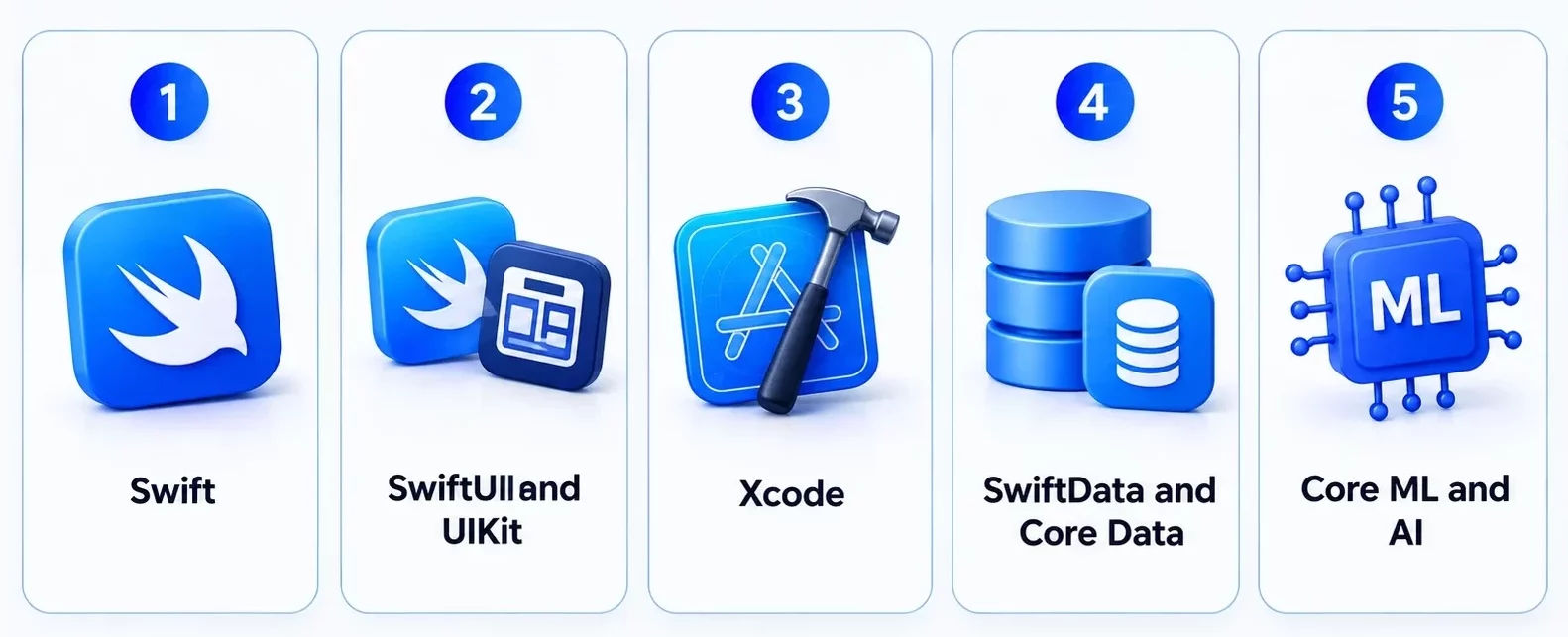
The technology stack directly influences performance, scalability, development effort, security, and maintenance. Modern iOS applications typically combine Apple’s programming language, UI frameworks, development environment, data technologies, and specialized platform services.
Swift
Swift is Apple’s primary programming language for modern iOS development. It is used for application logic, networking, data processing, concurrency, business rules, and native feature implementation.
Swift’s modern language features also support safer and more maintainable application architecture, making it the standard choice for most new iOS products.
SwiftUI and UIKit
SwiftUI is Apple’s declarative framework for creating user interfaces across Apple platforms. Developers can describe how an interface should respond to application state rather than manually managing every UI change.
UIKit is Apple’s established UI framework and remains widely used for mature applications, advanced customization, and projects with existing UIKit code.
Businesses do not necessarily have to select one framework exclusively. Many production applications combine SwiftUI and UIKit, particularly when modernizing an established application. For a deeper comparison, explore this SwiftUI vs UIKit comparison article.
Xcode
Xcode is Apple’s integrated development environment for developing, testing, debugging, profiling, and distributing applications.
It provides the tools developers need to manage source code, build interfaces, test applications on simulators and physical devices, identify performance issues, run automated tests, and prepare App Store releases.
SwiftData and Core Data
Applications that store information locally may use SwiftData or Core Data depending on their architecture and requirements.
SwiftData provides a modern approach to persistence for applications built with Swift, while Core Data remains relevant for established applications and mature data architectures. The appropriate choice depends on the application’s minimum OS requirements, data model, synchronization needs, and existing codebase.
Core ML and AI
Core ML and Apple’s broader intelligence technologies allow developers to incorporate machine learning and AI capabilities into applications. Potential use cases include personalized recommendations, image analysis, prediction, text processing, and intelligent automation.
Apple is also expanding its developer tools around on-device intelligence. Its current approach emphasizes privacy and the ability to perform certain AI experiences directly on compatible devices.
Other Apple Frameworks
Depending on the product, developers may also use frameworks such as HealthKit, StoreKit, MapKit, Vision, ARKit, RealityKit, WidgetKit, ActivityKit, and UserNotifications.
The important consideration is not how many frameworks an application uses, but whether each technology supports a genuine product requirement.
Types of iOS Apps Businesses Can Build
iOS applications can support almost any digital business model, but the architecture and functionality vary according to the product category.
Consumer iOS Apps
Consumer applications include social platforms, entertainment products, fitness applications, shopping apps, lifestyle products, and productivity tools.
These applications typically focus heavily on onboarding, engagement, personalization, retention, and monetization. Their success often depends on reducing friction during common user journeys.
Enterprise iOS Apps
Enterprise applications help organizations digitize internal and field operations. They may support employee communication, sales activities, inventory management, reporting, field service, and workflow automation.
Unlike many consumer apps, enterprise applications often require deeper integrations with existing business systems and stronger role-based access controls.
On-Demand Apps
On-demand applications connect customers with services such as transportation, food delivery, healthcare, home services, and professional assistance.
A typical on-demand product may combine discovery, booking, payment, real-time tracking, notifications, ratings, and customer support.
B2B Applications
B2B iOS products can support customer relationship management, workflow automation, document management, analytics, team collaboration, and sales enablement.
These applications often need APIs and integrations with existing enterprise systems, making backend architecture an important part of the planning process.
Super Apps
Super apps combine multiple services within one application, such as payments, shopping, messaging, booking, loyalty, and financial services.
While the model can create significant ecosystem value, businesses should validate individual workflows before expanding the product into a highly complex multi-service platform.
iOS App Development Across Different Industries
The flexibility of Apple’s ecosystem makes iOS suitable for many industries, but each vertical introduces different product and technical requirements.
Fintech and Banking
Financial applications can support digital banking, payments, investment management, personal finance, insurance, and financial analytics.
Security is particularly important because financial applications handle sensitive user and transaction information. Features such as biometric authentication can provide an additional layer of security while keeping authentication convenient.
Retail and E-Commerce
Retail applications can improve product discovery, purchasing, loyalty, and repeat engagement. Businesses can use features such as personalized recommendations, digital payments, push notifications, visual search, and augmented reality product previews to create more engaging shopping experiences.
Healthcare
Healthcare applications can support telemedicine, appointment management, remote monitoring, health tracking, medication management, and patient communication.
Healthcare products require careful consideration of privacy, security, consent, data handling, and applicable regulatory requirements. For a deeper industry-specific overview, read our healthcare app development guide.
Education
Education applications can provide video lessons, interactive courses, assessments, progress tracking, and personalized learning experiences.
iPad compatibility can also be valuable for educational products that require larger-screen experiences.
Logistics
Logistics applications can support driver workflows, fleet management, delivery tracking, route planning, inventory management, and proof of delivery.
Real-time synchronization becomes particularly important when several users and operational systems need access to the same data.
Travel and Hospitality
Travel applications can combine booking, digital itineraries, location services, personalized recommendations, loyalty programs, notifications, and customer support.
The best products focus on reducing friction throughout the entire travel journey rather than treating booking as the only objective.
iOS App Development Process: 8 Stages
The iOS app development process should move from business validation to product design, engineering, testing, and continuous improvement. A structured approach helps control scope while creating a foundation that can support future growth.
Stage 1: Discovery and Business Requirements
The process begins by understanding the problem the application is expected to solve. The team defines the target audience, business objectives, value proposition, revenue model, primary features, technical requirements, integrations, and success metrics.
At this point, businesses should also distinguish between essential functionality and features that can be introduced later. This prevents the first release from becoming unnecessarily complex.
Stage 2: Market Research and User Analysis
Market research helps establish whether the proposed solution addresses a meaningful need. The team studies competitors, existing alternatives, customer pain points, market gaps, pricing models, and user expectations. User personas and journeys can then be created based on actual research rather than assumptions.
This stage is particularly useful for identifying opportunities to differentiate the product before development begins.
Stage 3: Product Scope and Information Architecture
Once the product direction is clear, the team defines its information architecture and MVP scope. User flows, navigation, feature priorities, integrations, and technical requirements are mapped before implementation begins.
A focused MVP allows businesses to validate the core product while avoiding unnecessary development costs. The architecture should still be designed so that validated functionality can be expanded later.
Stage 4: UI/UX Design
The design team converts product requirements into wireframes, prototypes, visual designs, and interaction patterns. iOS interfaces should follow Apple’s Human Interface Guidelines while maintaining the application’s brand identity. Design should also account for accessibility, different screen sizes, Dark Mode, Dynamic Type, loading states, errors, empty states, and offline scenarios.
Testing the prototype with representative users can reveal usability issues before engineering resources are committed. A UI UX design agency can help refine these elements into a consistent and user-friendly experience before development begins.
Stage 5: iOS Development and Architecture
Developers implement the approved product using the selected technology stack. This stage can involve Swift, SwiftUI, UIKit, APIs, databases, authentication, payments, notifications, analytics, cloud services, AI, and third-party integrations.
Architecture should reflect realistic growth expectations. Decisions around APIs, data models, authentication, caching, networking, and modularity can have a major impact on future maintenance.
Stage 6: Quality Assurance and Testing
Testing should occur throughout development rather than being treated as a final activity. Functional testing verifies that features behave as expected, while performance testing evaluates responsiveness, memory usage, network behavior, and battery impact. Security, accessibility, API, UI, and regression testing should also be included.
Testing on physical Apple devices is important because hardware-specific behavior may not always be visible in a simulator.
Stage 7: App Store Submission
Before submitting an application, the team prepares the required metadata, screenshots, privacy information, age rating, review details, and other App Store materials.
Apple’s App Review Guidelines require applications to be complete, functional, accurate, and compliant with applicable requirements. Apple also recommends testing applications for crashes and bugs and providing reviewers with appropriate access when required.
App Store preparation should begin before the final development stage because review-related changes can sometimes require updates to functionality or user experience.
Stage 8: Post-Launch Monitoring and Improvement
The launch is the beginning of the product’s next development cycle. Teams should monitor crashes, performance, retention, conversion, feature adoption, user feedback, reviews, security issues, and compatibility with new iOS releases.
These insights can guide future releases and help businesses invest in features that have demonstrated user or commercial value.
iOS App Design Best Practices
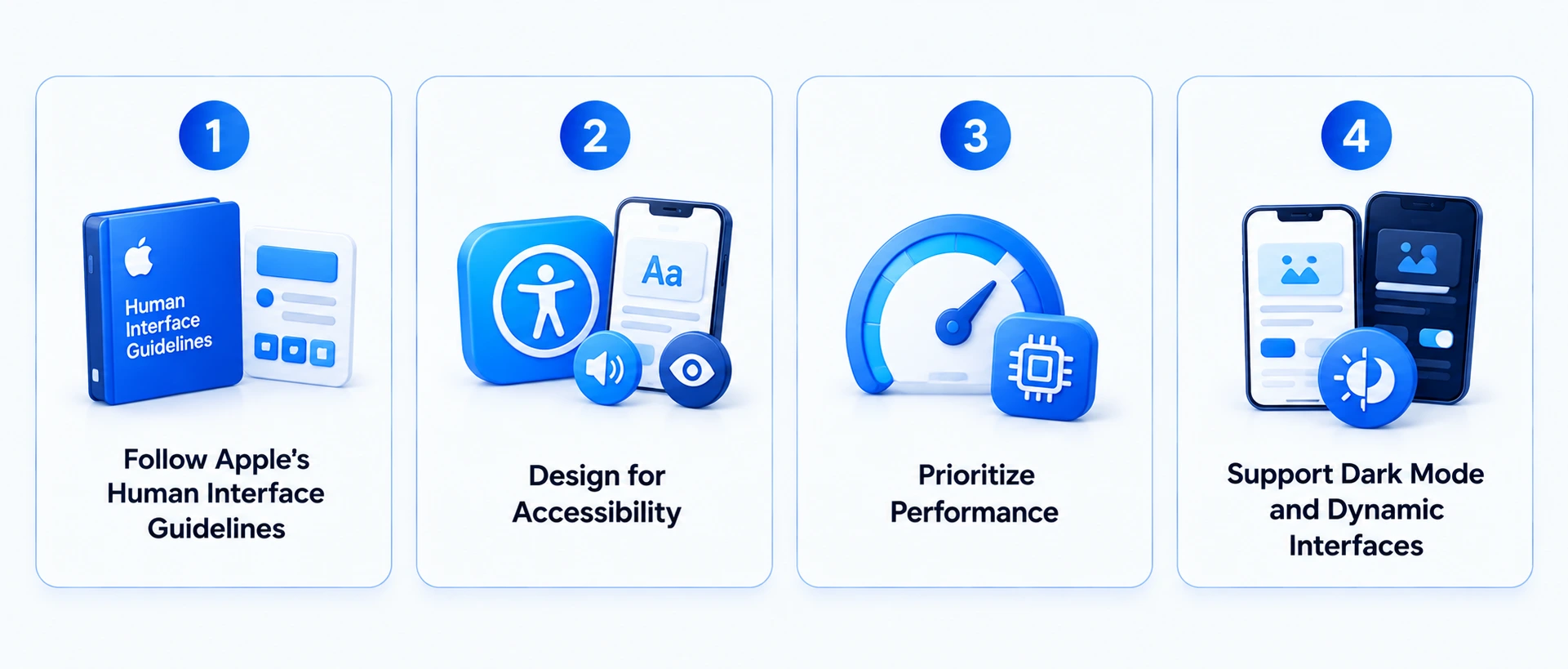
A technically sound application can still struggle if its user experience is difficult or inconsistent. Design should therefore be treated as a core part of product development.
Follow Apple’s Human Interface Guidelines
Apple’s Human Interface Guidelines provide recommendations for navigation, typography, controls, layouts, interaction patterns, feedback, and accessibility.
Following established platform conventions helps users understand how the application works without having to learn unfamiliar interaction patterns.
Design for Accessibility
Accessibility should be considered during the initial design phase. Support for VoiceOver, Dynamic Type, appropriate contrast, accessible labels, suitable touch targets, and reduced-motion preferences can make the application more usable for a broader audience.
Prioritize Performance
Performance is part of the user experience. Slow startup times, excessive memory usage, unnecessary network requests, and inefficient background activity can negatively affect the perceived quality of an application.
Performance profiling should therefore happen throughout development rather than immediately before release.
Support Dark Mode and Dynamic Interfaces
Modern iOS applications should adapt to different system preferences and device configurations.
Dark Mode, Dynamic Type, responsive layouts, appropriate animations, and haptic feedback can contribute to a polished experience when implemented with purpose.
AI and Machine Learning in iOS Apps
AI can provide meaningful value when it addresses a specific user or business problem rather than being added simply as a trend.
On-Device AI
On-device intelligence can be particularly useful when privacy, latency, or offline functionality matters. Examples include image analysis, recommendations, classification, predictions, and smart suggestions.
Apple’s current developer direction places significant emphasis on on-device intelligence, helping developers create AI-powered experiences while maintaining strong privacy considerations.
Personalization
AI can analyze user behavior to personalize content, products, recommendations, learning experiences, or notifications.
For example, an education application could recommend learning material based on a student’s previous performance, while an e-commerce application could personalize product discovery.
Voice and Natural Language
Natural language technologies enable voice search, speech transcription, conversational interfaces, accessibility features, and voice-driven workflows. They can make iOS apps more intuitive by allowing users to interact with features through natural speech and conversational commands.
Computer Vision
Computer vision can enable document scanning, visual search, image classification, object recognition, and augmented reality experiences.
The appropriate AI architecture depends on factors such as data sensitivity, model requirements, latency, infrastructure, and expected usage.
How Much Does iOS App Development Cost?
The cost of iOS app development depends on product complexity, feature scope, UI/UX requirements, backend infrastructure, integrations, security requirements, development resources, and advanced technologies.
For early-stage budgeting, the following ranges provide a practical starting point:
iOS App Development Cost by Complexity
| App complexity | Typical cost range | Typical development timeline |
| Basic | $20,000–$50,000 | 3–4 months |
| Mid-level | $50,000–$150,000 | 4–8 months |
| Advanced | $150,000+ | 6–12+ months |
These figures are planning ranges rather than fixed quotes. A product with several user roles, real-time functionality, complex integrations, advanced security requirements, or AI capabilities can require considerably more engineering effort than a basic application.
The ranges are aligned with RipenApps’ dedicated iOS app development cost guide, which provides a more detailed breakdown of development costs and the factors that influence them.
Factors That Influence iOS App Development Cost
The first major factor is application complexity. A content-based application with a limited number of screens is significantly different from a fintech, healthcare, marketplace, or social platform with real-time functionality.
Feature scope is another major consideration. Authentication, payments, chat, video calling, maps, notifications, analytics, AI, and other advanced features each add design, engineering, and testing requirements.
The backend can also have a substantial effect on cost. Custom APIs, databases, cloud infrastructure, real-time synchronization, authentication, and complex business logic require additional development.
Third-party integrations can increase both initial and ongoing costs. Payment gateways, maps, analytics platforms, communication tools, enterprise systems, and external APIs need to be evaluated for compatibility, maintenance, licensing, and security.
Finally, security and compliance requirements can significantly affect the budget for applications handling financial, healthcare, enterprise, or other sensitive information.
How to Control iOS Development Costs
Businesses can manage budgets by defining a focused MVP, prioritizing high-value features, validating user workflows early, and avoiding unnecessary integrations.
It is also important to consider the total cost of ownership rather than only the initial development quote. Poor architecture, inadequate testing, and unclear requirements can create significant rework after launch.

How Long Does It Take to Develop an iOS App?
The development timeline depends on application complexity and the amount of design, backend, integration, and testing work required.
A basic application can generally take around 3–4 months. Mid-level products may require approximately 4–8 months, while complex applications can take 6–12 months or longer.
The timeline is also influenced by the development approach. A focused MVP with a limited number of workflows can reach launch faster than a product that requires multiple user roles, real-time communication, complex integrations, advanced AI, or support for several Apple platforms.
Reducing discovery or testing to accelerate the schedule can create problems later. A realistic development plan should leave enough time for design validation, engineering, QA, App Store preparation, and post-launch stabilization.
Getting an iOS App Through the App Store
App Store submission requires more than uploading the application binary. Businesses need to prepare the app’s metadata, screenshots, description, privacy information, age rating, review details, and other required materials.
Apple’s review process evaluates applications for areas including functionality, safety, privacy, security, content, and reliability.
App Store Optimization
App Store optimization can improve both discovery and conversion. App Store optimization can improve discovery and conversion. Key elements include the app’s title, subtitle, description, keywords, screenshots, previews, ratings, reviews, and localization.
Optimization should focus on accurately communicating the application’s value. Repeating keywords without improving the product’s positioning is unlikely to create a strong App Store experience.
iOS App Monetization Models
Businesses can choose from several monetization approaches, including subscriptions, in-app purchases, freemium models, paid downloads, advertising, transaction fees, marketplace commissions, and enterprise licensing.
The monetization strategy should be considered during product planning because it can influence payment architecture, analytics, user flows, and ongoing revenue management.
iOS App Security and Privacy Best Practices
Security should be incorporated into the application’s architecture rather than added immediately before launch.
An application may process personal information, financial data, health information, location data, authentication credentials, and behavioral information. The development team should therefore determine what data is required, why it is collected, where it is stored, who can access it, and how it is protected. Common security measures include:
- Secure authentication
- Biometric authentication where appropriate
- Encryption in transit and at rest
- Keychain-based credential storage
- Secure API communication
- Least-privilege access
- Secure session management
- Input validation
- Dependency management
- Security testing
Applications operating in regulated industries may require additional controls and compliance measures. For deeper security guidance, read this dedicated iOS App Security Best Practices guide.
iOS App Development Trends Businesses Should Watch
The latest iOS app development trends are helping businesses build smarter, more secure, personalized, and future-ready mobile experiences.
AI-Powered Experiences
Artificial intelligence is becoming increasingly common across consumer and business applications. Apple’s 2026 App Store ecosystem research found that more than 40 of the top 100 apps featured consumer-facing AI capabilities in 2025.
For businesses, the opportunity lies in applying AI to specific workflows such as recommendations, automation, search, personalization, and content generation.
Spatial Computing
Spatial computing can extend applications beyond traditional mobile interfaces. Retail, education, training, design, entertainment, and visualization products can use spatial technologies when three-dimensional interaction provides genuine user value.
Wearable Integration
Apple Watch can extend an iOS product into areas such as fitness, health, notifications, productivity, monitoring, and quick interactions.
The value of wearable integration depends on whether users benefit from accessing the product without opening their phone.
Real-Time Experiences
Modern networks and cloud infrastructure make real-time functionality practical for products involving collaboration, communication, tracking, streaming, and live updates.
However, applications should still be designed to handle unreliable network conditions rather than assuming constant high-speed connectivity.
Intelligent and Agentic Applications
AI-powered applications are increasingly moving beyond simple question-and-answer interactions toward task assistance and workflow automation. Potential use cases include intelligent search, scheduling, personalized recommendations, automated workflows, and contextual assistance.
Businesses should evaluate these capabilities based on reliability, privacy, user control, and measurable value.
Real-World iOS Apps and What They Demonstrate
Well-known applications can provide useful examples of how different product strategies work on iOS.
Airbnb
Airbnb combines search, maps, property discovery, booking, payments, messaging, reviews, and personalized recommendations within a single marketplace experience. Its iOS app needs to handle large amounts of dynamic information while keeping the booking journey simple and intuitive.
For businesses, Airbnb demonstrates the importance of designing connected workflows rather than treating each feature as a separate module. Location services, search filters, real-time availability, secure payments, notifications, and messaging must work together seamlessly. The key takeaway is to build an information-rich app around clear user journeys, with navigation and performance considered from the beginning.
Duolingo
Duolingo combines personalization, gamification, short learning sessions, progress tracking, reminders, and interactive exercises to encourage users to return regularly. Instead of relying only on educational content, the platform uses product design to make learning feel accessible and rewarding.
For businesses, Duolingo shows how engagement can be built into the product experience itself. Progress indicators, personalized recommendations, achievement systems, and timely notifications can encourage repeat usage when they provide genuine value. The broader lesson is that retention depends not only on technical functionality but also on understanding user motivation and designing experiences around it.
Robinhood
Robinhood demonstrates how a financial app can simplify complex information and actions through a focused mobile experience. Users can monitor markets, review portfolios, place trades, and manage financial activity from a smartphone, making performance and usability particularly important.
For businesses developing fintech applications, Robinhood highlights the need to balance simplicity with security and transparency. Financial data must be presented clearly, critical actions should have appropriate safeguards, and the application should remain responsive during high-demand periods. The lesson extends beyond fintech: whenever an app handles sensitive information or high-value actions, trust, performance, and clarity should be treated as core product requirements.
Calm
Calm combines content delivery, personalization, subscriptions, progress tracking, notifications, and a polished mobile experience to encourage recurring engagement. Its approach shows how an app can turn a large content library into a guided experience rather than simply presenting users with a collection of resources.
For businesses, Calm illustrates the value of combining personalization with a frictionless content experience. Recommendations, structured content journeys, subscription features, and thoughtful notifications can help users discover relevant content and build recurring usage. The broader takeaway is that a successful content-driven app needs more than a large content library; it needs an experience that helps users find and consistently use the right content.
These products should be treated as references rather than templates. Their success comes from aligning technology, UX, business models, and user needs. Businesses planning an iOS app should identify the workflows and product principles relevant to their audience, then develop an architecture and experience around their own objectives rather than simply replicating features from established apps.
RipenApps iOS App Development Experience
RipenApps has experience developing mobile products across education, healthcare, e-commerce, finance, and other business categories.
Mednovate Connect
Mednovate Connect is a US-focused HealthTech platform for telemedicine and medication management. RipenApps built the iOS and Android solution in three months, connecting patients with licensed clinical pharmacists.
The platform supports medication management plans, pharmacist consultations, appointment booking, treatment monitoring, and patient-provider messaging. Its focus on healthcare workflows highlights the importance of secure communication, reliable data handling, usability, and compliance-oriented design in iOS healthcare applications.
Cobone
Cobone is a Middle Eastern daily-deals and coupons marketplace built for Android and iOS using React Native. RipenApps delivered the cross-platform application in three months, with unified logic across platforms.
The platform combines geo-fenced discovery across 20+ categories, secure transactions, in-app purchase and redemption, account management, and real-time tracking. As of August 2026, it has 500K+ Google Play installs and a 4.0-star rating from 6.8K+ reviews.
These projects demonstrate that iOS development requires more than technology selection. Product strategy, UX, architecture, security, testing, and ongoing optimization must align with the application’s specific business and user requirements.
Common iOS App Development Challenges
The iOS app development process challenges can involve factors related to performance, security, scalability, compatibility, App Store requirements, and ongoing maintenance.
Managing Different Apple Devices
Supporting different screen sizes and Apple devices requires responsive design and appropriate testing. The solution is to define the target device range early and validate the experience across relevant physical devices.
Meeting App Store Requirements
App Store requirements can create delays when privacy information, functionality, metadata, or review materials are incomplete.
Teams should review Apple’s requirements throughout development instead of waiting until submission.
Balancing Security With User Experience
Security controls should protect users without creating unnecessary friction. Platform capabilities such as biometric authentication can help achieve this balance when implemented appropriately.
Maintaining Performance
Large media files, inefficient network calls, memory-intensive processes, and unnecessary background activity can affect performance and battery usage. Continuous profiling and physical-device testing can identify these problems earlier.
Managing Third-Party Dependencies
External SDKs can accelerate development but also introduce compatibility, licensing, maintenance, and security considerations.
Every dependency should therefore be evaluated for its long-term value rather than added simply because it provides a convenient shortcut.
Building for Scale
An architecture that works for an MVP may not support significant user growth. Businesses should consider API design, database architecture, caching, authentication, observability, and cloud infrastructure before scaling becomes an urgent problem.
How to Choose the Right iOS App Development Partner
Selecting an iOS development partner is a long-term business decision. The right team should be able to understand the product, recommend an appropriate architecture, manage development, and support the application after launch. For a better understanding of the development process, businesses can also explore tips to hire iOS app developers.
Evaluate Relevant Experience
A portfolio should demonstrate more than attractive interfaces. Look for projects with comparable industry requirements, technical complexity, integrations, security needs, and user workflows.
Understand the Technical Approach
Ask how the team plans to approach architecture, APIs, databases, authentication, security, testing, scalability, and third-party integrations.
A strong partner should be able to explain why particular technologies are appropriate for the product rather than simply recommending the latest framework.
Review the Development Process
The partner should have a structured process covering discovery, UX design, development, QA, deployment, and maintenance. Clear project milestones and communication practices also make it easier to manage changes in scope.
Assess Post-Launch Support
iOS applications require ongoing maintenance as Apple releases new operating systems, SDKs, security updates, and platform capabilities.
Before signing an agreement, clarify how the development team handles bug fixes, OS updates, performance improvements, security updates, and future feature development.
Final Thoughts
Developing an iOS application is a product journey rather than a one-time coding project. Businesses need to define the right problem, validate the product scope, select an appropriate technology stack, design a strong user experience, and establish an architecture that can support future requirements. Working with a mobile application development company can also help businesses align these technical and product decisions with long-term goals. Cost and timeline depend primarily on application complexity. A basic iOS app may cost approximately $20,000–$50,000 and take 3–4 months, while a mid-level product can require $50,000–$150,000 and around 4–8 months. Advanced products can exceed $150,000 and require 6–12 months or longer.
The commercial opportunity is also significant. Apple’s latest ecosystem study reported more than $1.4 trillion in developer billings and sales during 2025, alongside more than 850 million average weekly App Store users across 175 countries and regions. The strongest approach is not to build the largest application possible. Start with a focused product, validate the most important user workflows, build a scalable foundation, and use real user and business data to determine what should come next.

FAQs
Q1. What is iOS app development?
iOS app development is the process of designing, building, testing, launching, and maintaining applications for Apple’s platforms, including iPhone and iPad. Modern iOS development commonly uses Swift, SwiftUI, UIKit, Xcode, SwiftData, and Apple’s native frameworks.
Q2. How much does it cost to develop an iOS app?
A basic iOS application can cost around $20,000–$50,000, while a mid-level application may cost $50,000–$150,000. Advanced applications can exceed $150,000. The final cost depends on features, complexity, design, backend infrastructure, integrations, security requirements, and development resources.
Q3. How long does iOS app development take?
A basic iOS application can take approximately 3–4 months. A mid-level application may require 4–8 months, while a complex product can take 6–12 months or longer depending on its features, integrations, backend complexity, testing requirements, and platform coverage.
Q4. Should I build a native iOS app or use a cross-platform framework?
Native iOS development is generally appropriate when performance, Apple-specific functionality, platform integration, and a highly optimized iOS experience are priorities. Cross-platform development can be useful when a business needs both iOS and Android applications and wants to share more of the development codebase.
Q5. What programming language is used for iOS app development?
Swift is Apple’s primary programming language for modern iOS development. Objective-C remains relevant in some older applications, but new iOS products commonly use Swift.
Q6. What is the difference between SwiftUI and UIKit?
SwiftUI is Apple’s declarative framework for building user interfaces, while UIKit is an established framework offering extensive controls and customization options. Many applications can use both technologies depending on the project requirements and existing codebase.
Q7. How do I get my app approved on the Apple App Store?
The application must comply with Apple’s current App Review Guidelines and technical requirements. Businesses should ensure that the application is complete, functional, accurately represented, properly tested, and accompanied by the required metadata and privacy information.
Q8. Can I add AI features to an iOS app?
Yes. AI can support recommendations, personalization, image analysis, prediction, voice capabilities, natural language processing, and workflow automation. Depending on the use case, AI processing can happen on-device, in the cloud, or through a hybrid architecture.
Q9. What should I look for when choosing an iOS app development company?
Evaluate the partner’s relevant portfolio, technical expertise, architecture approach, development process, security practices, testing capabilities, communication model, scalability strategy, and post-launch support.
Q10. How do I maintain an iOS app after launch?
Post-launch maintenance includes bug fixes, performance optimization, security updates, dependency upgrades, iOS compatibility updates, analytics monitoring, App Store compliance updates, and new feature development based on user feedback and business priorities.
Discuss your project and request for proposal
SHARE
WRITTEN BY

Ishan Gupta
CEO & Founder
Ishan Gupta is a seasoned entrepreneur and CEO with extensive 10+ years of experience in business and mobile app development landscape. He believes that the right digital product allows companies to focus on what they do best, while technology handles the rest. With deep exposure to global markets, he understands what makes an app succeed. His approach translates business needs into clear product strategies, ensuring that every feature contributes to measurable ROI.
View All Articles