
Key Takeaways
- Enterprise UX improves employee productivity by reducing friction in everyday workflows.
- Clear interfaces help teams complete tasks faster and make fewer operational errors.
- Role-based experiences make complex enterprise applications easier to navigate.
- Consistent design systems improve usability across departments, devices, and business units.
- User research helps businesses align software experiences with real operational needs.
- Measuring usability and task performance helps connect design improvements with business outcomes.
Enterprise software supports the everyday work that keeps a business running. Employees use it to manage customers, process transactions, monitor performance, coordinate teams, and make important decisions. However, complex interfaces, disconnected workflows, and difficult navigation often slow these activities down. Even a feature-rich application can become a productivity barrier when employees struggle to use it.
This is where Enterprise UX Design becomes important. It focuses on making business applications easier to understand and operate while supporting the needs of different users. Unlike consumer-facing products, enterprise platforms must handle multiple roles, large volumes of information, complex permissions, and interconnected workflows. A strong experience brings these elements together without overwhelming the people who rely on the software.
A clear understanding of UI and UX design also helps businesses recognize how interface elements and user journeys work together. UI determines how users interact with the visual elements, while UX focuses on the overall experience of completing tasks. Both influence how effectively employees use business software.
For organizations investing in digital transformation, usability should be part of the product strategy from the beginning. Working with a team that understands business workflows and user expectations helps turn complex requirements into practical digital experiences. With the right enterprise application development services, businesses can create applications that improve productivity, support collaboration, and remain usable as operations expand.
Table of Contents
What is Enterprise UX Design?
Enterprise UX refers to the experience employees, administrators, managers, partners, and other business users have while working with enterprise software. It covers the complete interaction with applications such as enterprise resource planning (ERP) systems, customer relationship management (CRM) platforms, human resource management systems, analytics dashboards, and supply chain management tools.
The objective is to help users complete business tasks with clarity, accuracy, and minimal effort. This includes simplifying navigation, organizing complex information, reducing unnecessary steps, and making important actions easy to identify. Effective Enterprise UX Design considers the full workflow rather than focusing only on individual screens.
For example, a sales representative may need quick access to customer records and sales updates, while a finance manager needs transaction summaries, approval controls, and reporting tools. Both users may work within the same enterprise application, but their priorities and daily tasks are different. The experience should support these differences without making the platform inconsistent.
Enterprise UX vs. Consumer UX
Enterprise and consumer applications share common usability principles, but they serve different purposes. Consumer applications generally focus on individual preferences, quick interactions, and customer engagement. Enterprise applications support structured business activities that often involve multiple users, departments, permissions, and approval stages.
| Comparison Area | Consumer UX | Enterprise UX |
| Primary goal | Engagement and convenience | Productivity and task completion |
| Main users | Individual customers | Employees, managers, and business partners |
| Workflows | Usually shorter and simpler | Often complex and interconnected |
| Data requirements | Limited or personalized | Large, detailed, and role-specific |
| Access controls | Basic user permissions | Multiple roles and permission levels |
| Success measures | Engagement and retention | Adoption, accuracy, and efficiency |
Enterprise platforms also have to support both experienced employees and new users. A frequent user may need shortcuts and advanced controls, while a new employee needs clear guidance. The design must balance both requirements without creating unnecessary complexity.
Why Enterprise UX Matters for Business Growth?
A business application affects more than the digital experience of its users. It influences how quickly teams work, how accurately they handle information, and how smoothly departments coordinate their activities. When employees spend less time navigating software, they have more time to focus on meaningful work.
Well-planned enterprise interfaces also help organizations get more value from their technology investments. Employees are more likely to adopt applications that support their actual responsibilities. This makes usability an important factor in digital transformation, process improvement, and long-term business growth.
1. Improves Employee Productivity
Employees often repeat the same actions throughout the workday. Searching for records, updating information, submitting requests, and generating reports can consume significant time when the interface is difficult to navigate. Clear menus, relevant shortcuts, and simplified workflows help reduce this effort.
A well-structured application also makes frequently used functions easier to access. Employees can complete routine tasks with fewer steps and spend less time switching between screens. These improvements create measurable productivity gains when applied across large teams.
2. Increases Software Adoption
Even a powerful enterprise platform delivers limited value if employees avoid using it or depend on manual workarounds. Complicated navigation, unclear labels, and inconsistent interactions can make users reluctant to adopt new systems.
A user-focused experience helps employees understand how the application works and where to find the tools they need. Guided onboarding, contextual instructions, and consistent navigation make the transition easier. Businesses can also improve adoption by collecting feedback and addressing usability issues after deployment.
3. Reduces Operational Errors
Enterprise applications often handle sensitive business information, financial records, customer details, inventory, and approvals. Confusing forms or unclear system feedback can lead to incorrect entries, missed steps, and costly rework.
Clear field labels, input validation, confirmation messages, and well-defined approval flows help prevent these problems. Users should also be able to review important information before submitting or approving an action. These design decisions support more accurate operations and reduce avoidable mistakes.
4. Strengthens Cross-Department Collaboration
Many business processes involve multiple teams. For example, a customer order may require coordination between sales, finance, inventory, and logistics. If each department works with disconnected tools or inconsistent information, delays and communication gaps become difficult to avoid.
A unified interface with shared records, clear task ownership, and visible workflow status helps teams coordinate their work. Employees can understand what has been completed, what requires approval, and which action comes next. This creates a more connected working environment.
5. Supports Faster Business Decisions
Managers need reliable information to monitor performance and respond to changing business conditions. However, large datasets are difficult to interpret when dashboards lack structure or present too many metrics at once.
A clear information hierarchy helps users identify important indicators first and explore detailed information when needed. Filters, visual reports, and role-specific dashboards make business data easier to interpret. This supports faster decisions across finance, operations, sales, and management teams.
How Enterprise UX Improves Operational Efficiency
Business growth depends on how well people, processes, and technology work together. Enterprise applications should make everyday operations easier to manage rather than adding more steps to existing processes. A thoughtful user experience helps organizations reduce friction across routine activities and complex workflows.
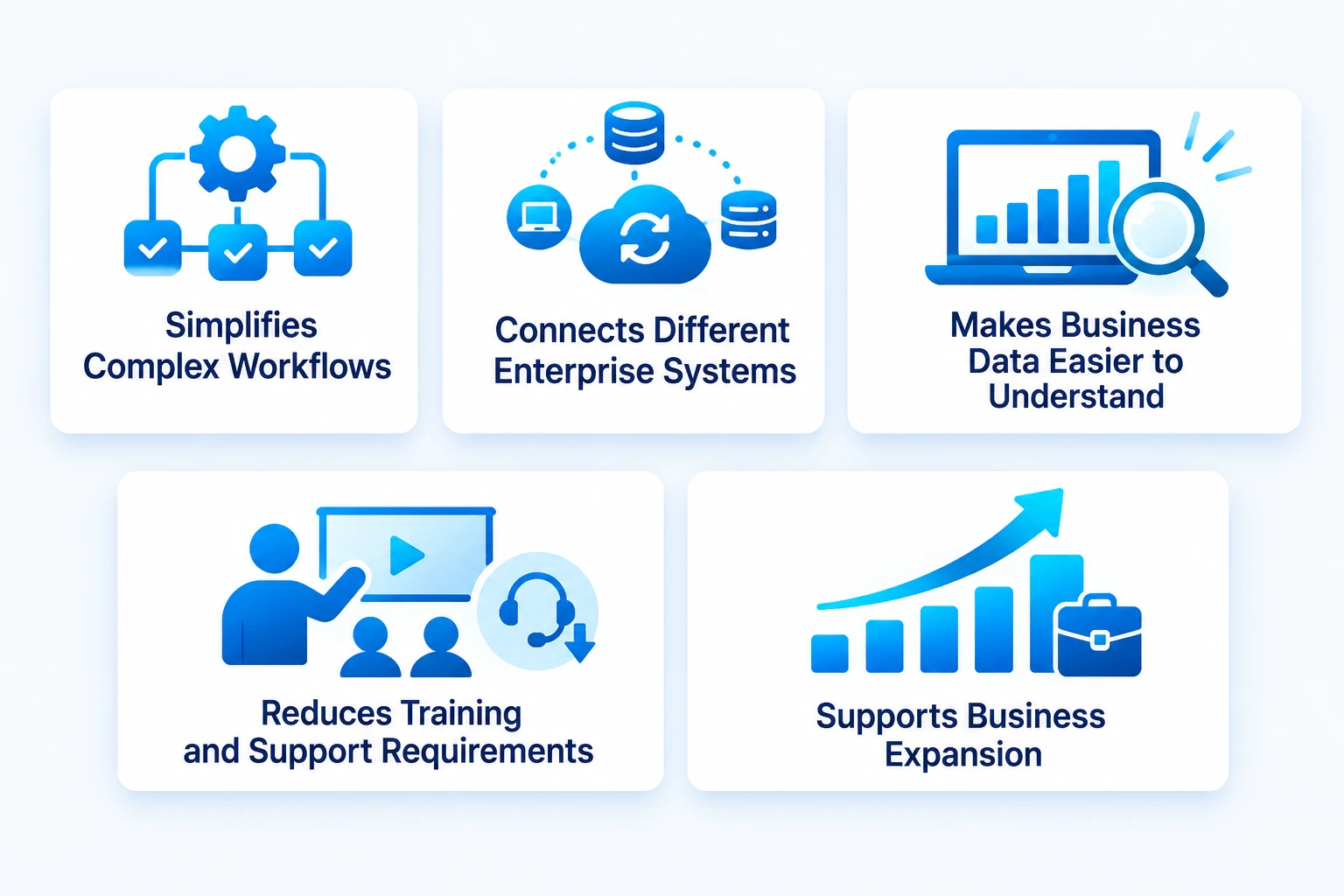
1. Simplifies Complex Workflows
Enterprise processes often involve several steps, users, and approval stages. Employees may need to move between modules to complete one task. Workflow mapping helps identify unnecessary actions, repeated data entry, and delays between departments.
Designers can then organize related actions into logical sequences. For example, an employee submitting a purchase request should be able to enter details, attach documents, check approval status, and track the request without searching through multiple sections. This approach supports a business-focused enterprise app development strategy by aligning application workflows with actual operational needs.
2. Connects Different Enterprise Systems
Organizations often use multiple applications for finance, HR, customer management, inventory, and reporting. When these systems do not share information effectively, employees have to switch between platforms or enter the same details more than once.
A connected experience helps users access relevant information from different systems through a consistent interface. Clear integration flows, understandable status indicators, and unified navigation reduce the effort required to move between business functions. The design should also make it clear when information comes from another system and whether an action has been completed successfully.
3. Makes Business Data Easier to Understand
Enterprise platforms handle large amounts of information. Presenting every metric, record, and control on one screen can overwhelm users and make important details harder to identify.
A better approach is to organize information according to user roles and task priorities. Managers may need performance summaries, while analysts require detailed filters and data views. Progressive disclosure, readable tables, meaningful labels, and visual hierarchy help users focus on the information they need.
4. Reduces Training and Support Requirements
Employees need time to learn new software, especially when it includes complex processes or specialized terminology. If the interface is inconsistent, businesses may have to invest more in training and ongoing support.
Familiar navigation patterns, clear instructions, contextual help, and predictable interactions make applications easier to learn. A strong mobile app user experience also matters when employees access enterprise tools through smartphones or tablets while working outside the office.
5. Supports Business Expansion
As a business grows, its software must support more employees, locations, customers, and operational processes. Interfaces that work for a small team may become difficult to manage when new departments and modules are added.
Scalable design patterns, reusable components, flexible navigation, and role-based access help applications accommodate these changes. Businesses should plan for future requirements without making the current experience unnecessarily complex. This is especially important when expanding types of enterprise applications across different functions.
Core Principles of Effective Enterprise UX Design
Enterprise applications need more than attractive screens. They must support complex tasks, provide reliable information, and remain consistent across different user roles. The following principles help businesses create software experiences that work in demanding operational environments.
1. Design Around User Roles
One enterprise application may serve employees, managers, administrators, analysts, and external partners. Each group has different responsibilities and information needs. A single interface that treats every user the same can create unnecessary complexity.
Role-based experiences display relevant tools, information, and actions according to user permissions and responsibilities. For example, an administrator may need access to configuration settings, while a sales representative needs customer records and follow-up tasks. This makes the application easier to navigate without compromising access control.
2. Maintain Consistency Across Modules
Users should not have to relearn navigation or interaction patterns every time they move between modules. Consistent buttons, forms, menus, icons, and feedback messages make the application more predictable.
A shared design system helps maintain this consistency as the product expands. It provides reusable components, typography, spacing rules, color standards, and interaction patterns. Teams can use these standards to build new features faster while keeping the experience familiar.
3. Prioritize Accessibility and Readability
Enterprise software is often used for long periods and by people with different abilities, devices, and levels of technical knowledge. Small readability issues can become significant barriers during daily work.
Use sufficient color contrast, legible typography, clear labels, keyboard-friendly navigation, and meaningful focus states. Avoid relying on color alone to communicate status. Accessibility should be considered throughout the design process rather than added after the interface is complete.
4. Simplify Data-Heavy Interfaces
Dashboards, analytics tools, and operational platforms often need to display large datasets. However, showing too much information at once makes it harder to identify important details.
Use clear grouping, filters, sorting, search, and visual indicators to organize complex data. Show high-priority information first and allow users to access deeper details when required. Strong enterprise software design makes information easier to scan without removing the depth that experienced users need.
5. Provide Clear System Feedback
Users should always know what is happening after they take an action. A submitted request, failed upload, saved record, or pending approval should have a clear status.
Use confirmation messages, progress indicators, error explanations, and activity histories to keep users informed. When an action fails, explain what went wrong and how the user can resolve it. Clear feedback builds confidence and prevents repeated actions or unnecessary support requests.
Essential Features of Enterprise Applications That Improve UX
The features of an enterprise application should support the way people work. Their purpose is to make business tasks easier to complete, information easier to access, and workflows easier to manage.
| Feature | How It Improves the Experience |
| Role-based dashboards | Display relevant information and actions for each user group. |
| Centralized search | Helps users find records, documents, and information quickly. |
| Workflow automation | Reduces repetitive steps and manual coordination. |
| Data visualization | Makes business performance and trends easier to interpret. |
| Notifications and alerts | Keeps users informed about tasks, approvals, and important updates. |
| Access management | Controls access according to roles and responsibilities. |
| Reporting tools | Helps teams monitor performance and review operational data. |
| Mobile responsiveness | Supports access across desktops, tablets, and smartphones. |
| Integration support | Connects enterprise tools and reduces fragmented workflows. |
| Accessibility features | Makes applications easier to use for a wider range of employees. |
These capabilities should work together as part of a coherent experience. Adding more features without considering how users interact with them can make an application harder to operate. Businesses should prioritize functions based on user needs, workflow complexity, and measurable operational goals.
How to Build an Effective Enterprise UX Strategy
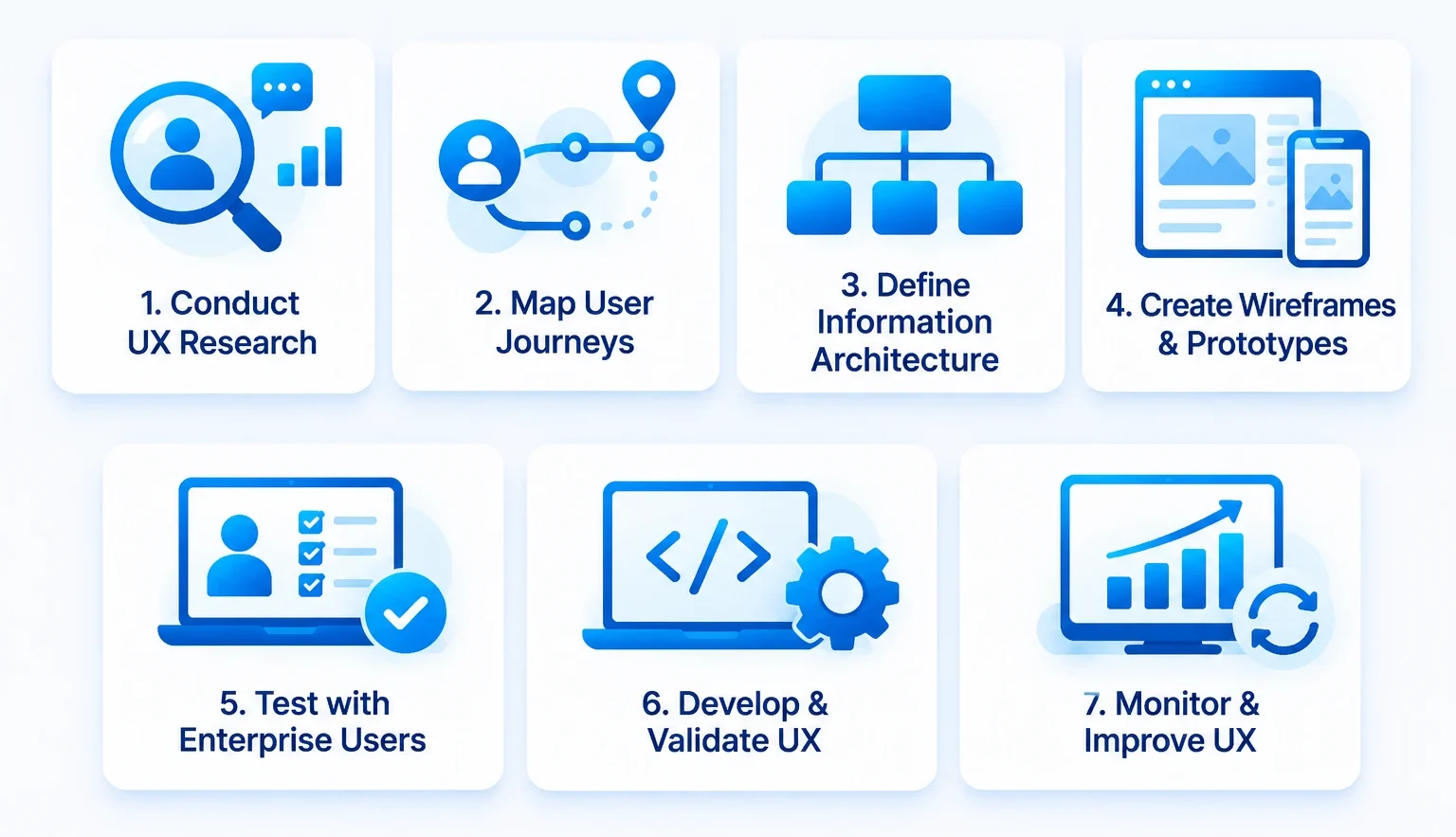
A successful UX strategy begins with understanding the people who use the application and the business processes it needs to support. It then translates those findings into design decisions that can be tested, refined, and implemented.
Step 1. Conduct Enterprise UX Research
Start by identifying the application’s user groups, responsibilities, daily tasks, and common challenges. Interview employees, observe real workflows, and speak with department heads to understand how work moves across the organization.
This research should also cover existing tools, technical limitations, accessibility needs, and business priorities. Strong enterprise app development process planning connects these findings with product requirements and implementation decisions.
Step 2. Map User Journeys and Workflows
Document how users complete important tasks, from the first action to the final outcome. Identify repeated steps, approval dependencies, system changes, and points where users experience delays.
Journey maps and workflow diagrams help teams understand the full process rather than designing isolated screens. They also reveal where automation, clearer instructions, or better information access could improve the experience.
Step 3. Define Information Architecture
Organize application content, modules, navigation, and permissions according to user needs. Group related functions together and make frequently used actions easy to locate.
A clear information architecture helps users understand where they are and how to reach the next step. It is especially important for enterprise platforms with multiple modules and large volumes of business data.
Step 4. Create Wireframes and Prototypes
Before development begins, create wireframes to establish page structure, navigation, and content hierarchy. Interactive prototypes help teams test how users move through important workflows.
Choosing between low-fidelity vs high-fidelity prototypes depends on what the team needs to validate. Low-fidelity versions help explore structure and task flow, while high-fidelity prototypes are useful for reviewing detailed interactions and visual design.
Step 5. Test with Real Enterprise Users
Conduct usability sessions with employees who represent different roles and experience levels. Ask them to complete realistic tasks and observe where they hesitate, make mistakes, or need assistance.
Use best prototyping methods that allow teams to test navigation, forms, dashboards, and complex workflows before investing in full development. Record feedback and prioritize changes based on how strongly they affect task completion and business operations.
Step 6. Develop and Validate the Experience
Once the design is tested, work closely with product managers and developers to implement it. Review the developed application against the approved designs, interaction rules, accessibility requirements, and business workflows.
The team should also validate responsive behavior, permissions, error handling, and integration states. UX validation should continue during development rather than being limited to the design handoff.
Step 7. Monitor Feedback and Improve Continuously
Launching the application is not the end of the UX process. Track user behavior, collect employee feedback, and review support requests to identify areas that need improvement.
Regular reviews help businesses adapt the experience as workflows, teams, and operational requirements change. Continuous improvement keeps the application useful as the organization grows.
Tools That Support Enterprise UX Design
The right design tools help teams create consistent interfaces, collaborate on prototypes, and validate user journeys before development. They also make it easier to maintain design standards across large products and multiple teams.
Common tools support different parts of the process, including wireframing, prototyping, design systems, collaboration, and usability testing. The selection should depend on project complexity, team workflows, integration needs, and the level of design detail required.
Some widely used UI UX designing tools include Figma, Sketch, Adobe XD, and collaborative whiteboarding platforms. Teams can use them to create reusable components, share feedback, and maintain a common reference for designers, developers, and product stakeholders.
A consistent mobile app design approach is also useful when enterprise platforms extend beyond desktop environments. It helps teams maintain familiar patterns across different screen sizes while adapting navigation and interactions to each device.
Enterprise UX for Mobile and Distributed Workforces
Enterprise employees do not always work from a desk. Field teams, sales representatives, warehouse staff, technicians, and managers may need to access business applications while travelling or working across different locations. Mobile access helps them complete tasks and retrieve information without returning to a desktop system.
However, simply shrinking a desktop interface for a smaller screen does not create a good mobile experience. Enterprise mobile applications need clear navigation, touch-friendly controls, readable content, and workflows suited to on-the-go tasks. Designers should also consider connectivity limitations, device security, and the need to access critical information quickly.
Businesses planning mobile solutions should follow relevant Android app design principles to maintain consistency and usability across devices. Organizations working with a ux design agency should also ensure that mobile workflows align with the broader enterprise experience rather than functioning as disconnected products.
For companies serving teams across international markets, mobile app development services USA can support the creation of mobile experiences that meet business requirements and user expectations. The design should remain consistent with the enterprise platform while accounting for the specific tasks employees perform on mobile devices.
How to Measure the Business Impact of Enterprise UX
UX improvements should connect with outcomes that matter to the organization. Visual quality alone does not show whether an application is helping employees work more effectively. Businesses need to measure how users interact with the software and whether the experience improves important workflows.
The following metrics help evaluate the impact of Enterprise UX Design:
| UX Metric | What It Measures | Business Impact |
| Task completion rate | Percentage of users completing a task successfully | Shows whether workflows are understandable |
| Task completion time | Time required to finish a specific activity | Indicates productivity improvements |
| Error rate | Frequency of incorrect entries or failed actions | Helps identify operational risks |
| User adoption rate | Number of employees actively using the application | Indicates acceptance and usability |
| Training time | Time required for users to become proficient | Reflects ease of learning |
| Support request volume | Number of usability-related help requests | Highlights recurring interface problems |
| User satisfaction | Feedback on the overall experience | Shows how employees perceive the software |
| Workflow abandonment | Tasks users leave incomplete | Reveals friction in important processes |
These metrics should be reviewed together rather than in isolation. For example, faster task completion is not a positive outcome if employees are making more mistakes. Similarly, high adoption does not automatically mean that users find the application easy to operate.
Businesses should establish baseline measurements before making major design changes. Comparing these figures after implementation helps teams understand which improvements are working and where further refinement is needed.
Cost and ROI of Enterprise UX Design
The investment in enterprise UX depends on the size and complexity of the application, the number of user roles, research requirements, design deliverables, and testing scope. A focused UX improvement for one workflow generally requires less effort than redesigning a large enterprise platform with multiple modules and integrations.
For a broader enterprise application project, the estimated development cost typically ranges from $50,000 to $300,000+. The final investment depends on application complexity, integrations, security requirements, and scalability needs. Within this budget, UI/UX design generally accounts for 10–15% of the total development cost, covering activities such as user research, wireframing, interface design, and usability validation. Reviewing the enterprise app development cost breakdown helps businesses plan their overall investment alongside UX requirements.
The return on UX investment comes from improvements such as reduced task completion time, fewer user errors, lower training requirements, and stronger software adoption. For example, simplifying a frequently used approval workflow can save time across hundreds of employees. When these gains are measured over time, businesses can assess how design improvements contribute to operational efficiency.
A practical way to evaluate ROI is to compare the cost of UX improvements with the measurable value of time saved, errors avoided, and support effort reduced. The results vary by organization, application, and workflow, so businesses should use their own operational data instead of relying on generic ROI assumptions.

Common Enterprise UX Challenges and How to Address Them
Enterprise applications operate in complex environments. They must support different users, established processes, legacy systems, and changing business requirements. These factors create design challenges that need to be addressed early.
1. Balancing Different User Requirements
Employees from different departments may use the same application for very different tasks. Trying to satisfy every user through one generic dashboard can make the interface cluttered.
How to address it: Use role-based navigation, personalized dashboards, and permission-aware content. Involve representatives from each user group during research and testing.
2. Managing Legacy Systems
Many organizations rely on older software that cannot be replaced immediately. New applications may need to work with existing databases, workflows, and technical limitations.
How to address it: Understand the existing technology environment before finalizing the design. Map system dependencies and create consistent interaction patterns across connected applications.
3. Handling Large Volumes of Data
Enterprise users often need access to detailed records, reports, and analytics. Poorly structured data views make it difficult to identify relevant information.
How to address it: Use search, filters, sorting, clear data labels, and progressive disclosure. Prioritize information based on the user’s role and immediate task.
4. Maintaining Consistency as Products Grow
As new modules and features are added, different teams may create inconsistent interfaces. This increases the learning effort for employees and makes the product harder to maintain.
How to address it: Establish a shared design system with reusable components, interaction guidelines, and documentation. Review new features against these standards before release.
5. Supporting Security Without Creating Friction
Enterprise software often contains confidential information and business-critical functions. Strict access controls are necessary, but confusing permission flows can interrupt everyday work.
How to address it: Make permissions role-based and explain restricted actions clearly. Use clear authentication, session, and confirmation patterns without adding unnecessary steps to routine tasks.
Enterprise UX Design Trends to Watch
Enterprise software is changing as businesses adopt AI, automation, cloud platforms, and more connected digital workflows. These developments are influencing how employees interact with business applications and how organizations manage complex tasks.
1. AI-Powered User Experiences
AI-powered features can help users search information, summarize reports, identify patterns, and receive contextual recommendations. These capabilities are especially useful in data-heavy enterprise applications.
However, AI outputs should remain transparent and easy to verify. Users need clear explanations, control over important actions, and a way to review recommendations before relying on them.
2. More Personalized Dashboards
Enterprise dashboards are becoming more adaptable to individual roles and responsibilities. Instead of showing the same information to everyone, applications can prioritize relevant tasks, metrics, and notifications for each user group.
This reduces information overload and helps employees focus on their immediate responsibilities.
3. Conversational Interfaces
Chat-based interfaces and natural-language search can help users find information or initiate routine tasks without navigating several menus. They are particularly useful when employees need to retrieve data from large enterprise systems.
These interfaces should complement traditional navigation. Critical actions must remain easy to review, confirm, and track.
4. Greater Focus on Accessibility
Accessibility is becoming a core requirement for digital products. Enterprise applications need to support users with different abilities, devices, and working environments.
Keyboard navigation, screen-reader compatibility, readable typography, sufficient contrast, and clear feedback help make software more inclusive and easier to use.
5. Connected Experiences Across Devices
Employees increasingly move between desktops, tablets, and smartphones during the workday. Enterprise products need to maintain consistent information and workflows across these devices.
Emerging mobile UI design trends also influence how businesses approach responsive layouts, navigation, and touch-based interactions. The goal is to make essential tasks accessible without compromising the depth of enterprise functionality.
6. Intelligent Workflow Automation
Automation can reduce repetitive actions such as data entry, approval routing, status updates, and report generation. When integrated into a clear interface, it helps employees focus on tasks that require judgment and decision-making.
Businesses exploring intelligent automation should ensure that users can understand automated actions, review important outcomes, and intervene when required.
Choosing the Right Enterprise UX Design Partner
Enterprise UX requires a strong understanding of business processes, user behavior, technical requirements, and product goals. The design partner should be able to translate complex operational needs into clear interfaces that support different user groups.
When evaluating a UX design agency or product development partner, consider the following factors:
- Enterprise project experience: Review experience with ERP, CRM, SaaS platforms, dashboards, and other business applications.
- Research capabilities: Check whether the team conducts user interviews, workflow analysis, and usability testing.
- Design system expertise: Look for experience creating reusable components and consistent design standards.
- Technical collaboration: Ensure designers work closely with developers and product teams throughout implementation.
- Scalability: Assess whether the design approach supports new features, user roles, and business expansion.
- Post-launch improvements: Choose a team that can evaluate feedback and refine the experience after deployment.
Businesses should also assess whether a partner understands the relationship between UX and application architecture. Effective enterprise UX design services should support both the user’s daily tasks and the organization’s long-term technology goals.
RipenApps brings together UI/UX design and application development capabilities to help businesses turn product requirements into practical digital solutions. Its teams focus on user needs, workflow clarity, and scalable product experiences. This approach helps organizations build applications that support employees while aligning with wider business objectives.
Conclusion
Enterprise software should make business operations easier to manage, not add complexity to everyday work. Clear navigation, role-based experiences, accessible interfaces, and connected workflows help employees complete tasks with greater accuracy and confidence. When businesses prioritize usability throughout product development, they create applications that support productivity, collaboration, and long-term operational efficiency.
Choosing the right custom application development company helps turn these UX goals into scalable digital products. RipenApps combines user-focused design with application development expertise to build enterprise solutions around real business requirements. By aligning technology with employee needs, organizations can create better software experiences and support sustainable business growth.
FAQs
Q1. What is enterprise UX design?
Enterprise UX refers to the experience people have while using business applications such as ERP, CRM, HR, and analytics platforms. It focuses on making complex workflows, data, and business tasks easier to understand and complete.
Q2. How does enterprise UX improve business growth?
A better user experience helps employees complete tasks faster, reduces operational errors, and improves software adoption. These improvements support productivity, collaboration, and more efficient business operations.
Q3. What are the key elements of effective enterprise UX?
Important elements include role-based dashboards, consistent navigation, accessible interfaces, clear information architecture, workflow automation, and useful system feedback. These elements help users work confidently across complex applications.
Q4. How is enterprise UX different from consumer UX?
Consumer UX generally focuses on individual convenience and engagement, while enterprise UX supports business tasks, multiple user roles, complex workflows, and large datasets. Enterprise applications prioritize task accuracy, productivity, and operational efficiency.
Q5. How do you measure enterprise UX success?
Businesses can measure UX performance through task completion time, error rates, user adoption, training time, support requests, and user satisfaction. Comparing these metrics before and after design improvements helps evaluate their impact.
Q6. Why is user research important for enterprise UX?
User research helps teams understand employee responsibilities, existing workflows, and common usability challenges. These insights guide design decisions and help ensure the application supports actual business needs.
Q7. How much does enterprise UX design cost?
Enterprise UX design typically costs $5,000 to $75,000+, depending on application complexity, the number of user roles and screens, research requirements, prototype scope, and testing needs. A focused UX improvement costs less than redesigning a large enterprise platform. A detailed project assessment helps determine the final estimate.
Q8. What role does a design system play in enterprise applications?
A design system provides reusable components, visual standards, and interaction guidelines. It helps maintain consistency across modules, speeds up design and development, and makes enterprise applications easier to expand.
Discuss your project and request for proposal
SHARE
WRITTEN BY

Ishan Gupta
CEO & Founder
Ishan Gupta is a seasoned entrepreneur and CEO with extensive 10+ years of experience in business and mobile app development landscape. He believes that the right digital product allows companies to focus on what they do best, while technology handles the rest. With deep exposure to global markets, he understands what makes an app succeed. His approach translates business needs into clear product strategies, ensuring that every feature contributes to measurable ROI.
View All Articles