


Key Takeaways
- Angular v22 enhances performance through improved Signals, SSR, hydration, and optimized rendering for modern applications.
- Standalone components continue maturing, simplifying project structures, reducing boilerplate code, and improving maintainability.
- Faster Angular CLI operations and build optimizations boost developer productivity and accelerate deployment workflows.
- Enhanced dependency injection, TypeScript integration, and debugging tools improve scalability, reliability, and development experience.
- Upgrading to Angular v22 delivers better performance, maintainability, and future-ready support for enterprise applications.
Angular continues to evolve as one of the most powerful frameworks for building enterprise-grade web applications. With the release of Angular v22, the Angular team has introduced several improvements focused on performance, developer productivity, modern rendering capabilities, and application scalability.
As businesses increasingly demand faster, more interactive, and highly maintainable web applications, Angular v22 arrives with enhancements that help development teams streamline workflows while delivering better user experiences. From refined Signals support and improved Server-Side Rendering (SSR) to optimized build performance and developer tooling upgrades, this release aims to make Angular development more efficient than ever.
Whether you’re maintaining a legacy Angular application, planning a migration from Angular 21, or evaluating frameworks for your next project, understanding the latest improvements can help you make informed development decisions. These advancements are especially valuable for organizations working with an AngularJS development company to build scalable, future-ready applications that can support evolving business needs and growing user demands.
In this comprehensive guide, we’ll explore everything new in Angular v22, including its major features, performance enhancements, migration considerations, and whether upgrading is the right choice for your organization.
Table of Contents
Angular v22 at a Glance
Angular v22 represents another significant step in the framework’s modernization journey.
The release focuses on four major areas:
- Enhanced reactivity through Signals improvements
- Better server-side rendering and hydration
- Faster development and build workflows
- Improved developer experience and tooling
These updates reflect Angular’s commitment to addressing modern mobile app development challenges while maintaining the framework’s reputation for scalability and maintainability.
Key Highlights of Angular v22
Some of the most notable improvements include:
- Advanced Signals capabilities for state management
- SSR performance enhancements
- Improved hydration strategies
- Faster Angular CLI operations
- Better TypeScript integration
- Optimized dependency injection mechanisms
- Enhanced standalone component support
- Reduced bundle sizes and build times
For organizations building large-scale digital products, these improvements can translate into lower development costs, faster deployment cycles, and better application performance.
Businesses investing in enterprise web platforms often leverage custom web app development services to maximize the benefits of modern Angular capabilities while ensuring scalability and long-term maintainability.
Major New Features in Angular v22
Angular v22 introduces a range of enhancements designed to improve application performance, streamline development workflows, and strengthen support for modern web architectures. The release builds upon recent Angular innovations by refining reactive state management, optimizing rendering capabilities, enhancing developer tooling, and improving overall framework efficiency.
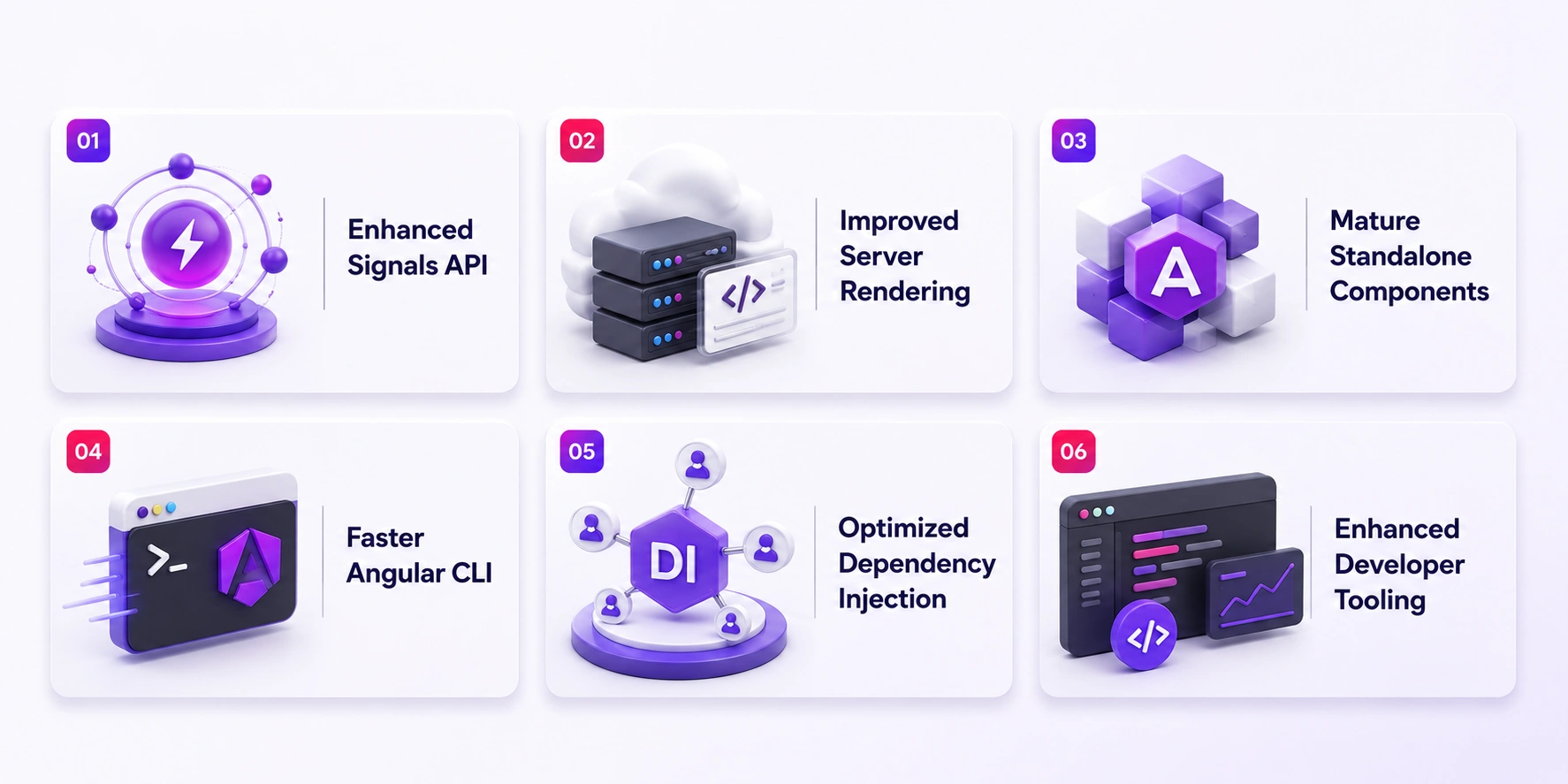
Whether you’re building enterprise-grade cross platform applications, SaaS applications, or progressive web applications, these new features help developers create faster, more scalable, and easier-to-maintain applications.
Enhanced Signals API
One of the most important advancements in Angular’s recent evolution has been the introduction of Signals. Angular v22 further strengthens this reactive programming model by introducing refinements that improve performance and developer ergonomics.
Signals provide a more predictable and efficient approach to state management compared to traditional change detection methods. They allow Angular applications to update only the components affected by state changes rather than triggering unnecessary updates throughout the application.
Why Signals Matter
Traditional change detection mechanisms can become expensive in large applications.
Signals solve this challenge by enabling:
- Fine-grained reactivity
- Improved rendering performance
- Reduced computational overhead
- Simpler state management patterns
- Better debugging capabilities
For development teams managing complex applications, Signals help create cleaner architectures and more maintainable codebases.
Benefits for Enterprise Applications
Large enterprise applications often struggle with:
- Performance bottlenecks
- Complex state synchronization
- Excessive re-rendering
- Maintenance challenges
Angular v22’s Signals improvements help address these concerns by enabling more efficient application updates and predictable state flows.
As organizations modernize their digital ecosystems, many combine Angular frontends with custom API development services to create scalable architectures capable of supporting millions of user interactions.
Improved Server-Side Rendering (SSR)
Server-Side Rendering has become increasingly important for businesses prioritizing search engine visibility, faster page loads, and improved user experiences.
Angular v22 introduces significant SSR optimizations that help applications:
- Render content faster
- Improve Core Web Vitals
- Enhance SEO performance
- Deliver quicker first contentful paints
- Reduce client-side processing requirements
Why SSR Is Critical in 2026
Modern users expect near-instant application loading experiences. Search engines also prioritize websites that demonstrate strong performance metrics.
SSR helps by generating HTML on the server before sending it to the browser, allowing users to view meaningful content immediately.
This is especially valuable for:
- SaaS platforms
- E-commerce applications
- Content-heavy websites
- Enterprise portals
- Marketing websites
Organizations building subscription-based digital products often integrate Angular SSR strategies within SaaS application development services to improve customer acquisition and retention through better performance.
Enhanced Hydration Support
Hydration is the process of making server-rendered content interactive once it reaches the browser.
Angular v22 introduces more intelligent hydration mechanisms that:
- Reduce unnecessary JavaScript execution
- Improve runtime efficiency
- Accelerate interactivity
- Minimize resource consumption
These improvements contribute directly to better user experiences and stronger Lighthouse performance scores.
Standalone Components Continue to Mature
Standalone components have become one of Angular’s most impactful innovations, reducing complexity by eliminating unnecessary module dependencies.
Angular v22 further expands standalone capabilities, making them an increasingly attractive option for modern mobile app architectures.
Advantages of Standalone Components
Development teams can benefit from:
- Simpler project structures
- Reduced boilerplate code
- Easier code organization
- Improved maintainability
- Faster onboarding for developers
These benefits are particularly valuable for organizations working with distributed engineering teams or rapidly scaling development operations.
Better Code Splitting Opportunities
Standalone components also improve code-splitting strategies by enabling more granular loading behavior.
As a result, applications can:
- Load faster
- Download less JavaScript initially
- Improve user experience
- Reduce bandwidth usage
For businesses focused on performance optimization, this represents a meaningful advantage in highly competitive digital markets.
Angular CLI Performance Enhancements
Angular CLI remains one of the framework’s strongest productivity tools, and Angular v22 introduces several upgrades designed to improve development workflows.
Key enhancements include:
- Faster builds
- Improved incremental compilation
- Reduced rebuild times
- Better caching mechanisms
- Optimized dependency processing
These improvements help development teams spend less time waiting for builds and more time delivering features.
Impact on Development Productivity
For large applications containing hundreds of components and services, even minor build improvements can save significant engineering hours over time.
Development teams may experience:
- Faster local development
- Quicker CI/CD pipelines
- Improved deployment efficiency
- Better overall developer experience
This becomes particularly valuable for companies delivering enterprise-grade solutions through ReactJS development company engagements, where faster build cycles, improved developer productivity, and high-quality code delivery directly impact project outcomes.
Dependency Injection Improvements
Dependency Injection (DI) has always been one of Angular’s core strengths, enabling developers to build modular, testable, and maintainable applications. Angular v22 introduces several refinements that make DI more efficient and developer-friendly.
What’s Improved?
The latest updates focus on:
- Faster dependency resolution
- Reduced runtime overhead
- Better tree-shaking capabilities
- Improved support for standalone architectures
- Enhanced debugging and error reporting
These enhancements help applications remain performant even as their complexity grows.
Benefits for Large-Scale Applications
Enterprise applications often contain hundreds of services interacting across multiple domains. Optimized dependency injection helps:
- Reduce memory consumption
- Improve startup performance
- Simplify service management
- Enable cleaner architectural patterns
As organizations expand their digital ecosystems, these improvements contribute directly to long-term maintainability and scalability.
Developer Tooling Updates
Angular v22 continues Angular’s focus on improving the day-to-day experience of developers.
Better TypeScript Integration
TypeScript remains a cornerstone of Angular development. Angular v22 provides tighter integration with the latest TypeScript capabilities, offering:
- Improved type safety
- Better code intelligence
- Enhanced editor support
- More accurate error detection
These improvements reduce bugs during development and help teams write more reliable applications.
Enhanced Debugging Experience
Debugging modern applications can be challenging due to increasing complexity. Angular v22 introduces enhancements that help developers:
- Identify issues faster
- Trace state changes more effectively
- Understand component interactions
- Resolve performance bottlenecks
This results in shorter development cycles and faster issue resolution.
Improved Development Workflow
The updated tooling ecosystem helps teams:
- Accelerate feature delivery
- Improve code quality
- Reduce development friction
- Enhance collaboration among developers
For businesses managing large development teams, these productivity gains can significantly impact project timelines and costs.
Performance & Developer Experience Improvements
Performance remains a critical consideration for both users and development teams. Angular v22 introduces improvements that target every stage of the application lifecycle.
Faster Build Times
Build speed directly impacts developer productivity.
Angular v22 introduces optimizations that reduce:
- Initial build durations
- Incremental build times
- Test execution overhead
- Compilation complexity
As applications grow larger, these improvements become increasingly valuable.
Why Faster Builds Matter
Every minute spent waiting for builds accumulates across development teams. Faster builds lead to:
- Quicker feedback loops
- Faster debugging
- Improved team productivity
- Reduced deployment delays
For organizations working under tight release schedules, these gains can create meaningful competitive advantages.
Reduced Bundle Sizes
Modern users expect fast-loading applications regardless of device or network conditions.
Angular v22 includes optimizations that help reduce the amount of JavaScript delivered to users.
Benefits include:
- Faster page loads
- Lower bandwidth consumption
- Improved Core Web Vitals
- Better mobile experiences
Applications targeting global audiences particularly benefit from these optimizations.
Improved Runtime Performance
Angular v22 introduces several runtime enhancements that improve application responsiveness.
Key areas of improvement include:
- Change detection efficiency
- Rendering optimization
- State update performance
- Resource utilization
These updates help applications remain responsive even under heavy workloads.
Better Developer Experience
Developer Experience (DX) has become an increasingly important factor when choosing frameworks.
Angular v22 improves DX through:
- Clearer error messages
- Better tooling integrations
- Simplified workflows
- Enhanced documentation support
Combined, these improvements reduce friction throughout the development process.

Breaking Changes & Deprecations
Every major framework release introduces changes that developers must consider before upgrading.
Angular v22 is no exception.
Deprecated APIs
Several legacy APIs continue moving toward retirement as Angular advances its modern architecture.
Development teams should review:
- Deprecated framework features
- Legacy rendering approaches
- Older dependency management patterns
- Outdated configuration options
Removing deprecated functionality helps Angular maintain a cleaner and more efficient ecosystem.
Removed Features
Certain legacy features may no longer be supported in Angular v22.
Before upgrading, teams should:
- Audit existing codebases.
- Identify deprecated implementations.
- Review official migration documentation.
- Test application behavior thoroughly.
Proactive planning can significantly reduce migration risks.
Compatibility Considerations
Before upgrading, organizations should verify compatibility with:
- Third-party libraries
- Internal shared packages
- Build tooling
- CI/CD pipelines
- Browser support requirements
Performing compatibility checks early helps avoid unexpected deployment issues.
Angular 21 vs Angular 22
Many organizations are evaluating whether Angular v22 delivers enough value to justify upgrading. Let’s compare the two versions.
| Area | Angular 21 | Angular 22 |
| Signals | Strong | More mature and optimized |
| SSR | Advanced | Faster and more efficient |
| Hydration | Good | Enhanced capabilities |
| CLI Performance | Fast | Faster builds and rebuilds |
| Standalone Components | Mature | Further optimized |
| Tooling | Excellent | Improved developer workflows |
| Bundle Optimization | Strong | Better overall efficiency |
Performance Comparison
Angular v22 focuses heavily on reducing unnecessary work throughout the rendering pipeline.
This results in:
- Faster startup times
- Improved responsiveness
- Better resource utilization
- Enhanced scalability
Developer Experience Comparison
While Angular 21 delivered substantial improvements, Angular 22 refines many of those capabilities, creating a smoother overall development experience. Faster builds, enhanced Signals support, and improved SSR workflows make Angular v22 a compelling upgrade for teams focused on long-term application scalability. These factors are also commonly evaluated during a React vs Angular comparison, where performance, scalability, and development efficiency often influence framework selection.
How to Upgrade to Angular v22
Upgrading to Angular v22 is generally straightforward when approached methodically.
Pre-Upgrade Checklist
Before beginning the migration process:
- Update project dependencies
- Review release notes
- Audit third-party packages
- Create a backup branch
- Run existing test suites
Preparation significantly reduces migration risks.
How to Successfully Navigate the Angular v22 Migration Process
Migrating to Angular v22 is generally straightforward, especially for applications already running on Angular 20 or 21. However, a structured approach can help minimize compatibility issues, reduce downtime, and ensure a smooth transition.
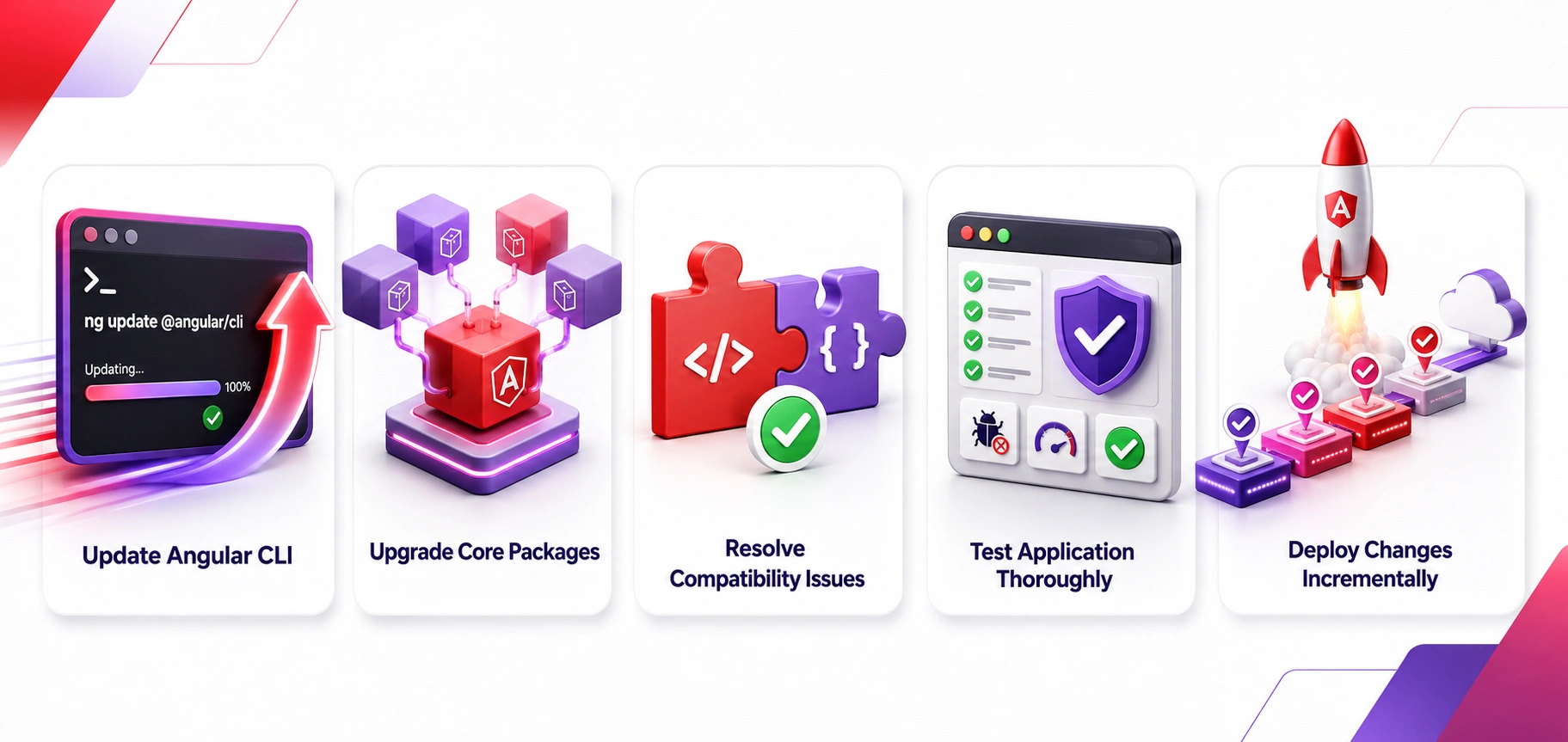
Step 1: Update Angular CLI
Start by updating Angular CLI to the latest Angular v22-compatible version. The Angular CLI includes important tooling updates, build optimizations, and migration schematics that automate many upgrade tasks.
Before proceeding, check your current Angular version and review the official update guide to understand any version-specific requirements. Updating the CLI first ensures that subsequent migration commands and dependency updates run correctly.
Step 2: Upgrade Core Packages
Once the CLI is updated, upgrade Angular core packages and related dependencies, including Angular Material, RxJS, TypeScript, and other framework-supported libraries.
Pay close attention to version compatibility across your project ecosystem. Using mismatched package versions can lead to build failures or unexpected runtime behavior. After updating dependencies, install fresh packages and verify that the application compiles successfully.
Step 3: Resolve Compatibility Issues
After the upgrade, review compiler warnings, deprecation notices, and build errors. Angular v22 may remove support for older APIs or introduce changes that require code adjustments. When reviewing an application for Angular v22 compatibility, developers should pay close attention to deprecated Angular APIs, third-party package compatibility, legacy module configurations, custom build scripts, and existing state management implementations.
Evaluating these areas early in the migration process helps identify potential issues, reduces upgrade-related risks, and ensures the application can fully leverage the latest framework enhancements. Addressing these issues early helps prevent technical debt and ensures the application fully benefits from Angular v22’s improvements.
Step 4: Test Thoroughly
Comprehensive testing is critical before deploying the upgraded application to production. Even seemingly minor framework updates can affect application behavior.
Your testing process should include:
- Unit Tests: Validate individual components, services, and business logic.
- Integration Tests: Ensure different application modules continue working together correctly.
- End-to-End (E2E) Tests: Simulate real user journeys to identify UI or workflow issues.
- Performance Audits: Measure page load times, rendering speed, and Core Web Vitals to confirm expected improvements.
Additionally, test critical workflows such as authentication, payments, API integrations, and data synchronization processes.
Step 5: Deploy Incrementally
For enterprise-scale applications, avoid deploying a major framework upgrade to all users at once. Instead, use a phased rollout strategy to minimize risk.
Best practices include:
- Deploying first to staging environments
- Releasing to a small percentage of users initially
- Monitoring application logs and performance metrics
- Gathering user feedback before wider deployment
- Maintaining a rollback plan if issues arise
An incremental deployment approach helps teams identify and resolve problems quickly while ensuring a stable user experience throughout the migration process.
Common Upgrade Challenges
During the migration process, some teams may encounter challenges such as third-party library incompatibilities, deprecated APIs, build configuration issues, or testing framework adjustments. These issues are common when upgrading to a major framework release and can usually be resolved by updating dependencies, reviewing migration documentation, and thoroughly testing the application before deployment.
Identifying and addressing such compatibility concerns early helps ensure a smoother transition to Angular v22. After migration, continuous monitoring, dependency updates, and application maintenance services can help maintain performance, resolve emerging compatibility issues, and keep the application aligned with future framework updates. Most challenges can be addressed through careful planning and staged implementation.
Should You Upgrade to Angular v22?
The answer depends on your application’s current state and business goals.
For Startups
Startups building new applications should strongly consider Angular v22 due to its improved performance, enhanced maintainability, and support for modern development architectures. The framework enables teams to build scalable applications more efficiently while reducing technical debt and simplifying long-term maintenance. Combined with Angular’s strong ecosystem and long-term support roadmap, these advantages make Angular v22 a solid foundation for startups aiming to develop future-ready digital products.
Additionally, Angular v22’s improvements in rendering performance, hydration, and developer tooling make it an excellent choice for Progressive Web Applications (PWAs). Businesses looking to deliver app-like experiences through the web can particularly benefit from modern approaches to building PWAs with Angular, helping improve user engagement and accessibility across devices.
For Enterprise Organizations
Enterprise organizations can benefit significantly from upgrading to Angular v22 due to its improved scalability, enhanced developer productivity, and stronger support for modern web architectures. The framework’s advancements in Server-Side Rendering (SSR), hydration, and build optimization help large applications deliver better performance while simplifying development workflows.
Additionally, Angular v22’s continued evolution aligns with long-term technology strategies, making it a reliable choice for enterprises focused on maintaining scalable, future-ready applications. Applications with active development roadmaps are particularly good candidates for upgrading.
For Existing Angular Applications
If your application currently runs on Angular 20 or 21, upgrading to Angular v22 can provide measurable improvements in performance and development efficiency. Organizations maintaining mission-critical systems should evaluate migration timelines based on testing and resource availability.

Conclusion
Angular v22 represents another major step forward in the framework’s evolution. By refining Signals, enhancing SSR and hydration, improving developer tooling, optimizing performance, and strengthening standalone architectures, Angular continues to address the demands of modern web development.
Whether you’re building enterprise platforms, SaaS products, customer-facing web applications, or progressive web apps, Angular v22 provides a robust foundation for creating scalable and high-performing digital experiences.
For businesses investing in modern frontend development, upgrading to Angular v22 can deliver meaningful improvements in performance, maintainability, developer productivity, and long-term application success. As Angular continues to mature, organizations that adopt its latest capabilities will be better positioned to build faster, smarter, and more resilient web applications.
FAQs
1. Is Angular v22 production-ready?
Yes. Angular v22 is designed for production use and includes improvements aimed at enhancing performance, scalability, and developer productivity. It also benefits from Angular’s mature ecosystem, making it suitable for both enterprise-grade and large-scale web applications.
2. What is the biggest feature in Angular v22?
The continued evolution of Signals, alongside SSR and hydration enhancements, represents one of the most significant advancements in Angular v22. These improvements help developers build more reactive applications while optimizing rendering efficiency and user experience.
3. Does Angular v22 improve performance?
Yes. Improvements in rendering, hydration, build processes, dependency injection, and bundle optimization contribute to better overall performance. As a result, applications can achieve faster load times, improved responsiveness, and stronger Core Web Vitals scores.
4. Should I migrate from Angular 21 immediately?
Most organizations can benefit from upgrading, but production systems should follow a structured migration plan that includes testing and validation. The ideal upgrade timeline depends on application complexity, dependency compatibility, and available development resources.
5. Are standalone components now the preferred approach?
Angular continues to invest heavily in standalone architecture, making it an increasingly attractive option for modern application development. They simplify project structures, reduce boilerplate code, and support more modular and maintainable application architectures.

SHARE
WRITTEN BY

Ishan Gupta
CEO & Founder
Ishan Gupta is a seasoned entrepreneur and CEO with extensive 8+ years of experience in business and mobile app development landscape. He believes that the right digital product allows companies to focus on what they do best, while technology handles the rest. With deep exposure to global markets, he understands what makes an app succeed. His approach translates business needs into clear product strategies, ensuring that every feature contributes to measurable ROI.
View All Articles



 India
India USA
USA Australia
 Canada
 UK
UK UAE
UAE