
Key Takeaways
- Validate the needs of older adults, family caregivers, and healthcare providers before defining the app scope.
- Prioritize essential features such as medication reminders, health tracking, emergency alerts, telehealth, and caregiver coordination.
- Design accessible interfaces that account for age-related changes in vision, hearing, mobility, and digital confidence.
- Plan for HIPAA obligations, data security, EHR integrations, and reliable remote monitoring.
- Start with a focused MVP, validate it with real users, and expand based on clinical, operational, and business requirements.
Older adults often need support that extends beyond occasional doctor visits. They may require help managing medications, tracking chronic conditions, attending virtual consultations, remembering appointments, or staying connected with family members and caregivers. At the same time, families and care providers need a reliable way to coordinate daily responsibilities and respond when something changes. Digital health solutions can bring these activities together, making elderly care more connected and easier to manage.
For US healthcare startups, this creates an opportunity to develop applications that address practical gaps in senior care. Some products focus on medication adherence and health monitoring, while others support home care coordination, telehealth, emergency response, or communication between older adults and their families. The wider healthcare app development landscape offers a foundation, but elderly care products need additional attention to accessibility, caregiver permissions, remote support, and the needs of aging users.
The opportunity also comes with specific product challenges. Older adults may have different levels of digital confidence, use assistive technologies, or rely on family members to manage certain app activities. Startups must also consider sensitive health information, integration with healthcare systems, dependable alerts, and the operational needs of care organizations. A product that overlooks these requirements can be difficult to adopt, even when its feature set looks impressive.
Working with a reliable mobile app development company in USA can help healthcare startups plan a product around user needs, technical requirements, and the US healthcare environment. This comprehensive guide explains how to approach elderly care app development, which features to prioritize, how to address compliance and security, what the development process involves, and how to prepare your app for sustainable growth. So, let’s get started:
Table of Contents
Why Are US Healthcare Startups Investing in Elderly Care Apps?
The demand for digital senior care solutions is connected to several changes in healthcare delivery. More older adults want to remain independent for as long as possible. Families often coordinate care across different locations, while healthcare providers need better ways to maintain communication between appointments. Digital applications can help connect these activities, provided they are designed around real care workflows.
The opportunity is not limited to one type of product. Startups can build apps for independent seniors, family caregivers, home healthcare agencies, assisted living providers, or healthcare organizations. The right audience determines the product’s features, pricing model, integrations, and regulatory responsibilities.
1. Growing Need for Independent and At-Home Care
Many older adults prefer to remain in familiar surroundings rather than move into a care facility. However, independent living can require regular support with medication schedules, appointments, daily activities, and health monitoring. An elderly care app can help users and their families manage these responsibilities through reminders, shared care plans, and communication tools.
2. Better Coordination Between Families and Caregivers
Care responsibilities are often shared among family members, professional caregivers, and healthcare providers. Without a central system, important updates can get lost across phone calls, messages, and paper records. A shared care platform can provide authorized users with relevant updates, task assignments, appointment details, and care notes.
3. More Accessible Remote Health Support
Travel, mobility limitations, and distance can make routine consultations difficult for some seniors. Telehealth features allow users to connect with healthcare professionals remotely when appropriate. Apps can also support appointment scheduling, follow-up reminders, and access to care instructions.
4. Greater Focus on Preventive Monitoring
Regular tracking of relevant health indicators can help users and care teams notice changes that deserve attention. With suitable connected devices and consent-based data sharing, apps can collect information such as activity levels, heart rate, or blood pressure. These readings should be presented with clear context and should not be treated as a substitute for clinical assessment.
5. New Opportunities Across the Senior Care Market
The elderly care app market offers opportunities for products serving both individual users and healthcare organizations. Startups can explore subscription-based family care platforms, tools for home care agencies, remote patient monitoring solutions, or integrated senior wellness services. Exploring relevant healthcare app ideas for startups can help businesses identify promising product opportunities and understand emerging market needs. However, the final concept should address a specific audience, solve a validated care problem, and offer a clear value proposition.
Essential Features of an Elderly Care App
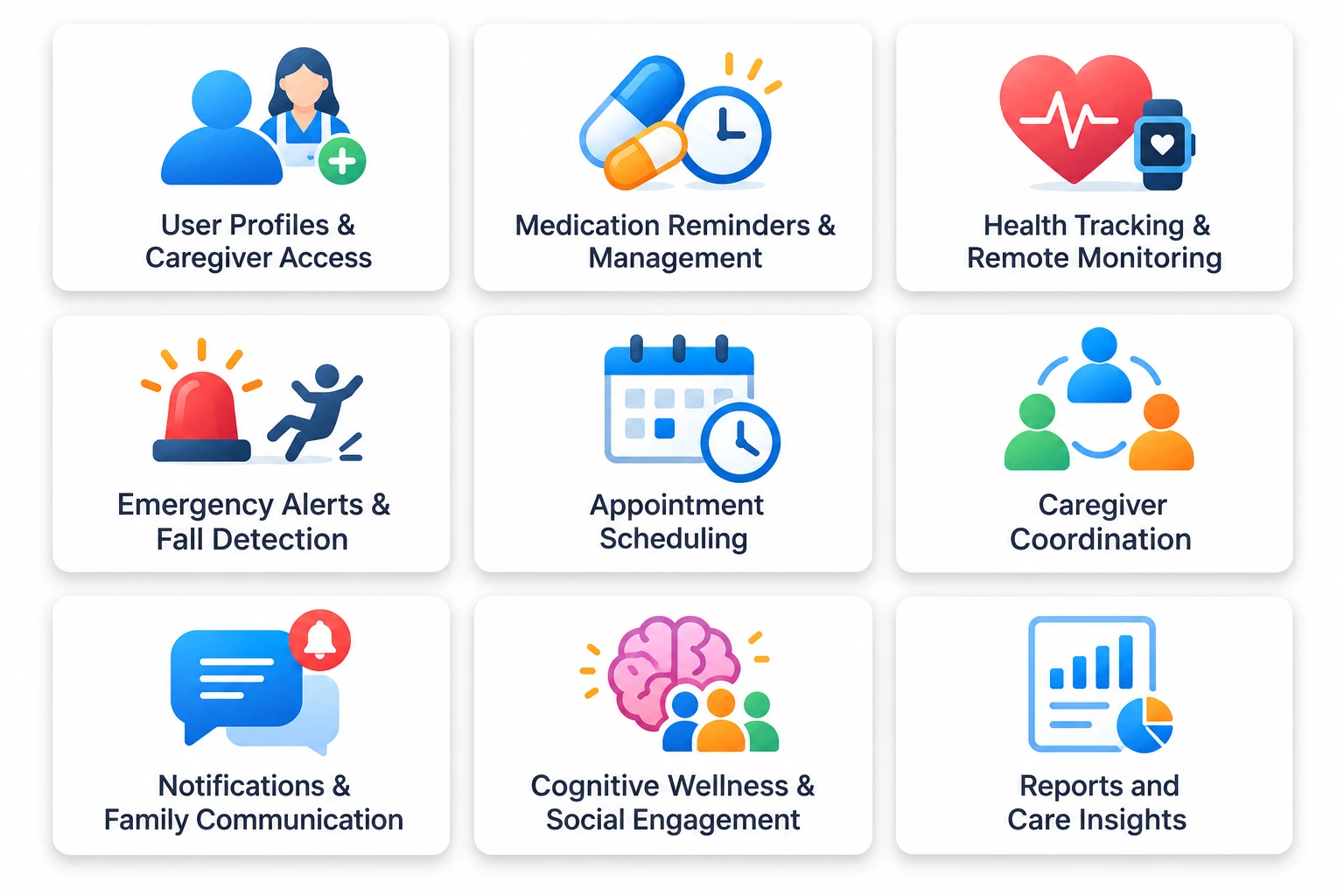
The feature set should reflect who will use the application and what care-related problem it is designed to solve. An app for independent seniors will need a different experience from a platform used by home care agencies or family caregivers. Start with the core user journeys, then add capabilities that improve safety, communication, and care coordination.
A well-planned elderly care app development project should consider the following features.
1. User Profiles and Caregiver Access
Allow older adults, family members, caregivers, and healthcare professionals to access the information relevant to their roles. Each user should have a separate profile with clearly defined permissions.
For example, a family caregiver might view medication reminders and appointment updates, while a healthcare professional may need access to specific health records. Role-based access helps prevent unnecessary exposure of sensitive information.
2. Medication Reminders and Management
Medication management is one of the most practical features for senior care applications. Users should be able to view prescribed medication details, dosage instructions, schedules, and refill reminders.
Useful capabilities include:
- Custom medication schedules and reminders.
- Dose confirmation and missed-dose notifications.
- Refill alerts and medication history.
- Caregiver notifications when a scheduled dose is missed.
The app should not independently change medication instructions or recommend dosage adjustments. Any treatment-related decisions should remain with the authorized healthcare professional.
3. Health Tracking and Remote Monitoring
Health tracking allows users or authorized caregivers to record selected health indicators over time. Depending on the product scope, this may include blood pressure, heart rate, blood glucose, weight, sleep, and activity levels.
Connected devices can reduce manual entry and provide more consistent readings. The application should display measurement dates, units, and relevant context so users do not mistake a single reading for a diagnosis.
For startups exploring wearable technology in healthcare, integrations with smartwatches, fitness trackers, and compatible medical devices can support activity tracking, fall detection, and remote monitoring workflows.
4. Emergency Alerts and Fall Detection
Emergency support is an important consideration for apps designed for older adults who live independently. Users should be able to contact selected family members or caregivers quickly through an emergency button or predefined alert workflow.
Depending on the connected device and product design, the app may also detect a possible fall and prompt the user to confirm whether assistance is needed. If the user does not respond, it can notify designated contacts according to the configured escalation process.
Fall detection should be tested carefully across supported devices and real-world conditions. The app must explain its limitations and should never imply that automated detection guarantees emergency response.
5. Appointment Scheduling and Telehealth
A built-in appointment module can help seniors and caregivers manage consultations, follow-ups, and routine checkups. It can include calendar views, appointment reminders, provider details, and secure links to virtual visits.
For startups planning remote consultation capabilities, doctor on demand app development offers useful context on appointment booking, virtual consultations, and provider-side workflows.
6. Caregiver Coordination and Daily Care Plans
Caregiver coordination features help families and professional care teams manage recurring responsibilities. A shared dashboard can display daily tasks, assigned caregivers, completed activities, and important updates.
For example, a home care team might use the app to record completed visits, meal assistance, mobility support, or medication-related observations. These records can help authorized users stay informed without relying entirely on calls or handwritten notes.
7. Notifications and Family Communication
Notifications keep users informed about upcoming appointments, medication schedules, care tasks, and important account updates. Family communication tools can also support messages, shared updates, and care-related announcements.
Give users control over notification preferences, frequency, and delivery channels. Too many alerts can create fatigue, while poorly timed or unclear notifications may cause users to miss important information.
8. Cognitive Wellness and Social Engagement
Elderly care products can also support emotional well-being and everyday engagement. Depending on the target audience, features might include memory activities, guided exercises, reminders for social activities, and communication with family members.
For products that address emotional wellness or cognitive support, the principles involved in mental healthcare app development can help inform privacy, user experience, and responsible support features. These tools should complement professional care rather than claim to diagnose or treat cognitive or mental health conditions.
9. Reports and Care Insights
A reporting dashboard can summarize relevant information such as medication adherence, completed care tasks, health readings, appointment history, and activity patterns. The information shown should depend on the user’s role and permissions.
For care organizations, reports can help supervisors review service delivery and identify incomplete tasks. For family members, a simplified summary may provide visibility into routine care without exposing unnecessary clinical details.
How to Design an Elderly Care App for Older Adults
Accessibility should shape the product from the first wireframe, not be treated as a final design adjustment. Older adults are not one uniform user group. Some may be comfortable with smartphones, while others may experience changes in vision, hearing, memory, dexterity, or confidence using digital interfaces.
A reliable UI UX design agency can help translate these needs into clear navigation, readable layouts, and accessible interactions. The design should be tested with older adults and caregivers instead of relying only on internal assumptions.
Use Readable Text and Clear Visual Hierarchy
Choose legible font sizes, strong text contrast, and sufficient spacing between interactive elements. Avoid placing important instructions in small text or relying on color alone to communicate a status.
Keep Navigation Simple
Use familiar labels and predictable navigation patterns. Keep essential actions, such as contacting a caregiver, viewing medication schedules, or joining a consultation, easy to locate.
Support Multiple Ways to Interact
Where appropriate, offer voice input, screen-reader compatibility, adjustable text sizes, and clear touch targets. Make sure important tasks do not depend on complex gestures or precise finger movements.
Provide Clear Feedback and Error Recovery
Confirm when an action has been completed, explain errors in plain language, and make it easy to correct mistakes. For example, if a user records a medication dose by mistake, provide a clear way to review or amend the entry with an appropriate audit trail.
Test With Older Adults and Caregivers
Usability testing should include people from the intended user group, including those with different levels of digital experience. Observe whether they can complete important tasks independently, understand alerts, and recover from errors.
Technology and Integrations Required for an Elderly Care App
The technical foundation should support secure data exchange, dependable notifications, device connectivity, and future product expansion. Technology decisions depend on the app’s features, expected user volume, integrations, and whether the product serves consumers, caregivers, or healthcare organizations.
Mobile App Development Platforms
Start by deciding whether the product needs iOS, Android, or both. Review the devices commonly used by your target audience, the capabilities required for wearable integrations, and the resources available for development and maintenance.
If the app needs to support both smartphones and tablets, test the experience across different screen sizes. Some families and care providers may prefer a larger interface for reviewing care plans or health summaries.
Backend and Cloud Infrastructure
The backend manages user accounts, permissions, care records, notifications, integrations, and application logic. Cloud infrastructure can support data storage, service availability, backups, and scaling as the user base grows.
For products that process sensitive health information, evaluate cloud security in healthcare before selecting a hosting and infrastructure approach. The architecture should account for access restrictions, secure data transmission, monitoring, backup procedures, and incident response.
EHR and Healthcare System Integrations
If the app needs to exchange information with healthcare providers, plan how it will connect with electronic health record systems, scheduling platforms, or other clinical software. Integration requirements may vary by provider and system.
Use appropriate standards and interfaces where supported, and define which data needs to be shared, who can access it, and how updates are reconciled. Startups working with older provider systems should also consider healthcare software modernization when planning integrations with legacy infrastructure.
Wearable and Medical Device Connectivity
Wearables and compatible health devices can provide data for activity tracking, alerts, and remote monitoring. Before selecting devices, check their supported data types, connectivity options, reliability, and integration requirements.
Do not assume that every consumer wearable provides clinically validated measurements. If the product uses device data to support clinical decisions, assess the intended use and applicable regulatory requirements before implementation.
AI and Data Analytics
AI in healthcare app development can support selected workflows, such as identifying unusual patterns in recorded data, prioritizing caregiver notifications, or summarizing activity trends. Its role should be clearly defined and tested against the risks associated with incorrect or incomplete outputs.
HIPAA Compliance and Data Security for Elderly Care Apps in the US
Compliance is a core product requirement when an elderly care app handles protected health information. However, HIPAA does not automatically apply to every health or wellness app. Whether the law applies depends on the organizations involved, the app’s role, and how health information is created, received, maintained, or transmitted.
If your startup develops an app for a healthcare provider or health plan and handles protected health information on its behalf, it may have responsibilities as a business associate. You should assess the relationship and obligations before development begins. The HHS resources for mobile health app developers explain how different app scenarios can involve HIPAA and other federal requirements.
1. Understand Whether HIPAA Applies
Start by identifying whether your startup is a covered entity, a business associate, or an app provider operating outside those categories. A business associate agreement may be required when a business associate handles protected health information for a covered entity or another business associate.
The product’s business model matters. An app offered directly to consumers may have different legal obligations from a platform integrated into a provider’s care workflow. Review the relevant HIPAA compliance application development requirements with qualified legal and compliance professionals before finalizing the product architecture.
2. Implement Strong Access Controls
Use role-based permissions to ensure that users can access only the information required for their responsibilities. For example, a family member may need medication and appointment updates, while a clinician may require access to specific clinical information.
Consider implementing:
- Unique user accounts and secure authentication.
- Multi-factor authentication where appropriate.
- Role-based access permissions.
- Automatic session timeouts and secure logout.
- Audit logs for access to sensitive information.
- Controlled access for administrators and support teams.
3. Protect Data at Rest and in Transit
Use appropriate encryption to protect sensitive information while it is stored and transmitted. Secure API communication, protected backups, key management, and restricted administrative access should be part of the technical design.
The HIPAA Security Rule requires regulated entities to apply reasonable and appropriate administrative, physical, and technical safeguards to protect electronic protected health information. It also emphasizes confidentiality, integrity, and availability.
4. Maintain Audit Trails and Data Integrity
Record important activities such as logins, access to health records, changes to care plans, and administrative actions. Audit trails help organizations investigate suspicious activity and understand how information was handled.
The system should also prevent unauthorized changes to health records and preserve the history of relevant updates. This is particularly important when multiple caregivers or healthcare professionals contribute to the same care plan.
5. Prepare for Incident Response and Breach Management
Define how your team will detect, investigate, contain, and respond to security incidents. Establish internal responsibilities, escalation procedures, backup and recovery plans, and communication workflows.
If HIPAA applies, your incident response process must align with the relevant breach notification requirements. Do not treat a privacy policy or security certification as a substitute for an operational security program.
6. Review Other Applicable US Regulations
HIPAA is not the only regulation that may affect a health app. Depending on the app’s functions and business model, startups may also need to assess the FTC Act, the FTC Health Breach Notification Rule, state privacy laws, and other requirements.
The FDA’s oversight is also function-specific. An app that provides basic reminders or helps users record wellness information may be treated differently from software that analyzes medical device data or performs a medical function that could affect patient safety.
For a wider view of application-level protection, review these app security measures and map them to the app’s actual data flows, user roles, and integrations.
Step-by-Step Process to Build an Elderly Care App
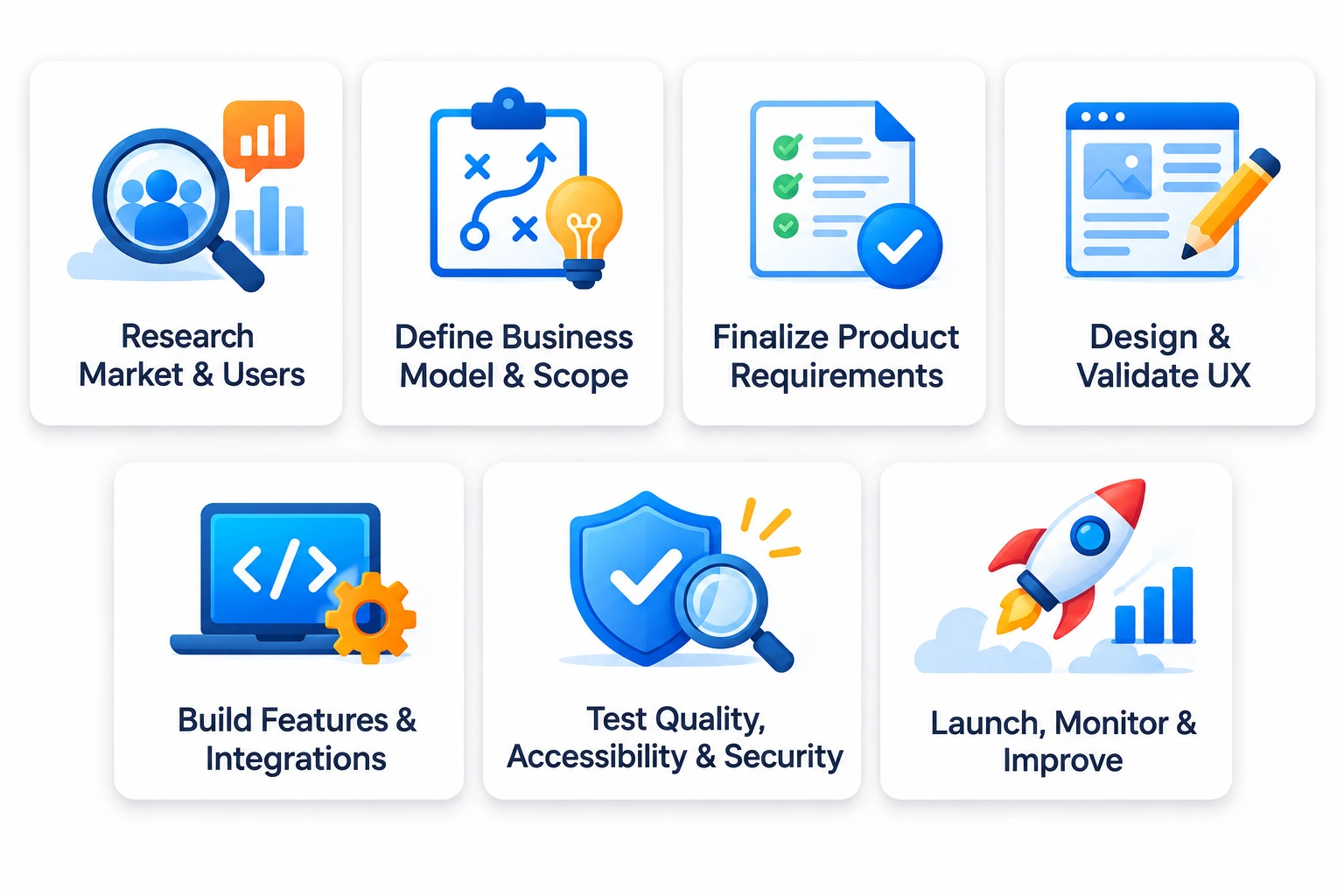
A structured development approach helps startups move from a care-related problem to a tested product without adding unnecessary features too early. Each stage should have clear outputs, decision points, and acceptance criteria.
Step 1. Research the Market and Define the Target Users
Identify whether the app will serve older adults, family caregivers, professional caregivers, home care agencies, assisted living facilities, or healthcare providers. Each group has different needs and expectations.
Conduct user interviews, review competing products, and map the problems that existing solutions do not address effectively. Also evaluate the operational challenges faced by senior home care agencies, such as caregiver scheduling, visit documentation, family communication, and care continuity.
Step 2. Define the Business Model and Product Scope
Decide how the product will create value and generate revenue. Possible models include direct subscriptions for families, licensing for care organizations, per-user pricing, or partnerships with healthcare providers.
Then define the first release. A focused MVP is often useful when a startup needs to validate user demand, test caregiver workflows, or assess whether a particular monitoring feature is valuable. Availing professional MVP development services can help translate these goals into a limited feature scope, a practical roadmap, and a testable first version.
Step 3. Prepare the Product Requirements
Document the user roles, primary workflows, feature requirements, integrations, data types, and security expectations. Include what the app should do when a user misses a medication reminder, a wearable stops syncing, or an emergency alert receives no response.
A clear requirements document helps designers, developers, and stakeholders work toward the same product outcome. It also makes estimates more reliable and reduces the risk of scope changes during development.
Step 4. Design and Validate the User Experience
Create user flows, wireframes, and clickable prototypes before starting full development. Test important tasks with older adults and caregivers, including medication tracking, contacting a family member, viewing an appointment, and responding to an alert.
Look for points where users hesitate, misunderstand instructions, or need assistance. Resolve these issues before finalizing the interface.
Step 5. Build the Core Features and Integrations
Develop the agreed features in manageable increments. Set up user authentication, permissions, backend services, notifications, data storage, and required third-party integrations.
Use regular demonstrations and stakeholder reviews to confirm that the application matches the requirements. For device integrations, test data accuracy, connection stability, and how the app handles missing or delayed readings.
Step 6. Test Functionality, Accessibility, and Security
Test the app across supported devices and operating system versions. Include functional testing, usability testing, integration testing, performance testing, and security assessment.
Pay special attention to critical workflows. Medication reminders, emergency alerts, caregiver permissions, and telehealth connections should behave reliably under expected conditions. Test failure scenarios as well as successful ones.
Step 7. Launch, Monitor, and Improve
Prepare app store listings, privacy disclosures, support processes, and release documentation. If the product is deployed for a healthcare organization, coordinate rollout requirements with its technical and compliance teams.
After launch, monitor adoption, crash reports, alert delivery, user feedback, and support requests. Use these insights to prioritize updates and decide when to introduce additional capabilities.
How Much Does Elderly Care App Development Cost?
Elderly care app development in US typically costs between $40,000 and $150,000, depending on the feature set, platform requirements, integrations, security needs, and overall product complexity. A basic app with profiles, medication reminders, appointment scheduling, and caregiver communication will generally require a smaller investment than a platform with wearable connectivity, telehealth, real-time monitoring, EHR integrations, and advanced analytics
For a US healthcare startup, the budget should cover more than mobile app development. Product discovery, accessible UI/UX design, backend engineering, compliance planning, security testing, cloud infrastructure, device integrations, and post-launch support all contribute to the total investment. The cost to develop an app can provide a starting point, but a healthcare product needs an estimate based on its specific data and regulatory requirements.
Key Factors That Influence Development Cost
| Cost factor | How it affects the budget |
| Feature complexity | Advanced monitoring, telehealth, and AI increase development effort |
| Platform selection | Supporting iOS, Android, and web requires additional design and testing |
| UI/UX requirements | Accessibility testing and specialized user flows add design effort |
| Backend infrastructure | Data storage, user roles, APIs, and reporting affect architecture costs |
| Third-party integrations | EHRs, wearables, payment systems, and video services require integration work |
| Security and compliance | Risk assessments, safeguards, audits, and documentation add project requirements |
| Maintenance | Updates, monitoring, bug fixes, and infrastructure management create ongoing costs |
How Startups Can Manage the Budget
- Start with a defined user group and a focused set of essential features.
- Validate workflows through prototypes before committing to full development.
- Prioritize integrations that are necessary for the first release.
- Plan security and compliance requirements during discovery, not after development.
- Keep a separate budget for maintenance, support, and future improvements.
A phased rollout can help manage the initial investment while allowing the startup to validate the product with real users. However, do not reduce essential security, accessibility, or reliability requirements simply to lower the first release cost.
Business Models for Elderly Care Apps
The right revenue model depends on whether the app serves individuals, families, care providers, or healthcare organizations. Startups should evaluate how the product creates value for each customer group before deciding how to charge for it.
Subscription-Based Model
Families or individual users pay a recurring fee for access to features such as medication reminders, care coordination, health summaries, and family communication. Different subscription tiers can support different levels of functionality.
Business-to-Business Licensing
Home care agencies, assisted living providers, and senior care organizations pay to use the platform for caregiver coordination, task management, reporting, and operational workflows. Pricing may depend on the number of staff members, clients, or locations.
Per-User or Per-Resident Pricing
Organizations pay according to the number of older adults or care recipients managed through the application. This model can work for platforms used by multiple care teams or facilities.
Partner-Based Model
Startups can explore partnerships with healthcare providers, insurance organizations, medical device companies, or care networks. The commercial arrangement may involve licensing, integration fees, or bundled services, depending on the partnership.
Avoid relying on advertising as the primary revenue source if it creates privacy concerns or interferes with the care experience. The business model should support user trust and make the value of the product clear.
Challenges in Building an Elderly Care App and How to Address Them
Elderly care applications involve more than standard mobile features. They must support users with different abilities, handle sensitive information, and work reliably across multiple people and systems.
1. Low Digital Confidence Among Some Older Adults
Some users may find complex navigation, small controls, or unfamiliar terminology difficult to manage.
How to address it: Use simple navigation, readable content, clear instructions, and consistent interaction patterns. Include older adults in usability testing and provide optional caregiver assistance without removing user control.
2. Fragmented Communication Between Care Teams
Family members, home care workers, and healthcare professionals may use separate systems to share updates. This can lead to missed information and duplicated work.
How to address it: Build role-based dashboards, shared care plans, task updates, and secure messaging. Define which information each user needs and how updates should be recorded.
3. Inaccurate or Delayed Device Data
Wearable devices and connected medical equipment may lose connectivity, produce incomplete readings, or use different data formats.
How to address it: Validate device compatibility, show timestamps and data sources, identify missing readings, and provide clear sync status. Avoid presenting incomplete data as a reliable health assessment.
4. Privacy and Security Risks
A platform that stores health information, medication details, and caregiver records needs strong data protection. Shared devices and family-managed accounts can introduce additional access risks.
How to address it: Apply appropriate authentication, role-based permissions, encryption, audit logging, secure session management, and regular security reviews. Build privacy requirements into the product architecture.
5. Integrating With Existing Healthcare Systems
Provider systems may use different interfaces, data formats, and access requirements. Integration can become complex when a startup needs to connect with multiple organizations.
How to address it: Identify integration partners early, confirm available APIs and standards, and define data ownership and synchronization rules before development. Start with the integrations required for the initial use case.
6. Supporting Users With Different Care Needs
An app designed for independent seniors may not work for users who need daily assistance or have cognitive or mobility limitations.
How to address it: Define user segments and create appropriate experiences for each. Support caregiver access, adjustable interface settings, and clear consent workflows while preserving the older adult’s independence wherever possible.
How to Measure the Success of an Elderly Care App
Downloads alone do not show whether an elderly care product is useful. Startups should measure whether the app improves the workflows it was designed to support and whether users continue to rely on it.
Consider tracking these metrics:
- User activation: Percentage of users who complete onboarding and set up their first care activity.
- Medication reminder engagement: Reminder views, confirmations, and missed-dose records.
- Caregiver participation: Active caregivers, completed tasks, and frequency of updates.
- Appointment engagement: Scheduled consultations, attendance, and completed follow-ups.
- Retention: Percentage of users who continue using the app over time.
- Alert reliability: Successful delivery and acknowledgement of important notifications.
- User satisfaction: Feedback from older adults, family members, and care professionals.
- Operational efficiency: Changes in documentation time, scheduling effort, or coordination workload for care organizations.
Set a baseline before launch and review these metrics regularly. For health-related outcomes, work with qualified clinical partners to define appropriate measures and avoid attributing improvements to the app without sufficient evidence.
How to Choose the Right Development Partner
Building a healthcare app requires a team that understands mobile engineering, accessible design, data security, integrations, and the realities of healthcare workflows. A development partner should be able to explain how these requirements will influence the product roadmap, architecture, budget, and release plan.
When evaluating potential top healthcare app development companies in USA, look beyond portfolio screenshots and headline pricing. Ask how the team handles sensitive data, tests critical workflows, documents integrations, and supports the product after launch.
Use these criteria to assess a potential partner:
- Healthcare project experience: Review products involving patient data, telehealth, remote monitoring, or care coordination.
- Security understanding: Ask how the team approaches access control, encryption, audit trails, and secure development.
- Accessible design expertise: Check whether the team conducts usability testing with older adults and considers assistive technologies.
- Integration capabilities: Confirm experience with APIs, EHR systems, wearables, and third-party healthcare services.
- Transparent project planning: Look for documented scope, milestones, deliverables, and change management.
- Post-launch support: Understand how maintenance, monitoring, updates, and issue resolution are handled.
An experienced healthcare app development company should also be willing to question assumptions and recommend a smaller, better-defined first release when the original scope is too broad.
Important Considerations Before Launching an Elderly Care App
Before releasing the product, review the operational and user experience details that can affect adoption and reliability.
Define Emergency Response Responsibilities
Clarify who receives emergency notifications, how alerts are escalated, and what happens if a contact does not respond. Explain that app alerts do not replace emergency services or guarantee immediate assistance.
Establish Consent and Caregiver Permissions
Older adults should understand what information is collected and who can view it. Create clear consent and permission workflows for family members, caregivers, and healthcare professionals. Provide a way to review or change access when care arrangements change.
Prepare Customer and Caregiver Support
Some users will need help setting up accounts, connecting devices, managing notifications, or understanding app features. Provide accessible help content, support channels, and clear instructions for common tasks.
Plan for Accessibility and Device Compatibility
Test the product across supported smartphones and tablets, different operating system versions, and relevant assistive technologies. Do not assume that every older adult uses the latest device or has the same level of digital experience.
Review the Product’s Regulatory Position
Before launch, review whether the app’s intended functions trigger HIPAA, FDA, state privacy, or other applicable requirements. Document the product’s intended use and obtain appropriate legal and regulatory guidance.
Future Trends in Elderly Care App Development
The future of senior care technology will involve more connected devices, personalized digital experiences, and better coordination between home-based care and healthcare providers. Startups should assess these developments based on user needs and evidence rather than adding emerging technology simply to make an app appear advanced.
AI-Assisted Care Insights
AI can help organize health records, summarize activity patterns, and identify changes that may need review. For example, a system might flag a noticeable change in recorded activity or repeated missed medication reminders for an authorized caregiver.
These insights should be explainable, tested, and presented with limitations. AI should not independently diagnose conditions or make treatment decisions unless the product has the appropriate clinical and regulatory basis.
More Connected Wearables and Sensors
Wearables and home sensors can support activity tracking, fall-related alerts, and selected health monitoring workflows. As device connectivity improves, apps may bring more information into a shared view for older adults, families, and care teams.
Startups should evaluate data quality, battery life, compatibility, and reliability before choosing integration devices.
Personalized Care Experiences
Apps can adapt reminders, content, and interface preferences to individual needs. For example, users may choose larger text, preferred notification times, or a simplified home screen. Personalization should remain transparent and give users control over their settings.
More Integrated Telehealth Experiences
Virtual consultations, appointment scheduling, care instructions, and follow-up reminders can be connected within one user journey. When evaluating trusted teletherapy apps for seniors, startups should consider accessibility, provider credentials, privacy, and the type of support being offered.
Better Coordination Across Home Care Services
Digital tools can help home care agencies manage schedules, visit records, daily tasks, and communication with families. Products that include activities of daily living (ADL) workflows may also support documentation of assistance with bathing, dressing, mobility, and other routine activities.
As these capabilities evolve, elderly caregiving app development will increasingly need to connect the needs of older adults with the operational requirements of care providers.
Conclusion
Elderly care app development requires a clear understanding of older adults, caregivers, and the healthcare organizations supporting them. From medication reminders and remote monitoring to telehealth and care coordination, every feature should address a practical need. Accessibility, privacy, security, and dependable performance must remain central to the product rather than being added after the core application is built.
For US healthcare startups, working with an experienced development partner can simplify the journey from product discovery to launch and ongoing improvements. RipenApps provides expert custom application development services to help businesses plan, design, and build digital products around their requirements. With a focused roadmap, the right technical foundation, and continuous user feedback, your elderly care platform can support better-connected care experiences as it grows.
FAQs
Q1. How much does it cost to build an elderly care app?
Elderly care app development typically costs between $40,000 and $150,000 in the US, depending on the app’s features, platforms, integrations, security requirements, and development complexity. A basic app with reminders and caregiver communication will generally cost less than a platform with telehealth, wearable connectivity, remote monitoring, and EHR integrations. The final estimate depends on the product scope and technical requirements.
Q2. How long does it take to develop an elderly care app?
A focused MVP may take a few months, while a feature-rich platform can require a longer development timeline. Discovery, accessible design, integrations, security testing, and regulatory reviews can all affect delivery. The timeline should be based on agreed milestones and product requirements.
Q3. What are the most important features in an elderly care app?
Common features include medication reminders, health tracking, emergency alerts, caregiver coordination, appointment scheduling, telehealth, and family communication. The right combination depends on whether the app serves older adults directly, family caregivers, home care agencies, or healthcare providers.
Q4. Do elderly care apps need to be HIPAA compliant?
Not every elderly care or wellness app is automatically subject to HIPAA. Applicability depends on the organizations involved and how the app handles protected health information. Apps working with covered entities or handling information on their behalf may have business associate obligations. Startups should obtain legal guidance based on their specific business model and data flows.
Q5. Can an elderly care app integrate with wearable devices?
Yes. Depending on device compatibility and available APIs, an app can connect with smartwatches, fitness trackers, and certain medical devices. Integrations can support activity tracking, selected health readings, and alerts. The product team should validate data quality and assess whether the intended use creates additional regulatory requirements.
Q6. What is the difference between elderly care apps and senior care management software?
An elderly care app often focuses on the experience of older adults and their families, such as reminders, health tracking, and communication. Senior care management software is more likely to support organizational workflows, including caregiver scheduling, resident records, task management, and reporting. Some platforms combine both experiences.
Q7. Can a startup launch an elderly care app with an MVP?
Yes. An MVP can help a startup validate a specific care problem before investing in a broader platform. The first release might focus on medication reminders, caregiver coordination, or appointment management. However, essential privacy, security, accessibility, and reliability requirements should be included from the beginning.
Q8. What should startups consider when building apps for elderly care?
Startups should identify their target users, validate the care problem, prioritize essential features, and design for accessibility. They should also plan for data protection, caregiver permissions, healthcare integrations, device compatibility, and ongoing support. Testing with older adults and caregivers is important before a wider launch.
Discuss your project and request for proposal
SHARE
WRITTEN BY

Ishan Gupta
CEO & Founder
Ishan Gupta is a seasoned entrepreneur and CEO with extensive 10+ years of experience in business and mobile app development landscape. He believes that the right digital product allows companies to focus on what they do best, while technology handles the rest. With deep exposure to global markets, he understands what makes an app succeed. His approach translates business needs into clear product strategies, ensuring that every feature contributes to measurable ROI.
View All Articles