

Quick Summary
Enterprise cloud migration costs depend on infrastructure complexity, application dependencies, data volume, security requirements, and modernization goals. This guide explores 2027 pricing estimates, migration strategies, hidden expenses, and ROI calculations. Learn how to build a realistic budget, optimize cloud spending, choose the right migration partner, and achieve sustainable long-term business value.
Enterprise cloud migration has become a strategic priority for businesses looking to improve scalability, strengthen security, accelerate innovation, and modernize their technology infrastructure. However, one question often determines how quickly organizations move forward: How much does enterprise cloud migration cost?
The answer depends on several factors, including infrastructure complexity, application dependencies, data volume, security requirements, migration strategy, and the cloud platform selected. A straightforward migration of a few applications may require a relatively modest investment, while a large enterprise transformation involving hundreds of interconnected systems can demand a substantial budget.
Enterprise cloud migration consulting helps organizations assess their existing infrastructure, develop a migration roadmap, select the right cloud architecture, and manage implementation risks. For businesses with limited internal cloud expertise, consulting support can simplify complex migration decisions and help align technology investments with business objectives.
Understanding cloud migration costs requires more than estimating the initial transfer of applications and data. Businesses must also account for cloud infrastructure, consulting fees, testing, staff training, ongoing operations, and optimization.
This guide explores enterprise cloud migration pricing in 2027, explains the factors influencing project budgets, and outlines practical ways to calculate cloud migration ROI. It also provides a step-by-step migration strategy, cost optimization techniques, and a budgeting checklist to help enterprises make informed investment decisions.
Table of Contents
What is Enterprise Cloud Migration?
Enterprise cloud migration is the process of moving an organization’s applications, databases, data, workloads, and IT infrastructure from on-premises environments or existing hosting platforms to cloud-based infrastructure.
Unlike a simple server transfer, enterprise migration often involves interconnected business systems, complex databases, legacy applications, compliance requirements, and operational dependencies. The objective is not merely to relocate technology but to create an infrastructure environment that supports business growth, operational efficiency, and long-term innovation.
Enterprise vs. Small-Business Cloud Migration
Small businesses typically migrate a limited number of applications, files, databases, or websites. Their infrastructure is often relatively straightforward, allowing them to adopt standardized cloud services with limited customization.
Enterprises face a different level of complexity. They may operate hundreds of applications, multiple data centers, distributed teams, large databases, and systems that support mission-critical operations. Migration planning must account for application dependencies, service availability, data governance, disaster recovery, and integration with existing enterprise platforms.
Consequently, enterprise cloud migration generally requires more detailed assessments, stronger governance, specialized expertise, and comprehensive testing.
Public, Private, Hybrid, and Multi-Cloud Environments
The target cloud architecture significantly affects migration costs.
- Public cloud: Infrastructure is provided by third-party platforms, such as Amazon Web Services (AWS), Microsoft Azure, and Google Cloud. Organizations pay for the resources and services they consume.
- Private cloud: Infrastructure is dedicated to a single organization. It offers greater control over certain configurations but may involve additional infrastructure and management expenses.
- Hybrid cloud: Workloads are distributed between private infrastructure and public cloud services. This approach can support gradual migration but introduces integration and connectivity considerations.
- Multi-cloud: Organizations use services from multiple cloud providers. This can improve flexibility and reduce dependence on one provider, but it may increase governance, networking, monitoring, and operational complexity.
Businesses evaluating these options should understand the differences between cloud deployment models before committing to a migration budget.
Common Business Objectives
Enterprises migrate to the cloud for several reasons:
- Reduce data center maintenance and infrastructure management burdens.
- Improve application availability and business continuity.
- Scale computing resources according to demand.
- Accelerate product development and deployment.
- Strengthen disaster recovery capabilities.
- Modernize legacy applications and databases.
- Support analytics, automation, and artificial intelligence initiatives.
- Improve visibility into infrastructure spending.
The most successful migrations begin with clearly defined business objectives. These objectives help determine which workloads should move first, which modernization investments are justified, and how the organization will measure the financial benefits of migration.
How Much Does Enterprise Cloud Migration Cost in 2027?
The cost of enterprise cloud migration in 2027 varies considerably depending on the size of the IT environment, the migration approach, the complexity of applications, and the level of modernization required.
There is no universal price for enterprise migration. A company moving a small portfolio of standard applications may spend tens of thousands of dollars, while a large organization undertaking a complex transformation may invest hundreds of thousands or several million dollars.
The following figures are illustrative planning ranges in USD, not verified market averages or vendor quotations. Actual costs should be established through infrastructure discovery, workload assessment, and provider-specific estimates.
Small, Medium, and Large Enterprise Migration Costs
The following ranges provide a starting point for preliminary budgeting.
| Enterprise size | Illustrative migration budget | Typical project scope |
| Small enterprise | $25,000–$100,000 | A limited number of applications, databases, and servers |
| Medium enterprise | $100,000–$500,000 | Multiple business applications, integrations, and databases |
| Large enterprise | $500,000–$2 million+ | Complex workloads, extensive data, security controls, and modernization |
| Highly complex transformation | $2million–$10 million+ | Large-scale modernization, multi-cloud architecture, or global infrastructure |
These estimates primarily represent migration project expenditure, not necessarily the full cost of cloud infrastructure over several years.
For example, a medium-sized enterprise might spend $200,000 migrating applications and databases, then incur additional monthly expenses for compute, storage, networking, software licenses, monitoring, and support.
A large enterprise may also require parallel environments, specialized security assessments, extensive integration testing, and phased deployments. These activities can significantly increase the initial investment.
Company size alone is not a reliable cost predictor. An organization with 20 highly interconnected legacy applications may require more engineering effort than another organization with 100 relatively independent applications.
Cloud Migration Cost by Migration Approach
The migration strategy is one of the most important cost drivers.
| Migration approach | Relative upfront cost | Cost considerations |
| Rehosting | Low to moderate | Limited application changes, but potential infrastructure inefficiencies |
| Replatforming | Moderate | Configuration changes, managed services, and compatibility testing |
| Refactoring | High | Code changes, architectural redesign, and extensive testing |
| Repurchasing | Moderate to high | New software subscriptions, data conversion, and integration |
| Retaining | No immediate migration expense | Existing infrastructure and maintenance costs continue |
| Retiring | Low to moderate | Decommissioning, data retention, and replacement dependencies |
| Relocating | Moderate | Infrastructure movement, compatibility checks, and operational validation |
Rehosting, commonly called lift-and-shift, is often attractive when speed is the priority. However, moving applications without optimizing them can result in higher cloud operating expenses.
Refactoring generally requires a larger initial investment because developers must modify application architecture or code. The additional expenditure may be justified when modernization improves scalability, resilience, deployment speed, or long-term operating efficiency. Enterprises should evaluate these approaches based on total cost of ownership rather than initial migration expenditure alone.
What Is Included in a Cloud Migration Estimate?
A comprehensive estimate should include the following cost categories:
- Discovery and assessment: Infrastructure inventory, application dependency mapping, workload profiling, and readiness analysis.
- Architecture and planning: Target architecture, networking, identity management, security design, and migration sequencing.
- Migration execution: Data transfer, server movement, application deployment, database migration, and configuration.
- Testing and validation: Performance testing, integration testing, security validation, and user acceptance testing.
- Modernization: Code refactoring, database upgrades, API changes, and application redesign where necessary.
- Project management: Scheduling, coordination, documentation, governance, and stakeholder communication.
- Training and change management: Preparing employees and technical teams to operate the new environment.
- Post-migration support: Monitoring, troubleshooting, performance tuning, and infrastructure optimization.
A reliable cloud migration estimate should separate one-time implementation expenses from recurring cloud operating costs. This makes it easier to compare providers, forecast cash flow, and calculate realistic financial returns.
Key Factors That Influence Enterprise Cloud Migration Pricing
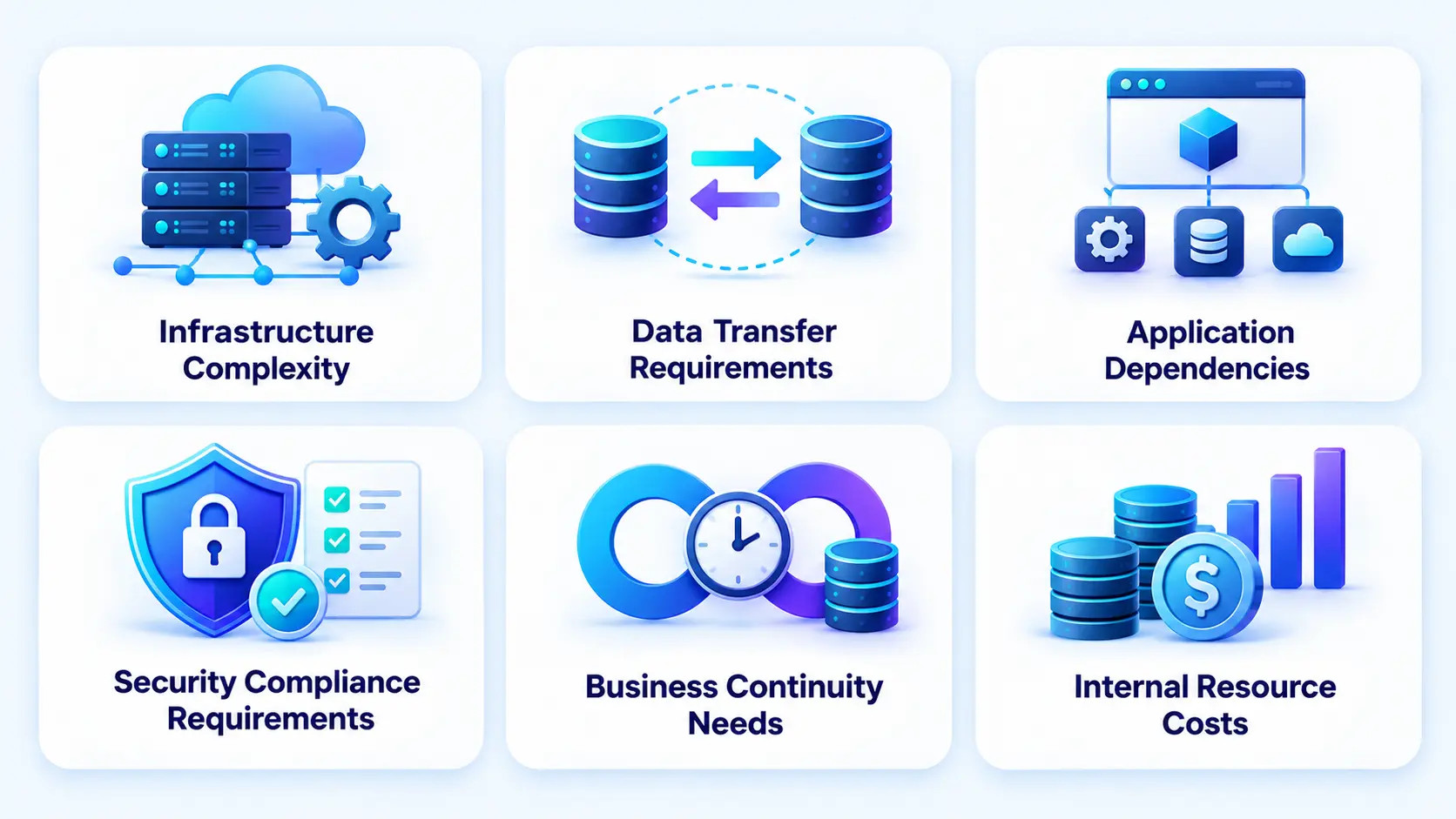
Several interconnected factors determine how much an enterprise pays to migrate its workloads to the cloud. Understanding them early helps businesses avoid budget overruns and prioritize the work that delivers the greatest value.
1. Infrastructure and Workload Complexity
The number of servers is only one part of the calculation. Organizations must also evaluate processor and memory requirements, storage performance, network architecture, operating systems, databases, and application interdependencies.
A standardized workload running on a supported operating system may be relatively easy to migrate. A legacy application that depends on custom hardware, outdated middleware, or undocumented configurations can require extensive engineering work.
Infrastructure complexity also affects the target architecture. Highly available systems may need multiple availability zones, load balancing, replication, and disaster recovery capabilities, increasing both implementation and operating expenses.
2. Data Volume and Transfer Requirements
The amount of data being transferred affects migration duration, network requirements, storage planning, and potential transfer fees. Large databases may require continuous replication or staged transfers to minimize downtime. Organizations with limited network bandwidth may need dedicated connectivity or physical data transfer appliances.
Data migration cost also depends on data quality, format compatibility, encryption, validation, and the number of transfer attempts required. Businesses should assess data retention requirements and remove redundant or obsolete information before migration where permitted.
3. Application Dependencies and Legacy Systems
Applications rarely operate in isolation. They may depend on databases, authentication services, internal APIs, reporting tools, message queues, and third-party integrations. Missing these dependencies can lead to application failures after migration. Dependency discovery, compatibility testing, and integration redesign therefore contribute directly to project costs.
Legacy systems may require operating system upgrades, database conversion, middleware replacement, or source-code changes. Enterprises planning these activities should review a legacy application modernization guide before finalizing their migration scope.
4. Security and Compliance Requirements
Financial institutions, healthcare organizations, and other regulated businesses may need specialized identity controls, encryption, audit logging, data residency configurations, and compliance assessments. Security requirements can also introduce additional penetration testing, vulnerability remediation, policy configuration, and documentation.
A structured approach to cloud migration and data security helps identify these requirements before they become expensive project changes. It also enables teams to define access controls, establish data protection measures, and maintain business continuity throughout the transition.
5. Downtime and Business Continuity
The acceptable downtime window determines how migration activities are scheduled and executed. Applications that can tolerate several hours of downtime may be migrated using simpler methods. Business-critical platforms that must remain available may require replication, parallel environments, staged cutovers, and rollback capabilities.
These additional safeguards increase project expenditure but can reduce the financial consequences of service disruption.
6. Internal Resources and Consulting Fees
Migration projects require cloud architects, engineers, database specialists, security professionals, project managers, and application owners. Organizations with experienced internal teams may perform more work themselves, reducing external consulting fees. However, internal labor still represents a cost, especially when employees must balance migration work with ongoing operational responsibilities.
External specialists can accelerate complex projects, provide established migration processes, and help prevent expensive mistakes. Their fees should be evaluated alongside the cost of delays, rework, and operational risk.
Enterprise Cloud Migration Pricing Models Explained
Cloud migration providers use several pricing models. The right option depends on how clearly the scope can be defined, how much uncertainty exists, and how much control the enterprise wants over project execution.
Fixed-Price Migration Projects
Under a fixed-price arrangement, the provider agrees to deliver a clearly defined scope for a predetermined fee. This model works well when application inventories, migration requirements, deliverables, and acceptance criteria are reasonably stable.
Its main advantage is budget predictability. However, changes to application scope, data volume, or technical requirements may trigger additional charges. Enterprises should examine exclusions, change-request procedures, and acceptance criteria before signing.
Time-and-Materials Pricing
Time-and-materials pricing charges for actual labor and agreed expenses, usually according to hourly or daily rates.
This model suits projects where the scope is uncertain, particularly when legacy dependencies or technical issues may only become apparent during discovery. It offers flexibility but requires active budget monitoring. Enterprises should request rate cards, resource estimates, spending limits, and regular progress reports.
Milestone-Based Pricing
Milestone-based pricing divides the project into stages, with payments tied to agreed deliverables. Typical milestones include discovery completion, architecture approval, pilot migration, workload migration, production cutover, and final acceptance.
This structure helps organizations connect payments to measurable progress. However, milestone definitions should specify completion criteria, dependencies, and the handling of delays.
Managed Migration Services
Managed migration services provide access to a team responsible for some or all migration activities. Depending on the contract, services may include assessment, architecture, implementation, testing, and post-migration support. Pricing may be fixed, subscription-based, milestone-driven, or time-and-materials.
This model is particularly useful for enterprises with limited internal cloud expertise. Organizations evaluating ongoing operational support can also explore managed cloud solutions.
Consumption-Based Cloud Pricing
Consumption-based pricing applies to the cloud infrastructure and services used after migration, rather than the migration project itself. Organizations typically pay for resources such as compute capacity, storage, database services, network traffic, and managed platforms.
Actual charges depend on usage, region, service configuration, licensing, and contractual discounts. Businesses should estimate these costs separately from implementation fees and review them regularly after deployment. A migration project that is inexpensive to execute can still become financially unattractive if the resulting infrastructure is poorly optimized.
One-Time vs. Ongoing Enterprise Cloud Migration Costs
Enterprise cloud migration involves both initial project expenditure and recurring operating expenses. Separating these categories is essential for accurate budgeting and ROI analysis.
Initial Assessment and Planning Costs
Before migration begins, enterprises must inventory infrastructure, evaluate application readiness, map dependencies, estimate resource requirements, and design the target architecture. Planning may also include security assessments, proof-of-concept development, business-case preparation, and migration roadmap creation.
Investing in assessment reduces uncertainty and helps organizations avoid migrating workloads that should instead be modernized, replaced, or retired.
Migration Execution Expenses
Execution expenses include engineering labor, consulting fees, data transfer, application modifications, testing, project management, and production cutover. Additional costs may arise from parallel-running environments, temporary infrastructure, database conversion, and rollback preparation.
These expenses are usually concentrated during the migration period, although some projects require phased execution over several months or years.
Post-Migration Infrastructure Costs
Once workloads move to the cloud, organizations begin paying recurring charges for compute, storage, databases, networking, backups, observability, security services, and software subscriptions.
Cloud bills can increase when resources are oversized, idle environments remain active, storage tiers are inefficient, or data moves frequently between regions or services.
Maintenance, Support, and Optimization
Ongoing expenses include patching, monitoring, incident response, backup testing, disaster recovery, compliance maintenance, and performance optimization. Enterprises may also need cloud operations engineers or managed service providers to maintain service reliability.
Capital Expenditure vs. Operating Expenditure
Traditional infrastructure often requires substantial upfront investment in servers, networking equipment, facilities, and maintenance contracts. These expenses may be treated as capital expenditure depending on accounting rules and the nature of the purchase.
Cloud services generally shift more infrastructure spending toward operating expenditure because resources are billed as services are consumed. However, migration implementation, software development, and certain contractual arrangements may receive different accounting treatment.
Finance teams should determine the appropriate classification with their accounting advisers rather than assuming every cloud-related expense is automatically an operating expense.
Enterprise Cloud Migration Strategy: A Step-by-Step Framework
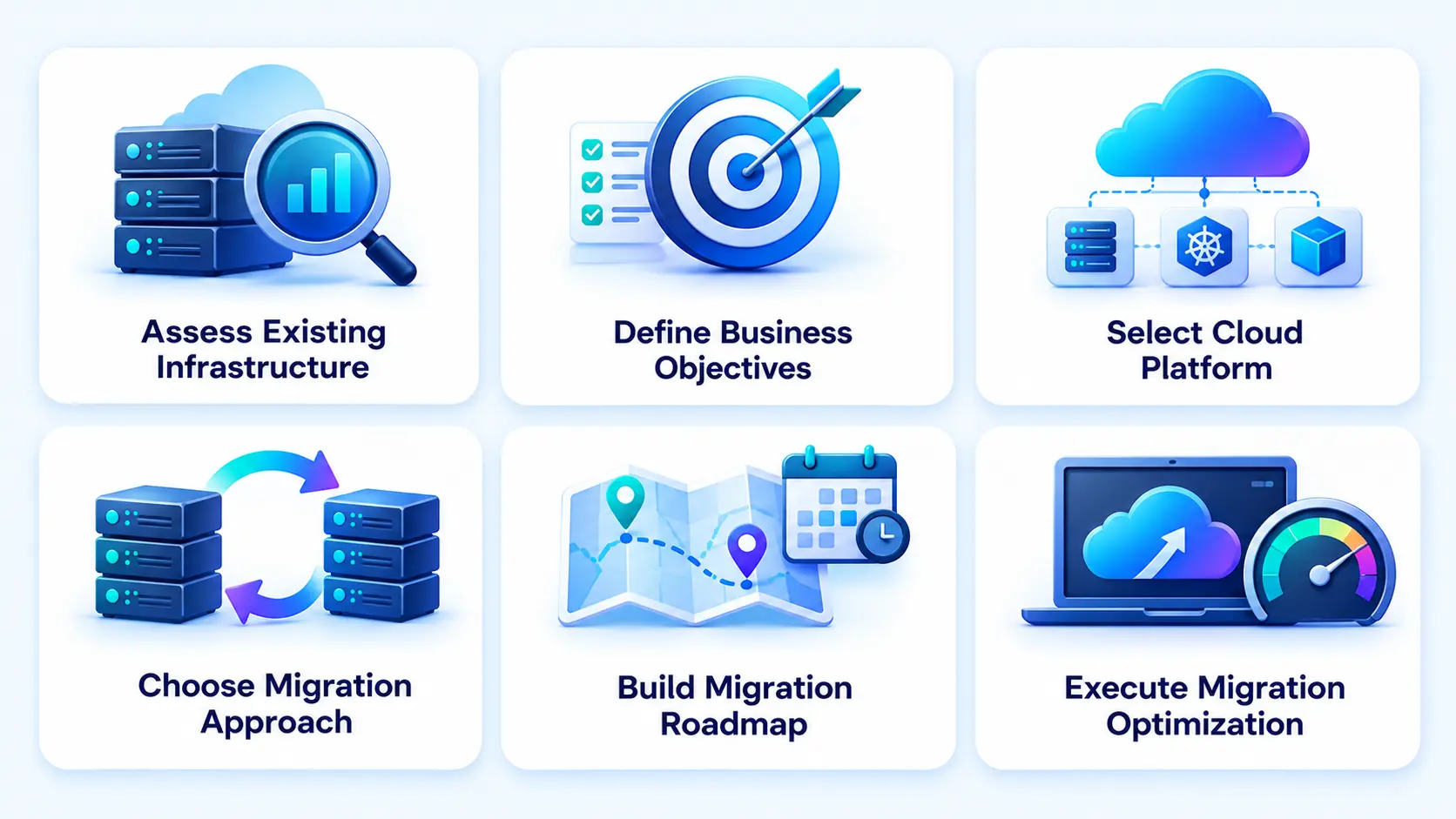
A structured enterprise cloud migration strategy reduces uncertainty, aligns technical decisions with business priorities, and creates a foundation for predictable spending.
1. Assess Existing Infrastructure and Applications
Begin with a detailed inventory of servers, applications, databases, storage systems, integrations, and network components. Record each workload’s business owner, technical dependencies, utilization, availability requirements, security classification, and operating costs.
Classify applications by migration readiness and complexity. Identify obsolete systems that can be retired, applications that require modernization, and workloads that can move with minimal changes. The assessment should establish a baseline for infrastructure expenditure, operational effort, performance, and business risk.
2. Define Business Objectives and KPIs
Migration objectives should be measurable rather than limited to moving applications. Relevant KPIs may include:
- Reduction in infrastructure and maintenance expenditure.
- Application availability and incident frequency.
- Deployment frequency and release lead time.
- Infrastructure provisioning time.
- Recovery time and recovery point objectives.
- Cloud spending per transaction, customer, or application.
- Time required to launch new products or features.
Each KPI should have a baseline, target, measurement method, and accountable owner.
3. Select the Cloud Platform and Target Architecture
Evaluate AWS, Microsoft Azure, Google Cloud, and other suitable providers according to workload requirements, geographic availability, compliance needs, existing technology investments, and team expertise.
Compare compute, storage, database, networking, identity, monitoring, and disaster recovery capabilities. Consider integration requirements and the operational complexity of using multiple providers.
The lowest headline price is not always the best choice. A slightly more expensive platform may reduce engineering effort, improve reliability, or work better with existing software. When comparing providers, AWS vs. Azure vs. Google Cloud is an important consideration, as each platform offers different pricing models, scalability options, and integration capabilities that can influence long-term cloud costs.
4. Choose the Right Migration Approach
Assign each workload an appropriate migration strategy based on its business value, technical condition, and expected return. Rehosting may suit stable applications that need to move quickly. Replatforming may be appropriate when managed databases or cloud-native infrastructure provide meaningful operational benefits.
Refactoring is more suitable when the business case supports deeper modernization. Repurchasing may make sense when a legacy application can be replaced by a commercial SaaS solution. Avoid applying the same migration approach to every application. Workload-level decisions generally produce better financial and operational outcomes.
5. Build the Migration Roadmap and Budget
Organize applications into migration waves based on dependencies, business criticality, readiness, and risk. Begin with a pilot or lower-risk workload to validate the architecture, tooling, deployment process, and rollback plan. Use the lessons learned to refine subsequent estimates.
The budget should include implementation labor, infrastructure, software licenses, testing, training, security, temporary environments, and post-migration support. Add a contingency allowance based on uncertainty and project complexity. The allowance should be justified by identified risks rather than treated as a substitute for detailed planning.
6. Execute, Test, and Optimize the Migration
Execute migration waves using documented procedures and clearly assigned responsibilities. Validate application functionality, data integrity, security controls, integrations, performance, and recovery procedures before switching production traffic.
After cutover, monitor reliability, user experience, and infrastructure expenditure. Compare actual spending with the original forecast and investigate significant variances. Finally, decommission obsolete infrastructure only after confirming that workloads are stable, retention obligations are satisfied, and rollback requirements have been addressed.
Migration is not complete when applications start running in the cloud. It is complete when the new environment meets business requirements and can be operated sustainably.
The 7 Rs of Cloud Migration and Their Cost Implications
The 7 Rs provide a practical framework for selecting a migration approach for each application. Each option has different implications for implementation costs, timelines, and long-term value.
Rehost
Rehosting moves an application to cloud infrastructure with minimal code changes. It is often one of the quickest approaches and can reduce initial engineering costs. However, applications may retain inefficient architectures, oversized servers, and expensive licensing arrangements. Rehosting is most appropriate when speed matters and the application can operate effectively without substantial redesign.
Replatform
Replatforming makes targeted changes without fundamentally redesigning the application. Examples include moving to a managed database, changing the operating system configuration, or adopting cloud-based load balancing. It generally costs more than a basic rehost but may reduce maintenance effort and improve operational efficiency.
Refactor or Re-architect
Refactoring changes application code or architecture to take advantage of cloud-native capabilities. The initial cost can be substantial because it involves development, testing, integration, and potentially a redesigned deployment pipeline.
However, refactoring can improve scalability, resilience, release speed, and resource efficiency. Its financial value should be assessed against the application’s expected lifespan and business importance. Enterprises pursuing this approach can develop a clear application modernization strategy to define modernization priorities, assess existing systems, and plan the transformation effectively.
Repurchase
Repurchasing replaces an existing application with a different product, often a SaaS platform. This can eliminate infrastructure management and reduce maintenance responsibilities. Nevertheless, organizations must account for subscription fees, data migration, customization, training, integration, and contract terms. It is particularly attractive when maintaining a legacy application is becoming disproportionately expensive.
Relocate
Relocation moves an existing infrastructure environment to another hosting environment with relatively limited architectural changes. Depending on the platform, this may involve moving virtual machines or entire infrastructure groups. The main cost drivers are compatibility, infrastructure preparation, migration tooling, connectivity, and operational validation.
Retain
Retaining means keeping an application in its existing environment for the time being. This may be necessary when an application has strict latency requirements, unresolved dependencies, regulatory constraints, or insufficient business justification for migration. Retaining avoids immediate migration expenditure but does not automatically reduce ongoing infrastructure costs. Organizations should revisit retained workloads periodically.
Retire
Retiring removes applications that no longer provide sufficient business value. This can eliminate infrastructure, licensing, maintenance, and support expenses. However, enterprises must first evaluate data retention, archival, compliance, and downstream dependencies.
Retirement is often one of the simplest ways to reduce migration scope and avoid paying to move systems that should no longer exist. The most cost-effective strategy combines these approaches across the application portfolio instead of treating cloud migration as a single, uniform project.
How to Calculate Enterprise Cloud Migration ROI
Cloud migration ROI measures the financial return generated by moving workloads to the cloud compared with the investment required to complete and operate the migration.
A positive result indicates that measured benefits exceed the included costs over the selected period. However, the calculation is only useful when assumptions are transparent and all material expenses are included.
Cloud Migration ROI Formula
The basic formula is:
Cloud migration ROI = (Total financial benefits − Total investment costs) ÷ Total investment costs × 100
For a meaningful analysis, define the measurement period, such as three or five years. Financial benefits may include:
- Reduced infrastructure and data center expenses.
- Lower hardware replacement and maintenance costs.
- Reduced operational labor requirements.
- Lower downtime-related losses.
- Faster product launches and development cycles.
- Improved employee productivity.
- Avoided future infrastructure investments.
Investment costs may include:
- Assessment and consulting.
- Migration engineering and project management.
- Data transfer and application modernization.
- Testing, training, and change management.
- Cloud infrastructure and software subscriptions.
- Ongoing support, security, and optimization.
Avoid counting the same benefit twice. For example, if a reduction in operational labor is already included in a consolidated infrastructure savings estimate, it should not be added again as a separate benefit.
It is also important to distinguish financial savings from strategic benefits. Improved agility or faster experimentation may be valuable, but they should only be converted into monetary benefits when a defensible estimation method exists.
Example: Calculating ROI for an Enterprise Migration
Consider a hypothetical enterprise migrating a group of business applications to the cloud.
Assume the following figures over three years:
| Cost or benefit | Three-year amount |
| Assessment and migration implementation | $180,000 |
| Cloud infrastructure and recurring services | $240,000 |
| Training, support, and optimization | $30,000 |
| Total investment and operating costs | $450,000 |
| Avoided infrastructure, maintenance, and related costs | $570,000 |
| Net financial benefit | $120,000 |
Using the formula:
ROI = (($570,000 − $450,000) ÷ $450,000) × 100
Three-year cloud migration ROI = 26.7%.
This example suggests that the enterprise generates approximately $0.27 in net financial benefit for every dollar invested over the measurement period.
The result depends on the assumptions. If cloud infrastructure costs rise or expected savings fail to materialize, ROI decreases. If optimization reduces operating costs or migration enables additional measurable revenue, ROI may improve.
The figures are illustrative and should not be interpreted as a benchmark for actual enterprise projects.
Migration Payback Period and Total Cost of Ownership
ROI should be considered alongside the payback period and total cost of ownership (TCO).
The payback period estimates how long it takes for cumulative financial benefits to recover the initial investment. When benefits and costs vary over time, calculate payback using a month-by-month or year-by-year cash-flow forecast rather than a simple average.
TCO compares the full cost of operating the environment over a defined period. It should include migration expenses, infrastructure, licenses, networking, support, security, labor, and decommissioning.
A migration can have positive ROI but still create short-term cash-flow pressure. Conversely, a project with a modest immediate return may provide substantial strategic value through improved resilience, scalability, or faster innovation.
For long-term decisions, finance teams should consider discounted cash flow and the time value of money. This creates a more complete cost-benefit analysis of cloud migration. Enterprises can also use the cloud cost optimization guide to identify opportunities to improve financial performance after migration.

Hidden Costs and Budget Risks to Watch Out For
Even well-planned migrations can encounter unexpected expenses. These risks should be identified during discovery and tracked throughout execution.
1. Data Egress and Transfer Charges
Cloud providers may charge for certain data transfers, particularly when data leaves a cloud environment or moves between regions or services. Inbound transfer treatment varies by provider and service.
Large datasets, repeated transfers, cross-region replication, and frequent application communication can increase expenses. Estimate network traffic and validate applicable pricing before selecting an architecture.
2. Temporary Parallel-Running Environments
Enterprises often run source and target environments simultaneously during migration and validation. This may involve continued data center costs alongside cloud compute, storage, and networking charges. Parallel operation can be necessary for continuity, but its expected duration should be included in the budget.
3. Application Refactoring and Compatibility Issues
Legacy applications may require unexpected code changes, database conversions, middleware upgrades, or third-party integration modifications. These issues can extend project timelines and increase engineering costs. Detailed dependency mapping and early proof-of-concept testing help identify problems before large migration waves begin.
4. Downtime and Rollback Planning
Production cutovers can expose unexpected performance or compatibility issues. A rollback plan may require keeping source infrastructure available until the new environment has been validated. Organizations should budget for cutover rehearsals, recovery testing, additional engineering coverage, and the potential business impact of service interruptions.
5. Security Audits and Compliance Remediation
Security reviews may uncover outdated components, excessive permissions, missing audit controls, or gaps in encryption and monitoring. Correcting these issues can add development, infrastructure, and consulting costs. Enterprises should include security and compliance work in the original migration scope rather than treating it as an afterthought.
6. Licensing and Support Costs
Existing software licenses may have restrictions related to cloud deployment, processor configuration, virtual machines, or regional use. Some organizations must purchase new licenses, change support agreements, or adopt different pricing plans. Review licensing terms before moving workloads.
7. Unexpected Cloud Spending
Cloud services can generate unanticipated bills when resources are oversized, development environments remain active, logging volumes increase, or workloads generate excessive network traffic. Budgets should include spending alerts, ownership tags, resource limits where appropriate, and regular cost reviews. A contingency reserve should reflect the project’s complexity, uncertainty, and risk profile. There is no universally appropriate percentage for every enterprise migration.
Read Also: Cloud App Development Guide: Process, Types, Cost & Best Practices
Common Enterprise Cloud Migration Budgeting Mistakes
Several budgeting mistakes can turn a promising migration into an expensive operational challenge.
Underestimating Application Dependencies
Migrating applications without identifying databases, authentication systems, APIs, and other dependencies can result in unplanned redesign and testing. Enterprises should map dependencies before estimating effort or scheduling cutovers.
Ignoring Post-Migration Operating Costs
Cloud migration does not eliminate infrastructure expenses. It changes how those expenses are incurred. Businesses must forecast compute, storage, networking, software, monitoring, security, and support over multiple years.
Overlooking Data Transfer Fees
Large-scale data movement and ongoing cross-region traffic can create meaningful expenses. Network usage should be estimated using realistic workloads rather than broad assumptions.
Failing to Allocate Contingency Funds
Unexpected compatibility problems, data quality issues, and security requirements can increase costs. A risk-based contingency budget gives project teams room to address genuine issues without compromising essential controls.
Migrating Without a Clear Financial Baseline
Organizations cannot reliably measure savings if they do not know their current infrastructure, maintenance, licensing, and labor costs.
Before migration, establish a financial baseline and define how savings will be measured. This makes post-migration comparisons more credible and helps teams identify whether the investment is delivering the expected value.
Best Practices to Reduce Enterprise Cloud Migration Costs
Cost reduction should begin during planning and continue throughout the cloud environment’s lifecycle.
Right-Size Compute and Storage Resources
Analyze actual utilization rather than replicating existing infrastructure specifications without review.
Select appropriate compute families, storage tiers, and database configurations. Use autoscaling where suitable and remove idle resources when they are no longer needed.
Rightsizing should not compromise performance, availability, or recovery objectives. Validate changes using workload monitoring and performance tests.
Automate Migration and Testing
Automation can reduce repetitive manual work, configuration errors, and inconsistent deployment processes.
Infrastructure as code, automated data validation, repeatable deployment pipelines, and regression testing help teams migrate workloads more efficiently.
Automation requires an initial investment, but it can generate greater value when applied across multiple migration waves.
Prioritize High-Value Workloads
Not every application should be migrated immediately.
Prioritize workloads based on business value, technical readiness, expected savings, dependencies, and risk. Early successes can validate the approach and reveal cost issues before more complex systems move.
Low-value applications may be better candidates for retirement than migration.
Remove Redundant Applications
Legacy environments frequently contain duplicate applications, unused servers, outdated databases, and unnecessary development resources.
Decommissioning these assets before migration reduces scope, licensing exposure, testing requirements, and target infrastructure needs.
Confirm business ownership and data retention obligations before removing any system.
Use Cloud Commitment Discounts Where Appropriate
Providers may offer discounted pricing for commitments to particular resource usage or spending levels.
Such arrangements can lower costs for predictable workloads, but enterprises should evaluate eligibility, flexibility, payment terms, and utilization risk before committing.
Avoid purchasing commitments for resources that are likely to be retired, resized, or moved to a different service.
Implement FinOps and Continuous Cost Monitoring
FinOps combines financial accountability, engineering decisions, and operational practices to improve cloud spending.
Enterprises should establish cost allocation through tags, budgets, dashboards, anomaly alerts, and regular reviews involving engineering and finance teams.
Measure unit economics such as cost per customer, transaction, or application to understand whether cloud spending is delivering business value rather than focusing only on the total cloud bill. Through cloud optimization, organizations can improve application performance while using infrastructure resources more efficiently.
Choosing an Enterprise Cloud Migration Partner
A cloud migration partner can provide specialist expertise, accelerate delivery, and reduce implementation risk. However, selecting a provider based solely on the lowest quoted fee can result in higher costs later.
Enterprises should compare technical capability, project methodology, commercial terms, security practices, and post-migration support.
Evaluating Technical Expertise and Certifications
Review the provider’s experience with the cloud platforms, operating systems, databases, and application architectures used by your organization.
Ask for examples of comparable migrations, references, delivery methodologies, and documented outcomes.
Relevant cloud certifications can indicate technical knowledge, but they do not replace practical experience. Confirm that the proposed team includes the specialists required for architecture, security, databases, networking, testing, and project management.
A capable partner should also explain how it handles discovery, dependency mapping, migration waves, testing, rollback, and operational handover.
Comparing Migration Service Pricing
Request a detailed proposal that separates assessment, implementation, modernization, testing, and ongoing support.
Compare fixed-price and time-and-materials arrangements based on the same scope. Examine assumptions, exclusions, resource rates, change-request procedures, payment milestones, and acceptance criteria.
Ask how the provider will report progress and manage deviations from the budget. A clear pricing structure makes it easier to identify potential additional expenses. Businesses developing new digital products alongside their migration initiatives can also consider cloud consulting services for digital products to align cloud architecture with product scalability, performance, and long-term operating requirements.
Assessing Security and Post-Migration Support
Migration partners should demonstrate how they manage identity and access, encryption, secrets, audit logging, vulnerability remediation, and compliance requirements.
Clarify responsibility for incident response, monitoring, backup validation, disaster recovery, and security updates after migration.
Review service-level agreements, escalation procedures, documentation, knowledge transfer, and exit arrangements. Enterprises should retain appropriate ownership of their cloud accounts, infrastructure configurations, and operational documentation.
The ideal partner offers more than migration execution. It helps establish a cloud environment that internal teams can operate, secure, and optimize over time.
Enterprise Cloud Migration Cost by Industry
Industry requirements influence migration complexity, implementation timelines, and ongoing operating expenses. The following examples explain common cost drivers without implying fixed industry-wide prices.
Financial Services and Banking
Financial institutions often operate transaction-processing platforms, customer databases, analytics systems, and highly interconnected legacy applications. Migration may require stringent identity controls, encryption, audit trails, resilience testing, and careful data governance. Downtime restrictions can also necessitate replication and staged cutovers.
These requirements may increase implementation expenditure, but migration can support more flexible infrastructure, faster analytics, and improved disaster recovery when designed appropriately.
Healthcare and Life Sciences
Healthcare organizations may migrate electronic health record integrations, clinical applications, medical imaging, research databases, and administrative systems. Key cost drivers include sensitive data protection, access controls, interoperability, retention requirements, and application availability.
Large imaging datasets can also create substantial storage and transfer requirements. Healthcare teams should account for clinical workflow testing, regulatory obligations, and specialized application compatibility.
Organizations evaluating modernization expenditure can consult this analysis of the cost to modernize a legacy healthcare app.
Retail and E-commerce
Retailers must support fluctuating demand, online transactions, inventory systems, customer data, and integration with payment and fulfillment platforms. Seasonal traffic may require elastic capacity and load testing. Migration plans should avoid peak trading periods and include performance validation for checkout, inventory synchronization, and customer-facing services.
Cost optimization opportunities include autoscaling, appropriate storage tiers, caching, and reducing idle resources during quieter periods.
Manufacturing and Logistics
Manufacturers and logistics businesses may operate warehouse management systems, enterprise resource planning platforms, supply chain applications, and industrial data systems. Legacy integrations, operational technology connectivity, latency requirements, and production continuity can increase migration complexity.
A phased approach is often preferable because it allows teams to validate connectivity, data exchange, and recovery procedures before changing critical production systems.
SaaS and Technology
SaaS companies may migrate application platforms, customer databases, development environments, analytics pipelines, and deployment infrastructure. Their major concerns include scalability, tenant isolation, uptime, deployment frequency, and infrastructure cost per customer.
Cloud-native redesign can improve product agility but may require substantial engineering effort. Teams should compare modernization costs with expected improvements in reliability, development speed, and operating efficiency.
Across industries, the best migration budget reflects the organization’s actual workload characteristics and business requirements rather than relying on generic sector averages.
Cloud Migration Cost Optimization Tools and Resources
Cloud pricing calculators and assessment tools help enterprises estimate infrastructure costs, compare architectures, and identify potential migration requirements. They are useful for planning, but their results depend on the accuracy of the inputs.
AWS Pricing and Migration Assessment Tools
AWS provides pricing calculators and migration assessment resources that help organizations estimate the cost of proposed services and evaluate existing workloads.
Start with representative compute, storage, database, networking, and backup requirements. Include the expected region, utilization, resilience configuration, and applicable discounts.
Microsoft Azure Pricing and Migration Tools
Microsoft Azure offers pricing tools and migration assessment capabilities for estimating target infrastructure costs and evaluating migration readiness.
Organizations should compare virtual machine sizing, managed databases, storage, bandwidth, and support requirements.
Google Cloud Pricing Calculators
Google Cloud provides pricing resources for estimating the cost of compute, storage, databases, networking, and other services.
Enter realistic usage patterns and compare suitable configurations rather than selecting services based only on headline rates.
Cloud Cost Monitoring and FinOps Platforms
Cloud-native cost management tools and third-party FinOps platforms can help enterprises allocate expenses, identify anomalies, analyze resource utilization, and track budgets.
Useful capabilities include cost allocation, forecasting, rightsizing recommendations, commitment analysis, and reporting across multiple accounts or providers.
Comparing Migration Scenarios
Build at least three scenarios: a minimal-change migration, a targeted modernization, and a more extensive cloud-native transformation.
For each scenario, estimate implementation costs, recurring infrastructure expenses, risk, expected savings, and operational benefits over the same period.
Keep assumptions consistent and document which estimates come from provider calculators, internal measurements, and consulting quotations. This creates a more reliable basis for comparing total cost of ownership and projected ROI.
Enterprise Cloud Migration Cost Checklist for 2027
Use this checklist to identify major budget categories before approving an enterprise migration.
Discovery and Assessment
- Inventory servers, applications, databases, and storage.
- Map application dependencies and identify obsolete workloads.
- Record existing infrastructure, licensing, and maintenance expenses.
- Assess performance, availability, and migration readiness.
Architecture and Cloud Setup
- Select the cloud provider and target architecture.
- Estimate compute, storage, networking, and database costs.
- Design identity, access, security, backup, and disaster recovery.
- Establish governance, monitoring, and cost allocation.
Data Migration
- Estimate data volume, transfer duration, and network requirements.
- Include applicable transfer and connectivity charges.
- Plan data validation, replication, and cutover.
- Confirm retention, archival, and deletion requirements.
Application Modernization
- Classify workloads using the 7 Rs.
- Estimate code changes, database conversions, and integration work.
- Identify replacement software and subscription expenses.
- Include performance and compatibility testing.
Security and Testing
- Budget for vulnerability assessments and security remediation.
- Validate application functionality and data integrity.
- Test disaster recovery and rollback procedures.
- Confirm applicable regulatory and audit requirements.
Training and Change Management
- Allocate training for development, operations, and security teams.
- Document new processes and operational responsibilities.
- Plan stakeholder communication and user acceptance testing.
Contingency Budget
- Identify major technical, financial, and schedule risks.
- Establish a risk-based contingency allowance.
- Define approval procedures for scope changes.
- Track actual expenditure against the approved baseline.
Post-Migration Support
- Forecast recurring infrastructure and software expenses.
- Establish budgets, spending alerts, and cost dashboards.
- Assign ownership for monitoring, security, and optimization.
- Measure actual ROI and compare it with the original business case.
- Decommission legacy resources when safe and appropriate.
Completing this checklist before execution helps enterprises identify missing cost categories and establish clearer accountability.
Conclusion
Enterprise cloud migration is a strategic investment that requires more than estimating the cost of moving applications and data. Businesses must evaluate infrastructure complexity, modernization requirements, security, implementation effort, recurring cloud expenses, and measurable financial benefits.
A structured migration strategy, realistic budget, and clear ROI framework help organizations make informed decisions and avoid unnecessary spending. For businesses that need ongoing operational support, managed cloud services can help maintain performance, strengthen security, and optimize cloud spending after migration. Continuous monitoring and optimization are equally important for ensuring that the cloud environment delivers lasting value.
RipenApps can help enterprises evaluate their cloud readiness, develop a migration roadmap, and identify opportunities to improve performance and cost efficiency. Contact RipenApps to discuss a cloud migration assessment tailored to your business objectives, technical requirements, and budget.
FAQs
1. What Is the Average Cost of Enterprise Cloud Migration?
There is no universal average because enterprise migration scope varies considerably. A relatively straightforward project may cost tens of thousands of dollars, while a large, complex transformation may require hundreds of thousands or several million dollars. A reliable estimate requires an assessment of workloads, dependencies, modernization needs, and operating requirements.
2. How Much Does It Cost to Migrate 100 Applications to the Cloud?
The cost of migrating 100 applications depends on their complexity, interdependencies, data requirements, and migration strategies. One hundred simple applications may cost substantially less than a portfolio of 20 mission-critical legacy systems. Enterprises should classify each application, estimate its migration effort, and account for shared infrastructure and testing costs.
3. How Long Does Enterprise Cloud Migration Take?
A limited migration may take several weeks or months, while a complex enterprise transformation can extend over many months or several years. Timelines depend on the number of workloads, application dependencies, regulatory requirements, modernization scope, and acceptable downtime. A phased roadmap generally provides better control over risk and execution.
4. Is Cloud Migration Cheaper Than On-Premises Infrastructure?
Cloud migration can reduce hardware ownership, data center maintenance, and some operational expenses. However, it does not automatically make infrastructure cheaper. Poor resource sizing, licensing, data transfer, and ongoing management can increase costs. Compare total cost of ownership over several years before deciding.
5. What Is the Most Cost-Effective Migration Strategy?
The most cost-effective strategy depends on each application’s condition and business value. Rehosting can reduce initial migration effort, while replatforming may improve operational efficiency. Refactoring can provide greater long-term benefits when modernization is justified. Retiring unnecessary applications may deliver savings without requiring a full migration.
6. How Can Enterprises Calculate Cloud Migration ROI?
Use the formula: (total financial benefits minus total investment costs) divided by total investment costs, multiplied by 100. Include implementation expenses, cloud operations, support, and measurable savings over a defined period. Compare the result with the payback period and total cost of ownership.
7. What Are the Biggest Hidden Migration Costs?
Common hidden costs include data transfer, parallel-running environments, application compatibility fixes, software licensing, security remediation, downtime, and unexpected cloud consumption. Detailed discovery, realistic forecasting, and contingency planning help reduce these risks.
8. Should Enterprises Hire a Cloud Migration Consultant?
A consultant can be valuable when the organization lacks cloud expertise, operates complex legacy systems, or needs independent architecture and cost assessments. Enterprises should compare consulting fees with the expected value of reduced risk, faster delivery, and improved cost control.
Discuss your project and request for proposal
SHARE
WRITTEN BY

Ishan Gupta
CEO & Founder
Ishan Gupta is a seasoned entrepreneur and CEO with extensive 10+ years of experience in business and mobile app development landscape. He believes that the right digital product allows companies to focus on what they do best, while technology handles the rest. With deep exposure to global markets, he understands what makes an app succeed. His approach translates business needs into clear product strategies, ensuring that every feature contributes to measurable ROI.
View All Articles