
Key Takeaways
- Start with features that address the app’s primary user needs and support its core purpose.
- Treat security, authentication, intuitive navigation, and performance as foundational requirements.
- Keep the MVP focused on essential functionality rather than adding features users may not need.
- Prioritize payments, push notifications, personalization, and offline access based on the app’s use case.
- Use user feedback and product analytics to identify gaps and guide future feature development.
- Evaluate each feature by its user value, business impact, implementation effort, and long-term relevance.
Mobile app features determine what users can accomplish, how businesses deliver value, and how much an application costs to develop. Most applications need secure authentication, intuitive navigation, reliable performance, analytics, and data privacy controls. Other capabilities, including AI recommendations, gamification, and augmented reality, depend on the product’s purpose and business model.
Understanding which mobile app features to prioritize helps founders allocate development budgets, define an MVP scope, and plan future improvements without investing in unnecessary functionality.
Feature selection should follow a clear development roadmap. Professional mobile app development services help businesses translate user requirements into practical feature plans, assess technical complexity, and prioritize essential MVP capabilities. This ensures development efforts align with business goals while leaving room for future enhancements.
Table of Contents
The 10 Features Almost Every App Needs
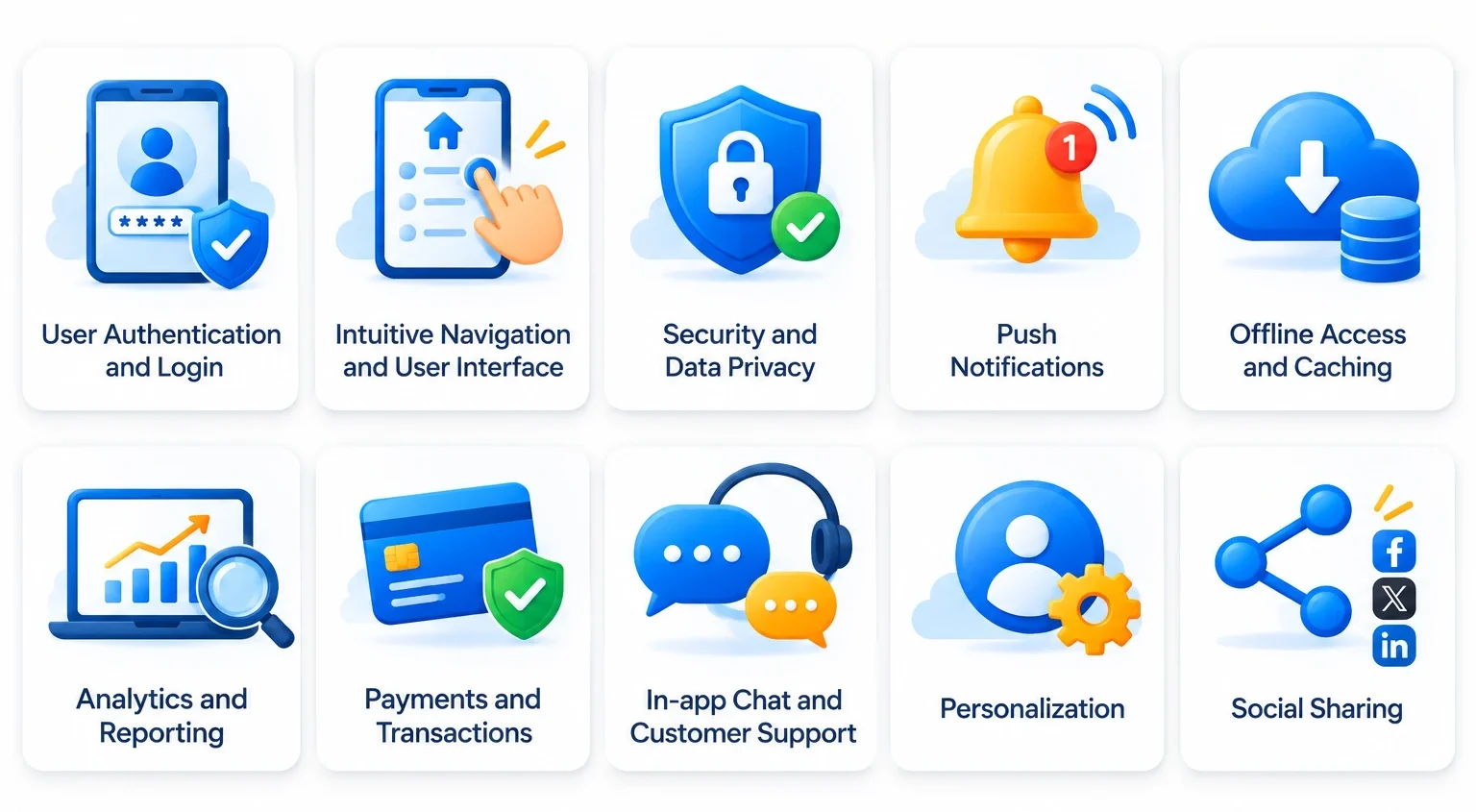
Although application requirements vary across industries, certain capabilities form the foundation of a reliable mobile experience. They support essential user journeys, protect information, and help businesses understand how customers interact with their products.
The following ten mobile app features provide a practical starting point for most businesses.
- User authentication and login: Registration, secure login, password recovery, and account management allow users to access their accounts and personalized services.
- Intuitive Navigation and User Interface: Clear layouts, consistent design elements, accessible controls, and logical navigation help users find information and complete tasks easily.
- Security and data privacy: Encryption, secure authentication, access controls, and privacy management protect sensitive information and reduce security risks.
- Push notifications: Timely notifications communicate order updates, account activity, reminders, and relevant product information.
- Offline access and caching: Cached content and locally stored information allow users to access essential functionality when connectivity is unavailable.
- Analytics and reporting: Usage analytics help businesses understand user behavior, identify friction points, and measure application performance.
- Payments and transactions: Payment gateways, transaction records, and secure checkout support applications that sell products, subscriptions, or services.
- In-app chat and customer support: Messaging, support requests, and help resources allow users to resolve problems without leaving the application.
- Personalization: User preferences and behavioral information help applications deliver relevant content, recommendations, and experiences.
- Social sharing: Sharing links, products, content, and achievements helps users distribute information through their preferred communication channels.
These capabilities establish a foundation, but they do not represent a mandatory checklist for every product. A banking application needs stronger transaction controls, while an eLearning platform requires course management and learning progress tracking.
Businesses should also consider three supporting requirements when defining their initial architecture: fast loading and performance, synchronization across devices, and reliable error handling. These capabilities directly affect the user experience.
Mobile App Features: Build Order and Development Effort
Choosing the right features is only part of the planning process. Businesses must also determine when to implement them and how much development effort they require.
A three-phase approach helps organize mobile application development around product maturity and business priorities.
| Feature or capability | Priority | Recommended phase | Development effort |
| Registration and authentication | Must-have | Phase 1: MVP | Medium |
| User profiles | Must-have | Phase 1: MVP | Low |
| UI/UX and navigation | Must-have | Phase 1: MVP | Medium |
| Security and data privacy | Must-have | Phase 1: MVP | High |
| Core analytics | Must-have | Phase 1: MVP | Low–Medium |
| Payments | Conditional | Phase 1: MVP | Medium–High |
| Basic push notifications | Must-have | Phase 1: MVP | Low–Medium |
| Essential offline access | Conditional | Phase 1: MVP | Medium |
| Customer support | Conditional | Phase 1–2 | Medium |
| Social sharing | Nice-to-have | Phase 2: Post-launch | Low |
| Advanced search and filters | Conditional | Phase 1–2 | Medium |
| Multi-device synchronization | Conditional | Phase 1–2 | High |
| Personalization | Nice-to-have | Phase 2: Post-launch | Medium–High |
| Gamification | Nice-to-have | Phase 2: Post-launch | Medium |
| Geolocation and maps | Conditional | Phase 1–2 | Medium–High |
| Multi-language support | Conditional | Phase 2: Post-launch | Medium |
| Predictive analytics | Advanced | Phase 3: Scale | High |
| AI-powered recommendations | Advanced | Phase 2–3 | High |
| Augmented reality | Advanced | Phase 3: Scale | High |
| Fraud detection | Conditional | Phase 2–3 | High |
| QR and barcode scanning | Conditional | Phase 1–2 | Low–Medium |
| Foldable and large-screen optimization | Conditional | Phase 2–3 | Medium |
Development effort is indicative. Actual requirements depend on functionality, integrations, platforms, security needs, and application architecture.
Phase 1: Build the MVP
The minimum viable product (MVP) should include everything necessary to deliver the application’s primary value.
For example, an eCommerce MVP needs product discovery, a shopping cart, checkout, and order management. A healthcare MVP may require patient registration, appointment scheduling, and secure communication.
Security, performance, and basic analytics should be considered from the beginning rather than postponed as optional enhancements.
Phase 2: Improve the Post-Launch Experience
Once the application reaches its initial users, businesses can use feedback and behavioral data to identify improvements.
This phase may include personalized recommendations, advanced search, loyalty programs, social sharing, and additional communication capabilities.
Prioritization should reflect actual user behavior. For example, if customers frequently search for products using specific attributes, advanced filters may provide more value than a gamification system.
Phase 3: Prepare for Scale
Advanced capabilities become relevant when the product has established demand and requires more sophisticated functionality. AI-powered recommendations, predictive analytics, advanced fraud detection, and complex automation can improve operations and user experiences at scale.
These features may require additional data infrastructure, third-party services, specialized development, and ongoing monitoring.
How to Decide Which Features Your App Needs: A Feature Prioritization Framework
A feature prioritization framework helps businesses distinguish essential functionality from additions that can wait. Without a structured evaluation process, teams may spend their initial budgets on features that do not contribute directly to the product’s primary purpose.
A practical approach evaluates every proposed feature against four questions:
1. Does It Support the Core User Requirement?
Start by identifying the primary problem the application must solve. Each proposed feature should contribute to that objective or enable users to complete an essential task.
For an eCommerce application, product discovery, shopping carts, checkout, and order tracking support the main purchasing journey. An advanced recommendation engine may improve discovery, but it is not necessarily required to validate the initial business model.
Ask:
- What problem does this feature solve?
- Which user journey does it support?
- Can users achieve the same outcome without it?
- Would removing it prevent the application from delivering its primary value?
Features that directly support the core user journey generally deserve higher priority.
2. Does It Improve Business Economics?
Evaluate how each feature affects revenue, acquisition costs, operating expenses, and customer retention.
For example, automated order tracking can reduce customer support requests in a delivery application. Subscription management can support recurring revenue in a SaaS product. A loyalty program may encourage repeat purchases, but its value depends on customer purchasing behavior and implementation requirements.
Prioritize features when their expected business contribution justifies their development and maintenance expenses.
3. Can It Wait Without Blocking Architecture?
Some features are unnecessary for the first release but require early architectural decisions. For example, a business may postpone multi-language functionality until entering international markets. However, its initial data model and content management architecture should accommodate localization if international expansion is already planned.
Similarly, an application may introduce advanced analytics later while implementing event tracking during the MVP stage.
Separate features that can be added independently from those that influence foundational architecture. This distinction helps prevent expensive restructuring during later development.
4. What Will It Cost to Change or Remove?
Consider the long-term implications of each feature before including it in the initial scope.
A simple content-sharing option may be relatively easy to modify. A custom payment architecture or complex user-permission system can affect several application components.
Evaluate:
- Initial development and integration effort.
- Third-party licensing and usage charges.
- Infrastructure and maintenance requirements.
- Security and compliance implications.
- Dependencies on other application modules.
This assessment helps businesses avoid features that create disproportionate technical or financial commitments.
Applying the Framework to Your MVP Scope
Once the evaluation is complete, categorize features into three groups:
- Build now: Essential functionality required to deliver the core product experience.
- Build next: Features supported by user feedback or measurable business requirements.
- Build later: Advanced capabilities that require additional investment or become valuable at scale.
For example, a marketplace may need payments, customer accounts, merchant management, and order tracking in its first release. Advanced recommendations and automated loyalty campaigns can follow after the business understands purchasing behavior.
This approach gives founders a clear rationale for discussing feature requirements and priorities with a development partner. It also keeps the initial release focused on validating the product rather than implementing every planned capability.
Core Feature Deep Dives
Beyond the foundational capabilities, several mobile app features require closer attention because they directly influence usability, accessibility, and product adoption.
Onboarding That Reduces First-Session Drop-Off
Onboarding introduces users to an application’s purpose and helps them complete their first meaningful action. Complicated registration processes and unnecessary permission requests can discourage users before they experience the product’s value.
Effective onboarding should include:
- Short registration forms with essential fields.
- Clear explanations of the application’s primary functionality.
- Guided instructions for unfamiliar workflows.
- Contextual permission requests.
- Progress indicators for multi-step processes.
- An option to skip nonessential tutorials.
For example, a financial application can introduce identity verification before enabling transactions, while an eLearning application can help users select courses according to their interests. Businesses should monitor onboarding completion, registration abandonment, and first-session actions to identify where users encounter friction.
In-App Search
Search functionality becomes important when applications contain large product catalogs, knowledge libraries, service listings, or other searchable information. A useful search experience includes keyword-based queries, relevant results, filters, sorting, suggestions, and recent search history.
An eCommerce application may require category, price, and brand filters, while a content platform may need title, author, and topic-based search.
Search functionality should reflect the structure and volume of application content. Basic database queries may be sufficient for smaller products, whereas larger platforms may need dedicated search infrastructure.
Push Notifications That Don’t Get Muted
Push notifications help businesses communicate with users outside active application sessions. However, irrelevant or excessive notifications can reduce engagement and encourage users to disable them.
Businesses should define notification triggers around meaningful events, such as:
- Order confirmations and delivery updates.
- Appointment reminders.
- Account security alerts.
- Subscription renewals.
- Relevant product updates.
- User-requested reminders.
Personalization, frequency controls, and notification preferences help keep communication relevant.
For example, a healthcare application can send appointment reminders, while a delivery application can notify customers about order preparation and arrival. The goal is to deliver relevant information at the right time, not to maximize notification volume.
Offline Access and Caching
Offline functionality allows users to access selected application features without a continuous internet connection. It is particularly useful for travel, field operations, education, and applications used in areas with inconsistent connectivity.
Common implementations include locally stored preferences, cached images and content, downloadable learning materials, offline forms, and synchronization when connectivity returns. Developers should define which information remains available offline and how the application handles conflicting changes.
For example, a field-service application may allow technicians to record inspection details without connectivity and synchronize those records when the network becomes available. Offline access should be designed around actual user requirements because local storage, synchronization, and conflict resolution increase implementation complexity.
Authentication and Social Login
Authentication protects user accounts and controls access to application functionality. Its implementation should reflect the sensitivity of the information and the application’s business model.
Common authentication options include:
- Email and password login.
- Phone number and OTP verification.
- Social sign-in.
- Biometric authentication.
- Multi-factor authentication.
- Password recovery and account management.
Social login can simplify registration, but businesses should retain alternative login methods rather than rely exclusively on social sign-in.
Applications handling financial, healthcare, or other sensitive information may require stronger verification and additional access controls.
For example, Al Muzaini incorporates AI-powered KYC onboarding and three-factor authentication with biometric login. These capabilities demonstrate how authentication requirements become more sophisticated in financial applications.
Social Sharing
Social sharing allows users to distribute application content through external communication platforms. It can support organic discovery and make applications more useful when sharing is part of the core experience.
Useful capabilities include sharing product or service links, articles, videos, referral links, achievements, and milestones.
An eCommerce application can allow customers to share product pages, while a fitness application can let users share completed activities. Businesses should measure referral traffic and resulting conversions rather than treating the number of shares as the only indicator of success.
QR and Barcode Scanning
QR and barcode scanning can simplify information retrieval, payments, product identification, and check-in processes.
Common applications include:
- Product identification in retail applications.
- Ticket and event verification.
- Restaurant menu access.
- Inventory tracking.
- Digital payments.
- Membership and loyalty identification.
The required implementation depends on scanning accuracy, supported code formats, camera permissions, and the systems that process scanned information.
A basic QR scanner may use an existing SDK, while a retail inventory solution may require additional product database integration and validation workflows.
Dark Mode and Display Preferences
Display preferences allow users to adjust an application’s appearance according to their needs and device settings.
Common options include light and dark themes, system-based appearance settings, adjustable text sizes, high-contrast display options, and reduced-motion preferences.
Dark mode can improve comfort in low-light environments, while accessibility settings help users interact with content more effectively.
Businesses should implement reusable design tokens and consistent color systems rather than maintaining separate, disconnected designs for each theme.
Features by App Type
The right mobile app features depend on the application’s business model and the tasks users need to complete. A cross-industry checklist provides a foundation, but vertical-specific requirements determine the final development scope.
eCommerce Applications
eCommerce applications need features that simplify product discovery, purchasing, and order management.
Important capabilities include:
- Product catalogs and advanced search.
- Shopping carts and secure checkout.
- Multiple payment options.
- Order tracking and notifications.
- Customer reviews and ratings.
- Personalized product recommendations.
Businesses planning digital shopping experiences can explore eCommerce app development services.
FinTech Applications
Financial applications require stronger security, transaction controls, and reliable financial data management. A reliable FinTech app development company can help businesses build secure financial platforms that support these requirements.
Important features include secure onboarding, identity verification, account management, payment transfers, biometric authentication, fraud monitoring, and real-time transaction notifications.
For example, Al Muzaini demonstrates the importance of combining authentication, KYC, and financial transaction capabilities in a remittance application.
Healthcare Applications
Healthcare applications must provide secure, accessible ways to manage patient information and coordinate care. With the right healthcare app development services, businesses can digitize clinical workflows and make healthcare services more accessible.
Common features include appointment scheduling, patient profiles, medical records, teleconsultation, prescription management, medication reminders, and secure communication.
Integration requirements may include electronic health records, healthcare APIs, and appropriate privacy and security controls.
On-Demand and Delivery Applications
On-demand applications connect customers with service providers, merchants, or delivery personnel. Their core features may include service discovery, booking, location tracking, provider availability, real-time notifications, payments, refunds, and ratings.
A delivery application may need separate interfaces for customers, merchants, and delivery partners. Location-based discovery and geofencing can also help users find relevant services. Businesses planning to build such platforms can leverage on-demand app development services to define the right features, streamline service workflows, and create a seamless experience across user groups.
eLearning Applications
eLearning products need functionality that makes educational content accessible and supports learning progress. An experienced eLearning app development company can build platforms with course catalogs, video and document access, search and categorization, progress tracking, quizzes, assessments, and offline learning materials.
For example, eGurukul combines video learning, online tests, daily MCQs, social feeds, and chat functionality. Offline lecture access and content discovery are particularly important when learners need flexibility across different network conditions.
Social Applications
Social applications require features that support content creation, communication, and community interaction. Typical capabilities include user profiles, content feeds, messaging, notifications, media sharing, comments, reactions, and privacy controls.
As social platforms grow, custom app development services can support evolving needs such as content moderation, account security, and scalable content management. These capabilities help maintain a reliable user experience as the community expands.
Emerging Features Worth Watching
Emerging technologies can create new product capabilities, but they should not automatically become part of an MVP. Businesses should evaluate their relevance, implementation requirements, and expected return before allocating development budgets.
Agentic AI
Agentic AI allows applications to perform multi-step tasks using AI models, tools, and defined workflows.
Potential applications include automated customer support, workflow coordination, and personalized task assistance. However, businesses need appropriate permission controls, human oversight, and safeguards for actions involving sensitive information.
Predictive Analytics and Churn Scoring
Predictive analytics uses historical and behavioral data to estimate future outcomes. Businesses can leverage predictive analytics services to identify customers who may stop using an application, forecast demand, and improve recommendations.
Implementation generally requires reliable event tracking, suitable datasets, model development, and ongoing performance monitoring.
For example, an eCommerce platform may use purchasing patterns to forecast demand, while a subscription application may identify behavioral signals associated with cancellations. Businesses considering these capabilities can explore predictive analytics for mobile apps.
Augmented Reality
Augmented reality overlays digital content onto real-world environments through a device’s camera and sensors. Businesses can leverage AR/VR app development services to create immersive experiences that connect digital interactions with physical environments.
Retail applications can use AR for virtual product placement, while real estate applications can provide interactive property previews.
These experiences require compatible devices, specialized development frameworks, and appropriate 3D assets. AR is most valuable when interactive visualization solves a genuine customer problem. Explore AR/VR in mobile apps to understand its applications and implementation requirements.
Foldable and Large-Screen Support
Foldable smartphones and larger displays create additional opportunities for multitasking and adaptive application layouts.
Businesses should consider responsive screen arrangements, adaptive navigation, continuity between folded and unfolded states, multi-window compatibility, and consistent content presentation across screen sizes.
These capabilities are particularly useful for productivity tools, enterprise applications, and content-heavy platforms. They should be prioritized according to the target device audience rather than treated as universal requirements. Learn more about mobile app development for foldable smartphones.
Mobile App Feature Costs and MVP Development Cost
Mobile app development costs depend on more than the number of features included in the initial scope. Each capability introduces different design, engineering, integration, testing, and maintenance requirements.
Several factors influence the final estimate.
- Feature complexity: Basic authentication requires less implementation effort than a custom identity system with biometric verification, multi-factor authentication, and role-based access.
- Third-party integrations: Payment gateways, mapping services, messaging platforms, and analytics tools may reduce custom development effort but introduce subscription, transaction, or usage charges.
- Platform requirements: Building for iOS and Android affects development and testing scope. Cross-platform frameworks may reduce duplicated work, depending on the application’s requirements.
- Backend infrastructure: Features involving real-time synchronization, complex data processing, and large user volumes require additional backend architecture and infrastructure planning.
- Security and compliance: Financial and healthcare applications may require additional verification, encryption, access controls, and compliance-related implementation work.
- Ongoing maintenance: Cloud infrastructure, API usage, software updates, security monitoring, and third-party subscriptions contribute to the long-term cost of ownership.
Businesses should define their core user journeys, required integrations, target platforms, and expected initial user volume before requesting a development estimate.
Estimated Development Costs for Selected Mobile App Features
| Feature | Priority | Build phase | Effort | Typical cost band (USD) | Third-party service or stack |
| Authentication and login | Must-have | Phase 1 | Medium | $2,000–$6,000 | Firebase Auth, OAuth |
| Payments | Conditional | Phase 1 | Medium–High | $5,000–$15,000 | Stripe, PayPal |
| Personalization | Nice-to-have | Phase 2 | Medium–High | $5,000–$15,000 | Recommendation engines, analytics |
| Geolocation and maps | Conditional | Phase 1–2 | Medium–High | $4,000–$12,000 | Google Maps API, Mapbox |
| AI recommendations | Advanced | Phase 2–3 | High | $15,000–$50,000 | ML models, recommendation APIs |
These are only indicative cost ranges. Actual costs depend on feature complexity, platform requirements, backend development, integrations, and testing. Third-party API usage, subscriptions, and ongoing maintenance are excluded.
How Feature Selection Affects the Overall Budget
Consider two applications with similar business objectives but different initial scopes.
An eCommerce startup may begin with product discovery, customer registration, checkout, payment processing, and order tracking. It can introduce AI-powered recommendations, advanced loyalty programs, and predictive analytics after validating customer demand.
A financial application may require identity verification, biometric authentication, transaction monitoring, and secure payment processing from the first release. These capabilities cannot simply be postponed without affecting the product’s core purpose and risk controls.
The difference demonstrates why application budgets should be based on functionality and business requirements rather than a fixed number of features.
Mobile App Development Projects by RipenApps
RipenApps has delivered applications across different industries, each with distinct feature, integration, and user experience requirements.
Cobone: Location-Based Offers and Geofencing
Cobone is a React Native application with location-based capabilities and geofencing across more than 20 offer categories. The project has exceeded 500K Google Play installs and holds a 4.0-star Google Play rating.
Al Muzaini: AI-Powered KYC and Biometric Authentication
RipenApps developed a cross-platform remittance and currency exchange application, Al Muzaini. The application supports domestic and international money transfers through AI-powered KYC onboarding, three-factor authentication with biometric login, and Western Union network integration.
It also provides real-time exchange rates, beneficiary management, and multilingual support. The application has recorded more than 100K Google Play installs.
eGurukul: Offline Learning and Content Discovery
RipenApps developed eGurukul, a medical education platform for students preparing for NEET-PG, INI-CET, and FMGE examinations. The application brings together more than 1,000 hours of recorded lectures and a question bank of over 35,000 syllabus-aligned MCQs.
Its features include video streaming, online tests, daily practice questions, social feeds, leaderboards, and in-app chat. eGurukul has surpassed 500K Google Play installs and holds a 4.2-star rating.
Hungama: Entertainment Streaming and Personalization
RipenApps contributed to selected features and capabilities of Hungama, a digital entertainment platform available on Android and iOS. The platform brings together a catalog of more than 30 million songs and 8,000+ movies and web shows, supported by personalized recommendations and multi-format streaming.
The engagement spanned seven months. Hungama has recorded over 50 million Google Play installs. Its Apple App Store listing holds a 4.0-star rating.
Conclusion
Choosing the right mobile app features starts with understanding what users need and what your business wants to achieve. Rather than building everything at once, prioritize the capabilities that solve key problems and deliver value from the first release. With the right MVP development services in USA, you can turn those priorities into a focused first version, launch sooner, and use user feedback to decide which features to add next.
Start with a well-defined MVP, validate its performance through user feedback and analytics, and prioritize future enhancements based on actual demand. With its experience in building mobile applications, RipenApps helps businesses turn focused product strategies into scalable apps that can evolve with changing user needs.

FAQs
Q1. What features does every mobile app need?
Most mobile applications need secure authentication, intuitive navigation, reliable performance, security controls, and basic analytics. Push notifications, offline access, payments, and customer support depend on the product’s functionality. Businesses should select features according to user requirements rather than follow a universal checklist.
Q2. Which features should go in an MVP?
An MVP should include the features required to deliver its primary value. These generally cover essential user journeys, account access, core functionality, basic security, and relevant analytics. Advanced personalization, gamification, and predictive capabilities can usually wait until businesses validate demand.
Q3. How much does each app feature add to development cost?
Feature costs depend on implementation complexity, integrations, platform requirements, and backend infrastructure. Basic features such as social sharing generally require less effort than custom payment systems or AI capabilities. Businesses should obtain feature-level estimates based on their actual requirements before finalizing a development budget.
Q4. How many features should an MVP have?
There is no fixed number of features for an MVP. A simple application may need only a handful of essential capabilities, while a marketplace or financial product may require several interconnected modules. The objective is to deliver a complete core user journey without unnecessary functionality.
Q5. What is the difference between must-have and nice-to-have features?
Must-have features are necessary for an application to perform its primary function and support essential user journeys. Nice-to-have features improve convenience, personalization, or engagement but are not required for the initial release. Their priority depends on user feedback, business objectives, and available resources.
Q6. How do I prioritize app features with a limited budget?
Start by identifying the application’s primary user problem and the functionality needed to solve it. Evaluate each feature according to business value, development effort, architectural dependencies, and long-term maintenance costs. Build essential capabilities first and schedule additional functionality according to validated user demand.
Q7. Which features drive user retention?
Retention depends on the application’s purpose and the value it provides over time. Relevant notifications, personalized experiences, reliable performance, convenient navigation, and useful customer support can encourage repeat usage. Businesses should monitor engagement and retention metrics to identify which features contribute to continued product adoption.
Discuss your project and request for proposal
SHARE
WRITTEN BY

Ishan Gupta
CEO & Founder
Ishan Gupta is a seasoned entrepreneur and CEO with extensive 10+ years of experience in business and mobile app development landscape. He believes that the right digital product allows companies to focus on what they do best, while technology handles the rest. With deep exposure to global markets, he understands what makes an app succeed. His approach translates business needs into clear product strategies, ensuring that every feature contributes to measurable ROI.
View All Articles