



Key Takeaways
- React performance directly impacts conversions, retention, productivity, infrastructure costs, and the overall business value of digital products.
- Measuring performance before optimization helps teams identify actual bottlenecks and prioritize improvements based on measurable business impact.
- Optimizing rendering, JavaScript bundles, data fetching, assets, and state management can significantly improve application responsiveness and usability.
- A scalable React architecture helps businesses manage growing users, datasets, features, integrations, and future development without creating unnecessary performance problems.
- Continuous performance monitoring helps detect regressions and maintain a fast, responsive application as products evolve and scale.
A React application can be feature-rich, visually appealing, and technically functional, yet still create a poor experience when it becomes slow. Users may wait for pages to become interactive, experience delays when switching between screens, or abandon important workflows because the interface does not respond quickly enough.
As a product grows, these problems can become increasingly difficult to ignore. More components, larger datasets, third-party libraries, API requests, images, and business logic can increase the amount of work performed by the browser and backend systems. This is why react performance optimization should not be viewed as a developer-only task. It can influence conversion, customer retention, employee productivity, infrastructure spending, and the cost of future development.
Businesses evaluating performance problems can work with a ReactJS development company to identify the technical bottlenecks and connect them with measurable business outcomes. The goal is not simply to make an application faster by a few milliseconds. It is to create a responsive experience that supports business objectives and remains efficient as the product scales.
Table of Contents
Why React Performance is a Business Concern
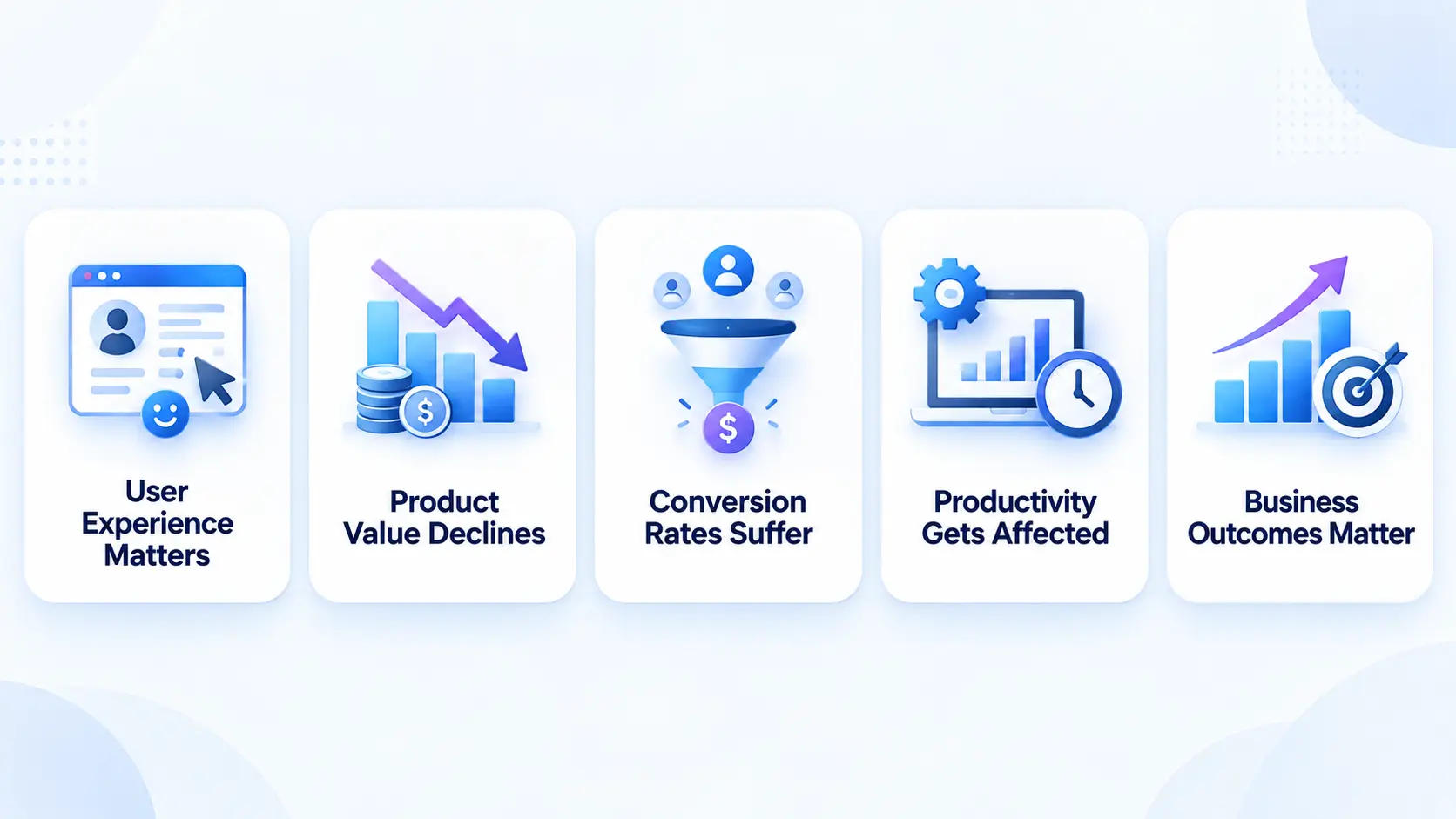
React performance can influence several areas of a business, from user experience and product value to conversions and productivity. Here are the key business concerns organizations should consider:
1. Performance Shapes the User Experience
Performance is more than a technical metric because users experience it directly through the speed and responsiveness of an application. They may not understand component trees, JavaScript bundles, API response times, or rendering cycles, but they immediately notice when a page takes too long to load, a button responds slowly, or a dashboard becomes difficult to use with a large amount of information. When an application feels responsive, users can move through their tasks naturally without unnecessary interruptions.
2. Slow Performance Can Reduce Product Value
A business may invest significantly in product design, development, and functionality, but these investments can lose their impact when users regularly encounter delays. Even a technically sophisticated application can create frustration if important interactions feel sluggish. Users generally judge the quality of a digital product by how easily they can accomplish their goals, making responsiveness an important part of the overall product experience.
3. Performance Can Influence eCommerce Conversions
For an eCommerce application, users typically move through several stages before completing a purchase, including product discovery, search, filtering, product evaluation, cart management, and checkout. When these interactions respond quickly, customers can move smoothly through the buying journey. However, slow filtering, sluggish product pages, or delayed checkout controls can introduce friction and make users more likely to abandon their purchase, even when the underlying functionality works correctly.
4. Performance Affects SaaS Productivity
SaaS users often perform repetitive tasks throughout the day, such as opening dashboards, updating records, generating reports, searching databases, and managing workflows. A few seconds of unnecessary waiting may not seem significant during a single interaction, but repeated delays can accumulate over time. When thousands of users experience these delays across hundreds of interactions, poor performance can affect productivity, engagement, and customer retention.
5. Performance Should Be Evaluated as a Business Metric
Businesses should therefore evaluate application performance from both technical and commercial perspectives. Instead of asking only whether an application is fast, organizations should consider whether its current performance supports their business objectives. Understanding how responsiveness affects conversions, retention, productivity, support requirements, and development costs allows companies to prioritize performance improvements according to their actual business value.
What Makes a React Application Slow?
React application performance is rarely affected by a single issue. Slowdowns can result from inefficient component structures, unnecessary re-renders, excessive state updates, expensive calculations, large datasets, oversized JavaScript bundles, and unoptimized assets. Components that handle too much logic or lists that render thousands of records can increase browser workload, while large images and unused dependencies can add to loading and rendering time. Dashboards, data-heavy tables, charts, filters, and search interfaces are especially sensitive to these issues because users expect them to remain responsive during interaction.
Network and backend activity can also make a React application feel slow even when the frontend code is well optimized. Multiple API requests, duplicated calls, sequential requests, slow server responses, and ineffective caching can delay the interface and increase the time users spend waiting for content. For this reason, performance optimization should begin with identifying the actual bottleneck through profiling, network monitoring, and performance metrics rather than applying optimization techniques without understanding the underlying problem.
Why Measurement Should Come Before React Optimization
- Avoid assumption-based optimization: A large component or frequent re-render may look like the problem, but it may not be the actual performance bottleneck.
- Measure before making changes: Use browser performance tools, React profiling tools, network analysis, bundle analyzers, application monitoring, and production data to identify where time is being spent.
- Focus on measurable impact: A component may render frequently but complete its work quickly, making render prevention less valuable. Another component may render less often but perform expensive calculations that have a greater impact.
- Check the full application stack: Slow performance may come from API responses, backend processing, network delays, or caching issues rather than React rendering itself.
- Follow a measurement-first cycle: Establish a baseline, identify the largest bottleneck, apply a targeted optimization, measure the result, and repeat the process.
- Demonstrate business value: Performance improvements become easier to communicate when teams can show measurable outcomes, such as faster workflows, reduced JavaScript payloads, or improved page responsiveness.
The Business Cost of a Slow React App
A slow React app can affect both user experience and business performance. The impact is not limited to lost conversions. Slow interactions can increase support requests, make development more difficult, and raise infrastructure usage as the application grows.
| Cost Area | Business Impact |
| Lost Revenue | Slow checkout, sign-up, or booking flows can lead to user abandonment |
| Marketing Spend | Businesses may lose the value of paid and organic traffic when visitors leave before converting |
| Customer Support | Users may repeat actions or contact support when the application appears unresponsive |
| Development Costs | Poor performance architecture can make new features harder and more time-consuming to build |
| Infrastructure | Unnecessary requests and inefficient processing can increase resource consumption and hosting costs |
These costs can become more noticeable as traffic and product complexity increase. A performance issue that seems minor for a small user base can create a much larger operational or financial impact at scale. This makes React performance optimization an ongoing product consideration rather than a one-time technical task.
How to Improve React App Performance Through Better Rendering
One of the most common areas for optimization is component rendering. React applications naturally re-render when state or props change, but unnecessary rendering can become expensive when components perform substantial work or when large parts of the interface update unnecerssarily.
The first step is to understand the component hierarchy. If a state value is stored at a high level even though only one small part of the interface needs it, updates to that state can cause unrelated components to participate in the rendering process.
Better state placement can therefore improve performance without introducing additional complexity. Components should generally own the state they actually need, while shared state should be introduced when there is a genuine requirement for sharing.
Memoization can also help in appropriate cases. React.memo can prevent certain components from rendering when their inputs have not meaningfully changed. However, it should not be treated as a universal solution. Adding memoization to every component can increase complexity and may produce little benefit when rendering is already inexpensive.
The same principle applies to hooks such as useMemo and useCallback. Understanding usememo vs usecallback is important because they address different optimization scenarios. useMemo can preserve the result of an expensive calculation, while useCallback can preserve a function reference. Their value depends on how the component is structured and what work is being repeated.
Good performance engineering therefore focuses on reducing meaningful work rather than eliminating renders simply because they exist.
1. Reducing JavaScript Bundle Size
JavaScript has become a central part of modern web applications, but loading too much of it too early can create performance problems. As products mature, developers often add new packages to solve specific problems. Over time, the application can accumulate dependencies that are used only on particular screens. Loading all of those dependencies during the initial application startup forces users to download and execute code that may not be immediately relevant.
Code splitting provides a practical solution. Instead of delivering one large bundle, the application can divide functionality into smaller pieces that are loaded when required. Route-based splitting is particularly useful for applications with distinct sections. A user visiting a customer dashboard does not necessarily need the JavaScript required by an administrative reporting module. Loading those resources only when the user reaches the relevant section can improve the initial experience.
Lazy loading can be used for features that are not immediately visible or necessary. However, lazy loading should be applied thoughtfully. If everything is deferred, users may experience delays when they interact with important functionality. The goal is to prioritize resources based on the user’s journey.
Dependency analysis is also important. Teams should periodically review which libraries contribute significantly to bundle size and whether lighter alternatives or native browser capabilities can be used.
These decisions become especially important when businesses are evaluating the broader technology stack. Resources such as full stack web development technologies can provide useful context when assessing how modern development practices fit into a long-term application strategy.
2. Handling Large Lists, Tables, and Data-Heavy Interfaces
Large datasets can create some of the most visible performance problems in React applications. Rendering thousands of elements at once increases DOM size, memory usage, and browser rendering work. Even if React itself handles the updates efficiently, the browser still has to manage the resulting interface.
Virtualization is one approach that can address this problem. Instead of rendering every item in a large list, the application renders the items that are currently visible and replaces them as the user scrolls. Pagination can provide another solution. Rather than retrieving and displaying an entire dataset, the application can request manageable portions based on what the user needs.
Server-side filtering and sorting can further reduce frontend work. Instead of sending thousands of records to the browser and asking JavaScript to process them, the backend can return only the information relevant to the current query.
This is particularly important for enterprise systems. When a product is expected to handle large datasets and many concurrent users, performance needs to be considered at both the interface and data layers. The right solution depends on the product. A small list does not need virtualization simply because virtualization exists. Optimization should be proportional to the actual workload.
3. Improving Data Fetching and API Performance
A React interface can be perfectly optimized and still feel slow if its data layer is inefficient. One common problem is duplicate API requests. A component may fetch information every time it mounts even though the same data has already been retrieved elsewhere. Another issue is sequential requests where independent data could be retrieved concurrently.
Caching can reduce unnecessary network activity. Frequently used information can sometimes be stored and reused rather than requested repeatedly. The appropriate caching duration depends on how frequently the underlying data changes.
Data-fetching architecture should also consider loading states. A page does not necessarily need to wait for every piece of information before becoming useful. Important content can be presented first while secondary information loads afterward.
For complex products, frontend performance may therefore require changes to API design, backend processing, database queries, or infrastructure. In such cases, full-stack web development services can help address the performance chain rather than focusing only on React components. This broader approach is particularly useful when the frontend is waiting on slow services. Optimizing the UI without addressing the source of the delay may create little improvement.
4. Optimizing Images, Fonts, and Other Assets
Visual assets have a direct effect on loading performance. Images should be delivered at dimensions appropriate for the device and interface. Sending a large desktop image to a small mobile screen wastes bandwidth. Modern image formats can also reduce file size when they are appropriate for the application’s browser-support requirements.
Lazy loading can be useful for images that are below the initial viewport. However, important visual content should not be delayed unnecessarily. Fonts require similar consideration. Loading multiple font families, weights, and styles can increase resource requirements. Teams should evaluate which typography resources are actually necessary and prioritize them appropriately.
Third-party scripts deserve attention as well. Analytics, advertising, chat widgets, tracking systems, and external integrations can contribute to page weight and execution time. Businesses should periodically review whether every external script remains necessary. These changes may seem small individually, but performance improvements often come from reducing many sources of unnecessary work.
5. Designing a Scalable React Architecture
Performance becomes harder to maintain when the architecture does not scale with the product. A scalable react architecture should make it clear which components own state, where data is retrieved, how information moves through the application, and how new features can be added without creating unnecessary dependencies.
Component responsibilities should remain understandable. When one component handles layout, data fetching, business logic, forms, filtering, and multiple interaction states, it becomes difficult to identify the source of performance problems.
Modular architecture can help separate responsibilities. It can also make testing and profiling more focused because individual areas of the application can be analyzed without understanding the entire product.
Architecture also needs to account for routing, caching, API communication, authentication, error handling, and deployment. Businesses planning a new application can use the web application architecture to understand how architectural decisions influence the structure and long-term maintainability of a web product. Performance should be part of those decisions from the beginning rather than added after the application becomes difficult to change.
Estimating the Cost of React Performance Optimization
The cost of optimization depends on the condition and complexity of the application. A relatively small React application may require only a performance audit and targeted changes to a few components. A large enterprise application may require profiling across multiple workflows, frontend refactoring, API optimization, infrastructure changes, testing, monitoring, and staged deployment.
Several factors influence the total effort. The number of screens, amount of data, number of dependencies, quality of existing architecture, severity of performance problems, backend involvement, and testing requirements can all affect the cost.
A business should therefore avoid judging an optimization project solely by developer hours. The more useful comparison is between the investment and the expected business impact. For example, if a performance problem affects a high-volume checkout process, fixing it may produce considerably more value than optimizing an internal page used by a small number of employees.
Businesses estimating broader development budgets can also refer to website development cost to understand the different factors that influence the investment required for web application development.
The cost of not fixing a performance problem should also be considered. Lost conversions, higher support workloads, inefficient infrastructure, and increased development effort can continue accumulating while the application remains slow.
Calculating the ROI of Performance Optimization
The ROI of React performance optimization becomes clearer when technical improvements are connected to measurable business outcomes. Instead of focusing only on faster load times, businesses can evaluate how performance improvements affect revenue, productivity, infrastructure usage, and customer support.
| ROI Area | How Performance Optimization Creates Value |
| Revenue | Faster workflows can reduce abandonment and increase successful purchases, sign-ups, bookings, or other conversions. |
| Employee Productivity | Faster internal applications can reduce the time employees spend waiting for dashboards, reports, searches, or repetitive workflows. |
| Infrastructure Savings | Reducing unnecessary API requests and processing can lower resource consumption and infrastructure costs. |
| Support Costs | Better responsiveness can reduce some performance-related issues, such as repeated actions and support requests caused by unresponsive interfaces. |
| Development Efficiency | Improving inefficient components and data flows can make the application easier to maintain and reduce future performance-related development work. |
ROI should be based on realistic measurements rather than assumed improvements. Businesses can compare performance metrics and product analytics before and after optimization to determine whether the investment produced meaningful results. The strongest ROI assessment combines technical performance data with actual business outcomes.
When Optimization is Better Than Rebuilding
Rebuilding is not always necessary when a React application has performance issues. Here are some situations where targeted optimization may be a more practical approach:
1. The existing application has valuable business logic
A mature React application may contain years of business rules, customer workflows, third-party integrations, authentication systems, and data structures. Rebuilding these elements from scratch can require significant time and resources. If the existing functionality is still valuable, targeted optimization can improve performance while preserving what already works.
2. Performance bottlenecks can be isolated
If profiling shows that the slowdown comes from specific components, unnecessary re-renders, inefficient API calls, large bundles, or poorly optimized assets, businesses may not need a complete rebuild. Developers can address these specific issues and measure whether performance improves after each change.
3. The current architecture is fundamentally stable
Optimization is more suitable when the application’s underlying structure can still support future development. Teams can gradually improve state management, component structure, data fetching, caching, code splitting, and asset delivery without replacing the entire codebase.
4. The business wants to minimize disruption
A complete rebuild can affect ongoing development, testing, integrations, data migration, and releases. If the application is business-critical, incremental optimization can allow teams to improve performance while keeping existing workflows and services operational.
5. The application has manageable technical debt
Some technical debt does not necessarily justify a rebuild. If outdated code or inefficient patterns are limited to specific areas, developers can refactor those areas as part of the optimization process and avoid the cost of replacing the entire application.
6. The performance problem is primarily frontend-related
When issues are caused by rendering, component updates, JavaScript bundles, large lists, or asset delivery, targeted React optimization may address the problem effectively without changing the broader application architecture.
7. The application has deeper architectural limitations
Rebuilding or modernization becomes more relevant when performance problems are connected to tightly coupled modules, duplicated logic, outdated dependencies, poor testing, inefficient data flows, or an architecture that cannot support the product’s expected scale.
8. Repeated optimization is producing only temporary results
If individual fixes repeatedly improve performance for a short period but new problems continue to appear, the underlying architecture may be contributing to the issue. In such cases, addressing the structural limitations may be more sustainable than continuing to apply isolated fixes.

Performance Requirements Across Different Web Applications
cDifferent React applications have different performance priorities because user workflows, data volumes, and technical requirements vary by product type. Understanding types of web applications can help teams determine which performance areas deserve the most attention.
| React Application Type | Key Performance Priorities | Common Performance Challenges |
| eCommerce | Product discovery, search, images, cart, checkout | Large image assets, slow product filtering, heavy third-party scripts |
| SaaS | Dashboards, forms, navigation, data workflows | Frequent state updates, API calls, complex component trees |
| Analytics | Data processing, charts, visualisations, filtering | Large datasets, expensive calculations, frequent chart re-renders |
| Enterprise | Large tables, dashboards, permissions, integrations | High data volumes, complex workflows, concurrent users |
For eCommerce applications, performance should focus on fast product discovery and frictionless purchasing journeys. Search, filtering, product images, cart interactions, and checkout are particularly important because delays in these areas can interrupt the path to conversion. Optimising image delivery, reducing unnecessary JavaScript, and keeping interactive elements responsive can improve the overall experience.
SaaS applications often have different requirements. Users may spend hours working with dashboards, forms, tables, notifications, and data-intensive workflows. In these applications, unnecessary component re-renders, inefficient state management, excessive API requests, or poorly handled asynchronous operations can gradually affect responsiveness.
Analytics applications can place greater demands on browser-side processing. Rendering large datasets, updating charts, applying filters, and transforming data can become expensive as the volume of information increases. Techniques such as memoisation, virtualisation, efficient data transformation, and selective rendering can help prevent these operations from affecting the rest of the interface.
Enterprise applications often combine several of these challenges. They may have long lifecycles and support large tables, complex dashboards, reporting tools, role-based functionality, third-party integrations, and real-time information. Performance problems in these workflows can directly affect employee productivity or customer service.
Enterprise applications should therefore be tested against realistic workloads rather than only small development datasets. An interface that performs well with hundreds of records may behave very differently when users work with thousands or millions of records simultaneously.
Maintainability also matters. A performance optimisation that improves one dashboard but introduces unnecessary complexity across the codebase may create future development costs. Performance decisions should therefore balance immediate responsiveness with architectural simplicity and long-term scalability.
This is also why React.js use cases vary significantly across products. React can support eCommerce platforms, SaaS products, analytics tools, and enterprise systems, but the optimisation strategy should be based on how users interact with the application and where computational or rendering costs actually occur.
For teams planning a complex product, the web application features checklist can also help evaluate performance alongside functionality, security, scalability, and usability. The goal is not to apply every React optimisation technique, but to identify the bottlenecks that have the greatest impact on the application’s actual users.
How Full-Stack Performance Affects React Applications
Frontend performance cannot always be improved independently of backend architecture. A React application might display a dashboard that depends on several API calls. If those APIs perform inefficient database queries or return excessive amounts of data, the frontend can remain slow despite optimized components.
Similarly, an application may repeatedly request information because the API does not provide an efficient aggregation mechanism. In this situation, improving the backend can have a greater impact than modifying React rendering.
This is why performance audits should examine the complete request lifecycle. A user clicks a button. The frontend handles the event. A request is generated. The network carries the request. The server processes it. The database may perform queries. The response returns. React receives the data and updates the interface. The browser then renders the result.
Any stage in this chain can create delay. Organizations dealing with these cross-layer problems may benefit from a team that understands frontend performance while also evaluating the wider application architecture. When backend and infrastructure work is required, the optimization process should address the complete application rather than focusing only on individual React components.
Building a Performance-Focused Development Process
Performance should not be treated as a final-stage optimisation task. It should be considered during planning, architecture, development, testing, and ongoing maintenance. Building performance into the development process can help teams identify problems earlier and reduce the cost of fixing them later.
1. Performance During Planning
Performance requirements should be defined before development begins. Teams can identify expected traffic, data volumes, critical user journeys, response-time expectations, and the devices or network conditions the application needs to support.
For example, an eCommerce application may prioritise fast product discovery and checkout, while an enterprise dashboard may need to remain responsive when displaying large datasets. Defining these requirements early gives developers measurable targets rather than leaving performance to subjective testing at the end of the project.
2. Clear Component Boundaries
Well-defined component boundaries can make React applications easier to optimise and maintain. Components should have clear responsibilities, predictable data flows, and limited unnecessary dependencies.
When component structures become overly complex, a small state change can trigger updates across unrelated parts of the interface. A modular architecture makes it easier to identify expensive rendering paths and optimise individual areas without introducing unintended effects elsewhere.
3. Maintainable Architecture
Performance and maintainability are closely connected. An application built around clear architecture, efficient data flows, reusable components, and appropriate state management is generally easier to improve as requirements evolve.
Teams should avoid optimisations that solve an isolated performance issue while making the codebase significantly harder to understand. Short-term gains can become long-term development costs when future developers need to work around unnecessarily complex implementations.
4. Performance Budgets
Performance budgets provide measurable limits for important application metrics. Depending on the product, a team may establish targets for JavaScript bundle size, image weight, page load performance, API response time, or rendering behaviour.
These budgets can be incorporated into development and deployment workflows so that performance regressions are identified before they reach production. They also give teams a shared standard for evaluating whether new features introduce an acceptable performance cost.
5. Realistic Testing
Performance testing should reflect how the application will actually be used. Testing only with small datasets, fast development machines, or ideal network conditions can hide problems that users encounter in production.
Teams should test realistic data volumes, concurrent activity, slower connections, lower-powered devices, and complex user workflows where relevant. Enterprise applications, for example, may need to be tested with thousands or millions of records rather than sample datasets.
6. Managing Technical Debt
Performance problems can become technical debt when they are repeatedly postponed. A slow component, inefficient data-fetching pattern, oversized dependency, or poorly structured state system may initially appear manageable. As more features are added, however, these issues can become increasingly difficult to isolate and fix.
Regular performance reviews can help teams identify and address these issues before they spread across the application. This is particularly important for products expected to operate for several years.
7. Reducing Future Development Costs
One of the less obvious benefits of performance-focused development is its effect on future development. An application with clear component boundaries, efficient data flows, and maintainable architecture is easier to extend. Developers can introduce new functionality without accidentally creating widespread rendering, data-fetching, or responsiveness problems.
By contrast, a fragile application can become progressively more expensive to maintain. Each new feature may require additional testing and debugging because developers cannot easily predict how changes will affect existing functionality.
Performance should therefore be viewed as an ongoing engineering practice rather than a one-time optimisation exercise. By establishing performance requirements during planning, maintaining a scalable architecture, testing realistic workloads, and addressing technical debt continuously, teams can create React applications that remain responsive without making future development unnecessarily expensive.
Creating a Practical React Performance Optimization Roadmap
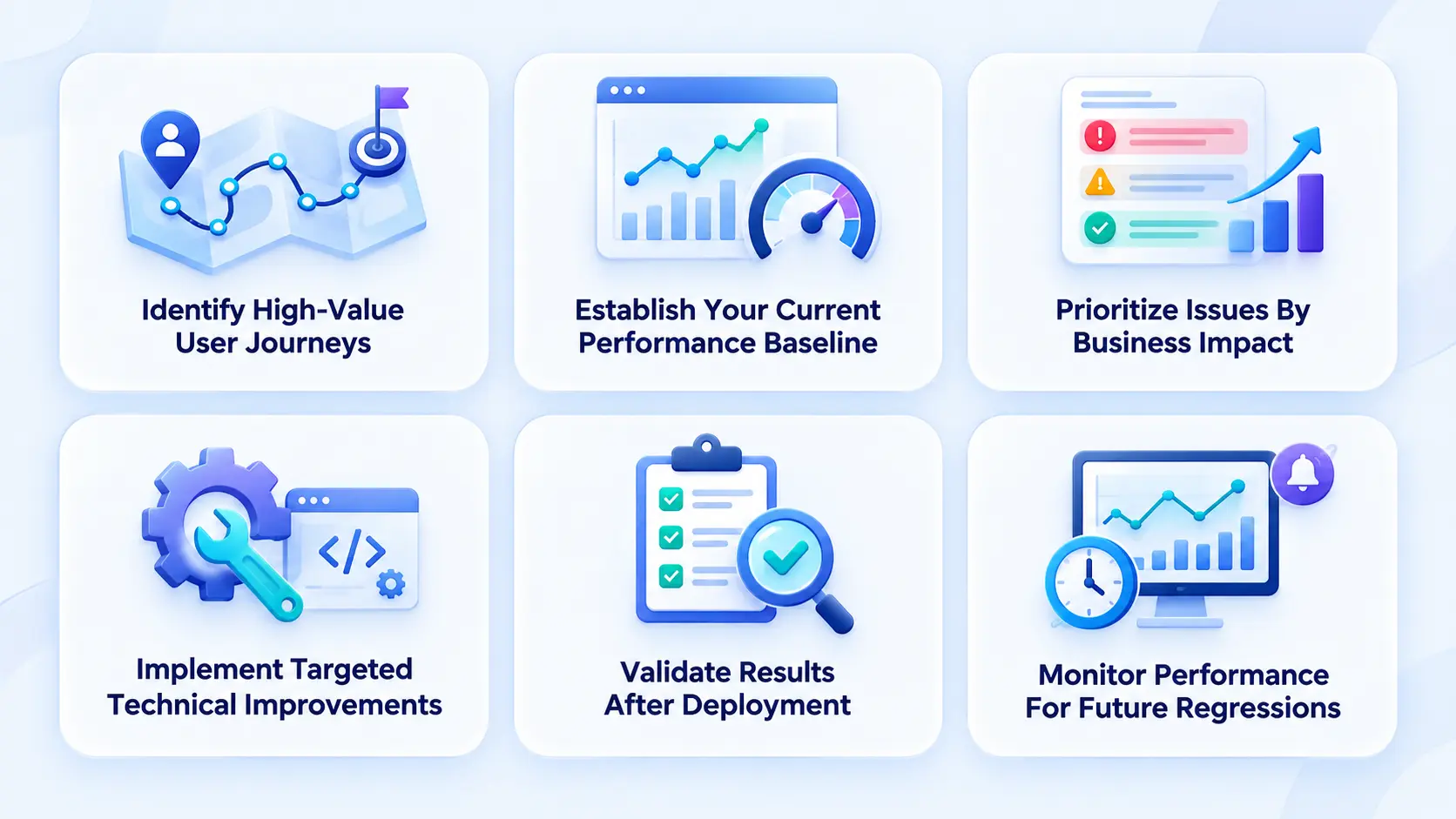
A practical optimization roadmap helps teams prioritize performance improvements based on user impact and business value. Here are the key steps to build an effective React performance optimization plan:
1. Identify High-Value User Journeys
The first step is to understand where slow performance matters most to the business. Instead of trying to optimize every part of the application at once, teams should focus on workflows that directly affect revenue, productivity, engagement, or customer satisfaction.
- Identify critical workflows such as onboarding, checkout, search, dashboard access, reporting, and account management.
- Determine which journeys are used most frequently by customers or employees.
- Identify interactions where delays could lead to abandonment, frustration, or reduced productivity.
- Connect important user journeys with relevant business outcomes so optimization efforts have a clear purpose.
2. Establish Your Current Performance Baseline
Before making technical changes, teams need a clear understanding of the application’s current behavior. A baseline provides measurable reference points that can be used to determine whether optimization efforts are actually producing improvements.
- Measure important areas such as page loading, rendering, interaction responsiveness, and data-fetching behavior.
- Record performance metrics for the application’s most important workflows.
- Identify slow pages, components, API interactions, and other recurring bottlenecks.
- Use the baseline to compare application behavior before and after optimization.
- Avoid relying only on subjective impressions of whether the application feels faster.
3. Prioritize Issues By Business Impact
Not every performance issue deserves the same level of attention. Once bottlenecks have been identified, they should be ranked according to their business impact, technical complexity, and potential improvement.
- Identify issues affecting high-value or frequently used workflows.
- Estimate the potential impact of fixing each bottleneck.
- Compare the expected benefit with the effort required for implementation.
- Address relatively simple improvements with significant impact first.
- Defer complex changes that have limited influence on important user journeys.
4. Implement Targeted Technical Improvements
The implementation stage should focus on the specific causes identified during the assessment rather than making broad technical changes without measurable objectives.
- Improve component rendering when unnecessary re-renders are affecting responsiveness.
- Review state management to reduce avoidable updates and inefficient data flows.
- Optimize data fetching and reduce unnecessary requests.
- Reduce JavaScript bundle size through techniques such as code splitting and lazy loading where appropriate.
- Improve asset delivery so images and other resources do not create unnecessary delays.
- Review API performance when slow backend responses contribute to frontend delays.
- Consider architectural improvements when existing application structures limit scalability or responsiveness.
5. Validate Results After Deployment
Optimization should not end when technical changes are implemented. Teams need to verify whether the changes produced measurable improvements in real application behavior.
- Compare post-optimization metrics with the original baseline.
- Test the workflows that were identified as high priority.
- Confirm that improvements do not introduce new usability or functionality problems.
- Evaluate whether the changes have produced meaningful business benefits.
- Document successful improvements so they can inform future optimization work.
6. Monitor Performance For Future Regressions
React applications continue to evolve as new features, dependencies, integrations, and users are added. Continuous monitoring helps ensure that improvements remain effective over time.
- Track important performance metrics after releases.
- Monitor critical user journeys for changes in responsiveness.
- Identify regressions before they significantly affect users.
- Include performance checks in ongoing development and release processes.
- Reassess optimization priorities as the application’s usage and business requirements change.
A structured roadmap allows businesses to treat React performance optimization as an ongoing, measurable initiative rather than a one-time technical exercise. By connecting technical improvements with user journeys and business outcomes, teams can focus their resources on changes that deliver meaningful value.
When to Hire a React Development Partner
Internal engineering teams may be able to solve individual performance issues, but external expertise can become valuable when the application is large or the source of the problem is unclear.
A development partner should begin with analysis rather than immediately recommending a rewrite. The team should be able to explain what is causing the slowdown, which areas have the greatest potential impact, what the estimated effort is, and how success will be measured.
A partner can also help when performance problems cross architectural boundaries. Frontend components, APIs, databases, infrastructure, and deployment systems may all contribute to the final experience.
For companies considering a larger development or modernization initiative, the web application development guide can help provide broader context around how architecture, development, testing, deployment, and maintenance fit together. The objective should be a sustainable solution rather than a temporary performance patch.
Conclusion
React performance optimization is not simply about making an application load faster. It is about reducing friction, protecting conversions, improving productivity, controlling technical debt, and creating a better experience for users. A slow application can quietly increase business costs through abandoned workflows, support requests, infrastructure usage, and slower development.
The right approach is to measure before changing, prioritize performance problems according to business impact, and select techniques that solve actual bottlenecks. Component optimization, efficient state management, code splitting, caching, asset optimization, better data fetching, and scalable architecture can all contribute to a stronger product when applied strategically.
RipenApps helps businesses build and optimize React applications with a focus on performance, scalability, maintainability, and user experience. Our development teams can assess existing applications, identify performance bottlenecks, and implement practical improvements across the frontend and supporting technology stack.
For organizations facing complex performance challenges, specialized development expertise can help diagnose and resolve frontend problems, while full-stack web development services can address issues that extend into APIs, databases, and infrastructure. The long-term objective is not merely a faster application today, but a responsive and maintainable product that continues to perform as the business grows.

FAQs
1. What is React performance optimization?
React performance optimization is the process of identifying and reducing unnecessary work in a React application to improve responsiveness, loading performance, rendering efficiency, and overall user experience. It can include optimizing component rendering, JavaScript bundles, data fetching, assets, state management, and application architecture.
2. Why is React performance optimization important for businesses?
React performance can affect conversions, customer retention, employee productivity, infrastructure usage, support requirements, and future development costs. A slow application can create friction in important workflows such as checkout, onboarding, dashboards, search, and reporting.
3. How do you identify performance problems in a React application?
Teams should measure performance before making changes. Browser performance tools, React profiling tools, network analysis, bundle analyzers, application monitoring, and production data can help identify rendering bottlenecks, large JavaScript bundles, inefficient API requests, slow server responses, and other performance issues.
4. What are the most common ways to improve React app performance?
Common techniques include reducing unnecessary re-renders, improving state management, using code splitting and lazy loading, optimizing JavaScript bundles, virtualizing large lists, improving API and data-fetching performance, caching frequently used data, optimizing images and fonts, and removing unnecessary third-party scripts.
5. How much does React performance optimization cost?
The cost depends on the application’s size, architecture, number of screens, data volume, dependencies, severity of performance problems, backend involvement, and testing requirements. A smaller application may require a targeted performance audit, while a complex enterprise application may require frontend refactoring, API optimization, infrastructure changes, testing, monitoring, and staged deployment.
6. How can businesses calculate the ROI of React performance optimization?
Businesses can compare performance metrics and product analytics before and after optimization. ROI can be evaluated through improvements in conversions, employee productivity, infrastructure usage, support costs, and development efficiency. The assessment should rely on measurable outcomes rather than assumed improvements.
Discuss your project and request for proposal
SHARE
WRITTEN BY

Ishan Gupta
CEO & Founder
Ishan Gupta is a seasoned entrepreneur and CEO with extensive 10+ years of experience in business and mobile app development landscape. He believes that the right digital product allows companies to focus on what they do best, while technology handles the rest. With deep exposure to global markets, he understands what makes an app succeed. His approach translates business needs into clear product strategies, ensuring that every feature contributes to measurable ROI.
View All Articles