


Key Takeaways
- RAG allows enterprise chatbots to generate responses using relevant internal business data.
- Enterprise RAG systems can connect documents, knowledge bases, databases, CRM, ERP, and other business systems.
- Retrieval quality depends heavily on data preparation, chunking, embeddings, indexing, and search strategies.
- Enterprise chatbot architecture should include knowledge, retrieval, intelligence, security, integration, and interaction layers.
- RAG is generally more suitable than fine-tuning when business knowledge changes frequently.
- Apply access controls during retrieval so users receive only the information they are authorized to access.
- Enterprise chatbot development costs depend on data volume, integrations, security, model selection, infrastructure, and deployment complexity.
- ROI should be measured through operational outcomes such as reduced search time, faster support resolution, employee productivity, adoption, and cost savings.
Enterprise AI is moving beyond generic conversational assistants. Businesses now want chatbots that can answer questions using internal documents, policies, databases, knowledge bases, and business systems while respecting user permissions and security requirements.
RAG helps bridge this gap by connecting generative AI with proprietary business knowledge. Instead of relying only on information learned during model training, a RAG-powered chatbot retrieves relevant enterprise data and uses it as context when generating a response.
For organizations exploring enterprise chatbot development, the real challenge is not simply connecting an LLM to a chat interface. The system needs reliable data pipelines, retrieval mechanisms, access controls, integrations, monitoring, evaluation, and a scalable architecture.
This is where an AI chatbot development company can help enterprises design and implement RAG-powered assistants that align with their data, workflows, security requirements, and business goals. This guide explains how RAG works in enterprise chatbots, the architecture and features involved, development costs, implementation challenges, ROI metrics, and security considerations.
Table of Contents
What Is an Enterprise AI Chatbot With RAG?
An enterprise AI chatbot with RAG combines a conversational interface, a retrieval system, enterprise data sources, and a large language model. When a user asks a question, the system retrieves relevant information from approved knowledge sources and provides that context to the model before generating the response.
So, what are enterprise chatbots in a practical business environment? They are conversational interfaces that can help employees, customers, partners, or support teams access information and complete tasks across enterprise workflows.
Unlike a basic chatbot that depends mainly on predefined responses or a model’s existing knowledge, an enterprise chatbot can be connected to business-specific information that changes over time.
For example, an employee could ask about a company reimbursement policy. The chatbot can retrieve the latest approved policy document, identify the relevant section, and generate an answer based on that information rather than relying on generic knowledge.
Why Do Enterprises Need RAG for AI Chatbots?
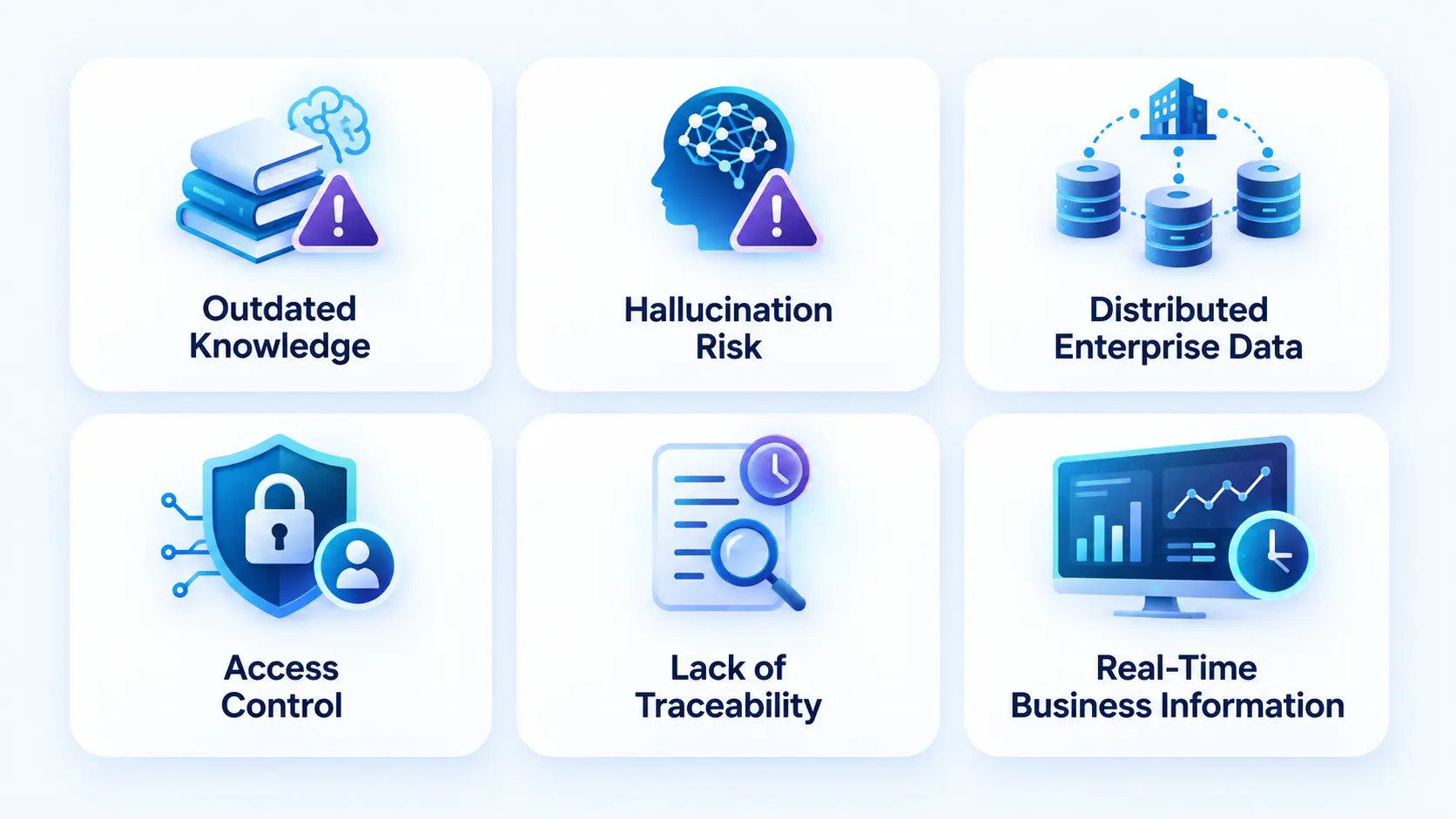
Large language models are capable of understanding natural language and generating detailed responses. However, they do not automatically have access to an organization’s private, recently updated, or operational data. This creates challenges when businesses try to deploy generic AI assistants across departments, workflows, and large user groups.
RAG helps connect the language model with approved enterprise information at the time of a query. Instead of relying only on the model’s pre-trained knowledge, the system retrieves relevant information from connected data sources and uses that context to generate a response.
1. Outdated Knowledge
Enterprise policies, product information, pricing, contracts, procedures, and documentation can change frequently. A model’s static training knowledge cannot automatically reflect every internal update. RAG allows the chatbot to retrieve information from updated enterprise sources when responding to a query.
2. Hallucination Risk
A language model can produce a confident answer even when it does not have enough information. In enterprise environments, an incorrect response can affect customer service, compliance, operations, or decision-making. RAG grounds responses in retrieved enterprise information, which helps reduce unsupported answers, although it does not eliminate hallucinations.
3. Distributed Enterprise Data
Business information is often spread across SharePoint, Google Drive, CRMs, ERPs, databases, ticketing systems, PDFs, internal wikis, and other repositories. RAG provides a retrieval layer that can bring relevant information from approved sources into the chatbot’s response process.
4. Access Control
Not every employee should have access to every piece of information. An enterprise AI system needs to respect existing roles, permissions, and data access policies. RAG implementations should apply these controls during retrieval so users receive information they are authorized to access.
5. Lack of Traceability
Employees may need to know where an answer came from, especially when the information relates to policies, compliance, contracts, or operational procedures. RAG systems can provide source references or citations alongside responses, making important information easier to verify and review.
6. Real-Time Business Information
Some enterprise questions require information that changes continuously, such as order status, inventory, customer records, or support tickets. RAG can work alongside APIs and enterprise integrations to retrieve current information from business systems when static documents are not enough.
RAG addresses these challenges by introducing a retrieval layer between the user’s question and the model’s response. With expert generative AI development services, enterprises can implement RAG with appropriate data governance, access controls, and integrations to build AI chatbots that are more grounded in their business information.
How Does RAG Work in an Enterprise Chatbot?
The basic RAG workflow can be represented as:
Enterprise Data → Ingestion → Chunking → Embeddings → Vector Database → Retrieval → Context → LLM → Grounded Response
When users ask questions, the system first interprets the query and searches the relevant knowledge sources. The retrieved information is then provided to the language model as context.
This makes a RAG-based chatbot more suitable for knowledge-intensive enterprise applications where answers need to reflect current internal information.
Step 1: Collect Enterprise Data
Data can come from documents, knowledge bases, CRM platforms, ERP systems, databases, APIs, websites, ticketing systems, and other approved sources.
Step 2: Clean and Prepare the Data
Documents should be processed, normalized, deduplicated, and enriched with metadata before indexing.
Step 3: Split Content Into Chunks
Large documents are divided into meaningful sections so the retrieval system can identify the portions most relevant to a user’s question.
Step 4: Generate Embeddings
The system converts text into numerical representations called embeddings. These allow semantic relationships between queries and documents to be identified.
Step 5: Store the Knowledge
The embeddings and metadata are stored in a vector database or another retrieval system that can efficiently search for relevant information.
Step 6: Retrieve Relevant Context
When a user asks a question, the retrieval layer searches the indexed knowledge and selects relevant content.
Step 7: Generate the Response
The LLM receives the user’s query together with the retrieved context and generates a response grounded in that information.
Step 8: Return Sources and Apply Controls
The system can provide citations or source references while enforcing permissions, response policies, logging, and other governance controls.
Read Also: A Complete Guide to Chatbot Development
Enterprise RAG Architecture Explained
A strong enterprise RAG architecture should separate knowledge management, retrieval, AI reasoning, security, integrations, and user interaction rather than treating the chatbot as a single application.
1. Knowledge Layer
This layer manages the information that the chatbot can access.
It can include:
- Internal documents
- Knowledge bases
- CRM records
- ERP information
- Product documentation
- Policies and procedures
- Support tickets
- Structured databases
- Approved external sources
The ingestion pipeline should also track metadata such as document owner, department, update date, access permissions, and source system.
2. Data Processing Layer
Raw enterprise data often requires cleaning before it can be used effectively. This layer handles document parsing, normalization, chunking, metadata extraction, deduplication, and embedding generation.
Good data preparation can have a significant impact on retrieval quality. A sophisticated model cannot compensate for poorly structured or outdated source data.
3. Retrieval Layer
The retrieval layer identifies the information most relevant to the user’s query.
A modern system can combine semantic vector search with keyword search, metadata filters, query rewriting, and re-ranking. This can be especially useful when users search for exact policy names, product codes, employee IDs, or domain-specific terminology.
4. Intelligence Layer
The intelligence layer contains the LLM and orchestration logic. It determines how retrieved information is passed to the model and how the final response should be generated.
It can also handle intent classification, query rewriting, summarization, tool selection, and response validation.
5. Security and Governance Layer
This layer manages authentication, authorization, encryption, audit logs, data policies, content filtering, and access controls.
Permissions should be enforced before information reaches the model. The chatbot should not retrieve sensitive information first and attempt to hide it later.
6. Integration Layer
Enterprise chatbots often need to work with existing business systems. APIs and middleware can connect the chatbot with CRM, ERP, HRMS, ticketing, analytics, payment, or workflow systems.
7. Interaction Layer
This is the user-facing experience. It can include a web chatbot, mobile interface, employee portal, CRM interface, Microsoft Teams, Slack, or another enterprise application.
Essential Features of an Enterprise RAG Chatbot
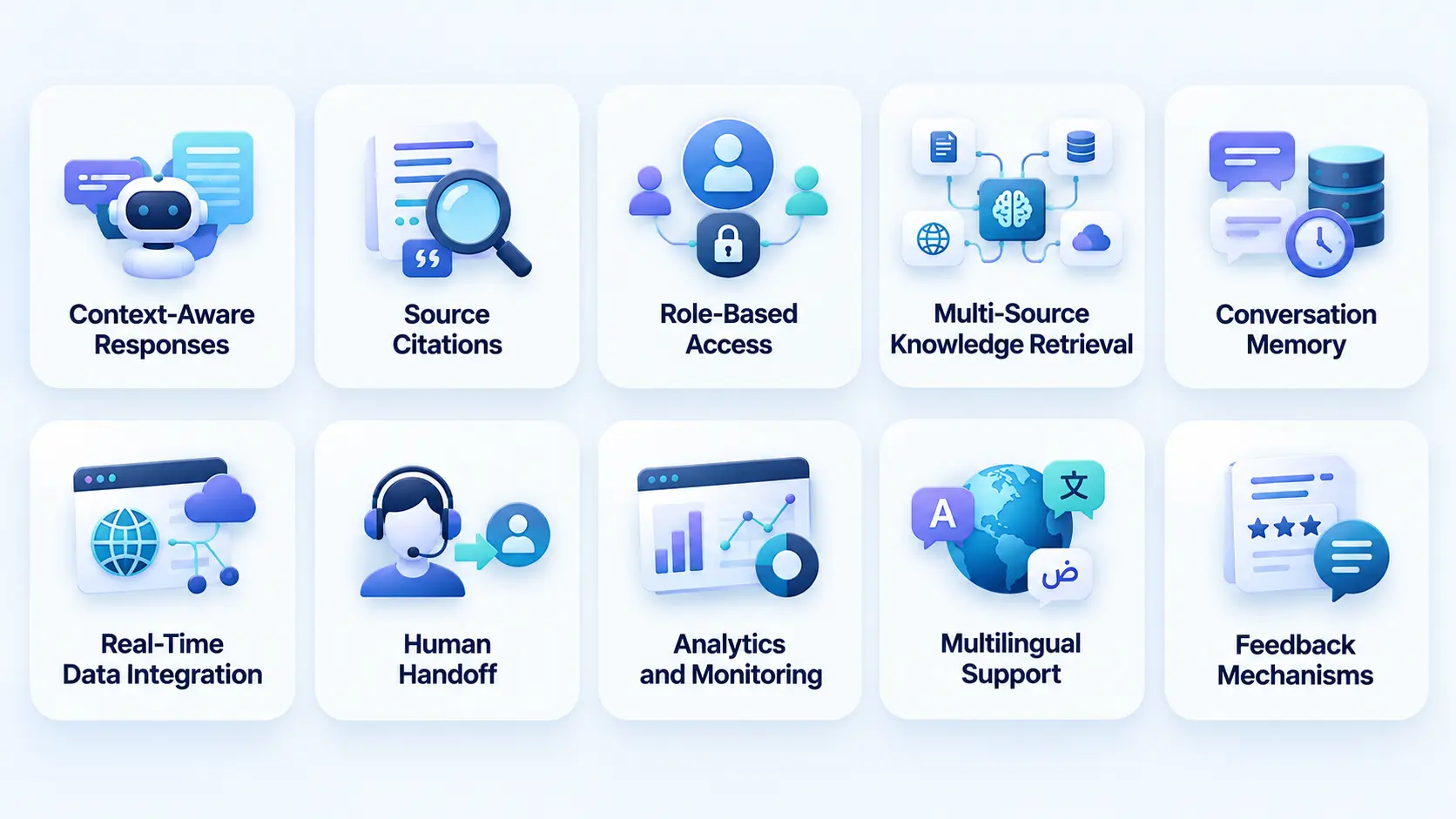
A production chatbot needs more than a conversational interface. Its features should support accuracy, security, usability, integrations, and measurable business outcomes. The right capabilities also help enterprises manage access, monitor performance, and connect AI with existing business systems.
1. Context-Aware Responses
The chatbot should use relevant enterprise information when responding instead of generating generic answers. RAG retrieves information related to the user’s query and provides that context to the AI model before generating a response. This improves relevance and reflects the power of chatbots in mobile apps by delivering more personalized, context-driven interactions while keeping answers aligned with approved business knowledge.
2. Source Citations
Responses can include references to the documents or knowledge sources used to generate an answer. This gives users a way to verify important information and helps teams understand where an answer came from. Source visibility is particularly useful for compliance, legal, financial, and other knowledge-sensitive workflows.
3. Role-Based Access
Users should receive information according to their existing permissions and organizational roles. The chatbot needs to respect access controls when retrieving documents or data from enterprise systems. This prevents sensitive information from being exposed to users who are not authorized to access it.
4. Multi-Source Knowledge Retrieval
The system should retrieve information from multiple approved enterprise repositories rather than relying on one document collection. These sources can include knowledge bases, PDFs, databases, CRM systems, ERP platforms, and internal documentation. Centralized retrieval makes the chatbot useful across different departments and workflows.
5. Conversation Memory
For appropriate use cases, the chatbot can maintain relevant conversation context so users do not need to repeat information during the same workflow. Memory helps support follow-up questions and multi-step interactions. Enterprises should define what information is retained and for how long based on privacy and security requirements.
6. Real-Time Data Integration
Some questions require current operational information rather than static documents. APIs can connect the chatbot with business systems to retrieve live data such as order status, inventory, account details, or support tickets. This allows the chatbot to provide more useful responses when information changes frequently.
7. Human Handoff
The system should recognize when it cannot confidently answer a question or when a request requires human judgment. It can then route the conversation to a support agent, specialist, or appropriate business workflow. This creates a clear path for handling complex or sensitive requests instead of forcing the AI to answer everything.
8. Analytics and Monitoring
Teams should be able to monitor usage, retrieval quality, response latency, unanswered questions, user feedback, and business outcomes. These insights help identify where the chatbot performs well and where the underlying knowledge or retrieval process needs improvement. Continuous monitoring also supports better performance after deployment.
9. Multilingual Support
Global enterprises may need the chatbot to understand and respond in multiple languages. Language support should work alongside the same access controls, knowledge sources, and governance policies used for other users. This helps organizations provide consistent AI assistance across different regions and teams.
10. Feedback Mechanisms
Thumbs-up, thumbs-down, corrections, and structured feedback give teams direct signals about response quality. This feedback can help identify inaccurate retrieval, missing information, or unclear answers. Over time, these insights can guide improvements to the knowledge base, prompts, retrieval logic, and overall chatbot experience.
Enterprise Chatbot Use Cases Across Business Functions.
The value of an enterprise chatbot depends on where it is integrated into the organization’s workflows. During enterprise app development, businesses can embed chatbots into employee portals, customer platforms, CRM systems, and other business applications to support repetitive knowledge access, information discovery, customer support, and operational assistance.
1. Employee Knowledge Assistant
Employees can ask questions about HR policies, benefits, internal processes, IT procedures, travel policies, and company documentation.
2. Customer Support
A RAG-powered support assistant can retrieve product documentation, troubleshooting guides, policies, and approved responses to help customers resolve common issues.
3. Sales Enablement
Sales teams can use the chatbot to search product specifications, pricing documentation, competitive information, case studies, and approved sales materials.
4. Legal and Compliance
Authorized teams can search contracts, policies, regulatory documentation, and internal compliance materials while maintaining source traceability.
5. IT Support
The chatbot can retrieve troubleshooting procedures, system documentation, configuration guides, and internal IT knowledge.
6. Knowledge Management
Instead of searching multiple repositories manually, employees can use conversational queries to find relevant information across approved enterprise sources.
These represent some of the most practical enterprise chatbot use cases because they connect AI directly with existing information-heavy workflows.
RAG vs Fine-Tuning for Enterprise Chatbots
Businesses often ask whether they should use RAG, fine-tuning, or both. The answer depends on what they need to change.
RAG vs. fine-tuning is primarily a question of where the model should get its information and what behavior needs to be customized.
| Factor | RAG | Fine-Tuning |
| Frequently changing knowledge | Strong fit | Less suitable |
| Private enterprise documents | Strong fit | Possible but usually unnecessary |
| Source citations | Strong fit | Not inherent |
| Response style | Limited | Stronger |
| Domain behavior | Good with context | Stronger for specific patterns |
| Updating information | Re-index data | Requires additional training |
| Cost of knowledge updates | Generally lower | Potentially higher |
| Best use | Knowledge grounding | Model behavior and task adaptation |
For many enterprise knowledge applications, RAG can provide a more practical way to connect an existing LLM to changing business information without retraining the model every time a document changes.
How to Build a RAG-Based Enterprise Chatbot
The development process should begin with the business workflow rather than the LLM selection.
1. Define the Business Objective
Identify what the chatbot needs to improve. This could be employee productivity, customer support, knowledge retrieval, sales enablement, or another measurable business outcome.
2. Identify Users and Permissions
Define who will use the chatbot and what information each user group is allowed to access.
3. Audit Enterprise Data
Map the available knowledge sources and assess their quality, ownership, structure, freshness, and accessibility.
4. Select the Retrieval Strategy
Determine whether the application needs semantic search, keyword search, hybrid retrieval, metadata filtering, re-ranking, or a combination of these approaches.
5. Select the LLM
Choose the model based on accuracy, context requirements, latency, supported languages, privacy considerations, infrastructure, and cost.
6. Build the RAG Pipeline
Develop ingestion, chunking, embedding, indexing, retrieval, context construction, and response-generation components.
7. Connect Enterprise Systems
Integrate the chatbot with relevant CRM, ERP, document repositories, databases, APIs, and workflow systems.
8. Add Security and Governance
Implement authentication, authorization, encryption, logging, data policies, and audit mechanisms.
9. Evaluate the System
Test retrieval accuracy, answer quality, hallucination rates, latency, access controls, and failure handling.
10. Deploy and Continuously Improve
Monitor real-world usage and update the knowledge pipeline, retrieval strategy, prompts, integrations, and model configuration as needed.
How to Build a RAG System for Enterprise Data
A successful RAG system requires more than connecting documents to a vector database. The underlying data lifecycle needs to remain reliable as the enterprise grows.
The process for how to build a RAG system for enterprise should therefore include data governance, source ownership, update frequency, metadata standards, access permissions, retrieval evaluation, and monitoring.
For example, if an HR policy changes, the system should be able to identify the updated document, remove or deprioritize outdated information, update the index, and ensure future answers use the latest approved version.
This makes enterprise RAG an ongoing data and AI operation rather than a one-time chatbot implementation.
How to Deploy a RAG Application With Enterprise Data
Deployment introduces additional considerations because enterprise data cannot be treated like ordinary application content.
When determining how to deploy a RAG application with enterprise data, teams should define where data will be stored, where embeddings will be generated, how information moves between systems, where the LLM is hosted, and which users or services can access each layer.
Deployment decisions should also account for data residency, encryption, network isolation, secrets management, logging, disaster recovery, scalability, and vendor dependencies.
For organizations with strict data requirements, private cloud, virtual private infrastructure, or controlled model deployments may be considered depending on the use case and regulatory environment.
Security Considerations for Enterprise RAG Chatbots
Enterprise AI systems can expose sensitive information if security is treated as an afterthought. Security controls therefore need to cover the entire data path from ingestion to response.
1. Identity and Access Management
Integrate enterprise authentication and authorization systems so the chatbot can identify users and apply their permissions.
2. Document-Level Permissions
Metadata should associate documents and data with appropriate access rules. Retrieval should filter information according to those permissions.
3. Encryption
Protect data during transmission and storage using appropriate encryption mechanisms.
4. Prompt and Response Security
Monitor inputs and outputs for attempts to bypass system instructions, extract restricted information, or manipulate the chatbot into revealing sensitive data.
5. Audit Logging
Maintain records of relevant queries, retrieved sources, responses, and system events according to organizational policies.
6. Vendor and Model Governance
Understand how external AI providers handle prompts, retrieved context, logs, retention, and data usage before connecting enterprise information.
Organizations implementing AI in mobile app security should apply the same principle to conversational interfaces embedded inside mobile applications. AI features need to be considered as part of the broader application security model.
Cloud Infrastructure and Security for Enterprise RAG
Enterprise RAG systems often depend on cloud infrastructure for model access, vector storage, APIs, document processing, monitoring, and scalable deployment.
Teams should follow established cloud application security practices such as identity-based access, network segmentation, encryption, secrets management, continuous monitoring, vulnerability management, and controlled service permissions.
Security should extend across the entire RAG pipeline. A secure vector database does not protect an improperly configured document ingestion service, and an encrypted database does not solve excessive user permissions.
Integrating an Enterprise Chatbot With CRM and ERP
Enterprise value increases when a chatbot can move beyond static knowledge retrieval and interact with operational systems.
For example, a customer service assistant might retrieve product documentation from a knowledge base while accessing a CRM system to check customer-specific information. An internal finance assistant could retrieve policy documentation and query approved financial data through secure APIs.
When considering how to choose enterprise AI chatbot for crm integration, evaluate API capabilities, authentication methods, data permissions, real-time requirements, workflow complexity, auditability, and the actions the chatbot is allowed to perform.
ERP integration can follow a similar model. Instead of allowing the LLM direct unrestricted access, use controlled APIs and business logic between the chatbot and the underlying system.
This is particularly relevant when implementing AI in ERP workflows, where the chatbot may need to retrieve or summarize operational information without bypassing existing business controls.
Common AI Integration Mistakes in Enterprise Chatbots
Enterprise AI projects can fail even when the underlying model performs well. Many problems originate in data, architecture, governance, or product strategy. So, below are some of the most important AI integration mistakes to identify before scaling an enterprise chatbot beyond a pilot.
1. Starting With the LLM
Choosing a model before defining the business problem can result in an impressive demo without a useful production workflow.
2. Ignoring Data Quality
Poorly structured, outdated, duplicated, or incomplete data can lead to poor retrieval and unreliable responses.
3. Treating RAG as a Simple Vector Search
A production RAG system may need query rewriting, hybrid search, metadata filtering, re-ranking, access controls, and evaluation.
4. Ignoring Permissions
The chatbot should not expose information simply because it exists in the enterprise knowledge base.
5. Skipping Evaluation
A chatbot should be tested against representative enterprise questions before production deployment.
6. Measuring Only Chatbot Usage
High conversation volume does not automatically indicate business value. Teams should connect usage with operational outcomes.
How Much Does Enterprise RAG Chatbot Development Cost?
The cost of building an enterprise RAG chatbot typically ranges from $50,000 to $250,000+, depending on its scope, data environment, integrations, security requirements, model strategy, and deployment architecture. A basic internal chatbot with limited data sources will cost less, while enterprise deployments with complex integrations, advanced security, large-scale data processing, and custom AI workflows require a higher investment.
Instead of treating chatbot cost as a single number, enterprises should evaluate the individual cost drivers.
| Cost Factor | What Influences Cost |
| Discovery | Number of use cases, workflows, stakeholders |
| Data preparation | Data sources, formats, cleaning, metadata |
| RAG pipeline | Chunking, embeddings, retrieval, re-ranking |
| LLM | Model selection, usage volume, context size |
| Integrations | CRM, ERP, APIs, databases, knowledge systems |
| Security | IAM, encryption, audit, compliance |
| Interface | Web, mobile, Teams, Slack, internal portals |
| Infrastructure | Cloud, storage, vector database, scaling |
| Testing | Evaluation datasets, security, performance |
| Monitoring | Analytics, observability, AI quality tracking |
For a basic enterprise knowledge assistant, the architecture can be relatively focused. A production system connected to multiple enterprise systems with strict access controls and high availability will require significantly more engineering.
The key is to estimate cost based on the actual architecture and expected usage instead of using a generic chatbot development figure.
How to Calculate the ROI of an Enterprise AI Chatbot
ROI should connect AI investment to measurable business outcomes. When calculating the AI integration cost, consider both the initial implementation expenses and ongoing costs against the value generated through reduced operational costs, improved productivity, faster response times, and better customer outcomes. A chatbot that answers thousands of questions but does not create measurable business value may not deliver the expected return.
Useful ROI categories include:
1. Employee Productivity
Measure the time employees spend searching for information before and after implementation.
2. Customer Support Efficiency
Track average handling time, first-response time, resolution time, ticket deflection, and escalation rates.
3. Knowledge Access
Measure how quickly users find relevant information and how often they need to search multiple systems manually.
4. Operational Cost
Compare the cost of repetitive support and knowledge tasks before and after deployment.
5. Revenue Impact
For customer-facing implementations, evaluate conversion, retention, upsell opportunities, and customer lifetime value where the chatbot directly influences these outcomes.
6. Adoption
Track active users, repeat usage, successful sessions, unresolved queries, and feedback.
When assessing which chatbot metrics matter for enterprise deployments, metrics should be tied to the original business objective rather than selected simply because they are easy to measure.
Enterprise Chatbot ROI Example
Consider an internal enterprise assistant used by 1,000 employees to answer policy, process, and documentation questions.
Suppose employees collectively spend 10,000 hours per year searching for information. If the chatbot reduces that effort by 25%, the organization saves approximately 2,500 hours annually.
The financial value can then be estimated using the average fully loaded hourly cost of the employees involved. The same framework can be applied to customer support, sales enablement, IT service desks, and other repetitive knowledge workflows.
The important point is to establish a baseline before deployment and compare it against measurable post-launch results.
RAG Chatbot Performance Metrics
A production system should evaluate both AI quality and business performance.
1. Retrieval Metrics
- Retrieval precision
- Recall
- Re-ranking quality
- Source relevance
- Retrieval latency
2. Response Metrics
- Groundedness
- Answer relevance
- Citation accuracy
- Hallucination rate
- Response latency
3. Business Metrics
- Resolution rate
- Ticket deflection
- Time saved
- Employee adoption
- Customer satisfaction
- Cost per interaction
- Conversion or retention where relevant
4. Operational Metrics
- API failures
- Infrastructure utilization
- Model costs
- Token consumption
- Index freshness
- System uptime
This combination gives teams a more complete picture of whether the chatbot is technically reliable and commercially useful.
How to Choose an AI Development Partner for Enterprise RAG
Enterprise RAG projects require expertise across AI, data engineering, backend development, cloud infrastructure, security, and enterprise integrations. A development partner should therefore be evaluated on more than its ability to create a chatbot interface.
When you choose an AI development partner, assess its experience with RAG architecture, enterprise integrations, data pipelines, security, model evaluation, deployment, and ongoing AI operations.
Ask potential partners:
- How will you evaluate our enterprise data?
- How will user permissions be enforced?
- Which retrieval strategy would you recommend and why?
- How will outdated documents be handled?
- How will hallucinations be evaluated?
- How will the system integrate with our CRM or ERP?
- How will AI usage and model costs be monitored?
- What happens when the chatbot cannot confidently answer?
- How will the system scale as data and users increase?
A technically impressive demo is not enough. The partner should demonstrate how the solution will operate under real enterprise constraints.
Enterprise RAG vs Traditional Chatbots
| Capability | Traditional Chatbot | RAG-Powered Enterprise Chatbot |
| Internal knowledge | Limited | Strong |
| Frequently updated information | Difficult | Easier through re-indexing |
| Source citations | Usually limited | Can be built into responses |
| Enterprise data access | Limited | Can connect through controlled integrations |
| Role-based retrieval | Basic or unavailable | Can be designed into retrieval |
| Complex questions | Limited | Better with contextual retrieval |
| Scalability | Depends on implementation | Designed for enterprise knowledge ecosystems |
| Governance | Often simpler | Requires stronger controls |
A traditional chatbot can still be appropriate for simple, predictable workflows. RAG becomes more relevant when users need answers based on changing, proprietary, or distributed enterprise knowledge.
Future of Enterprise AI Chatbots With RAG
RAG systems are moving beyond simple question-and-answer experiences. As enterprises connect AI to more business systems, chatbots can increasingly support multi-step workflows rather than simply return information. AI integration solutions can help businesses connect RAG-powered chatbots with enterprise data, applications, and workflows, enabling them to retrieve relevant information and support more contextual, task-oriented interactions.
1. Agentic RAG
Agentic systems can determine which tools, knowledge sources, or workflows are needed to complete a task. This can allow the assistant to move from information retrieval toward controlled task execution.
2. Multimodal RAG
Future systems will increasingly work with documents, images, audio, video, tables, and structured enterprise data rather than text alone.
3. Real-Time Enterprise Data
Chatbots can combine retrieved documents with live information from approved APIs and operational systems.
4. Personalized Enterprise AI
The assistant can adapt responses based on the user’s role, department, permissions, workflow, and context.
5. Continuous Knowledge Updates
Automated ingestion and indexing pipelines can help keep enterprise knowledge aligned with changing policies, documentation, and operational information.
These developments are part of broader AI chatbot development trends and indicate a shift from standalone chat interfaces toward AI systems embedded within enterprise workflows.
Best Practices for Enterprise RAG Chatbot Development
A reliable enterprise AI chatbot requires coordination between product strategy, data engineering, AI development, security, and operations.
- Start with a measurable business problem.
- Audit enterprise data before designing the retrieval system.
- Keep source ownership and document freshness clear.
- Use metadata to improve retrieval and permissions.
- Combine semantic and keyword search where appropriate.
- Evaluate retrieval separately from response generation.
- Apply access controls before retrieved data reaches the model.
- Provide citations for high-value or sensitive responses.
- Build human fallback workflows.
- Monitor AI quality alongside infrastructure performance.
- Control model and token costs.
- Start with a focused use case before expanding across the enterprise.
- Continuously evaluate the system using real enterprise queries.
Read Also: AI Strategy for Digital Products: What to Build, What to Avoid, & How to Scale
Enterprise RAG Implementation Checklist
Before moving into development, organizations should confirm:
1. Business Readiness
- Is there a clearly defined business problem?
- Are the expected outcomes measurable?
- Are the primary users identified?
2. Data Readiness
- Are the relevant knowledge sources identified?
- Is the data current and properly structured?
- Are ownership and access permissions defined?
3. Technical Readiness
- Are APIs available for required enterprise systems?
- Is the infrastructure capable of supporting the expected workload?
- Has the retrieval strategy been defined?
4. Security Readiness
- Are authentication and authorization requirements documented?
- Are sensitive data flows mapped?
- Are audit and compliance requirements clear?
5. AI Readiness
- Has the appropriate LLM been evaluated?
- Is there a strategy for hallucination and uncertainty?
- Are retrieval and response evaluation datasets available?
6. Operational Readiness
- Are monitoring and analytics planned?
- Is there a process for updating enterprise knowledge?
- Is there a human escalation workflow?
Conclusion
An enterprise RAG chatbot can turn scattered business knowledge into a conversational interface that employees and customers can use more efficiently. When designed correctly, it can retrieve relevant information, respect access controls, connect with enterprise systems, provide traceable responses, and support measurable operational improvements.
Successful enterprise chatbot development depends on much more than choosing an LLM. RipenApps helps businesses plan secure RAG architectures, connect enterprise data, integrate AI into existing workflows, and build scalable chatbot solutions aligned with measurable business goals.
An experienced enterprise app development company can help businesses plan the architecture, connect enterprise data, build secure RAG pipelines, integrate AI into existing workflows, and create a scalable chatbot aligned with measurable business goals.
FAQs
1. What is a RAG chatbot?
A RAG chatbot combines a language model with a retrieval system that finds relevant information from approved knowledge sources before generating a response. This helps ground answers in current business data.
2. What is a RAG-based chatbot used for?
A RAG-based chatbot can support internal knowledge search, customer service, employee assistance, sales enablement, IT support, compliance research, and other information-heavy workflows.
3. How to build a RAG chatbot for enterprise data?
Start by defining the use case and auditing the enterprise data sources. Then build the ingestion and retrieval pipeline, connect the LLM, implement security and permissions, integrate required business systems, and evaluate the system before production deployment.
4. Is RAG better than fine-tuning for enterprise chatbots?
RAG and fine-tuning solve different problems. RAG is generally useful for frequently changing business knowledge, while fine-tuning is more relevant when the model needs to learn specific behaviors, formats, or task patterns.
5. How much does an enterprise RAG chatbot cost?.
There is no fixed development price for an enterprise RAG chatbot. Costs typically depend on data preparation, integrations, model usage, security, infrastructure, interface requirements, deployment scale, and ongoing maintenance. On average, enterprise RAG chatbot development can range from $50,000 to $250,000+, depending on the complexity of the solution and the level of customization required.
6. What are the best agentic RAG platforms for enterprise search?
The right platform depends on the organization’s data sources, security requirements, deployment environment, integration needs, retrieval strategy, and AI stack. Enterprises should evaluate platforms against their actual workflows rather than selecting one based only on model capability.
Discuss your project and request for proposal
SHARE
WRITTEN BY

Ishan Gupta
CEO & Founder
Ishan Gupta is a seasoned entrepreneur and CEO with extensive 10+ years of experience in business and mobile app development landscape. He believes that the right digital product allows companies to focus on what they do best, while technology handles the rest. With deep exposure to global markets, he understands what makes an app succeed. His approach translates business needs into clear product strategies, ensuring that every feature contributes to measurable ROI.
View All Articles