


Key Takeaways
- HRMS software development helps businesses centralize employee data, automate HR workflows, and manage core workforce processes through one platform.
- Clearly defining HRMS system requirements before development helps align features, workflows, integrations, security, and reporting with business needs.
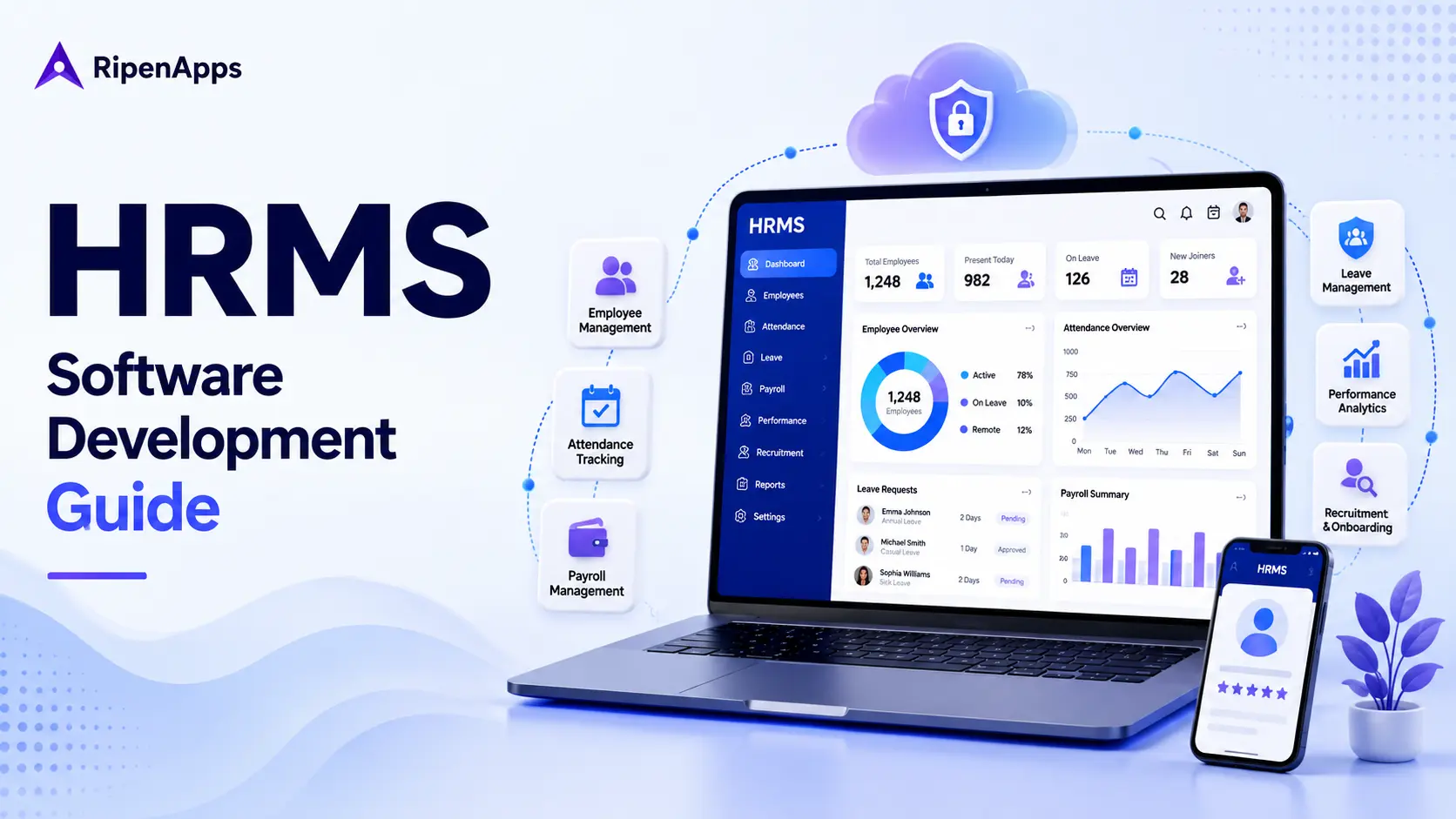
- A modern HRMS includes employee management, recruitment, onboarding, attendance, leave, payroll, performance management, reporting, and employee self-service.
- HRMS development cost and timeline depend on scope, feature complexity, integrations, development hours, team composition, security requirements, and other project-specific factors.
- A future-ready HRMS generally uses a scalable architecture, strong security controls, planned integrations, and relevant AI capabilities to support evolving workforce requirements.
Managing employee data through spreadsheets, disconnected software, and manual HR workflows becomes increasingly difficult as a business grows. HR teams need a centralized system to manage employee information, recruitment, onboarding, attendance, payroll, performance, and other workforce processes.
HRMS software development helps businesses bring these processes into one structured platform. A modern HRMS generally automates repetitive workflows, centralizes workforce data, simplifies approvals, and gives HR teams better visibility into day-to-day operations.
However, building an HRMS is not simply a matter of combining common HR features. Businesses working with custom software development services need to define their HRMS system requirements, map workflows, plan integrations, select an appropriate technology stack, and establish security controls before development begins.
This guide covers everything businesses need to know about HRMS software development, including requirements, features, development steps, technology stack, integrations, AI capabilities, cost factors, timelines, and best practices.
Table of Contents
What Is HRMS Software Development?
HRMS software development is the process of designing, building, testing, integrating, and deploying a human resource management system around an organization’s specific HR processes and workforce requirements.
An HRMS typically brings multiple HR functions into a centralized platform. Depending on the scope, it can manage employee records, recruitment, onboarding, attendance, leave, payroll, performance, reporting, employee self-service, and other workforce processes.
The terms HR software development, HR system development, and HRMS development are closely related, but they can describe different levels of scope.
- HR software development is the broader process of building software for one or more human resource functions.
- HR system development focuses on designing a structured system around an organization’s HR data, users, workflows, and operational processes.
- HRMS development generally refers to a broader and more structured HR platform that brings multiple HR management functions together.
HRMS development should start with business requirements instead of a fixed feature list. A well-planned HRMS should fit existing HR workflows while providing enough flexibility to support organizational growth. The system architecture, user permissions, integrations, and data model should all be defined according to the organization’s operational requirements. A structured software development life cycle helps teams move from HRMS requirements and architecture planning to development, testing, deployment, and ongoing improvements.
HRMS vs. HRIS vs. HCM: Which Do You Need?
HRMS, HRIS, and HCM are often used interchangeably, but they represent different levels of HR functionality and workforce management.
| Factor | HRMS | HRIS | HCM |
| Core focus | HR process management and automation | HR information management | Workforce and talent management |
| Employee records | Yes | Yes | Yes |
| Attendance and leave | Yes | Yes | Yes |
| Payroll support | Common | Common | Common |
| Recruitment | Common | Limited or available through integrations | Yes |
| Performance management | Yes | Limited | Yes |
| Learning and development | Available | Limited | Extensive |
| Analytics | Operational HR analytics | Basic reporting | Advanced workforce analytics |
| Workforce planning | Moderate | Limited | Strong |
| Ideal use | Growing businesses needing broader HR automation | Businesses focused on core HR data | Organizations with broader workforce strategy |
An HRIS generally focuses on collecting, storing, and managing employee information and core HR processes.
An HRMS expands that scope by combining HR data management with broader workflow automation. It also supports processes such as recruitment, onboarding, attendance, payroll, leave, and performance management.
An HCM generally takes a broader strategic approach to human capital. It typically includes talent management, workforce planning, learning and development, performance, and advanced workforce analytics.
For a growing SMB replacing spreadsheets and disconnected tools, an HRMS needs to provide a practical middle ground between basic HR information management and a broader enterprise HCM platform. The right choice ultimately depends on workforce requirements. Businesses evaluating an HRMS alongside other core business systems generally use an enterprise app development approach to plan integrations, scalability, security, and long-term system requirements.
Key Benefits of an HRMS System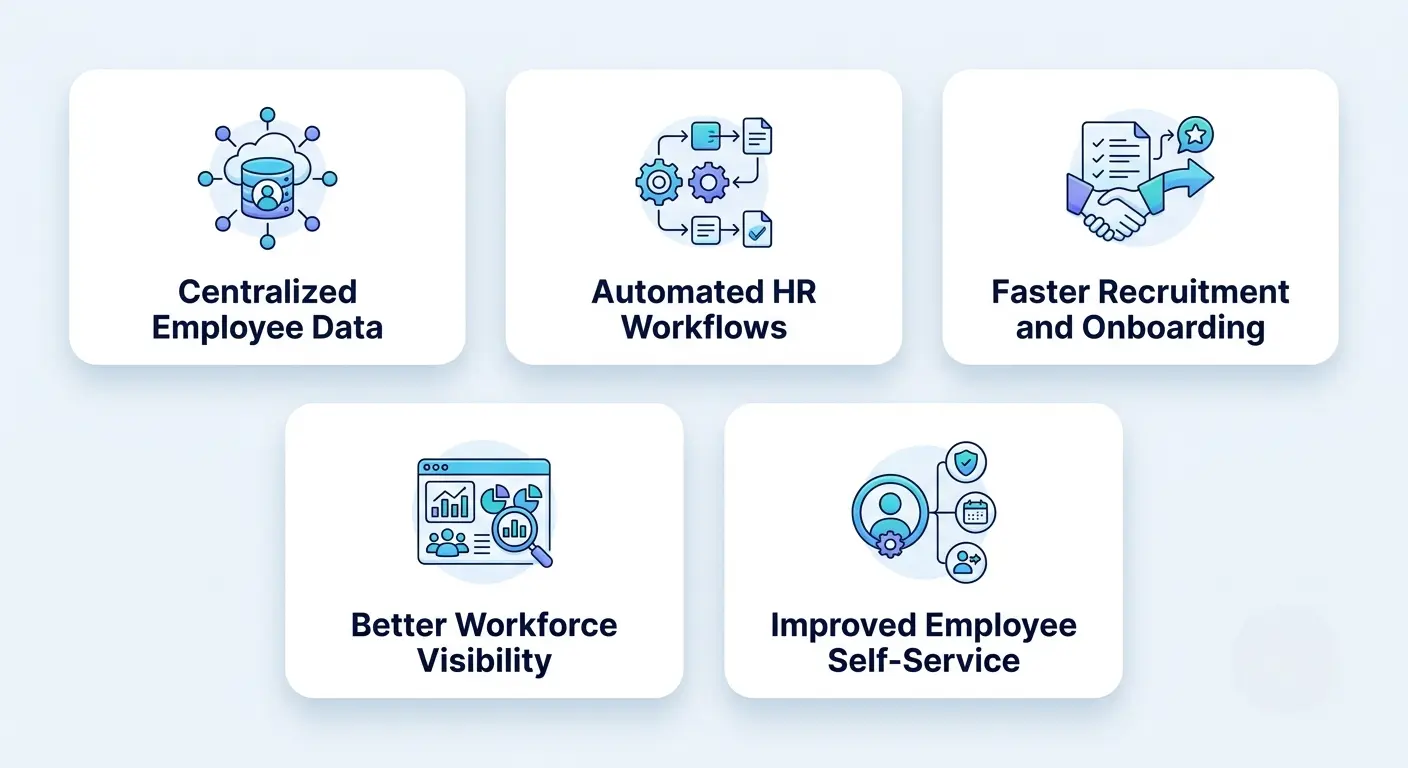
A modern HRMS helps businesses move routine HR activities from fragmented manual workflows into a centralized system.
Defining UI and UX requirements early helps ensure that HR administrators, managers, and employees also navigate the HRMS efficiently according to their specific workflows.
Centralized Employee Data
An HRMS creates a central location for employee information. Instead of maintaining records across spreadsheets, emails, documents, and different applications, authorized users can access relevant information from one platform.
Centralized data also reduces duplicate entries and makes employee information easier to maintain.
Automated HR Workflows
Many HR processes involve repetitive activities, including leave requests, approvals, onboarding tasks, employee updates, and notifications.
An HRMS generally automates these workflows according to predefined business rules. This reduces manual intervention and gives HR teams more time to focus on higher-value activities.
Faster Recruitment and Onboarding
Recruitment and onboarding workflows need to be managed within the same platform. HR teams generally track candidates, manage recruitment stages, assign onboarding tasks, collect required information, and monitor progress.
This creates a more structured hiring process and reduces the need to coordinate the same information across disconnected systems.
Better Workforce Visibility
An HRMS generally provides dashboards and reports covering employee information, attendance, leave, recruitment, payroll-related data, and other workforce activities.
Managers use these insights to understand workforce activity and make decisions using centralized information.
Improved Employee Self-Service
Employee self-service allows employees to complete routine HR activities without depending on HR teams for every request.
Depending on the system scope, employees update their profiles, request leave, access documents, view attendance information, and track HR requests through the platform.
HRMS Requirements: What to Define Before Development
A successful HRMS begins with a clear HRMS software requirement specification. Before development starts, businesses should document the users, workflows, data, integrations, security requirements, and functionality the system must support.
Business Objectives
Define what the HRMS is expected to accomplish, such as replacing spreadsheet-based employee management, centralizing HR information, automating repetitive workflows, improving recruitment and onboarding, supporting attendance and leave management, connecting payroll processes, improving workforce reporting, and providing employee self-service. Each requirement should address a specific business or operational need.
User Roles and Access
Define every user group that will interact with the platform, including HR administrators, HR managers, department managers, employees, recruiters, payroll administrators, and system administrators.
Use role-based permissions to ensure users generally access only the information and functionality relevant to their responsibilities.
HR Workflows
Document how each major HR process works before converting it into software. For example, a leave workflow may involve an employee submitting a request, a manager approving or rejecting it, HR recording the decision, the employee receiving a notification, and the leave balance being updated.
Apply the same approach to recruitment, onboarding, attendance, payroll, performance reviews, and offboarding.
Employee and Organizational Data
Define what information the HRMS will store and how it will be organized. Requirements may include employee profiles, employment history, departments, roles and reporting structures, attendance records, leave balances, compensation and benefits information, performance records, and employee documents.
Security Requirements
Because HRMS platforms handle sensitive workforce information, establish security requirements before development. These cover authentication, role-based access, data encryption, audit logs, access monitoring, secure APIs, backup and recovery, data retention, and administrative controls.
Integration Requirements
Identify external systems the HRMS needs to communicate with. Potential integrations include payroll, accounting, attendance systems, recruitment platforms, identity providers, benefits platforms, communication tools, and analytics systems.
Reporting Requirements
Define the reports and dashboards HR teams and managers need. Reporting requirements generally specify the information required, who can access it, how frequently data should update, and which metrics are important to the business.
A clear requirements phase reduces scope ambiguity and gives the development team a stronger foundation for architecture, estimation, testing, and implementation.
Must-Have Features of Modern HRMS Software
A modern HRMS combines essential HR functions, automation, security, and employee self-service in one centralized platform. The structured approach used in appointment scheduling software development demonstrates why requirements, workflow mapping, architecture, development, testing, and deployment should be planned as connected stages.
Employee Database Management
Employee database management provides a centralized record of workforce information. The module generally stores employee profiles, employment information, organizational details, documents, attendance records, compensation-related information, and other required data.
Search, filtering, permissions, and audit capabilities are designed according to the needs of HR administrators and managers.
Recruitment and Onboarding
A recruitment module typically manages job openings, candidate profiles, applications, interviews, recruitment stages, and hiring decisions.
Once a candidate is hired, onboarding workflows can automatically assign tasks, collect documents, notify relevant stakeholders, and track completion.
Workforce Management
Workforce management generally covers attendance, shifts, schedules, time tracking, leave, and related workforce activities.
The module reflects actual organizational policies. For example, different departments or employee groups may have different schedules, approval rules, or leave policies.
Real-Time Reporting
Reporting dashboards provide visibility into HR operations and workforce activity.
Reports cover:
- Employee data
- Attendance trends
- Leave utilization
- Recruitment pipeline
- Workforce activity
- Payroll-related information
- Performance information
The reporting layer is connected to the underlying data model so authorized users can access relevant information without creating duplicate records.
Payroll and Benefits
A payroll module supports salary information, payroll workflows, deductions, reimbursements, benefits, and other compensation-related processes.
Where payroll is handled by another platform, the HRMS exchanges required employee and payroll information through an integration instead of duplicating the complete payroll system.
Employee Self-Service
Employee self-service gives employees direct access to routine HR functions.
Common capabilities include:
- Profile management
- Leave requests
- Attendance information
- Document access
- HR requests
- Notifications
- Approval tracking
Notifications and Approvals
Generally notifications alert employees and managers about pending actions, deadlines, approvals, and workflow changes.
Configurable approval flows allow the system to reflect organizational policies instead of relying on manual email-based coordination.
HRMS Software Development Process: 6 Steps
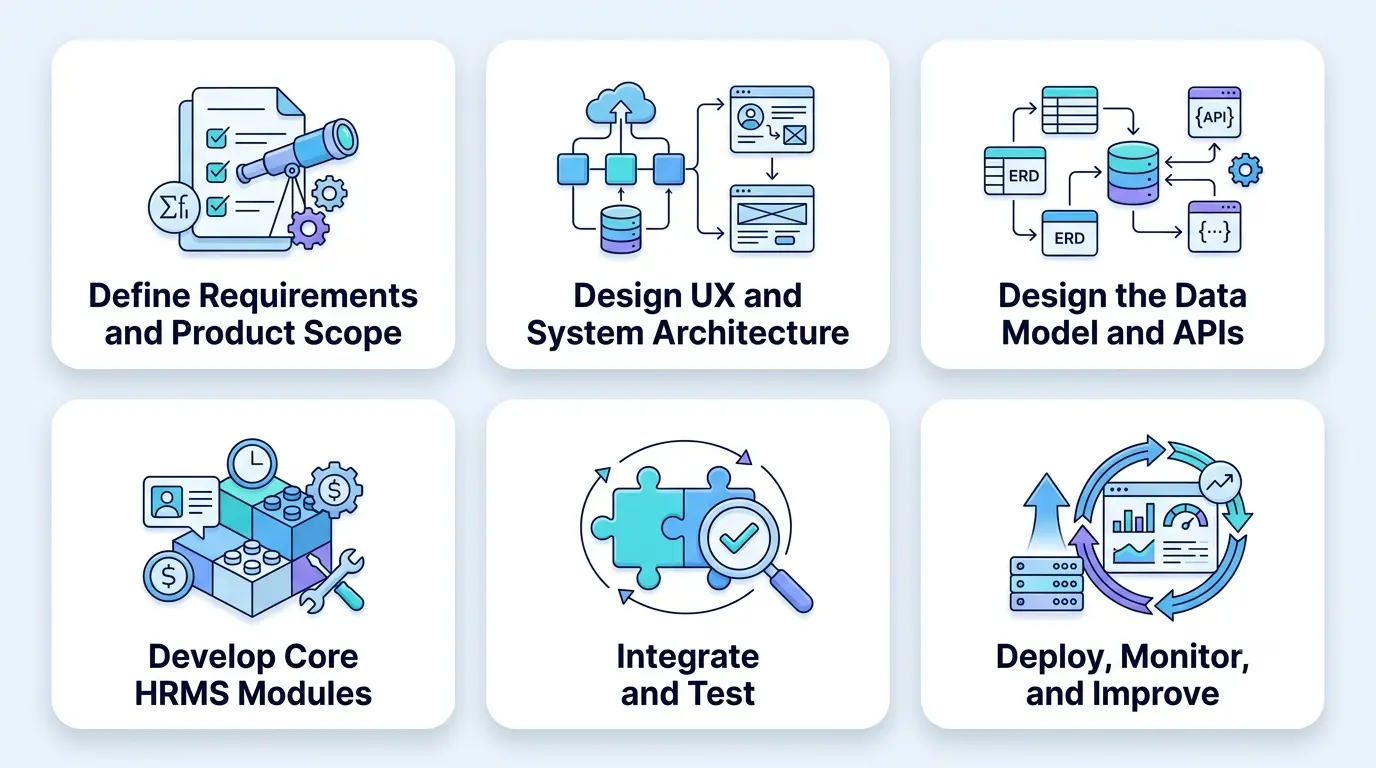
A structured six-step development process helps build an HRMS that aligns with business needs, user requirements, security standards, and scalability goals.
Step 1: Define Requirements and Product Scope
Start by documenting business objectives, user roles, HR workflows, functional requirements, data requirements, integrations, security expectations, and reporting needs.
Prioritize the requirements into essential functionality for the initial release and capabilities that can be introduced later. This prevents the first version from becoming unnecessarily complex while keeping the architecture ready for future expansion.
Step 2: Design UX and System Architecture
The next stage is to design the user experience and technical architecture. The UX reflects different user roles. HR administrators may need detailed management dashboards, while employees may need a simpler self-service interface.
The architecture should account for scalability, security, integrations, data management, permissions, and future modules.
Step 3: Design the Data Model and APIs
The development team defines how employee, organizational, attendance, leave, recruitment, payroll-related, and performance data will be structured.
APIs need to be designed to support communication between the HRMS and external systems. At this stage, the team also defines authentication, authorization, data validation, error handling, and integration rules.
Step 4: Develop Core HRMS Modules
Development begins with the modules prioritized during scope definition.
Depending on requirements, these generally include:
- Employee management
- Recruitment
- Onboarding
- Attendance
- Leave management
- Payroll
- Performance management
- Reporting
- Employee self-service
A modular approach allows businesses to launch core functionality first and expand the platform as requirements evolve.
Step 5: Integrate and Test
Testing should cover functionality, workflows, permissions, integrations, security, performance, and usability.
The team also needs to test real-world scenarios across different user roles. Integration testing is particularly important because HRMS platforms commonly exchange sensitive information with other business systems.
Step 6: Deploy, Monitor, and Improve
After testing and validation, the HRMS needs to be deployed to the selected environment. Post-launch activities typically include monitoring, issue resolution, performance analysis, security reviews, user feedback, and continuous improvements.
HRMS implementation therefore needs to be treated as an ongoing product lifecycle rather than a one-time software launch.
HRMS Implementation: Process, Strategy & Best Practices
HRMS implementation involves more than deploying the software. It requires preparing employee data, configuring workflows, connecting external systems, training users, and monitoring the platform after launch. A structured implementation approach helps organizations reduce disruption, improve adoption, and ensure the HRMS supports actual business processes.
HRMS Implementation Planning
Start by validating the HRMS scope, implementation objectives, stakeholders, workflows, responsibilities, and timeline. Identify which HR processes will move to the new system and define implementation priorities. Establish clear ownership between HR teams, business stakeholders, and the development team to keep implementation activities aligned with business requirements.
Data Migration and System Configuration
Prepare existing employee data before migration by removing duplicates, correcting inconsistencies, and mapping information to the new HRMS data structure. Validate migrated records before going live. Configure user roles, permissions, approval workflows, HR policies, notifications, and other system settings according to organizational requirements.
Integration and Testing
Connect the HRMS with required systems such as payroll, accounting, attendance, identity providers, benefits platforms, and other business applications. Test data synchronization, authentication, workflows, and error handling across these integrations. Functional, integration, security, performance, and user acceptance testing should be completed before production deployment.
User Training and Change Management
Prepare HR administrators, managers, and employees to use the new platform effectively. Provide role-specific training, documentation, onboarding materials, and support resources. Communicate process changes clearly and address user concerns before and during rollout. A structured change-management approach can help improve adoption and reduce reliance on manual HR processes.
Deployment and Post-Launch Support
Consider a phased rollout when the HRMS includes multiple modules, departments, or complex integrations. Monitor system performance, workflow completion, user activity, and integration health after deployment. Address technical issues promptly and collect feedback from HR teams and employees. Ongoing maintenance, security reviews, feature improvements, and workflow optimization help the HRMS remain aligned with changing workforce and business requirements.
HRMS Technology Stack
The HRMS technology stack typically supports security, scalability, maintainability, integrations, and the expected workload.
| Technology Layer | Common Options | Role |
| Frontend | React, Angular, Vue | HR dashboards and user interfaces |
| Backend | Node.js, Python, Java, .NET | Business logic and APIs |
| Database | PostgreSQL, MySQL, MongoDB | Workforce and application data |
| APIs | REST, GraphQL | System and third-party integrations |
| Cloud | AWS, Microsoft Azure, Google Cloud | Infrastructure and deployment |
| Authentication | OAuth, OpenID Connect, SSO | Identity and access |
| Infrastructure | Containers, CI/CD | Deployment and operational management |
| Analytics | Reporting and analytics platforms | Workforce insights |
The final stack should be selected based on project requirements rather than technology popularity alone. For example, the database should match the data model and consistency requirements, while the backend supports the expected workflows and integration load. Choosing the right cloud deployment approach typically helps an HRMS balance scalability, accessibility, infrastructure management, security, and future growth requirements.
The technology stack is also evaluated against the organization’s existing ecosystem. Choosing technologies that integrate cleanly with existing systems reduces implementation complexity.
Key HRMS Integrations
An HRMS often needs to exchange data with other business systems. Well-planned HRMS integrations reduce duplicate data entry and help organizations maintain consistent information across platforms.
| Integration | Purpose |
| Payroll system | Exchange employee and payroll-related information |
| Accounting software | Connect payroll and financial workflows |
| Attendance system | Synchronize time and attendance data |
| Recruitment platform | Exchange candidate and hiring information |
| Identity provider | Support authentication and SSO |
| Benefits platform | Manage benefits-related information |
| Communication tools | Deliver employee and HR notifications |
| Analytics platform | Extend reporting and workforce analysis |
HRMS Payroll Integration
Payroll is one of the most important integration areas in HR software. An HRMS payroll integration defines:
- Which data is exchanged
- Which system is the source of truth
- How frequently data is synchronized
- How authentication is handled
- How errors are detected
- How failed transactions are retried
- Which users can access payroll information
For example, employee changes recorded in the HRMS may need to flow into a payroll system, while payroll-related information may need to return to the HRMS for employee visibility and reporting. The integration architecture should also account for sensitive data and access controls.
Integration Planning Best Practices
Integrations need to be considered during architecture planning rather than added after the core system is completed.
Teams document API availability, data formats, synchronization requirements, authentication mechanisms, rate limits, error handling, and ownership of each data element before implementation.
Connecting HRMS data with predictive analytics will help organizations move beyond basic reporting toward deeper analysis of workforce patterns and trends.
Best Practices for Building Future-Ready HRMS Software
Follow proven development practices to build secure, scalable, user-friendly HRMS software that can adapt to evolving workforce and business needs.
Align HRMS Development With Business Goals
Do not build an HRMS around a generic feature checklist. Identify the operational problems the platform needs to solve and prioritize features according to business impact.
Deloitte’s 2026 Global Human Capital Trends report found that 85% of leaders consider it critical for organizations and their workforces to adapt to change at the required speed. Yet, only 7% say they are leading in this area. This gap highlights the need for HRMS platforms that support continuous learning, workforce visibility, and agile people management.
Use Modular Architecture
A modular architecture makes it easier to introduce new HR capabilities without redesigning the entire platform.
Core employee management can be developed first, followed by recruitment, attendance, payroll, performance, analytics, or other modules according to business priorities.
Implement Cloud-Based Infrastructure
Cloud-based infrastructure supports centralized access, scalable resources, deployment automation, monitoring, and integration with other cloud applications.
The infrastructure is selected according to security, performance, availability, compliance, and growth requirements.
Prioritize Strong Security Measures
Security is built into the HRMS architecture from the beginning. Use appropriate authentication, role-based access, encryption, audit logging, secure API practices, backup controls, and monitoring.
Access to sensitive employee information is limited according to job responsibilities.
Measure KPIs Frequently
Post-launch measurement helps determine whether the HRMS is delivering the intended operational benefits.
Businesses can track metrics such as:
- HR workflow completion time
- Employee self-service adoption
- Recruitment cycle time
- Administrative workload
- Support requests
- System usage
- Workflow error rates
Regular measurement also helps teams identify opportunities for process improvements and future product enhancements.
AI in HRMS Software
AI can extend HRMS capabilities by helping organizations automate repetitive activities, analyze workforce information, and improve employee interactions.
AI-Powered Employee Assistance
AI assistants can help employees find HR information, understand policies, and navigate routine HR processes through conversational interfaces.
For example, an employee could use an AI assistant to locate relevant HR information or understand the steps required to submit a routine request.
AI-Assisted Recruitment
AI can support recruitment workflows through capabilities such as resume analysis, candidate matching, job description assistance, and recruitment workflow automation.
These capabilities need to be designed with appropriate human oversight, particularly when AI contributes to decisions involving candidates or employees.
Workforce Analytics
AI can analyze workforce information to identify patterns and trends that may require further investigation.
HR teams can use these capabilities to explore workforce activity, recruitment patterns, employee engagement indicators, or other organizational data available within the system.
Automated HR Operations
AI can assist with repetitive tasks such as document classification, information extraction, HR query handling, and workflow routing.
Automation can reduce manual processing while keeping employees and HR administrators involved where human judgment is required.
Personalized Employee Experience
AI can provide more relevant employee interactions by using available organizational and employee information. For example, an HRMS could personalize notifications, surface relevant HR information, or guide employees through appropriate workflows.
AI is introduced based on clearly defined business requirements, data availability, security considerations, and responsible-use requirements. It needs to support HR teams rather than remove appropriate human oversight.
HRMS Software Development Cost & Timeline
There is no single defensible fixed price for HRMS software development because the scope can vary significantly between projects.
The development budget needs to be estimated using the following factors:
- Development scope
- Number of HR modules
- Feature complexity
- Development hours
- Team composition
- Technology stack
- UI/UX requirements
- Third-party integrations
- Payroll requirements
- Security requirements
- Reporting and analytics
- AI functionality
- Testing requirements
- Cloud infrastructure
- Post-launch support
HRMS Cost Factors by Scope
| HRMS Scope | Estimated Development Cost | Typical Timeline | Typical Features |
| Core HRMS | $25,000–$50,000 | 3–5 months | Employee management, roles, basic workflows, leave, basic reporting |
| Mid-level HRMS | $50,000–$100,000 | 5–7 months | Recruitment, onboarding, attendance, leave, self-service, reporting |
| Advanced HRMS | $100,000–$175,000 | 7–10 months | Payroll, benefits, performance, advanced analytics, integrations |
| Enterprise HRMS | $175,000+ | 10–15+ months | Multiple business units, complex workflows, extensive integrations, advanced security and analytics |
These are indicative ranges for planning purposes, not fixed quotes. Actual HRMS development cost and timeline depend on the number of modules, complexity, integrations, security requirements, team composition, and project scope.
A platform containing employee records, leave management, and basic reporting requires substantially less development effort than a system containing payroll, recruitment, performance management, multiple integrations, advanced analytics, and AI.
The most reliable approach is to estimate the project after documenting the required modules, user roles, workflows, integrations, platforms, and technical requirements.
Why Choose RipenApps for HRMS Development
For HRMS projects, RipenApps can support requirements definition, product design, development, integrations, testing, and deployment through its software development services. Its experience with multi-role platforms, dashboards, workflow management, benefits and claims management, and secure business workflows provides relevant technical capabilities for building custom HRMS solutions.
The emmyHealth project demonstrates experience building benefits and claims management features with personalized dashboards. These capabilities are relevant to HRMS platforms that require structured workflows, role-based experiences, centralized management, and employee-focused services.
The Stoklo project demonstrates RipenApps’ experience in building B2B platforms with structured workflows and multi-party business operations. The platform connects businesses with 500+ manufacturers, highlighting experience with centralized data, role-based workflows, and scalable business processes that are relevant to custom HRMS development.
Conclusion
HRMS software development helps businesses replace spreadsheets and disconnected HR applications with a centralized platform for managing workforce data and processes. Successful projects start with clear requirements covering workflows, user roles, data, integrations, security, and reporting. A modular architecture also makes it easier to scale the platform as business needs evolve.
Technology selection needs to support security, scalability, integrations, maintainability, and the existing technology ecosystem. AI can further enhance HRMS through employee assistance, recruitment support, analytics, automation, and personalized experiences. Development costs need to be estimated based on scope, complexity, integrations, team composition, and security needs. Businesses planning a custom HR platform can work with experienced technology partners like RipenApps to align development with actual workforce requirements.
FAQs
1. What are the main HRMS software requirements?
HRMS software requirements typically include employee data management, user roles and permissions, HR workflows, recruitment, onboarding, attendance, leave, payroll, reporting, security, integrations, and employee self-service. The exact requirements reflect the organization’s workforce structure, existing systems, HR processes, compliance needs, and expected future growth.
2. What is the difference between HR software development and HRMS development?
HR software development is a broad term covering software built for one or more HR functions. HRMS development generally involves a centralized platform that combines employee data, workflows, and multiple HR processes such as recruitment, attendance, leave, payroll, and performance management. The final scope depends on the organization’s workforce and operational requirements.
3. How does HRMS implementation work?
HRMS implementation typically starts with requirements and workflow analysis, followed by UX and architecture planning, data and API design, module development, integrations, testing, deployment, and optimization. Teams also define user roles, security controls, data migration needs, integrations, and training requirements before deployment to support smoother adoption and reduce implementation risks.
4. How much does HRMS software development cost?
HRMS software development cost depends on the number of modules, feature complexity, development hours, team composition, integrations, security requirements, payroll functionality, reporting, AI capabilities, infrastructure, and support. A basic HRMS can cost significantly less than an enterprise platform. A project-specific estimate is prepared after defining the required scope and technical requirements.
5. What technology stack is used for HRMS software development?
An HRMS technology stack can include React, Angular, or Vue for the frontend; Node.js, Python, Java, or .NET for the backend; PostgreSQL, MySQL, or MongoDB for data; REST or GraphQL APIs; cloud infrastructure; and modern authentication technologies. The final stack needs to match the project’s security, scalability, integration, and maintenance requirements.
6. What are the most important HRMS integrations?
Common HRMS integrations include payroll systems, accounting software, attendance platforms, recruitment systems, identity providers, benefits platforms, communication tools, and analytics platforms. Integration requirements define data ownership, synchronization frequency, authentication, error handling, and access controls before development begins.
Discuss your project and request for proposal
SHARE
WRITTEN BY

Ishan Gupta
CEO & Founder
Ishan Gupta is a seasoned entrepreneur and CEO with extensive 10+ years of experience in business and mobile app development landscape. He believes that the right digital product allows companies to focus on what they do best, while technology handles the rest. With deep exposure to global markets, he understands what makes an app succeed. His approach translates business needs into clear product strategies, ensuring that every feature contributes to measurable ROI.
View All Articles