


Key Takeaways
- Successful AI integration starts with a clear business goal, not a vague objective like simply adding AI features.
- Most businesses achieve faster results by integrating existing AI APIs before considering fine-tuning or custom models.
- High-quality data and the right infrastructure are critical for building accurate, scalable, and reliable AI applications.
- AI deployment is an ongoing process that requires monitoring, retraining, and continuous performance optimization after launch.
- Strong privacy, security, and compliance practices help reduce risk and build long-term user trust and adoption.
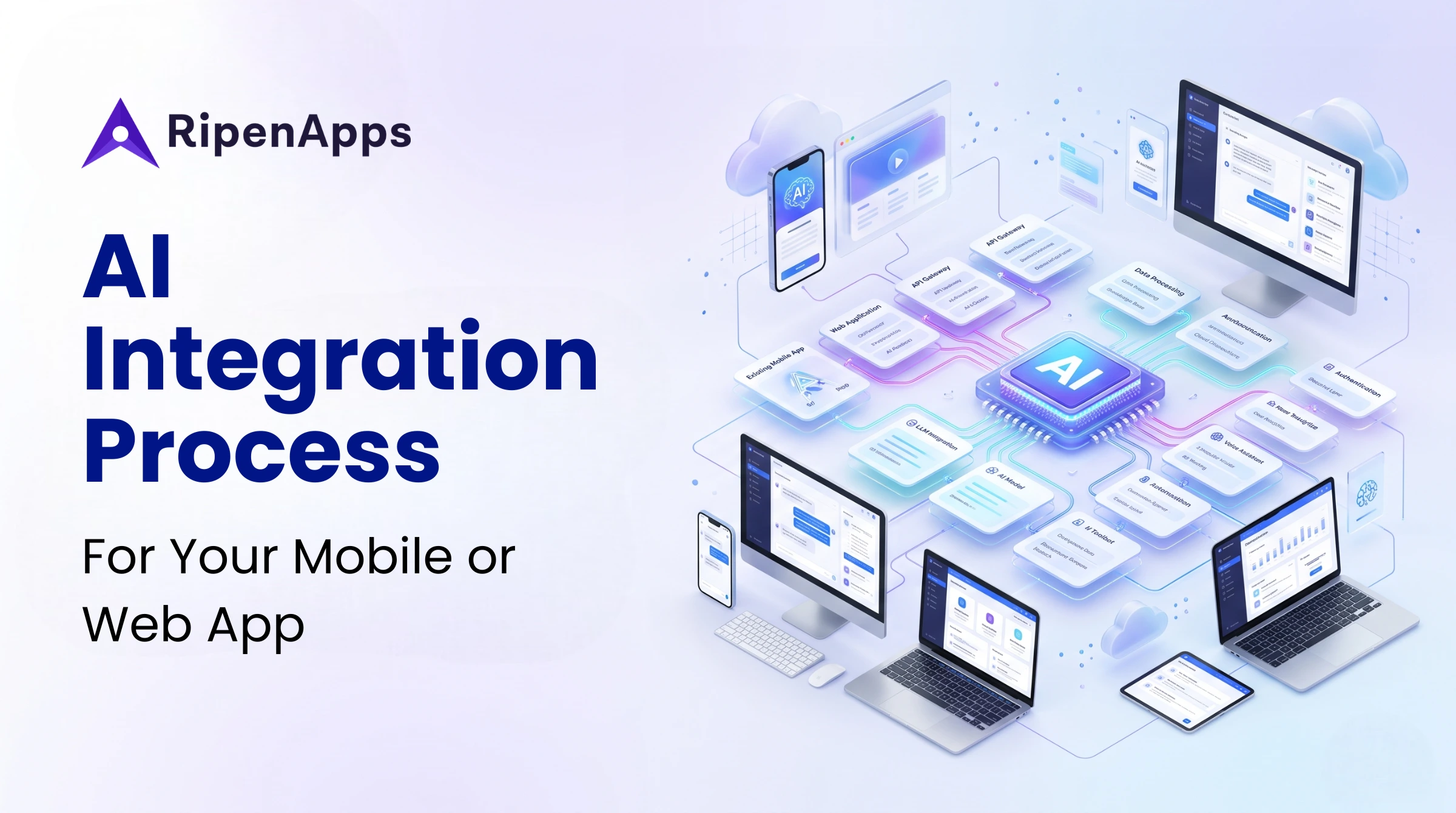
Artificial intelligence can be integrated into a mobile or web app by identifying a clear business use case, preparing quality data, selecting the right AI architecture, integrating APIs or models, and continuously monitoring performance after launch. The most successful AI implementations focus on measurable outcomes such as automation, personalization, customer retention, and operational efficiency.
AI is no longer a future innovation reserved for large enterprises. In 2026, startups, SaaS companies, digital product businesses, and enterprise organizations are using AI to improve customer experiences, automate workflows, reduce costs, and create new revenue streams. The question is no longer whether to adopt AI, but how to implement it effectively.
For founders, the challenge often lies in selecting the right technology, infrastructure, compliance approach, and deployment strategy. A successful AI strategy & implementation plan aligns technical decisions with business objectives. Without a structured approach, AI projects can increase costs and complexity, while a structured AI implementation roadmap helps organizations reduce risk and accelerate adoption.
Whether you’re exploring intelligent app personalization, launching new AI SaaS product features, or building a long-term AI product strategy, understanding the right integration framework is essential for maximizing ROI and accelerating digital transformation. This AI integration guide explains how to identify a clear business use case, prepare quality data, select the right AI architecture, integrate APIs or models, and continuously optimize performance after launch.
Table of Contents
Why Should You Integrate AI into Your App in 2026?
AI adoption has moved from experimentation to business necessity. Organizations across industries are investing heavily in AI-powered products because of their measurable impact on growth, efficiency, and customer experience.
AI adoption has moved from experimentation to business necessity. Organizations across industries are investing heavily in AI-powered products because of their measurable impact on growth, efficiency, and customer experience. For businesses building an AI strategy for digital product innovation, AI has become a critical driver of competitive advantage and long-term growth.
Higher Retention and Engagement
AI-powered applications consistently outperform traditional applications in user engagement and retention metrics. The business case for AI continues to strengthen. According to the World Economic Forum’s Future of Jobs Report 2025, 86% of employers expect AI and information processing technologies to transform their business operations by 2030.
Personalized recommendations, intelligent onboarding, predictive assistance, and contextual interactions keep users engaged longer and increase lifetime value.
Automation of Repetitive Workflows
AI excels at eliminating manual and repetitive processes.
Common automation use cases include:
- Customer support responses
- Data entry automation
- Form processing
- Invoice extraction
- Fraud detection
- Anomaly monitoring
- Workflow orchestration
Automation allows teams to focus on higher-value business activities while reducing operational costs.
Personalization at Scale
Traditional personalization relies on segments. AI enables individual-level personalization.
Modern AI systems can:
- Recommend products uniquely for each user
- Customize content feeds
- Adjust onboarding flows
- Predict next-best actions
- Optimize marketing experiences
This level of personalization improves customer satisfaction and conversion rates across millions of users simultaneously.
Competitive Moat Creation
Organizations that integrate AI today gain valuable data, operational experience, and product advantages that become increasingly difficult for competitors to replicate.
Revenue Growth Opportunities
AI directly impacts revenue through:
- Premium AI-powered features
- Higher subscription upgrades
- Better conversion rates
- Increased customer retention
- Reduced support costs
- Improved sales productivity
Organizations that align AI investments with a clear AI product strategy are seeing measurable improvements in profitability and operational efficiency.
Many of these capabilities are driven by the top AI trends shaping software development in 2026, including generative AI, AI agents, multimodal models, predictive analytics, and hyper-personalized user experiences.
What Types of AI Features Can You Integrate Into a Mobile or Web App?
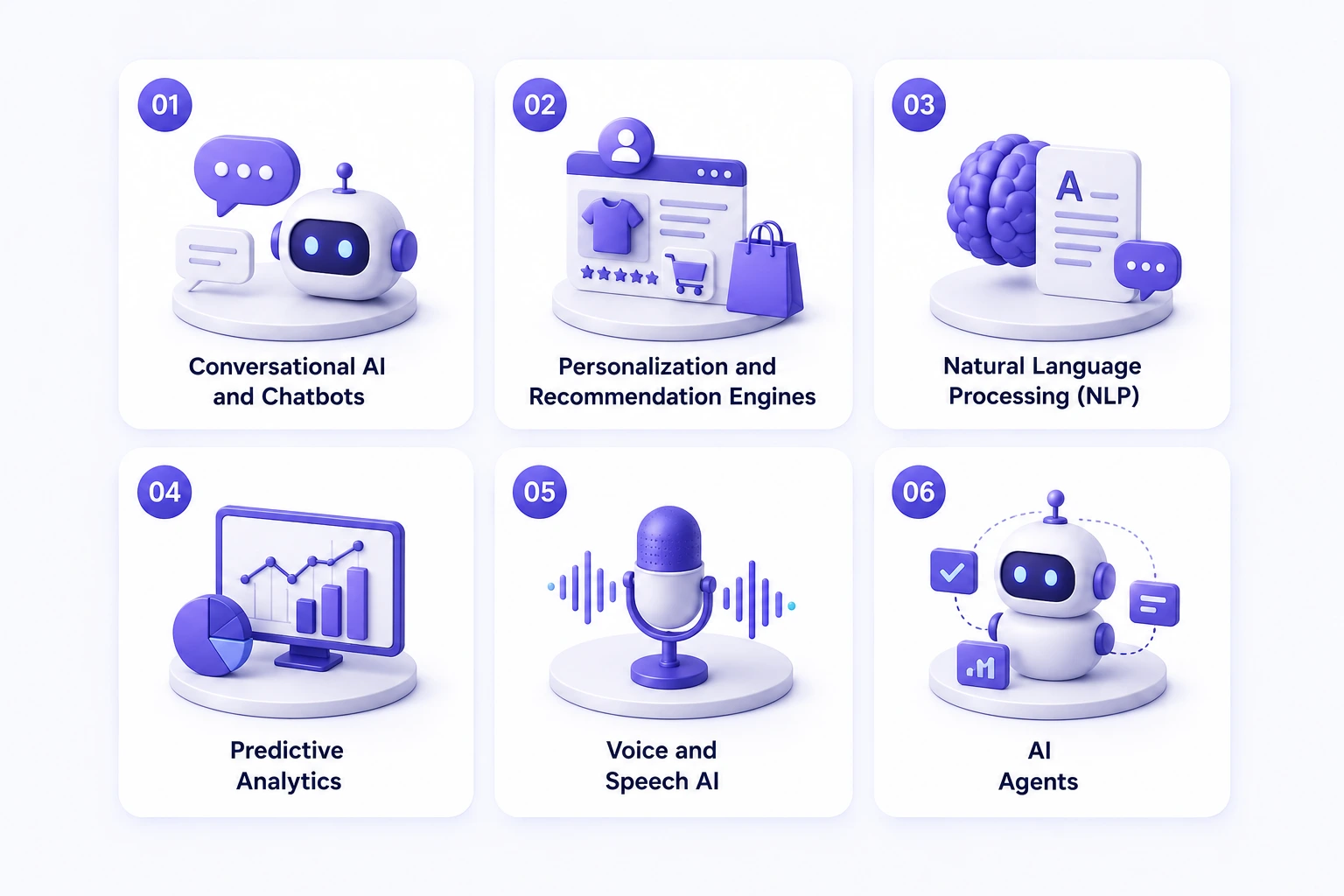
Modern AI-powered applications combine multiple intelligent capabilities to improve user experience, automate workflows, and enable data-driven decision-making at scale. Choosing the right mix of AI features depends on your product goals, user needs, and technical architecture.
Conversational AI and Chatbots
LLM-powered chat interfaces use models from OpenAI, Anthropic, and Google Gemini to provide intelligent customer interactions. These systems answer questions, resolve support issues, guide onboarding, and assist users in real time.
Among the most important AI chatbot development trends are context-aware conversations, multilingual support, voice-enabled assistants, and agentic workflows that can complete actions across multiple systems.
Personalization and Recommendation Engines
Recommendation engines analyze user behavior and preferences to suggest relevant products, content, or actions.
Common approaches include:
- Collaborative filtering
- Content-based filtering
- Hybrid recommendation models
Natural Language Processing (NLP)
NLP enables applications to understand and process text-based information.
Typical use cases include:
- Smart search
- Sentiment analysis
- Content classification
- Summarization
- Intent detection
Predictive Analytics
Predictive AI uses historical data to forecast future outcomes.
Common use cases:
- Churn prediction
- Demand forecasting
- Fraud detection
- Revenue forecasting
- User behavior prediction
Voice and Speech AI
Voice AI converts speech into text and text into speech.
Popular technologies include:
- Whisper
- Google Speech-to-Text
- Amazon Transcribe
AI Agents
AI agents autonomously perform multi-step tasks, make decisions, and interact with multiple systems.
Generative AI integration is increasingly powering AI agents by enabling natural language reasoning, task execution, workflow automation, and contextual decision-making across multiple business systems.
How Do You Integrate AI Into Your App? Step-by-Step Process
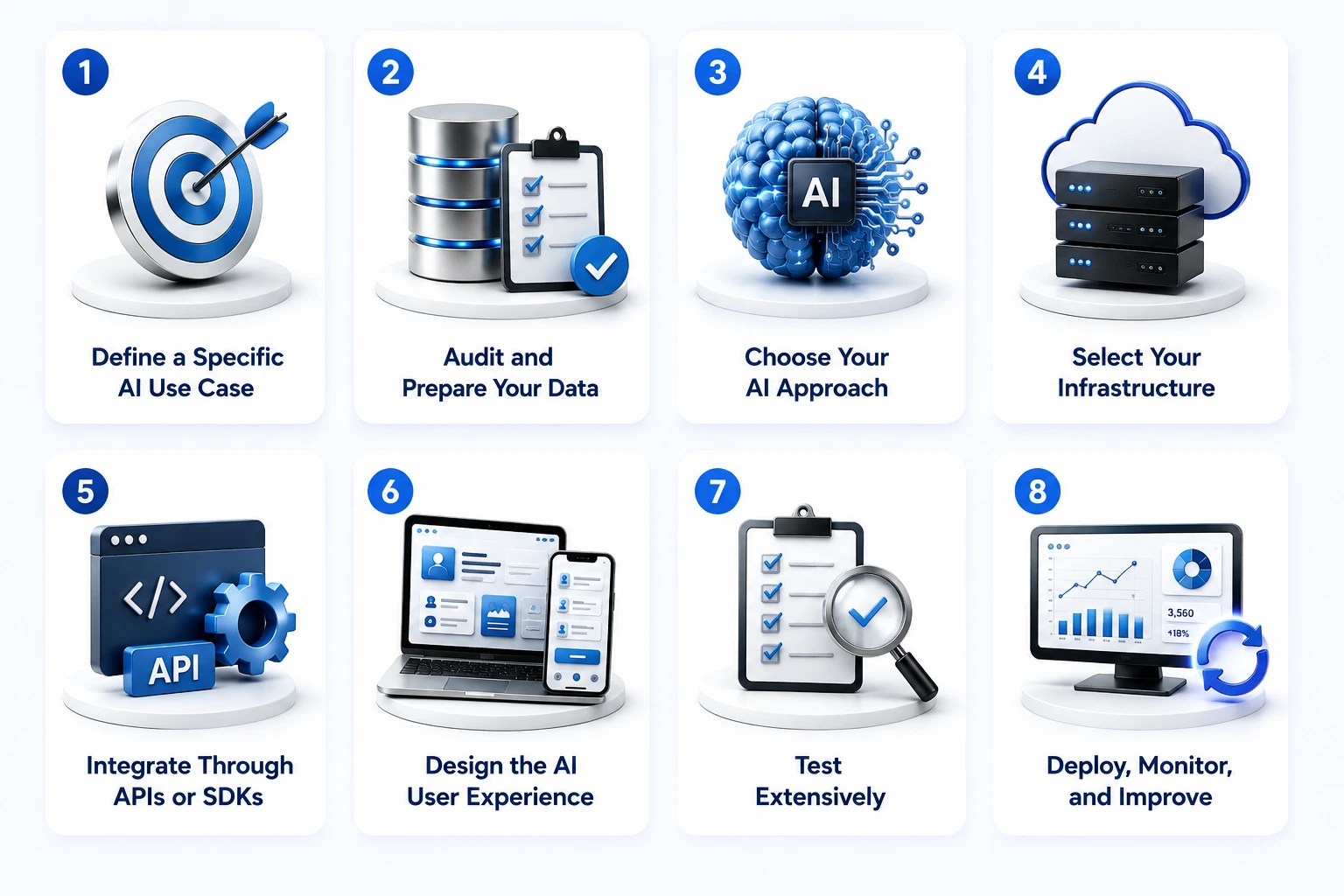
Successfully integrating AI into a mobile or web application requires more than adding a model or API. Following a structured implementation process helps ensure better performance, scalability, compliance, and long-term business value.
Step 1: Define a Specific AI Use Case
Every successful AI initiative starts with a clearly defined business objective. Focus on measurable outcomes that align AI investments with customer needs and organizational goals. Avoid vague goals like “add AI.”
Instead, establish measurable objectives such as:
- Reduce support tickets by 30%
- Increase conversion by 15%
- Improve retention by 20%
Estimated Cost: AI Integration Cost usually depends on research depth and stakeholder alignment.
Most teams spend $1,000 – $5,000 for simple planning, while enterprise discovery workshops can go up to $15,000.
Step 2: Audit and Prepare Your Data
AI systems are only as effective as the data they learn from. Ensuring data quality, accuracy, and governance early in the process significantly improves implementation success.
Focus on:
- Data accuracy
- Data completeness
- Label quality
- Governance standards
Estimated Cost: This step involves cleaning, structuring, and organizing data for AI readiness. Costs typically range from $2,000 – $10,000 for smaller datasets, and $10,000 – $50,000+ for enterprise-level data preparation.
Step 3: Choose Your AI Approach
Selecting the right AI solution impacts development speed, costs, flexibility, and scalability. Your choice should align with your business requirements, technical capabilities, and compliance obligations.
Select between:
- Third-party APIs
- Platform SDKs
- Fine-tuning
- Custom models
The right choice depends on compliance requirements, budget, and scalability goals. Common AI implementation methods range from third-party APIs and platform SDKs to fine-tuned and custom models. Choosing the right implementation of AI depends on business complexity, available resources, and long-term product goals.
Estimated Cost: Choosing between APIs, fine-tuning, or custom models affects the overall budget. Simple API-based setups usually cost $1,000 – $8,000, while advanced or fine-tuned solutions range from $15,000 – $60,000.
Step 4: Select Your Infrastructure
Infrastructure decisions determine how AI models are deployed and accessed. Evaluating latency, privacy, performance, and operational costs helps identify the most suitable architecture.
Evaluate:
- On-device inference
- Cloud inference
- Edge deployment
Consider latency, privacy, cost, and performance requirements.
Estimated Cost: This includes cloud setup, hosting, and AI model deployment architecture. Basic infrastructure setups cost around $2,000 – $12,000, while scalable enterprise systems can reach $20,000 – $100,000+.
Step 5: Integrate Through APIs or SDKs
Once your AI solution is selected, integration connects intelligence to your application workflows. Choosing the right communication protocols ensures reliability, responsiveness, and scalability.
Common integration methods include:
- REST APIs
- GraphQL
- gRPC
- WebSockets
Streaming applications such as chat and transcription often benefit from WebSocket-based architectures.
Effective AI integration depends on strong backend & API development practices. A scalable backend architecture ensures secure data exchange, reliable model communication, and seamless integration between AI services and existing business systems.
Organizations seeking a quick implementation AI method often begin with API-based integrations before expanding to more advanced architectures and custom AI workflows.
Estimated Cost: This step covers backend & API development, model integration, and system connectivity. Typical costs range from $3,000 – $15,000 for standard integrations, and $25,000 – $120,000+ for complex, multi-system architectures.
Step 6: Design the AI User Experience
An effective AI experience goes beyond technical accuracy. Transparent interactions, user control, and trust-building design principles help drive adoption and user satisfaction. An experienced AI chatbot development agency can help businesses design conversational AI experiences that prioritize clarity, personalization, user control, and trust throughout the customer journey.
Focus on:
- Transparency
- User control
- Progressive disclosure
- Trust-building interactions
AI should enhance user workflows rather than create confusion.
Estimated Cost: Designing intuitive AI interactions improves adoption and user trust. Simple UX design costs around $1,000 – $7,000, while advanced conversational or AI-first UX systems range from $10,000 – $25,000.
Step 7: Test Extensively
Comprehensive testing helps validate accuracy, reliability, security, and performance before launch. Rigorous evaluation minimizes risks and ensures the AI delivers meaningful business outcomes.
Testing should cover:
- Accuracy
- Bias
- Security
- Scalability
- Latency
- A/B experiments
Benchmark AI performance against business KPIs.
Estimated Cost: Testing ensures accuracy, performance, and reliability before launch. Most teams spend $2,000 – $10,000, while enterprise-grade testing frameworks can go up to $50,000+.
Step 8: Deploy, Monitor, and Improve
AI implementation is an ongoing process rather than a one-time project. Continuous monitoring, optimization, and retraining help maintain performance as user behavior and business requirements evolve.
Implement:
- MLOps pipelines
- Model monitoring
- User feedback systems
- Retraining workflows
Organizations that successfully scale AI prioritize governance and operational readiness. Deloitte’s State of Generative AI in the Enterprise report, based on a survey of 2,773 AI-enabled organizations, found that governance, risk management, and data readiness remain essential for scaling AI successfully and generating long-term business value.
Estimated Cost: This includes MLOps setup, monitoring dashboards, and continuous optimization. Basic setups cost around $3,000 – $15,000, while full-scale enterprise monitoring systems range from $20,000 – $80,000+.
Quick Glance: AI Implementation Steps & Cost Overview
A quick, structured overview of each AI implementation step with estimated costs for both MVP and enterprise-grade deployments.
| Step | Phase | Low Complexity (MVP) | Enterprise Scale |
| 1 | Use Case Definition | $1K – $5K | $5K – $15K |
| 2 | Data Preparation | $2K – $10K | $10K – $50K+ |
| 3 | AI Approach Selection | $1K – $8K | $15K – $60K |
| 4 | Infrastructure Setup | $2K – $12K | $20K – $100K+ |
| 5 | Backend & API Development | $3K – $15K | $25K – $120K+ |
| 6 | AI UX Design | $1K – $7K | $10K – $25K |
| 7 | Testing & QA | $2K – $10K | $15K – $50K+ |
| 8 | Deployment & MLOps | $3K – $15K | $20K – $80K+ |
Some Real-World Examples of AI-Powered Mobile and Web Apps
Leading companies and innovative digital products are using AI to improve user experiences, automate workflows, and deliver personalized services at scale. The growing adoption of AI in product development is evident across industries, where businesses are using intelligent features to enhance user experiences, automate workflows, and deliver greater value at scale. Here are some examples of how AI creates measurable business value across industries.
Netflix: AI-Powered Content Recommendations
Netflix uses machine learning algorithms to analyze viewing behavior, preferences, and engagement patterns. Its recommendation engine personalizes content for each user, helping improve retention, watch time, and customer satisfaction.
Duolingo: AI-Driven Personalized Learning
Duolingo leverages AI to customize lesson difficulty, learning paths, and practice sessions based on individual performance. This adaptive learning approach improves engagement while helping users achieve better learning outcomes.
Spotify: Intelligent Music Discovery
Spotify uses AI-powered recommendation models, natural language processing, and behavioral analytics to create personalized playlists such as Discover Weekly and Daily Mix. These features increase listening time and user loyalty.
EmmyWellness: AI-Enhanced Wellness Management
Featured in RipenApps’ portfolio, EmmyWellness is a wellness management platform designed to simplify health and wellness tracking. AI can support personalized recommendations, user engagement optimization, and data-driven wellness experiences.
Mednovate Connect: AI-Powered Telemedicine Experiences
Mednovate Connect is a telemedicine application focused on remote healthcare and medication management. AI capabilities such as intelligent patient assistance, automated documentation, symptom analysis, and predictive healthcare insights can significantly enhance virtual care experiences.
Should You Use On-Device AI or Cloud Inference?
Choosing the right AI deployment architecture directly impacts performance, user experience, privacy, scalability, and operational costs. Understanding the strengths of on-device and cloud-based AI helps product teams make smarter technology decisions.
On-Device AI Delivers Speed and Privacy
On-device AI processes data locally on a user’s device, making it ideal for applications that require fast response times, offline functionality, and enhanced data privacy.
Benefits:
On-device inference reduces dependency on internet connectivity while delivering near-instant responses and greater control over sensitive user data.
- Offline functionality
- Low latency
- Better privacy
Popular tools:
- Core ML
- TensorFlow Lite
- ONNX Runtime
Cloud Inference Enables Larger Models
Cloud-based AI runs on remote servers, providing access to powerful models and virtually unlimited computing resources without device limitations.
Benefits:
- Greater model capacity
- Easier updates
- Centralized management
Popular providers:
- OpenAI
- Vertex AI
- AWS SageMaker
Hybrid Architectures Offer the Best Balance
Most modern AI-powered applications combine on-device and cloud inference to optimize performance, privacy, cost, and scalability based on specific use cases.
Use on-device AI for:
- Authentication
- Image processing
- Offline tasks
Use cloud AI for:
- LLM interactions
- Generative AI
- Complex reasoning
Platforms such as Cloudflare Workers AI and Vercel Edge allow inference closer to users while maintaining cloud scalability.
What Happens After Launching an AI Feature?
Launching an AI feature is not the finish line; it’s the beginning of an ongoing optimization process. To maintain accuracy, performance, and business value, organizations must continuously monitor, evaluate, and improve their AI systems after deployment. Regular monitoring also makes it easier to spot common AI integration mistakes early and refine the feature based on real-world performance and user feedback.
Model Drift Impacts Accuracy
Over time, user behavior, market conditions, and data patterns change, causing AI models to become less accurate. Identifying and addressing model drift early helps prevent performance degradation and poor user experiences.
Monitoring Pipelines Improve Reliability
A robust monitoring framework helps teams track critical metrics such as accuracy, latency, hallucination rates, user satisfaction, and error frequency. Continuous visibility ensures issues are detected before they affect users or business outcomes.
Track:
- Accuracy
- Latency
- Hallucination rates
- User satisfaction
- Error frequency
Retraining Maintains Performance
Regular retraining keeps AI models aligned with evolving data and user expectations. Establishing clear retraining schedules and model versioning processes reduces risk while ensuring consistent performance. An experienced AI app development company can also help businesses implement efficient retraining strategies that maintain long-term model accuracy and scalability.
User Feedback Creates Better Models
User interactions provide valuable signals for improving AI quality and relevance. Capturing ratings, corrections, abandonment events, and support feedback helps refine model behavior over time.
Capture:
- Thumbs up/down ratings
- Corrections
- Abandonment events
- Support interactions
MLOps Tools Enable Scale
Modern MLOps platforms streamline monitoring, experimentation, deployment, and model governance. Tools like Prometheus, Grafana, Weights & Biases, LangSmith, and Galileo help teams manage AI systems efficiently at scale.
Popular platforms include:
- Prometheus
- Grafana
- Weights & Biases
- LangSmith
- Galileo
Final Thoughts
Integrating AI into a mobile or web application is no longer a technology experiment. It is a business strategy that directly influences growth, efficiency, customer experience, and long-term competitiveness. Organizations that start with a clear use case, prioritize data quality, select the right architecture, and invest in ongoing optimization are best positioned to generate sustainable ROI from AI initiatives.
Whether you’re planning intelligent app personalization, launching new AI SaaS product features, or developing a comprehensive AI product strategy, successful AI implementation requires the right technology foundation, implementation expertise, and long-term optimization approach. Partnering with an experienced AI integration team can significantly reduce risk and accelerate time-to-market. At RipenApps, we help startups, enterprises, and digital product leaders build scalable AI-powered solutions that deliver measurable business outcomes and long-term competitive advantage.

Frequently Asked Questions
1. How do I start integrating AI into my existing app?
Start by identifying a specific, measurable business objective for AI, such as reducing support tickets or improving user retention. Next, assess your existing data, choose the most suitable AI approach (API, fine-tuned model, or custom solution), and integrate it through APIs or SDKs. Begin with one use case, measure performance, and expand gradually. Following a structured AI implementation planning process helps ensure measurable outcomes and reduces deployment risks.
2. What is the easiest AI feature to add to a web or mobile app?
An LLM-powered chatbot is often the easiest and fastest AI feature to implement, typically using APIs from providers like OpenAI, Anthropic, or Google. Organizations evaluating chatbot implementation can also benefit from following an AI Chatbot guide to understand architecture choices, integration requirements, and long-term maintenance considerations. Smart search powered by semantic embeddings and recommendation engines is also relatively simple to deploy and can deliver immediate user value. A practical AI chatbot integration guide can also help teams choose the right model, infrastructure, and user experience strategy.
3. Should I build my own AI model or use a third-party API?
For most businesses, third-party AI APIs are the best starting point because they offer faster deployment, lower development costs, and ongoing model improvements. Building a custom AI model is usually only justified when you have highly sensitive data, unique business requirements, or large-scale operations that demand complete control.
4. How much does it cost to integrate AI into an app in 2026?
The cost depends on the complexity of the feature and the level of customization required. Basic AI integrations typically range from $2,000 to $15,000, while advanced AI-powered products or enterprise-grade solutions can cost anywhere from $80,000 to over $300,000, excluding ongoing maintenance and infrastructure expenses.
5. What is the difference between on-device AI and cloud AI?
On-device AI processes data directly on a user’s device, providing lower latency, stronger privacy, and offline functionality. Cloud AI runs on remote servers, enabling access to larger and more powerful models, easier updates, and greater scalability. Most modern applications use a hybrid approach that combines both.
6. How do I make my AI app GDPR compliant?
To support GDPR compliance, collect only the data necessary for your AI feature, obtain explicit user consent where required, establish a lawful basis for processing, and implement data deletion and retention workflows. If you use third-party AI providers, ensure appropriate Data Processing Agreements (DPAs) are in place.
7. What is RAG and do I need it for my AI app?
Retrieval-Augmented Generation (RAG) connects large language models to your organization’s documents, databases, or knowledge bases without retraining the model. If your application needs to provide accurate answers based on proprietary business information, RAG is often the most practical and cost-effective solution.
8. How long does AI integration take?
A basic AI API integration can typically be completed within 2–6 weeks. For example, teams looking to develop AI-based app with React Native can often accelerate development timelines by leveraging existing AI APIs and cross-platform frameworks instead of building custom models from scratch. More advanced implementations, such as recommendation engines, computer vision systems, or agentic AI workflows, may take 3-9 months depending on requirements, testing, compliance, and infrastructure complexity. Organizations following an AI implementation guide and phased rollout strategy can often reduce deployment timelines and accelerate time-to-market.
Discuss your project and request for proposal
SHARE
WRITTEN BY

Ishan Gupta
CEO & Founder
Ishan Gupta is a seasoned entrepreneur and CEO with extensive 10+ years of experience in business and mobile app development landscape. He believes that the right digital product allows companies to focus on what they do best, while technology handles the rest. With deep exposure to global markets, he understands what makes an app succeed. His approach translates business needs into clear product strategies, ensuring that every feature contributes to measurable ROI.
View All Articles