
Key Takeaways
- ERP software costs depend on business size, system complexity, modules, integrations, and customization requirements.
- Small business ERP solutions generally require a lower investment than multi-department enterprise platforms.
- Development, implementation, licensing, data migration, training, and maintenance contribute to the total ERP budget.
- Cloud-based and on-premises ERP systems have different pricing and infrastructure requirements.
- A phased implementation strategy helps businesses control costs and prioritize essential functionality.
- The right ERP investment should be measured against long-term operational efficiency, visibility, and business growth.
An Enterprise Resource Planning (ERP) system brings important business functions into one connected platform. It helps organizations manage activities such as finance, inventory, procurement, human resources, sales, and supply chain operations. Instead of relying on disconnected tools and manual processes, businesses use ERP software to centralize information, coordinate workflows, and make better operational decisions.
However, building or implementing an ERP system requires a significant investment. The budget varies depending on the number of modules, business locations, users, integrations, customization needs, deployment model, and complexity of existing operations. A small business with basic inventory and accounting requirements will have a different budget from a large enterprise managing multiple departments, warehouses, and international operations. Understanding the ERP software development cost before starting helps businesses set realistic expectations and avoid unexpected expenses during the project.
Businesses should evaluate more than the initial development estimate. Licensing, implementation, data migration, employee training, infrastructure, and ongoing support also affect the total investment. Working with an experienced ERP software development company helps organizations assess their requirements, choose a suitable architecture, and plan an ERP solution around their operational goals. By the end of this blog, you will get a broader understanding of the ERP software development cost breakdown. So, let’s get started:
Table of Contents
How Much Does ERP Software Development Cost?
The cost of an ERP system depends on what the business needs the platform to manage. A basic solution with a few core modules requires less development and implementation effort than a customized platform connecting multiple departments, locations, and external systems.
For planning purposes, the following ranges provide an indicative estimate for custom ERP development. These are broad project-budget ranges, not fixed market quotations. Actual pricing varies by region, team composition, technology, scope, and implementation requirements.
| ERP solution type | Indicative cost range | Typical scope |
| Basic ERP solution | $20,000–$50,000 | Core modules such as inventory, accounting, and basic reporting |
| Small business ERP | $50,000–$100,000 | Multiple business functions, role-based access, and selected integrations |
| Mid-sized business ERP | $100,000–$250,000 | Advanced workflows, department-level modules, dashboards, and custom integrations |
| Enterprise ERP platform | $250,000–$350,000+ | Complex workflows, multiple locations, extensive integrations, and advanced security |
These estimates are based on a custom software development approach, where an ERP solution is planned and built around specific business requirements rather than using a pre-packaged product. Packaged ERP products follow different pricing models, such as subscriptions, user-based fees, or module-based charges.
When estimating the ERP software development cost, businesses should also clarify whether the quotation includes implementation, data migration, third-party licenses, infrastructure, training, and post-launch support. These expenses can significantly change the total project budget.
ERP Software Development Cost by Business Size
The number of users, departments, business locations, andwithout introducing unnecessary complexity. Common requirements include accounting, inventory, sales, purchasing, and basic reporting. A focused custom ERP solution for these needs operational workflows has a direct impact on ERP pricing. A small company might need only finance, sales, and inventory modules, while a growing organization might require procurement, HR, manufacturing, customer management, and advanced reporting.
The following breakdown offers a practical starting point for comparing the ERP system cost for small business requirements with mid-sized and enterprise projects.
| Business size | Typical requirements | Indicative custom development cost |
| Small business | 2–4 core modules, basic reporting, limited integrations | $20,000–$50,000 |
| Growing business | 4–6 modules, workflow automation, role-based access | $50,000–$100,000 |
| Mid-sized business | 6–10 modules, multiple departments, advanced reporting and integrations | $100,000–$250,000 |
| Large enterprise | Multiple locations, complex workflows, extensive integrations, advanced security | $250,000–$500,000+ |
These ranges are illustrative estimates for custom development, not standard ERP vendor prices. A small company with specialized manufacturing or compliance requirements could spend more than a larger business with straightforward workflows. The final estimate depends on the depth of customization, data complexity, and implementation scope.
ERP Software Cost for Small Businesses
Small businesses generally need an ERP system that connects essential operations without introducing unnecessary complexity. Common requirements include accounting, inventory, sales, purchasing, and basic reporting. A focused custom ERP solution for these needs might fall within the $20,000–$50,000 range.
Businesses should prioritize features that solve existing operational problems rather than investing in every available module. A phased rollout also helps control the initial budget. This is where the benefits of custom ERP software development become relevant, as it allows smaller organizations to build around their workflows and expand functionality as their requirements grow.
ERP Software Cost for Mid-Sized Businesses
Mid-sized companies often manage several departments, larger teams, and more complex approval processes. Their ERP requirements might include finance, HR, procurement, inventory, sales, customer management, and business intelligence. Custom development for this scope generally falls between $100,000 and $250,000.
Integration requirements also become more demanding as businesses connect ERP software with CRM platforms, e-commerce systems, payment gateways, and logistics tools. The number of users and business locations further influences licensing, access management, testing, and deployment effort.
ERP Software Cost for Large Enterprises
Large organizations often require ERP platforms that support multiple subsidiaries, warehouses, production facilities, currencies, and business locations. They also need advanced permissions, audit trails, compliance controls, and extensive integrations with existing enterprise systems.
A customized enterprise ERP project might start around $250,000 and exceed $350,000, depending on its scope. Complex data migration, specialized workflows, high-availability requirements, and multi-location deployment can increase the investment further. Businesses planning this scale of solution should assess their long-term needs through expert enterprise application development services before finalizing the architecture and budget.
What Factors Affect ERP Software Development Cost?
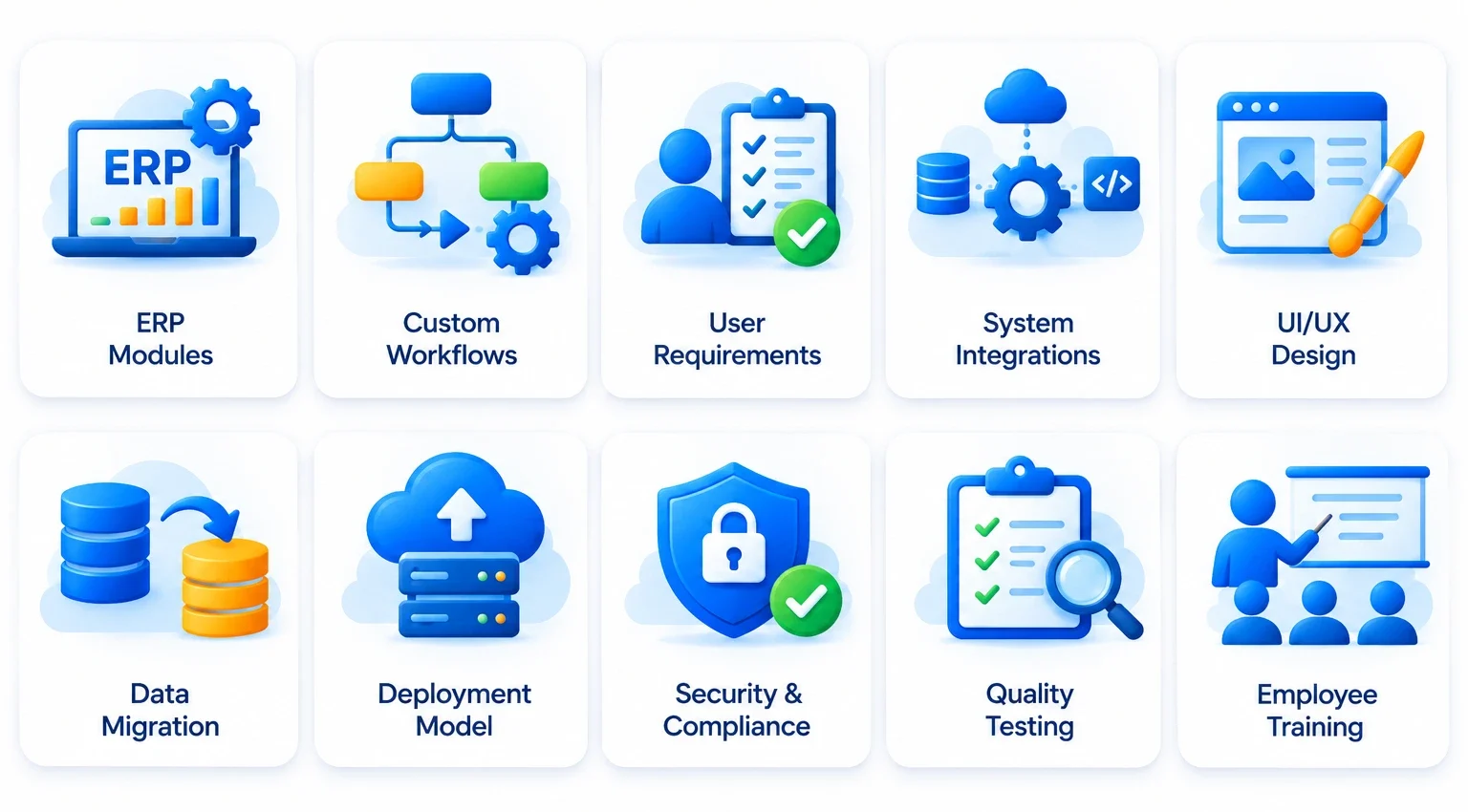
No two ERP projects have exactly the same requirements. The final budget depends on how much functionality the platform needs, how it connects with existing systems, and how closely it must match the organization’s workflows.
The following factors have a direct influence on the ERP development cost.
1. Number and Complexity of ERP Modules
Each ERP module requires its own workflows, data structures, permissions, interfaces, and testing. A basic finance and inventory system requires less effort than a platform covering finance, HR, procurement, manufacturing, sales, supply chain, and customer management.
Advanced functionality also increases development effort. Features such as production planning, demand forecasting, automated approvals, and multi-level reporting require additional business logic and validation.
2. Customization and Business-Specific Workflows
Standard ERP products provide predefined processes, but businesses often have unique approval rules, pricing structures, reporting needs, and operational requirements. Customizing the platform to support these processes increases design, development, and testing effort.
The custom ERP development cost also depends on how much of the system needs to be built from scratch. A solution that extends existing ERP modules generally requires a different budget from one that introduces entirely new workflows and functionality.
3. Number of Users and Access Roles
The number of employees using an ERP system affects user management, permissions, infrastructure planning, and sometimes software licensing. A platform used by 20 employees has different access and performance requirements from one supporting 1,000 users across multiple locations.
Role-based access also adds complexity. Finance teams, warehouse staff, managers, and administrators need different permissions and dashboards. The system must ensure that each user sees the information and actions relevant to their responsibilities.
4. Third-Party Integrations
ERP platforms often need to exchange information with CRM systems, payment gateways, e-commerce platforms, payroll software, banking services, and logistics providers. Each integration requires compatibility checks, API configuration, data mapping, error handling, and testing.
The cost increases when external systems have limited APIs, inconsistent data formats, or complex authentication requirements. Businesses should identify essential integrations during planning instead of adding them after core development is complete.
5. UI/UX Design and Dashboard Requirements
ERP interfaces often display large volumes of operational data. Employees need clear dashboards, intuitive navigation, and role-specific views to complete tasks without unnecessary steps. Designing these experiences requires user research, information architecture, prototyping, and usability testing.
Working with a professional UX design agency helps businesses plan interfaces around actual employee workflows. The design scope also depends on the number of screens, dashboard variations, device requirements, and accessibility considerations.
6. Data Migration and Data Quality
Moving information from spreadsheets, legacy systems, and disconnected applications into a new ERP platform requires careful preparation. Data must be extracted, cleaned, mapped, validated, and imported without losing important business records.
The effort increases when organizations have duplicate entries, inconsistent formats, outdated records, or large historical databases. Data migration should therefore have a separate budget and testing plan rather than being treated as a minor deployment task.
7. Deployment Model and Infrastructure
Cloud-based ERP systems generally use recurring hosting or subscription costs, while on-premises solutions require server infrastructure, installation, maintenance, backups, and internal IT resources. Hybrid deployments combine elements of both models.
Infrastructure requirements also depend on system availability, data storage, security, backup frequency, and expected user traffic. These decisions influence both initial setup expenses and ongoing operational costs.
8. Security and Compliance Requirements
ERP platforms often store sensitive financial, employee, customer, and operational information. Businesses need suitable authentication, access controls, encryption, audit logs, backup policies, and monitoring.
Industries with specific regulatory obligations might also require additional documentation, data controls, and security assessments. The more demanding the compliance requirements, the greater the planning, implementation, and validation effort.
9. Testing and Quality Assurance
ERP testing covers more than checking whether individual features work. Teams need to verify complete business workflows, module interactions, integrations, user permissions, data accuracy, performance, and security.
User acceptance testing is particularly important because employees need to confirm that the system supports real operational processes. Insufficient testing can lead to costly errors after deployment, making quality assurance an essential part of the project budget.
10. Training and Change Management
An ERP system changes how employees access information and complete everyday tasks. Without proper training, users might struggle with new workflows or continue relying on older tools. This reduces adoption and limits the value of the investment.
Training costs depend on the number of user groups, system complexity, training materials, and support required during rollout. Businesses should include onboarding sessions, documentation, and post-launch assistance in their implementation plan.
Custom ERP vs. Off-the-Shelf ERP Cost
One of the first decisions businesses need to make is whether to develop a custom ERP system or purchase an existing product. Both options have different pricing structures, implementation requirements, and long-term ownership costs.
| Cost consideration | Custom ERP | Off-the-shelf ERP |
| Initial investment | Higher development cost | Usually lower initial setup for standard requirements |
| Customization | Built around specific workflows | Limited by available features and customization options |
| Licensing | No standard per-user license unless third-party tools are used | Often subscription-based or license-based |
| Implementation | Depends on development and integration scope | Depends on configuration, migration, and customization |
| Scalability | Can evolve around business requirements | Depends on product capabilities and pricing tiers |
| Maintenance | Requires a dedicated support and upgrade plan | Often includes vendor updates, with support costs depending on the plan |
When Custom ERP Development Makes Sense
Custom ERP development is suitable for businesses with specialized workflows, industry-specific requirements, or operational processes that standard products cannot support efficiently. It also gives organizations greater control over features, integrations, and future enhancements.
However, custom development requires a larger upfront investment and a clear maintenance strategy. Businesses should assess their requirements through digital product discovery before committing to a complete build. This helps define essential modules, validate workflows, and avoid spending on features that do not support immediate business goals.
When Off-the-Shelf ERP Is More Practical
Off-the-shelf ERP software is often suitable for businesses with standard accounting, inventory, sales, HR, and procurement requirements. It provides ready-made functionality and can reduce the time needed to get core operations running.
The initial license or subscription might appear more affordable, but businesses should also consider customization, additional users, integrations, upgrades, and recurring support. A product that requires extensive modifications might become expensive over time, so compare the total ownership cost rather than looking at the license price alone.
ERP Pricing Models Explained
ERP vendors and development partners use different pricing models. Understanding these structures helps businesses compare proposals and estimate recurring expenses.
1. Per-User Subscription Pricing
Cloud ERP platforms often charge a recurring fee based on the number of users and the features they need. This model offers a predictable entry point, but the annual subscription increases as more employees require access.
2. Module-Based Pricing
Some ERP providers charge according to the modules a business selects. Organizations might begin with finance and inventory, then add HR, procurement, manufacturing, or analytics as their needs expand. Additional modules increase the subscription or license cost.
3. One-Time License Pricing
Certain ERP products offer perpetual licenses with a one-time purchase fee. Businesses also need to budget for implementation, infrastructure, upgrades, and annual support. The initial license payment does not represent the complete cost of ownership.
4. Custom Development Pricing
Custom ERP projects are generally estimated according to project scope, development effort, team size, integrations, and technical complexity. Vendors might offer fixed-price contracts for clearly defined requirements or time-and-materials arrangements for projects where the scope is expected to evolve.
For a more accurate ERP software development cost estimate, businesses should ask vendors to separate development, implementation, migration, infrastructure, and maintenance charges.
ERP Implementation Cost Breakdown
Development is only one part of the total ERP investment. A complete budget should include the activities required to configure, launch, and maintain the system. The exact allocation varies by project, but the following table provides a useful planning framework.
| Cost component | What it covers | Indicative budget share |
| Software development or licensing | Custom modules, platform licenses, or subscriptions | 20–35% |
| Implementation and configuration | Process mapping, setup, workflow configuration, and deployment | 20–30% |
| Integrations | APIs and connections with existing business systems | 10–15% |
| Data migration | Data cleaning, mapping, transfer, and validation | 5–10% |
| Testing and quality assurance | Functional, integration, security, and user acceptance testing | 5–10% |
| Training and change management | Employee onboarding, documentation, and adoption support | 5–10% |
| Infrastructure and security | Hosting, backups, monitoring, and security controls | 5–10% |
These are illustrative budgeting allocations, not fixed industry percentages. The categories and shares vary by deployment model, vendor contract, and project scope. Some costs, such as licensing and infrastructure, recur annually.
Businesses should also account for internal employee time, project management, post-launch support, and future enhancements. These expenses are often missed when comparing vendor quotations. A realistic ERP implementation cost breakdown should cover the full journey from initial planning to ongoing operations.
ERP Development Cost vs. Implementation Cost
ERP development cost covers the work required to create or customize the software. This includes architecture, module development, interface design, integrations, and testing.
ERP implementation cost covers the work needed to make the system operational within the business. It includes configuration, data migration, employee training, process alignment, deployment, and go-live support. A project might have a relatively modest development estimate but still require substantial implementation effort if it involves multiple departments or complex legacy systems.
One-Time Costs vs. Recurring ERP Expenses
One-time expenses generally include discovery, development, initial configuration, data migration, and deployment. Recurring expenses include cloud subscriptions, hosting, maintenance, technical support, security monitoring, and software upgrades.
Businesses should compare costs over at least three to five years. This provides a clearer picture of the long-term investment than comparing only the initial quotation. Cloud ERP often shifts more spending toward recurring subscriptions, while on-premises systems require greater attention to infrastructure and internal maintenance.
Cloud ERP vs. On-Premises ERP Cost
The deployment model influences how businesses pay for, manage, and maintain an ERP system. Cloud ERP runs on vendor-managed or third-party infrastructure, while on-premises ERP is hosted on the organization’s own servers. Hybrid ERP combines cloud and local infrastructure based on business requirements.
| Cost factor | Cloud ERP | On-Premises ERP |
| Initial setup | Usually lower infrastructure investment | Higher server and installation investment |
| Payment model | Recurring subscription | License purchase or subscription, depending on product |
| Hosting | Usually included in the service plan | Managed by the organization or its hosting provider |
| Maintenance | Vendor handles much of the infrastructure maintenance | Internal IT team or external partner manages infrastructure |
| Upgrades | Often included in the subscription | Planned and managed separately, depending on the license |
| Scalability | Resources can often be adjusted through the provider | Requires infrastructure capacity planning |
| Data control | Depends on provider, hosting region, and contract | Greater direct control over local infrastructure |
Cloud ERP Software Pricing
Cloud ERP software pricing usually depends on the number of users, selected modules, storage, and subscription tier. It reduces the need for businesses to purchase and maintain their own server infrastructure, although recurring subscription and customization expenses continue throughout the system’s use.
Cloud deployment is often suitable for growing businesses that need remote access, faster setup, and flexible infrastructure. However, organizations should evaluate data residency, vendor security, integration options, and subscription increases before selecting a provider.
On-Premises ERP Pricing
On-premises ERP requires organizations to invest in servers, databases, network infrastructure, installation, and ongoing maintenance. Businesses also need resources to manage backups, security updates, hardware issues, and system upgrades.
This model offers greater control over infrastructure and data management, which might suit organizations with specific security, regulatory, or operational requirements. However, the initial investment and internal IT responsibilities are generally higher than those of a cloud-based setup.
Which Deployment Model Should Businesses Choose?
The right option depends on the organization’s security requirements, IT capabilities, budget, and long-term plans. Cloud ERP offers a subscription-based model with less infrastructure management, while on-premises ERP gives businesses more direct control over their environment. A hybrid model might suit organizations that need cloud accessibility while keeping selected systems or data on local infrastructure.
How to Reduce ERP Software Development and Implementation Costs?
Reducing ERP expenses does not mean removing essential features or compromising system quality. The goal is to invest in functionality that solves real business problems and avoid unnecessary customization, rework, and operational complexity.
Here are practical ways to manage the ERP software development cost without limiting the system’s long-term value.
1. Define Requirements Before Development
Document business processes, user roles, reporting needs, and integration requirements before requesting estimates. Clear requirements reduce misunderstandings and prevent expensive changes during development.
2. Prioritize Essential ERP Modules
Avoid developing every module in the first release. Start with high-priority functions such as finance, inventory, procurement, or sales. Additional capabilities can be introduced as the business grows and users provide feedback.
3. Consider a Phased Development Approach
Divide the project into manageable releases. This allows businesses to validate core functionality, gather user feedback, and distribute spending over time. For an organization that wants to validate a focused product before expanding, MVP development services in USA can support an initial release with essential workflows and features.
4. Reuse Existing Tools and Integrations
Review existing business systems before building new functionality. Integrating a reliable accounting, payment, or communication tool might be more cost-effective than recreating the same capability within the ERP platform.
5. Choose the Right Technology Stack
Select technologies based on system requirements, team expertise, security, scalability, and long-term support. Avoid adopting complex tools that do not provide meaningful value to the project.
6. Plan Data Migration Early
Assess data quality and identify outdated, duplicate, or inconsistent records before migration begins. Early preparation reduces rework and helps prevent delays during implementation.
7. Invest in Testing From the Start
Regular testing helps identify defects before they affect connected modules or business operations. Automated tests, integration checks, and user acceptance testing reduce the likelihood of expensive post-launch fixes.
8. Compare Development Partners Carefully
Compare vendors based on technical capabilities, project experience, communication, delivery practices, and support commitments. The lowest initial quotation might exclude important services that appear later as additional charges.
How Long Does ERP Software Development and Implementation Take?
The development timeline depends on the number of modules, level of customization, integrations, data migration requirements, and stakeholder availability. A focused ERP solution with a few core modules generally takes less time than a large platform supporting multiple departments and locations.
The following estimates offer a broad planning reference:
| ERP project scope | Indicative timeline |
| Basic ERP solution | 2–4 months |
| Small business ERP | 3–6 months |
| Mid-sized ERP platform | 6–12 months |
| Large enterprise ERP | 12–18+ months |
These are indicative project timelines, not guaranteed delivery commitments. Complex integrations, data quality issues, regulatory requirements, and delayed stakeholder approvals can extend the schedule.
Read Also: An Expert Guide To ERP Software Development: Features, Benefits, and Cost
Key Stages of ERP Development
A structured process helps teams manage scope, identify risks, and track progress throughout the project. The main stages include:
- Requirement Analysis: Identify business goals, workflows, user roles, and functional requirements.
- Product Discovery: Validate requirements, prioritize modules, and define the project roadmap.
- Architecture Planning: Select the technology stack, database structure, integrations, and deployment model.
- UI/UX Design: Create dashboards, workflows, wireframes, and interface prototypes.
- Software Development: Build ERP modules, business logic, permissions, and integrations.
- Testing and Validation: Conduct functional, integration, security, performance, and user acceptance testing.
- Data Migration: Clean, map, transfer, and validate existing business information.
- Deployment and Training: Launch the platform and prepare employees to use the new system.
- Maintenance and Optimization: Monitor performance, resolve issues, and introduce improvements.
Following a structured software development life cycle (SDLC) helps teams manage these stages with clear deliverables and quality checks. The overall timeline & cost also depend on how quickly business stakeholders review requirements, approve designs, and validate completed modules.
ERP Features and Advanced Modules That Influence Pricing
The modules selected for an ERP system determine how much of the organization’s operations the platform will manage. Core modules support everyday business activities, while advanced modules introduce deeper automation, analytics, and specialized workflows.
Core ERP Modules
| ERP module | Key capabilities | Cost considerations |
| Finance and Accounting | Invoicing, budgeting, expenses, financial reports | Tax rules, multi-currency support, and financial integrations |
| Inventory Management | Stock tracking, warehouse records, reorder alerts | Multiple warehouses, barcode systems, and stock forecasting |
| Human Resource Management | Employee records, attendance, payroll, leave management | Payroll rules, employee self-service, and HR integrations |
| Sales and CRM | Customer records, quotations, order management | Sales workflows, customer data, and CRM integration |
| Procurement | Purchase orders, supplier records, approval workflows | Vendor management and multi-level approvals |
| Manufacturing | Production planning, bills of materials, quality checks | Production complexity, machine data, and shop-floor integration |
| Supply Chain Management | Logistics, distribution, shipment tracking | External logistics connections and multi-location operations |
| Reporting and Analytics | Dashboards, KPIs, business reports | Data volume, reporting complexity, and real-time processing |
Advanced ERP Modules and Their Cost Impact
Advanced capabilities increase the scope of an ERP platform because they require additional business logic, data processing, integrations, and validation.
- AI-powered forecasting: Uses historical data to support demand planning, inventory decisions, and predictive insights. Explore how AI in ERP is changing enterprise resource planning.
- Workflow automation: Automates repetitive tasks, approval requests, notifications, and data updates. Businesses can also explore intelligent automation to understand how automation supports enterprise operations.
- Business intelligence: Combines operational data into dashboards and reports for better business visibility.
- Multi-location management: Supports operations across branches, warehouses, subsidiaries, and regions.
- Compliance management: Adds controls, audit trails, and reporting requirements for regulated business activities.
Businesses should prioritize advanced modules based on measurable operational needs. Adding features without a clear purpose increases development effort and makes the platform harder to maintain.
How to Calculate the Total Cost of ERP Ownership
The initial development or license price does not represent the full financial commitment. Businesses need to consider the costs of running, supporting, and improving the ERP system over several years. This broader calculation is known as the total cost of ownership (TCO).
A practical ERP budget should account for:
- Initial software development or license purchase
- Implementation and configuration
- Data migration and system integrations
- Cloud hosting or on-premises infrastructure
- Employee training and change management
- Annual maintenance and technical support
- Security updates and software upgrades
- Future enhancements and additional modules
For example, a business might select an ERP platform with a lower initial price but later spend more on customization, integrations, and support. Another solution might require a higher upfront investment but fit existing workflows more closely. Comparing these expenses over a three-to-five-year period provides a more realistic view of the investment.
ERP Return on Investment
ERP ROI should be evaluated against the operational improvements the system delivers. These benefits might include fewer manual tasks, more accurate inventory records, faster financial reporting, improved coordination, and better visibility across departments.
Businesses can track indicators such as:
- Reduction in manual data entry
- Time saved on routine processes
- Improvement in inventory accuracy
- Faster order processing
- Reduced reporting delays
- Lower costs from duplicate systems
- Fewer operational errors
A realistic ROI assessment compares these measurable improvements with the full cost of ownership. The results depend on how effectively employees adopt the platform and how well the system addresses existing business problems.

Common Mistakes That Increase ERP Development Costs
Even a well-planned ERP project can become expensive when businesses overlook important requirements or make decisions without considering their long-term impact. Avoiding these mistakes helps control the budget and prevents unnecessary rework.
1. Starting Development Without Clear Requirements
Beginning development before documenting business workflows often leads to scope changes and repeated modifications. Businesses should finalize essential requirements and define project priorities before committing to the development budget.
2. Choosing an ERP Based Only on Initial Price
A lower license or development quote does not always mean a lower long-term investment. Compare implementation, customization, integration, training, and maintenance expenses before making a decision.
3. Adding Too Many Features at Once
Including every possible module in the initial release increases development time and complexity. Prioritize the functionality employees need most, then introduce additional modules as business requirements evolve.
4. Ignoring Employee Training
Employees need time and guidance to adapt to new workflows. Insufficient training affects adoption and often leads to continued dependence on spreadsheets or disconnected applications.
5. Underestimating Data Migration
Legacy data might contain duplicate records, outdated information, or inconsistent formats. Failing to prepare this data before migration can create errors and delay deployment.
6. Overlooking Future Maintenance
ERP systems require ongoing updates, security improvements, and technical support. Businesses should include recurring maintenance expenses in the initial budget rather than treating them as unexpected costs.
Conclusion
ERP investment depends on business size, operational complexity, selected modules, customization, integrations, and deployment requirements. A small business might need a focused system for finance and inventory, while a large enterprise might require a connected platform supporting multiple departments and locations. Understanding the ERP software development cost and its different components helps businesses plan realistic budgets, compare pricing models, and avoid unexpected expenses.
The right ERP solution should support current operations while remaining adaptable to future business needs. RipenApps helps organizations plan and build tailored digital platforms around their operational goals. Its expertise in software modernization services also helps businesses improve legacy systems, upgrade existing workflows, and prepare their technology infrastructure for evolving requirements.
FAQs
Q1. How much does ERP software development cost?
Custom ERP software development typically costs between $20,000 and $350,000+, depending on business size, modules, customization, integrations, and technical complexity. Large enterprise platforms with multiple locations and advanced workflows might require a higher investment.
Q2. What factors affect ERP software pricing?
ERP software pricing depends on the number of modules, users, customization, integrations, deployment model, data migration, security requirements, and maintenance needs. Implementation and training also contribute to the overall investment.
Q3. Is custom ERP development more expensive than off-the-shelf ERP?
Custom ERP development generally requires a higher initial investment because the software is built around specific business workflows. Off-the-shelf ERP products often have lower entry costs, but licensing, customization, integrations, and recurring subscriptions influence their long-term cost.
Q4. How long does ERP software development take?
A basic ERP solution might take around 2–4 months, while a small business platform might require 3–6 months. Mid-sized projects often take 6–12 months, and large enterprise implementations can extend beyond 12–18 months.
Q5. How can businesses reduce ERP development costs?
Businesses can control ERP expenses by defining requirements early, prioritizing essential modules, choosing suitable technologies, planning data migration, and testing throughout development. A phased rollout also helps distribute investment and validate functionality before expanding the system.
Discuss your project and request for proposal
SHARE
WRITTEN BY

Ishan Gupta
CEO & Founder
Ishan Gupta is a seasoned entrepreneur and CEO with extensive 10+ years of experience in business and mobile app development landscape. He believes that the right digital product allows companies to focus on what they do best, while technology handles the rest. With deep exposure to global markets, he understands what makes an app succeed. His approach translates business needs into clear product strategies, ensuring that every feature contributes to measurable ROI.
View All Articles