


Key Takeaways
- Automate payroll operations to reduce manual calculations, salary errors, and repetitive administrative work.
- Prioritise UAE payroll requirements such as WPS-related salary processing, employee entitlements, and applicable labour regulations.
- Choose essential features first, including salary calculations, payslips, attendance integration, approval workflows, reporting, and employee self-service.
- Plan your development budget carefully. Custom payroll software costs depend on feature complexity, integrations, security, and data migration.
- Protect sensitive employee data with role-based access, encryption, audit trails, secure backups, and regular security testing.
- Compare custom and ready-made solutions based on your payroll requirements, flexibility, implementation time, and long-term costs.
- Select the right development partner to validate payroll calculations, manage integrations, and support the software after launch.
A single payroll mistake can lead to delayed salaries, frustrated employees, and compliance issues. As your business grows, managing salary calculations, overtime, deductions, and employee records through spreadsheets becomes increasingly difficult.
In the UAE, payroll management also involves local labour requirements, the Wage Protection System (WPS), employee entitlements, and applicable end-of-service benefits. Keeping every calculation accurate while meeting these requirements demands a reliable and well-structured process.
Payroll software development helps businesses automate salary calculations, connect attendance data, manage employee records, and generate accurate payroll reports. It reduces repetitive manual work and gives HR and finance teams better control over payroll operations.
This guide explores the essential features, development process, estimated costs, and security considerations to help you plan payroll management software that fits your UAE business needs.
Table of Contents
What is Payroll Management Software?
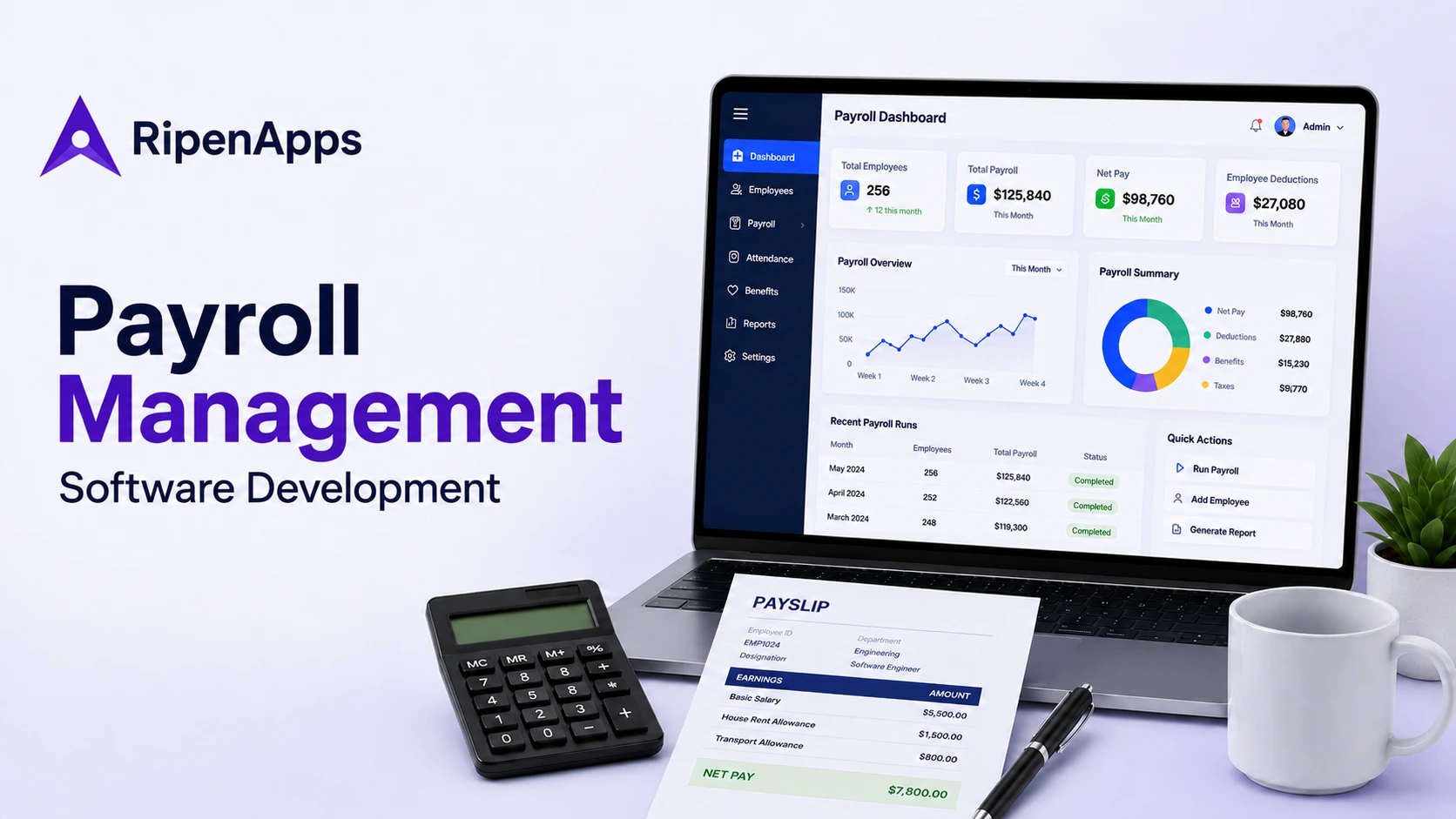
Payroll management software helps businesses calculate employee salaries, account for earnings and deductions, manage payroll records, and prepare salary payments and reports. Depending on its scope, the system can also handle attendance data, overtime, leave adjustments, payslips, approvals, and end-of-service calculations.
A modern payroll management system reduces repetitive administrative work by bringing payroll data and calculations into a controlled workflow. Instead of maintaining separate files for employee details, attendance, salary changes, and payment records, authorised users work from a consistent source of information.
For UAE businesses, the software should support relevant local requirements, including WPS-related salary processing where applicable. It should also account for different employment arrangements, company policies, and the information required to calculate and document employee payments correctly.
How Payroll Software Works
A typical payroll workflow follows these steps:
- Collect employee data such as salary details, employment terms, attendance, approved leave, and overtime.
- Calculate earnings and adjustments based on salary structures, allowances, deductions, and applicable policies.
- Review and approve payroll so authorised HR or finance personnel can check exceptions before processing.
- Prepare salary payments through the organisation’s approved banking or WPS-compatible arrangements, where applicable.
- Generate payslips and reports that document salary calculations and provide records for employees, HR, and finance.
- Maintain payroll history to support reconciliation, audits, corrections, and future calculations.
The exact workflow varies by employer. A small company might need straightforward salary calculations and payslips, while a larger organisation might require multiple approval levels, branch-wise payroll, accounting integration, and detailed audit trails.
UAE Payroll Requirements Businesses Should Consider
Payroll software in the UAE needs to reflect the rules that apply to the employer, employee category, and employment arrangement. A system designed around generic salary calculations might miss important local requirements, so businesses should define compliance needs before deciding which features to build.
Wage Protection System (WPS) Compatibility
The UAE’s Wage Protection System supports the timely payment of wages through authorised financial institutions. Employers registered with the Ministry of Human Resources and Emiratisation (MoHRE) must follow the applicable WPS requirements for salary payments. The Central Bank of the UAE explains how the system supports wage transfers and monitoring.
A payroll solution should prepare accurate salary information and support the payment workflow required by the employer’s authorised bank or exchange house. The exact integration depends on the organisation’s banking arrangements and the relevant WPS procedures. Confirm the current technical requirements with the financial institution and MoHRE before implementation.
End-of-Service Benefits and Employee Entitlements
Payroll calculations may need to account for annual leave, overtime, unpaid leave, salary adjustments, and end-of-service benefits. For eligible private-sector employees, gratuity calculations depend on factors such as employment duration and basic salary, while different employment categories can follow different rules. The UAE government’s official guidance on end-of-service benefits explains the applicable provisions.
The software should store the relevant employment details and apply configurable rules that reflect the employee’s contract and applicable legislation. Since regulations and employee circumstances can change, HR teams should be able to review calculations and update approved rules without rewriting the entire system.
Employee Records and Data Accuracy
Payroll depends on accurate employee records, including job details, salary structures, bank information, attendance, leave balances, and approved changes to compensation. If these records are scattered across spreadsheets and separate tools, payroll teams spend more time reconciling information and investigating discrepancies.
A structured approach to custom data management software helps businesses organise employee information, manage access, and maintain consistent records across connected systems. The payroll platform should also keep a traceable history of important changes, including who made them and when.
Data Hosting, Privacy, and Security
Payroll records contain sensitive personal and financial information, so businesses need to decide how that data will be stored, accessed, transferred, and backed up. Security requirements should be considered alongside hosting costs and integration needs.
When evaluating hosting options, understanding public vs private vs hybrid cloud helps businesses compare different approaches to control, scalability, and infrastructure management. The final choice should reflect the organisation’s security policies, contractual commitments, and applicable UAE data protection requirements rather than assuming that one hosting model is always best.
Essential Features of Payroll Management Software
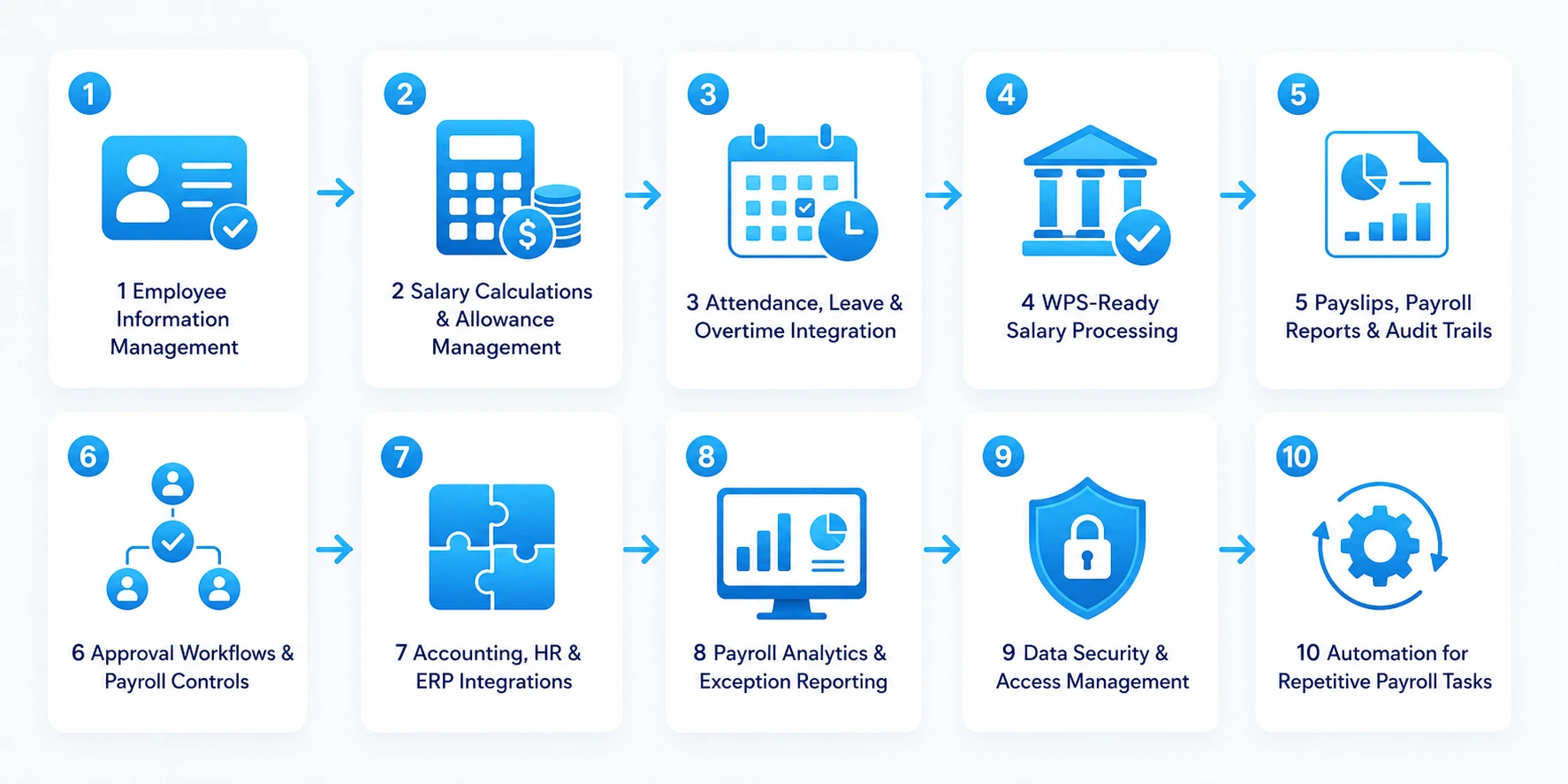
The right feature set depends on employee count, payroll complexity, internal approval policies, and existing business systems. For many UAE organisations, the goal is to reduce manual calculations while making payroll easier to review, process, and audit.
1. Employee Information Management
The system should maintain employee profiles with employment details, salary components, bank information, leave balances, and relevant contract records. Role-based access helps ensure that only authorised users can view or update sensitive information.
2. Salary Calculations and Allowance Management
The software should calculate gross pay from configured salary components, such as basic salary, housing allowance, transport allowance, overtime, bonuses, and other approved earnings. It should apply deductions and adjustments according to company policy and the rules relevant to each employee.
A flexible calculation engine is important because salary structures can differ across roles, contracts, and business units. HR teams should be able to review exceptions and approve changes before finalising payroll.
3. Attendance, Leave, and Overtime Integration
Connecting attendance and leave records with payroll reduces the need to enter the same information multiple times. The system should import approved timesheets, overtime, unpaid leave, and other relevant adjustments from attendance tools or HR systems.
For businesses with shift-based teams, the platform should support configurable working schedules and approval rules. This helps reduce discrepancies between recorded attendance and the final salary calculation.
4. WPS-Ready Salary Processing
A UAE-focused payroll solution should support the preparation and validation of salary information needed for the applicable WPS workflow. It should flag missing employee details, inconsistent payment amounts, and incomplete records before payroll is approved.
Where direct integration is required, confirm the supported file formats, interfaces, validation rules, and authorisation process with the employer’s financial institution. Avoid assuming that every bank offers the same technical integration options.
5. Payslips, Payroll Reports, and Audit Trails
Employees should be able to access clear payslips showing salary components, allowances, deductions, and net pay. HR and finance teams also need reports for payroll totals, payment status, adjustments, and historical records.
Maintain audit trails for salary changes, approvals, and payroll corrections. These records help teams investigate discrepancies, reconcile payments, and respond to internal or external reviews.
6. Approval Workflows and Payroll Controls
Payroll should follow a defined approval process before payments are prepared. For example, an HR executive might verify attendance and employee changes, while a finance manager reviews the final payroll totals and authorises processing.
The system should flag unusual changes, missing information, and calculation exceptions for review. Configurable approval levels help businesses apply appropriate controls without slowing down routine payroll tasks.
7. Accounting, HR, and ERP Integrations
Payroll rarely operates in isolation. Integrating it with accounting software, attendance tools, HR platforms, and an ERP helps keep employee records and financial entries consistent across the business.
A payroll platform built alongside an ERP software development strategy should define which system owns each data field, how records are synchronised, and how errors are handled. Clear integration rules reduce duplicate entry and help finance teams reconcile payroll costs with accounting records.
For salary disbursement workflows, suitable fintech APIs may support connections with financial services, subject to the bank’s capabilities, API access, and applicable WPS requirements.
8. Payroll Analytics and Exception Reporting
Reporting tools help HR and finance teams review salary costs, overtime, allowances, payroll adjustments, and recurring discrepancies. Instead of manually comparing several spreadsheets, authorised users can filter reports by pay period, department, location, or other relevant attributes.
The software should also highlight exceptions such as missing attendance records, unexpected salary changes, and incomplete employee details. These alerts help teams investigate issues before payroll is approved.
9. Data Security and Access Management
Payroll software needs strong safeguards because it stores salary records, bank details, and other confidential employee information. Apply role-based permissions, encryption in transit and at rest where appropriate, secure authentication, and controlled access to exports and reports.
A robust software security strategy helps teams identify vulnerabilities, protect sensitive employee data, and manage access across the system. Regular security reviews should continue after launch as the software, its integrations, and user permissions evolve.
10. Automation for Repetitive Payroll Tasks
Automation can reduce repetitive work such as importing approved attendance, checking required fields, generating payslips, and preparing payroll reports. It should not remove human oversight from sensitive decisions or unusual calculations.
A broader intelligent automation approach helps businesses identify which tasks are suitable for automation and where approval or manual review should remain mandatory.
Not every business needs all these features at launch. A smaller organisation might begin with employee records, salary calculations, payslips, and WPS-related workflows, then introduce advanced reporting and integrations as requirements grow.
Read Also: HRMS Software Development: Top Features, Costs, & Best Practices
Payroll Software Development Process
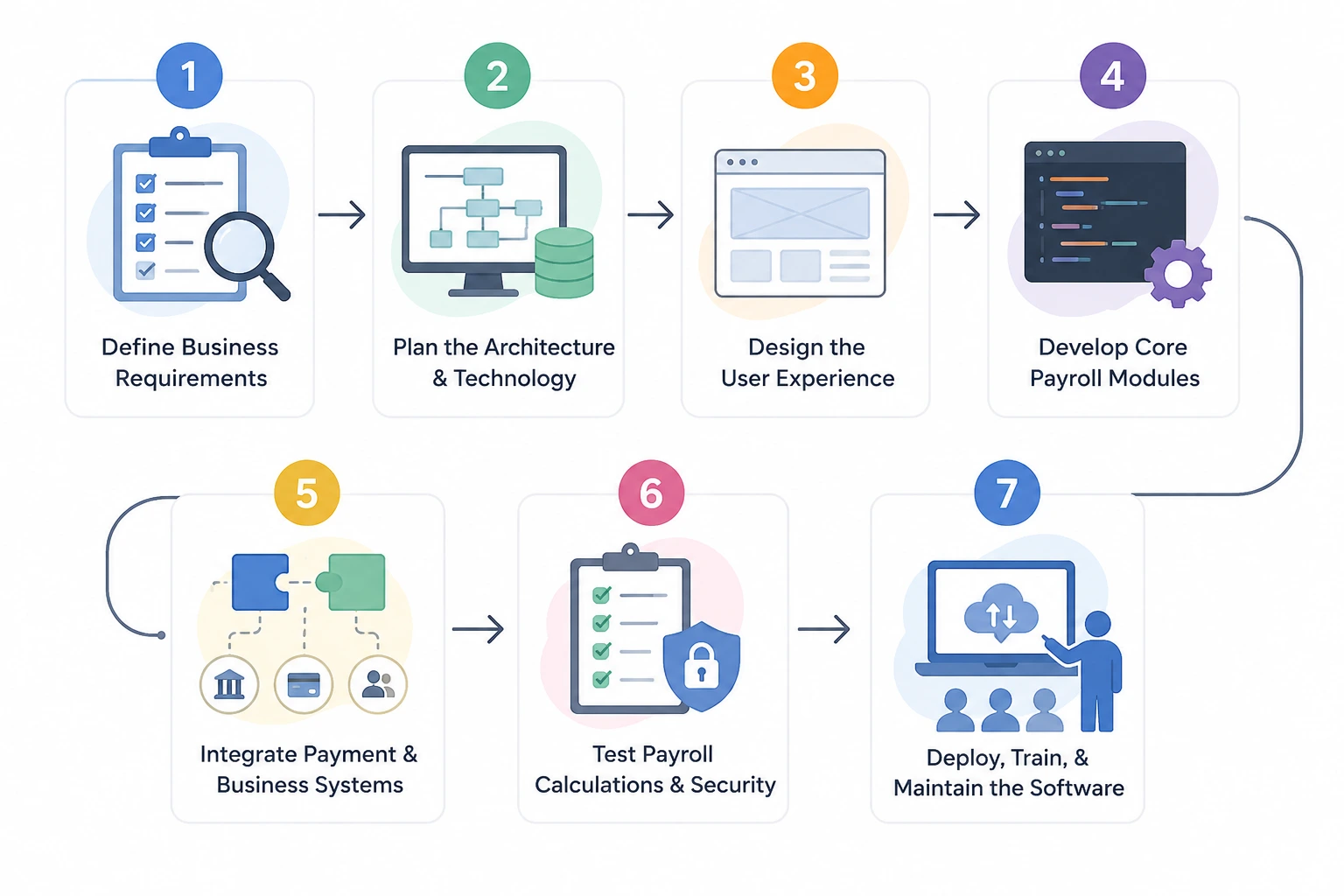
Building a payroll platform requires more than implementing salary calculations. The team needs to understand employment rules, employee workflows, payment requirements, data security, and the systems the software must connect with. A structured process helps businesses control scope, validate requirements, and reduce expensive changes later.
Step 1. Define Business Requirements
Start by identifying the problems the software needs to solve. Document employee numbers, salary structures, payroll frequency, approval levels, attendance sources, reporting needs, and the existing systems used by HR and finance.
Businesses should also identify the employee categories and UAE-specific requirements the platform must support. Software product discovery workshops help stakeholders prioritise essential features, map workflows, and agree on a realistic first release before development begins.
Step 2. Plan the Architecture and Technology
The architecture should define how employee records, payroll calculations, approvals, reports, and payment integrations will work together. Decide whether the system needs a single-company setup or a multi-entity structure that supports separate branches, subsidiaries, or client organisations.
Choose a technology stack based on security, maintainability, integration requirements, and expected growth. If the software is intended for multiple businesses, plan tenant isolation, configurable payroll rules, and separate access permissions from the beginning.
Step 3. Design the User Experience
Payroll software needs clear workflows for HR teams, finance managers, administrators, and employees. Design the main journeys for adding employee details, reviewing salary calculations, approving payroll, downloading payslips, and resolving discrepancies.
A dedicated UI UX design agency can help structure these workflows into clear interfaces and test prototypes with representative users. For UAE organisations with multilingual teams, consider Arabic and English support, including right-to-left layouts where required.
Step 4. Develop Core Payroll Modules
Build the essential modules according to the approved scope. These typically include employee records, salary components, attendance inputs, leave adjustments, payroll calculations, approval workflows, payslips, and reports.
The engineering team should implement calculation rules as configurable logic where possible. This makes it easier to maintain approved policies and handle changes without altering unrelated parts of the software. Core calculations should also have automated tests covering normal scenarios, edge cases, and corrections.
Step 5. Integrate Payment and Business Systems
Connect the payroll platform with the relevant banking or WPS workflow, accounting software, attendance tools, and HR systems. Each integration needs defined data formats, permissions, error handling, and reconciliation procedures.
During this stage, teams should test incomplete records, rejected transactions, duplicate requests, and failed synchronisation. Payroll must remain traceable even when an external service is temporarily unavailable.
Step 6. Test Payroll Calculations and Security
Testing should verify both the accuracy of salary calculations and the security of employee information. Use sample records to check allowances, overtime, leave adjustments, deductions, end-of-service calculations, and any other rules included in the approved scope.
Conduct integration, performance, access-control, and regression testing before launch. Compare sample payroll results with independently reviewed calculations and resolve discrepancies before the system handles live employee records.
Step 7. Deploy, Train, and Maintain the Software
Before launch, migrate approved employee and historical payroll data, validate record totals, configure production access, and prepare backups and recovery procedures. Run a controlled payroll cycle or parallel calculation where practical so the business can compare results before fully relying on the new system.
Train HR and finance teams, document support procedures, and assign responsibility for future updates. Following a defined software development life cycle helps teams manage planning, implementation, testing, release, and ongoing maintenance in a consistent way.
How Much Does Payroll Software Development Cost in the UAE?
The cost of payroll software development depends on the features you need, the complexity of salary calculations, required integrations, security measures, and the number of users. A basic payroll tool will cost less than an advanced system designed for multiple companies, complex approval workflows, and WPS-related salary processing.
The overall budget can vary significantly based on the project’s scope. A simple system with essential payroll features generally requires a smaller investment, while a more advanced platform with custom integrations, detailed reporting, and complex payroll rules requires a higher budget.
The following table provides indicative cost estimates for custom payroll software development. Your actual budget will depend on your business requirements, technical complexity, and integration needs.
| Project scope | Indicative development cost | Typical scope |
| Basic payroll solution | AED 40,000–100,000 | Employee records, salary calculations, payslips, basic reports |
| Mid-complexity payroll platform | AED 100,000–250,000 | Attendance integration, approval workflows, accounting connections, stronger reporting |
| Advanced or enterprise payroll platform | AED 250,000–500,000+ | Multi-entity support, complex rules, multiple integrations, advanced controls, custom reporting |
Note: These ranges are planning guides rather than guaranteed prices. A project with complex WPS or banking integration, historical data migration, multilingual interfaces, or specialised payroll rules could fall outside them. Ask experts to separate one-time development costs from recurring hosting, support, licensing, and maintenance charges.
Key Factors That Affect Payroll Software Development Cost
Several decisions influence the final budget. Defining these early helps businesses compare proposals and avoid unexpected expenses during development.
- Feature complexity: Basic salary calculations cost less to implement than configurable rules for multiple employee categories, complex allowances, and detailed reporting.
- Number of integrations: Connecting attendance tools, accounting platforms, HR systems, banks, and WPS-related workflows adds development and testing effort.
- Compliance requirements: The system must reflect the labour and payroll rules relevant to the business and its employees. Specialised calculations require additional validation.
- Data migration: Moving employee records and historical salary information requires mapping, cleaning, reconciliation, and secure transfer.
- User roles and approvals: Multiple companies, departments, branches, and approval levels increase the complexity of access controls and workflows.
- Security and infrastructure: Encryption, audit logs, backups, monitoring, and disaster recovery add to implementation and ongoing operating costs.
- Design and languages: Custom interfaces, employee self-service features, Arabic localisation, and right-to-left layouts require additional design and testing.
- Ongoing maintenance: Hosting, monitoring, updates, support, and changes to payroll rules need a separate operating budget.

How to Manage the Development Budget
Start with the payroll functions your business needs to operate accurately and meet its applicable requirements. Prioritise employee records, salary calculations, approval workflows, payslips, and essential payment preparation before investing in advanced analytics or optional automation.
Ask experts to provide a feature-wise estimate, milestone-based delivery plan, and clear list of exclusions. Confirm who will handle external integration approvals, data migration, security testing, training, and post-launch support. These details make it easier to compare proposals based on the actual deliverables rather than the headline price alone.
Businesses replacing older payroll tools should also assess whether existing records and workflows can be retained. Professional software product modernization services may be relevant when the goal is to improve an existing product, upgrade its technology, or strengthen integrations instead of rebuilding every component from scratch.
Security and Data Protection in Payroll Software
Payroll platforms store sensitive employee and financial records, making security a core requirement rather than an optional feature. Understanding common software security vulnerabilities, such as weak authentication, excessive access permissions, and poorly configured integrations, helps businesses protect salary information and prevent unauthorised changes to employee records.
Apply Role-Based Access Controls
Give HR administrators, finance managers, approvers, and employees access only to the information and actions they need. Separate duties where appropriate, especially for salary changes, payroll approvals, and payment authorisation.
Encrypt Sensitive Information
Protect data in transit and use appropriate encryption for stored records. Keep credentials and encryption keys out of source code, limit access to production data, and avoid exposing confidential information in logs or exported reports.
Secure Data Migration
Moving historical salary records from spreadsheets or an older platform requires careful planning. Map the source fields, restrict access during transfer, validate record counts and totals, and confirm that the migrated data matches the original records. The cloud migration & data security checklist provides additional considerations for protecting data during migration.
Monitor Activity and Maintain Audit Trails
Record important actions such as salary changes, permission updates, payroll approvals, and corrections. Monitoring and audit trails help businesses investigate unexpected changes and identify suspicious activity while preserving a clear history of payroll decisions.
Plan for Backups and Recovery
Maintain secure backups and test restoration procedures regularly. Define how payroll operations will continue if the platform, database, or an external integration becomes unavailable. Recovery plans should protect data integrity as well as service availability.
Benefits of Custom Payroll Software for UAE Businesses
A well-designed payroll platform helps businesses standardise calculations, improve visibility, and reduce repetitive administrative work. The value depends on how well the software fits existing workflows and how consistently teams use it.
- Less manual processing: Automated calculations and data imports reduce repeated entry across spreadsheets and disconnected systems.
- More consistent records: A central source of employee and payroll information makes reconciliation easier.
- Clearer approvals: Defined workflows show who reviewed and authorised payroll changes.
- Better employee access: Self-service payslips and payroll records reduce routine requests to HR.
- Improved reporting: HR and finance teams can review payroll costs, adjustments, and exceptions more efficiently.
- Greater flexibility: Configurable rules and modular architecture make it easier to respond to organisational growth and changing requirements.
- Stronger operational oversight: Audit trails and exception reports help teams investigate discrepancies and improve accountability.
The goal is not to automate every decision. It is to make routine payroll work more reliable while preserving the reviews and approvals needed for sensitive financial operations.
Should You Build a Custom Payroll System or Use Ready-Made Software?
The right choice depends on how closely your payroll needs match the features offered by existing products. Ready-made tools are often suitable when standard payroll workflows meet your requirements, while custom development becomes more relevant when you need specialised calculations, complex integrations, or greater control over the system’s roadmap.
| Consideration | Ready-made payroll software | Custom payroll software |
| Initial investment | Usually lower | Usually higher |
| Time to launch | Often shorter | Depends on scope and integrations |
| Features | Based on the software’s existing features | Defined around your requirements |
| Integrations | Limited to supported options | Can be designed for required systems |
| Maintenance | Managed by the software provider, depending on the plan | Requires an ongoing support arrangement |
| Flexibility | Depends on available settings | Greater control over features and changes |
Before deciding, compare subscription and licensing fees with custom development, implementation, migration, and maintenance costs. Also verify that the chosen product supports the applicable UAE payroll requirements and your financial institution’s payment workflow.
Mobile Access and Cloud Deployment Considerations
Some businesses need employees and managers to access payroll information outside the office. A responsive web portal may be enough for viewing payslips and approving requests, while a dedicated mobile experience may suit organisations with distributed or shift-based teams.
If a mobile solution is required, a leading mobile app development company in UAE can help plan secure employee access, notifications, and approval workflows. Mobile access should follow the same permissions and data-protection rules as the main payroll platform.
Cloud deployment is another decision to make early. A cloud app development approach can support remote access and scalable infrastructure, but the architecture still needs appropriate access controls, backups, monitoring, and data protection measures.
How to Choose the Right Payroll Software Development Partner
The development partner should understand both the technical requirements and the payroll workflows the software needs to support. Evaluate potential partners against these criteria:
- Requirements and compliance understanding: Ask how they will document relevant UAE payroll rules and validate calculations before launch.
- Integration experience: Check whether they can handle accounting, attendance, HR, and banking-related integrations.
- Security approach: Review how they manage access control, encryption, audit trails, testing, and data migration.
- Transparent estimates: Request a breakdown of features, milestones, assumptions, exclusions, and ongoing costs.
- Testing and validation: Confirm how the team will verify salary calculations, edge cases, and integration failures.
- Post-launch support: Agree on how updates, defects, changing requirements, and operational issues will be handled.
At RipenApps, we focus on understanding your payroll workflows, integration needs, and business goals before recommending a development approach. This helps you plan a practical, secure solution that fits your requirements and supports future growth.
Conclusion
Payroll Software Development helps UAE businesses replace manual calculations and disconnected records with accurate, efficient payroll workflows. With the right features, secure data handling, and reliable integrations, businesses can simplify salary processing, reduce administrative work, and improve visibility across HR and finance operations. Partnering with a trusted custom software development company helps ensure the solution aligns with your business requirements, budget, and compliance needs.
Whether you’re building a new payroll platform or upgrading an existing system, the right development approach starts with clear goals and a well-defined feature set. RipenApps helps businesses turn their requirements into tailored software solutions designed for efficiency, security, and long-term growth.

FAQs
Q1. How much does payroll software development cost in the UAE?
Custom payroll software development in UAE may cost around AED 40,000–100,000 for a basic system, AED 100,000–250,000 for a mid-level solution, and AED 250,000–500,000 or more for an advanced platform. The final cost depends on features, integrations, security requirements, data migration, and ongoing maintenance.
Q2. How long does payroll software development take?
A basic payroll tool might take a few months, while a platform with complex salary rules, multiple integrations, and enterprise-level controls needs a longer timeline. Requirements clarity, testing, and external integration approvals also affect delivery.
Q3. What features should payroll software include in the UAE?
Essential features include employee records, salary calculations, allowances, payslips, approval workflows, reporting, and secure data management. Businesses that need WPS-related processing should also confirm the requirements of their authorised financial institution.
Q4. Is custom payroll software better than ready-made software?
Custom software offers greater control over workflows, calculations, integrations, and future changes, but it usually requires a higher initial investment. Ready-made software may be more practical when its existing features meet your requirements.
Q5. Can payroll software integrate with HR and accounting systems?
Yes. Payroll software can connect with HR platforms, attendance tools, and accounting systems through APIs, supported connectors, or scheduled data exchanges. The integration should include validation, error handling, and reconciliation to keep records consistent.
Q6. How does payroll software protect employee data?
It should use appropriate encryption, role-based access controls, secure authentication, audit trails, and tested backup procedures. Regular security assessments and controlled data exports help reduce the risk of unauthorised access.
Discuss your project and request for proposal
SHARE
WRITTEN BY

Ishan Gupta
CEO & Founder
Ishan Gupta is a seasoned entrepreneur and CEO with extensive 10+ years of experience in business and mobile app development landscape. He believes that the right digital product allows companies to focus on what they do best, while technology handles the rest. With deep exposure to global markets, he understands what makes an app succeed. His approach translates business needs into clear product strategies, ensuring that every feature contributes to measurable ROI.
View All Articles