


Key Takeaways
- Custom data management solutions can connect information across fragmented enterprise systems.
- Centralized data access can reduce duplication and improve operational visibility.
- Data quality, governance, security, and lineage should be built into the system rather than treated as separate concerns.
- Custom software is useful when standard tools cannot accommodate specific workflows or integration requirements.
- AI can make enterprise data easier to analyze, search, classify, and use when the underlying data is reliable and governed.
- A phased implementation helps businesses control complexity and demonstrate value early.
- The right solution should improve measurable outcomes such as reporting speed, data accuracy, operational efficiency, and decision-making.
Enterprise operations depend on data moving accurately between departments, systems, applications, and decision-makers. As organizations grow, customer records, financial information, inventory data, employee details, operational metrics, and analytics often end up distributed across multiple platforms. This makes it harder to maintain consistency, find reliable information, and respond quickly to business needs.
A well-designed data management software solution brings structure to this environment by helping businesses collect, organize, integrate, govern, and access information across their operations. Modern solutions can include capabilities such as data integration, quality management, governance, metadata management, lineage, security, and analytics.
Off-the-shelf tools can address common data management requirements, but enterprises often have workflows, systems, access rules, and reporting requirements that are specific to their operations. Custom development allows these requirements to become part of the solution instead of forcing teams to adapt their processes around a generic platform.
This ultimate guide explains how custom data management software can improve enterprise operations, which features matter most, how it integrates with existing systems, when custom development makes sense, implementation challenges, development costs, and how businesses can measure its impact. Let’s get started:
Table of Contents
What is Data Management Software?
Data management software refers to software that helps organizations control, organize, integrate, protect, and maintain data throughout its lifecycle. It can bring together capabilities such as data integration, governance, quality management, metadata management, security, storage, and analytics rather than treating data as isolated information within individual systems.
In an enterprise environment, the purpose goes beyond storing information. A modern data management system helps teams understand where data comes from, how it changes, who can access it, and whether it is reliable enough for operational or analytical use.
The exact architecture differs between organizations. Some businesses use multiple specialized platforms for integration, storage, governance, analytics, and master data management. Others build a unified layer that connects these capabilities according to their operational requirements. This is why there is no single definition of the best software for data management for every enterprise.
Why Enterprise Operations Struggle With Data?
Data problems often become operational problems. When information is scattered across applications, teams spend more time reconciling records, checking accuracy, searching for information, and resolving inconsistencies instead of acting on it. Common issues include:
1. Data Silos Across Departments
Sales, finance, HR, operations, customer support, and supply chain teams often use different applications and maintain separate datasets. This creates disconnected information that is difficult to compare or synchronize.
When teams lack a shared view of important business information, reporting becomes slower, and decisions often depend on manually combined data.
2. Duplicate and Inconsistent Data
The same customer, product, supplier, or transaction might appear differently across multiple systems. Duplicate records and inconsistent formats create additional work and increase the risk of inaccurate reports.
A centralized approach to application data management helps establish consistent rules for how information is collected, updated, validated, and shared across business applications.
3. Delayed Reporting and Decision-Making
When analysts need to collect information from several systems before creating a report, even routine business questions can take hours or days to answer. This limits the ability of managers to respond quickly to changes in demand, costs, customer behavior, or operational performance.
These challenges are closely connected to broader enterprise app development challenges, particularly data silos, duplication, integration complexity, and delayed access to business information.
4. Limited Data Visibility
Businesses often know that data exists but struggle to determine where it is stored, who owns it, how reliable it is, or how it is being used.
Metadata, data catalogs, lineage, and clear ownership help create this visibility. Modern data platforms increasingly combine these capabilities to make enterprise information easier to discover and trust.
How Custom Data Management Software Improves Enterprise Operations
Custom software becomes valuable when data management needs are closely connected to specific business processes. Instead of providing a generic set of tools, the system can be designed around the organization’s data sources, workflows, user roles, governance policies, and operational goals.
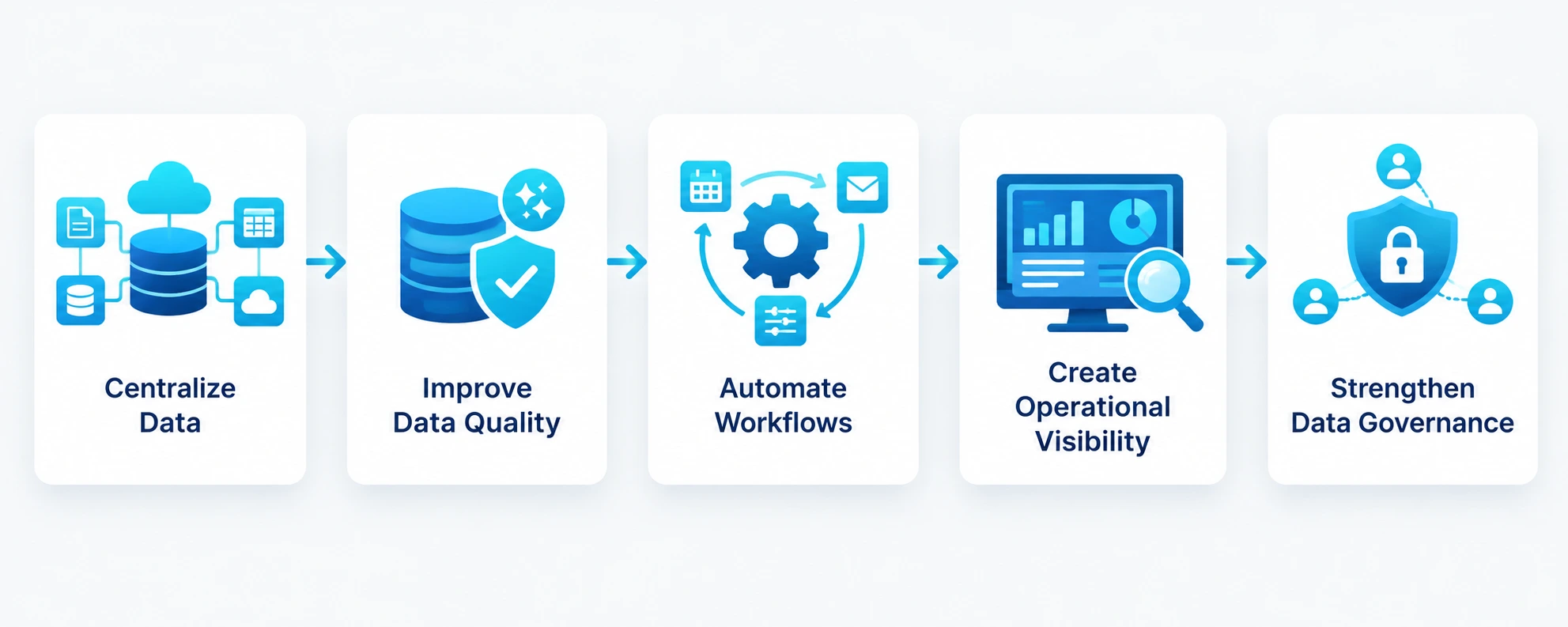
1. Centralizes Critical Business Data
A custom solution can connect information from multiple departments and applications through a structured data layer. This does not necessarily mean moving every dataset into one physical database. Instead, the system can provide a consistent way to access and manage information across connected sources.
For example, an enterprise could connect customer records from CRM software, transaction data from financial systems, inventory information from operational platforms, and support data from customer service tools. This gives authorized users a more complete view of business activity.
2. Improves Data Quality
Reliable operations require reliable information. Custom validation rules can check data for missing values, duplicates, inconsistent formats, outdated records, and other quality issues according to business-specific requirements.
A business data management software solution can also automate selected quality checks and route exceptions to the appropriate teams. This reduces dependence on manual spreadsheet-based validation.
3. Automates Repetitive Data Workflows
Many enterprise data tasks still depend on manual exports, spreadsheet updates, file transfers, and repetitive reconciliation. Custom automation can reduce these activities by triggering workflows when data is created, updated, approved, or transferred between systems.
This allows employees to spend less time maintaining information manually and more time working on tasks that require business judgment.
4. Creates Better Operational Visibility
When data from different operational systems is connected and presented through appropriate dashboards or interfaces, managers can monitor relevant business information without waiting for manually prepared reports.
The value of data management applications here comes from connecting data with the decisions employees need to make. A supply chain manager, for example, might need inventory and supplier information together, while a finance team may need transaction, customer, and revenue data in the same workflow.
5. Strengthens Data Governance
Data governance defines how information should be collected, classified, accessed, maintained, and used. Custom software can embed these policies directly into operational workflows.
Features such as role-based access, approval workflows, audit trails, data classification, retention rules, and ownership controls help businesses apply governance consistently. Modern enterprise platforms increasingly combine governance with cataloging, lineage, quality, and automated policy enforcement.
Core Features of Custom Data Management Software
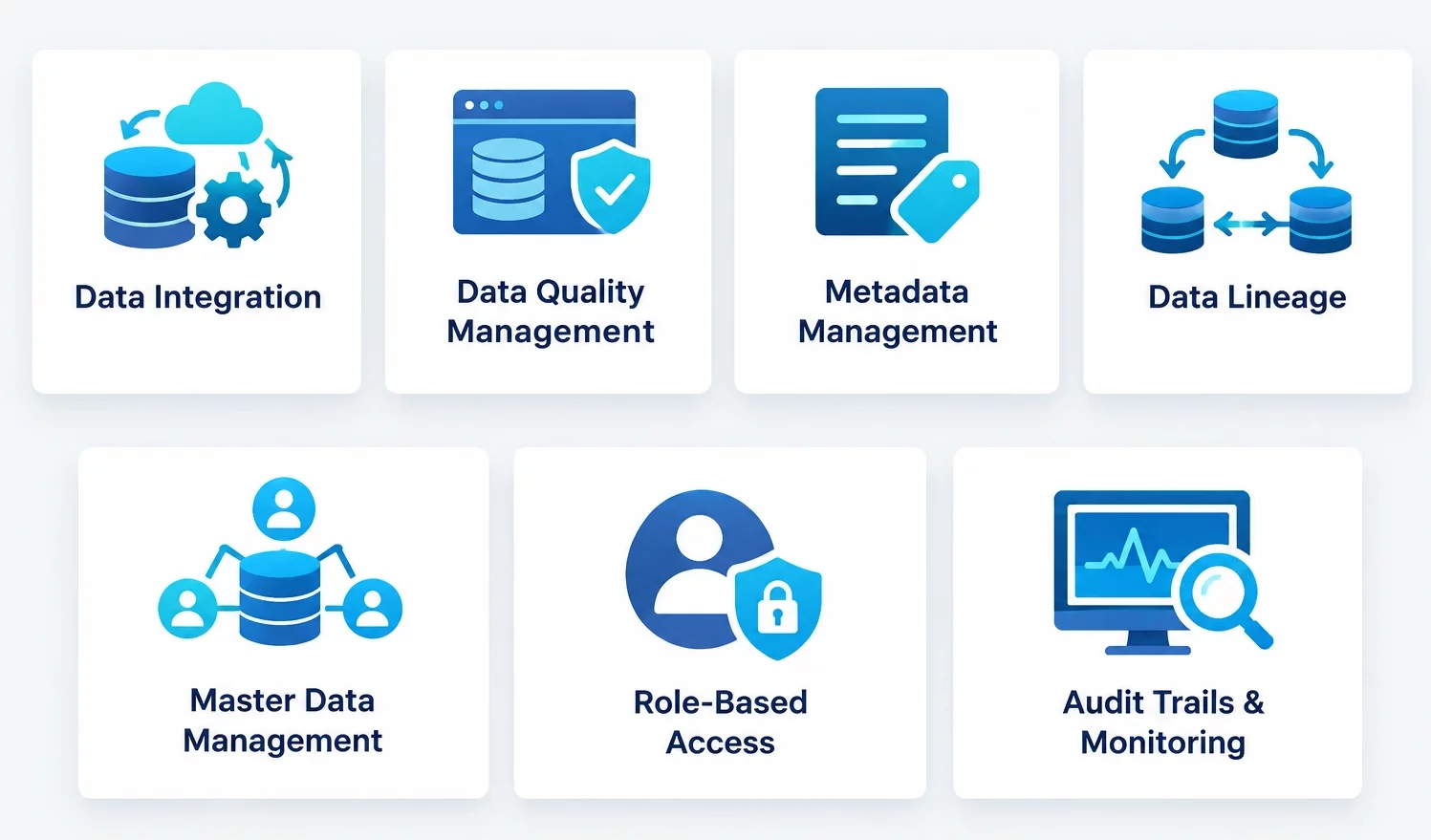
The right feature set depends on the organization’s data architecture and operational requirements. However, several capabilities are particularly relevant to enterprise environments.
1. Data Integration
The platform should connect relevant sources such as ERP, CRM, HR, finance, supply chain, databases, APIs, and third-party applications. APIs, ETL or ELT pipelines, event-based integrations, and scheduled synchronization can support different data flows.
For enterprises already managing multiple business applications, these capabilities also complement broader enterprise app features such as centralized data management, security, integrations, and reporting.
2. Data Quality Management
Data quality tools can identify missing, duplicate, outdated, or inconsistent information. Custom rules can be created according to the requirements of individual data domains.
For example, a business might require every customer record to contain a valid identifier, approved contact information, and a defined ownership status before it enters a downstream workflow.
3. Data Catalog and Metadata Management
A data catalog helps users discover what information is available and understand its meaning, ownership, source, and context. Metadata management adds the information needed to make datasets easier to understand and use.
This is increasingly important as enterprise data environments become more distributed across cloud platforms, SaaS applications, warehouses, and other systems.
4. Data Lineage
Data lineage shows where information originates, how it moves, and what transformations occur before it reaches a report, dashboard, or application.
This makes it easier to investigate errors, assess the impact of system changes, support audits, and understand whether a business metric is based on reliable information.
5. Master Data Management
Master data management helps organizations maintain consistent records for important business entities such as customers, products, suppliers, locations, and employees.
A custom approach can define matching, validation, approval, and ownership rules around the master data that matters most to a particular business.
6. Role-Based Access Control
Not every employee should have access to every dataset. Role-based permissions allow businesses to determine what users can view, modify, approve, export, or administer.
Access policies should be designed around job responsibilities and sensitive data requirements rather than giving broad access for convenience.
7. Audit Trails and Monitoring
Audit logs record important actions such as data changes, access events, approvals, and administrative activities. Monitoring can also help identify unusual activity, failed integrations, or data quality issues.
These capabilities provide greater visibility into how enterprise information is being used and managed.
Custom vs Off-the-Shelf Data Management Software
Off-the-shelf platforms provide predefined capabilities for common data management requirements. They can be a practical choice when an organization’s workflows, integrations, governance policies, and reporting needs fit within the platform’s existing capabilities.
Custom development becomes more relevant when the business has specialized processes or needs deeper integration with internal systems. A custom solution can be designed around existing data structures, approval workflows, user roles, security policies, and operational requirements rather than requiring teams to change established processes.
| Factor | Off-the-Shelf Software | Custom Software |
| Initial implementation | Usually faster | Requires more planning and development |
| Custom workflows | Limited to available configuration | Designed around business requirements |
| Integrations | Depends on supported connectors | Built for required systems |
| User experience | Standardized | Tailored to different user roles |
| Scalability | Based on vendor capabilities | Designed around expected growth |
| Data governance | Predefined capabilities | Customized policies and controls |
| Ownership | Vendor-controlled product | Business-specific solution |
The decision should therefore depend on business complexity rather than the assumption that custom software is always better. Businesses with highly specific workflows, fragmented systems, or long-term integration requirements should evaluate custom app development more closely before choosing a standard platform.
When Should Enterprises Build a Custom Data Management Solution?
Custom development makes sense when data management directly affects core business operations and existing products cannot accommodate important requirements.
Consider a custom solution when:
- Multiple business systems need specialized integration
- Data workflows vary significantly across departments
- Existing tools create operational bottlenecks
- Business-specific governance rules are required
- Users need different access and approval workflows
- The organization needs complete control over data processes
- Existing software creates excessive manual work
- The platform needs to support future AI or advanced analytics
- Data requirements are expected to evolve with the business
A structured discovery phase helps determine whether custom development is justified. Moreover, Product discovery workshops can help teams map data sources, users, workflows, operational problems, integrations, and desired outcomes before development begins.
How Custom Data Management Software Integrates With Enterprise Systems
A data management platform rarely operates in isolation. Its value increases when it can exchange information reliably with the systems employees already use.
1. ERP Integration
ERP systems contain important financial, operational, inventory, procurement, and other business information. Connecting these systems with a centralized data layer can reduce duplicate data entry and provide broader visibility.
Businesses planning ERP software development should consider data architecture early because the way information is structured and shared directly affects reporting, integrations, automation, and future scalability.
2. CRM Integration
Connecting CRM data with operational and financial information gives teams a broader view of customers. Sales teams can access relevant customer information, while management can connect customer activity with revenue, support, and retention metrics.
3. Legacy System Integration
Many enterprises still depend on older applications that contain valuable historical data. Replacing these systems immediately can be expensive and disruptive.
A structured legacy application modernization strategy can help businesses migrate important data, introduce APIs, modernize selected components, and gradually reduce dependence on outdated systems.
4. API and Third-Party Integration
Modern enterprises often use cloud applications, payment platforms, analytics tools, logistics systems, and specialized SaaS products. APIs allow the data management layer to exchange information with these systems without requiring every application to share the same technology stack.
How AI Makes Enterprise Data More Useful
AI becomes significantly more valuable when it has access to reliable, well-structured, governed enterprise data. A strong data foundation allows AI systems to work with business information while applying appropriate access and security controls.
For example, AI in ERP can support predictive analysis, anomaly detection, demand forecasting, and operational decision-making when the underlying ERP data is accurate and accessible.
AI can also help classify information, identify anomalies, automate data-quality checks, summarize large datasets, and surface patterns that would take employees considerably longer to identify manually.
Making Enterprise Data Searchable With RAG
Enterprise employees often know that information exists somewhere but struggle to locate it across documents, databases, knowledge bases, and business applications.
An enterprise AI chatbot development with RAG approach can make authorized enterprise information easier to query through natural language. Retrieval-Augmented Generation allows an AI system to retrieve relevant information from connected knowledge sources before generating a response, making enterprise data more accessible while keeping responses grounded in available business information.
This requires more than adding a chatbot. Businesses need controlled data access, reliable retrieval, permissions, source management, monitoring, and evaluation to ensure users receive relevant information without exposing data they should not access.
Data Security and Privacy Considerations
Enterprise data management involves information that could include customer records, financial details, employee information, intellectual property, and other sensitive business data. Security therefore needs to be part of the architecture from the beginning.
Important controls include:
- Encryption during storage and transmission
- Role-based access
- Multi-factor authentication
- API security
- Audit logs
- Data classification
- Backup and recovery
- Data retention policies
- Secure integrations
- Continuous monitoring
When data is being moved between systems or into cloud infrastructure, businesses should also evaluate migration risks, access permissions, encryption, compliance requirements, and potential exposure points. A cloud migration & data security checklist can help teams organize these considerations before moving sensitive enterprise information.
How to Build Custom Data Management Software
A successful implementation should begin with business requirements rather than technology selection.
1. Identify Operational Problems
Document where data-related problems affect daily operations. Look for duplicate records, manual processes, disconnected systems, slow reporting, poor visibility, and recurring data-quality issues.
2. Map Data Sources and Workflows
Identify where important data originates, how it moves between systems, who uses it, and where transformations or approvals occur. This creates a clearer picture of the existing data environment.
3. Define the Solution Architecture
Choose the appropriate databases, integration methods, APIs, cloud infrastructure, security controls, data pipelines, and interfaces based on actual requirements.
4. Prioritize the MVP
Avoid trying to connect every system and automate every workflow at launch. Start with the data domains and operational problems that create the highest business value.
Investing in professional MVP development services can help enterprises validate the initial solution with a focused feature set before expanding it across additional departments, data sources, and workflows.
5. Develop and Integrate
Build the core platform, data pipelines, interfaces, governance controls, and integrations. Testing should cover both individual components and end-to-end data flows.
6. Validate Data Quality and Security
Before launch, verify that information is transferred correctly, access rules work as intended, data quality checks identify expected issues, and audit mechanisms capture important activities.
7. Deploy and Monitor
After deployment, monitor system performance, integration failures, data quality, user adoption, security events, and operational outcomes.
8. Scale Gradually
Once the initial implementation proves its value, additional data sources, departments, workflows, automation, analytics, and AI capabilities can be introduced.
Common Implementation Challenges
Custom data management software development involves several challenges that need to be addressed during planning.
Complex Data Integration
Different systems often use different formats, identifiers, schemas, and update schedules. Establishing reliable data flows requires careful mapping and validation.
Poor Existing Data Quality
A new platform does not automatically fix inaccurate legacy information. Data cleansing, deduplication, validation, and migration planning should happen before critical datasets are moved.
Resistance to New Workflows
Employees may continue using spreadsheets or familiar applications if the new system creates additional steps. User experience, training, and workflow design therefore influence adoption.
Scope Expansion
Enterprises often discover additional requirements once development begins. A phased roadmap helps control scope while leaving room for future capabilities.
Governance Complexity
Different departments may have different data owners, access requirements, and retention rules. Governance needs clear ownership and consistent policies across the organization.
How Much Does Custom Data Management Software Cost?
Custom data management software typically costs $40,000-$300,000+, depending on the project scope. A basic solution with limited integrations may cost around $40,000- $80,000, while a more sophisticated enterprise platform can range from $1,00,000-$3,00,000+. Large implementations involving multiple legacy systems, complex data governance, advanced analytics, AI, and high-scale infrastructure can exceed this range.
The final cost depends on the number of systems being integrated, data volume, user roles, security requirements, automation, analytics, AI capabilities, and the complexity of the existing infrastructure.
The development estimate should also account for:
- Data migration and cleansing
- API and system integrations
- Cloud infrastructure
- Security and compliance
- UI/UX design
- Testing and quality assurance
- AI or analytics capabilities
- Maintenance and monitoring
A detailed estimate is more useful than a fixed industry average because architecture and scope can vary significantly between enterprises.
How to Measure the Business Impact
The success of a data management platform should be measured through operational outcomes rather than the number of features delivered.
Useful metrics include:
- Reduction in duplicate records
- Data-quality error rate
- Time required to prepare reports
- Manual data-entry hours
- Integration failure rate
- Time required to find business information
- Data access request completion time
- Employee adoption
- Cost of data-related operations
- Decision-making turnaround time
For example, if employees previously spent several hours each week reconciling information from multiple systems, the reduction in that manual work provides a measurable operational benefit.
Future of Enterprise Data Management
Enterprise data environments are becoming increasingly distributed across cloud platforms, SaaS applications, data warehouses, operational databases, and AI systems. This is increasing the need for architectures that make information accessible while maintaining governance and security. Several trends are shaping the future:
1. AI-Ready Data Architecture
Businesses are preparing their data environments to support AI applications. Clean, governed, well-documented data makes it easier to build reliable predictive models, assistants, recommendation systems, and automation.
2. Automated Data Governance
Automation is increasingly being used for data classification, quality checks, policy enforcement, lineage, and monitoring. This reduces the amount of governance work that depends on manual intervention.
3. Real-Time Data Processing
Operational decisions increasingly require current information rather than periodic reports. Real-time or near-real-time data pipelines can support faster monitoring, personalization, fraud detection, and operational responses.
4. Data Democratization With Controls
More employees want direct access to business information. Future platforms will need to make data easier to discover and use while maintaining permissions, governance, and security.
These developments align with broader application modernization trends, where businesses are moving toward cloud-native architectures, API-driven systems, automation, and AI-ready data environments.
How to Choose the Right Data Management Development Partner
The right partner should understand both software development and enterprise data challenges. Review their experience with complex integrations, databases, cloud platforms, APIs, security, data migration, enterprise applications, and custom workflows.
Ask potential partners how they approach data discovery, architecture, governance, migration, testing, security, and post-launch monitoring. A strong team should also be able to explain how the solution will integrate with your existing technology rather than proposing an isolated platform.
Review relevant case studies, development methodology, communication processes, maintenance capabilities, and ownership terms before making a decision. A partner should also provide a clear roadmap that separates the MVP from future enhancements.
For businesses evaluating the broader enterprise product lifecycle, an enterprise app development guide can provide additional context on planning, architecture, development, security, and scalability.
Conclusion
Enterprise data becomes valuable when employees can access reliable information at the right time and use it within the workflows that drive daily operations. Custom data management software can help businesses reduce data silos, improve quality, automate repetitive work, strengthen governance, connect legacy and modern systems, and create a stronger foundation for analytics and AI.
The right approach starts with the business problem rather than the technology. Organizations should identify critical data flows, prioritize high-impact use cases, establish governance and security requirements, and build the solution in manageable stages. This reduces implementation risk while creating opportunities to expand the platform as operational needs evolve.
A leading custom software development company can help enterprises turn fragmented data environments into connected, scalable systems designed around their workflows. RipenApps can support the journey from discovery and architecture to custom development, integrations, AI capabilities, testing, and ongoing optimization, helping businesses build data solutions that support measurable operational improvements.

FAQs
Q1. What is data management software?
Data management software helps businesses collect, organize, integrate, govern, secure, and maintain data across different systems. Enterprise solutions can include data integration, quality management, metadata, lineage, governance, and access controls.
Q2. What is the difference between data management software and a database?
A database primarily stores and retrieves information, while a broader data management solution handles activities around that information, including integration, quality, governance, security, metadata, and lifecycle management.
Q3. Why should enterprises build custom data management software?
Custom development is useful when standard products cannot support specific workflows, integrations, governance rules, user roles, or data requirements. It allows the solution to be designed around the organization’s existing operations.
Q4. How does data management improve business operations?
It can reduce duplicate data, automate repetitive processes, improve information access, strengthen governance, connect business systems, and provide more reliable information for reporting and decision-making.
Q5. Can AI be integrated into a data management system?
Yes. AI can support data classification, anomaly detection, predictive analytics, natural-language search, data-quality checks, and intelligent assistants. Reliable and governed data is essential for producing useful AI outputs.
Q6. How much does custom data management software cost?
Custom development can range from roughly $40,000 to $300,000+, depending on integrations, data complexity, security, automation, analytics, AI requirements, and scale. Enterprise implementations with extensive legacy modernization can cost more.
Q7. How long does it take to build custom data management software?
A focused MVP can take several months, while a complex enterprise platform can require significantly longer. The timeline depends on the number of integrations, data migration requirements, feature scope, testing, and compliance needs.
Discuss your project and request for proposal
SHARE
WRITTEN BY

Ishan Gupta
CEO & Founder
Ishan Gupta is a seasoned entrepreneur and CEO with extensive 10+ years of experience in business and mobile app development landscape. He believes that the right digital product allows companies to focus on what they do best, while technology handles the rest. With deep exposure to global markets, he understands what makes an app succeed. His approach translates business needs into clear product strategies, ensuring that every feature contributes to measurable ROI.
View All Articles