


Key Takeaways
- Custom POS software adapts checkout, inventory, payments, and workflows to specific business and operational requirements.
- The right POS features depend on industry, locations, transaction volume, hardware, integrations, and customer experience requirements.
- A scalable POS tech stack should support reliable transactions, integrations, offline functionality, security, and future growth.
- POS development timelines vary based on complexity, integrations, hardware, platforms, testing requirements, and deployment scope.
- Security, payment compliance, synchronization, and reliable integrations should be addressed throughout the POS development lifecycle.
What happens when a standard POS system no longer fits the way your business operates? From complex checkout workflows and multi-location inventory to payment integrations and real-time reporting, growing businesses often need more flexibility than off-the-shelf platforms can provide. Custom POS software development addresses these gaps by creating a system designed around specific operational requirements, business rules, integrations, and future growth.
For growing retailers, restaurants, and POS product companies, the right architecture also makes it easier to scale transaction volumes, locations, users, integrations, and data without redesigning the entire system. Businesses can choose the functionality they actually need while creating a foundation for future capabilities such as AI-powered analytics, automated inventory forecasting, and personalized customer experiences.
Working with an experienced technology partner can help businesses translate operational requirements into a reliable, scalable product through custom software development services. The development approach should account for transaction reliability, integrations, security, performance, and compliance from the beginning rather than treating them as post-launch considerations.
This guide covers what custom POS software includes, the different types of POS systems businesses can build, must-have and advanced features, recommended technology choices, essential integrations, the development process, realistic timelines, security and compliance considerations, common challenges, and how to evaluate the right development partner.
Table of Contents
What is Custom POS Software Development?
Custom POS software development is the process of designing and building a point-of-sale platform specifically around a business’s checkout, payment, inventory, customer, reporting, and operational workflows. Unlike off-the-shelf POS products, a custom system can be tailored to business rules, integrations, hardware, locations, user roles, and industry-specific requirements.
A POS platform can function as the transaction layer between customers, employees, payment providers, inventory systems, accounting platforms, e-commerce channels, and business intelligence tools. Its scope therefore extends beyond processing sales.
Custom POS vs. Off-the-Shelf POS
Off-the-shelf POS platforms such as Square, Toast, and Clover provide standardized functionality that can help businesses start quickly. They are often suitable when a company’s processes closely match the platform’s existing workflows.
Custom POS software becomes more relevant when standard functionality creates operational limitations. For example, a growing retailer may need a specialized inventory workflow, a restaurant group may require complex table and kitchen operations, or a multi-location business may need centralized controls with location-level flexibility.
| Factor | Custom POS | Off-the-Shelf POS |
| Business workflows | Designed around specific processes | Based on predefined workflows |
| Integrations | Custom integrations can be developed | Limited to supported integrations |
| Hardware | Can be designed around required devices | Usually tied to supported hardware |
| Multi-location operations | Configurable | Depends on vendor capabilities |
| Offline functionality | Can be engineered around requirements | Depends on provider |
| Data ownership | Architecture can provide greater control | Subject to vendor platform |
| Feature roadmap | Controlled by the business | Controlled by the vendor |
| Scalability | Designed according to expected growth | Depends on platform limitations |
Why Businesses Build Custom POS Software?
Businesses typically consider custom POS software development when their operational requirements extend beyond standard checkout functionality. For a single-location business with straightforward transactions, an existing POS may provide everything required. However, complexity increases when a company operates multiple stores, sells through different channels, manages large inventories, supports multiple payment methods, or needs POS data synchronized with other business systems.
Common reasons for building a custom POS include:
Specialized workflows: Retailers, restaurants, wholesalers, entertainment businesses, and service providers can have very different transaction processes. Custom software allows these workflows to become part of the product instead of forcing employees to adapt to generic processes.
Multi-location control: A growing business may need centralized product catalogs, pricing rules, inventory visibility, employee management, and reporting while allowing individual locations to operate independently.
Integration requirements: A business may need its POS to communicate with accounting software, ERP systems, e-commerce apps, payment gateways, loyalty platforms, CRM systems, tax engines, or delivery services.
Offline operation: Retail and restaurant environments cannot always depend on uninterrupted internet connectivity. A custom architecture can support local transaction processing and synchronization mechanisms for defined offline scenarios.
The strongest business case for customization is therefore not simply “we want our own POS.” It is the presence of operational requirements that directly affect efficiency, customer experience, transaction reliability, or the ability to scale.
Types of POS Systems You Can Build
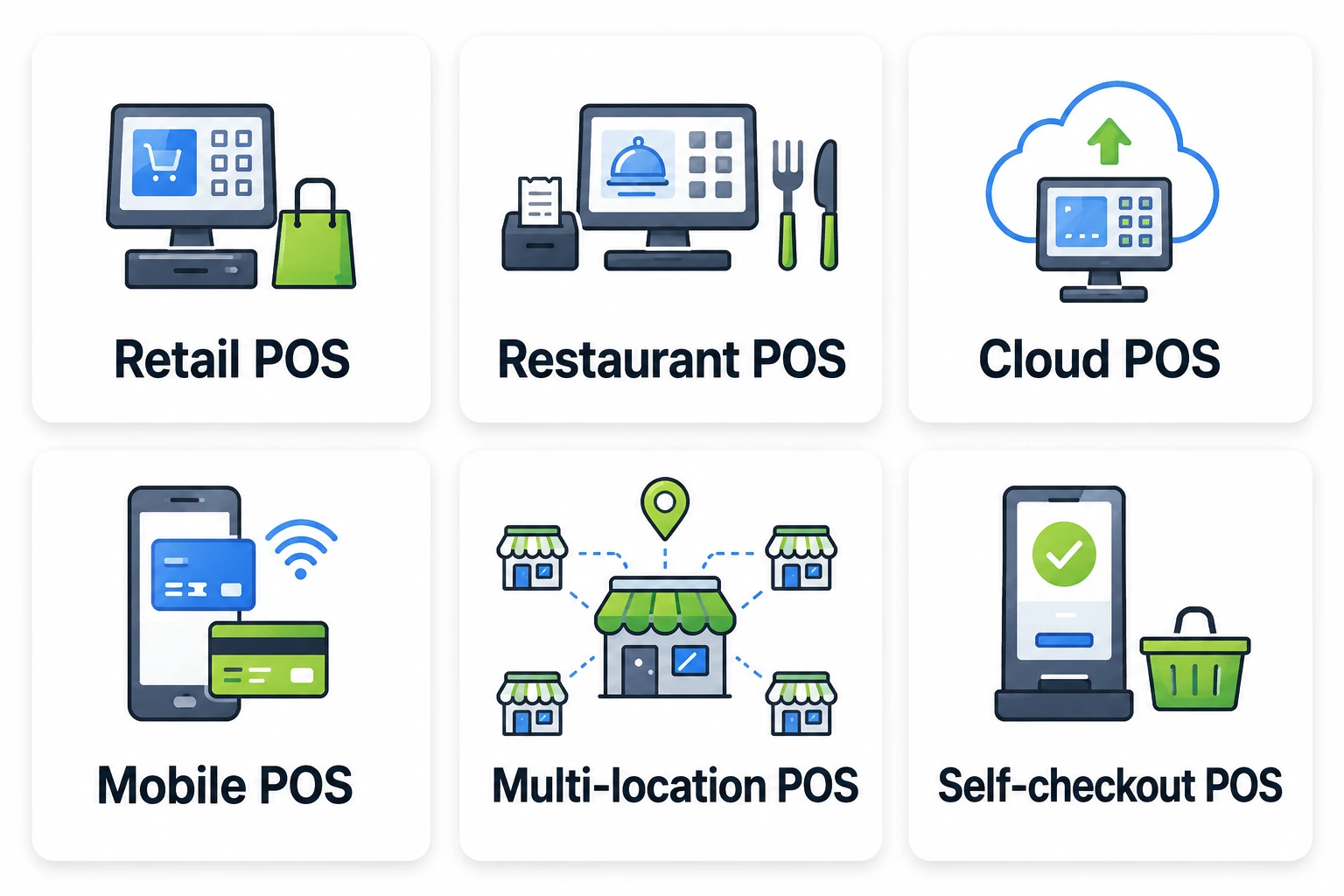
Not every business needs the same type of POS system. A retail store may prioritize inventory and barcode scanning, while a restaurant may need table management, kitchen orders, and menu customization. Businesses operating across multiple locations may require centralized management and real-time synchronization.
| POS Type | Best For | Key Features | Main Consideration |
| Retail POS | Retail stores | Inventory, barcode scanning, promotions | Stock accuracy |
| Restaurant POS | Restaurants | Tables, KDS, modifiers | Order speed |
| Cloud POS | Multi-location businesses | Centralized data, reporting | Connectivity |
| Mobile POS | Events, pop-ups, line-busting | Portable checkout | Device/payment support |
| Multi-location POS | Retail/restaurant chains | Centralized management | Synchronization |
| Self-checkout POS | High-volume retail | Customer-led checkout | Security & UX |
Here are the main POS types businesses can build based on their operational needs:
1. Retail POS
A retail POS connects checkout with product and inventory management. It may support barcode scanners, receipt printers, cash drawers, card terminals, discounts, refunds, stock adjustments, and customer profiles.
For larger retailers, the system may also include centralized product management, store-level pricing, warehouse synchronization, purchase orders, and cross-location inventory visibility.
2. Restaurant POS
Restaurant POS software is designed around food-service workflows rather than standard retail transactions. It may include table management, menu configuration, order modifiers, kitchen display systems, split bills, tips, discounts, delivery integrations, and staff management.
For restaurant groups, centralized menu management combined with location-level controls can simplify administration while preserving flexibility across individual outlets.
3. Cloud POS
Cloud-based POS systems centralize transaction and operational data on cloud infrastructure, allowing authorized users to access information across locations and supported devices.
They can support centralized administration, real-time reporting, inventory visibility, automated backups, and easier management of multi-location operations. The architecture should account for network availability, data synchronization, security, and scalability.
4. Mobile POS
Mobile POS systems allow employees to process transactions using smartphones, tablets, or other portable devices instead of relying on a fixed checkout counter.
They can be useful for pop-up stores, events, restaurants, large retail environments, and line-busting scenarios. The system should account for device capabilities, connectivity, payment terminals, offline workflows, and secure transaction processing.
5. Multi-location POS
Multi-location POS systems are designed for businesses operating across multiple stores, branches, or outlets. They require centralized administration while allowing individual locations to maintain their own operational controls.
Key capabilities can include centralized product catalogs, location-specific pricing, inventory synchronization, employee permissions, reporting, customer data, and loyalty management.
6. Self-checkout POS
Self-checkout POS systems allow customers to scan products, review purchases, complete payments, and receive receipts with limited employee assistance.
These systems require additional functionality for product validation, payment processing, customer guidance, receipt generation, exception handling, and integration with store security processes. The interface should prioritize simplicity and clear instructions to reduce checkout friction.
Must-Have Features of Custom POS Software
A successful POS should make transactions fast while keeping operational data synchronized across the business. The exact feature set should be defined during discovery based on the industry, transaction model, locations, hardware, integrations, and user roles.
1. Sales and Checkout
The checkout module should support product selection, barcode scanning, quantity changes, discounts, taxes, refunds, returns, receipts, and transaction history. Complex workflows may also require split payments, gift cards, promotional rules, deposits, custom pricing, and role-based approvals.
2. Inventory Management
A custom POS can support real-time stock updates, product and SKU management, barcode management, stock transfers, low-stock alerts, purchase orders, inventory adjustments, warehouse tracking, and location-level inventory. Reliable synchronization ensures sales, returns, and transfers keep inventory records accurate across locations.
3. Payments and Payment Gateways
The payment layer should handle authorization, refunds, reversals, settlements, and failed transactions while integrating smoothly with selected gateways and terminals. For digital wallet integrations, understanding how Apple Pay and Google Pay work can help teams design secure and efficient payment flows.
4. Reporting and Analytics
POS reporting can provide insights into sales by product, location, and employee, payment methods, refunds, inventory turnover, best-selling products, peak periods, and customer purchasing patterns. A custom analytics layer can also connect POS data with business intelligence tools to create dashboards tailored to operational goals.
5. CRM and Loyalty
A POS can connect transactions with customer profiles, purchase history, preferences, loyalty points, membership status, rewards, and promotional eligibility. This enables retailers and restaurants to deliver more targeted promotions and personalized customer experiences.
6. Offline Mode and Multi-Store Synchronization
A custom POS can support offline transactions during connectivity issues while multi-store synchronization keeps products, pricing, inventory, customer data, and transactions consistent across locations, ensuring accurate operations and centralized visibility.
Advanced and AI-Powered POS Features in 2026
Once the core POS is stable, businesses can introduce intelligent functionality that improves forecasting, personalization, and operational decision-making.
AI-powered POS capabilities can include demand forecasting, product recommendations, anomaly detection, intelligent inventory alerts, customer segmentation, and natural-language reporting. Businesses can integrate these capabilities into an existing POS using AI feature integration services, depending on their product architecture and operational requirements.
A forecasting model could analyze historical sales, seasonality, location-level patterns, and product movement to identify likely demand. This can help businesses plan inventory more effectively.
AI can also assist with transaction anomaly detection. Instead of relying only on fixed rules, an intelligent system can identify unusual patterns such as repeated refunds, abnormal discount activity, or transaction behavior that differs significantly from normal operations.
Natural-language analytics can make POS reporting easier for non-technical users. Instead of manually filtering dashboards, a manager could ask questions such as “Which locations had the highest sales last week?” or “Which products experienced the largest drop in sales?”
AI should complement the transactional core rather than replace it. The system still needs reliable transaction processing, accurate inventory records, secure integrations, and deterministic business rules.
Custom POS Software Development Tech Stack
The technology stack should be selected according to the POS environment, hardware, expected transaction volume, offline requirements, integration ecosystem, and scalability goals.
| Layer | Recommended technologies | Role |
| Frontend | React, React Native, Flutter, native Android/iOS | POS interface across web, desktop, tablets, and mobile devices |
| Backend | Node.js, Java, .NET, Python | Business logic, APIs, authentication, transaction workflows |
| Database | PostgreSQL, MySQL, MongoDB | Transaction, product, customer, inventory, and operational data |
| APIs | REST, GraphQL, webhooks | Communication with payment, accounting, ERP, e-commerce, and other systems |
| Payment and hardware SDKs | Gateway SDKs, terminal SDKs, printer/scanner SDKs | Payment and peripheral integration |
| Cloud | AWS, Microsoft Azure, Google Cloud | Infrastructure, storage, databases, monitoring, scalability |
| DevOps | Docker, Kubernetes, CI/CD, monitoring tools | Deployment automation, reliability, scaling, observability |
| Security | OAuth 2.0, JWT, TLS, secrets management | Authentication, authorization, encryption, and access control |
Frontend
The frontend should prioritize speed and usability because employees interact with POS interfaces repeatedly throughout the day.
React can work well for browser-based POS applications, while React Native or Flutter can support tablet and mobile experiences. Businesses considering Flutter app development services can use Flutter when they need a consistent POS experience across supported devices. Native development may be appropriate when the product depends heavily on device-specific capabilities or hardware SDKs.
The choice should be based on the actual device ecosystem rather than technology preference alone.
Backend
The backend manages business rules, authentication, transaction workflows, inventory logic, reporting, integrations, and synchronization.
Node.js can be suitable for API-driven systems requiring high concurrency and real-time communication. Java and .NET can be strong choices for enterprise environments with complex business logic and existing infrastructure. Python can be useful where predictive analytics and AI workloads are closely integrated with application services.
Database
Relational databases such as PostgreSQL or MySQL are often suitable for transactional POS workloads because transactions, relationships, and consistency are central to the system.
NoSQL databases such as MongoDB can complement relational systems when flexible document structures or specific high-scale workloads justify their use.
The database architecture should distinguish transactional data from analytics workloads where necessary. A growing POS should not allow heavy reporting queries to interfere with checkout performance.
Payment and Hardware SDKs
Hardware integrations can include barcode scanners, receipt printers, cash drawers, customer displays, payment terminals, weighing scales, and other peripherals. For Android-based POS tablets and terminals, partnering with an experienced Android app development company can help address device-specific capabilities and hardware SDK requirements.
Payment terminal integrations should be selected based on the target market, supported payment methods, acquiring relationships, and compliance requirements.
Cloud and DevOps
Cloud infrastructure can provide centralized databases, scalable APIs, monitoring, automated deployment, backups, disaster recovery, and multi-location access.
DevOps practices should include CI/CD, environment separation, infrastructure monitoring, logging, alerting, automated testing, and controlled release processes.
Essential POS Integrations
A POS rarely operates in isolation. Its value increases when transaction and operational data can move reliably between the POS and the systems already used by the business.
1. Payment Gateways
Payment integrations enable card, wallet, QR, bank, and other supported payment methods. The architecture should account for authorization, payment confirmation, reversals, refunds, settlement information, and failure handling.
2. Accounting Software
Accounting integration can automatically transfer sales, tax, refund, payment, and settlement data into accounting workflows.
This reduces duplicate data entry and helps finance teams reconcile transactions more efficiently. Whether a POS should integrate with accounting software depends on the business’s reporting, tax, reconciliation, and financial-control requirements.
3. E-commerce Platforms
Businesses operating both physical and online stores may need synchronized product catalogs, inventory, customer profiles, orders, and promotions.
A unified architecture can help prevent discrepancies between online and physical inventory.
4. ERP Systems
Larger businesses may connect POS systems with ERP platforms to create a more connected operational environment across procurement, finance, inventory, supply chain, and workforce management. Understanding the capabilities of the top 10 ERP software development companies can also help businesses evaluate partners for these broader integration requirements.
5. CRM and Loyalty Platforms
CRM integrations allow transaction data to inform customer profiles, campaigns, rewards, and retention programs.
6. Delivery and Third-party Platforms
Restaurant and retail businesses may integrate with delivery platforms, shipping services, marketplaces, tax systems, and other third-party services.
APIs and webhooks should be designed with failure handling, authentication, retries, rate limits, and monitoring in mind. OWASP’s API Security Top 10 highlights risks such as broken authorization, authentication failures, unrestricted resource consumption, security misconfiguration, and unsafe consumption of APIs.
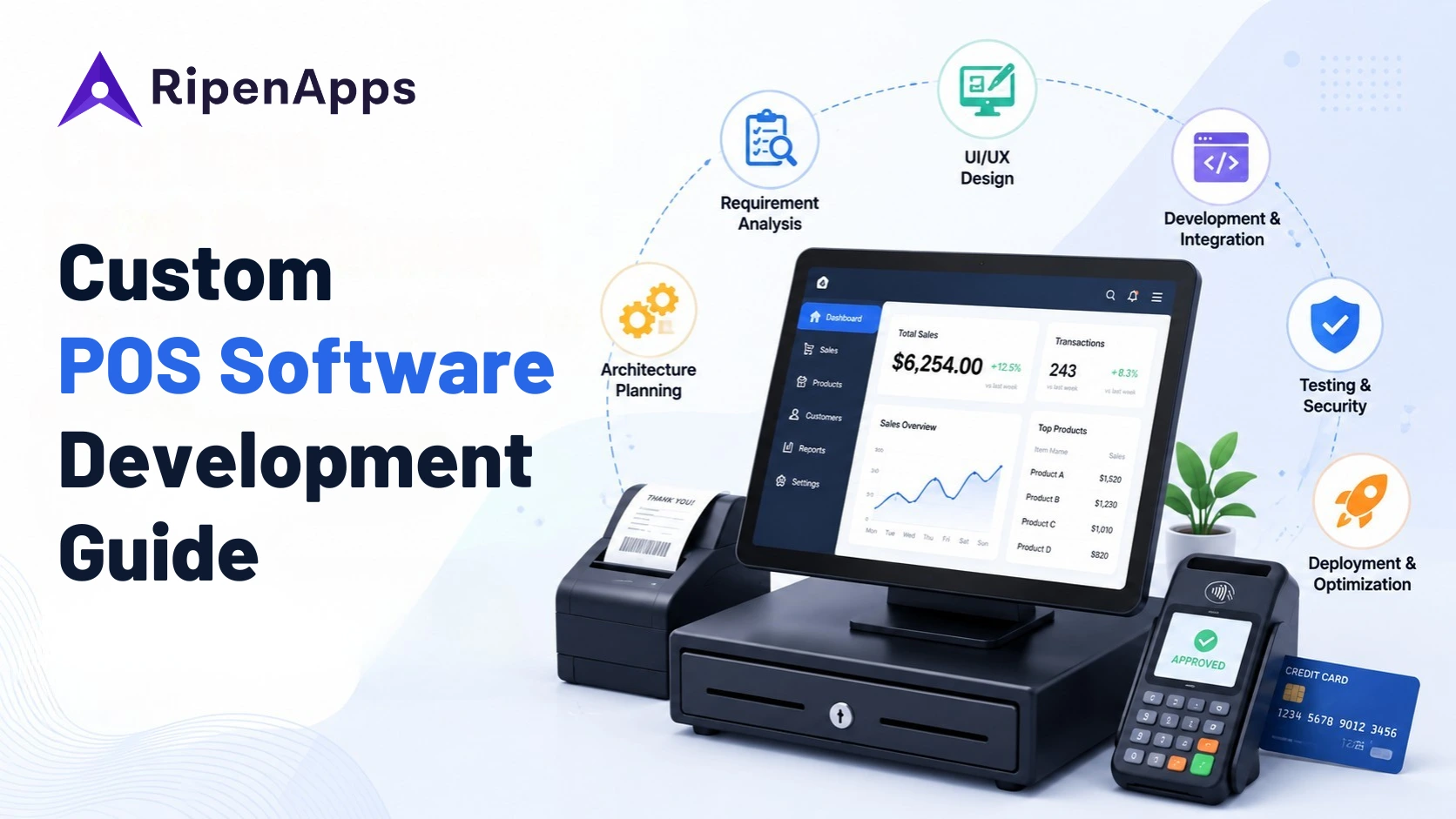
The POS Development Process, Step by Step
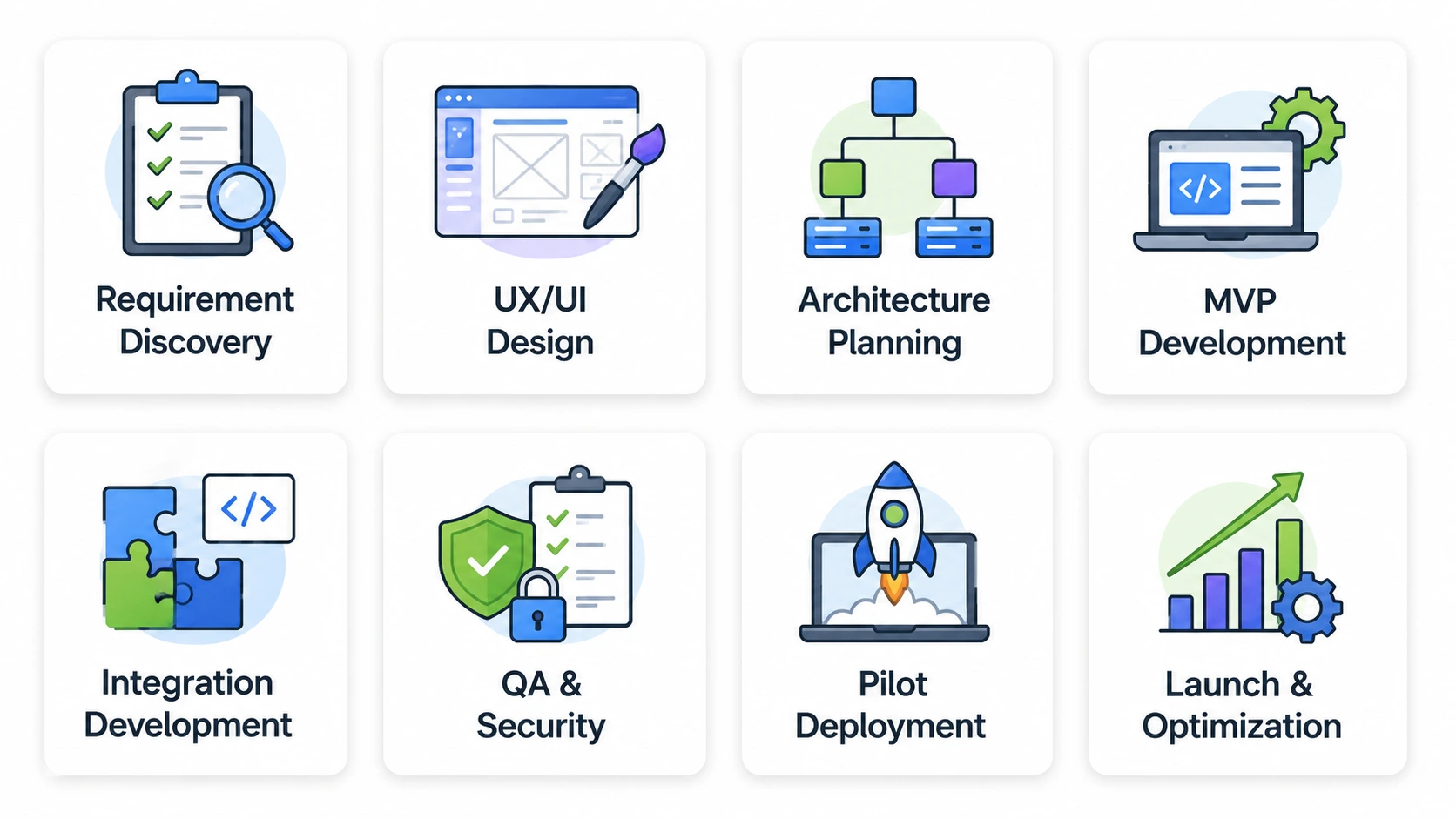
A structured yet custom POS software development process reduces the risk of building features that do not solve the actual operational problem.
1. Discovery and Requirement Analysis
The first product discovery phase identifies business workflows, users, locations, transaction types, hardware, payment methods, integrations, reporting requirements, security constraints, and offline scenarios.
The team should document both normal and exception flows, such as failed payments, refunds, cancelled orders, stock discrepancies, network failures, and partial transactions.
2. Product and UX Design
Designers convert workflows into information architecture, user journeys, wireframes, prototypes, and high-fidelity interfaces. Working with a UI UX design company can help ensure the POS interface is designed around employee workflows, usability, accessibility, and efficient transaction processing.
POS design should minimize unnecessary interactions. Employees may process hundreds of transactions, so speed, clarity, accessibility, and error prevention are more important than visual complexity.
3. Architecture and Technology Planning
The development team defines the application architecture, database model, API structure, authentication system, integration strategy, hardware approach, synchronization mechanism, and cloud infrastructure.
This is also where the team decides how offline functionality, real-time updates, and multi-location data synchronization will work.
4. MVP Development
The first development phase should focus on the smallest operationally complete product. Depending on the business, this may include authentication, product management, checkout, payments, inventory, receipts, and basic reporting.
5. Integration and Hardware Development
Payment gateways, accounting platforms, ERP systems, e-commerce platforms, printers, scanners, and payment terminals are integrated and tested.
Hardware testing should happen on real devices wherever possible rather than relying entirely on simulated environments.
6. Quality Assurance and Security Testing
Testing should cover functional workflows, transaction accuracy, payment failures, concurrency, performance, device compatibility, offline scenarios, synchronization, APIs, and security.
For payment-related software, compliance requirements should be mapped to the actual architecture and responsibilities of the merchant, software provider, payment processor, and other parties.
7. Pilot Deployment
A controlled deployment can expose real-world problems before a wider rollout. Businesses can test the POS at one location or with a limited user group, measure transaction reliability, gather employee feedback, and identify workflow issues.
8. Full Launch and Continuous Optimization
After validation, the system can be deployed across additional locations. Monitoring, analytics, security updates, bug fixes, infrastructure optimization, and feature releases become part of ongoing product operations.
Read Also: An Ultimate Guide to Fintech Software Development: Key Features, Benefits, And Cost
How Long Does It Take to Build a Custom POS?
The timeline for custom POS software development depends on the number of platforms, features, integrations, hardware devices, locations, compliance requirements like PCI DSS, and testing scenarios. These factors can also influence the overall POS software development cost, which should be evaluated separately based on the project’s scope and requirements.
A practical planning range is:
| POS complexity | Typical Scope | Estimated Timeline |
| Basic POS | Checkout, products, inventory, payments, basic reporting | 10 to 16 weeks |
| Mid-level POS | Advanced inventory, CRM, loyalty, integrations, offline support | 16 to 24 weeks |
| Advanced POS | Multi-location, extensive integrations, hardware, advanced analytics | 24 to 36+ weeks |
| POS SaaS platform | Multi-tenant architecture, merchant administration, billing, APIs, analytics | 28 to 40+ weeks |
These ranges are planning estimates rather than fixed commitments. A POS with complex payment infrastructure or several hardware integrations can require additional validation and testing.
A typical project can be divided into phases as follows:
| Phase | Typical Duration |
| Discovery and requirements | 2 to 3 weeks |
| UX/UI design | 3 to 5 weeks |
| Architecture and setup | 1 to 2 weeks |
| Core development | 6 to 12 weeks |
| Integrations and hardware | 3 to 6 weeks |
| QA and security testing | 3 to 5 weeks |
| Pilot and launch | 1 to 3 weeks |
Several phases can overlap. For example, backend development can begin while final UI screens are being completed, and integration planning can happen during architecture rather than waiting until the end.
The most important timeline variable is not the number of screens. It is the number of business rules, integrations, transaction scenarios, devices, and environments that need to work reliably together.
Security and Compliance
POS systems process sensitive operational and, depending on architecture, payment-related information. Security should therefore be incorporated into the architecture from the beginning.
PCI DSS provides baseline technical and operational requirements for organizations and environments involved in storing, processing, or transmitting payment account data. PCI SSC currently identifies PCI DSS v4.0.1 as the active revision following the retirement of v4.0 at the end of 2024. The applicable requirements depend on how payment data flows through the POS, which components handle payment information, and which responsibilities are managed by the merchant, software provider, payment processor, and other service providers.
A POS development project should evaluate:
Data protection: Sensitive information should be protected during transmission and at rest according to the applicable requirements and architecture.
Authentication and authorization: Employees, managers, administrators, and other users should receive permissions based on their roles, with access to sensitive functions restricted according to business and security requirements.
EMV and certified payment terminals: For card-present transactions, POS systems should support EMV-enabled payment terminals and the applicable certification requirements for the target market and payment environment. EMV helps authenticate chip-based card transactions and can reduce exposure to certain forms of card-present fraud. Terminal selection and certification should therefore be considered during architecture and integration planning.
Payment Tokenization: Tokenization can replace sensitive payment data with tokens that have limited value outside the intended payment environment. When the POS delegates sensitive card-data handling to an appropriate payment provider or validated payment solution, tokenization can reduce the amount of payment data exposed to the POS environment and potentially reduce PCI DSS scope. The exact scope reduction depends on the implementation and should be validated against the applicable PCI DSS requirements.
Audit Logging: Security-sensitive and operational actions should be traceable through appropriate logging, including relevant payment, authentication, administrative, and transaction events.
Secure APIs: APIs should use strong authentication, authorization, input validation, rate limiting, monitoring, and secure error handling, particularly when connecting the POS with payment providers, ERP systems, accounting platforms, e-commerce systems, and other third-party services.
Payment Architecture: Teams should determine early whether payment data is handled directly by the POS or delegated to validated payment solutions and providers. Minimizing the POS environment’s exposure to sensitive payment data can simplify security controls and may reduce PCI DSS scope depending on the architecture. PCI SSC maintains separate standards covering payment security and secure payment software.
Device Security: POS terminals, tablets, scanners, printers, cash drawers, and other connected devices should be managed as part of the overall security environment. Device configuration, software updates, access controls, and supported payment-terminal capabilities should be considered during implementation.
Backup and Recovery: Transaction and operational data should have appropriate backup, recovery, and disaster recovery mechanisms to protect business continuity and minimize the impact of system failures.
Security requirements vary by architecture, geography, payment model, and regulatory environment. Businesses should validate their specific compliance obligations with qualified security and compliance professionals rather than treating a development checklist as a compliance certification.
The Team You Need to Build a POS System
A custom POS project requires a cross-functional team covering product requirements, UX, development, hardware, security, and testing. Depending on the scope, this may include a product manager or business analyst, UI/UX designer, frontend and backend developers, mobile or device developer, QA engineer, DevOps engineer, solution architect, and security specialist for payment-sensitive implementations.
For smaller projects, some responsibilities can be combined. For example, a full-stack developer may handle frontend and backend development, while shared DevOps, architecture, or security support can be added as needed. The right team structure depends on the project’s scope, integrations, hardware requirements, platforms, and overall complexity rather than a fixed headcount.
Common POS Development Challenges and How to Solve Them
1. Payment failures and transaction reliability
A payment may fail because of a gateway issue, network interruption, terminal problem, timeout, or authorization response. The POS must distinguish between failed, pending, reversed, and successful transactions to prevent duplicate charges or incorrect order states.
2. Offline synchronization
Offline capability creates data consistency challenges. The system needs clear rules for locally stored transactions, synchronization, conflict resolution, and recovery after reconnection.
3. Hardware compatibility
Different payment terminals, scanners, printers, and cash drawers may use different SDKs or communication methods. Hardware should be identified during discovery rather than introduced immediately before launch.
4. Multi-location data consistency
A centralized POS must keep products, prices, inventory, users, and transactions synchronized without allowing one location to corrupt another location’s data.
5. Integration failures
Third-party systems can experience downtime, API changes, authentication failures, rate limits, or unexpected responses. Integrations should therefore use retries, timeouts, monitoring, logging, and controlled fallback mechanisms.
6. Performance during peak periods
Retail and restaurant systems can experience transaction spikes during holidays, promotions, weekends, and meal periods. Performance testing should simulate realistic concurrency rather than testing only individual transactions.
7. Security and compliance complexity
Payment-related security requirements can affect architecture, infrastructure, development practices, testing, and vendor selection. Addressing these considerations late can cause redesigns and launch delays.
Why Partner with RipenApps for Custom POS Software Development?
Building a POS requires more than implementing checkout screens. The development partner needs to understand transactional systems, integrations, scalable backend architecture, security, and the operational realities of retail and restaurant environments. RipenApps brings experience across custom software development and payment-oriented fintech products, making it relevant for businesses exploring custom POS solutions.
A useful example is Al Muzaini, which RipenApps developed as a fintech money-transfer platform rather than a POS deployment. The project included secure remittances, real-time exchange rates, multiple beneficiaries, biometric authentication, AI-powered KYC, and integrations with banking networks and Western Union. The published case study reports a seven-month development timeline, 100K+ downloads, 50K+ active users, and a #1 FinTech app ranking in Kuwait.
These results demonstrate experience with payment-sensitive workflows, secure transaction processing, API integrations, identity verification, and high-concurrency fintech architecture. They should not be interpreted as a POS case study. Instead, they provide relevant evidence of capabilities that overlap with the payment and transaction layer of a custom POS product.
For businesses evaluating a custom POS, the appropriate next step is to map the required workflows, integrations, hardware, locations, transaction volume, and compliance environment before selecting the architecture.
As a FinTech app development company, RipenApps brings relevant experience in building secure, transaction-focused digital products. If you are planning a custom POS platform around specific workflows, integrations, and payment requirements, book a consultation to discuss your product requirements.
Final Thoughts
Building a custom POS system is about creating a platform that fits a business’s workflows while supporting future growth. The right solution should bring together checkout, inventory, payments, integrations, analytics, security, and multi-location operations through a reliable architecture.
Businesses should define their workflows, technology requirements, integrations, hardware, security needs, and scalability goals before development begins. With the right architecture and development partner, a custom POS can provide greater control, operational efficiency, and flexibility than a standardized platform.
FAQs
Q1. What is custom POS software development?
Custom POS software development is the process of building a point-of-sale system around a business’s specific checkout, payment, inventory, customer, reporting, hardware, and integration requirements. Unlike off-the-shelf POS platforms, custom software can be designed around specialized workflows, multiple locations, offline operation, and unique business rules.
Q2. How do you build a POS system?
To build a POS system, first define business workflows, transaction types, users, hardware, integrations, and compliance requirements. Then design the UX, select the architecture and technology stack, develop core modules, integrate payment and business systems, test transactions and security, run a pilot, and progressively deploy the platform.
Q3. What features should a POS system have?
Core POS features typically include checkout, product and inventory management, payment processing, receipts, refunds, reporting, customer management, user roles, and transaction history. Businesses may also need offline mode, multi-location synchronization, loyalty, accounting integration, e-commerce connectivity, hardware integrations, and advanced analytics.
Q4. How long does it take to develop a custom POS?
A basic POS can take around 10 to 16 weeks, while a mid-level system can require 16 to 24 weeks. Advanced multi-location systems with extensive integrations and hardware can take 24 to 36 weeks or longer. The actual timeline depends on feature complexity, integrations, devices, testing, and compliance requirements.
Q5. Should a POS integrate with accounting software?
A POS should integrate with accounting software when the business needs automated transfer of sales, taxes, refunds, payments, settlements, or other financial data. Integration can reduce duplicate data entry and improve reconciliation. The required integration depends on the accounting workflows, tax requirements, and financial systems used by the business.
Q6. Can a custom POS work offline?
Yes. A custom POS can be designed to support defined offline workflows, allowing certain transactions or operational activities to continue when connectivity is unavailable. The architecture must include local data handling, synchronization, conflict resolution, and recovery mechanisms to ensure that offline activity does not create inconsistent transaction or inventory records.
Q7. What technology is used to build POS software?
POS software can use technologies such as React, React Native, Flutter, Node.js, Java, .NET, PostgreSQL, MySQL, MongoDB, REST APIs, cloud platforms, and device-specific SDKs. The appropriate stack depends on the required devices, integrations, offline capabilities, transaction volume, security requirements, and scalability goals.
Q8. Is custom POS software PCI DSS compliant by default?
No. A POS is not automatically PCI DSS compliant simply because it uses secure technologies. PCI DSS applicability depends on the payment environment, data flows, responsibilities, architecture, and parties involved. The development team should identify relevant requirements early and work with appropriate payment and compliance professionals to validate the implementation.
Q9. Can AI be integrated into POS software?
Yes. AI can be added to POS systems for demand forecasting, product recommendations, anomaly detection, customer segmentation, intelligent inventory alerts, and natural-language analytics. AI should be introduced after the transactional foundation is reliable so that intelligent features operate on accurate sales, inventory, and customer data.
Q10. What is the difference between POS development and custom POS software development?
POS development is a broad term covering the creation or implementation of point-of-sale software. Custom POS software development specifically refers to building a POS around the requirements of a particular business or product. Custom development offers greater control over workflows, integrations, hardware, data architecture, and future feature expansion.
Discuss your project and request for proposal
SHARE
WRITTEN BY

Ishan Gupta
CEO & Founder
Ishan Gupta is a seasoned entrepreneur and CEO with extensive 10+ years of experience in business and mobile app development landscape. He believes that the right digital product allows companies to focus on what they do best, while technology handles the rest. With deep exposure to global markets, he understands what makes an app succeed. His approach translates business needs into clear product strategies, ensuring that every feature contributes to measurable ROI.
View All Articles