



Key Takeaways
- Angular is a TypeScript-first framework suited to enterprise applications, SaaS platforms, dashboards, and complex business software.
- AngularJS and modern Angular are different frameworks. AngularJS reached end of life in 2021, while modern Angular continues to receive updates.
- Businesses can build mobile experiences with Angular using Ionic and Capacitor, NativeScript, or Progressive Web Apps (PWAs).
- Businesses still running AngularJS face security and maintenance risks; a staged migration to modern Angular is often the first step.
- Framework selection should reflect application complexity, team experience, integration needs, mobile requirements, and long-term maintenance costs.
Angular is Google’s TypeScript-based framework for building scalable web applications and mobile experiences through technologies such as Ionic, Capacitor, and NativeScript. AngularJS is a separate, discontinued framework that reached end of life in December 2021. For businesses planning a new application, Angular suits products that require structured architecture, long-term maintainability, and consistent development practices across large teams.
Businesses considering Angular can explore Angular development services to assess how the framework aligns with their product requirements, technical needs, and long-term goals.
This guide covers Angular’s key features, benefits, and mobile development options. It also compares Angular with AngularJS and React, explains how Node.js fits into the technology stack, and outlines the factors that influence development costs.
Table of Contents
AngularJS vs Angular: What’s the Difference?
AngularJS and Angular share a name, but their architecture, programming approach, and support status differ substantially.
AngularJS was introduced in 2010 and used JavaScript, scopes, and controllers within an MVC-inspired architecture. In 2016, Google released Angular 2 as a complete rewrite, introducing a component-based architecture and TypeScript-first development. Subsequent releases continued under the Angular name.
As of October 2026, Angular 22 is the latest major release. AngularJS reached end of life on December 31, 2021, while modern Angular remains actively maintained.
| Comparison | AngularJS | Modern Angular |
| First release | 2010 | Angular 2 released in 2016 |
| Primary language | JavaScript | TypeScript-first |
| Architecture | Controllers, scopes, and MVC-inspired patterns | Components, dependency injection, and reactive APIs |
| State and reactivity | Scope-based two-way data binding | Signals, RxJS, and other supported patterns |
| Mobile development | Requires additional technologies | Supports Ionic, Capacitor, NativeScript, and PWAs |
| Performance | Legacy change-detection architecture | Modern rendering, optimization, SSR, and zoneless support |
| Tooling | Legacy tooling and ecosystem | Angular CLI and modern build tools |
| Support status | Official support ended December 31, 2021 | Actively maintained |
For new projects in 2026, AngularJS is not the recommended starting point. If a vendor recommends AngularJS for a new application, confirm whether they mean modern Angular or are proposing a legacy technology.
Existing AngularJS applications may continue to operate, but businesses should assess security exposure, dependency compatibility, maintenance challenges, and migration requirements. Companies planning to replace outdated applications can explore legacy product modernization services to evaluate their migration options.
What Is Angular and Why Do Businesses Choose It?
Angular is an open-source web application framework maintained by Google. It provides a structured way to organize interfaces, application logic, navigation, data access, and testing.
Unlike a UI library that leaves most architectural decisions to the development team, Angular includes an integrated toolchain and established development patterns. This structure helps businesses maintain consistency as products expand, teams grow, and new features are introduced.
Built-In Structure for Large Teams
Angular includes the Angular CLI, dependency injection, routing, form handling, HTTP utilities, and testing support. Teams can follow consistent conventions for organizing components, managing dependencies, and connecting interfaces to backend services.
This structure is useful when multiple teams work on different parts of a product. Standard patterns make code reviews, onboarding, and ownership easier to manage. However, Angular introduces more concepts than a lightweight library, so smaller projects may not need its full feature set.
TypeScript and Long-Term Maintainability
Angular uses TypeScript as its primary development language. TypeScript adds static type checking to JavaScript, helping teams identify many coding errors before applications reach production.
For business applications with complex workflows, financial calculations, user roles, or integrations, these checks can reduce the risk of unintended changes. Interfaces and shared types also help teams understand how different parts of an application communicate.
TypeScript does not eliminate defects or guarantee maintainability. Its benefits depend on code quality, testing, documentation, and consistent development practices.
Performance: Signals, Zoneless Change Detection, SSR and Hydration
Modern Angular provides capabilities for building responsive applications. Signals help developers manage reactive state, while zoneless change detection reduces reliance on ZoneJS to determine when the interface needs updating. Zoneless change detection is the default for new applications in modern Angular.
Server-side rendering (SSR) can generate HTML on the server before delivering a page to the browser. Hydration then allows Angular to attach application behavior to the rendered page. These features can improve initial page delivery and support search visibility for suitable public-facing applications.
Actual performance depends on application architecture, rendering strategy, API response times, bundle size, and hosting infrastructure. Teams should configure and measure these capabilities against the product’s requirements.
Predictable Release Cadence and Long-Term Support
Angular follows a defined release and support policy. Starting with Angular 22, the framework follows an approximately 12-month major release cadence. Each major release typically receives 12 months of active support followed by 12 months of long-term support.
This policy gives businesses a clearer basis for planning upgrades, security maintenance, and technical budgets. Teams can schedule dependency reviews and compatibility testing instead of allowing an application to fall several versions behind.
Businesses should check the official Angular versioning and release policy when setting maintenance plans.
Enterprise Ecosystem
Angular has an established ecosystem for building and maintaining complex applications. Angular Material provides ready-made interface components, while the Component Dev Kit (CDK) offers reusable building blocks for custom interfaces.
Nx supports monorepo development and shared tooling across multiple applications and libraries. NgRx provides state-management options for applications that need structured handling of complex shared state and asynchronous workflows.
These tools help teams reuse components, standardize state management, and share code across applications where appropriate. They are not all mandatory; the right combination depends on the product’s size, team structure, and complexity.
What Angular v22 Means for Your Project
Angular 22, released on June 3, 2026, provides a current baseline for businesses planning new applications or evaluating upgrades. Signal Forms, Asynchronous Signals, and Angular Aria reached stable status in this release, giving teams production-ready options for reactive state, forms, and accessible interface components.
Zoneless change detection is also stable and the default for new applications. These capabilities offer more choices for building responsive interfaces and managing application state without relying exclusively on older patterns.
New projects can evaluate these capabilities during architecture planning, while existing applications need a compatibility assessment before upgrading.
Adopting a new major version without reviewing third-party libraries and critical workflows can introduce avoidable risks. Businesses should budget for dependency updates, compatibility testing, and ongoing maintenance. For detailed release information, see the Angular 22 features and upgrade guide.
Building Web Applications With Angular
Angular is particularly suitable for web products with complex interfaces, multiple user roles, substantial business logic, and long maintenance lifecycles. Its structured architecture helps teams manage these requirements through consistent development patterns.
Common use cases include:
- Enterprise dashboards and admin portals: Manage permissions, reporting, operational workflows, and large datasets through a consistent interface.
- SaaS products: Support account management, subscriptions, configuration screens, analytics, and multi-tenant workflows.
- Fintech and banking interfaces: Organize transaction views, customer onboarding, account management, and integrations with secure backend services.
- ERP and CRM platforms: Connect business functions through shared components, forms, and data services.
- Internal business tools: Standardize workflows across departments and integrate with existing enterprise systems.
- Content-heavy applications: Use SSR and appropriate rendering strategies to support initial page delivery and search visibility.
Businesses building SaaS platforms or operational interfaces can explore SaaS development services.
When Is Angular a Strong Fit?
Angular is a strong fit when:
- The application has complex workflows, permissions, and integrations.
- Multiple developers or teams need consistent architectural conventions.
- The product is expected to evolve over several years.
- The business needs established tooling for routing, forms, testing, and dependency management.
- The application benefits from SSR, structured state management, or a shared component system.
Angular may be a weaker fit for a very small marketing website, a simple landing page, or a short-lived project with minimal application logic. A lightweight framework or static-site approach may deliver those requirements with less implementation overhead.
The decision should reflect the product’s expected complexity and maintenance needs rather than the popularity of a particular technology.
Can You Build Mobile Apps With Angular?
Yes. Angular can support mobile applications through several approaches, but the choice determines how the interface is rendered, how the app accesses device features, and how much code can be shared with the web version.
Ionic + Capacitor
Ionic provides mobile-oriented UI components, while Capacitor connects web applications to native device capabilities through plugins. Together with Angular, they allow businesses to build applications for iOS, Android, and the web from a shared codebase.
This approach can reduce duplicated development work when mobile and web products share workflows, business rules, and interface patterns. Device capabilities such as the camera, geolocation, and push notifications can be accessed through supported plugins and native integrations.
The trade-off is that the interface generally runs inside a WebView. A well-built application can provide a polished mobile experience, but demanding animations, complex native interactions, or platform-specific behavior may require additional optimization and native code.
Best for: Business applications, customer portals, booking platforms, field-service tools, and products that prioritize code sharing across web and mobile.
NativeScript
NativeScript supports Angular-based mobile applications with native UI rendering. Rather than rendering the entire interface inside a conventional web-based WebView, it uses native platform components and provides access to native APIs through its ecosystem.
This approach can suit businesses that want to retain Angular and TypeScript while building an interface around native mobile components. However, teams must evaluate plugin availability, platform-specific requirements, ecosystem maintenance, and the experience needed to support both iOS and Android.
Best for: Applications that need native UI components while retaining an Angular-oriented development approach.
Progressive Web Apps (PWAs)
Angular can power Progressive Web Apps that users access through a browser and install on supported devices. Angular service-worker support can enable features such as caching and offline experiences when configured appropriately.
PWAs can be practical when the priority is broad access without maintaining separate app-store releases. They support many business workflows, although device API availability, background execution, notifications, and installation behavior vary across browsers and operating systems.
A PWA remains a web application. Businesses that require extensive native capabilities or consistent access to platform-specific APIs should evaluate a hybrid or native approach instead.
Best for: Customer portals, internal tools, service applications, and products where browser access and simpler distribution are priorities.
Angular Mobile Development Approaches Compared
| Approach | Native feel | Device access | Performance considerations | Web code sharing | Best for |
| Ionic + Capacitor | Web-based UI styled for mobile | Native plugins and APIs | Depends on WebView rendering and application complexity | High | Shared web and mobile products |
| NativeScript | Native UI components | Native APIs through supported integrations | Depends on UI complexity, plugins, and implementation | Partial; business logic can be shared | Angular teams needing native UI |
| Angular PWA | Browser-based, installable experience | Browser-supported APIs | Depends on browser, network, and caching strategy | Very high | Installable web applications |
The best approach depends on whether the business prioritizes code sharing, native UI behavior, device access, or distribution flexibility.
When to Choose React Native or Flutter Instead
Angular supports mobile app development through Ionic and Capacitor, but React Native or Flutter may be a better fit when mobile requirements take priority over web code sharing.
- Choose React Native when your team already has React experience and wants to reuse relevant skills and business logic for mobile development.
- Consider Flutter when the product requires highly customized interfaces, complex animations, or gesture-heavy interactions.
- Evaluate native or dedicated cross-platform development when the app depends heavily on Bluetooth, persistent background tasks, augmented reality (AR), or other platform-specific SDKs. Confirm that the chosen framework and its plugins support these requirements before committing.
A mobile-first product with no web counterpart may also benefit from evaluating React Native, Flutter, or native development rather than choosing Angular primarily for code reuse.
Businesses comparing these approaches should consider code reuse, native functionality, performance requirements, and long-term maintenance. For more details, read about cross-platform app development.
The right choice depends on the product’s performance requirements, platform-specific interactions, and user experience goals. Our comparison of React Native vs Flutter explores the key differences to consider when selecting a mobile development framework.
Building a Full-Stack App With Angular and Node.js
Angular can serve as the frontend for an application whose backend runs on Node.js. This combination uses TypeScript and JavaScript across the application, allowing teams to share some development practices, data models, and validation logic.
Angular manages the user interface, navigation, forms, and client-side application state. The backend handles business rules that must be enforced securely, authentication and authorization, data access, external integrations, and other server-side operations.
Sharing a language does not automatically make the architecture simpler. API contracts, security boundaries, database design, and deployment processes still require deliberate planning.
The MEAN Stack Explained
MEAN stands for MongoDB, Express, Angular, and Node.js. Each technology serves a distinct role:
- MongoDB: Stores application data in a document-oriented database.
- Express: Provides a framework for defining API routes and backend middleware.
- Angular: Powers the browser-based user interface.
- Node.js: Runs JavaScript on the server.
A MEAN application can suit products that use document-oriented data and need flexible application models. However, MongoDB is not a requirement for Angular or Node.js applications. PostgreSQL is a strong alternative when relational data, complex joins, transactions, and structured reporting are central to the product.
When Angular + Node.js Is the Right Backend Choice
This pairing can work well for API-driven SaaS platforms, operational dashboards, collaboration tools, and applications that handle real-time updates through technologies such as WebSockets.
It can also simplify code sharing for teams experienced in TypeScript. A consistent language across frontend and backend may help with shared validation schemas, API types, and development workflows.
Node.js is not the default answer for every backend. CPU-intensive processing may require worker processes, specialized services, or a different runtime. Businesses with established Java or .NET infrastructure may find it more practical to extend their existing platform rather than introduce another backend stack.
A Typical Angular and Node.js Architecture
The application can be organized into four main layers:
- Frontend: Angular renders the interface and communicates with backend APIs. SSR can be added when appropriate.
- Backend: Node.js with Express or NestJS validates requests, enforces business rules, and manages authentication and authorization.
- Database: MongoDB or PostgreSQL stores application data, depending on data structure and transaction requirements.
- Cloud infrastructure: Hosting, monitoring, logging, backups, and deployment pipelines support availability and ongoing operations.
This separation allows each layer to evolve without placing all business logic inside the frontend. Businesses considering this stack can explore Node.js development services.
Angular vs React: Which Should You Choose?
Angular and React can both support sophisticated web applications, but they approach application development differently. Angular provides a more integrated framework, while React focuses on building user interfaces and relies on additional libraries and architectural decisions for a complete application.
| Comparison | Angular | React |
| Type | Full application framework | UI library |
| Language | TypeScript-first | JavaScript or TypeScript |
| Architecture | Integrated conventions and built-in services | Flexible architecture assembled from libraries |
| Learning curve | More concepts and framework-specific conventions | Smaller core, with additional ecosystem choices |
| State management | Signals, RxJS, and optional libraries | React state, Context, and optional libraries |
| Routing | Angular Router included | Usually added through a separate library |
| Mobile path | Ionic, Capacitor, NativeScript, or PWA | React Native or PWA |
| Best fit | Structured enterprise applications and large teams | Flexible UI development and products needing a customizable stack |
| Team considerations | Useful when consistency across large teams is a priority | Useful when flexibility and access to React talent matter |
When Angular Is the Better Choice
Angular is a strong option for enterprise applications with complex workflows, shared business rules, extensive forms, and long-term maintenance requirements. Its integrated tooling and conventions can help large teams maintain a consistent architecture.
Businesses that want fewer decisions about foundational application structure may also prefer Angular. The framework provides established solutions for routing, dependency injection, forms, and HTTP communication, reducing the need to select separate libraries for every core capability.
Angular still requires experienced planning and implementation. Its conventions are most valuable when the team applies them consistently and the application benefits from the framework’s structure.
When React Is the Better Choice
React can be a better choice when the business wants flexibility over application architecture, needs to integrate UI components into an existing system, or plans to share concepts and business logic with a React Native mobile application.
Its broad ecosystem and large talent pool can also make hiring and team expansion easier in some markets. However, the project still needs decisions about routing, data fetching, state management, testing, and other application concerns.
React is not automatically faster or cheaper to develop with. Total delivery cost depends on the team’s experience, architecture, project scope, and long-term maintenance requirements. Our detailed Angular vs React comparison examines the key differences.
How to Build an Angular App: The Development Process
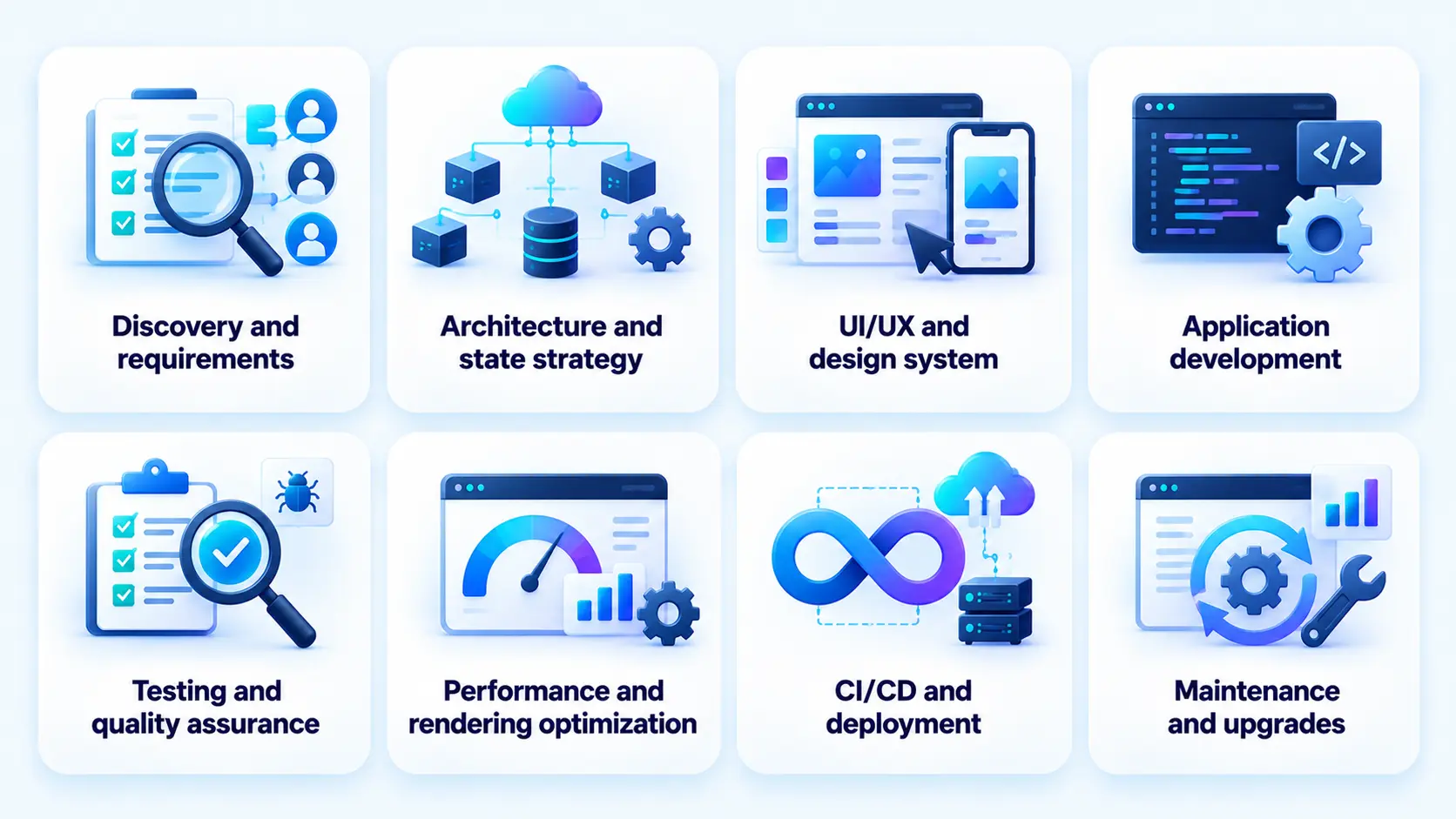
Angular development begins with defining business requirements, user workflows, integrations, security controls, and the architecture needed to support the product.
- Discovery and requirements: Define business objectives, target users, essential workflows, user roles, and success criteria. Identify the integrations and operational constraints that influence the project.
- Architecture and state strategy: Decide how to organize components, services, routing, state, API communication, and backend responsibilities. Establish whether SSR, a PWA, or a mobile framework is needed.
- UI/UX and design system: Map user journeys and create wireframes and interface designs. Establish reusable components, accessibility standards, responsive layouts, and design conventions.
- Application development: Build the frontend using Angular components, services, forms, and routing. Integrate APIs, authentication, data validation, and required third-party services.
- Testing and quality assurance: Test business workflows, API interactions, responsive behavior, accessibility, security controls, and performance. Include automated unit and integration tests alongside appropriate end-to-end testing.
- Performance and rendering optimization: Evaluate bundle size, loading behavior, caching, SSR, hydration, and change detection where relevant. Measure performance against agreed targets rather than relying on assumptions.
- CI/CD and deployment: Configure automated builds, test pipelines, environment settings, release controls, monitoring, and rollback procedures. Deploy to infrastructure suited to the application’s availability and scaling requirements.
- Maintenance and upgrades: Monitor production behavior, resolve defects, update dependencies, review security issues, and plan Angular upgrades within the supported release window.
The process varies by project. An internal dashboard may need little public-facing SSR, while a content-heavy product may depend heavily on rendering strategy and search visibility.
Cost and Timeline Considerations
Angular development costs depend on application scope, interface complexity, integrations, backend requirements, security controls, and the delivery model. Mobile support can add work when the project requires platform-specific features, native integrations, or separate app-store release processes.
| Project scope | Estimated cost | Typical timeline |
| MVP or basic application | $20,000–$55,000 | 2–3 months |
| Mid-complexity application | $55,000–$100,000 | 3–5 months |
| Enterprise-grade application | $100,000–$250,000+ | 5–8+ months |
These are the estimated cost ranges; actual costs vary by scope, feature complexity, integrations, and technical requirements. Enterprise projects with advanced requirements may exceed $250,000.
The main cost drivers include:
- Feature scope: User roles, complex workflows, reporting, and advanced forms increase implementation and testing effort.
- Integrations: Payment providers, identity systems, enterprise APIs, and third-party platforms add integration and maintenance requirements.
- Rendering and performance: SSR, hydration, caching, and optimization may require additional architecture and infrastructure work.
- Mobile approach: Ionic, NativeScript, and PWA implementations have different UI, testing, and device-integration requirements.
- Legacy migration: Replacing AngularJS or upgrading a substantially outdated application requires dependency analysis, compatibility testing, and regression checks.
Estimate the budget after defining the feature set, required integrations, deployment needs, and expected release date.

How RipenApps Builds Angular Applications
Angular project planning should account for application architecture, API integrations, responsive design, testing, deployment, and ongoing maintenance. The implementation approach should reflect the product’s requirements, whether it is an enterprise application, SaaS platform, operational dashboard, or mobile experience.
The right architecture depends on whether the business needs an enterprise web application, a SaaS platform, an operational dashboard, or a mobile experience supported by Angular technologies. These requirements should guide framework selection and delivery planning.
RipenApps’ Mind Alcove mood-tracking app is an example of its work on a wellness application. The product focuses on mood tracking and mental wellness, illustrating the importance of aligning application functionality with users’ needs.

Conclusion
Angular is a strong choice for businesses building scalable web applications, enterprise platforms, SaaS products, and complex internal tools. Its structured architecture, TypeScript support, integrated tooling, and long-term support policy help teams maintain consistency as products evolve. For mobile projects, Ionic and Capacitor, NativeScript, and Progressive Web Apps offer different options depending on code reuse, native functionality, and distribution requirements. Businesses evaluating mobile app development services should consider their product scope, technical requirements, team expertise, and long-term budget before choosing the right approach.
RipenApps helps businesses plan and build applications around their product requirements, user workflows, and growth objectives. Whether you are developing an enterprise platform, a SaaS product, or a mobile application, the right technology stack and architecture can support future enhancements and maintainability.
FAQs
1. Is AngularJS still supported?
No. AngularJS reached end of life on December 31, 2021, and official support has ended. Businesses maintaining AngularJS applications should review security exposure, dependency compatibility, and migration options. Modern Angular is a separate framework that continues to receive updates.
2. What is the difference between AngularJS and Angular?
AngularJS is the original JavaScript-based framework built around controllers and scopes. Modern Angular was released in 2016 as a complete rewrite, with a TypeScript-first approach, component-based architecture, modern tooling, and ongoing support.
3. Is Angular good for web application development in 2026?
Yes. Angular is well suited to complex web applications, enterprise dashboards, SaaS platforms, and products that need consistent architecture across large teams. Its value depends on application complexity, team experience, performance requirements, and long-term maintenance plans.
4. Can I build a mobile app with Angular?
Yes. Angular can support mobile applications through Ionic and Capacitor, NativeScript, or Progressive Web Apps. Ionic and Capacitor are useful for sharing web and mobile code, NativeScript supports native UI rendering, and PWAs offer an installable browser-based experience.
5. Should I use Ionic or NativeScript with Angular?
Choose Ionic with Capacitor when code sharing across web and mobile is a priority and a WebView-based interface meets the product’s needs. Consider NativeScript when native UI rendering is important and its ecosystem supports your requirements. Evaluate device APIs, plugin availability, performance, and team experience before deciding.
6. How do I migrate from AngularJS to Angular?
Start by auditing the existing application, dependencies, business logic, and integration points. Assess whether a staged migration or a broader rewrite is more appropriate. Prioritize critical workflows, establish automated tests, migrate components and services incrementally where practical, and validate the new application before retiring the legacy system.
7. Is Angular better than React?
Neither is universally better. Angular is often a strong choice for structured enterprise applications and teams that prefer integrated tooling. React offers more architectural flexibility and a direct path to React Native for mobile development. Compare team skills, application requirements, ecosystem, and maintenance needs before choosing.
8. Can Angular be used with Node.js?
Yes. Angular can serve as the frontend for a Node.js backend built with Express, NestJS, or another compatible server framework. This combination supports API-driven SaaS products, dashboards, and real-time applications. The backend can use MongoDB, PostgreSQL, or another database selected for the product’s data requirements.
Discuss your project and request for proposal
SHARE
WRITTEN BY

Ishan Gupta
CEO & Founder
Ishan Gupta is a seasoned entrepreneur and CEO with extensive 10+ years of experience in business and mobile app development landscape. He believes that the right digital product allows companies to focus on what they do best, while technology handles the rest. With deep exposure to global markets, he understands what makes an app succeed. His approach translates business needs into clear product strategies, ensuring that every feature contributes to measurable ROI.
View All Articles