
Key Takeaways
- Custom pharma software connects research, manufacturing, quality, inventory, regulatory, and distribution workflows through a unified digital ecosystem.
- Purpose-built platforms help reduce manual work, data silos, process delays, and operational errors.
- Modular architecture allows pharma companies to add capabilities as production volumes, product portfolios, and regulatory needs grow.
- Integrations with ERP, LIMS, MES, QMS, CRM, and supply chain systems improve data flow across departments.
- Automation, analytics, and AI can support better forecasting, quality monitoring, documentation, and operational decisions.
- Security, audit trails, validation, and regulatory requirements must be considered from the planning stage.
- A phased implementation approach helps companies modernize operations without disrupting critical business processes.
Pharmaceutical companies manage complex operations that extend far beyond drug research and manufacturing. They coordinate clinical and laboratory data, production schedules, quality checks, regulatory documentation, supplier networks, inventory, distribution, and post-market activities. Each function generates large volumes of information that must remain accurate, accessible, secure, and traceable.
As businesses expand into new markets, introduce more products, increase production capacity, or work with additional research and manufacturing partners, these processes become harder to manage through spreadsheets and disconnected applications. Teams may spend hours transferring information between systems, preparing reports manually, tracking approvals, and resolving data inconsistencies. These delays can affect productivity, decision-making, and the ability to scale operations efficiently.
This is where Pharmaceutical Software Development becomes a strategic investment. Instead of relying on separate tools for every department, companies can build connected software that supports their specific workflows, integrates with existing systems, and adapts as operational requirements change.
Working with a reliable custom software development company helps pharma businesses translate complex operational requirements into secure, scalable software platforms. The right solution can support process automation, improve data visibility, strengthen quality management, and create a technology foundation for sustainable growth.
Table of Contents
Why Pharma Companies Need Scalable Software to Grow?
Growth in the pharmaceutical sector brings new operational demands. A company that manages a limited product portfolio may initially rely on basic inventory tools, spreadsheets, and standalone applications. As production increases, the same setup can create bottlenecks across procurement, manufacturing, quality assurance, regulatory affairs, and distribution.
Scalable software helps companies manage this growing complexity without increasing manual effort at the same rate as business volume.
1. Managing Increasing Operational Complexity
Pharma operations involve multiple interconnected activities. Research teams generate scientific data, manufacturing teams manage production batches, quality teams review test results, and regulatory teams prepare documentation for different markets.
When these activities operate through disconnected systems, employees often need to enter the same information more than once. This increases administrative work and creates opportunities for inconsistencies.
A connected pharmaceutical industry software ecosystem gives teams a shared view of relevant information. It can help coordinate workflows, standardize processes, and reduce repeated data entry as the organization expands.
2. Improving Production Planning and Capacity
Increasing production requires better coordination of raw materials, equipment, workforce availability, production schedules, and quality checks. Without reliable operational data, companies may struggle to identify bottlenecks or plan capacity effectively.
Manufacturing platforms can help teams monitor production activities, track batch progress, record equipment usage, and review performance indicators. These insights support more informed planning and help organizations respond to changing demand.
3. Maintaining Consistent Quality Standards
Higher production volumes also increase the need for consistent quality oversight. Teams must document inspections, deviations, corrective actions, equipment calibration, and batch release activities.
A digital quality management system can centralize these records and make review workflows easier to track. It can also support audit readiness by maintaining traceable records of changes, approvals, and quality-related activities.
4. Coordinating Global Supply Chains
Pharmaceutical supply chains often involve multiple suppliers, contract manufacturers, logistics partners, warehouses, and distributors. Managing this network becomes more difficult when teams lack timely information about stock levels, shipment status, supplier performance, and product traceability.
Integrated inventory and supply chain tools can improve visibility across these activities. They help companies monitor stock movement, identify potential shortages, coordinate replenishment, and track products across distribution channels.
5. Supporting Regulatory and Market Expansion
Entering a new market often means adapting to additional regulatory requirements, documentation standards, labeling rules, and reporting processes. Managing these requirements manually can increase administrative effort and make it harder to maintain consistent records.
Digital regulatory workflows can help teams organize submissions, manage document versions, track review status, and maintain records across product portfolios. The software must still be configured and validated according to the applicable regulations and intended use.
Common Operational Challenges That Limit Pharma Companies’ Growth
Before choosing a software solution, companies need to understand where existing processes create friction. Technology should address specific operational gaps rather than introduce another disconnected platform.
1. Data Silos Across Departments
Research, manufacturing, quality, regulatory, procurement, and distribution teams often use different applications. These systems may store information in separate formats and databases, making it difficult to build a complete picture of operations.
For example, production teams may not have immediate access to updated material availability, while quality teams may need to request batch information from another department. Such delays affect coordination and slow down routine decisions.
An integrated platform can connect these workflows through APIs, shared data models, and controlled access. Companies planning broader technology upgrades can also refer to healthcare software modernization to understand how legacy systems can be upgraded while preserving critical business processes.
2. Manual Documentation and Repetitive Tasks
Pharma companies handle extensive documentation, including batch manufacturing records, standard operating procedures, quality reports, validation documents, and regulatory submissions.
When employees prepare and update these records manually, the process consumes time and increases the risk of missing information, inconsistent versions, and delayed approvals.
Workflow automation can route documents to the right reviewers, notify teams about pending actions, and maintain version histories. It can also reduce repetitive administrative work while keeping human review in place for decisions that require expertise or formal approval.
3. Limited Real-Time Operational Visibility
When data is spread across separate systems, managers may rely on periodic reports to understand production performance, inventory status, quality trends, or order fulfillment.
This creates a gap between what is happening on the operational floor and what decision-makers can see. By the time a report highlights a delay or shortage, the issue may already have affected other activities.
Centralized dashboards and reporting tools can bring relevant operational indicators together. Teams can monitor production progress, inventory levels, quality events, and supply chain activity with better visibility.
4. Difficulties Scaling Legacy Systems
Older applications may work well for a limited number of users or transactions but struggle as data volumes, integrations, and operational requirements increase. Some systems also depend on outdated technologies that are difficult to maintain or connect with modern platforms.
Companies do not always need to replace every legacy application. They can assess which components should be modernized, integrated, replatformed, or rebuilt. A phased approach can help reduce disruption while improving long-term scalability.
5. Compliance and Data Security Risks
Pharmaceutical software may handle sensitive research data, proprietary formulas, manufacturing records, supplier information, and regulated documentation. Weak access controls, incomplete audit trails, or inconsistent data handling can create compliance and security concerns.
Companies need systems that support role-based access, secure data storage, audit logging, controlled document management, and appropriate validation. Security planning should also cover connected services, cloud infrastructure, third-party integrations, and ongoing monitoring.
Read Also: Cloud Security in Healthcare: A Practical Guide to HIPAA-Ready Applications
Types of Pharmaceutical Software That Support Business Growth
There is no single platform that handles every pharmaceutical workflow. Companies may need one core system or a combination of specialized applications connected through a shared architecture. The right choice depends on business size, product portfolio, manufacturing model, regulatory responsibilities, and existing technology.
1. Enterprise Resource Planning Software
ERP software connects core business functions such as procurement, finance, inventory, production planning, order management, and resource allocation.
For pharmaceutical companies, an ERP platform can help coordinate material purchasing, stock movement, manufacturing costs, supplier records, and financial reporting. It provides a broader operational view and reduces the need to manage these activities through separate tools.
2. Laboratory Information Management Systems
A Laboratory Information Management System (LIMS) helps laboratories manage samples, testing workflows, results, instruments, and related records.
It can support sample tracking, test assignment, result recording, review processes, and laboratory reporting. In research and quality environments, a LIMS can improve traceability and help teams manage growing volumes of laboratory data.
3. Manufacturing Execution Systems
A Manufacturing Execution System (MES) monitors and manages production activities on the manufacturing floor. It can connect production schedules with batch execution, equipment, operators, material usage, and process records.
For pharma manufacturers, MES capabilities can support electronic batch records, production monitoring, workflow enforcement, and traceability. These features help teams maintain consistent processes as manufacturing operations expand.
4. Quality Management Systems
A Quality Management System (QMS) manages processes related to quality assurance and continuous improvement. Common capabilities include deviation management, corrective and preventive actions (CAPA), change control, audits, document control, and training records.
A digital QMS helps teams centralize quality activities and track issues from identification to resolution. It can also support more consistent review and approval workflows.
5. Regulatory Information Management Systems
Regulatory Information Management Systems (RIMS) help pharmaceutical companies organize product registrations, regulatory submissions, market requirements, and related documentation.
These platforms can provide visibility into submission status, deadlines, product information, and regulatory commitments. They are particularly useful for businesses managing products across multiple regions.
6. Supply Chain and Inventory Management Software
These systems help companies manage suppliers, raw materials, finished goods, warehouses, orders, and distribution activities.
Features may include batch and lot tracking, expiry monitoring, stock alerts, demand planning, shipment tracking, and supplier management. When connected with manufacturing and ERP systems, they can improve coordination between production requirements and material availability.
7. Clinical Trial Management Software
Clinical Trial Management Systems (CTMS) support the planning and coordination of clinical research activities. Depending on the platform, they can manage study timelines, site information, participant visits, investigator details, and trial-related documentation.
A CTMS can help sponsors and research teams monitor study progress and coordinate activities across multiple trial sites. It may integrate with electronic data capture and other clinical research systems.
8. Pharmacovigilance Software
Pharmacovigilance platforms help companies collect, assess, manage, and report information about suspected adverse events and product safety.
These systems can support case intake, safety case processing, signal management, reporting workflows, and safety documentation. They help pharmacovigilance teams manage growing case volumes while maintaining appropriate oversight and traceability.
How Custom Pharmaceutical Software Helps Companies Scale Operations
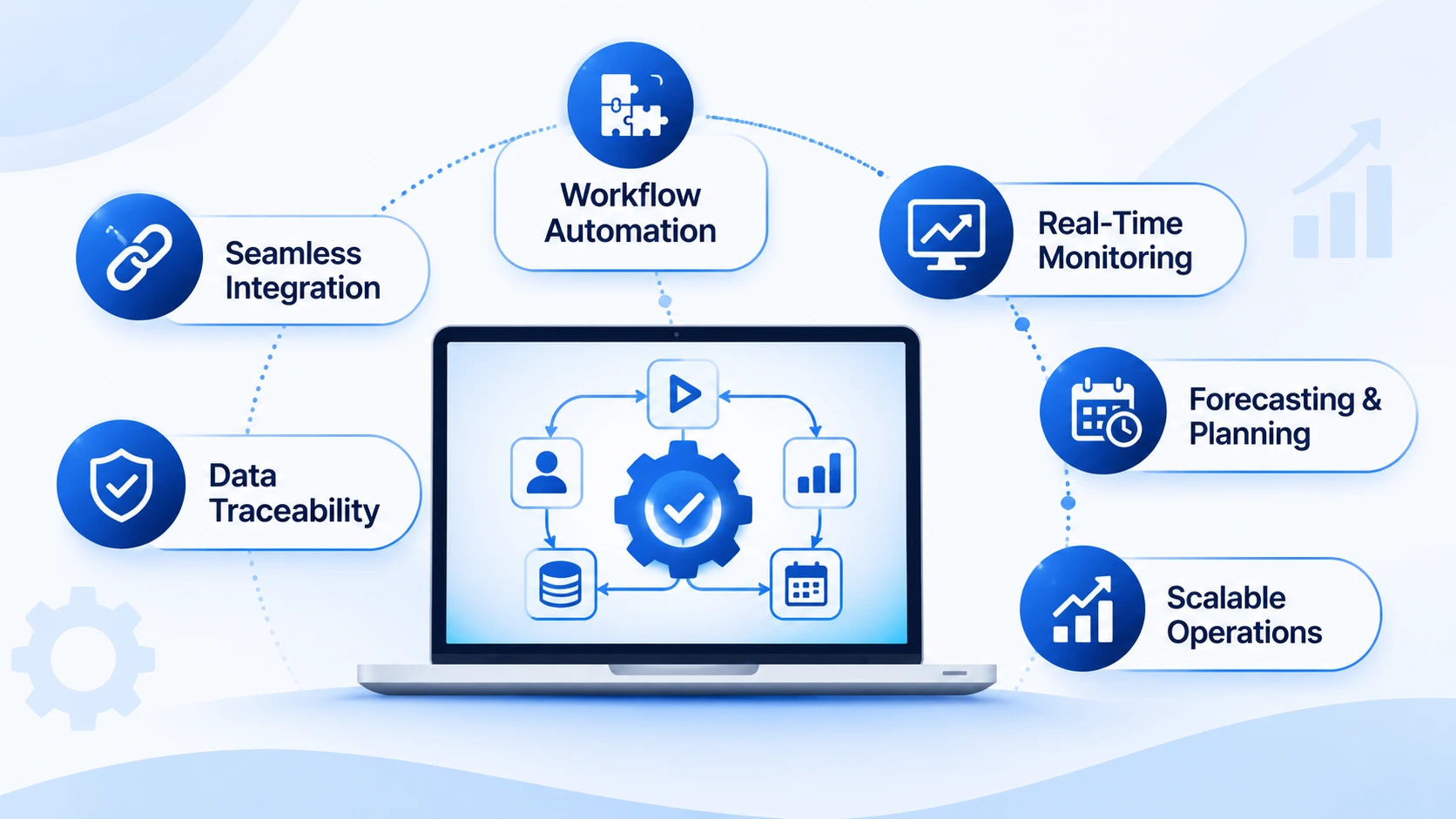
A scalable platform should do more than digitize existing tasks. It should connect departments, standardize workflows, improve data access, and support operational growth. The following capabilities show how purpose-built systems can create measurable improvements across pharmaceutical businesses.
1. Automating Repetitive Business Workflows
Manual processes often slow down activities such as document reviews, purchase approvals, production scheduling, quality checks, and inventory updates. As transaction volumes increase, these tasks require more time and coordination.
Automation can help route requests, trigger notifications, update records, and assign tasks based on predefined rules. For example, when a batch moves to the next production stage, the system can notify the relevant team and update its status.
A well-planned automation workflow reduces repetitive work while keeping approval checkpoints and human oversight in place.
2. Connecting Systems Through Seamless Integrations
Pharmaceutical companies rarely operate through one application. Their technology environment may include ERP, LIMS, MES, QMS, CTMS, CRM, warehouse management, and regulatory systems.
When these applications do not exchange data effectively, employees often rely on manual exports, spreadsheets, and repeated data entry. This can create delays and inconsistent records.
A custom platform can connect these systems through APIs, middleware, and standardized data exchange. The integration strategy should define which system owns each data type, how updates are synchronized, and how errors are monitored.
3. Improving Data Management and Traceability
Pharma companies generate data throughout research, manufacturing, testing, packaging, storage, and distribution. Teams need to know where information came from, who updated it, and whether it has been reviewed or approved.
A centralized data layer can help organize information from connected systems. Role-based permissions, audit trails, timestamps, and version histories make it easier to trace important changes.
Strong data governance is especially important when systems support regulated activities. Companies should define data ownership, retention, access, backup, and review policies before implementation.
4. Enabling Real-Time Monitoring and Reporting
Operational dashboards can bring important indicators into one place. Depending on the systems connected, managers may monitor production output, batch status, equipment performance, inventory levels, quality events, order fulfillment, and supplier activity.
Instead of waiting for manually prepared reports, teams can use current information to identify delays and investigate emerging issues.
For example, if a raw material falls below its defined stock threshold, the system can notify procurement teams. If a production batch is delayed, managers can review its current stage and identify the next action required.
5. Supporting Better Forecasting and Planning
Demand planning becomes more complex when companies manage multiple products, suppliers, production facilities, and distribution channels.
Analytics tools can use historical sales, inventory movement, production capacity, and supply chain data to support forecasting. More advanced systems may use machine learning to identify patterns and generate predictive insights.
These outputs should support, not replace, business judgment. Forecasts depend on data quality, model assumptions, and changing market conditions. Teams should be able to review the information behind recommendations before making operational decisions.
6. Scaling Across Locations and Product Lines
A pharmaceutical business may expand from one manufacturing facility to several locations or introduce new products across different markets. Software should accommodate this growth without requiring a complete rebuild.
Modular architecture, configurable workflows, and centralized administration can make it easier to add users, facilities, product categories, and integrations. Companies can also apply location-specific permissions and workflows where operational or regulatory requirements differ.
This flexibility is one of the important outcomes of Pharmaceutical Software Development when scalability is considered from the architecture and planning stages.
Essential Features to Include in Custom Pharma Software
The feature set should reflect the company’s workflows and operational priorities. A research-focused organization may need laboratory and clinical data capabilities, while a manufacturer may prioritize production, quality, inventory, and batch traceability.
The following features provide a practical starting point.
| Feature | How it supports pharma operations |
| Role-based access control | Restricts access according to user responsibilities and permissions. |
| Workflow automation | Routes tasks, approvals, notifications, and reviews. |
| Document management | Organizes SOPs, reports, validation records, and controlled documents. |
| Batch and lot tracking | Tracks materials and products across manufacturing and distribution stages. |
| Inventory management | Monitors stock levels, expiry dates, and replenishment needs. |
| Audit trails | Records important user actions, updates, and approvals. |
| Reporting dashboards | Displays operational and quality indicators in one place. |
| API integrations | Connects ERP, LIMS, MES, QMS, and other business systems. |
| Data analytics | Helps teams identify patterns and evaluate performance. |
| Notification management | Alerts users about pending tasks, exceptions, and important events. |
Features for Manufacturing Teams
Manufacturing teams need tools that support production planning, batch execution, equipment monitoring, material consumption, and production documentation.
A manufacturing module may include:
- Production scheduling and work orders
- Batch and lot record management
- Equipment status and maintenance tracking
- Raw material consumption records
- Process monitoring and exception alerts
- Electronic batch record workflows
- Production performance dashboards
These capabilities help teams coordinate manufacturing activities and identify bottlenecks earlier.
Features for Quality and Regulatory Teams
Quality and regulatory workflows require controlled documentation, traceable approvals, and clear accountability.
Useful capabilities include:
- Deviation and CAPA management
- Change control
- Quality audits and inspections
- SOP and document version control
- Training records
- Validation documentation
- Regulatory submission tracking
- Approval histories and audit trails
These features should be configured around the company’s quality processes and applicable regulatory requirements.
Features for Research and Development Teams
Research teams need structured ways to manage scientific information, experiments, samples, and project activities.
Depending on the product, an R&D platform may include:
- Research project management
- Experiment and sample tracking
- Laboratory data management
- Scientific document storage
- Research collaboration tools
- Data visualization and reporting
- Integration with laboratory instruments
The objective is to make research information easier to organize, retrieve, review, and share with authorized users.
How AI and Data Analytics Can Improve Pharmaceutical Operations
AI and analytics can help pharma companies work with large datasets and identify patterns that are difficult to detect through manual reporting. Their value depends on the quality of available data, the problem being addressed, and the level of human oversight.
1. Predictive Maintenance
AI models can analyze equipment performance, sensor readings, maintenance history, and operating conditions to identify patterns that may indicate equipment issues.
Maintenance teams can use these insights to investigate potential problems and plan inspections. Predictive alerts should be validated against actual equipment conditions before maintenance decisions are made.
2. Demand Forecasting
Forecasting models can analyze historical demand, seasonal patterns, order volumes, and inventory movement. These insights can help planning teams estimate future requirements and coordinate procurement and production.
The quality of forecasts depends on reliable historical data and the ability to account for market changes, supply disruptions, and product lifecycle events.
3. Quality Trend Analysis
Analytics can help quality teams review deviations, test results, complaints, and recurring process issues across batches or facilities.
For example, dashboards can highlight repeated deviations associated with a particular process stage or equipment category. Quality professionals can then investigate the underlying cause and decide whether corrective action is required.
4. Research Data Analysis
Pharmaceutical software helps research teams organize scientific literature, manage large datasets, identify patterns, and streamline research workflows. These tools also support better data handling, collaboration, and documentation throughout the research process.
By centralizing research information and improving data accessibility, pharmaceutical companies can make informed decisions, reduce manual effort, and maintain better control over research activities.
5. Document Processing and Workflow Support
Document automation tools can help extract information from selected records, classify documents, identify missing fields, and route files for review.
These capabilities can reduce administrative effort, but regulated documents still need appropriate verification, approval, and version control. AI-generated content should not be treated as an approved record without the required review process.
Read Also: How AI in Healthcare Apps Can Help You Enhance Patient Care?
Integrations That Make Pharmaceutical Software More Effective
A pharmaceutical platform becomes more useful when it works with the systems employees already rely on. Integrations reduce information gaps and help departments coordinate activities without repeatedly switching between disconnected tools.
ERP Integration
Connecting with ERP software can synchronize procurement, inventory, finance, order management, and production planning information. This gives teams a more consistent view of business operations and resource availability.
LIMS Integration
LIMS integration can connect laboratory samples, test results, instrument information, and quality workflows with other operational systems. It helps reduce duplicate data entry and improves access to relevant laboratory records.
MES Integration
MES integration connects production activities with planning, quality, equipment, and inventory systems. It can help synchronize work orders, batch status, material consumption, and manufacturing records.
QMS Integration
QMS integration allows quality-related information to move between manufacturing, laboratory, document management, and enterprise systems. It can improve visibility into deviations, CAPA actions, change requests, and quality approvals.
CRM Integration
CRM integration can connect customer interactions, sales activities, product information, and support requests. This can help commercial teams coordinate communication with healthcare professionals, distributors, and business partners while following applicable privacy and promotional requirements.
Cloud and Data Platform Integration
Cloud platforms and data warehouses can support centralized reporting, secure data exchange, and scalable infrastructure. However, companies should assess data residency, access controls, retention, backup, and vendor responsibilities before selecting a cloud architecture.
Compliance and Security Considerations in Pharmaceutical Software Development
Pharmaceutical software may support regulated processes, handle sensitive business information, or maintain records used to demonstrate product quality and operational control. Compliance requirements depend on the software’s intended use, the company’s activities, the markets it serves, and the regulations that apply.
For example, systems used in US FDA-regulated activities may need to consider applicable requirements under 21 CFR Part 11 when electronic records and electronic signatures are used in place of required paper records. Good Manufacturing Practice requirements may also apply to relevant manufacturing and quality processes. Other markets have their own regulatory frameworks.
1. Electronic Records and Audit Trails
Systems used for regulated records should support appropriate controls over record creation, modification, review, and retention.
Audit trails can capture who performed an action, what changed, and when the change occurred. Their configuration should reflect the system’s intended use and applicable requirements.
2. Electronic Signatures and Access Controls
Where electronic signatures are used for regulated activities, the system should support appropriate identity verification, signature attribution, and record association.
Role-based permissions can help ensure that users only access functions and records relevant to their responsibilities. Access should be reviewed periodically, especially when employees change roles or leave the organization.
3. Computer System Validation
Computerized systems used in regulated processes may require documented assurance that they perform as intended. Validation activities should be risk-based and aligned with the system’s intended use.
This may involve requirements documentation, risk assessment, testing, traceability, change management, and periodic review. Validation should not be treated as a one-time activity if the system changes or its intended use evolves.
4. Data Integrity
Pharmaceutical systems should protect the accuracy, completeness, consistency, and availability of important records.
Controls may include access restrictions, audit trails, secure backups, validation checks, controlled changes, and documented review processes. Companies should also establish clear procedures for handling corrections and data exceptions.
5. Data Privacy and Cybersecurity
Pharmaceutical software must protect sensitive research data, product information, employee records, supplier details, and personal information. Strong security practices also help companies maintain data integrity and meet applicable regulatory requirements, including HIPAA where protected health information is involved. Following HIPAA-compliant application development practices becomes particularly important when pharmaceutical platforms handle protected health information.
Security measures may include data encryption, secure authentication, network protection, vulnerability management, continuous monitoring, incident response, and disaster recovery. Companies should also assess third-party services and integrations to keep data protected across the software ecosystem.
Real-World Example of Pharmaceutical and Healthcare Software Development
RipenApps developed Mednovate Connect, a US-based telemedicine and medication management platform available on iOS and Android. Built in three months, the application connects patients with licensed clinical pharmacists and supports medication management across 20,000+ approved drugs. Its features include personalized medication plans, pharmacist consultations, appointment booking, treatment monitoring, and patient-provider messaging.
This project reflects RipenApps’ expertise in building healthcare solutions that bring complex medication-related workflows into one digital platform. It also demonstrates the value of combining telemedicine capabilities, medication management, and healthcare compliance considerations when developing software for the pharmaceutical and healthcare sectors.
Step-by-Step Process to Build Custom Pharmaceutical Software
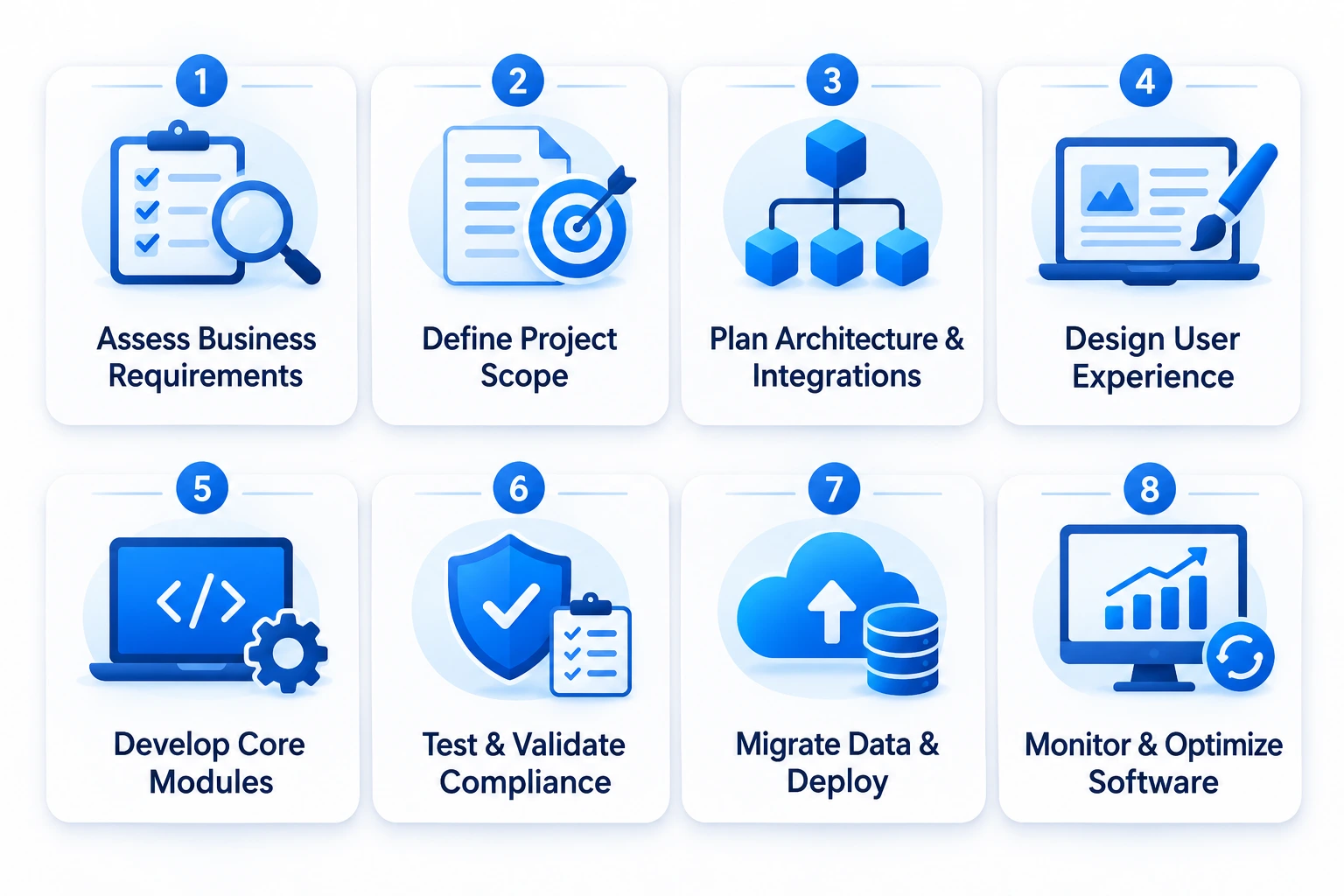
A structured development process helps companies convert operational requirements into a practical software solution. It also reduces the risk of building features that do not align with actual workflows or regulatory responsibilities.
Step 1. Assess Business Operations and Requirements
Start by reviewing existing processes across research, manufacturing, quality, regulatory affairs, procurement, inventory, and distribution.
Identify manual tasks, duplicate data entry, system gaps, reporting delays, and integration challenges. Interview employees who use these systems daily to understand where problems occur.
The assessment should result in a clear list of business goals, user roles, workflows, technical requirements, and measurable outcomes.
Step 2. Define the Software Scope and Priorities
Not every department needs to be included in the first release. Prioritize the workflows that create the greatest operational impact or address the most urgent business problems.
For example, a manufacturer may begin with batch tracking, inventory visibility, and quality workflows. A research-focused company may prioritize laboratory data, sample management, and project collaboration.
A phased roadmap helps teams control scope and introduce new modules as business needs evolve.
Step 3. Plan the Architecture and Integrations
The architecture should support the expected data volume, number of users, security requirements, and future expansion.
Decide whether the platform should use a modular monolith, microservices, or another suitable architecture. Define database structures, API standards, hosting requirements, identity management, and integration methods.
If the company already uses ERP, LIMS, MES, or QMS platforms, document how the new system will exchange information with them.
Step 4. Design the User Experience
Scientists, production operators, quality specialists, regulatory professionals, managers, and administrators may use pharmaceutical software. Each role has different tasks and information needs.
A thoughtful interface should make frequent workflows easy to complete. Use clear navigation, role-specific dashboards, consistent forms, and helpful validation messages.
Working with a custom application development company that understands complex business workflows can help turn these requirements into a usable product without unnecessarily complicating the interface.
Step 5. Develop the Core Modules
Development should follow the agreed scope and architecture. Teams can build the highest-priority modules first, then connect them through APIs and shared services.
Depending on the requirements, the initial release may include:
- User and role management
- Document and record management
- Workflow automation
- Inventory or batch tracking
- Reporting dashboards
- Integration services
- Audit and activity logs
Regular demonstrations and stakeholder reviews help confirm that the software matches real operational needs.
Step 6. Test Functionality, Integrations, and Compliance Controls
Testing should cover more than whether individual features work. The team should verify complete workflows, data exchanges, permissions, error handling, performance, and security.
For systems used in regulated activities, testing and validation documentation should be aligned with the intended use and applicable quality processes.
Testing may include:
- Functional testing
- Integration testing
- User acceptance testing
- Performance and load testing
- Security testing
- Data migration testing
- Backup and recovery testing
- Validation activities, where required
Step 7. Migrate Data and Deploy in Phases
Before migration, assess existing data for accuracy, completeness, duplication, and relevance. Define mapping rules and validate migrated records against the source systems.
A phased rollout can begin with one department, facility, or workflow. This allows teams to resolve issues before expanding deployment across the organization.
Training, support documentation, and clear communication are important during this stage.
Step 8. Monitor, Maintain, and Improve
Software needs ongoing maintenance after launch. Teams should monitor performance, integration health, user feedback, security alerts, and operational metrics.
As the business expands, new modules, workflows, and integrations can be introduced through a controlled change process. Companies should also review whether system configurations and validation evidence remain appropriate after significant updates.
How Much Does Custom Pharmaceutical Software Development Cost?
The cost of custom pharmaceutical software depends on the number of modules, integration requirements, data complexity, security controls, validation needs, and deployment model. A focused application for one workflow will generally require a smaller investment than an enterprise platform connecting research, manufacturing, quality, regulatory, and supply chain operations.
The cost of custom pharmaceutical software development typically ranges from $30,000 to $250,000+, depending on the project’s scope and complexity. A focused application for a single workflow, such as inventory tracking or quality management, may cost around $30,000–$70,000. A mid-sized solution with multiple modules, third-party integrations, and compliance features may require $70,000–$150,000. An enterprise platform connecting research, manufacturing, quality, regulatory, and supply chain operations can exceed $150,000–$250,000. The final investment depends on data complexity, security controls, validation needs, integration requirements, and the deployment model.
The main cost factors include:
- Software scope: The number of modules, workflows, user roles, and business functions included in the product.
- System integrations: Connecting ERP, LIMS, MES, QMS, CTMS, CRM, laboratory instruments, and external services.
- Data migration: Cleaning, mapping, transferring, and validating information from legacy systems.
- Security requirements: Implementing authentication, access control, encryption, monitoring, and recovery mechanisms.
- Compliance and validation: Documenting requirements, risk assessments, testing, and validation activities where applicable.
- Technology and infrastructure: Selecting hosting, databases, cloud services, and architecture based on operational needs.
- Maintenance and support: Managing updates, monitoring, technical support, and future enhancements.
A reliable estimate should follow a discovery and technical assessment. Companies should define the intended use, business scope, integration landscape, and applicable regulatory requirements before comparing development proposals.

How to Choose the Right Pharmaceutical Software Development Partner
Selecting a development partner is an important decision because pharmaceutical platforms often involve complex workflows, sensitive data, legacy integrations, and regulated activities.
The right partner should understand both software engineering and the operational context in which the product will be used.
1. Relevant Domain and Technical Experience
Review whether the team has experience building enterprise applications, data-intensive platforms, workflow automation, system integrations, and secure software.
Ask how they approach pharmaceutical requirements such as batch traceability, document control, audit trails, and validation support. Do not rely on general healthcare experience alone when the project involves specialized pharmaceutical processes.
2. Strong Integration Capabilities
The partner should be able to work with the systems already used by the business. Ask about API development, middleware, data migration, legacy integration, and error monitoring.
A clear integration strategy helps prevent the new application from becoming another isolated system.
3. Security and Compliance Awareness
The development team should understand secure architecture, role-based access, audit logging, data integrity, and change management.
They should also be able to work with the client’s quality and regulatory teams to document requirements and support applicable validation activities. Regulatory responsibility remains with the organization operating the system, so roles and responsibilities should be defined clearly.
4. Scalable Architecture and Maintainability
The software should support future modules, users, locations, and integrations without requiring unnecessary redevelopment.
Ask the partner to explain the architecture, deployment model, database strategy, and approach to monitoring and maintenance. The solution should be maintainable by the internal team or a future technology partner.
5. Transparent Development and Communication
A reliable partner should provide clear project milestones, documentation, testing plans, progress updates, and ownership terms.
Regular reviews help business stakeholders confirm that development remains aligned with operational priorities. The team should also explain technical trade-offs in a way that non-technical stakeholders can evaluate.
Companies comparing the best software development firms for pharmaceuticals should assess domain understanding, integration experience, security practices, delivery approach, and long-term support rather than relying on cost alone.
Future Trends Shaping Pharmaceutical Software
Pharmaceutical technology is evolving as companies adopt connected manufacturing, advanced analytics, automation, and more integrated research environments. Several developments are likely to influence how pharma businesses plan their software investments.
1. AI-Assisted Research and Operations
AI tools are being explored for scientific data analysis, document processing, forecasting, and selected research workflows. Their practical value depends on data quality, model reliability, scientific review, and appropriate governance.
2. Connected and Data-Driven Manufacturing
Smart manufacturing environments use connected equipment, sensors, and industrial systems to collect operational data. When integrated with manufacturing software, this information can support process monitoring, equipment analysis, and production visibility.
3. Cloud-Based Pharmaceutical Platforms
Cloud infrastructure can help companies scale computing resources, support distributed teams, and connect applications across locations. Adoption still requires careful planning around security, data residency, system availability, vendor responsibilities, and regulatory obligations.
4. Greater Focus on Data Interoperability
As pharma companies work with more partners, facilities, and specialized applications, the ability to exchange data reliably becomes increasingly important. Standardized APIs, integration layers, and consistent data governance can help reduce information silos.
5. Automation Across Quality and Regulatory Workflows
Digital document management, automated task routing, and structured approval processes can reduce administrative effort. These tools can also help teams maintain clearer records and monitor pending actions, provided that required human review and approval controls remain in place.
6. Advanced Analytics for Supply Chain Resilience
Analytics platforms can help organizations review demand patterns, inventory movement, supplier performance, and distribution data. These insights can support more informed planning and help teams identify potential supply chain risks earlier.
Conclusion
Custom pharmaceutical software helps companies connect complex workflows, automate repetitive tasks, improve data visibility, and manage growing operational demands. From research and manufacturing to quality, regulatory affairs, and distribution, purpose-built platforms can support more consistent processes and better coordination across departments. A scalable architecture also makes it easier to introduce new capabilities as business requirements evolve.
For pharma businesses planning their next stage of growth, the focus should be on building software around real operational needs, integration requirements, and regulatory responsibilities. RipenApps provides custom healthcare software development services to help businesses plan and build secure, scalable digital platforms. With the right technology strategy, pharmaceutical companies can create a stronger foundation for operational efficiency and long-term expansion.
FAQs
Q1. What is pharmaceutical software development?
Pharmaceutical software development involves designing and building digital platforms that support pharma operations such as research, manufacturing, quality management, regulatory documentation, inventory, and distribution. These solutions can be developed as standalone applications or integrated with existing enterprise systems.
Q2. How does custom software help pharmaceutical companies scale?
Custom software connects business workflows, automates repetitive tasks, improves data visibility, and supports integration between departments. Its modular architecture can also help companies add users, facilities, workflows, and capabilities as operations expand.
Q3. What types of software are used in the pharmaceutical industry?
Common systems include ERP, LIMS, MES, QMS, RIMS, CTMS, pharmacovigilance platforms, and supply chain management software. Each system supports a different part of pharmaceutical operations, and integrations help connect their data and workflows.
Q4. What are the key features of pharmaceutical software?
Important features may include role-based access, document management, workflow automation, batch tracking, inventory management, audit trails, reporting dashboards, and system integrations. The final feature set depends on the company’s workflows and intended use.
Q5. Is pharmaceutical software required to comply with FDA regulations?
Not every pharmaceutical application is subject to the same requirements. Software used in FDA-regulated activities may need to meet applicable requirements based on its intended use. For example, 21 CFR Part 11 may apply to certain electronic records and electronic signatures, while other regulations and quality requirements may apply to manufacturing and related processes.
Q6. Can custom pharmaceutical software integrate with ERP, LIMS, and MES?
Yes. Custom platforms can integrate with ERP, LIMS, MES, QMS, CTMS, CRM, and other systems through APIs, middleware, or supported data exchange methods. Integration planning should define data ownership, synchronization rules, access permissions, and error handling.
Q7. How long does it take to develop pharmaceutical software?
The timeline depends on the number of modules, integrations, data migration requirements, security controls, testing, and validation activities. A focused application may take less time than an enterprise platform connecting multiple departments and legacy systems. A discovery phase is necessary to establish a realistic timeline.
Q8. What is the difference between custom pharmaceutical software and off-the-shelf software?
Off-the-shelf software provides predefined features designed for a broad set of users. Custom software is built or configured around a company’s specific workflows, integrations, and operational requirements. Some businesses use a combination of both approaches.
Q9. How much does pharmaceutical software development cost?
Pharmaceutical software development typically costs $30,000 to $250,000+, depending on the project scope and complexity. A focused workflow application may cost around $30,000–$70,000, while a mid-sized solution with multiple modules and integrations may range from $70,000–$150,000. Enterprise platforms connecting manufacturing, research, quality, and regulatory operations can exceed $150,000–$250,000. The final estimate depends on architecture, data migration, security, integration, and validation requirements. These figures are indicative and may vary based on specific project needs.
10. How can pharma companies ensure data security in custom software?
Companies should implement role-based access, secure authentication, encryption, audit logging, vulnerability management, backups, and continuous monitoring. They should also review third-party integrations, define data retention policies, and align security controls with applicable regulatory and business requirements.
Discuss your project and request for proposal
SHARE
WRITTEN BY

Ishan Gupta
CEO & Founder
Ishan Gupta is a seasoned entrepreneur and CEO with extensive 10+ years of experience in business and mobile app development landscape. He believes that the right digital product allows companies to focus on what they do best, while technology handles the rest. With deep exposure to global markets, he understands what makes an app succeed. His approach translates business needs into clear product strategies, ensuring that every feature contributes to measurable ROI.
View All Articles