


Key Takeaways
- Identify vulnerabilities early to prevent data breaches, unauthorized access, and costly security incidents.
- Follow secure coding practices to reduce injection risks, authentication failures, and access control weaknesses.
- Test applications regularly using vulnerability assessments, code analysis, and penetration testing.
- Protect sensitive data with encryption, strong authentication, and appropriate access permissions.
- Update dependencies and configurations to address known security flaws and reduce software supply chain risks.
- Monitor applications continuously to detect suspicious activity and respond to incidents quickly.
- Make security part of development by including risk assessments, testing, and maintenance throughout the software lifecycle.
A single software flaw can give attackers access to customer records, expose confidential business data, or bring critical operations to a standstill. The biggest risk is that these weaknesses often remain hidden until someone exploits them. By then, the damage may extend beyond the application to your customers, revenue, and business reputation.
The challenge becomes greater as applications grow more complex. Third-party libraries, cloud services, APIs, user accounts, and connected systems create multiple points where security gaps can emerge. Even a small configuration error or outdated component can allow attackers to compromise a system.
Ignoring these risks can lead to expensive recovery efforts, regulatory concerns, operational delays, and a loss of customer trust. Businesses need to identify weaknesses before attackers do, understand which risks deserve immediate attention, and make security an ongoing priority rather than a final pre-launch task.
This is where working with a leading custom software development company that prioritizes security throughout the development lifecycle becomes important. From secure architecture and coding practices to vulnerability testing and ongoing maintenance, the right approach helps businesses build more resilient applications. This guide explores common software security vulnerabilities, their business impact, and practical ways to prevent them.
Table of Contents
What Are Software Security Vulnerabilities?
Software Security Vulnerabilities are weaknesses in an application’s code, design, configuration, or dependencies that attackers can exploit to compromise confidentiality, integrity, or availability. These weaknesses might allow unauthorized access to sensitive information, changes to business records, service disruption, or execution of unintended actions.
A vulnerability does not always mean an attack has occurred. However, when a weakness remains unaddressed, it creates an opportunity for exploitation. For example, an application that fails to validate user input might allow an attacker to manipulate database queries, while poor access controls could expose records belonging to other users.
Understanding what software security involves helps businesses take a broader view of protection. Security is not limited to firewalls or antivirus tools. It also includes secure coding, identity and access management, data protection, dependency updates, configuration reviews, and ongoing testing throughout the software lifecycle.
Common Types of Software Security Vulnerabilities
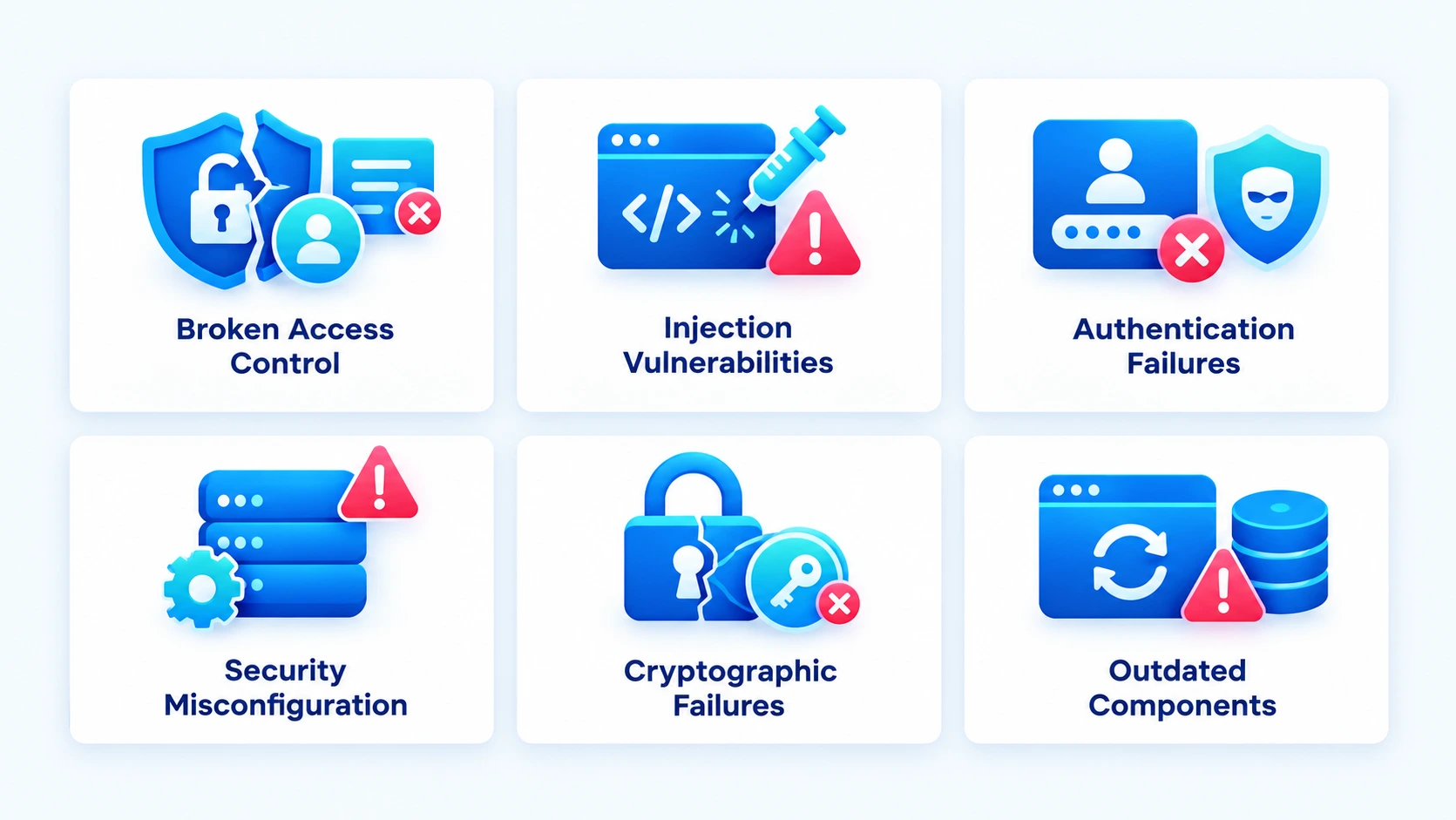
Common software security risks include broken access control, security misconfigurations, software supply chain weaknesses, cryptographic failures, injection attacks, and authentication failures. These vulnerabilities can expose sensitive data, enable unauthorized actions, or disrupt business operations. During custom software development, teams should assess these risks based on the system’s architecture, data sensitivity, and potential business impact to build stronger security controls from the start.
1. Broken Access Control
Broken access control occurs when an application fails to enforce the permissions assigned to users. An attacker might access another user’s records, change information without authorization, or reach administrative functions through requests they should not be allowed to make.
For example, a customer portal might let users view invoices by changing an invoice ID in the URL. If the backend checks whether the invoice exists but does not verify whether the logged-in user owns it, confidential business information could be exposed.
How to prevent it
- Apply role-based access controls and the principle of least privilege.
- Verify permissions on the server for every sensitive request.
- Restrict access to administrative functions and confidential records.
- Test authorization rules across different user roles and account types.
- Review permissions whenever roles or business workflows change.
These controls are particularly important for enterprise platforms with multiple user roles, departments, and integrations. During ERP software development, teams should define access permissions, establish data governance policies, and restrict access to sensitive business information based on user responsibilities. Regular permission reviews and secure integration practices help reduce unauthorized access and protect critical business data.
2. Injection Vulnerabilities
Injection vulnerabilities occur when an application treats untrusted input as part of a command or query. SQL injection is a common example in which an attacker manipulates database queries through input fields, potentially exposing or modifying stored information.
Similar weaknesses can affect operating system commands, directory queries, and other application components. These software vulnerabilities often arise when developers construct commands dynamically without properly separating data from executable instructions.
How to prevent them
- Use parameterized queries and prepared statements for database operations.
- Validate input according to the expected format and business rules.
- Avoid building database queries or system commands by concatenating user input.
- Apply least-privilege permissions to database accounts.
- Run automated security tests against input-handling functions.
Input validation helps, but it should not replace safe query construction. Developers should use secure APIs and established frameworks that handle untrusted input appropriately.
3. Authentication and Session Management Failures
Authentication confirms a user’s identity, while session management controls access after login. Weak password policies, missing multi-factor authentication, insecure session tokens, and poorly implemented password recovery flows can allow attackers to take over accounts.
For example, a business application that does not limit repeated login attempts could become vulnerable to automated password-guessing attacks. If session tokens remain valid after a password reset or logout, an attacker might continue using a compromised session.
How to prevent them
- Implement multi-factor authentication for privileged and sensitive accounts.
- Apply rate limits and protections against repeated login attempts.
- Store passwords using an established, secure password-hashing algorithm.
- Generate unpredictable session tokens and protect them in transit.
- Expire sessions appropriately and invalidate tokens after logout or security-sensitive changes.
Businesses should also review API authentication. For instance, fintech APIs need strong identity verification, scoped permissions, and secure token handling because they often connect applications to financial data and transactions.
4. Security Misconfiguration
Security misconfiguration happens when software, servers, databases, cloud resources, or security controls use unsafe settings. Common examples include publicly accessible storage, default credentials, unnecessary open ports, excessive permissions, and error messages that reveal sensitive system details.
These weaknesses are easy to overlook when development and production environments use different settings. A storage bucket intended for internal use, for example, could expose confidential files if its access policy is configured incorrectly.
How to prevent them
- Establish secure configuration baselines for production environments.
- Disable default accounts, unused services, and unnecessary ports.
- Review cloud storage permissions, network rules, and application settings.
- Keep development, testing, and production environments separate.
- Scan configurations regularly and monitor changes to critical settings.
When moving workloads to the cloud, businesses should use a cloud migration & data security checklist to review encryption, permissions, storage exposure, and security controls before and after migration.
5. Cryptographic Failures and Insecure Data Storage
Cryptographic failures occur when sensitive information is not adequately protected. Applications might transmit data without secure encryption, store passwords or confidential records improperly, use outdated cryptographic algorithms, or manage encryption keys insecurely.
The consequences depend on the information exposed. A breach involving customer details, authentication credentials, payment information, or business records can lead to fraud, privacy violations, and loss of customer trust.
How to prevent them
- Use current, secure encryption protocols for data in transit.
- Encrypt sensitive stored data when appropriate to the threat model.
- Store passwords using secure password hashing rather than reversible encryption.
- Keep encryption keys and secrets separate from application code.
- Limit access to sensitive records and remove data the application no longer needs.
Businesses handling large volumes of sensitive information should also consider custom data management software to organize, control, and protect their data more effectively. With appropriate encryption, access permissions, and secure data storage policies, they can reduce unauthorized access and keep confidential records better protected.
6. Vulnerable and Outdated Components
Modern applications depend on third-party libraries, frameworks, plugins, runtime environments, and external services. If these components contain known flaws or no longer receive security updates, attackers may exploit them even when the application’s own code is well written.
This risk becomes harder to manage when teams do not maintain an accurate dependency inventory or rely on components that have been abandoned by their maintainers. OWASP’s 2025 guidance treats these issues as part of broader software supply chain failures.
How to prevent them
- Maintain an inventory of direct and transitive dependencies.
- Use dependency-scanning tools to identify known vulnerabilities.
- Apply security patches based on severity, exposure, and exploitability.
- Obtain packages from trusted sources and verify their integrity.
- Replace unsupported components when they cannot be secured.
Older software systems often require a broader security review because their frameworks, libraries, and dependencies may no longer receive updates. Businesses should identify unsupported components, assess known vulnerabilities, and determine whether to upgrade, replace, or refactor affected parts of the software to reduce security risks and maintain long-term reliability.
Why Software Security Vulnerabilities Matter to Businesses?
A vulnerability becomes a business concern when it creates a path to data exposure, service disruption, financial loss, or unauthorized activity. The impact depends on the application’s purpose, the sensitivity of its data, the attacker’s access, and how quickly the weakness is detected and addressed.
1. Data Breaches and Privacy Exposure
Attackers may access customer records, employee information, intellectual property, or confidential business documents. Beyond the immediate exposure, businesses might face incident-response costs, customer notifications, contractual obligations, and regulatory scrutiny.
2. Financial Loss and Operational Disruption
An exploited vulnerability could interrupt critical services, corrupt records, enable fraudulent transactions, or force teams to take systems offline during an investigation. Recovery may require technical remediation, service restoration, and additional security testing.
3. Compliance and Legal Risks
Businesses operating in regulated sectors must consider the security and privacy requirements that apply to their data and services. For example, organizations handling healthcare information need controls that address access, storage, transmission, and cloud infrastructure risks. In that case, reviewing cloud security in healthcare can help teams understand security considerations in this context.
4. Reputational Damage and Loss of Trust
Customers and partners expect businesses to protect their information. A serious incident can weaken that trust, delay new contracts, and increase scrutiny during vendor assessments. The consequences can continue long after the original vulnerability has been fixed.
5. Higher Remediation Costs
Fixing a security weakness during design or development is generally easier than correcting it after deployment, when the application has users, integrations, and live data. Teams that identify risks early have more options to adjust architecture and implementation before the issue becomes an operational problem.
For this reason, security should be considered during product planning, not added only before launch. Product discovery workshops allow stakeholders and development teams to identify sensitive data, user permissions, integration risks, and security requirements before implementation begins.
How Businesses Can Prevent Software Security Vulnerabilities
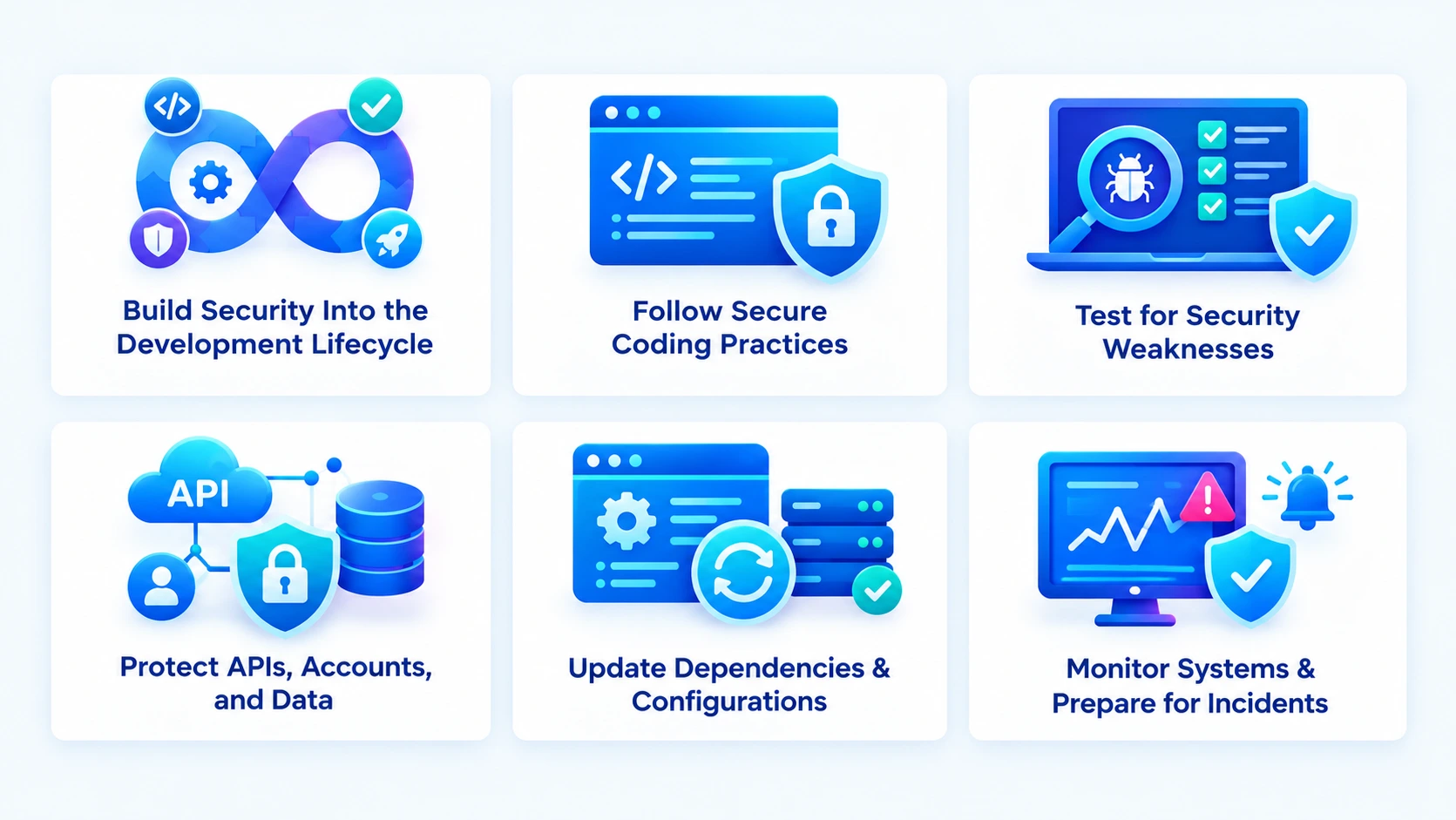
Preventing Software Security Vulnerabilities requires a consistent approach that covers planning, development, testing, deployment, and maintenance. This is especially important in software development for startups, where limited resources and tight launch timelines can lead teams to overlook security requirements. Combining secure coding practices, automated testing tools, clear security policies, and regular reviews helps reduce risks and protect software as the business grows.
1. Build Security Into the Development Lifecycle
Security works best when teams consider it from the beginning rather than treating it as a final pre-launch check. During planning, identify the data the application handles, who should access it, which systems it connects to, and what could happen if a component is compromised.
Integrate security requirements into the software development lifecycle, including code reviews, release approvals, and ongoing maintenance. This approach helps teams identify and address vulnerabilities at every stage instead of relying on last-minute testing.
2. Follow Secure Coding Practices
Developers should follow established coding standards and use secure frameworks to reduce common implementation errors. They should validate untrusted inputs, handle errors safely, enforce server-side permissions, and avoid exposing sensitive information through logs or error messages.
Regular code reviews help teams identify risky logic, weak authentication flows, and unsafe data handling before release. Applying secure coding principles across the software development lifecycle helps protect sensitive data, strengthen access controls, and reduce vulnerabilities before they reach production.
3. Test Applications for Security Weaknesses
Functional testing confirms that an application works as expected, but it does not establish that the application is secure. Businesses should combine several testing methods to find weaknesses across source code, running applications, dependencies, and deployed environments.
- Static Application Security Testing (SAST) examines source code or binaries to identify potentially unsafe coding patterns.
- Dynamic Application Security Testing (DAST) tests a running application for exploitable weaknesses.
- Software Composition Analysis (SCA) checks third-party dependencies for known vulnerabilities and licensing concerns.
- Penetration testing simulates realistic attack scenarios to assess how weaknesses could be exploited.
Use the results to prioritize remediation based on severity, exposure, business impact, and exploitability. Retest fixes to confirm that the vulnerability is resolved without introducing another problem.
4. Protect APIs, Accounts, and Sensitive Data
Applications often exchange information through APIs, making authentication, authorization, and data protection essential. Every request should be checked to confirm that the user or service has permission to perform the requested action. Sensitive operations should never rely solely on frontend checks.
Businesses should use secure transport protocols, protect credentials and API keys, apply rate limits, and avoid storing unnecessary sensitive information. A well-designed software architecture should define how application components, APIs, databases, and external services interact, ensuring that appropriate security controls protect data throughout the system.
5. Keep Dependencies and Configurations Updated
Outdated libraries, unsupported frameworks, and unsafe server settings create avoidable risks. Maintain an inventory of application components, monitor security advisories, and establish a patching process that addresses critical vulnerabilities promptly.
Teams should also review cloud permissions, database access, storage exposure, and production settings regularly. Automated scans can help identify configuration drift, but critical changes still require appropriate review and approval.
6. Monitor Applications and Prepare for Incidents
Preventive controls cannot guarantee that every attack will be blocked. Businesses also need monitoring and a defined response plan to reduce the impact of security incidents.
Record relevant security events without logging passwords, authentication tokens, or unnecessary personal information. Monitor unusual login attempts, permission changes, unexpected data transfers, and suspicious API activity. Define who will investigate alerts, isolate affected systems, communicate with stakeholders, and restore services if an incident occurs.
Regularly test backup restoration and incident-response procedures. A documented plan helps teams respond more consistently instead of making critical decisions during an active attack.
Read Also: Why Software Projects Fail: 10 Common Causes and How to Avoid Them
Strengthening Security in Enterprise and Legacy Applications
Large applications often involve multiple teams, databases, cloud environments, third-party services, and user roles. These connections make security reviews more complex because a weakness in one component could affect other parts of the system. Businesses need an approach that accounts for both individual application risks and the wider technology environment.
Review Legacy Systems Before Modernization
Professional software product modernization services help businesses address security risks in older software that relies on unsupported technologies, outdated authentication methods, or components that no longer receive security patches. Limited documentation and tightly connected modules can also make it difficult to track sensitive data and identify vulnerabilities.
Before making changes, businesses should map dependencies, review access permissions, and assess known security gaps. Upgrading frameworks, replacing unsupported components, and restructuring tightly connected systems can improve security, performance, and maintainability. Regular security assessments and timely updates also help businesses keep their software reliable and better protected against emerging threats.
Address Enterprise-Wide Security Risks
Enterprise software often connects departments, customers, vendors, and external platforms. Different access requirements, complex integrations, and inconsistent security policies can create gaps that are difficult to detect through isolated security testing.
Businesses should establish common standards for identity management, data classification, API protection, vulnerability reporting, and release approvals. An experienced enterprise platform development company should account for these requirements when designing integrations and building systems that support business-critical workflows.
Teams should also address security challenges related to integration complexity, changing requirements, access management, and maintenance across multiple systems. Regular security reviews and consistent policies help protect connected systems and reduce the risk of vulnerabilities spreading across the business.
Choose Technology With Security in Mind
The frameworks, databases, cloud services, and third-party packages selected for an application affect how easily teams can maintain and secure it. Popularity alone is not a sufficient reason to choose a technology. Businesses should evaluate its support lifecycle, security update frequency, ecosystem maturity, and compatibility with existing infrastructure.
When selecting a technology stack, consider how the team will manage dependencies, protect credentials, apply security patches, and monitor the software after launch. Choosing well-supported technologies and maintainable components helps teams strengthen security controls as business needs evolve.
Assess AI Features and External Integrations
AI-enabled software introduces security risks when it processes confidential information, connects to business systems, or performs actions based on user requests. Poorly controlled data access, excessive permissions, and inadequate input validation can expose sensitive information or trigger unintended actions.
During AI agent software development, teams should restrict access to sensitive data, validate actions before execution, and ensure agents operate only within their assigned permissions. Secure API integrations and clear access controls also help prevent unauthorized activities.
Security reviews should take place before deployment and continue as AI models, integrations, datasets, and permissions change. Regular testing helps teams identify weaknesses and maintain appropriate safeguards as AI capabilities evolve.
How to Identify and Prioritize Software Security Vulnerabilities
Finding security weaknesses is only the first step. Businesses also need to determine which issues require immediate attention and which can be addressed through planned updates. Prioritization helps teams use their time and security budgets effectively without overlooking risks that could affect critical systems.
Conduct Regular Vulnerability Assessments
A vulnerability assessment reviews applications, infrastructure, dependencies, and configurations to identify known weaknesses. Teams should conduct assessments during development, before major releases, after significant architectural changes, and periodically throughout the application’s lifecycle.
Automated scanners help detect common issues, but their findings need technical review. Some alerts require further investigation, while other weaknesses might not be detected without manual testing. Combining automated assessments with code reviews and penetration tests provides a more complete view of application security.
Prioritize Issues Based on Risk
Not every vulnerability presents the same level of risk. A weakness in a public-facing payment API might require immediate attention, while an issue in an isolated internal tool could have a lower priority. Teams should consider the vulnerability’s severity, whether attackers can reach it, the sensitivity of the affected data, and the potential business impact.
Use the Common Vulnerability Scoring System (CVSS) as one input when assessing known vulnerabilities. However, do not rely on a score alone. A vulnerability’s real-world exploitability, exposure, available fixes, and role in business-critical workflows should also guide remediation decisions.
Track Fixes and Verify Remediation
Maintain a vulnerability register that records the affected component, risk level, assigned owner, remediation deadline, and current status. This gives security and development teams a shared view of outstanding issues.
After applying a fix, retest the affected functionality and check whether the change introduced other problems. Critical issues should remain open until the team verifies that the weakness has been addressed or documents an approved risk exception with appropriate safeguards.
Software Security Checklist for Businesses
Use this checklist when reviewing a new application, assessing an existing platform, or preparing for a major release. Adapt it to your industry’s regulatory requirements, application architecture, and business risks.
- Access control: Verify user permissions on the server and restrict access to sensitive functions.
- Authentication: Enforce strong authentication, protect sessions, and enable multi-factor authentication for privileged accounts.
- Data protection: Encrypt sensitive information where required and manage credentials and encryption keys securely.
- Input handling: Use parameterized queries and validate untrusted input to reduce injection risks.
- Dependencies: Inventory third-party components and address known vulnerabilities in supported versions.
- Configuration: Remove default credentials, disable unnecessary services, and review cloud permissions.
- Security testing: Combine code analysis, dependency scanning, dynamic testing, and penetration testing according to risk.
- Logging and monitoring: Track suspicious activity while avoiding unnecessary sensitive information in logs.
- Incident response: Assign response responsibilities and test backup restoration and recovery procedures.
- Ongoing maintenance: Reassess risks after major changes and keep software, frameworks, and infrastructure updated.
This checklist provides a baseline, not a guarantee of security. Businesses handling sensitive customer data, financial transactions, or critical operations should tailor their controls to the threats they face and verify that safeguards work as intended.
Conclusion
Software Security Vulnerabilities affect more than application code. Weak access controls, outdated dependencies, unsafe configurations, and poorly protected integrations can expose business data and disrupt essential services. A strong software product development strategy incorporates security assessments, secure coding practices, and timely remediation throughout the software lifecycle to reduce these risks.
If you’re planning to build a new software or improve an existing platform, partner with an experienced custom software development company that prioritizes security across planning, architecture, development, testing, and maintenance. RipenApps helps businesses build digital solutions with a focus on reliability, scalability, and business needs, helping you address security risks early and protect your application as it evolves.
FAQs
Q1. What are software security vulnerabilities?
Software security vulnerabilities are weaknesses in an application’s code, design, configuration, or dependencies that attackers can exploit. They can expose sensitive data, enable unauthorized access, or disrupt business operations.
Q2. What are the most common software security vulnerabilities?
Common examples include broken access control, injection flaws, authentication failures, security misconfigurations, cryptographic failures, and vulnerable third-party components. The risks vary depending on the application’s architecture, data, and integrations.
Q3. How can businesses prevent software security vulnerabilities?
Businesses should follow secure coding practices, enforce strong access controls, update dependencies, and conduct regular security testing. Continuous monitoring and timely remediation also help reduce the risk of exploitation.
Q4. What is the difference between a vulnerability assessment and penetration testing?
A vulnerability assessment identifies and evaluates potential security weaknesses across an application or system. Penetration testing goes further by simulating attacks to determine whether identified weaknesses can be exploited and what impact they could have.
Q5. How often should software security testing be performed?
Security testing should take place throughout development, before major releases, and after significant application or infrastructure changes. Regular assessments are also important because new vulnerabilities emerge as dependencies, technologies, and attack methods evolve.
Q6. Why are outdated software components a security risk?
Outdated libraries, frameworks, and plugins might contain publicly known vulnerabilities that attackers can exploit. Keeping an inventory of dependencies, applying security patches, and replacing unsupported components helps reduce this exposure.
Q7. How do software security vulnerabilities affect businesses?
Exploited vulnerabilities can cause data breaches, financial losses, service interruptions, compliance issues, and reputational damage. The impact depends on the sensitivity of the affected data and the role of the compromised system in business operations.
Q8. When should a business consider application modernization for security?
A business should assess modernization when its applications rely on unsupported technologies, outdated dependencies, weak security controls, or systems that are difficult to maintain. Modernization helps address these risks when security improvements are included in the upgrade or redesign plan.
Discuss your project and request for proposal
SHARE
WRITTEN BY

Ishan Gupta
CEO & Founder
Ishan Gupta is a seasoned entrepreneur and CEO with extensive 10+ years of experience in business and mobile app development landscape. He believes that the right digital product allows companies to focus on what they do best, while technology handles the rest. With deep exposure to global markets, he understands what makes an app succeed. His approach translates business needs into clear product strategies, ensuring that every feature contributes to measurable ROI.
View All Articles