


Key TakeAways
- Transportation software helps businesses manage fleet operations, shipments, bookings, dispatch, and logistics through a centralized platform.
- Different solutions, including TMS, fleet management, route optimization, and shipment tracking software, address specific transportation needs.
- Essential features include GPS tracking, route planning, fleet management, driver coordination, payment processing, and real-time notifications.
- Advanced capabilities such as AI-powered route optimization, predictive maintenance, geofencing, and automated billing improve operational efficiency.
- Custom transportation software offers greater flexibility, tailored workflows, and integration options compared to off-the-shelf solutions.
- A structured development process covers requirement analysis, product discovery, UI/UX design, development, integration, testing, and deployment.
- Transportation software development costs typically range from $20,000 to $500,000+, depending on project complexity, features, integrations, and scalability requirements.
- Businesses should prioritize data security, system integration, performance, and scalability when choosing a development partner.
- AI and automation help transportation businesses make faster decisions, reduce operational costs, and improve service visibility.
Modern transportation businesses manage far more than vehicles and deliveries. They coordinate drivers, routes, shipments, customers, warehouses, carriers, payments, and real-time updates. When these operations run through disconnected tools, spreadsheets, and manual processes, delays and rising costs become difficult to control.
A well-designed transportation platform brings these activities into a connected system. It helps businesses plan routes, manage fleets, track shipments, coordinate drivers, and monitor operational performance. However, building the right solution requires more than adding tracking or dispatch features. Businesses need to consider their operating model, technology requirements, integrations, and future growth.
This guide explains how to plan, build, and scale transportation software, including its key features, development process, technology considerations, costs, and common challenges. Whether you operate a logistics company, manage a delivery fleet, or provide transport services, the right transportation software development strategy helps turn fragmented operations into more efficient and connected workflows. Partnering with a reputed custom software development company helps align the solution with your business processes, user needs, and long-term technology goals.
Table of Contents
What is Transportation Software Development?
Transportation software development is the process of planning, designing, building, and maintaining digital solutions that manage transportation and logistics operations. These solutions help businesses coordinate vehicles, drivers, shipments, routes, orders, customers, and delivery activities through centralized applications.
Depending on the business model, transportation software might support freight management, fleet operations, passenger transportation, last-mile delivery, vehicle shipping, or supply chain coordination. Some platforms focus on a single operational activity, such as route planning or vehicle tracking. Others combine multiple functions into a comprehensive transportation management system (TMS).
A TMS typically helps businesses plan and execute transportation activities, manage carriers, monitor shipments, and review transportation performance. Custom solutions can also connect with enterprise resource planning (ERP), warehouse management, order management, and accounting systems to reduce information gaps across operations.
The scope of transportation software development depends on the problems a business wants to solve. A small fleet operator might need vehicle assignment, driver management, and delivery tracking. A large logistics provider might require freight procurement, carrier management, automated billing, route optimization, and advanced analytics.
Transportation Software vs. Transportation Management System
Transportation software is a broad category that includes applications for different transport-related activities. A transportation management system is a specific type of platform that focuses on planning, executing, and monitoring the movement of goods.
| Comparison area | Transportation software | Transportation management system |
| Scope | Covers different transport operations | Focuses on transportation planning and execution |
| Common use cases | Fleet management, passenger booking, vehicle tracking, delivery management | Freight planning, carrier selection, shipment execution, freight billing |
| Users | Fleet operators, drivers, passengers, logistics teams, transport businesses | Shippers, carriers, freight brokers, logistics managers |
| Core capabilities | Depends on the application type | Load planning, route optimization, shipment tracking, carrier management |
| Integrations | Mapping, payments, telematics, customer platforms | ERP, WMS, order management, carrier systems, finance tools |
A business might use several transportation applications alongside a TMS. The right combination depends on whether it needs to manage passenger journeys, company-owned vehicles, freight movement, or end-to-end logistics operations.
Types of Transportation Software Businesses Can Develop
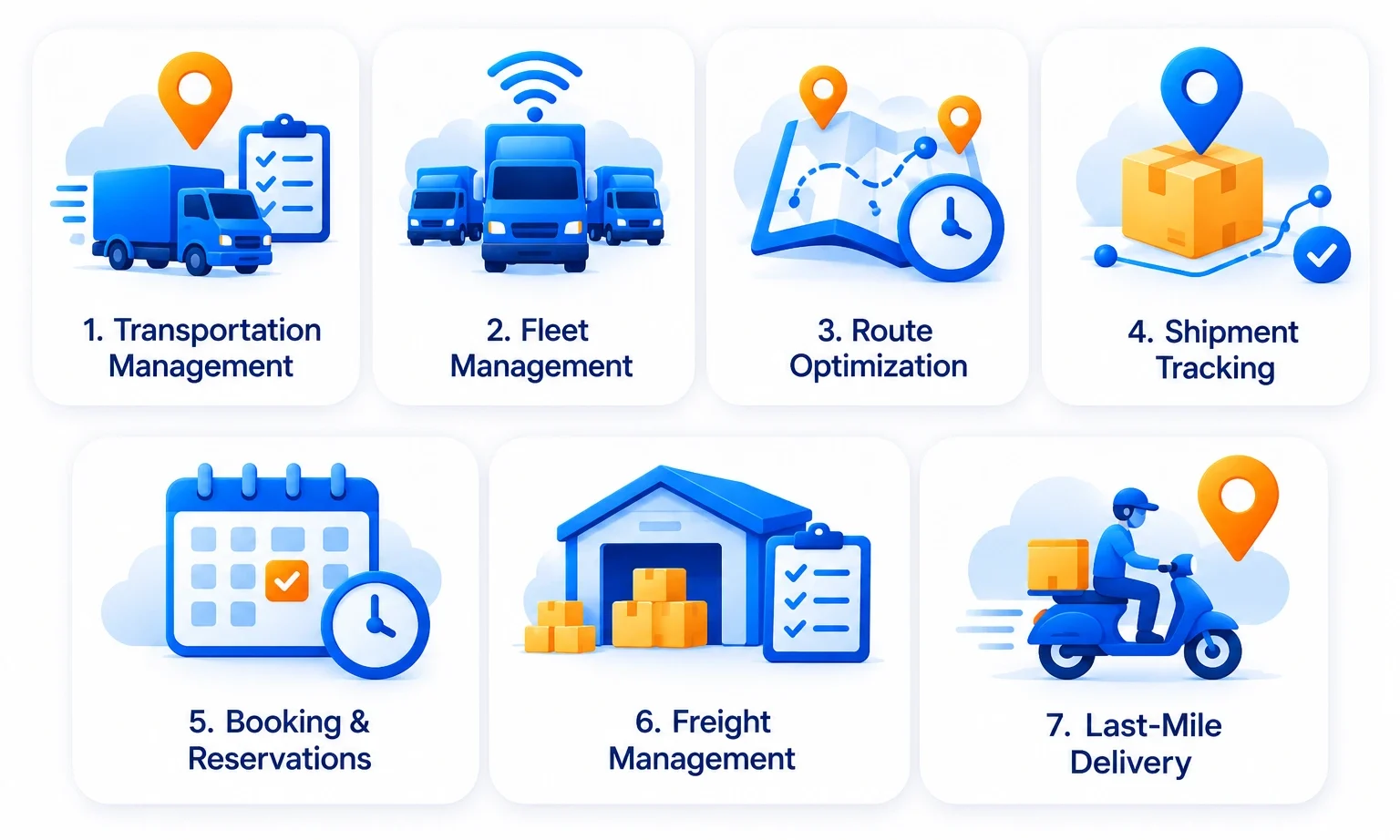
Transportation businesses have different operational requirements. A passenger transport provider needs booking and driver coordination, while a freight company requires shipment planning, carrier management, and delivery visibility. Identifying the right software category helps define the product scope and development priorities.
1. Transportation Management Software
Transportation management software helps businesses plan shipments, select carriers, organize loads, manage transportation costs, and monitor deliveries. It supports the movement of goods from the point of origin to the final destination.
A typical TMS platform includes shipment planning, carrier selection, freight rate management, route optimization, tracking, delivery confirmation, and reporting. Businesses handling multiple shipments, carriers, and delivery locations use these capabilities to improve coordination and control transportation expenses.
2. Fleet Management Software
Fleet management software helps businesses monitor and manage their vehicles throughout daily operations. It gives fleet managers visibility into vehicle location, availability, usage, maintenance schedules, fuel consumption, and driver activity.
Common capabilities include:
- Vehicle registration and profile management.
- GPS-based location tracking.
- Fuel and mileage monitoring.
- Maintenance scheduling.
- Driver assignment and performance tracking.
- Vehicle inspection and compliance records.
These capabilities support better vehicle utilization and help businesses identify maintenance or operational issues before they disrupt services.
3. Route Optimization and Dispatch Software
Route optimization software helps businesses identify efficient routes based on delivery locations, traffic conditions, vehicle capacity, time windows, and other operational constraints. Dispatch software helps assign drivers and vehicles to planned trips and coordinate changes during execution.
For example, a delivery business handling multiple orders across a city can use route planning to organize stops and reduce unnecessary travel. Dispatchers can monitor progress, reassign tasks, and respond to delays through a centralized interface.
4. Logistics and Shipment Tracking Software
Shipment tracking software provides visibility into the movement of goods across transportation networks. It allows businesses, customers, and logistics teams to monitor shipment status and receive updates at important stages.
Features often include GPS tracking, estimated arrival times, delivery notifications, shipment history, and proof of delivery. These capabilities reduce the need for manual status checks and help teams respond to exceptions more quickly.
Read Also: Logistics App Development Guide: Process, Features, Cost & Challenges
5. Transportation Booking and Reservation Software
Booking software supports businesses that manage passenger transportation, rentals, scheduled rides, or vehicle reservations. It allows customers to check availability, select services, book trips, and make payments through a digital platform.
A transportation booking application might include:
- Customer registration and profiles.
- Ride or vehicle search.
- Booking and scheduling.
- Fare estimation.
- Online payments.
- Booking history and notifications.
- Driver or vehicle assignment.
This type of transportation app software development is relevant to taxi operators, shuttle services, car rental businesses, and companies managing scheduled transportation.
6. Freight and Carrier Management Software
Freight management software helps shippers, freight brokers, and logistics providers coordinate loads, carriers, rates, contracts, and shipment documentation. It supports communication between businesses and their transportation partners.
A custom solution might include load posting, carrier onboarding, rate comparison, shipment assignment, document management, and freight payment workflows. It becomes especially useful when businesses work with multiple carriers or operate across different transportation modes.
7. Last-Mile Delivery Management Software
Last-mile delivery software manages the final stage of a shipment’s journey, from a distribution center or local hub to the customer’s location. It helps businesses coordinate delivery assignments, optimize routes, track drivers, and share delivery updates.
Retailers, eCommerce businesses, food delivery operators, and courier companies use these platforms to manage delivery schedules and improve visibility. Features such as delivery time slots, proof of delivery, customer notifications, and failed-delivery management support smoother operations.
Why Businesses Invest in Transportation Software Development?
Manual coordination and disconnected applications make it difficult to maintain visibility across transportation operations. A centralized platform gives teams better control over daily activities and provides the data needed to improve planning and decision-making.
1. Improve Operational Efficiency
Transportation software automates repetitive activities such as trip assignment, shipment updates, delivery notifications, and routine documentation. Teams spend less time coordinating tasks manually and more time managing exceptions and improving operations.
A centralized dashboard also helps managers review vehicle availability, active shipments, driver assignments, and pending deliveries without switching between multiple tools.
2. Optimize Routes and Reduce Transportation Costs
Poor route planning leads to unnecessary mileage, higher fuel consumption, longer delivery times, and inefficient vehicle utilization. Route optimization tools help businesses plan trips based on operational requirements and available data.
The system can account for factors such as vehicle capacity, delivery windows, traffic, distance, and stop priorities. This supports better resource allocation and more predictable transportation planning.
3. Strengthen Shipment and Fleet Visibility
Real-time tracking helps businesses monitor vehicles and shipments during transit. Managers can review location updates, identify delays, and communicate relevant information to customers or partners.
This visibility is particularly important when businesses handle multiple deliveries, work with external carriers, or coordinate transportation across different regions.
4. Enhance Customer Experience
Customers expect accurate booking information, transparent pricing, timely updates, and reliable deliveries. Transportation applications help businesses provide these experiences through self-service booking, tracking links, notifications, and digital payment options.
When customers have access to relevant information, they need fewer manual status updates from support teams. This also helps businesses manage customer expectations more effectively.
5. Make Data-Driven Business Decisions
Transportation platforms collect operational data related to trips, fuel usage, delivery times, vehicle performance, and transportation costs. Reporting tools help managers identify patterns and evaluate performance.
For example, businesses can compare planned and actual delivery times, review vehicle utilization, identify high-cost routes, and assess carrier performance. These insights support better operational planning and resource allocation.
6. Support Business Growth and Scalability
As transportation businesses expand, the number of vehicles, drivers, orders, customers, and delivery locations increases. Manual processes become harder to manage at this scale.
A scalable platform helps businesses add users, vehicles, service areas, integrations, and operational modules as requirements evolve. A well-planned transportation software development approach also gives businesses greater flexibility to adapt workflows without depending entirely on disconnected third-party tools.
Essential Features of Transportation Software
The features of a transportation platform should reflect the business model, user roles, and operational challenges it needs to address. A freight management solution requires different capabilities from a passenger booking application. However, several core features form the foundation of most modern transportation systems.
1. User Registration and Role-Based Access
A transportation platform often serves multiple user groups, including administrators, drivers, customers, dispatchers, fleet managers, and carriers. Each group needs access to specific features and information.
Role-based access allows businesses to define permissions according to user responsibilities. For example, drivers can view assigned trips, dispatchers can allocate vehicles, and administrators can manage users, pricing, and operational settings.
2. Vehicle and Fleet Management
Fleet management features help businesses maintain accurate records of their vehicles and monitor their availability. Administrators should be able to add vehicle details, assign drivers, review maintenance schedules, and track vehicle usage.
For larger fleets, the system should also support vehicle categories, registration documents, insurance records, inspection schedules, and maintenance history. These capabilities help managers make better decisions about vehicle allocation and operational readiness.
3. GPS Tracking and Real-Time Location Updates
GPS tracking provides visibility into vehicle and shipment movement. It helps dispatchers monitor active trips, review location history, and identify unexpected route changes.
A tracking module typically includes:
- Live vehicle location.
- Trip history and route playback.
- Estimated arrival times.
- Geofencing alerts.
- Location sharing.
- Delay and route deviation notifications.
The accuracy and frequency of updates depend on GPS devices, mobile connectivity, mapping services, and the application’s data processing design.
4. Route Planning and Optimization
Route planning helps transportation teams organize trips based on delivery points, vehicle capacity, driver availability, traffic, and delivery schedules.
A route optimization engine can evaluate several possible routes and recommend an efficient sequence of stops. More advanced systems also account for time windows, vehicle restrictions, pickup and drop-off priorities, and changing road conditions.
5. Order and Shipment Management
Order management connects customer requests with transportation execution. Teams should be able to create shipments, assign pickup and delivery locations, set delivery priorities, and monitor order status.
For freight businesses, the module might also support load planning, shipment consolidation, cargo details, shipping documents, and delivery confirmation. These capabilities help maintain continuity between order creation, dispatch, and final delivery.
6. Driver and Dispatcher Management
Driver management helps businesses maintain driver profiles, availability, assignments, documents, and performance records. A dedicated driver application gives drivers access to trip details, navigation, delivery instructions, and status updates.
Dispatchers need a separate interface to assign trips, monitor progress, communicate with drivers, and handle operational exceptions. Both interfaces should share updated information so that changes made by one user are visible to the relevant team members.
7. Booking, Fare Estimation, and Payments
Passenger transport, rental, and delivery businesses often require booking and payment capabilities. Customers should be able to request a service, review available options, receive an estimated fare, and complete payments through supported methods.
For businesses with variable pricing, the platform might calculate charges based on distance, time, vehicle category, demand, service type, or additional fees. A flexible pricing engine helps administrators update business rules without changing the entire application.
8. Notifications and Communication
Automated notifications keep customers, drivers, and operations teams informed throughout a trip or shipment lifecycle. Updates might include booking confirmation, driver assignment, pickup reminders, shipment status, delivery confirmation, and payment receipts.
In-app messaging, push notifications, SMS, and email integrations help businesses communicate through suitable channels. Notification preferences should also be configurable to avoid unnecessary messages.
9. Reports and Analytics Dashboard
An analytics dashboard helps managers understand operational performance through clear metrics and reports.
Useful reporting areas include:
- Vehicle utilization.
- Driver performance.
- Fuel and maintenance expenses.
- On-time delivery rate.
- Shipment status.
- Revenue and payment records.
- Route efficiency.
- Customer booking trends.
These reports help businesses identify operational bottlenecks and make decisions based on actual performance data.
Advanced Features That Make Transportation Software More Competitive
Core features support daily transportation operations. Advanced capabilities help businesses improve automation, visibility, forecasting, and customer experience as their requirements become more complex.
1. AI-Powered Route Optimization
AI and machine learning can analyze historical trip data, traffic patterns, delivery volumes, and operational constraints to support route planning. These models can help identify patterns that basic rule-based routing might miss.
Businesses should define the specific decisions AI needs to improve. For example, a system might recommend better delivery sequences or predict the likelihood of a delay. Recommendations should remain reviewable by dispatchers, particularly when real-world conditions change.
2. Predictive Fleet Maintenance
Predictive maintenance uses vehicle performance data, usage history, and sensor information to identify possible maintenance needs. Instead of relying only on fixed service intervals, businesses can use available data to detect patterns that indicate potential equipment issues.
This feature requires reliable vehicle data and a suitable monitoring setup. It is most useful for businesses operating larger fleets where unexpected vehicle downtime affects service delivery.
3. Automated Freight Rating and Billing
Freight rating features calculate transportation charges based on agreed rates, shipment details, distance, weight, service type, and other pricing rules. Automated billing can use these calculations to prepare invoices and support payment reconciliation.
For vehicle transport operators, auto transport pricing software integration with TMS can connect quote calculations with dispatch, shipment records, and billing workflows. This reduces repeated data entry and helps maintain consistency across transportation activities.
4. Geofencing and Automated Alerts
Geofencing creates virtual boundaries around specific locations, such as warehouses, delivery zones, customer sites, and distribution centers. When a tracked vehicle enters or leaves a defined area, the system can trigger an event.
Businesses can use these alerts to confirm arrivals, monitor loading and unloading, notify customers, and identify unexpected stops. The feature is especially useful when transportation teams manage several vehicles and delivery locations at once.
5. Digital Proof of Delivery
Digital proof of delivery records confirmation that a shipment or order has reached its destination. Depending on the business process, drivers can capture recipient signatures, photographs, timestamps, delivery notes, or one-time verification codes.
This information gives operations teams a digital record of completed deliveries and helps resolve disputes related to missing or delayed shipments.
6. Customer and Partner Portals
A customer portal allows users to create bookings, track shipments, view invoices, and access service information. A partner portal can support carrier onboarding, document sharing, load acceptance, and communication.
These portals reduce dependency on manual updates and provide different user groups with access to information relevant to their responsibilities.
7. IoT-Based Vehicle Monitoring
IoT devices and telematics systems can collect information about vehicle location, speed, fuel consumption, engine performance, and other operating conditions. The transportation platform processes this data to provide better fleet visibility.
Businesses should select sensors and connected devices according to the data they need. The application also needs reliable data ingestion and monitoring to handle device connectivity issues.
Custom Transportation Software vs. Off-the-Shelf Solutions
Businesses planning a new transportation platform need to decide whether to use an existing product, customize a commercial solution, or build software from the ground up. The right option depends on operational complexity, budget, integration requirements, and long-term product plans.
| Evaluation factor | Off-the-shelf software | Custom transportation software |
| Initial setup | Usually faster with predefined modules | Requires discovery, design, and development |
| Features | Based on available product capabilities | Designed around specific business workflows |
| Customization | Limited to supported configurations | Greater control over features and business rules |
| Integrations | Depends on vendor-supported connectors and APIs | Planned around required systems and data flows |
| Cost structure | Subscription, licensing, setup, and add-on fees | Upfront development plus hosting and maintenance |
| Scalability | Depends on vendor plans and platform limits | Can evolve according to architecture and business needs |
| Ownership and control | Governed by vendor terms | Greater control over product roadmap and custom code, subject to contract terms |
When Should You Choose Off-the-Shelf Transportation Software?
Off-the-shelf software is suitable when your business has standard transportation workflows and the available features meet most operational requirements. It is often a practical option for smaller operators that need a platform quickly without managing a custom development project.
However, check the pricing model, user limits, supported integrations, data access, customization options, and vendor support before selecting a product. A low initial subscription cost does not always represent the full long-term expense.
When Does Custom Transportation Software Make More Sense?
Custom software is worth considering when your business follows specialized workflows, manages complex pricing rules, operates across multiple regions, or needs integrations that existing products do not support well.
A tailored platform also gives businesses greater control over the product roadmap. They can prioritize features based on operational needs instead of adapting every process to a predefined system.
A well-planned custom software development approach helps businesses align application capabilities with their specific processes while keeping future expansion in view.
Transportation Software Development Process
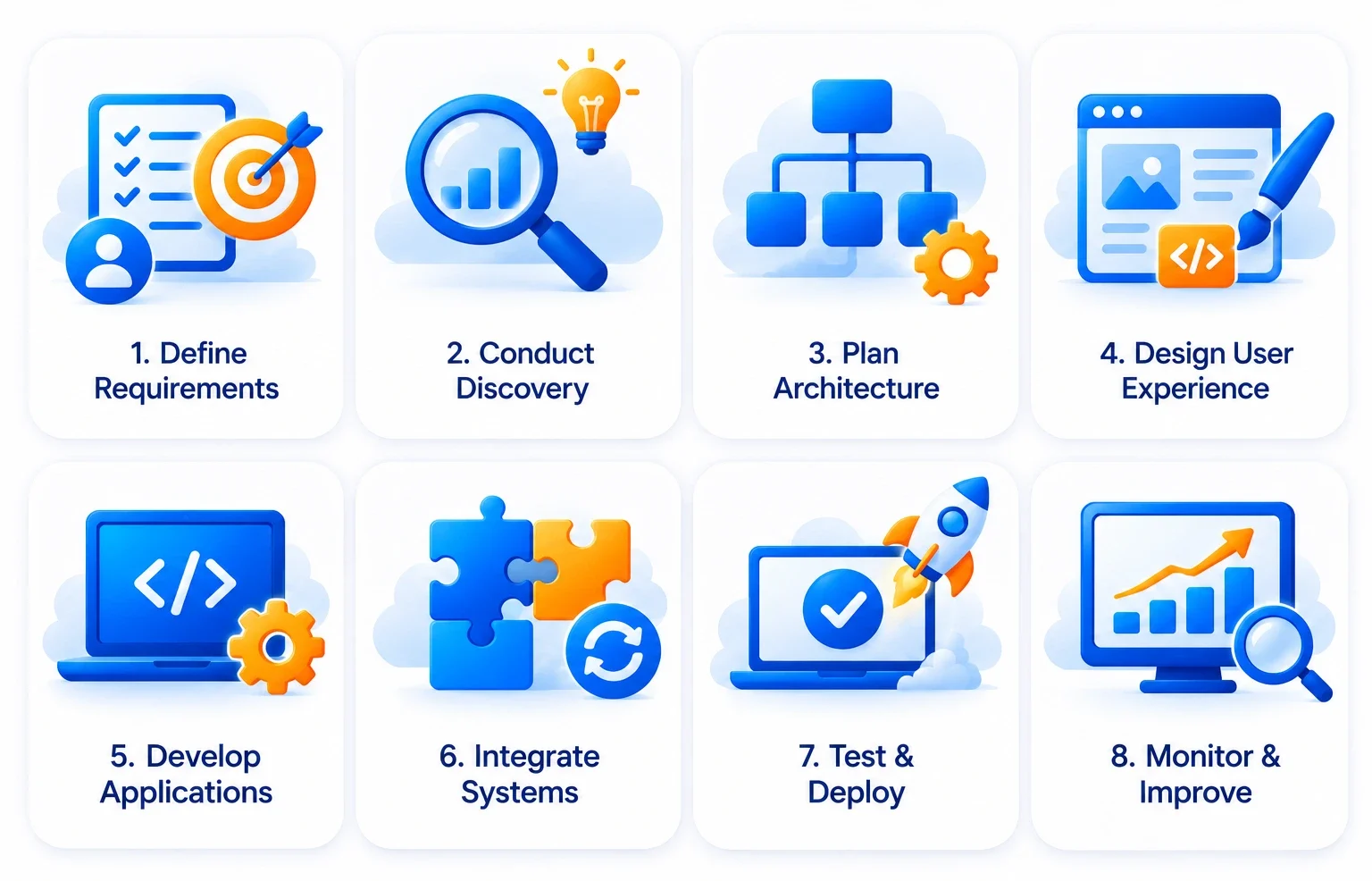
Building a transportation platform requires a structured process. It should begin with an understanding of business operations and continue through design, development, testing, deployment, and ongoing improvement.
A well-defined transportation management system development process helps teams manage technical dependencies and reduce the risk of building features that do not solve the intended business problem.
Step 1. Define Business Goals and Requirements
Start by identifying the operational problems the software needs to address. These might include delayed deliveries, poor fleet visibility, manual dispatching, fragmented booking processes, or limited reporting.
Discuss the requirements with the people who will use the platform. This includes business owners, fleet managers, dispatchers, drivers, customers, and finance teams.
Document the following:
- Business objectives and expected outcomes.
- User roles and permissions.
- Existing operational workflows.
- Required software modules.
- Third-party systems and integrations.
- Security and compliance requirements.
- Budget and delivery expectations.
Clear requirements help the team define the initial scope and avoid unnecessary feature expansion.
Step 2. Conduct Product Discovery and Workflow Analysis
Product discovery helps translate business expectations into a practical software plan. The team reviews existing processes, identifies user pain points, and evaluates technical dependencies before development begins.
Map how bookings, shipments, vehicle assignments, dispatch, tracking, and payments currently work. Identify where information is repeated, where delays occur, and which tasks require automation.
A structured digital product discovery phase also helps teams prioritize features according to business impact and technical feasibility. It provides a stronger foundation for defining the product roadmap.
Step 3. Plan the Features and Product Architecture
Once the requirements are clear, decide which features belong in the first release and which can be introduced later. A small transportation operator might start with vehicle profiles, driver assignments, trip scheduling, and tracking. A larger logistics provider might need shipment planning, carrier management, billing, and ERP integration from the beginning.
The architecture should define the frontend, backend, database, APIs, integrations, and infrastructure. It should also account for expected user volume, data flows, system availability, and future expansion.
For a structured view of development stages, the software development life cycle (SDLC) explains how planning, design, development, testing, deployment, and maintenance fit together.
Step 4. Design the User Experience and Interface
Transportation software often serves users working in different environments. Dispatchers might use large desktop dashboards, while drivers need simple mobile screens that are easy to operate during their workday.
Design user journeys around the tasks each role performs. Keep important information visible and reduce unnecessary steps in frequent workflows.
A skilled UX design agency can help create clear dashboards, intuitive navigation, accessible interfaces, and consistent experiences across web and mobile applications. Usability testing should involve representative users before the design moves into full development.
Step 5. Develop the Frontend and Backend
Frontend development creates the interfaces users interact with. Backend development manages application logic, data processing, authentication, permissions, notifications, and integrations.
The development team should build the system in manageable modules. For example, user management, vehicle records, trip scheduling, tracking, and payments can be developed and tested as connected components.
This modular approach makes it easier to identify issues, manage changes, and introduce additional capabilities as the product evolves.
Step 6. Integrate Maps, GPS, Payments, and Business Systems
Transportation applications depend on external services and business platforms. Common integrations include mapping APIs, GPS and telematics devices, payment gateways, SMS and email services, ERP systems, CRM platforms, and warehouse management software.
Integration planning should define what data moves between systems, how frequently it updates, and what happens when a connection fails. Secure authentication, API monitoring, error handling, and data validation are important for maintaining reliable communication.
Step 7. Test the Application and Validate Workflows
Testing should cover the complete user journey, not only individual features. A booking application, for example, should be tested from customer request through vehicle assignment, trip completion, and payment.
Key testing activities include:
- Functional testing.
- API and integration testing.
- Usability testing.
- Performance and load testing.
- Security testing.
- GPS and location accuracy checks.
- Cross-device compatibility testing.
- User acceptance testing.
Testing with real-world scenarios helps identify issues that might not appear in controlled development environments.
Step 8. Deploy, Monitor, and Improve
After testing and approval, deploy the application to the production environment. Configure monitoring, backups, error reporting, and access controls before making it available to users.
Track application performance and collect feedback from drivers, dispatchers, customers, and administrators. Use these insights to fix issues, improve workflows, and prioritize future releases.
This iterative process helps transportation software development remain aligned with changing operational requirements and business growth.
Technology Stack for Building Transportation Software
The technology stack influences software performance, integration capabilities, security, and long-term maintenance. The right selection depends on the product’s functionality, expected user volume, development budget, and deployment requirements.
Here are the main technology components businesses should evaluate.
| Technology layer | Common technology options | Purpose |
| Frontend development | React.js, Angular, Vue.js | Build web dashboards and user interfaces |
| Mobile app development | Flutter, React Native, Kotlin, Swift | Develop driver, customer, and fleet applications |
| Backend development | Node.js, Java, Python, .NET | Manage business logic, APIs, and application operations |
| Database | PostgreSQL, MySQL, MongoDB | Store user, vehicle, shipment, and transaction data |
| Cloud infrastructure | AWS, Microsoft Azure, Google Cloud | Host applications and manage infrastructure |
| Mapping and location | Google Maps Platform, Mapbox | Support maps, directions, and location-based features |
| Real-time communication | WebSockets, MQTT | Support live updates and connected devices |
| Analytics | Power BI, Tableau, custom dashboards | Review operational data and performance |
Important Integrations in Transportation Software
A transportation platform rarely works in isolation. It needs to exchange information with business applications, external service providers, and connected devices. Integration planning is therefore an important part of transportation management application development.
1. ERP Integration
ERP integration connects transportation operations with finance, procurement, inventory, and other business processes. It helps teams share shipment costs, delivery records, order information, and financial data across departments.
Businesses planning ERP software development projects should consider how transportation workflows connect with inventory, order processing, procurement, and accounting. A connected system reduces repeated data entry and improves operational visibility.
2. Warehouse Management System Integration
A warehouse management system (WMS) manages inventory movement, storage, picking, packing, and dispatch activities. Connecting it with transportation software helps coordinate shipment readiness and vehicle scheduling.
For example, when a warehouse marks an order as ready for dispatch, the transportation platform can use that information to plan vehicle allocation and pickup schedules.
3. CRM and Customer Portal Integration
CRM integration connects customer information, service requests, communication history, and delivery updates. It helps sales and support teams access relevant transportation details without switching between multiple platforms.
A customer portal can also display booking information, shipment status, invoices, and delivery confirmations. This creates a more consistent experience across customer-facing and internal operations.
4. Payment Gateway and Accounting Integration
Payment gateway integration supports online payments, refunds, and transaction records. Accounting integration helps businesses manage invoices, expenses, settlements, and financial reconciliation.
The integration should account for payment status updates, failed transactions, refunds, and secure handling of payment-related information.
5. GPS and Telematics Integration
GPS and telematics integrations provide vehicle location and performance data. Depending on the devices and services used, businesses can access information such as mileage, fuel consumption, engine status, and driving behavior.
These integrations help fleet managers monitor vehicles and make informed decisions about maintenance, utilization, and route performance.
6. Carrier and Third-Party Logistics Integration
Businesses working with external carriers need a reliable way to exchange shipment details, rates, status updates, and delivery confirmations. APIs and electronic data interchange (EDI) help connect transportation platforms with carrier systems.
A well-integrated TMS platform reduces manual coordination and helps businesses maintain consistent shipment information across their transportation network.
7. Custom ERP and Business Application Integration
Some businesses use specialized applications for procurement, inventory, order processing, or finance. A custom transportation platform should connect with these systems through secure APIs or suitable integration methods.
For small and growing operators, custom ERP software development can help connect business processes that standard platforms do not support effectively.
How AI and Automation Are Transforming Transportation Operations
Transportation businesses manage large volumes of operational information. AI and automation help process this information, identify patterns, and reduce repetitive tasks. Their value depends on the quality of available data and how well the technology fits the business workflow.
1. Intelligent Route Recommendations
AI-powered systems can analyze historical delivery data, traffic information, vehicle capacity, and route constraints to recommend suitable routes. Dispatchers can use these recommendations to improve planning and respond to changing conditions.
2. Predictive Delivery and Arrival Estimates
Machine learning models can use historical trip patterns and live location updates to estimate arrival times. More accurate estimates help businesses communicate delivery expectations and identify shipments that are likely to arrive late.
3. Automated Dispatch and Task Assignment
Automation can assign trips based on driver availability, vehicle type, location, capacity, and delivery requirements. Dispatchers can review the proposed assignments and make changes when operational conditions require human judgment.
4. Fuel and Maintenance Optimization
Data from vehicles and telematics devices can help identify unusual fuel consumption, maintenance patterns, and potential equipment issues. These insights support better fleet planning and help reduce unexpected downtime.
5. Automated Documentation and Billing
Automation can extract information from shipment documents, prepare invoices, update records, and trigger notifications. Businesses should include validation and approval steps for sensitive financial or compliance-related activities.
A broader intelligent automation strategy helps businesses identify which transportation workflows are suitable for automation and where human oversight remains necessary.
How Much Does Transportation Software Development Cost?
The cost of building transportation software depends on the product’s scope, business model, platforms, features, integrations, and technical complexity. A basic fleet management application requires a different investment from a full transportation management platform that connects carriers, warehouses, GPS devices, payments, and enterprise systems.
For planning purposes, custom transportation software projects might fall into the following indicative ranges:
| Solution type | Estimated development cost |
| Basic transportation or fleet application | $20,000–$50,000 |
| Mid-level transportation management platform | $50,000–$150,000 |
| Advanced custom TMS with multiple integrations | $150,000–$300,000 |
| Complex enterprise transportation platform | $300,000–$500,000+ |
These are broad planning estimates, not fixed market prices or vendor quotations.
How to Optimize Transportation Software Development Costs
Businesses can control development expenses by prioritizing essential workflows, reusing reliable services, and planning integrations early.
- Define the primary business problem before finalizing features.
- Launch core modules first and introduce advanced capabilities in phases.
- Reuse existing systems where they meet business requirements.
- Select integrations based on operational priorities.
- Test critical workflows throughout development.
- Plan infrastructure according to realistic usage expectations.
Why Choose RipenApps for Transportation Software Development?
Transportation businesses need digital solutions that connect their daily operations and support future growth. As one of the top custom software development companies in USA, RipenApps brings experience in mobile and web application development, custom product engineering, UI/UX design, and software integrations to help businesses turn operational requirements into practical digital products.
From planning the application architecture to developing user-focused interfaces and integrating essential business systems, the team follows a structured development approach. The goal is to create software that aligns with your workflows, supports operational visibility, and adapts as your business expands.
Whether you are planning a fleet management application, a shipment tracking platform, or a custom TMS, RipenApps helps translate your requirements into a product roadmap and development strategy. Its focus on transportation software development supports businesses looking to connect fragmented processes through scalable digital solutions.
Conclusion
Transportation businesses need connected systems to manage vehicles, drivers, shipments, customers, and daily operations efficiently. The right software brings these activities into one platform, improves visibility, reduces manual coordination, and gives managers better information for decision-making. Successful development starts with clearly defined business requirements, followed by thoughtful feature planning, reliable integrations, secure architecture, and continuous improvement.
As transportation operations evolve, businesses also need to modernize applications that no longer support their workflows or growth plans. RipenApps helps organizations evaluate and improve their digital products through professional software modernization services, custom application development, and technology solutions aligned with business needs. Build a transportation platform that supports today’s operations and is ready for tomorrow’s demands.
FAQs
Q1. What is transportation software development?
Transportation software development is the process of building digital applications that manage transportation activities such as fleet operations, route planning, shipment tracking, dispatching, bookings, and delivery management. These solutions help businesses improve visibility and coordinate daily operations.
Q2. What are the main types of transportation software?
The main types include transportation management systems, fleet management software, route optimization tools, shipment tracking platforms, freight management applications, booking systems, and last-mile delivery software. The right solution depends on the business model and operational requirements.
Q3. What features should transportation software include?
Core features include user management, vehicle and driver management, GPS tracking, route planning, dispatch, shipment management, notifications, and reporting. Depending on the business, the platform might also need booking, payments, carrier management, and proof of delivery.
Q4. How much does transportation software development cost?
A basic transportation or fleet application might cost $20,000–$50,000, while a mid-level platform could range from $50,000–$150,000. Advanced custom TMS solutions might cost $150,000–$300,000, and complex enterprise platforms could exceed $500,000. The final estimate depends on features, integrations, platforms, and infrastructure requirements.
Q5. How long does it take to develop transportation software?
A basic application might take a few months, while a mid-level platform could require around 4–8 months. Complex enterprise transportation systems with multiple integrations and advanced modules can take 9–12 months or longer. The timeline depends on project scope, technical complexity, and testing requirements.
Q6. How does AI improve transportation software?
AI can support route recommendations, delivery time predictions, fleet maintenance insights, demand forecasting, and automated task assignment. Its effectiveness depends on reliable data, suitable models, and human oversight for important operational decisions.
Discuss your project and request for proposal
SHARE
WRITTEN BY

Ishan Gupta
CEO & Founder
Ishan Gupta is a seasoned entrepreneur and CEO with extensive 10+ years of experience in business and mobile app development landscape. He believes that the right digital product allows companies to focus on what they do best, while technology handles the rest. With deep exposure to global markets, he understands what makes an app succeed. His approach translates business needs into clear product strategies, ensuring that every feature contributes to measurable ROI.
View All Articles